Shortcuts
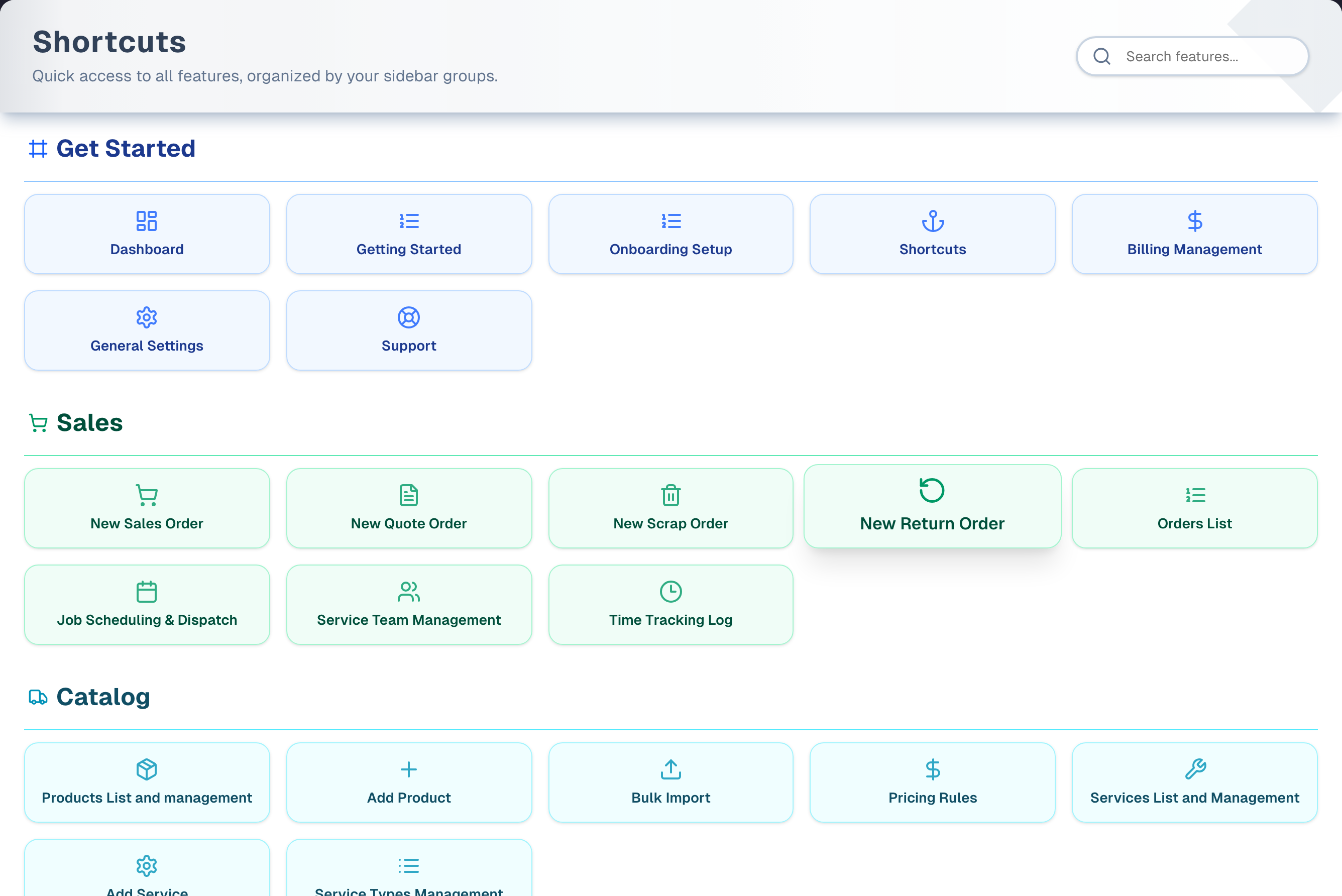
Shortcuts is your launchpad and the first page you see after you sign in. At the top, Quick Facts shows how this week is going and what needs doing today. Below it is a grid of cards grouped much like your sidebar. Many cards skip a step and open a specific tab or form, such as a new quote, a new expense or a new customer group. Type in the search box to filter the cards, or scan a group and click.
Overview
- Where you land. Signing in, creating an account and resetting your password all bring you here. So does opening the app's main address with nothing after it. The one exception: if you opened an app page while signed out, signing in takes you back to that page.
- Quick Facts first. Between the page title and the cards sits the Quick Facts & To-Do panel: this week's figures and today's to-do list. Hide folds it away and Show brings it back; your browser remembers which for you. It steps aside while you type a search. See Quick Facts.
- Groups. Cards come in colored groups, in the same order and under the same names as the sidebar: Get Started, Sales, Catalog, Inventory, Growth, Team, Finance, Reports. The groups follow the menu's own order, as the sidebar does.
- Not a copy of the sidebar. Most of the page is a fixed list of 53 cards — the whole of Get Started, Sales, Catalog, Growth and Finance, plus Inventory's first seven — that open a feature on a particular tab or with a form already open (for example New Quote Order, Add New Empty Group, Import Expense Records). Only the last four Inventory cards (Snapshot, Vendors, Labels, Marketplace) and the whole of Team and Reports are built from your menu. So a few sidebar items have no card here at all: Routes, Walk-ins, Customer Portal, Complaints, Communications Hub, Reviews Booster, Loyalty Program, Bank Reconciliation, Transactions and Income Tax Prep. Use the sidebar for those.
- What you see depends on who you are. Billing Management and General Settings show to everyone Settings opens for: the Owner switch, the owner role, or the store's only active member. Onboarding Setup follows the store-profile form's own, narrower rule — the Owner switch or the owner role — so it never leads to a page that turns you away. Workforce and My Hours (Team) show when the store's Workforce switch is on or the plan is Premium or a free trial. If the owner hid a menu item for you, the cards for its pages (and the pages that belong to it) are hidden too, and those pages show "403 - Forbidden" if you open them another way.
- Plan features are tagged, not hidden. Pro features such as SMS campaigns, ads insights and the finance pages show on every plan, and a card whose page your plan does not open carries a small Pro or Premium tag in its top-right corner. Opening one shows the upgrade panel. A free trial unlocks everything, so no tags show during a trial, and none show until your plan has finished loading.
- Language. The English / Español / 中文 buttons change this page's text only. The rest of the app stays in English.
Step by step: jump to a feature
- Sign in. You land on Shortcuts. To come back later, open the app's main address.
- Type in the Search features... box (for example "expense" or "quote"), or scroll to the group you need.
- Click the card. You go straight to that page and, where the card names one, that tab or form. Ctrl-click or Cmd-click opens it in a new browser tab.
Key features
| Feature | What it does |
|---|---|
| Search features | Filters the cards as you type. It matches card titles (in the language shown and in English) and the address each card opens. It does not match group names |
| Grouped cards | On the standard menu, in eight groups: the 53 fixed cards plus 14 taken from your menu (four in Inventory, two in Team, eight in Reports). How many you see depends on the three owner-only cards — 67 with the Owner switch on, 66 for anyone else Settings opens for (they get Billing Management and General Settings but not Onboarding Setup), 64 for everyone else. See Who can use what below. The groups keep the sidebar's names and order |
| Deep links | Many cards open a specific tab or form: the Quote and Scrap cards pick the order type for you, Add New Empty Group opens the new-group dialog, New Review Boost Campaign fills in a Google review request text |
| Support card | In Get Started, Support opens the in-app support chat, the same as the sidebar's Support button. It does not leave the page |
| Owner-only cards | Billing Management and General Settings show whenever Settings opens for you: the Owner switch, the owner role, or the store's only active member. Onboarding Setup needs the Owner switch or the owner role |
| Language switch | English, Español or 中文 for this page. Your browser remembers the choice |
Tips & best practices
- Shortcuts is the quickest way to open a tab or form deep inside a feature, such as Receive Procurement Order or New Asset/Liability. Nothing to hunt for in the sidebar.
- A couple of letters is usually enough to search. The search also matches the page address, so "settings" finds Billing Management and General Settings, and "inventory" also finds the Catalog product cards.
- Service Team Management and Time Tracking Log open Workforce on its Team and Timesheets tabs. Both need Workforce and a manager's permissions; without those you land on the Workforce page's explainer, which points at My Hours.
- A new store with no purchase orders yet always lands on the Import tab from the procurement cards. The other procurement tabs unlock after your first import.
Troubleshooting
| Issue | Fix |
|---|---|
| "We couldn't load your shortcuts" | Your saved menu could not be read. The page shows the standard layout so you can carry on; press Try again to load yours. The sidebar still works |
| "Every shortcut is hidden for you" | The owner has hidden every menu item that has a card. Ask the owner to check your menu settings in Settings → Team |
| "No shortcuts available" | There is genuinely nothing to show. Rare: a store with no menu set up gets the standard layout instead |
| "No results" after searching | Clear the box or search for part of a card title. Group names such as "Growth" are not searched. Some features have no card at all (see Overview), so use the sidebar for those |
| A feature you expect is missing | It may have no card (see Overview). Billing Management and General Settings need the Settings rule (the Owner switch, the owner role, or being the store's only active member) and Onboarding Setup needs the Owner switch or the owner role. The owner may have hidden it from your menu. For Workforce and My Hours, the store's Workforce switch may be off on a Basic or Pro plan. A card your plan does not include is never hidden — it is tagged Pro or Premium instead |
| A card opens a different tab than its name suggests | The procurement cards open Import until your store has its first purchase order |
| Service Team Management or Time Tracking Log is missing | They open Workforce, so they follow the same rule as the sidebar's Workforce row: the store's Workforce switch is off and the plan isn't Premium (a trial counts as Premium), or Workforce is hidden from your menu |
| Service Team Management or Time Tracking Log opens an explainer | Those tabs are for owners and managers. The page points you at My Hours, which shows your own hours |
What's next
- Set up your business: Get Started → Onboarding
- Work the go-live checklist: Prepare to Sell
- Track performance: Get Started → Dashboard
- Make a sale: Sales → New
Detailed reference
Every button, icon, field and message on this page, for when you need the exact detail. Each panel starts closed — open the one you need.
Page header and toolbar
| Control | Where | What it does | Notes |
|---|---|---|---|
| Title Shortcuts | Header, left | Static heading | Español shows "Accesos Directos", 中文 shows "快捷方式" |
| Subtitle "Quick links to everyday tasks, grouped like your sidebar." | Under the title | Static description | Español: "Accesos rápidos a las tareas del día a día, agrupados como tu barra lateral." 中文: "日常任务的快捷入口,按侧边栏分组。" Some menu items have no card (see the Overview) |
| Globe icon | Header, right, before the language buttons | Marks the language switch | Not clickable |
| English | Header, right, first button | Shows this page in English | The selected button is solid blue. Your browser remembers the choice for your next visit. Only this page changes |
| Español | Header, right, second button | Shows this page in Spanish | Card titles are fully translated. Group headings keep the English name with the Spanish in brackets, for example "Sales(Ventas)" or "Get Started(Primeros Pasos)" |
| 中文 | Header, right, third button | Shows this page in Simplified Chinese | Same rules as Español, for example "Sales(销售)" |
| Search box, magnifier icon, placeholder "Search features..." (screen-reader label "Search features") | Header, right, after the language buttons | Filters the cards as you type. Upper or lower case doesn't matter, and spaces at either end are ignored. A card matches when its title (as shown or in English) or the address it opens contains your text. Groups with no matches disappear, and the Quick Facts panel steps aside until the box is empty again | Placeholder is "Buscar funciones..." in Español and "搜索功能..." in 中文 (screen-reader label "Buscar funciones" / "搜索功能"). There is no clear (X) button, so delete the text to see every card again. The search is not remembered when you leave. Words must appear in order: "sales order" finds New Sales Order, "order sales" finds nothing |
| Amber note "We couldn't load your shortcuts — Showing the standard layout. Try again to load your own." with Try again | Above the cards | Says the standard layout is standing in because your saved menu could not be read. Try again loads it again without reloading the page | Only after a failed read. The cards below it still work |
| Setup reminder strip (checklist icon): "Setup … of 3 · …" | Blue strip above the page header | Shows how many of the three setup steps are done (for example "Setup 0 of 3") and names the owner's next step: 1 "Finish your store profile." ("Add a store location and a tax rate so orders can be priced and invoiced."), 2 "Add your first product or service." ("Orders are built from your inventory and services, so add at least one to sell."), 3 "Create your first order." ("You are ready to sell. Ring up a sale or a quote to see the whole flow.") | Owners only, until the store has its first order. Shows on most pages, and you usually see it here first because you land here after signing in. The explanation after the step name is hidden on phones |
| Finish store profile / Add a product / Create an order (arrow icon) | Setup strip, right | Opens Get Started on Step 2. Profile Setting, the Procurement Import tab, or the Create Order page, depending on the step | Owners only |
| or add a service | Setup strip, right, after the button | Opens Services on the Add Service tab | Step 2 only. Hidden on phones |
| X icon (tooltip Hide for now) | Setup strip, far right | Hides the strip for the current step | It comes back when you close and reopen the browser tab, or when the next step becomes current |
Section: Quick Facts panel
| Control | Where | What it does | Notes |
|---|---|---|---|
| Quick Facts & To-Do (gauge icon) | Between the page header and the cards | This week's (or this month's) figures on the left, the To Do list on the right; stacked on a phone | Everything inside is explained in Quick Facts. The panel is in English whichever language the page is in |
| Hide / Show (arrow) | Panel header, right | Folds the panel away, or opens it again | Your browser remembers the choice for you, per person. While folded, no figures are read |
| Location picker | Panel header, right | Picks one store location, or All locations | Only for stores with two or more active store locations |
| (panel hidden) | — | The panel is not shown while you type in the search box, or when the Quick Facts menu item is hidden for you | The Quick Facts card follows the same menu item |
Section: How you arrive on Shortcuts
| Control | Where | What it does | Notes |
|---|---|---|---|
| Sign In (successful) | Sign-in page | Opens Shortcuts | If you opened an app page while signed out, signing in takes you back to that page instead. Two other exceptions move you straight on: an account with no store yet goes to onboarding ("Redirecting to onboarding..."), and a store whose free trial has ended goes to the billing page ("Redirecting..."). If sign-in fails you stay on the sign-in page with "Authentication Failed". See Account access |
| Create account | Sign-up page | Opens Shortcuts once the account is created and you are signed in | If the automatic sign-in doesn't complete, you are sent to the sign-in page instead |
| Update password and sign in | Reset-password page | Opens Shortcuts | Only when the new password is saved. "The passwords don't match." shows if the two boxes differ |
| The app's main address, with nothing after it | Browser | Forwards to Shortcuts | Always |
| Opening a Settings page without owner access | Any Settings page except the standalone billing page | Shows "Redirecting..." and then opens Shortcuts | Settings opens for people with the Owner switch, the owner role, or the store's only active member (people switched off or removed in Team don't count). Opening it is not the same as being able to change everything there. See Settings |
| Pressing Enter in the sidebar Search box with nothing typed | Sidebar | Forwards to Shortcuts | With text typed, Enter opens the product search results instead |
| Go home | The "Something went wrong" page shown when a page fails to load | Opens Shortcuts | Try again next to it reloads the page that failed instead |
| Shortcuts card | This page, Get Started group | Points to this page, so clicking it here keeps you on Shortcuts | Everyone |
Section: Card grid (every group)
| Control | Where | What it does | Notes |
|---|---|---|---|
| Where the cards come from | Whole page | Get Started, Sales, Catalog, Growth and Finance, and Inventory's first seven cards, are a fixed list of 53 cards written into the page: they don't change when UpChannels adds or renames a menu item, and they don't repeat their group's menu items one for one. Inventory then adds its remaining menu items (Snapshot, Vendors, Labels, Marketplace), and Team and Reports are built from the menu alone | Every card, fixed or not, is checked against your menu settings before it is shown |
| Group heading (icon + name) | Above each group, with a thin colored line under it | Not clickable | Colors: Get Started blue, Sales green, Catalog cyan, Inventory violet, Growth amber, Finance rose, Reports indigo. Team is plain grey. Get Started uses a lightning bolt and Team a people icon; the others use a shopping cart (Sales), truck (Catalog), clipboard (Inventory), megaphone (Growth), dollar sign (Finance) and pie chart (Reports) |
| Any card (icon + title) | Inside a group | Opens that page in the same browser tab | Ctrl-click, Cmd-click or middle-click opens it in a new tab. On hover the card grows, lifts and casts a shadow. Cards are a fixed height, so long titles wrap |
| Grid layout | Each group | 2 cards per row on phones, 3 on small screens, 4 on medium and 5 on large | — |
| Group order | Whole page | Follows the app's standard menu, exactly as the sidebar does | Today: Get Started, Sales, Catalog, Inventory, Growth, Team, Finance, Reports. Group names are the sidebar's too, so the first group is Get Started, not Onboarding |
| Empty groups | Whole page | A group with no cards left to show is removed entirely | Happens when every card in it is hidden for you, or when a search matches nothing in it |
| Loading placeholders | Card area | Four grey blocks while the cards load for the first time | Only on the first load. When your plan or access finishes loading a moment later, the cards are checked again in place, without the grey blocks coming back |
| Backup layout | Whole page | If the app's menu has no groups at all, Shortcuts shows a shorter fixed layout: Onboarding (Dashboard, Get Started, Quick Facts, Onboarding Setup, Shortcuts), Sales (the same 8 cards), Catalog (the same 7 cards) and Growth (the first 10 cards, Customers List and Management through Ads Performance Comparison) | Rare. In this layout Onboarding Setup follows the same rule as usual, and there are no Support, Billing Management or General Settings cards |
Section: Get Started cards
| Control | Where | What it does | Notes |
|---|---|---|---|
| Dashboard (dashboard icon) | Get Started, 1st | Opens the Business Dashboard | Everyone. Hidden if the Dashboard menu item is hidden for you |
| Get Started (numbered-list icon) | Get Started, 2nd | Opens the Get Started page on Step 3. Prepare to Sell, the go-live checklist. See Prepare to Sell | Everyone. It opens Step 3, not Step 1 "Knowing Basics". Hiding the menu's Get Started item doesn't hide this card |
| Quick Facts (gauge icon) | Get Started, 3rd | Opens the Quick Facts page: the same panel as the top of this page, full width, with How these numbers are calculated under it | Everyone. Hidden, together with the panel at the top of this page, if the Quick Facts menu item is hidden for you. Español "Datos Rápidos", 中文 "经营速览" |
| Onboarding Setup (numbered-list icon) | Get Started, 4th | Opens the Get Started page on Step 2. Profile Setting, the store profile form. See Onboarding | The Owner switch or the owner role — the same people the form itself lets in. Anyone else who reaches that tab another way sees "Owner Access Required" ("Please switch to an owner account to edit the organization profile settings.") instead of the form, or "We couldn't check your access" with Try again if the check could not be made at all. Hiding the menu's Profile Setup item doesn't hide this card: it closes the wizard's own page, not the tab this card opens |
| Shortcuts (anchor icon) | Get Started | Points to this page, so clicking it keeps you here | Everyone |
| Billing Management (dollar-sign icon) | Get Started | Opens the Billing & Subscription page on its own, without the Settings menu. See Plan & Billing | Shows to everyone Settings opens for: the Owner switch, the owner role, or the store's only active member. Anyone signed in can still open that page itself, so an expired trial can be paid, but changing billing there needs the Owner switch or the owner role. Everyone else sees it read-only |
| General Settings (gear icon) | Get Started | Opens Settings | Shows to everyone Settings opens for: the Owner switch, the owner role, or the store's only active member — the same people the sidebar Settings button shows to |
| Support (life-buoy icon) | Get Started, last | Opens the in-app support chat window. The page doesn't change | Everyone. Same chat as the sidebar Support button. If the chat is still loading, it opens once it's ready. If support chat can't be reached, a red message says "Support chat could not be reached." |
Section: Sales cards
| Control | Where | What it does | Notes |
|---|---|---|---|
| New Sales Order (cart icon) | Sales, 1st | Opens Create Order on the Sell tab | Hidden if the New menu item is hidden for you. That also hides the next three cards |
| New Quote Order (document icon) | Sales, 2nd | Opens Create Order on the Others tab with order type Quote already picked | Quote: "Generate quote for customer - allows product selection, no inventory impact" |
| New Scrap Order (trash icon) | Sales, 3rd | Opens Create Order on Others with type Scrap already picked | Scrap: "Scrap inventory items - deducts from inventory quantity" |
| New Return Order (circular-arrow icon) | Sales, 4th | Opens Create Order on the Returns tab | — |
| Orders List (numbered-list icon) | Sales, 5th | Opens the Order Management page. See Order Management | Hidden if the List menu item is hidden for you |
| Job Scheduling & Dispatch (calendar icon) | Sales, 6th | Opens the Scheduling & Dispatch page. See Schedule | Hidden if the Schedule menu item is hidden for you. The next two cards follow Workforce instead, not Schedule |
| Service Team Management (people icon) | Sales, 7th | Opens Workforce on its Team tab. See Workforce | Hidden unless the store's Workforce switch is on or the plan is Premium (a trial counts), and unless Workforce is shown in your menu. Owners and managers only: anyone else sees the Workforce page's explainer pointing at My Hours |
| Time Tracking Log (clock icon) | Sales, 8th | Opens Workforce on its Timesheets tab, the store's clock-in records. See Workforce | Same rule as the card above. For your own hours, use Team → My Hours (My Hours) |
| (no card) Routes, Walk-ins, Customer Portal | — | These Sales menu items have no card | Use the sidebar. See Routes, Walk-ins, Customer Portal |
Section: Catalog cards
| Control | Where | What it does | Notes |
|---|---|---|---|
| Products List and management (box icon) | Catalog, 1st | Opens the Products Catalog on the Products tab. See Products | "management" is lowercase on the card. Hidden, with the next three cards, if Products is hidden in your menu. Hiding Snapshot doesn't affect them |
| Add Product (plus icon) | Catalog, 2nd | Opens the Products Catalog on Add Product | — |
| Bulk Import (upload icon) | Catalog, 3rd | Opens the Products Catalog on Bulk Import | — |
| Pricing Rules (dollar-sign icon) | Catalog, 4th | Opens the Products Catalog on Pricing Rules | — |
| Services List and Management (wrench icon) | Catalog, 5th | Opens the Services Catalog page on Services Catalog. See Services | Hidden, with the next two cards, if Services is hidden in your menu |
| Add Service (gear icon) | Catalog, 6th | Opens the Services page on Add Service | — |
| Service Types Management (list icon) | Catalog, last | Opens the Services page on Service Types | — |
Section: Inventory cards
| Control | Where | What it does | Notes |
|---|---|---|---|
| Procurement Orders List (numbered-list icon) | Inventory, 1st | Opens Procurement Orders on the Orders tab. See Procurement | A store with no purchase orders yet lands on Import: Orders, New Order and Receive show a lock and stay disabled until the first one exists ("Orders, New Order and Receive unlock after your first import."). Hidden, with the next three cards, if Procurement is hidden in your menu |
| New Procurement Order (box-with-plus icon) | Inventory, 2nd | Opens Procurement Orders on New Order | Same lock: opens Import until the store has a purchase order |
| Import Procurement Order (upload icon) | Inventory, 3rd | Opens Procurement Orders on Import | Always available. This is how a new store creates its first purchase order |
| Receive Procurement Order (box icon) | Inventory, 4th | Opens Procurement Orders on Receive | Same lock as Orders |
| Search Inventory (magnifier icon) | Inventory, 5th | Opens the Inventory Management page on its Search tab. See Management | Hidden if the Management menu item is hidden for you |
| Transfer Inventory (truck icon) | Inventory, 6th | Opens a standalone Transfer page (green "Live System" tag) for moving stock between locations | Not in the sidebar. Same form as the Transfer tab of Management, and part of it for menu visibility: hidden, with its page blocked ("403 - Forbidden"), if Management is hidden for you |
| Count Inventory (clipboard icon) | Inventory, 7th | Opens a standalone Inventory Count page (blue "Count System" tag) | Not in the sidebar. Same form as the Count tab of Management, and part of it for menu visibility: hidden, with its page blocked, if Management is hidden for you |
| Snapshot (camera icon) | Inventory, from the menu | Opens the Inventory Status Overview. See Snapshot | Hidden if Snapshot is hidden in your menu. That hides only this card: the other Inventory and Catalog cards follow their own menu items |
| Vendors (building icon) | Inventory, from the menu | Opens Vendors | — |
| Labels (barcode icon) | Inventory, from the menu | Opens Barcode & Label Management. See Labels | — |
| Marketplace (shop icon) | Inventory, from the menu | Opens the Marketplace page, a coming-soon page with a Join the Waitlist form. See Marketplace | — |
| (not repeated) the menu's Procurement, Management and Guide & Tips items | — | Left out on purpose; the fixed cards above replace them | — |
Section: Growth cards
| Control | Where | What it does | Notes |
|---|---|---|---|
| Customers List and Management (people icon) | Growth, 1st | Opens Customer Management on the Customers tab. See Customers | Hidden, with the next four cards, if the Customers Nurturing menu item is hidden for you |
| Customer Group Management (tags icon) | Growth, 2nd | Opens Customer Management on Marketing Groups | — |
| Add Customer (person-plus icon) | Growth, 3rd | Opens a standalone page with the new-customer form | — |
| Add New Empty Group (plus icon) | Growth, 4th | Opens Marketing Groups with the Add Marketing Group dialog already open | — |
| Add New Group from Segment (filter icon) | Growth, 5th | Opens Marketing Groups with the Create Marketing Group From Segments dialog open | Name filled in as "Segment Group" plus today's date and time; description "Group created from audience segment filters" |
| SMS Campaigns List (speech-bubble icon) | Growth, 6th | Opens SMS Campaigns | Pro; the card carries a Pro tag on Basic. The page shows its upgrade panel. Hidden, with the next two cards, if SMS Campaigns is hidden in your menu |
| New SMS Marketing Campaign (send icon) | Growth, 7th | Opens the new-campaign form | Pro; the card carries a Pro tag on Basic, and the form itself opens with the upgrade panel over it |
| New Review Boost Campaign (star icon) | Growth, 8th | Opens the new-campaign form with the message filled in: Hi {{firstName}}! Thanks for your recent visit. Could you share your feedback? It really helps us grow: followed by a Google review link | The campaign is named Google Review Request for you, so it is easy to find again; a name you have already typed is left alone. A connected Google Business profile is picked automatically (one you selected before, otherwise the first), and its review link replaces the placeholder in the text. With no Google Business profile connected, the link keeps the placeholder "PLACE_ID", so edit it before sending. Pro, as above |
| Ads & Sales Insights (bar-chart icon) | Growth, 9th | Opens Google Ads Insights on Weekly Reports. See Ads & Sales | Pro; the card carries a Pro tag on Basic. The page shows its upgrade panel. Hidden, with the next card, if Ads Insights is hidden in your menu |
| Ads Performance Comparison (trend icon) | Growth, 10th | Opens Google Ads Insights on Performance Comparison | Pro; tagged on Basic |
| Competitor Search (magnifier icon) | Growth, 11th | Opens Competitors Monitor on Search & Discover. See Competitors | Hidden, with the next three cards, if Competitors Monitor is hidden in your menu |
| Competitor Google Ads (bar-chart icon) | Growth, 12th | Opens Competitors Monitor on Google Ads Intelligence | — |
| Competitor Facebook Ads (megaphone icon) | Growth, 13th | Opens Competitors Monitor on Facebook Ads Intelligence | — |
| Competitor Search Trends (trend icon) | Growth, 14th | Opens Competitors Monitor on Google Search Trends | — |
| Local Relevant News (book icon) | Growth, 15th | Opens Local Vibes on Local Relevant News. See Local Vibes | Hidden, with the next card, if Local Vibes is hidden in your menu |
| Local Events (calendar icon) | Growth, 16th | Opens Local Vibes on Events | — |
| Partner Network Development (share icon) | Growth, 17th | Opens the Partner Network Development page. See Partners | Hidden if Partners Network is hidden in your menu |
| Pro Marketing (rocket icon) | Growth, last | Opens Pro Marketing, which has a Request a Consultation form | Hidden if Pro Marketing is hidden in your menu |
| (no card) Complaints, Communications Hub, Reviews Booster, Loyalty Program | — | These Growth menu items have no card | Use the sidebar. See Complaints, Messages, Reviews, Loyalty Program |
Section: Team cards
Both cards come straight from the sidebar's Team group; nothing here is a fixed card.
| Control | Where | What it does | Notes |
|---|---|---|---|
| Workforce (clock icon) | Team, 1st | Opens Workforce | Shown when the store's Workforce switch is on (the default) or the plan is Premium or a free trial. Also shown while the plan is still loading. Hidden on Basic or Pro when the owner has switched Workforce off |
| My Hours (person-with-tick icon) | Team, 2nd | Opens My Hours | Same rule as Workforce. It follows the My Hours menu item: hiding Workforce for someone doesn't hide it |
| (group hidden) | — | When both cards are hidden, the whole Team group disappears | — |
Section: Finance cards
| Control | Where | What it does | Notes |
|---|---|---|---|
| Assets & Liabilities Management (scale icon) | Finance, 1st | Opens Assets & Liabilities on Live Accounts. See Assets & Liabilities | Pro; the card carries a Pro tag on Basic. The page shows its upgrade panel. Hidden, with New Asset/Liability, if the Finance group's Assets & Liabilities item is hidden in your menu |
| Expenses Records (document icon) | Finance, 2nd | Opens Expense Management on Expenses Records. See Expenses | Pro; the card carries a Pro tag on Basic. Hidden, with the next two cards, if Expenses is hidden in your menu. The Reports Expenses Report card follows its own menu item |
| New Expense (dollar-sign icon) | Finance, 3rd | Opens Expense Management on Create Expense | Pro; the card carries a Pro tag on Basic |
| Import Expense Records (upload icon) | Finance, 4th | Opens Expense Management on Bulk Import | Pro; the card carries a Pro tag on Basic |
| New Asset/Liability (scale icon) | Finance, last | Opens Assets & Liabilities on Add Assets, Liabilities & Equity | Pro; the card carries a Pro tag on Basic |
| (no card) Bank Reconciliation, Transactions, Income Tax Prep | — | These Finance menu items have no card | Use the sidebar. See Reconciliation, Transactions, Income Tax Prep |
Section: Reports cards
| Control | Where | What it does | Notes |
|---|---|---|---|
| Daily Journal (book icon) | Reports | Opens the Business Journal. See Daily Journal | Cards in this group come straight from the Reports menu |
| Services Report (wrench icon) | Reports | Opens Services Report. See Services Report | — |
| Inventory Report (document icon) | Reports | Opens the Inventory Report | — |
| Expenses Report (wallet icon) | Reports | Opens the Expenses Report | Pro; the card carries a Pro tag on Basic. Hidden if the Reports group's Expenses Report item is hidden for you |
| Profit & Loss (trend-up icon) | Reports | Opens the Profit & Loss Statement (Pre-Tax). See Profit & Loss | Pro; the card carries a Pro tag on Basic |
| Assets & Liabilities (scale icon) | Reports | Opens the Assets & Liabilities Report. See Assets & Liabilities report | Pro; the card carries a Pro tag on Basic. Not the same page as the Finance card Assets & Liabilities Management. Hidden only by the Reports group's Assets & Liabilities item, not the Finance one |
| Sales Report (document icon) | Reports | Opens the Sales Report | — |
| Lost sales (trend-down icon) | Reports, last | Opens the Lost sales report. See Lost Sales Report | Lowercase "sales", as in the menu |
| (not repeated) Guide & Tips | — | Guide & Tips items are left out of every group | — |
Messages you may see
| Message | When it appears | What to do |
|---|---|---|
| Four grey placeholder blocks | While the cards load for the first time | Wait a moment |
| "We couldn't load your shortcuts" / "Showing the standard layout. Try again to load your own." with Try again | Your saved menu could not be read. The standard layout is shown in its place, so the page still works, and this note sits above the cards | Press Try again. Español: "No pudimos cargar tus accesos directos" / "Mostramos el diseño estándar. Vuelve a intentarlo para cargar el tuyo." / "Reintentar". 中文: "无法加载您的快捷方式" / "当前显示的是标准布局。请重试以加载您自己的布局。" / "重试" |
| "Every shortcut is hidden for you" / "Ask the owner to check your menu in Settings → Team." | There were cards, and your menu settings hide every one of them | Ask the owner in Settings → Team. The sidebar still works. Español: "Todos los accesos directos están ocultos para ti" / "Pide al propietario que revise tu menú en Configuración → Equipo." 中文: "所有快捷方式对您都已隐藏" / "请让店主在“设置 → 团队”中检查您的菜单。" |
| "No shortcuts available" / "There are no cards to show here yet." | Nothing to show, and nothing hidden or failed | Rare: a store with no menu set up gets the standard layout instead. Español: "No hay accesos directos disponibles" / "Todavía no hay tarjetas que mostrar aquí." 中文: "暂无可用的快捷方式" / "这里暂时没有可显示的卡片。" |
| "No results" / "Try a different search term." | Your search matches no card | Clear the box, or search for part of a card title (group names aren't searched). Español: "Sin resultados" / "Prueba con otro término de búsqueda." 中文: "无结果" / "请尝试其他搜索词。" |
| "No shortcuts in this group." | Not seen in practice: an empty group is removed before it can show | — |
| "Shortcuts page will match the visibility settings on this page for this user." | Shown to the owner in Settings → Team, under the Shortcuts item, when editing someone who isn't an owner. That item's Visible switch is locked, so Shortcuts itself can't be hidden from anyone | Informational: hiding other menu items for that person also hides the matching cards here |
| "403 - Forbidden" / "You do not have permission to view this page. Contact your organization owner." | You opened a page that belongs to a menu item the owner hid for you (stores with more than one active person): the item's page, a page under it, or one that belongs to it such as Transfer Inventory under Management. Shortcuts hides the cards for those pages, so you usually meet this only through a saved link or a typed address. The owner can't switch Shortcuts itself off for anyone | Ask the owner to switch that menu item back on for you in Settings → Team |
| "Loading..." | Briefly, while your access is checked | Wait |
| "Redirecting..." | You opened a Settings page without owner access and are being sent to Shortcuts, or your free trial ended and you are being sent to the billing page | Ask the owner for the change, or choose a plan on the billing page |
| "Redirecting to onboarding..." | You are signed in but your account has no store yet | Finish onboarding |
| "Redirecting to sign in..." | You are signed out, or your session ended | Sign in again. You land back on the page you were opening; a tab that was signed out while it was open (Sign Out, the 18-hour sign-out, or a sign-out from another device) lands on Shortcuts |
| Setup strip "Setup … of 3 · …" | Owners whose setup isn't finished (see Page header and toolbar) | Click the blue button to do the step, or the X to hide it for now |
Who can use what
| Who or what | What changes on Shortcuts |
|---|---|
| Everyone signed in to a store | Opens the page and sees every card except the three owner-only ones |
| People whose Owner switch is on (Settings → Team) | Also see Onboarding Setup, Billing Management and General Settings |
| The owner role | The same three |
| A store's only active member (anyone else switched off or removed in Team) | Also see Billing Management and General Settings, because Settings opens for them. Not Onboarding Setup: the store profile form still turns them away |
| Basic plan | Pro cards still show, and each carries a small Pro tag in its top-right corner, the same way the sidebar marks the feature: SMS Campaigns List, New SMS Marketing Campaign, New Review Boost Campaign, Ads & Sales Insights, Ads Performance Comparison, all five Finance cards, and the Reports cards Expenses Report, Profit & Loss and Assets & Liabilities. The card still opens; its page shows the upgrade panel. Workforce and My Hours are hidden unless the Workforce switch is on, and carry a Premium tag when the switch is on |
| Pro plan | Pro cards open normally and carry no tag. Workforce and My Hours follow the Workforce switch, and carry a Premium tag when the switch is on |
| Premium plan or a free trial | Every Pro card opens normally. Workforce and My Hours show even with the Workforce switch off. If you already chose a plan during the trial, the chosen plan decides instead |
| Store switches | Only the Workforce switch matters here. The Delivery and Customer Portal switches don't, because Routes and Customer Portal have no card |
| Menu settings for a person (owner, in Settings → Team, User Visibility Settings) | Apply only to people who aren't owners: owners (the Owner switch, or the owner role) are never restricted. The Shortcuts item's switch is locked for everyone, so Shortcuts itself can't be hidden. Hiding any other menu item hides every card that opens its page, a page under it, or a page that belongs to it. Examples: New hides the four "New … Order" cards; Schedule hides three schedule cards; Customers Nurturing hides all five customer cards; SMS Campaigns hides three SMS cards; Expenses hides three expense cards; Management hides Search, Transfer and Count Inventory; Procurement hides the four procurement cards, and the older purchase-orders address behind them; Products hides the four catalog cards, and the older product addresses behind them (the products list and Add Product); Snapshot hides only the Snapshot card; Workforce hides only the Workforce card; Quick Facts hides the Quick Facts card and the panel at the top |
| A store with one active person (everyone else switched off or removed in Team) | Menu settings never apply, so nothing is hidden and nothing shows "403 - Forbidden" |
| Language choice | Per browser, for this page only |
Common questions
Why do I land on Shortcuts after signing in? Signing in, creating an account and resetting your password all open Shortcuts, and the app's main address forwards here too. The exception is a sign-in you were sent to from another app page while signed out: that one takes you back to the page.
Why don't I see Billing Management, General Settings or Onboarding Setup? Each card is shown only to the people the page behind it lets in. Billing Management and General Settings need Settings to open for you: the Owner switch in Settings → Team, the owner role, or being the store's only active member. Onboarding Setup needs the Owner switch or the owner role. Ask the owner if you need something changed there.
Where are Routes, Walk-ins, Customer Portal, Transactions or Communications Hub? They have no card on Shortcuts. The same goes for Complaints, Reviews Booster, Loyalty Program and Bank Reconciliation. Open them from the sidebar.
Where do Service Team Management and Time Tracking Log go? To Workforce — the Team tab and the Timesheets tab. They are the same pages as Team → Workforce in the sidebar, so they appear only when your store has Workforce (its switch on, or a Premium plan or trial) and Workforce is shown in your menu. Both tabs are for owners and managers; everyone else sees the explainer and should use Team → My Hours for their own hours.
I clicked New Procurement Order but it opened Import. Why? Your store has no purchase orders yet. Until it does, Orders, New Order and Receive are locked and every procurement card lands on Import. Import your first purchase order and the other tabs unlock.
We're on Basic. Why do I see SMS and finance cards? Shortcuts shows every feature on every plan, so you can see what a higher plan adds. A card your plan does not open carries a Pro or Premium tag in its corner, and the page behind it opens with an upgrade panel — including the new-campaign form.
I switched to Español, but the rest of the app is still English. The language buttons change only the Shortcuts page, and your browser remembers the choice for next time. Group headings keep the English name with the translation in brackets. The Team heading, the Workforce, My Hours and Lost sales cards, and the Quick Facts panel stay in English.
Is there a demo or guided tour of Shortcuts? No. Shortcuts has no Demo button or tour. Many pages the cards open, such as Get Started and Scheduling & Dispatch, have their own. See Demo mode.