Products
The Products Catalog (sidebar Catalog → Products) is the master list of everything you sell. It shows live stock and prices and has four tabs: Products, Add Product, Bulk Import and Pricing Rules. The amber Demo button in the header opens a sample copy of the page with a guided tour.
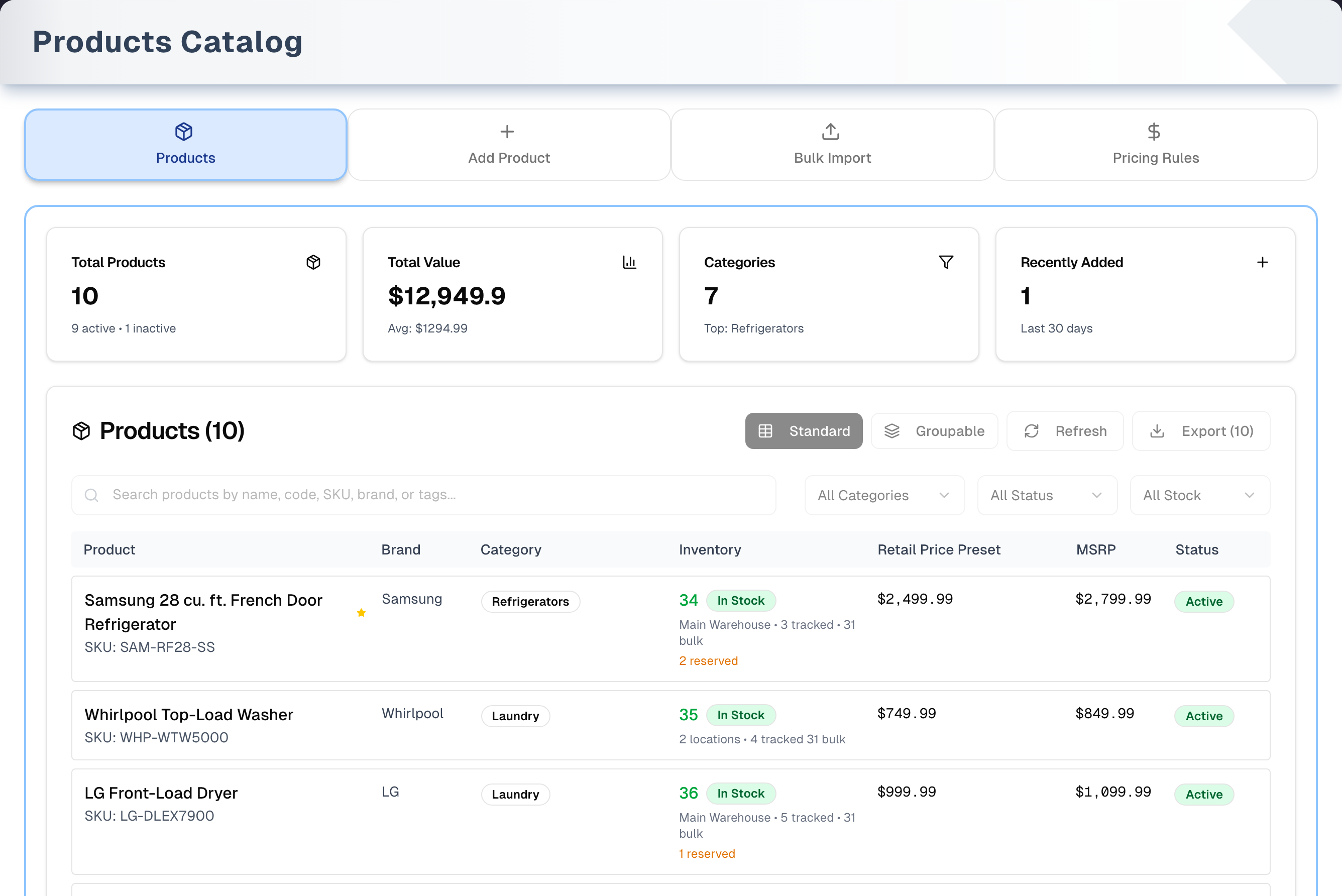
Overview
Four summary cards sit above the list: Total Products (active and inactive), Total Value (retail price × units on hand, with the cost of that stock underneath), Categories and Recently Added (last 30 days). The cards follow your search and filters, and read 0 when nothing matches.
Click any product to open its window. There you can see details, purchase orders and stock, and Edit or Delete the product. Staff may see Hidden in place of cost, margin and markup, and a read-only selling price: the owner sets both in Settings → Team. Export and the Groupable view need the Premium plan or an active free trial. Without it, they open an upgrade prompt.
Tabs in detail
Products
- Search by name, code, SKU, barcode, UPC, model, brand, category, description or tags — a scanned barcode finds the product here, as it does on the Sell screen.
- Filters: Category, Status (Active / Inactive / Discontinued) and Stock (In Stock / Low Stock / Out of Stock). Discontinued finds products you have switched off that are also marked No longer made — open the product, click Edit and use the switch at the bottom of Basic Info. A product you are still selling stays Active even once the maker has retired it. Low Stock only finds products that have a minimum stock level set.
- Views: Standard (table) and Groupable (group by category, brand, status, subcategory or price range). Groupable is Premium.
- Inventory column: units available across all locations, a stock badge, tracked and bulk counts, and units reserved for orders.
- Refresh re-reads products and stock. Export downloads a CSV of every product that matches your filters (Premium). The list shows 20 products per page, newest first.
Product window
- Product Details, Procurement and Inventory tabs show the product, its purchase orders and its stock. A walk-in card shows how many people asked for the product in the last 30 days.
- Edit opens six tabs (Basic Info, Pricing, Physical, Variants, Vendors, Media). Save writes them all at once and confirms with "Product saved". It needs a name, and refuses a SKU another product already uses — your store checks that again as it saves, so two people cannot give two products the same SKU at the same moment. If part of the save does not go through, it says so and stays in edit mode. Deleting a variant, and linking or unlinking a vendor, take effect straight away without Save.
- Delete asks you to confirm. It is blocked if the product has stock on hand, serial-numbered units still on the shelf or promised to an order, purchase orders or sales orders. Units you have already sold or scrapped don't block it on their own — though the sales orders they were sold on still do. A deleted product disappears from the catalog and the New Sale search, and its SKU is free to use again. To stop selling a product you want to keep, switch Active off instead.
Add Product
A form in step cards. Steps 2 onward stay greyed out until the product has a name.
- Basic Information: Name (required), SKU, Barcode, Model, Category and Brand (the + buttons create a new one on the spot), Description, and the switches Has Variants, Track Inventory, Active and Serial number required on every unit.
- Pricing (optional): Cost Price, Retail Price and MSRP, with live gross margin, margin % and markup %.
- Physical & Media (optional): Weight (lbs), Dimensions, Primary Image URL and More Images.
- Variants (only when Has Variants is on): add attributes (Size, Color…) and their values. A variant is generated for every combination, each with its own Variant SKU, price adjustment and Active switch. A variant you switch off is created switched off, and what you set on a variant stays set while you carry on editing the rest of the form.
- Vendors (optional): link existing vendors or create a new one, with vendor SKU, cost, lead time, minimum quantity and a primary flag. This is step 4 when Has Variants is off.
Create Product blocks a SKU or barcode another product in your store still uses (upper and lower case count as the same, and spaces at the ends are ignored). Products you deleted don't count, and characters such as _ and % are matched exactly. Your store checks the SKU again as it creates the product, so two people adding the same SKU at once — or an Add Product and a Bulk Import — make one product, and the other sees the same "Duplicate SKU" message. When the product is created you get a confirmation and return to the Products tab.
Bulk Import
- Download the Simple CSV Template (the required columns plus
description) or the Comprehensive CSV Template (all columns). - Required columns:
name,sku,model,category,brand,msrp. Optional:description,productType,barcode,retailPrice,costPrice,weight,dimensions,tags,imageUrl,imageUrls. Every one of them is saved. Missing categories and brands are created for you — once each, even when two people import the same new name at the same time, and only for rows that are actually created. - After upload, each row is checked. A row missing a required value shows "Missing …". A row whose SKU or barcode matches an existing product is marked Existing and set to Merge. Other rows are New and set to Create. A SKU that appears on two rows of the file shows "SKU repeated on row …" on the later one, naming the first, until you set one of them to Skip.
- Per row, choose Create, Merge (update the existing product with only the columns you filled in) or Skip.
- Start Import waits for that check: it stays off while the check runs, and if the check fails it stays off and says nothing was imported until Check SKUs succeeds.
- Start Import creates the new rows in batches. A batch that fails marks only its own rows Failed and the rest of the file still imports, so a long file is not all-or-nothing. A results line shows created, merged, skipped and failed counts, and says so plainly when only part of the file went through. Pressing Start Import again retries just the rows that did not go in — rows that did are never sent again, even after you set another row to Skip.
- Uploading a file again, even after a reload, does not duplicate it: the check marks every product that already went in as Existing and sets it to Merge. Your store also refuses a second product with a SKU it already has, so a row whose SKU was taken in the meantime — say by someone importing at the same time — is marked "Not created: your store already has a product with this SKU" and the rest of the file still imports.
Pricing Rules
- Four cards: Total Rules, Active Rules, Total Applications and Total Discount. They count every rule in your store, however many there are, whatever the filters below them are showing.
- The Search, Rule Type and Status filters narrow the table as you change them; Search waits until you stop typing. The table shows 20 rules a page, highest priority first, and each page is read from your store with the filters, so every rule can be reached. Clear filters empties all three and brings every rule back; the refresh icon beside it re-reads the rules, for when somebody else has changed one.
- A rule has a name, a type (Product Specific, Category Specific, Promotional or Volume Discount), a percentage or fixed-amount adjustment, optional price and quantity limits, a priority, optional start and end dates, and switches for Requires Approval, Exclusive (not combinable) and Active.
- Flip a rule's switch in the table to turn it on or off at once. The trash icon only appears on rules that have never been used, and only to the owner and managers — they are the only ones who can delete.
- At checkout (New Sale, step 7 "Promotions & Loyalty Benefit"), matching Product Specific, Category Specific and Volume Discount rules switch on by themselves. Promotional rules start off, so staff turn them on. Rules that need approval never switch on by themselves and show "Manager approval required".
Step by step: add a product
- Open the Add Product tab.
- Type the product name, then fill the rest of Basic Information and Pricing.
- Leave Track Inventory on. Turn on Has Variants if the product comes in options such as size or color.
- (Optional) Add images, variants and vendors.
- Click Create Product.
Tips & best practices
- Keep SKUs and barcodes unique. A SKU belongs to one product in your store: upper and lower case count as the same, spaces at the ends are ignored, and a deleted product or a product with no SKU holds none. Another store can use the same SKU as yours. Add Product, Save in the product window, Bulk Import and Procurement Import's new products all refuse a SKU another product already has (Add Product checks the barcode too), and labels and scanning rely on them.
- For large catalogs, start from the Simple CSV Template or Comprehensive CSV Template. The Export file uses different column names, so it cannot be re-imported as it is.
- To update prices for many products, import a CSV with just
name,sku,model,category,brand,msrpand the price columns. Matching rows merge, and only the columns you fill in change. - Switch a product's Active off instead of deleting it. It disappears from the New Sale product search but keeps its history.
- Finish Add Product before you switch tabs. Leaving the tab clears the form.
- Give Promotional rules start and end dates, and tell staff to switch them on at checkout.
Troubleshooting
| Issue | Fix |
|---|---|
| "No products yet" | Your catalog is empty. Click Add your first product, or use Bulk Import |
| "No products found matching your search criteria" | Clear the search and set the filters back to All Categories, All Status and All Stock |
| Export or Groupable opens "Unlock Premium Features" | Both need the Premium plan or an active free trial. Check Details opens Billing |
| "Duplicate SKU" but you can't find that product | Another product in your store uses it and is hidden by your search or filters — clear them, or set Status to All Status. Deleted products don't count |
| "Cannot delete product" | The product still has stock on hand, serial-numbered units on the shelf or promised to an order, or purchase or sales orders. Units already sold or scrapped do not count on their own, though the sales orders they were sold on still do. The message names which. Sell, scrap or move the units, or switch Active off in Edit instead |
| "There is still stock recorded against …" | The stock half of that check, refused by the store itself rather than by the screen — you see this wording if a product holding stock is put away some other way than the Delete button |
| "One change was not saved" or "… changes were not saved" after Save | Part of the product saved and part did not, usually a variant. The window stays in Edit, the message names what, and the variant rows keep what you typed, so Save again retries exactly that. A variant that did save the first time is corrected on the second press, not added a second time. If it keeps failing, reload the page to see what is there now |
| "Enter a product name" or "Duplicate SKU" when you press Save | The product needs a name, and its SKU has to be one no other product in your store uses. The window opens Basic Info on the field to fix |
| "Duplicate SKU" although nobody seemed to have that SKU | Someone else gave a product that SKU a moment before you saved — Add Product, the product window or a Bulk Import. Your store checks again as it saves and let the first one through. Search for the SKU, then use a different one or edit that product |
| The CSV file is refused with its size | Bulk Import takes files up to 10MB. Split the file and import the parts one after another |
| Stock not updating | Click Refresh, and check stock in Inventory → Management |
| Low Stock filter shows nothing | It only finds products with a minimum stock level set at a location. Set one on Inventory → Snapshot; the product window's Inventory tab shows "Not set" until you do |
| Import row says "Missing …" | Fix the file, choose it again, or set that row to Skip |
| Every new row failed on import | New rows are sent in batches of 250, and a batch that fails takes all its rows with it, so every row of a small file shares the one error. Fix the error shown on the rows and press Start Import again: only the rows that did not go in are sent |
| Create Rule seems to do nothing | Look for the red message inside the dialog, just above the buttons: it names the field to fix. It stays until you fix it and try again |
| "This pricing rule was not deleted. …", saying that deleting is limited to managers and the store owner and that it may also have been removed by someone else already | Your access changed while the page was open, or someone else deleted the rule first. Reload the page; if the rule is still there, ask the owner or a manager, or switch the rule off instead |
What's next
- Stock these products: Inventory → Procurement
- Print barcodes: Inventory → Labels
- Add services too: Catalog → Services
- Use pricing rules on a sale: Sales → New
Detailed reference
Every button, icon, field and message on this page, for when you need the exact detail. Each panel starts closed. Open the one you need.
Page header and toolbar
| Control | Where | What it does | Notes |
|---|---|---|---|
| Title Products Catalog and "Browse, manage, and organize all items in one centralized dashboard." | Header | Static text | Shown while loading, on error and when loaded |
| Demo (Play icon, amber) | Header, right | Opens the demo copy of this page with sample data and a guided tour | Everyone. See the Demo mode panel and Demo mode |
| Products (Package icon) | Tab bar | Shows the product list | Default tab. ?tab=products once you click a tab |
| Add Product (Plus icon) | Tab bar | Shows the add form | ?tab=add-product. Leaving the tab clears anything you typed |
| Bulk Import (Upload icon) | Tab bar | Shows the CSV importer | ?tab=import. Leaving the tab clears the loaded file |
| Pricing Rules (Dollar sign icon) | Tab bar | Shows the pricing rules manager | ?tab=pricing |
| "Loading organization data..." | Page body | Shown while your store loads | |
| "No organization found for this user" (red) | Page body | Your login is not attached to a store. The tabs do not appear | Another reason may show in its place if loading failed. Sign out and back in. If it stays, the account needs a store |
| Amber note "Showing the first batch of stock records…" | Above the summary cards | Warns that the page could not load its stock figures and fell back to reading your stock itself, and that read stopped before the end, so the quantities and values on it may be low | Each product's stock, the Inventory column, the stock filter, the product window and the summary cards are counted over every stock record and serialized unit, however large your store is. Only if those figures cannot be loaded does the page read the records itself, and that read stops at a very high ceiling (tens of thousands of either), so an ordinary store never sees this. Reload the page to try the figures again |
Ways to open this page:
| Control | Where | What it does | Notes |
|---|---|---|---|
| Catalog → Products | Sidebar | Opens the Products tab | |
| Products List and management, Add Product, Bulk Import, Pricing Rules | Shortcuts page, Catalog group | Opens that tab | A card is hidden if the menu item is hidden for you |
| Add Rule (plus icon) | New Sale, step 7 "Promotions & Loyalty Benefit", Pricing Rules box | Opens Pricing Rules in a new browser tab | See Sales → New |
| Add your first product | Products tab, empty catalog | Switches to Add Product | |
A link ending ?tab=add-product&model=… | Address bar | Opens Add Product with Model filled in | Fills it once and never overwrites text you typed |
A link ending ?productId=… | Address bar | Opens that product's window once the list loads | Deleted products do nothing. The dashboard's recent activity uses this on the separate Products list page (see the Sub-page panel) |
Old address /inventory/add-product | Address bar | Redirects to the Add Product tab |
Tab: Products
Summary cards:
| Control | Where | What it does | Notes |
|---|---|---|---|
| Total Products: number, then "… active • … inactive" | Card 1 | Products that match your search and filters | Deleted products never count |
| Total Value: "$…", "At retail · Cost $…", "Avg: $…" | Card 2 | Retail price × units on hand, added up. Cost is the same units at their average stock cost. Avg is Total Value divided by the number of products | Units on hand include units reserved for orders. Products with no stock add $0. Avg is not an average price. Every stock record counts, however large your store is |
| Categories: number, then "Largest: …" | Card 3 | Number of different categories | "Largest" is the category holding the most of the matching products — not a best seller, which this page has no sales figures for. Two categories of the same size are settled alphabetically. Products with no category count as "General". With nothing matching, the line reads "No products match" |
| Recently Added: number, then "Last 30 days" | Card 4 | Products created in the last 30 days | |
| Grey pulsing cards | Card row | Shown while loading | |
| All four cards | Card row | Recalculate for the current search and filters | A search or filter that matches nothing shows 0 and $0, not the numbers from before. Nothing is recalculated while the page is still loading, so the grey cards stay until the figures are real |
List header and toolbar:
| Control | Where | What it does | Notes |
|---|---|---|---|
| Products (…) and "• Page … of …" | List header | Number of matching products | The page count only shows above 20 products |
| Standard (table icon) | List header, right | Table view | Default. Highlighted when active |
| Groupable (layers icon) | List header, right | Grouped view (see the next panel) | Premium or active trial. Otherwise it shows sample data under an upgrade prompt |
| Refresh (circular arrows) | List header, right | Re-reads products and stock. Nothing is changed | Disabled and spinning while loading |
| Export (…) (download icon) | List header, right | Downloads a CSV of every matching product, all pages. File name products_ plus the date, with filter names added when filters or search are set | Premium or active trial. Otherwise it opens "Unlock Premium Features". Disabled when nothing matches. Columns: Name, SKU, Code, Brand, Category, Subcategory, Retail Price, Cost Price, MSRP, Margin %, Status, Available Stock, On Hand, Reserved, Committed, Stock Status, Location Count, Tracked Items, Bulk Quantity, Description, Tags, UPC, Weight, Created At, Updated At. Margin % is (Retail − Cost) ÷ Retail, and 0 when either price is missing |
Search and filters:
| Control | Where | What it does | Notes |
|---|---|---|---|
| Search box "Search products by name, SKU, barcode, model, brand or tags..." | Above the list | Filters as you type on name, code, SKU, barcode, UPC, model, brand, category, description and the product's tags | Any part of a value matches, and upper and lower case are the same, so a scanned barcode or a partial model number finds the product. Tags come from the product itself, so a product with none is only found by its other details. Returns to page 1 |
| All Categories | Right of search | Shows one category | Lists the categories your products use, plus "General" for products with none |
| All Status: Active, Inactive, Discontinued | Right of search | Shows products with that status | A product is Active while its Active switch is on. A product switched off reads Discontinued when it is also marked No longer made — the switch at the bottom of Edit → Basic Info, or the date the maker stopped making it, which the catalog look-up fills in for the stores that have it. Otherwise it reads Inactive. A product you are still selling from remaining stock stays Active even once the maker has retired it |
| All Stock: In Stock, Low Stock, Out of Stock | Right of search | In Stock: more than 0 available (low-stock items included). Low Stock: more than 0 but at or below the minimum level. Out of Stock: 0 available | Low Stock needs a minimum (reorder) level set on the product's stock at a location. Both figures cover the whole store: units available everywhere against the minimums of every location that has one, added up — the same reading the product window's Inventory tab shows |
Table (Standard view):
| Control | Where | What it does | Notes |
|---|---|---|---|
| Columns Product, Brand, Category, Inventory, Retail Price Preset, MSRP, Status | Table header | Static | Newest product first. Columns can't be sorted |
| Row click | Any row | Opens the product window | |
| Product | Each row | Name and "SKU: …" | |
| Brand | Each row | Brand name | "Generic" when none is set |
| Category | Each row | Category badge, with the subcategory under it | "General" when none is set |
| Inventory | Each row | Units available (green, yellow or red), badge In Stock, Low Stock or Out of Stock, a line such as "All Locations • … tracked • … bulk" or "… locations • … tracked … bulk", and amber "… reserved" | Available adds up every location, and every stock record at each: a product stocked as two variants at one location, or with a duplicate record there, counts both. Out of Stock at 0 or less. Low Stock only when a minimum level is set somewhere and available is at or below the minimums added up. A product with no minimum anywhere is never Low Stock. "Reserved" counts units held for orders plus other holds. A single location still reads "All Locations" |
| Retail Price Preset | Each row | The product's retail price | |
| MSRP | Each row | The MSRP | Shows "N/A" when blank |
| Status | Each row | Active (green), Inactive (grey) or Discontinued (red) | Discontinued only for a product that is both switched off and marked No longer made |
| "Showing … to … of … products" | Below the list | Range shown | Only above 20 products |
| Previous / Next | Below the list | Change page | Disabled on the first or last page |
| Page number buttons | Below the list | Jump to a page | Up to 5 at a time. The current page is highlighted |
| "No products yet" and Add your first product | List area | The button switches to Add Product | Only when the store has no products |
| "No products found matching your search criteria" | List area | Products exist but none match | |
| "Couldn’t load your products", the reason, and Retry | List area | Retry re-reads products and stock | A load failure, not an empty catalog |
| Grey pulsing rows | List area | Shown while loading |
Tab: Products (Groupable view)
| Control | Where | What it does | Notes |
|---|---|---|---|
| "Groupable Product View" | Card title | Premium or active trial | |
| Group by: Category, Brand, Product Status, Subcategory, Price Range | Card header | Groups the matching products. Price ranges: Under $100, $100 - $500, $500 - $1000, $1000 - $2000, Over $2000 | Default Category. Products with no subcategory go under "No Subcategory" |
| Then by: None, plus the other fields | Card header | Adds a second level of groups | Default None |
| Group row: arrow, name, "… products • Avg: $… • Range: $… - $…", badges "… products" and "$…" | Each group | Click to open or close the group | Groups start closed. Avg, Range and the total use each product's retail price, not stock value |
| Sub-group row: name, "… products", "$…" | Inside an open group | Click to open or close | Only when Then by is set |
| Product table: Product (name, NEW badge, SKU), Category, Inventory, Cost, Retail Price, MSRP, Status | Inside an open group | Row click opens the product window | NEW marks products added in the last 30 days. Inventory shows units available, the stock badge and the location count, without tracked and bulk counts. Cost is shown without number formatting (for example "$650") |
| "No products to display" | Card body | Nothing to group | |
| "Loading products..." | Card body | Shown while loading | |
| Demo Data (amber label) | Top of the view | Without Premium, shows sample products grouped by Category, then Product Status, with every group open. Rows can't be clicked | Your own products never show here without Premium |
| "Available groupings:" chips | Under the selects | Lists the grouping options | Only in the sample view without Premium |
| "Unlock Premium Features" overlay | Over the view | See the Unlock Premium Features panel | Clicking the dark area hides it. It comes back each time you click Groupable |
Tab: Add Product
Steps 2 onward are greyed out and can't be clicked until Product Name has text.
| Control | Where | What it does | Notes |
|---|---|---|---|
| "Product Name *" | Step 1 | Product name | Required. Create Product stays disabled until it has text, and steps 2 onward stay greyed out. The box turns red if you clear it while an error message is showing |
| "SKU" | Step 1 | Product SKU, kept exactly as typed | Optional. Checked for duplicates when you create |
| "Barcode" | Step 1 | Barcode | Optional. Checked for duplicates when you create |
| "Model — e.g. A2849, MBP-16-M3" | Step 1 | Model number | Appliance stores get a catalog look-up list here (see the Catalog model look-up panel) |
| "Category" | Step 1 | Pick one of your active categories | Sub-categories show as "Name (Parent)" |
| + next to Category | Step 1 | Opens the New Category form in place of Category and Brand | |
| New Category form: "Category Name *", "Description", "Parent Category", Create Category, X (close) | Step 1 | Creates the category and selects it | Create Category is disabled until a name is typed |
| "Brand" | Step 1 | Pick one of your active brands | |
| + next to Brand | Step 1 | Opens the New Brand form | Hidden while New Category is open |
| New Brand form: "Brand Name *", "Logo URL", Create Brand, X (close) | Step 1 | Creates the brand and selects it | Create Brand is disabled until a name is typed |
| Green banner "Prefilled from the UpChannels Catalog — filled …" and Clear (X) | Step 1 | Appears after you pick a catalog match. Clear undoes the fill and drops the catalog link | Fields you changed after the fill are kept. Appliance stores only |
| "Loading catalog details…" | Step 1 | Shown while a catalog pick loads | Appliance stores only |
| "Description — features, specifications, key details..." | Step 1 | Product description | Up to 256 characters. Typing stops at the limit |
| Has Variants | Step 1, switches | Shows the Variants step | Default off. Turning it off clears all attributes and variants |
| Track Inventory | Step 1, switches | Saved on the product | Default on |
| Active | Step 1, switches | Saved on the product. Inactive products don't appear in the New Sale product search | Default on |
| Serial number required on every unit "— each unit received gets its own record; the audit flags any unit that arrives without one" | Step 1, switches | Saved as a receiving rule | Default off. The product can still hold untracked bulk units |
| "Cost Price", "Retail Price", "MSRP" ($) | Step 2 Pricing (Optional) | Saved on the product | Numbers with 2 decimals. Retail Price is what the product is meant to sell for, and selling below it never changes it: a price typed on an order line is that sale's price only, and the order records it beside the retail price set here |
| "Gross Margin", "Margin %", "Markup %" (read-only) | Step 2 | Gross Margin = Retail − Cost. Margin % = (Retail − Cost) ÷ Retail. Markup % = (Retail − Cost) ÷ Cost | Only shown when Cost and Retail are both filled |
| "Weight" (lbs) | Step 3 Physical & Media (Optional) | Saved as the weight | Pounds everywhere: the edit window and both read-only panes label the same number lbs |
| "Dimensions — 12 x 8 x 4 in" | Step 3 | Saved as typed | |
| "Primary Image URL" | Step 3 | The main image | Up to 256 characters |
| More Images (Plus) | Step 3 | Adds an "Additional Image URL" row | |
| "Additional Image URL" and trash icon | Step 3, one per extra image | The trash icon removes that row | Saved with the product. Up to 256 characters each. Empty rows are ignored |
| Image preview, or "Unable to load image preview" | Step 3 | Preview of the primary image | |
| "… variants" badge | Step 4 Variants, header | Number of generated combinations | Step 4 only shows when Has Variants is on |
| Add Attribute (Plus) and "Define attributes like Size, Color, Style" | Step 4 | Adds an attribute card | |
| "Attribute Name — e.g. Size, Color" | Attribute card | Names the attribute | Attributes with no name or no values are ignored |
| Trash icon (red) | Attribute card, right | Removes the attribute | |
| Value chips with X | Attribute card | X removes that value | |
| "Add value — e.g. Small, Red (press Enter)" and Add | Attribute card | Enter or Add adds one value | Duplicate values are not blocked here |
| "Generated Variants (…)" list: variant name and "attribute: value" | Step 4 | One variant for every combination of values | Rebuilt when you change the attributes, but a combination that is still there keeps its SKU, price adjustment and Active switch. Typing in the product's SKU, Weight or Dimensions doesn't rebuild the list: the Weight and Dimensions follow the product, and so does any variant SKU that is still the product SKU followed by a number, wherever its row has ended up in the list — a code of your own keeps it |
| "Variant SKU" | Each variant | Starts as the product SKU plus "-1", "-2"… | Saved exactly as the box shows it, whatever you change it to. Starts blank when the product has no SKU |
| "Price Adj." ($) | Each variant | Price adjustment saved on the variant | |
| Active and "Marks this variant retired. To stop selling, switch the product off." | Each variant | Saved on the variant, so a variant you switch off is created switched off and shows an Inactive badge on the product | Default on. Switching it off marks the variant retired: New Sale stops naming it under the product, both when its SKU is the product's own and in the "…, … +N more" list of variant names, and a product whose variants are all retired shows no variant name at all. It does not stop the product being sold — the product's own Active switch in step 1 does that. You can change it later in the product's Edit window |
| Link Vendor (Plus) | Vendors step, header | Opens the Link Vendor form | Step 5 when Has Variants is on, otherwise step 4 |
| Link Vendor form title and X (close) | Vendors step | X closes the form | |
| "Select Vendor": New Vendor, then your vendors | Link Vendor form | Choose a vendor, or New Vendor to create one | Lists every vendor on your Vendors list that is active and not deleted, in alphabetical order, however many there are, minus the ones already linked here. Hidden while your Vendors list is empty — type the name instead. If the list could not be read at all, the form says so, offers nothing and shows a Try again button, so a new vendor cannot be created by mistake on top of one you already have |
| "New Vendor Name *" | Link Vendor form | Name for a new vendor | Shown for New Vendor, or when there are no vendors to pick from. The vendor is added to your Vendors list as Supplier and Active. A name you already have on the Vendors list, whatever its capitals or spacing, links that vendor instead of adding a second one with the same name. The name of a vendor you switched off is refused with "Vendor link failed" / "A vendor named "…" is already on your Vendors list, switched off. …": a manager switches it back on in Inventory → Vendors, and then it can be picked |
| Primary Vendor | Link Vendor form | Marks this vendor as primary | |
| "Vendor SKU", "Cost Price" ($), "Lead Time (days)", "Min. Quantity" | Link Vendor form | Link details | Lead time defaults to 0, minimum quantity to 1 |
| Link Vendor / Create & Link | Link Vendor form | Adds the vendor to this product's list. It is saved when the product is created | Create & Link creates the new vendor straight away, even if you never create the product. When there are no vendors to pick from, the button reads Link Vendor but still creates the vendor from the name you typed. Greyed out until a vendor is picked or a name typed, and while your vendors could not be loaded |
| Cancel | Link Vendor form | Closes the form | |
| Linked vendor row: name, "Primary" badge, vendor SKU or "—", cost or "—", "… days", trash icon | Vendors step | The trash icon removes it from the list | Nothing is saved until Create Product |
| "No vendors linked yet" | Vendors step | Empty state | |
| Cancel | Bottom right | Goes back to the previous page in your browser | Disabled while saving |
| Create Product / "Creating..." | Bottom right | Checks the SKU and barcode against products in your store that have not been deleted, creates the product and its variants, saves the other fields, links the vendors, shows "Product created", clears the form and returns to Products | Disabled while the name is empty or while saving. Your store checks the SKU again as it creates the product, taking turns with anyone else adding or importing the same SKU, so a SKU taken a moment earlier is refused with the same "Duplicate SKU" message and nothing is created |
Tab: Bulk Import
| Control | Where | What it does | Notes |
|---|---|---|---|
| "Bulk Import Products (CSV)" | Card title | ||
| "CSV requirements" help box | Top of tab | Lists required columns (name, sku, model, category, brand, msrp) and recommended ones, and says missing categories and brands are created automatically. imageUrls takes several links separated by a vertical bar or a comma. Merge: "only the columns you provide will overwrite existing values" | Headers are also accepted in other spellings: Name, SKU, Barcode, Description, Model, Category, ProductType, Brand, cost, Cost, price, Price, MSRP, Weight, Dimensions, ImageUrl, image_urls, Tags |
| "Upload CSV File" box: file name ("No file selected") and size ("CSV, up to 10MB") | Upload area | Shows the chosen file | A bigger file is refused with its size and a note to split it into smaller files |
| Choose CSV file | Upload area | Opens the file picker. The file is read at once, then every row is checked against your products | Disabled while reading, checking or importing. Choosing the same file a second time reads it again, so the usual fix-it-and-try-again works: correct the file, click Choose CSV file and pick it |
| Simple CSV Template | Upload area | Downloads product-import-simple.csv: name, sku, model, category, brand, msrp, description and 2 sample rows | Same disabling |
| Comprehensive CSV Template | Upload area | Downloads product-import-comprehensive.csv with all 16 columns and 2 sample rows | Same disabling |
| Re-parse | Upload area | Reads the copy you chose earlier again and clears earlier results | Disabled with no file, or while busy. It re-reads the file as it was when you chose it. If you have edited it since, choose it again instead — Re-parse then says the file could not be read |
| "Parsed … rows • Organization: …" | Above the rows | Row count and the store the rows will be imported into | The badge shows "—" only if the store name could not be read. From 2,000 rows up, a blue note above it says the new products are sent in batches and will take a few moments. While the import runs, that note is replaced by "Importing… batch 3 of 16" |
| Enrich from UpChannels Catalog | Above the rows, right | When on, blank fields on Create rows are filled from exact catalog matches of the model. Your CSV values always win. Merge rows are never enriched | Appliance stores only. Default off |
| Check SKUs | Above the rows, right | Checks every row's SKU and barcode against all of your products, ignoring upper and lower case. A match is marked Existing and set to Merge. Otherwise New and Create | Runs by itself after each upload. Deleted products are not matched. Running it again refreshes Existing and New, but keeps any action you chose yourself — a row you set to Skip stays on Skip. A choice that has become impossible changes: Merge on a row that no longer matches becomes Create, and Create on a row that now matches becomes Merge. Disabled while checking or importing |
| Start Import / "Importing..." | Above the rows, right | Runs the import | Disabled when there are no rows, when every row is Skip, when a row not set to Skip has a "Missing …" or "SKU repeated on row …" error, while Check SKUs is running, and until Check SKUs has succeeded for this file — so a check that fails keeps it off, with "Nothing was imported. Press Check SKUs to try again" under the error. It stays on for a retry after an import |
| Row columns Name, SKU, Model, Category, Brand, MSRP, Description, STATUS, plus any extra CSV columns | Rows | Preview | A wider layout (Name, Sku, Model, Category Name, Brand Name, Description, Msrp, Retail Price, Cost Price, Product Type, Barcode, Weight, Dimensions, Image Url, Image Urls, Tags, Status) is used when any row fills an optional column |
| Row action: Create / Merge / Skip | Name cell of each row | What happens to that row | Create is disabled for Existing rows and Merge for New rows. Skip is always allowed and lifts that row's error block |
| "New" badge next to a category | Category cell | That category does not exist yet and will be created | Only in the standard layout, not the wider one |
| Existing (amber) / New (green) | Status cell | Result of the SKU and barcode check | |
| "Missing Name", "Missing SKU", "Missing Model", "Missing Category", "Missing MSRP", "Missing Brand" (red) | Status cell | The first required value missing on that row | An MSRP that is not a number counts as missing. Other number columns that aren't numbers are left blank |
| "SKU repeated on row …" (red) | Status cell | This row's SKU is already used by an earlier row of the file, the one named (numbered as in your spreadsheet, the header being row 1, blank lines counted). Each row shows its own "Row …" under its name, so the one named can be found on screen | Matched ignoring upper and lower case and surrounding spaces, among rows not set to Skip, Merge rows included. Blocks Start Import until one of the rows is set to Skip |
| "Done", or a red error | Status cell | Outcome of each row after import | |
| "Not created: your store already has a product with this SKU. Press Check SKUs to merge into it instead." (amber) | Status cell | Your store refused to create this row because a product it holds already has the SKU — typically one added after the check ran, or by someone importing at the same time | The rest of its batch still imports, and pressing Start Import again does not send the row. Check SKUs finds the product, sets the row to Merge and clears this note; if that product has gone in the meantime, the row goes back to Create |
| "Import Results": "Total: … • Created: … • Merged: … • Skipped: … • Failed: …" | Below the rows | Summary after import | Ends "• Already in your store: …" when your store refused rows whose SKU it already had. Adds an amber line — "… of … products created; … rows could not be imported…" — whenever part of the file did not go through, and "Catalog: … exact match(es) • … linked" when catalog enrichment matched rows |
What Start Import does:
- Create rows go to your store in batches of 250. Each batch is all-or-nothing on its own, so a row that fails takes its own batch's rows with it and shows them the same error, while every other batch still imports. Missing categories and brands are created, and new products are always Active. They are created only for rows that go in: a row your store refuses for its SKU brings no new category or brand with it. Two people importing the same new category or brand at once take turns, so it is made once and both imports use it. Pressing Start Import again sends only the rows that did not go in, never a row marked Done — setting a row to Skip between presses does not change that. A batch that actually reached your store before the connection dropped is recognised and not imported a second time, as long as its rows are unchanged.
- Your store checks each new row's SKU itself, ignoring upper and lower case and surrounding spaces. If a product that is not deleted already has it — added since the check ran, created by someone importing at the same time, or created by an earlier row of this same batch — the row is not created and is marked "Not created: your store already has a product with this SKU". Two people importing the same SKU at once take turns, so only one product is made. Rows with no SKU are not checked. Products that already share a SKU from before are left as they are.
- Uploading the file again, or reloading and uploading it, does not create anything twice: the check marks every product that already went in as Existing and sets it to Merge.
- Merge rows update their existing product one at a time, using only the columns that have a value. Pressing Start Import again leaves out a Merge row already marked Done, so it is neither written nor counted twice. Categories and brands are linked only when one with that name already exists. If the product is gone by the time the import runs — deleted, or no longer yours — that row is marked Failed rather than counted as merged. A Merge row matched on its barcode whose SKU another product already has is refused by your store and marked Failed with "Another product in your store already has the SKU "…". Edit that product instead, or use a different SKU.", so the import never gives two products one SKU.
productType,tagsandimageUrlsare saved on both Create and Merge rows. A product type the importer does not recognise is left at the usual PHYSICAL, and that row still imports. On a Merge row, a blanktagsorproductTypecell leaves what the product already has.- Deleted products are not matched, so a row with a deleted product's SKU creates a new product.
Tab: Pricing Rules
| Control | Where | What it does | Notes |
|---|---|---|---|
| "Pricing Rules Management" and "Create, manage, and monitor pricing rules for your products" | Tab header | ||
| Create New Rule (Plus, blue) | Tab header, right | Opens "Create New Pricing Rule" | Always opens blank, whatever you were editing before |
| "How Pricing Rules Work" help card | Under the header | Explains the four rule types and the settings, with the tip "Only active rules are applied at checkout. Toggle the Active switch to enable/disable rules without deleting them." | Static |
| Total Rules, Active Rules, Total Applications, Total Discount ($) | Card row | Counts and lifetime usage totals for every rule in your store | They do not follow the filters below them — the table does that. Worked out by your store, so they cover every rule however many there are. Loyalty program rules are left out. They are managed on Loyalty Program |
| "Search" ("Search by name or description..."), "Rule Type" (All Types, Product Specific, Category Specific, Promotional, Volume Discount), "Status" (All Status, Active, Inactive) | Filters card | Filter the table as you change them. Rule Type and Status apply at once; Search waits until you stop typing for a moment | Returns to page 1. Each change reads the matching rules from your store, so a rule far down the list is found as readily as the first. Search matches the rule's name or its description, ignoring upper and lower case, and every character stands for itself (% and _ are not wildcards). Clearing a box brings the other rules straight back, with nothing to press |
| Clear filters | Filters card | Empties Search, Rule Type and Status, so the table shows every rule again | Greyed out while nothing is filtered |
| Refresh (circular-arrow icon) | Filters card, beside Clear filters | Re-reads the rules from your store, keeping the filters as they are | For a rule somebody else added or changed. Greyed out while the tab is loading |
| "Pricing Rules (…)" | Table title | Number of rules matching the filters, across every page | The cards above count every rule in your store; this counts the ones the filters leave |
| "No pricing rules found" / "Create your first pricing rule to get started" | Table area | Empty state | |
| Columns Name (with description), Type, Adjustment, Status, Applications, Actions | Table | Type shows the rule type by name (Product Specific, Category Specific, Promotional, Volume Discount). Adjustment shows "…%" or "$…". Applications shows "… uses" and "$… saved" | Listed by priority, highest first. Can't be sorted. No priority column |
| Status switch, with "Active" / "Inactive" | Each row | Turns the rule on or off at once, with no confirmation | Shows "Pricing rule activated successfully" or "Pricing rule deactivated successfully" |
| Pencil icon | Each row, Actions | Opens "Edit Pricing Rule" filled in | No tooltip |
| Trash icon | Each row, Actions | Opens "Delete Pricing Rule" | Only on rules with 0 uses, and only for the owner and managers. Rules that have been used can't be deleted. Switch them off instead. Everyone else keeps the pencil icon and the Active switch |
| "Page … of …", Previous, Next | Below the table | 20 rules per page. Each page is read from your store as you move to it | Only above 20 matching rules. Every page can be reached, however many rules the store has. If the page you are on empties — its last rule deleted — the tab moves back to the last page there is |
| "Loading pricing rules..." | Whole tab | Replaces the tab while the rules load the first time | Creating, updating and deleting leave the dialog on screen; the button reads "Creating...", "Updating..." or "Deleting..." while it saves |
How rules behave at checkout (New Sale, step 7 "Promotions & Loyalty Benefit"):
- Only active rules within their dates are offered.
- Product Specific, Category Specific and Volume Discount rules switch on by themselves when the order matches. A Volume Discount needs its Min Qty or more on the line. One saved without a minimum quantity needs a quantity above 1, and opening the rule fills the box in with 2 so it can be saved — unless its Max Qty is 1, where the box is left alone and the message asks you to raise the maximum.
- Promotional rules always start switched off, so staff turn them on.
- Rules with Requires Approval never switch on by themselves and show "Manager approval required". Exclusive rules show "Not combinable".
Dialog: Product window (view)
Opens when you click a product row in either view, or from a link that names the product (such as an inventory entry in the dashboard's recent activity). The title is the product name. Under it: code (the SKU, or an automatic code when there is none) • SKU • brand.
| Control | Where | What it does | Notes |
|---|---|---|---|
| Link / Refresh from catalog (circular arrows) | Window header | Opens the catalog link dialog | Appliance stores only |
| Edit (pencil) | Window header | Switches the window to edit mode | |
| Delete (trash, red) | Window header | Browser prompt "Are you sure you want to delete this product?". OK checks for stock and orders, removes the product's variants and hides the product from the catalog and the New Sale search. You see "Product deleted — … has been deleted." and the window closes. Cancel stops | Blocked with "Cannot delete product" if the product still has serial-numbered units on the shelf or promised to an order, stock on hand, reserved or committed stock, purchase orders or sales orders. The stock half of that is enforced by the store itself, not only by this screen, so it holds however the product is put away — a product that still has units or a non-zero stock level cannot be hidden and leave them where nothing can find them. Units already sold or scrapped are history and don't block it on their own, though the sales orders they were sold on still do. The message names which ones apply and how to clear them: units and stock can be sold, scrapped or moved, and a product held only by orders is put away by switching Active off in Edit, which keeps those orders' history. The deleted product is also switched to inactive. Any team member can delete |
| X (close), Esc, or click outside | Window corner | Closes the window | In edit mode this throws away unsaved changes without a warning |
| Product Details | View tabs | Walk-in card, then Basic Info, Pricing, Physical, Variants, Inventory Breakdown, Vendors and Media cards | Default tab |
| Walk-in card: "No one asked for this in the last 30 days", "1 person asked for this in the last 30 days" or "… people asked for this in the last 30 days" | Product Details, top | Shows walk-in demand. The line under it reads "… waiting for a text · … on a purchase order" or "Out of stock … times when asked for". Up to 5 recent requests: date, customer (or "No customer recorded"), "×quantity" (only above 1), status Logged, Waiting, Texted, Bought or Cancelled, and "on a PO" | Read-only. Error: "Walk-in requests could not be loaded." See Walk-ins |
| Order it (cart icon) | Walk-in card | Opens the Replenishment page to create a purchase order | Only when someone asked while it was out of stock. See Procurement |
| See requested items (arrow) | Walk-in card | Opens the Lost Sales Report on its Requested tab | Always shown. See Lost Sales Report |
| Basic Info card: Name, SKU, Barcode, Brand, Category, Model, Status, Weight ("… lbs"), Track Inventory, Has Options, Dimensions, Description, Created | Product Details | Read-only | "N/A" when blank. Dimensions and Description only appear when filled in. Status shows the same badge as the list: Active (green), Inactive (grey) or Discontinued (red) |
| Pricing card: Display Price, Cost Price, Retail Price, MSRP | Product Details | Read-only | |
| Physical card: Weight (lbs), Dimensions | Product Details | Read-only | |
| Variants card: each variant's name, option values, "SKU:", "Adj: $…", Active or Inactive badge | Product Details | Read-only | Only when Has Options is on. "No variants found for this product." when there are none |
| Inventory Breakdown card: Has Options, Track Inventory, Created | Product Details | Read-only | |
| Vendors card: Vendor, Vendor SKU, Cost Price, Lead Time ("… days"), "Primary" and Active or Inactive badges | Product Details | Read-only | "No vendors linked." or "Loading vendors..." |
| Media card: Primary Image and Gallery | Product Details | Read-only | "No media" when empty |
| Procurement (…) | View tabs | Total Orders, Total Quantity, Total Value, Pending Orders (pending and draft), "Order Status Breakdown", "Recent Orders" (latest 3) and "Order Details" for each order (Vendor, Quantity, Expected Delivery, Grand Total, "Order Items:", "Notes:") | Read-only. Vendor is the vendor's name, even for a vendor since deleted; "Unknown vendor" when it cannot be read, "N/A" when the order has none. A blank Grand Total shows "N/A". "Loading procurement orders..." while loading. Empty: "No procurement orders found" / "This product hasn't been procured yet, or there might be connectivity issues." |
| Inventory | View tabs | "Current Stock" (units available), "Stock Status", "Min Stock Level", "Max Stock Level", "Location", "Last Updated", "Stock Level Progress" bar | Min and Max are your own levels, added up over the locations that have one, or "Not set". Stock Status (Low Stock, Warning, Good Stock) only appears once a minimum is set, and the progress bar only once a maximum is set — with neither, the tab says so and points at Inventory → Snapshot, where a manager can set them. Everything on the tab is judged against the same Current Stock figure. Location shows the location's name, or "All Locations (… tracked)" for a product stocked in more than one, counting locations and not stock records, so two variants at one location still name that location |
Dialog: Product window (edit)
After Edit, the header buttons change to Cancel and Save.
| Control | Where | What it does | Notes |
|---|---|---|---|
| Cancel | Window header | Leaves edit mode and puts every field back to its saved value, the variant list included — a variant you took out of the attributes is no longer waiting to be removed | Disabled while saving. Does not undo a variant you removed with its trash icon, or a vendor you linked, because both happen straight away |
| Save / "Saving..." | Window header | Checks the name and the SKU, saves every tab, updates the variants that match your attributes, creates the new ones, removes the ones that no longer match, then shows "Product saved" and returns to view mode | Refuses a blank name ("Enter a product name") or a SKU another product already uses ("Duplicate SKU"), and opens Basic Info so you can fix it. Your store checks the SKU again as it saves, so a SKU someone else took after the window's own check is refused the same way and nothing is saved. If saved variants are about to be removed it names them and asks first, and removing them cannot be undone. A variant that still has units recorded against it is never removed — Save says so and keeps it. If one of the variants going has receiving records or walk-in requests, they are named too: those records stay on the product but stop saying which variant they were for. If anything does not go through it names what ("One change was not saved" or "… changes were not saved") and stays in edit mode, so nothing you typed is lost — pressing Save again finishes the job, correcting the variants that did save rather than creating them again |
| Basic Info, Pricing, Physical, Variants, Vendors, Media | Tab strip | Switch sections | Opens on Basic Info. Each tab has one card, headed "Basic Product Information", "Pricing Information", "Physical Properties", "Product Variants & Options", "Vendor Management" and "Product Media" |
| "Product Name *" ("Enter product name") | Basic Info | Name | Required. Save refuses an empty name and opens this tab |
| "Description" ("Describe your product...") | Basic Info | Description | |
| "SKU" ("Product SKU"), "Barcode" ("Product barcode") | Basic Info | Saved as typed, except that anything from "-uc-" onward in a SKU is dropped | Save refuses a SKU another product in your store already uses, ignoring upper and lower case, as Add Product does, and your store refuses it again at the moment of saving. Changing only the case or the spaces at the ends of the product's own SKU is never refused, and neither is saving a product that already shares its SKU with another. It checks the shortened code, the one that will be saved, so a code ending in "-uc-…" cannot slip past the check. "_", "%" and "*" in a code stand for themselves, so a code is only ever reported as taken when a product really uses it. Deleted products are not counted, and Barcode is not checked here |
| "Model" ("e.g., A2849, MBP-16-M3") | Basic Info | Model number | |
| "Category" ("Select category"), "Brand" ("Select brand") | Basic Info | Pick an existing category or brand | No "create new" here. If the product had no category or brand, Save gives it "General" and "Generic", creating them if needed |
| Has Options, Track Inventory, Active, Serial number required on every unit, No longer made | Basic Info, bottom | Saved on Save | Turning Has Options off empties the variant list here. The saved variants are not deleted. No longer made records that the maker has stopped making this model. It is separate from Active: a product you are still selling from remaining stock keeps reading Active. Only when both No longer made is on and Active is off does the product read Discontinued in the Status column and match the Discontinued filter. Turning it back off also clears the date the maker stopped making it, so the product stops reading Discontinued. It is only sent when you change it, so editing a price never rewrites it |
| "Cost Price", "Retail Price", "MSRP" | Pricing | Saved on Save | The MSRP box shows the retail price as a hint only. An empty MSRP stays empty |
| "Weight (lbs)", "Dimensions" ("e.g., 12 x 8 x 4 in") | Physical | Saved on Save | The same units as Add Product and both read-only panes. Dimensions are free text; nothing is converted |
| "No Variants Enabled" / "Enable "Has Options" in the Basic Info tab to create product variants." and Enable Variants | Variants, Has Options off | Turns Has Options on | Saved on Save |
| "Variant Attributes", Add Attribute and "Add variant attributes like Size, Color, Style to get started" | Variants | Add Attribute adds an attribute card | A product that already has variants opens with its attributes and values filled in, and the list below is exactly what is saved until you change something here. The hint only shows when there are no attributes |
| Attribute card: "Attribute name (e.g., Size, Color)", trash icon (red), "Values" chips with X, "Add value (e.g., Small, Red)" and Add | Variants | Builds the combinations. Enter adds a value, and commas split several values | A repeated value shows "Duplicate option" |
| "Generated Variants (…)" rows: "Variant Name" ("e.g., Small - Red"), "SKU" ("Variant SKU"), "Price Adjustment" ($), Active with "Marks this variant retired. To stop selling, switch the product off.", trash icon, and under them "Barcode" ("Variant barcode"), "Weight" and "Dimensions" | Variants | Edits are saved on Save. Barcode, Weight and Dimensions show what the variant holds, including a value Bulk Import or the API set; emptying one of them on a saved variant and pressing Save clears it. A variant switched off is retired: New Sale stops naming it under the product, but the product still sells until its own Active switch in Basic Info is off. Stock received for a variant goes onto that variant's own stock record at the location. A sale names no variant: it draws on all of the product's stock records at the location as one, so it can sell what any variant's record holds there, taking the units off the oldest record first and the next when that one runs out, and a cancel or return gives each record back its own part. Inventory → Snapshot → Audit weighs all of the product's records there together. The trash icon deletes a saved variant at once and Cancel does not bring it back. It asks first only when that variant has receiving records or walk-in requests, which stay on the product but stop saying which variant they were for | A repeated name shows "Duplicate variant name". Changing the attributes rebuilds the list, but a variant whose option values are still there keeps its place, SKU, price adjustment and Active switch, and is updated instead of copied. Typing in the product's SKU, Weight or Dimensions doesn't rebuild the list. A saved variant that no longer matches any combination is named in an amber note above the list, and Save removes it for good after asking — add its value again and it comes back instead. Neither the trash icon nor Save will remove a variant that still has units on hand, held for orders or serial-numbered: you are told to move or scrap them first, and the refusal comes from your store's own records rather than from this window alone, so a unit received in the moment between the check and the removal is caught too. A variant that is carrying nothing takes its empty stock entry with it, so the product is left with one stock entry per location |
| "How Product Variants Work" (purple card) | Variants | Static help | |
| "Product Vendors" / "Associate vendors who supply this product" and Link Vendor | Vendors | Opens "Link Vendor Relationship" | |
| Linked vendor rows (Vendor, Vendor SKU, Cost Price, Lead Time, Primary and Active badges) and trash icon | Vendors | The trash icon unlinks the vendor at once, with no prompt | Blank values show "N/A". If the unlink does not go through you get "Vendor unlink failed" with the reason, and the list is re-read. "Loading vendors..." or "No vendors linked." while there are none |
| "Link Vendor Relationship" form: X, "Vendor" ("Select vendor": New Vendor, then vendors), "Vendor Name *" ("Enter new vendor name", for New Vendor), "Vendor SKU" ("Vendor's product code"), "Cost Price", "Lead Time (Days)", "Minimum Quantity", Primary Vendor | Vendors | Details for the link | The list is your own Vendors list — every active, undeleted vendor, alphabetically — minus the ones already linked to this product. A vendor you deleted or switched off is not offered. Lead time defaults to 0 and minimum quantity to 1 |
| "Enter vendor name" and "No vendors set up yet. Type a name and it will be added to your Vendors list." | Vendors form | Shown while your Vendors list really is empty | Type a name and press Link Vendor: the vendor is added to your Vendors list (Supplier, Active) and linked to this product in one step. It then appears in the dropdown like any other |
| "Your vendors could not be loaded, so none can be picked and a new one would risk a duplicate." with a Try again button | Vendors form | Shown when the vendor list could not be read. Try again reads the list again | Neither the dropdown nor the name box appears, and Link Vendor stays greyed out, so a moment's connection trouble cannot add a second copy of a vendor you already have |
| Link Vendor / Create & Link, Cancel | Vendors form | Links the vendor at once, without Save. Create & Link first creates the vendor | Greyed out until a vendor or name is chosen, and while your vendors could not be loaded |
| "Primary Image URL" ("https://example.com/image.jpg"), "…/256" counter, preview | Media | Saved on Save | Up to 256 characters |
| "Additional Images (up to 10)": preview tile ("No URL"), link box ("https://example.com/product-image.jpg") with "…/256", trash icon per row, Add Image URL | Media | Saved on Save | Add Image URL is disabled at 10. Empty rows are dropped on Save |
Emptying a box and pressing Save clears that value on the product. This works for Description, SKU, Barcode, Model, Cost Price, Retail Price, MSRP, Weight, Dimensions and Primary Image URL. Category and Brand have no blank choice, so they can be changed to another one but not emptied. A price box that holds something that is not a number is treated as empty.
Dialog: Link to catalog / Refresh from catalog
Opened from Link / Refresh from catalog in the product window. Appliance stores only.
| Control | Where | What it does | Notes |
|---|---|---|---|
| Title "Link to catalog" or "Refresh from catalog", amber Catalog updated badge | Header | "Refresh" when the product is already linked. The badge means the catalog record changed since your last sync | |
| "Checked fields are written to this product. Blank fields are checked by default — values you already entered are never overwritten unless you check them yourself." | Header | ||
| "Find the model in the catalog" and model search ("Model — e.g. WRF560SEHZ") | Body | Find and pick the catalog record | Only when not yet linked |
| "Loading catalog data…" | Body | Shown while loading | |
| "The catalog is unavailable right now. Nothing was changed — try again later." (amber) | Body | Catalog outage | |
| "This catalog record has no fields to copy." | Body | ||
| Field table: tick box, Field ("(has value)"), Current value, Catalog value. Fields: Name, Description, Brand, Category, GTIN, MSRP, Weight (lb), Dimensions, Images, Discontinued | Body | Tick the fields to copy onto your product | Blank fields start ticked. Identical fields are greyed out and can't be ticked |
| "… of … differing field(s) selected" | Footer | ||
| Cancel | Footer | Closes with no change | |
| Link and apply selected / Apply selected | Footer | Writes the ticked fields and the catalog link. Shows "Product linked" or "Catalog refresh applied" with "Updated … field(s) from the catalog." or "Catalog link updated; no field values were changed." | Disabled until a catalog record is loaded. Error: "Could not apply catalog values" |
Dialog: Catalog model look-up
The drop-down list under the Add Product Model box and the Link to catalog search. Appliance stores only.
| Control | Where | What it does | Notes |
|---|---|---|---|
| Result rows: picture, "Brand — Model", title, match badge, status badge when not active | Under the model box | Click or Enter picks the record. On Add Product it fills blank fields only | Opens after 3 characters. Up to 12 results plus an exact match |
| "No catalog matches" | List | ||
| No match — keep as typed | List footer | Closes the list and keeps your text | |
| Up and down arrows, Enter, Esc | Model box | Move, pick, close |
Dialog: Unlock Premium Features
| Control | Where | What it does | Notes |
|---|---|---|---|
| "Unlock Premium Features" (lock) / "Advanced reporting & data export" | Window | Opens when someone without Premium clicks Export, and as an overlay on the Groupable view | |
| Check Details (green) | Window header | Opens Billing | |
| "Premium" list: "Everything in Pro", "2,000 SMS/month", "Advanced reporting (grouped/pivot)", "CSV / PDF data export" | Window body | Static | |
| Click the dark area around it | Outside the window | Closes it (or hides the Groupable overlay) |
Dialog: Create New Pricing Rule
Fields:
| Field | Required | Default | Rules and error text |
|---|---|---|---|
| "Rule Name" ("Enter rule name") | Yes | Empty | "Rule name is required." |
| "Rule Type": Product Specific, Category Specific, Promotional, Volume Discount | Yes | Product Specific | Changing the type clears products or categories that no longer apply |
| "Description" ("Enter rule description") | No | Empty | |
| "Adj. Type": Percentage, Fixed Amount | Yes | Percentage | |
| "Adj. Value" | Yes | 0 | Percentage must be above 0 and at most 100: "Percentage adjustment must be between 0 and 100." Fixed amount must be above 0: "Fixed amount adjustment must be greater than 0." |
| "Min Price", "Max Price" | No | 0 (no limit) | "Minimum price cannot exceed maximum price." |
| "Priority" ("Higher applies first") | No | 100 | |
| "Min Qty" (shows "Min Qty *" for Volume Discount), "Max Qty" | Min Qty is required for a Volume Discount | 0, or 2 as soon as the type is set to Volume Discount | "A volume discount needs a minimum quantity of 2 or more." — whole units only, and 1 is refused because that is every sale. "Minimum quantity cannot exceed maximum quantity." On a volume discount with Max Qty set to 1, Min Qty is left as it is and the message names the maximum instead: "A volume discount needs a minimum quantity of 2 or more, so its maximum quantity has to be 2 or more too." |
| "Start (optional)", "End (optional)" | No | Empty | Date and time in your browser's time zone. "Start date cannot be after end date." |
| "Select Products": search "Search products by name or SKU...", results (name and SKU), chips with X | Product Specific only | None | Needs 2 characters. Shows up to 10 matches (deleted products can appear). "Select at least one product for a product-specific rule." |
| "Select Categories": clickable category badges, "Selected: …" | Category Specific only | None | Only categories that have at least one product are offered. "No categories found" when there are none. "Select at least one category for a category-specific rule." |
| Requires Approval | No | Off | At checkout the rule starts switched off and shows "Manager approval required". It is switched on by hand. There is no approval threshold field, so a rule made here needs a manager for any discount at all, however small. When one is set another way, the store measures that rule's own discount itself at save time — from the rule's setting and the product's retail price — so the approval cannot be dodged by under-stating it. A line the rule's own conditions leave out (below its minimum quantity, or outside its price range) is not measured against it, so it cannot be refused over a rule that shows no badge |
| Exclusive (not combinable) | No | Off | Shows "Not combinable" at checkout |
| Active | No | On |
Buttons:
| Control | Where | What it does | Notes |
|---|---|---|---|
| Cancel | Dialog footer | Closes the dialog | What you typed is discarded, so the next dialog you open — Create or Edit — starts from where it should |
| Create Rule / "Creating..." | Dialog footer | Checks the fields and creates the rule. Shows "Pricing rule created successfully" | If a field is wrong, or the rule cannot be saved, the dialog stays open and shows the reason in a red box just above the buttons. It stays until the next attempt |
| X (close), Esc, or click outside | Dialog | Same as Cancel |
Dialog: Edit Pricing Rule
Same fields and checks as Create New Pricing Rule, filled in from the rule. Dates show in your local time. A Volume Discount saved without a minimum quantity opens with Min Qty set to 2, the smallest a volume discount can carry. If that rule has Max Qty set to 1, nothing is filled in for you: Save then asks you to raise the maximum, so no field you never touched is changed behind your back.
| Control | Where | What it does | Notes |
|---|---|---|---|
| All fields | Dialog body | Filled in from the rule | Clearing a date saves "no date" |
| Cancel | Dialog footer | Closes without saving | The rule's values are dropped, so the next Create New Rule opens blank |
| Update Rule / "Updating..." | Dialog footer | Checks the fields, then saves. Shows "Pricing rule updated successfully" | If a field is wrong, or the rule cannot be saved, the dialog stays open and shows the reason in a red box just above the buttons |
Dialog: Delete Pricing Rule
| Control | Where | What it does | Notes |
|---|---|---|---|
| "Delete Pricing Rule" and "Are you sure you want to delete the rule "…"? This action cannot be undone." | Dialog | Only reachable for rules with 0 uses | |
| Cancel | Dialog footer | Closes. The rule is kept | |
| Delete Rule / "Deleting..." (red) | Dialog footer | Permanently deletes the rule. Shows "Pricing rule deleted successfully" | The owner and managers only, and the trash icon that opens this dialog is hidden from everyone else. "Pricing rule deleted successfully" only appears when the rule really went; if nothing was deleted the dialog stays open and shows the reason in a red box above the buttons |
Sub-page: Products list (/inventory/products)
The same product list as the Products tab, on its own page. Header "Products Catalog" with breadcrumb Inventory › Products and a green "Live Data" chip. There is no tab bar and no Demo button. Every control works as described in the Tab: Products panels.
| Control | Where | What it does | Notes |
|---|---|---|---|
| Active products card | Dashboard | Opens this page | |
| Products link | Dashboard, Operational level | Opens this page | |
| Inventory entries in "Recent activity" | Dashboard | Open this page with that product's window already open | |
| Result cards | Search results page (type in the sidebar search box and press Enter) | Open this page (the list, not that product) | The results page only covers products |
| Add your first product | Empty list | Opens the Catalog page on the Add Product tab |
This page has no menu item of its own, so for menu visibility it belongs to Products, and so does the older Add Product address. Hiding Products from a team member shows them "403 - Forbidden" here too, from a link, a bookmark or a typed address.
Sub-page: Catalog Guide & Tips (/catalog/guide)
Sidebar Catalog → Guide & Tips. A read-only overview page. It has no links out.
| Control | Where | What it does | Notes |
|---|---|---|---|
| "Catalog Guide & Tips", with tags Products and Services | Top of page | Static intro | |
| Products card (chevron) | Page | Click the card header to open or close it. Inside: the four areas (Catalog, Add product, Bulk import, Pricing), a five-step workflow, key features and three tips ("Keep SKUs unique", "Import in batches", "Price by rule") | Starts closed |
| Services card (chevron) | Page | Opens or closes the same kind of summary for services | Starts closed. See Catalog → Services |
Messages you may see
| Message | When it appears | What to do |
|---|---|---|
| "Loading organization data..." | The page is loading your store | Wait |
| "Showing the first batch of stock records — the quantities and values on this page may be incomplete for very large catalogs." (amber, above the summary cards) | The stock figures could not be loaded, and your store has more stock records or serialized units than the page will read itself (tens of thousands of either) | The product names and prices are all there; only the quantities and Total Value may be low. Reload the page; if the note stays, contact UpChannels support |
| "No organization found for this user" | Your login is not attached to a store | Sign out and back in. If it stays, the account needs a store |
| "Couldn’t load your products" and a reason | The product list failed to load | Click Retry and check your connection |
| "No products yet" / "Add your first product to start building your catalog." | The store has no products | Click Add your first product, or use Bulk Import |
| "No products found matching your search criteria" | Search or filters exclude everything | Clear the search and set the filters back to All |
| "Demo Data" | Groupable view without Premium | Upgrade to group your own products |
| "Unlock Premium Features" / "Advanced reporting & data export" | Export or Groupable without Premium | Check Details opens Billing |
| "Product created" — "… has been added to your catalog." (the SKU shows in brackets after the name when you entered one) | Add Product succeeded | None |
| "Product name is required" | Create Product with an empty name (rare, because the button stays disabled without a name) | Type a name |
| "Organization ID is missing. Please refresh and try again." | Add Product could not find your store | Refresh the page |
| "Description must be ≤ 256 characters" / "Primary image URL must be ≤ 256 characters" | Text too long | Shorten it |
| "Duplicate SKU" — "A product with SKU "…" already exists. Please edit the existing product instead of creating a new one." | Add Product. The SKU matches another product that has not been deleted, ignoring upper and lower case and spaces at the ends — found by the form's check, or by your store as it creates the product when someone took the SKU a moment earlier | Use a different SKU, or edit the existing product. Every character counts as itself, so a SKU with _, % or * only clashes with the same SKU |
| "Duplicate barcode" — "A product with barcode "…" already exists. Please use a different barcode." | Add Product. The barcode matches another product | Use a different barcode |
| "Could not verify duplicates" — "Unable to check for an existing SKU/barcode right now. Please try again." | The duplicate check failed | Try again |
| "Failed to create category: …" / "Failed to create brand: …" | The New Category or New Brand form failed | Try again and check the name |
| A red message with the reason, for example "Product category … not found in this organization", "Product brand … not found in this organization" or "Failed to create product" | Create Product was refused | Pick the category and brand again, then try again |
| "Some vendor links failed to save" — "…: …" | The product was created but some vendor links were not | Open the product, Edit, Vendors, and link them again |
| "Vendor link failed" — "Could not create the vendor. Please try again." / "Organization is missing. Please refresh and try again." | Add Product, Create & Link | Try again, or refresh |
| "Vendor already linked" — "… is already linked to this product." | Link Vendor with the name of a vendor this product is already linked to | Nothing to do: the vendor is on the product's list already. Edit that link instead |
| "Vendor link failed" — "Pick a vendor, or type the name of a new one." | The vendor you had picked is no longer on your Vendors list — it was deleted or switched off while the form was open. (With nothing chosen and no name typed the button is simply greyed out) | Pick another vendor, or choose New Vendor and type a name |
| "Vendor link failed" — "Could not create the vendor." / "Could not link the vendor to this product." / "Organization is missing. Please refresh and try again." | Product window, Vendors tab. Adding the vendor, or linking it to the product, did not go through | Press Link Vendor again. If the vendor itself was already added it is now on the list and is simply linked, so trying again never leaves you with two copies of it. If it keeps failing, add the vendor on Vendors first, then pick it here |
| "Catalog unavailable" — "Could not load catalog details. Your entries were kept as typed." / "Could not enrich from the catalog. Your entries were kept as typed." | A catalog pick on Add Product failed | Type the details yourself |
| "Prefilled from the UpChannels Catalog — filled …. Anything you had already typed was left as-is." / "— linked to the catalog record; nothing was overwritten." | After a catalog pick | Check the fields. Clear undoes it |
| "Cannot delete product" — "This product is linked to existing …." then, when units or stock are in the way, "Sell, scrap or move those units, or switch Active off in Edit to stop selling it." (the list names serial-numbered units still on the shelf, stock on hand, procurement orders or sales orders) | Delete on a product with serial-numbered units still on the shelf or promised to an order, stock on hand, purchase orders or sales orders | Clear whichever the message names, or keep the product and switch Active off |
| "Cannot delete product" — "This product is linked to existing …. Switch Active off in Edit to stop selling it — the orders that use it keep their history." | Delete on a product whose only ties are purchase or sales orders | Open Edit and switch Active off. That hides it from the catalog and the New Sale search and leaves the orders alone. Deleting is itself how a product is put away here, so there is no separate Archive button to try instead |
| "Product deleted" — "… has been deleted." | The product was deleted | None |
| "Delete failed" — "Could not remove product variants." / "Failed to delete product. Please try again." / "Could not remove existing variant." | Deleting a product or variant failed | Try again |
| "Product saved" — "Your changes to this product are saved." | Save in the product window went through in full | None |
| "Enter a product name" — "A product needs a name before it can be saved." | Save in the product window with the name box empty | Type a name. The window opens Basic Info for you |
| "Duplicate SKU" — "A product with SKU "…" already exists. Please edit that product instead, or use a different SKU." | Save in the product window. The SKU is one another product already uses — found by the window's check, or by your store as it saves | Nothing was saved. Use a different SKU, or edit that product instead |
| "Could not verify duplicates" — "Unable to check for an existing SKU right now. Please try again." | Save in the product window could not run the SKU check | Nothing was saved. Press Save again |
| "Product not saved" and the reason, or "Please try again." when there is none | Save in the product window was stopped. The window stays in Edit with everything you typed | Read the reason, fix what it names and press Save again |
| "One change was not saved" or "… changes were not saved", with up to three of the reasons | Part of the save went through and part did not, usually a variant. The window stays in Edit | Press Save again. The rows keep what you typed, and a variant that did save is corrected rather than added a second time |
| "This variant was not saved." or "This variant was not removed." — "It may have been removed already, or your access changed while the window was open." | One of the reasons behind "… changes were not saved" | Reload the page to see what is there now |
| ""…" still has stock, so it was not removed. Move or scrap the units first." | Save was about to remove a variant that still has units | The variant is kept. Move or scrap its units in Inventory → Management, then take its value out of the attributes again |
| "This variant still has stock" — ""…" still has units recorded against it. Move or scrap them first, then remove the variant." | The trash icon on a variant row | The variant is kept. Move or scrap the units first |
| ""…" still has units recorded against it. Move or scrap them first, then remove the variant." on its own, with no title above it | Your store refused the removal directly — the units arrived between this window's check and the removal itself | The variant is kept and nothing else in the save is affected. Move or scrap the units, then try again |
| "Could not check variants for stock" or "Could not check variants for past records" — "Nothing was saved. Please try again." | Save could not check the variants it was about to remove | Nothing at all was saved. Press Save again |
| "Could not check this variant for stock" or "Could not check this variant for past records" and the reason | The trash icon on a variant row | The variant is kept. Try again |
| "Could not refresh this product" — "What you can see may be out of date. Close this window and open it again." | The product window could not re-read the product and its variants | Nothing was changed. Close the window and open it again |
| "Vendor unlink failed" — "This vendor was not unlinked. It may have been unlinked already, or your access changed while the window was open." (or the reason from the server) | The trash icon on a linked vendor row | The vendor list is re-read. Reload the page if the vendor is still there |
| "Duplicate option" — ""…" already exists for …. Please choose a different value." | Product window, adding a repeated variant value | Use a different value |
| "Duplicate variant name" — "Please choose a unique variant name." | Product window, renaming a variant to an existing name | Pick another name |
| "Duplicate variant names" — "One or more variant names would duplicate existing ones (case-insensitive). Adjust option values to make names unique." | Product window, attribute values that would repeat a name | Change the values |
| "No Variants Enabled" | Product window, Variants tab with Has Options off | Click Enable Variants |
| "No vendors linked." / "No vendors linked yet" / "Loading vendors..." | Vendor sections | None |
| "No variants found for this product." | Product window, Has Options on but no variants | Edit, then Variants |
| "No procurement orders found" / "This product hasn't been procured yet, or there might be connectivity issues." | Procurement tab with no orders | None |
| "Walk-in requests could not be loaded." | The walk-in card failed | Try again later |
| "Product linked" / "Catalog refresh applied" | Catalog link dialog applied | None |
| "Could not apply catalog values" | Catalog link dialog failed | Try again |
| "The catalog is unavailable right now. Nothing was changed — try again later." | Catalog outage | Try again later |
| "Missing Name" / "Missing SKU" / "Missing Model" / "Missing Category" / "Missing MSRP" / "Missing Brand" | Bulk Import row without a required value (or an MSRP that isn't a number) | Fix the file and choose it again, or set the row to Skip |
| "Could not read that file. If you edited it after choosing it, choose it again." (sometimes with the reader's own reason) | The file could not be read — most often because it was edited on your computer after you chose it | Click Choose CSV file and pick it again. If it still fails, save it as a CSV file and try again |
| "Failed to check existing SKUs/barcodes" and "Nothing was imported. Press Check SKUs to try again — Start Import stays off until the check succeeds." | The duplicate check failed, so the rows were not compared with your products | Click Check SKUs. Start Import stays off until it succeeds. After an import the second line reads "Start Import stays off until the check succeeds. Press Check SKUs to try again." |
| "Nothing was imported. Press Check SKUs and let it finish, then press Start Import." | Start Import was pressed while the check was running or before it had succeeded | Wait for Check SKUs to finish, then press Start Import |
| "SKU repeated on row …" | Two rows of the file have the same SKU | Set one of them to Skip, or fix the file and choose it again |
| "Not created: your store already has a product with this SKU. Press Check SKUs to merge into it instead." | A product with that SKU was added after the check ran, for example by someone else's import | Click Check SKUs: the row becomes Merge, and Start Import updates that product |
| "Missing organization context. Please ensure you are logged in and have a valid organization selected." | Start Import could not find your store | Refresh and sign in again |
| "Import failed" / "Bulk import failed" / "Missing existing product ID for merge" | The import or a row failed | Try again. The Create rows of one batch fail together |
| "Another product in your store already has the SKU "…". Edit that product instead, or use a different SKU." | A Merge row matched on its barcode carries a SKU another product already has | Fix the SKU in the file, or set the row to Skip |
| "Import Results" — "Total: … • Created: … • Merged: … • Skipped: … • Failed: …" | After an import | None |
| "… of … products created; … rows could not be imported. The rows that failed are marked below — press Import again to retry just those; the ones that worked are not created twice." | After an import where at least one batch of new products did not go through | Read the error on the marked rows, fix them if you can, and press Start Import again |
| "Importing… batch … of …" | Above the rows while a long file is being imported | Wait — each batch is sent one after another |
| "Failed to load pricing rules. Please try again." | Pricing rules failed to load | Click the refresh icon beside Clear filters, or reload the page |
| "Rule name is required." and the other rule checks | Create Rule or Update Rule | Fix the field. The message is in a red box inside the dialog, above the buttons |
| "Pricing rule created successfully" / "Pricing rule updated successfully" / "Pricing rule deleted successfully" / "Pricing rule activated successfully" / "Pricing rule deactivated successfully" | After each action. Success messages clear after 5 seconds, errors after 10 | "Pricing rule deleted successfully" only shows when the rule really was removed |
| "Failed to create pricing rule" / "Failed to update pricing rule" / "Failed to delete pricing rule" (or the reason from the server) | Saving or deleting a rule failed | Try again. The message is inside the open dialog, above the buttons |
| "Failed to update rule status" (or the reason from the server) | The Active switch on a row failed | Try again. The message is at the top of the tab |
| "Rules with usages cannot be deleted. Disable or edit the rule instead." | Trying to delete a rule that has been used | Switch the rule off |
| "No pricing rules found" / "Create your first pricing rule to get started" | No rules match | Click Create New Rule |
| "403 - Forbidden" / "You do not have permission to view this page. Contact your organization owner." | Products has been hidden from your menu. It shows here, on the separate products list and on the older Add Product address | Ask the store's owner to switch Products back on for you in Settings → Team |
Who can use what
| Capability | Who | Notes |
|---|---|---|
| Open the page, all four tabs and the product window | Every signed-in team member, on every plan | Besides the staff rules (next row), the only control that depends on your role is the pricing-rule trash icon (see below) |
| See cost, margin and markup; change a product's selling price | Owners and managers always. Staff: cost only when the owner has not hidden it, prices only when the owner allows it | Both are switches in Settings → Team: cost is hidden from staff and prices are locked by default. Hidden cost shows as Hidden, the products CSV export leaves it out, and a staff edit or import leaves an existing product's cost as it was. A locked price is read-only, and a catalog import leaves an existing product's price as it was |
| Add, edit and import products, variants and vendor links | Every team member | |
| Delete a product (it is hidden, not erased), delete variants, unlink vendors | Every team member | Deleting a product is blocked while it has stock, serial-numbered units or orders. Removing a variant is blocked while that variant has units on hand, held for orders or serial-numbered — by your store's records, so no route round the window works either |
| Create, edit and switch pricing rules on or off | Every team member | |
| Delete a pricing rule | The owner and managers | Other team members don't see the trash icon at all. If a delete is refused anyway — your access changed while the page was open, or someone else deleted the rule first — the red note says "This pricing rule was not deleted…" and nothing is reported as done. Roles are set in Settings → Team |
| Export and the Groupable view | Premium plan, or an active free trial | If you picked a lower plan at checkout during the trial, that plan applies. Others see "Unlock Premium Features" |
| Catalog look-up (Model list, Link / Refresh from catalog, Enrich from UpChannels Catalog) | Stores whose industry is Appliance Retail or Appliance Services | Hidden for other industries |
| Menu access | The store's owner | In a store with more than one active login, the owner can hide Products from a team member in Settings → Team. That person no longer sees it in the sidebar or on Shortcuts, and opening it shows "403 - Forbidden" — on this page, on the separate products list and on the older Add Product address, from a bookmark or a typed address as well. The demo still opens, and the store's owner and the store's only active member are never blocked |
Demo mode (/inventory/catalog/demo)
- Open it: the amber Demo button (Play icon) at the right of the Products Catalog header.
- Header: "Products Catalog — Demo" / "Sample catalog populated with demo data. All actions are disabled."
- Banner: "Demo mode — catalog is populated with sample data. All actions are disabled." Take a Tour restarts the tour from step 1.
- Tour: starts by itself the first time the page opens. The tooltip shows "… of 14", Back (from step 2), Skip, Next and, on the last step, Got it!. Right arrow or Enter goes forward, left arrow goes back, Esc closes. Clicking the dark background closes the tour. Each step switches to its tab first. If the highlighted area doesn't appear within about 3 seconds, the tour moves on.
- Disabled: everything inside the tabs (search, filters, view buttons, Refresh, Export, pages, every field, switch and button). Product rows don't open a window. Still works: the tab bar, Take a Tour, Exit Demo Mode and the tour controls.
- Sample data: depends on your store's industry. There are sets for Appliance Retail, Furniture Retail, Electronics Retail, Liquidation Retail, Apparel Retail, HVAC Services, Plumbing Services and Appliance Services. Other industries see Electronics Retail. Add Product shows a filled-in Samsung French Door Refrigerator with 4 variants and 3 vendors. Bulk Import shows the file "appliance-inventory-2024.csv" for "Demo Appliance Store". Pricing Rules shows 7 sample rules.
- Leave: Exit Demo Mode (back-arrow button, top right) returns to the live Products Catalog.
| # | Tab | Tour step | What it points at |
|---|---|---|---|
| 1 | Products | Catalog Tabs | The tab bar. Explains the four sections |
| 2 | Products | Catalog Overview | The four summary cards, calculated from the filtered results |
| 3 | Products | Search & Filters | The search box and the category, status and stock filters. Names every field the search reads |
| 4 | Products | Products Table | The product list. Click a row to view or edit |
| 5 | Products | View & Export | The Standard, Groupable, Refresh and Export buttons |
| 6 | Add Product | Add Product — Basics | Step 1 card: name, SKU, barcode, model, category, brand and the switches |
| 7 | Add Product | Pricing & Margins | Step 2 card: cost, retail and MSRP with live margin and markup |
| 8 | Add Product | Variants | Variants card: attributes that generate a SKU for every combination |
| 9 | Add Product | Vendor Sourcing | Vendors card: suppliers with vendor SKU, cost, lead time and a primary vendor |
| 10 | Bulk Import | Bulk Import — Upload | The upload box and the Simple and Full templates |
| 11 | Bulk Import | Import Preview | The row counts to create, merge and skip, with per-row actions |
| 12 | Pricing Rules | Pricing Rules — How They Work | The "How Pricing Rules Work" card: rule types and adjustments |
| 13 | Pricing Rules | Rule Performance | The four summary cards: rules, applications and customer savings |
| 14 | Pricing Rules | Manage Rules | The rules table: type, adjustment, priority, status and usage. Switch a rule on or off without deleting it |
Differences from the live page:
- The search box is the live one and reads the same fields, but the sample products carry no barcode or model, so searching for one finds nothing here.
- Total Value adds up retail prices with no cost line. No product is ever out of stock.
- Groupable doesn't change the view, and rows don't open a window.
- Add Product has no Serial number required on every unit switch, no No longer made switch, no "Add value" box and no catalog look-up. Row buttons use a gear icon instead of a trash icon, and "Price Adj." shows full prices.
- Bulk Import has "Simple Template" and "Full Template" buttons, four count cards (Total Rows, To Create, To Merge, To Skip), a green "Ready to Import" card, an "Exists" badge and a sample "Missing barcode" error. The live page has none of these before import, and barcode is never required.
- Pricing Rules shows "Total Savings" with extra lines under each card, and the table has Priority, Approval badges, friendly type names and "Showing 1 to 7 of 7 rules". The live table has none of these.
Common questions
Why can't I delete this product? Delete is blocked while the product still has serial-numbered units on the shelf or promised to an order, stock on hand, reserved or committed stock, purchase orders or sales orders. Units already sold or scrapped are history and don't block it on their own, though the sales orders they were sold on still do. The message lists which ones apply. Sell, scrap or move the units — or open the product, click Edit, switch Active off and Save. It stays in your history but no longer shows in the New Sale product search.
I deleted a product. Can I reuse its SKU? Yes. Deleted products don't count in the duplicate check, in Add Product, in the product window or in Bulk Import, so the SKU is free for a new product.
Can two products have the same SKU?
Not two products in your store that are still in the catalog. Upper and lower case count as the same, and spaces at the ends are ignored, so WM-100, wm-100 and WM-100 are one SKU. A deleted product holds no SKU, and any number of products can have none. Products in another store may use the same SKU as yours: the rule is per store.
Two of my products already share a SKU. What happens to them?
UpChannels support sorts them out with you. A copy that holds no stock is deleted, which keeps its history. If both copies hold stock, neither is deleted: the second keeps its stock and its SKU gets -DUP on the end (for example WM-100-DUP, and WM-100-DUP2 for a third), so it stands out in the list and in search. Sell it down, or count its stock into the first product, then delete it. Nothing is merged and no stock is moved for you.
Why does Export (or Groupable) show "Unlock Premium Features"? Both need the Premium plan or an active free trial. Everything else on the page works on every plan. Check Details opens Billing.
Why doesn't the Low Stock filter show anything? Low Stock only finds products with a minimum stock level set at a location. Without one, a product is either In Stock or Out of Stock.
When does a product read Discontinued rather than Inactive? When you have switched its Active switch off and the product is marked No longer made. Both switches are at the bottom of Edit → Basic Info; for stores with the catalog look-up, the date the maker stopped making it counts as the mark too. A product you are still selling from remaining stock stays Active, even once the maker has retired it, so it keeps showing in the New Sale search. If the Discontinued filter shows nothing, no product has both switches set that way yet.
Why didn't my pricing rule apply to a sale? Check that the rule is Active and inside its start and end dates, and that the item is within the Min and Max Price and quantity. Promotional rules start switched off at checkout, so staff turn them on in step 7. Rules with Requires Approval never switch on by themselves. They show "Manager approval required" and have to be switched on by hand.
How do I change prices for many products at once?
Import a CSV with name, sku, model, category, brand, msrp and the price columns you want to change. Rows whose SKU or barcode matches an existing product are set to Merge, and only the columns you fill in are overwritten.
Is there a separate page for updating prices in bulk? No. The address /inventory/pricing opens this Products page. Edit a product's prices in its product window, change many at once with Bulk Import (above), and manage pricing rules on the Pricing Rules tab.
What does Total Value mean, and why is "Avg" so high? Total Value is each product's retail price × the units on hand (units held for orders included), added up. The cost line is the same units at their average stock cost. Avg is Total Value divided by the number of products, so it is stock value per product, not an average price.
Will editing a product add extra variants? No. The Variants tab opens filled in from the variants the product already has, and a variant whose values are still in your attributes is updated in place rather than copied. Typing in the product's SKU, Weight or Dimensions does not rebuild the list. If you take a value out, the variants behind it are named in an amber note and Save asks before removing them for good — unless they still have stock, which is refused. If part of a save does not go through and you press Save again, the variants that did save are corrected, not created a second time. Cancel puts the list back as it was.