Services
The Services Catalog (sidebar Catalog → Services) defines the services you offer — repairs, installs, deliveries, consultations — each with a price, a duration and a type. It has three tabs: Services Catalog, Add Service, and Service Types.
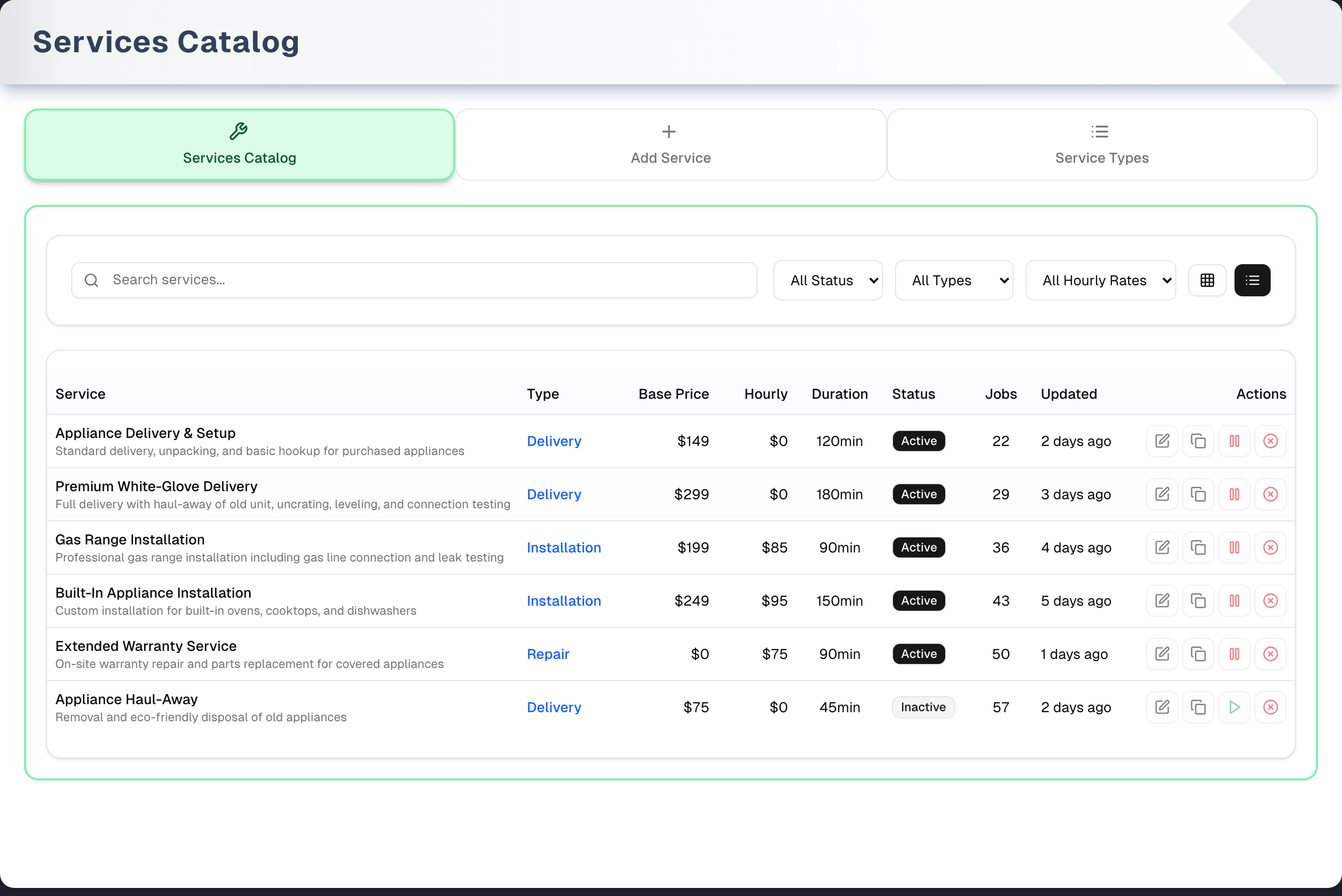
Overview
Browse services in List or Grid view with a count of the jobs that use each service, create new services, and manage the service types used to categorize them. The amber Demo button in the header opens a read-only copy with sample services and a guided tour (see Demo mode).
When you add a service to an order on Create Order (Sales → New), its Base Price becomes the line price ($0 if blank) and its Duration becomes the default job length when you schedule it (60 minutes if blank). You can change both on the order. The Hourly Rate is shown in the catalog and used by the Hourly Rate filter, but it is not used to price order lines.
Anyone on your team who can open the page can create, edit, duplicate, activate and deactivate services and service types. Only the owner and managers can delete them, and the delete controls are shown only to them.
Tabs in detail
Services Catalog
- Search by service name, description or Service Type — the same type the list shows for each service.
- Filters: Status (All / Active / Inactive), Type, and Hourly Rate range (Under $50, $50 - $100, $100 - $150, Over $150). The Type filter lists your store's service types, whether or not a service uses one yet. Picking an hourly range hides services that have no hourly rate. There's no clear-filters button — set each dropdown back to "All …".
- Views: List (table, the default) and Grid (cards). The page goes back to List when you reload.
- Columns / card fields: Service (name and description), Type, Base Price, Hourly, Duration, Status badge, Jobs, Updated. Jobs counts every scheduled job that uses the service, including completed and cancelled ones. Services are sorted by name, all on one page.
- Per-service actions — icon buttons at the end of each row, or at the bottom of each card:
- Edit (pencil) opens Edit Service.
- Duplicate (two squares) immediately creates an inactive copy named "… (Copy)".
- Deactivate (red pause) / Activate (green play) switches the status at once, with no confirmation.
- Delete (red ⊗) asks for confirmation, then deletes permanently.
- A message in the top right corner confirms each duplicate, activate, deactivate and delete, and says so with the reason when one fails.
Add Service
- Step 1 Basic Information: Service Name (required), Service Type (optional, "N/A" for none), Active Service switch (on by default), Description (required).
- Step 2 Pricing & Duration: Base Price ($), Hourly Rate ($) and Duration (minutes) — all optional. Prices are 0 or more; duration is whole minutes, 1 or more.
- Create Service saves, confirms with "Service "…" created" in the top right corner and takes you back to the Services Catalog, where the new service appears. Cancel clears the form and goes back without saving.
- What you type is kept if you switch tabs and come back, until you save or cancel.
- The Service Type list is read each time you open this tab, again whenever you add, edit, enable, disable or delete a type on Service Types, and again when you come back to this browser tab (so a type changed in another tab is picked up) — no reload needed. If it can't be read, the form says so and offers Try again rather than showing an empty list.
Service Types
- Step 1 Create Service Type: Type Name (required, must be unique in your store), Description (optional), Sort Order (default 0) and an Active switch, then Add Type.
- Step 2 Manage Service Types: a table (Name, Description, Sort, and Active shown as Yes/No) with Edit (change name, description and sort in the row, then Save or Cancel), Disable / Enable, and Delete.
- Delete asks "Delete service type?" first. Services that used the type stay, but their type is cleared.
- Types fill the Service Type dropdown on Add Service and Edit Service, lowest Sort first. Only active types are offered: Disable sets the Active column to No and takes the type out of those dropdowns, except on a service that already uses it, where it stays and is marked "(disabled)".
Step by step: create a service
- (Optional) On Service Types, add the categories you use.
- Open Add Service; enter a Service Name, pick a Service Type, and write a Description.
- Set a Base Price (this is the price that goes on orders) and/or an Hourly Rate, and a Duration in minutes.
- Click Create Service. You land back on the Services Catalog with the new service in the list.
Tips & best practices
- Create your Service Types first so new services slot into the right category — switch back to Add Service and the new type is already in the dropdown.
- Duplicate a similar service to add variants quickly (e.g. "Repair – Window" → "Repair – Door"). The copy is inactive and named "(Copy)" — edit the name, then activate it.
- Give every service you sell a Base Price, even hourly work: an order line takes its price from Base Price only.
- Use the Jobs count to spot your most- and least-used services. To retire a service that has jobs, Deactivate it — it can't be deleted.
Troubleshooting
| Issue | Fix |
|---|---|
| Service Type dropdown is empty, or missing a type you just added | Add the type on Service Types — the dropdown picks it up when you switch back to Add Service. A type that was switched off there is left out on purpose, and if it was the one you had chosen the box goes back to Service Type (N/A) |
| The Type column shows a type the service's Service Type box doesn't | Some older imported services carry a type label of their own. Open the service, choose N/A (or a type) and click Update Service: the label is replaced by what you chose |
| A duplicate is inactive | That's intentional — click its green play icon, or edit it and switch Active Service on |
| Can't delete a service: "This service is booked on the schedule or used by a recurring job, so it cannot be deleted." | The service is used by at least one scheduled job (any status, even completed or cancelled) or a recurring job. Completing jobs doesn't help. Deactivate it instead, or delete those jobs in Schedule first |
| "This service was not deleted…" / "This service type was not deleted…" | Your access changed while the page was open, or someone else deleted it first. Reload the page; if it is still there, ask the owner or a manager, or pause the service instead |
| Searching for a type name finds nothing | No service uses that type. Check the spelling against the Type filter, which lists your store's types |
| "No services found" although you have services | A filter is hiding them, and the card says "Try adjusting your filters to see more results." The usual culprit is Hourly Rate, which hides every service with no hourly rate — set it back to All Hourly Rates. "Get started by creating your first service." appears only when no filter is set at all |
| A type is missing from the Type filter | The filter lists the active types on Service Types, plus any switched-off type a listed service still uses. Add or enable it there and it appears here. If a red note says service types couldn't be loaded, the list is incomplete — reload the page |
| A service is missing from the Add service search on Create Order | That search offers active services only. Open the service and switch Active Service on |
| "This service has been switched off" when a sale or a quote is saved | The service was switched off after the order form was opened, so the line can no longer be sold. Switch it back on in Catalog → Services (the green play icon on its row), then save again — or take the line off and pick another service |
| A service called "General Service" appeared | UpChannels creates it when a job is scheduled without a service linked to it, for example from an order line with no service chosen. Because jobs use it, it usually can't be deleted |
What's next
- Schedule service work: Sales → Schedule
- Sell services on an order: Sales → New
- Review service performance: Reports → Services Report
- Set up the products you sell: Catalog → Products
Detailed reference
Every button, icon, field and message on this page, for when you need the exact detail. Each panel starts closed — open the one you need.
Page header and toolbar
| Control | Where | What it does | Notes |
|---|---|---|---|
| Sidebar Catalog → Services (wrench icon) | Sidebar | Opens this page on Services Catalog | The Catalog group also holds Guide & Tips and Products |
| Cards Services List and Management, Add Service, Service Types Management | Shortcuts page, Catalog group | Open this page on Services Catalog, Add Service or Service Types | A card is hidden if Services is hidden from your menu |
| Card Services Setup ("Configure the services your business provides and their profiles. Only sell products? You can skip this.") | Get Started page | Opens this page on Add Service | Skipping it is fine: Inventory Setup on its own completes Step 1 |
| Link "or add a service" | Owner setup banner, step "Add your first product or service" | Opens Add Service | Owner only. The step counts as done once your store has any product or service, active or not. The link is hidden on phone-width screens |
| "Can't find it? Add Service" | Create Order, bottom of the Add service search list | Leaves the order form and opens Add Service | — |
| Services Catalog link in "Reminder: Please ensure inventory items and service profiles are created before adding them to the order…" | Create Order, Order Items section | Opens this page | — |
| Add a service (wrench icon) | Create Order, amber note "Add a product or service before creating an order" | Opens Add Service | Owner only. Shown while the store profile is finished but the store has no product or service yet, and never once the store has taken an order |
| Services link, Services card, Service/warranty attach card | Dashboard level cards | Opens this page | The attach card shows only on some levels |
| Link to a specific tab (from Shortcuts, Get Started, the setup banner or Create Order) | — | Opens the page on that tab | Only on first load; switching tabs later doesn't change the address |
| Title Services Catalog, subtitle "Define, organize, and manage all service offerings in one centralized dashboard." | Header | Display only | — |
| Demo (Play icon, amber) | Header, right | Opens the demo copy with sample services and a guided tour | Everyone. Nothing is saved. See Demo mode below |
| Tab Services Catalog (wrench icon) | Tab bar | Search, filters and the service list | Default tab. Green frame |
| Tab Add Service (plus icon) | Tab bar | The "Create New Service" form | Purple frame. Keeps what you typed when you switch away and back |
| Tab Service Types (list icon) | Tab bar | Create and manage service types | Blue frame. Reloads each time you open it, so a half-typed new type is cleared |
| Left / right arrow keys | Tab bar, when a tab has focus | Move between tabs | — |
Tab: Services Catalog — search, filters and list states
| Control | Where | What it does | Notes |
|---|---|---|---|
| Search box "Search services..." (magnifier icon) | Toolbar, left | Filters the list as you type, matching service name, description or Service Type (not case sensitive) | The type it matches is the one the list shows: the type picked from the Service Types tab, or the older free-text label some imported services carry. No clear (×) button: delete the text |
| Status dropdown All Status / Active / Inactive | Toolbar | Shows all, only active, or only inactive services | Default All Status |
| Type dropdown All Types + type names | Toolbar | Shows only services of the chosen type | Lists your store's service types in Sort order, lowest first, leaving out only the switched-off ones no listed service uses; a switched-off type a listed service still uses keeps its place in that order. After them come the older free-text labels some imported services carry, A to Z. A type nobody has used yet is still offered. Adding, renaming, enabling, disabling or deleting a type on Service Types updates this list straight away — no reload — and a rename does not break the choice: the same services stay selected under the new name. If the chosen type disappears, the filter goes back to All Types. A red note beside the dropdown says when the list couldn't be read |
| Hourly rate dropdown All Hourly Rates / Under $50 / $50 - $100 / $100 - $150 / Over $150 | Toolbar | Filters by hourly rate | Under $50 means below 50. The two middle ranges include both ends, so a $100 service shows in both. Over $150 means above 150. Any range hides services with no hourly rate. There is no Base Price filter |
| Grid view button (grid icon, screen-reader label Grid view) | Toolbar, far right | Switches to cards | Filled when active. Not remembered: reloading returns to List |
| List view button (list icon, screen-reader label List view) | Toolbar, far right | Switches to the table | Default |
| Sorting and pages | — | Services are always sorted by name, A to Z, all on one page | No sort or page controls. Names starting with a capital letter come before names starting with a lowercase letter |
| Clearing filters | — | There's no clear button. Empty the search box and set each dropdown back to "All …" | — |
| Grey pulsing placeholder cards (six) | List area | Shown while services load | Also shown briefly after each add, edit, duplicate, status change or delete while the list reloads |
| Red card "Unable to load services" + the reason | List area | The list couldn't be loaded. A red "Organization Error: …" note also appears under the tab area | — |
| Retry | Error card | Loads the services again | — |
| Set up organization | Error card | Opens store setup | Offered for any load error, not only a missing store |
| Card "No services found" | List area | No services yet, or none match the search and filters | Says "Try adjusting your filters to see more results." whenever the search box, Status, Type or Hourly Rate is set. "Get started by creating your first service." appears only when none of them is |
| Add Service (plus icon) | "No services found" card | Opens the Add New Service dialog (not the Add Service tab) | The only way to open that dialog |
Tab: Services Catalog — table, cards and row actions
List view (table) columns, left to right: Service, Type, Base Price, Hourly, Duration, Status, Jobs, Updated, Actions.
| Control | Where | What it does | Notes |
|---|---|---|---|
| Service | Table column | Name in bold, then one grey line of description (cut off if long), or "No description provided" | — |
| Type | Table column | The service's Service Type in blue, or "N/A" | Some older imported services show their own type label. Choosing N/A (or a type) in Edit and saving replaces it |
| Base Price | Table column | "$" and the amount as saved (e.g. "$120", "$99.5"), or "N/A" if blank | "$0" when set to zero |
| Hourly | Table column | "$" and the rate, or "N/A" if blank | — |
| Duration | Table column | Minutes, e.g. "90min", or "N/A" if blank | — |
| Status | Table column | Badge Active (dark) or Inactive (grey) | — |
| Jobs | Table column | Number of scheduled jobs that use this service | Counts every job status, including completed and cancelled |
| Updated | Table column | "Under an hour ago", "1 hour ago" or "N hours ago" within the last 24 hours, otherwise "1 day ago" or "N days ago" | Based on the last change to the service |
| Clicking a row | Table | Nothing happens | Use the icons in the Actions column |
| Pencil icon (hover title Edit Service) | Each row, Actions | Opens Edit Service for that service | — |
| Two-squares icon (hover title Duplicate Service) | Each row, Actions | Immediately creates "… (Copy)" set to Inactive, with the same description, type, prices and duration. No confirmation. The list reloads and "Service "…" duplicated" appears in the top right corner. If the original's type has since been disabled, the copy gets no type (Service Type (N/A)) and the message adds "Its type … is switched off, so the copy has no type." | Disabled while copying (title "Duplicating..."). Copying a copy gives "… (Copy) (Copy)". Duplicate names are allowed |
| Red pause icon (hover title Deactivate Service) | Each row, Actions — active services | Immediately marks the service Inactive. No confirmation. "Service "…" deactivated" appears in the top right corner | Disabled while saving (title "Deactivating..."). Only the status changes. From then on the service is offered nowhere and can no longer be put on a new sale or quote — an order form already open is refused when it saves. Orders that already carry it keep their line exactly as it is |
| Green play icon (hover title Activate Service) | Each row, Actions — inactive services | Immediately marks the service Active. "Service "…" activated" appears in the top right corner | Disabled while saving (title "Activating...") |
| Red ⊗ icon (hover title Delete Service) | Each row, Actions | Opens Delete Service | Shown only to the owner and managers. Everyone else sees the rest of the row's actions, including the pause icon |
| Card icon | Grid card, top left | A picture for the service | Chosen from the name of the service's type (the Service Types row, or the older imported label): a repair, maintenance, installation, delivery, consultation, security or design type each has its own picture, read from words such as "Repair", "Install", "Delivery" or "Haul-away" in the name. Any other type, or no type, shows a wrench |
| Card header | Grid card | Name, Active / Inactive badge, "Type: …" (or N/A) | — |
| Card description | Grid card | Up to 2 lines, or "No description provided" | — |
| Base Price, Hourly Rate, Duration, Jobs | Grid card | Same values as the table | Prices use thousands separators ("$1,200"). A blank price shows as "N/A". Cards have no Updated field |
| Pencil, two-squares, pause or play, and ⊗ icons (tooltips Edit Service, Duplicate Service, Deactivate Service or Activate Service, Delete Service) | Grid card, bottom row | Same as the table icons | Tooltips read "Duplicating...", "Deactivating..." or "Activating..." while working |
| Message in the top right corner | Over the page | Confirms a duplicate, activate, deactivate or delete, naming the service | Always in the same place, whatever you have scrolled to, and it fades by itself |
| Red message in the top right corner: "Failed to duplicate service: …", "Failed to activate service: …" or "Failed to deactivate service: …" | Over the page | The action failed; the reason follows the colon | A refused delete is different — it stays inside the Delete Service dialog, where you can try again or cancel |
Tab: Add Service
Card "Create New Service" (plus icon), subtitle "Define a new service with pricing, requirements, and operational details". The fields have no labels above them — the placeholder text inside each box names it.
Fields:
| Field | Required | Default | Rules and error text |
|---|---|---|---|
| "Service Name *" | Yes | Empty | "Service name is required". Spaces at the start and end are removed. Names don't have to be unique |
| Service Type ("Service Type (N/A)") | No | N/A (no type) | Lists the active service types, lowest Sort first; disabled ones are left out. Read again each time you open this tab, whenever a type changes on Service Types, and when you come back to this browser tab from another, so a type you just added, enabled or disabled is right without a reload. "Loading types…" shows while it reads. If the type you had chosen is switched off or deleted there, the box goes back to Service Type (N/A) rather than keeping a retired type out of sight. A change someone else makes while you stay on this page isn't shown until you come back to the tab, so Create Service checks the chosen type once more as it saves. If the list can't be read, a red "Service types couldn't be loaded." appears with Try again, so an empty box is never mistaken for a store with no types. Helper: "Create a new type in the Service Types tab." |
| Active Service switch | — | On | Off means the service starts Inactive: it is not offered on Create Order and cannot be put on a sale or a quote until it is switched on |
| Description ("Description — describe what this service includes...") | Yes | Empty | "Description is required" |
| "Base Price ($)" | No | Blank | 0 or more, up to 2 decimals; the browser blocks negatives and extra decimals with its own message. "Base price must be a valid number". On Create Order this becomes the line price ($0 if blank) |
| "Hourly Rate ($)" | No | Blank | Same rules. "Hourly rate must be a valid number". Not used to price order lines |
| "Duration (minutes)" | No | Blank | Whole number, 1 or more; the browser blocks 0 and decimals. "Duration must be a positive number (in minutes)". The default job length when the service is scheduled from an order (60 minutes if blank) |
Buttons:
| Control | Where | What it does | Notes |
|---|---|---|---|
| "STEP 1 Basic Information" and "STEP 2 Pricing & Duration" markers | Form | Section headings | Step 2 helper: "Base price and duration can be overridden when creating orders or quotes." |
| Cancel | Form footer | Clears the form and goes to Services Catalog. Nothing is saved | Disabled while saving |
| Create Service (save icon) | Form footer | Checks the fields, saves the service, clears the form, reloads the list and goes to Services Catalog | Shows a spinner and "Creating Service..." and is disabled while saving. Pressing Enter in a one-line box also submits. "Service "…" created" appears in the top right corner, so you see it on the catalog you land on |
| Red note (alert icon) with the reason | Top of the form | The save failed | Shows the reason, or "Failed to create service". Stays until you try again or cancel |
Tab: Service Types
A red note at the top of this tab shows any failure here (loading, adding, saving, enabling, disabling or deleting). It clears the next time the table reloads successfully.
Step 1 Create Service Type fields:
| Field | Required | Default | Rules and error text |
|---|---|---|---|
| "Type Name *" | Yes | Empty | Add Type stays greyed out until it has text. Must be unique in your store, exact spelling ("Repair" and "repair" count as different). A name already used shows "A service type called "…" already exists in your store. Use a different name — spelling and capitalisation count." in the red note |
| "Description (optional)" | No | Empty | — |
| "Sort Order" | No | 0 | Whole numbers; blank counts as 0. A decimal is refused before anything is sent — "Sort order must be a whole number." in the red note, and what you typed stays in the box. Lower numbers come first in the table and in the Service Type dropdowns |
| Active switch | — | On | Off creates the type disabled: the Active column shows No and the type is not offered in the Add Service and Edit Service dropdowns |
Buttons and table:
| Control | Where | What it does | Notes |
|---|---|---|---|
| "STEP 1 Create Service Type" and "STEP 2 Manage Service Types" markers | Tab | Section headings | — |
| Add Type (plus icon) | Create row, right | Saves the type, clears the row (Sort back to 0, Active back on) and reloads the table | Disabled until Type Name has text, and while saving ("Saving..."). Enter in any box also saves. The Add Service tab's dropdown picks the new type up as soon as you switch to it |
| Columns Name, Description, Sort, Active, Actions | Step 2 table | Your types, lowest Sort first. Description shows "-" when empty; Active shows Yes or No | "Loading..." while loading; "No service types yet." when there are none |
| Edit | Each row | Turns Name, Description and Sort into boxes; the buttons become Save and Cancel | One row at a time — clicking Edit on another row drops unsaved changes on the first |
| Name box (placeholder "Name") | Row, edit mode | New name | Save with it empty is refused — "Type name is required" appears at the top of the tab and the row stays open. A name already used gives "A service type called "…" already exists in your store." |
| Description box (placeholder "Description") | Row, edit mode | New description | Empty the box and Save to remove the description; the row then shows "-" |
| Sort box | Row, edit mode | New sort order | Whole numbers only — a decimal is refused with "Sort order must be a whole number." before anything is sent, and the row stays open with what you typed. Blank sets the sort to 0 |
| Save | Row, edit mode | Saves name, description and sort — including a description you emptied — and leaves edit mode | Doesn't change Active. Enter doesn't save. An empty Type Name is refused. If nothing was saved (the type was deleted, or your access changed while the page was open) a red note says so and the row stays open |
| Cancel | Row, edit mode | Leaves edit mode without saving | — |
| Disable / Enable | Each row | Flips Active at once and reloads, with no confirmation | "Disable" on active types, "Enable" on disabled ones. Services already using the type keep it, and it still shows in their Edit Service dropdown as "… (disabled)"; it is offered nowhere else until you Enable it again, and a new service that had it chosen goes back to Service Type (N/A). Duplicate on the Services Catalog follows the same rule: a copy of a service whose type is disabled has no type, and the message says so |
| Delete (red) | Each row | Opens Delete service type? | Shown only to the owner and managers. Everyone else still has Edit and Disable |
Dialog: Add New Service
| Control | Where | What it does | Notes |
|---|---|---|---|
| Opening it | — | Only from Add Service on the "No services found" card | Tip: a search that matches nothing also shows that card |
| Title Add New Service | Header | — | — |
| X (close), Esc, or click outside | Dialog | Closes without saving | The form starts empty next time |
| All fields | Body | Same fields, defaults, rules and messages as the Add Service tab | The Service Type list loads fresh each time the dialog opens |
| Cancel | Footer | Closes the dialog. Nothing is saved | — |
| Create Service ("Creating Service..." while saving) | Footer | Saves, closes the dialog and reloads the list | You stay on Services Catalog, and "Service "…" created" appears in the top right corner |
| The words "Active Service" next to the switch | Body | Flips the switch, the same as clicking the switch itself | — |
Dialog: Edit Service
Opened by the pencil icon on a table row or grid card. Sections: "Basic Information", "Pricing & Duration", "Service Status".
Fields:
| Field | Required | Default | Rules and error text |
|---|---|---|---|
| Service Name * (placeholder "Enter service name") | Yes | Current name | "Service name is required" |
| Service Type | No | Current type, or N/A | "N/A" removes the type. "Loading types…" while the list loads, and a red "Service types couldn't be loaded." with Try again if it fails. Lists the active types; a disabled type appears only when this service already uses it, shown as "… (disabled)". Reloads each time the dialog opens. Update Service checks the chosen type once more: one someone else switched off or deleted while the dialog was open is refused, and the box goes back to the service's own type (or N/A). Helper: "Create a new type in the Service Types tab." |
| Description (placeholder "Describe what this service includes...") | Yes, although the label has no asterisk | Current description | "Description is required" |
| Base Price ($) (placeholder "0.00") | No | Current price | Emptying it clears the price. 0 or more, 2 decimals. "Base price must be a valid number" |
| Hourly Rate ($) (placeholder "0.00") | No | Current rate | Emptying it clears the rate. "Hourly rate must be a valid number" |
| Duration (minutes) (placeholder "60") | No | Current duration | Emptying it clears the duration. Whole number, 1 or more. "Duration must be a positive number (in minutes)" |
| Active Service switch | — | Current status | Helper: "Active services are available for booking and will appear in your service catalog." Switching it off also takes the service out of the Add service search on Create Order. Clicking the words flips it too |
Buttons:
| Control | Where | What it does | Notes |
|---|---|---|---|
| Title Edit Service | Header | — | — |
| X (close), Esc, or click outside | Dialog | Closes without saving | — |
| Cancel | Footer | Closes without saving | Disabled while saving |
| Update Service (save icon) | Footer | Saves every field, closes the dialog and reloads the list | Shows a spinner and "Updating Service..." and is disabled while saving. The dialog closes at once and "Service "…" saved" appears in the top right corner |
| Red note (alert icon) with the reason | Top of dialog | The save failed; the dialog stays open | Shows the reason, or "Failed to update service" |
Dialog: Delete Service
| Control | Where | What it does | Notes |
|---|---|---|---|
| Title Delete Service | Header | — | Opened by the red ⊗ icon |
| "Are you sure you want to delete …? This action cannot be undone." | Body | Confirmation text | — |
| X (close), Esc, or click outside | Dialog | Closes, nothing deleted | — |
| Cancel | Footer | Closes, nothing deleted | — |
| Delete (red) | Footer | Permanently deletes the service; the dialog closes, "Service "…" deleted" appears in the top right corner and the list reloads | Reads Deleting… and is disabled while it runs, and Cancel is disabled with it, so the button cannot be pressed twice. Past order lines that used the service keep their description and price. If the service was not removed the dialog stays open with a red note — "This service was not deleted…" — so it never closes as if it were gone |
| Amber note (alert icon) | Body, above the buttons | "This service is booked on N jobs, so it cannot be deleted. Switch it off instead — it then disappears from new sales and quotes while past jobs keep their line." | Shown before you press Delete, whenever the row's Jobs count is above 0 |
| Red note (alert icon) | Body | The delete was refused; the dialog stays open so you can cancel or try again | "This service is booked on the schedule or used by a recurring job, so it cannot be deleted. Switch it off instead — it then disappears from new sales and quotes while past jobs keep their line." At least one scheduled job (any status, including completed or cancelled) or recurring job uses the service. Use Deactivate, or delete those jobs in Schedule first |
Dialog: Delete service type?
| Control | Where | What it does | Notes |
|---|---|---|---|
| Title Delete service type? | Header | — | Opened by Delete on a Service Types row |
| "Deleting "…" detaches it from any services currently using it (their service type is cleared). This can't be undone." | Body | Explains the effect | Services stay; their Type becomes N/A |
| Cancel | Footer | Closes, nothing deleted | Esc also cancels. Clicking outside doesn't close this dialog |
| Delete | Footer | Closes the dialog, deletes the type and reloads the table | Errors show in the red note at the top of the tab, including "This service type was not deleted…" when nothing was removed. The Services Catalog's Type filter drops the type straight away; the Type shown on each service row updates after a page reload |
Messages you may see
| Message | When it appears | What to do |
|---|---|---|
| "Service name is required" | Add or Edit saved with a blank name | Enter a name |
| "Type name is required" | Save on a service type row with an empty Type Name | Type a name, or Cancel to keep the old one |
| "This service type was not saved. It may have been deleted, or your access changed while the page was open." | Saving a service type row that no longer exists for you | Reload the page and try again |
| "Description is required" | Add or Edit saved with a blank description (required in Edit too, though its label has no asterisk) | Enter a description |
| "Base price must be a valid number" / "Hourly rate must be a valid number" | A price isn't a number of 0 or more (the browser usually stops this first) | Enter a plain number such as 120 or 120.50 |
| "Duration must be a positive number (in minutes)" | Duration is 0, negative or not a number | Enter whole minutes, 1 or more |
| Browser pop-ups such as "Value must be greater than or equal to 0" or "Please enter a valid value…" | Negative price, 0 duration, too many decimals, decimal duration, or decimal Sort Order when creating a type | Fix the value. Wording depends on your browser |
| Service "…" created | A new service was saved, from the Add Service tab or the Add New Service dialog (top right corner) | — |
| Service "…" saved | Edit Service saved your changes (top right corner) | — |
| Service "…" deleted | Delete Service removed the service (top right corner) | — |
| "Failed to create service" / "Failed to update service" / "Failed to delete service" | A save or delete failed with no specific reason | Try again. If it keeps happening, contact support |
| Service "…" duplicated | Duplicate worked (top right corner) | The copy is Inactive — edit it and activate it |
| Service "…" duplicated. Its type … is switched off, so the copy has no type. | Duplicate worked, but the original's service type is disabled, so the copy was given none | Edit the copy and pick a current Service Type before you activate it |
| Service "…" activated / Service "…" deactivated | Status change worked (top right corner) | — |
| "Install: this service has been switched off. Switch it back on in Catalog -> Services, or pick another service." | Saving a sale or a quote whose line names a service that is now Inactive. Nothing is saved — not the order, not its other lines | Switch the service back on, or take that line off and pick another service, then save again |
| "Failed to duplicate service: …" / "Failed to activate service: …" / "Failed to deactivate service: …" | Duplicate or status change failed | Read the reason after the colon |
| "Are you sure you want to delete …? This action cannot be undone." | Delete Service dialog | Click Delete or Cancel |
| "This service is booked on the schedule or used by a recurring job, so it cannot be deleted. Switch it off instead — it then disappears from new sales and quotes while past jobs keep their line." | Deleting a service that scheduled jobs or a recurring job still use | Use Deactivate on the service, or delete those jobs in Schedule first |
| "A service type called "…" already exists in your store. Use a different name — spelling and capitalisation count." | Adding or renaming a service type to a name already used in your store | Use a different name, or edit the existing type |
| "Sort order must be a whole number." | A decimal typed into Sort Order, on Add Type or on a row being edited | Type a whole number such as 3, or leave it blank for 0 |
| "Deleting "…" detaches it from any services currently using it (their service type is cleared). This can't be undone." | Delete service type? dialog | Click Delete or Cancel |
| "Unable to load services" + reason, with "Organization Error: …" below the tabs | The service list failed to load | Click Retry. If it says no organization, use Set up organization |
| "No organization found for your account. Ask the store owner to add you to the store." | Your login isn't linked to a store | Finish store setup, or ask your owner |
| "Failed to load services" | The list failed to load with no specific reason | Click Retry or reload |
| "Failed to load service types" / "Could not save this service type. Nothing was changed." / "Could not change this service type. Nothing was changed." (Disable / Enable) / "Could not delete this service type. Nothing was changed." | Something failed on the Service Types tab (red note at the top) | Try again |
| "Service types couldn't be loaded." with Try again | The Service Type list could not be read, in the Add Service form or the Edit Service dialog | Click Try again. The box is not empty because your store has no types |
| "That service type was switched off or removed while this page was open. Pick another type, or Service Type (N/A), and save again." | Create Service or the Edit Service dialog's save, when someone else switched off or deleted the type you picked after your list was read. Nothing is saved, and the list is read again. The box then shows what the next save will use: Service Type (N/A) on Create Service, and in Edit Service the type the service already has (it can still be kept while it exists), or N/A when that type is the one removed | Pick another type or Service Type (N/A), then save again |
| "Service types couldn't be loaded, so the Type list may be incomplete." | The same read failed for the filter row above the services table. There is no Try again here | Reload the page. Until it succeeds the Type dropdown may be missing some of your types |
| "No services found" + "Try adjusting your filters to see more results." | The search box, Status, Type or Hourly Rate matches nothing | Empty the search and set the dropdowns to "All …" |
| "No services found" + "Get started by creating your first service." | No services yet. Shown only when the search box and all three dropdowns are clear | Click Add Service |
| "No service types yet." | The Service Types table is empty | Add one in Step 1 |
| "Loading..." / "Loading types…" | Service types are loading | Wait |
| "Create a new type in the Service Types tab." | Helper under the Service Type dropdown (Add Service, Edit Service) | — |
| "Base price and duration can be overridden when creating orders or quotes." | Helper in Add Service, Step 2 | — |
| "Active services are available for booking and will appear in your service catalog." | Helper under the switch in Edit Service | It means what it says: an inactive service is not offered in the Add service search on Create Order |
| "403 - Forbidden" / "You do not have permission to view this page. Contact your organization owner." | Services is hidden from your menu | Ask your owner to show it in Settings → Team |
Who can use what
| What | Who | Notes |
|---|---|---|
| Open the page | Everyone on the team | In a store with more than one active login, the owner can hide Services from a member's menu in Settings → Team; that member sees "403 - Forbidden". A store's only active login never sees this |
| Create, edit, duplicate, activate and deactivate services | Everyone who can open the page | No role check |
| Create, edit, enable and disable service types | Everyone who can open the page | No role check |
| Delete a service or a service type | The owner and managers | The delete controls are hidden from everyone else. If a delete is refused anyway — your access changed while the page was open, or someone else deleted it first — a red note says "This service was not deleted…" (or "This service type was not deleted…") instead of closing as if it were done |
| Demo | Everyone | Nothing is saved |
| Plan or add-on | None needed | Available on every plan |
Demo mode (/service-profiles/demo)
- Open it: the amber Demo button (Play icon) at the right of the page header.
- Header: "Services Catalog — Demo", subtitle "Sample services populated with demo data. All actions are disabled."
- Banner: "Demo mode — services catalog is populated with sample data. All actions are disabled." Take a Tour (question-mark icon) at its right end restarts the tour from step 1.
- Tour: starts by itself the first time the demo opens.
- Still works: switching tabs, the search box, the Status, Type and Hourly Rate filters, the Grid / List toggle, Take a Tour and Exit Demo Mode.
- Disabled: every row and card icon (dimmed; grid tooltips don't show); the whole Add Service form (pre-filled and locked, Cancel and Create Service greyed out); the whole Service Types tab (pre-filled create row, Add Type, Edit, Disable / Enable, Delete greyed out). No dialogs open.
- Leave: Exit Demo Mode (back-arrow icon, top-right of the header) returns to the live page.
| # | Tab | Tour step | What it points at |
|---|---|---|---|
| 1 | Services Catalog | Navigation Tabs | The tab bar; explains the three tabs |
| 2 | Services Catalog | Search & Filters | The toolbar: search, the Status, Type and Hourly Rate filters, and the view toggle |
| 3 | Services Catalog | View Modes | The Grid / List buttons |
| 4 | Services Catalog | Services Table | The table (or card grid). "…The rows are a list, not links — use the actions at the end of a row to edit, duplicate or switch a service off." |
| 5 | Services Catalog | Service Actions | The first service's four icons: Edit, Copy (duplicate), Play/Pause (status) and X (delete) |
| 6 | Add Service | Add Service — Basics | Step 1 Basic Information: name, type, Active switch, description |
| 7 | Add Service | Pricing & Duration | Step 2: base price, hourly rate and duration in minutes |
| 8 | Service Types | Create Service Type | The create row, and its text "mark it active to make it selectable" — a disabled type is not offered in the Add Service and Edit Service dropdowns |
| 9 | Service Types | Manage Service Types | The types table: Edit, Enable / Disable, Delete, and how sort order sets dropdown order |
Each step switches the page to the tab in the table before it points at anything. Tour controls: progress dots and "N of 9"; Back (from step 2); Skip closes the tour; Next moves on, and reads Got it! on the last step, which closes it. Keys: Esc closes; right arrow or Enter goes to the next step (on the last step they close the tour); left arrow goes back. Clicking the dark backdrop closes the tour. If a step's target isn't on screen (for example, the filters leave no rows for step 5), the tour moves on after about 3 seconds.
Differences from the live page:
- The sample services depend on your store's industry: 6 services each for Appliance Retail, Furniture Retail, Electronics Retail, Liquidation Retail, Apparel Retail, HVAC Services, Plumbing Services and Appliance Services. Any other industry sees the HVAC set. One service in each set is Inactive.
- Jobs counts and "N days ago" are sample figures.
- A sample service with no hourly rate shows "N/A", as on the live page, and is left out of every Hourly Rate range.
- The list isn't sorted by name.
- There's no "No services found" card — an empty table or grid shows instead.
- Add Service is pre-filled with "AC System Tune-Up", type Maintenance, Active on, description "Comprehensive AC system tune-up including filter replacement, coil cleaning, and refrigerant check", Base Price 120.00, Hourly Rate 75.00, Duration 90. The Step 2 helper line is missing.
- Service Types shows a create row pre-filled with "Emergency", "Urgent after-hours service calls", sort 6, Active; the table lists Installation (1), Repair (2), Maintenance (3), Consultation (4) and Delivery (5, Active No).
- No Demo button, and no green or red notes.
Common questions
Why can't I delete a service? If the Delete Service dialog says "This service is booked on the schedule or used by a recurring job, so it cannot be deleted.", at least one scheduled job — in any status, including completed or cancelled — or a recurring job uses the service. The Jobs column shows how many. Deactivate the service (red pause icon) instead, or delete those jobs in Schedule first. If you see "This service was not deleted…", either your access changed while the page was open or someone else deleted it first: reload the page, and ask the owner or a manager if it is still there.
What's the difference between Deactivate and Delete? Deactivate keeps the service and its history and marks it Inactive; you can activate it again at any time, and while it is inactive it is not offered in the Add service search on Create Order. Delete removes it permanently and is only possible when no jobs use it. Past order lines keep their description and price either way.
Which price is used when I sell a service? The Base Price becomes the order line's price ($0 if blank), and you can change it on the order. The Hourly Rate is not used to price order lines. The Duration becomes the default job length when the service is scheduled (60 minutes if blank).
I added a Service Type but it isn't in the Add Service dropdown. Adding, editing, enabling, disabling or deleting a type on Service Types re-reads the list everywhere on the page, so a type you have just created is in the dropdown with no reload, and the Edit Service dialog and the Add New Service dialog also read it fresh each time they open. A type somebody else added on another computer arrives the next time the list is read — switch tabs, reopen the dialog, or reload the page. A switched-off type is offered only to a service that already uses it.
Why isn't my Service Type in the Type filter? The Type filter lists your store's types whether or not a service uses one yet, so a type you have just created can be picked straight away. The only one left out is a switched-off type that no listed service still uses. Renaming a type keeps everything filed under it — the filter matches the type itself, not its spelling — and the new name appears the next time the list is read.
Does disabling a Service Type hide it? From new choices, yes. Disable sets the Active column to No and takes the type out of the Service Type dropdowns in Add Service and Edit Service. Services that already use it keep it, and their Edit Service dropdown shows it as "… (disabled)". To remove it, delete it — the Delete button is there for the owner and managers; services that used it keep going with no type.
Where did "General Service" come from? When a job is scheduled from an order line that has no service chosen, UpChannels looks for a service whose name contains "General Service" and, if there isn't one, creates it (description "Default service profile for assignments created from orders", 60 minutes, Active). Because jobs use it, it usually can't be deleted. If you rename it, a new one is created the next time this happens.
Why is my duplicated service inactive and called "(Copy)"? Duplicate always makes an inactive copy named after the original plus "(Copy)", so you can rename and adjust it first. Edit the name and details, then activate it with the green play icon or the Active Service switch.