Services Report
Reports → Services Report shows how your service work is going, on two tabs: Service Report and Agent Performance. The page is read-only, so nothing you do here changes a job or an order. The numbers come from jobs on Sales → Schedule and from service lines on your sales orders.
Overview
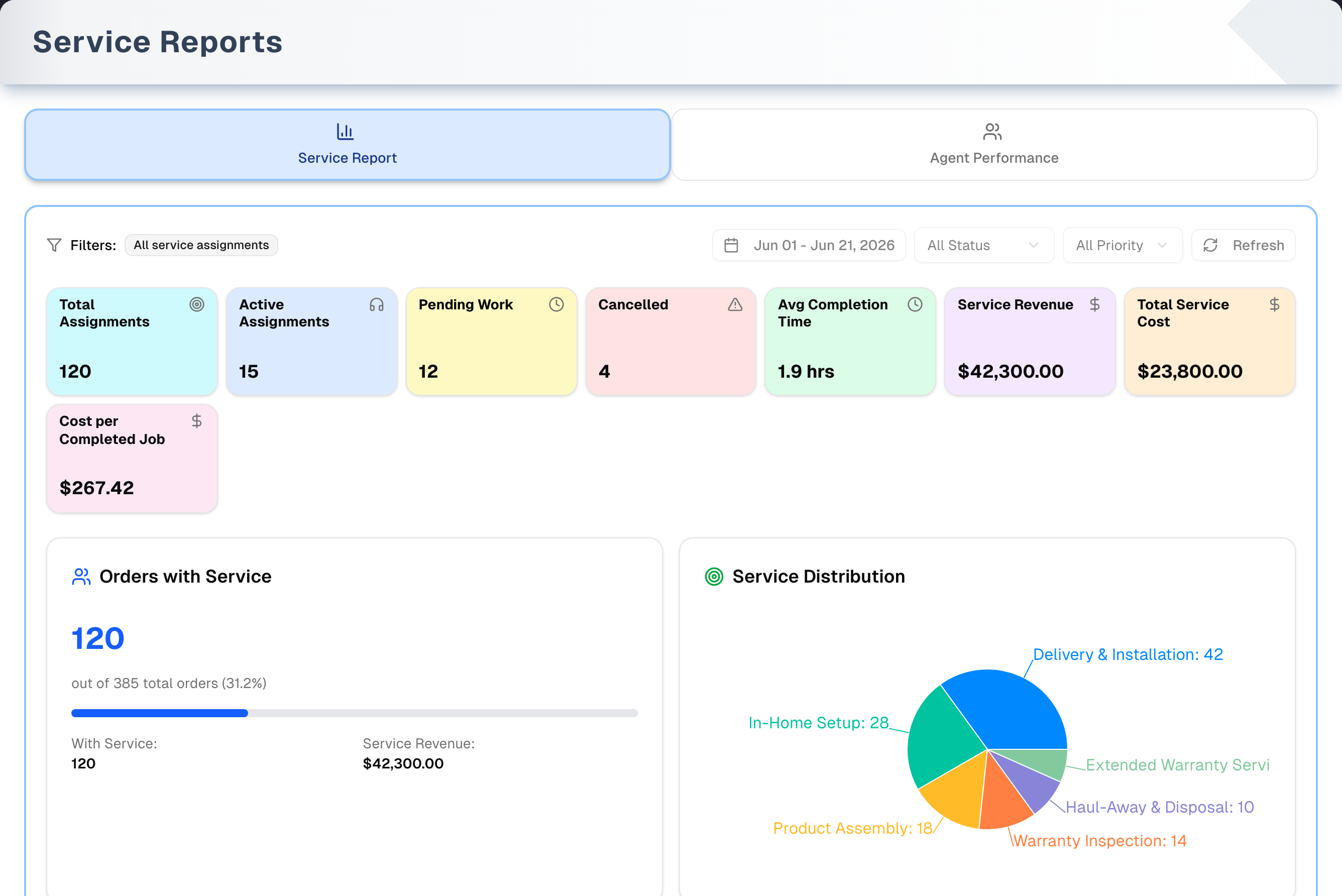
- Service Report is a dashboard for a date range you choose. The range starts as the 1st of this month through today. The tab has 8 KPI cards, an Orders with Service card, a Service Distribution pie chart and a Service Distribution Details table. Status and Priority filters narrow the job figures.
- Agent Performance ranks every worker who has jobs scheduled this month so far. It has no date picker or filters, only a sort dropdown and Refresh.
- Changes reload at once, with no Apply button. Switching tabs resets the tab you leave to its defaults.
- The page has no export, print, search or drill-down. Rows and chart slices aren't clickable.
- Demo (header, right) opens the page with sample data and a guided tour.
Where the numbers come from
| Figure | Comes from |
|---|---|
| Total Assignments, Active Assignments, Pending Work, Cancelled, and the leaderboard's Total Jobs, Completed and Pending | Jobs on Schedule whose scheduled date falls in the range. For the leaderboard, the range is always this month so far |
| Avg Completion Time and Avg Time | The time logged when the job was completed. That is the Actual Duration (min) typed on the job's Timing tab; left empty, the job's Duration is logged instead. Completed jobs only |
| Total Service Cost, Cost per Completed Job, Job Cost and Total Team Cost | Total Cost on the job's Timing tab. Completed jobs only. It's typed by hand, and it is a cost, not what you charged |
| Service Revenue | The money received for service lines in the range, before tax — the service share of the money received on sales, the same figure as the Service Revenue line on Profit & Loss. Each payment is split across its order's lines by their value, and counts on the day it was received |
| Orders with Service | Service lines on sales orders that are Completed, Delivered or Shipped, counted by the day the order became a sale (a converted quote: the day it was accepted; any other sale: the day it was entered). Quotes, drafts, and cancelled or refunded orders don't count |
| Customer rating (Agent Performance only) | Customer Rating (1-5) on the job's Customer tab. A star rating from a customer-portal review is also copied onto the order's latest completed job |
Tabs in detail
Service Report
- Filters: date range (a two-month calendar), Status (All Status, Scheduled, In Progress, Completed, Cancelled, Rescheduled, No Show), Priority (All Priority, Low, Normal, High, Urgent, Emergency) and Refresh. There is no Technician filter or Urgent toggle. Status and Priority don't change Service Revenue or Orders with Service.
- The default range ends today, so jobs scheduled later aren't counted until you move the end date.
| Card | What it counts |
|---|---|
| Total Assignments | Jobs scheduled in the range that match the filters, in any status |
| Active Assignments | Scheduled and In Progress jobs |
| Pending Work | Scheduled jobs only |
| Cancelled | Cancelled jobs |
| Avg Completion Time | Average logged time of the completed jobs that have one, as "N min" under an hour or "N.N hrs" |
| Service Revenue | The money received for service lines in the range, before tax |
| Total Service Cost | Total of Total Cost on completed jobs |
| Cost per Completed Job | Total Service Cost divided by the number of completed jobs that have a cost. A completed job with no Total Cost typed in is left out of both, so it doesn't read as a free job |
- Orders with Service shows how many of the completed sales orders include at least one service line, "out of N total orders (x%)", a progress bar, and Service Revenue again.
- Service Distribution is a pie chart with one slice per active service that has jobs in the range. Hover a slice to see its name and job count.
- Service Distribution Details lists every active service, including services with 0 jobs, with its Category, Assignments and Percentage, most-booked first. Category is the service's service type, as set on its profile in the Services catalog; a service with no type set shows "Uncategorized".
Agent Performance
- This tab always covers jobs scheduled from the 1st of the current month through today. You can't change the range, and the Service Report dates don't carry over.
- Summary cards: Total Workers, Total Assignments, Avg Completion Rate, Avg Customer Rating (x.x/5, with the number of rated jobs under it) and Total Team Cost. Total Workers and the two averages count people only; Total Assignments and Total Team Cost cover every job, including ones with nobody on them yet.
- The Worker Leaderboard has one row per worker. Each row shows:
- A rank: gold, silver and bronze trophies for the top three, then #4, #5 and so on.
- The worker's name.
- Total Jobs, Completed and Pending. Pending counts the jobs still Scheduled, which is what the Pending Work card at the top counts too. Completed and Pending deliberately don't add up to Total Jobs: the rest are in progress, cancelled, rescheduled or no-shows.
- Avg Time and Job Cost.
- Completion Rate, with a bar.
- A badge: Excellent (95% or more), Good (85% or more), Average (75% or more) or Needs Improvement (below 75%). The badge is based on completion rate only. The small "x% on-time" line under it is a separate figure.
- The sort dropdown (top right, it shows Completion Rate at first) offers Completion Rate, Total Assignments, Customer Rating and Total Job Cost, highest first. Ratings aren't shown on the rows. Sorting by Customer Rating is the only way to rank workers by rating.
- Jobs with nobody on them yet are grouped into one row named Unassigned, shown last with a dashed outline, no rank and no badge. It doesn't count as a worker, and it doesn't change Avg Completion Rate or Avg Customer Rating. Everyone else's name shows normally.
Step by step: review service performance
- Open Reports → Services Report.
- On Service Report, click the date button. Click the day you want as the start. If it becomes the end of the range instead, click it once more. Then click the end day. The report reloads after each click. Leave Status and Priority on All for the full picture.
- Read the KPI cards. Compare Service Revenue (the money received for services) with Total Service Cost (what the completed jobs cost).
- Check Service Distribution to see your most-booked services.
- Switch to Agent Performance. Use the sort dropdown to see who completes the most jobs this month and who needs support.
- If cost or rating figures are empty, open those jobs on Sales → Schedule and fill in Total Cost and Customer Rating. Fill in Actual Duration (min) too when the job took longer or less than its Duration.
Tips & best practices
- Fill in Actual Duration (min), Total Cost and Customer Rating on the job, in the same save that sets it to Completed if you like — a completing save keeps every change you made in it. Leave Actual Duration (min) empty and the job's own Duration is logged as the time, so it is cost that reads $0 on a row when nobody fills it in. A worker with no rated job sorts as 0.0 under Customer Rating (ratings aren't shown on the rows), but the team's Avg Customer Rating ignores unrated jobs entirely. See Schedule.
- Assign a worker to every job. Jobs with nobody on them sit in the Unassigned row at the bottom of the leaderboard — their jobs and cost still count in the totals, but nobody gets the credit.
- Agent Performance starts over on the 1st of each month. For a full month, check it on the last day of the month.
- A low completion rate can come from cancelled or no-show jobs, not only unfinished ones — and those are not in Pending, so a worker with a low rate and a low Pending count has jobs that fell through rather than jobs still ahead of them. Total Jobs minus Completed minus Pending is that group.
- Service Revenue is counted by the day the money came in and cost by job date. A deposit taken weeks before the job puts the two in different weeks. For a margin check, use a range long enough to cover both.
Troubleshooting
| Issue | Fix |
|---|---|
| Every KPI card shows 0 | No jobs are scheduled in the range, or Status or Priority filters them all out. Set both to All and widen the dates. To count jobs scheduled after today, move the end date forward |
| Service Revenue is $0 but you have jobs | Service Revenue is the money received for service lines on sales in the range. It doesn't come from jobs: record the payment on the sale the service is on |
| Total Service Cost or Job Cost is $0, or Cost per Completed Job shows "—" | Only completed jobs with a Total Cost count. Enter it on the job's Timing tab in Schedule; it is kept whether or not the same save completes the job |
| Avg Completion Time shows "0 min" | No completed job in the range has any time logged. A job completed with Actual Duration (min) empty logs its Duration instead, so this usually means those jobs have no duration either, or were completed with no time logged |
| "No service assignments found for the selected period" | Your store has no active services, or none of them has jobs in the range. Widen the dates or clear the filters, or add or reactivate a service in Catalog → Services |
| Agent Performance says "No worker data available" | No jobs are scheduled this month yet. The tab only covers this month so far, as the line under the message says. With a red "Failed to load performance data" card above it and no such line, the data didn't load: click Refresh |
| A leaderboard row is named "Unassigned" | Those are jobs with nobody on them yet. Assign a worker to each on Schedule, then click Refresh |
| A row shows "Worker" plus 8 characters | That person's name couldn't be found, usually because they're no longer a member of your store. Reassign their jobs on Schedule |
| Avg Customer Rating says "No ratings" | No job this month has a Customer Rating. Enter it on the job's Customer tab in Schedule |
| Every worker shows "0.0% on-time" | The on-time figure needs an Actual Start on completed jobs. Record one on the job's Timing tab in Schedule; jobs completed before anyone did that have none |
| Category says "Uncategorized" | That service has no service type on its profile. Set one in the Services catalog |
| "Failed to load service data: …" or "Failed to load performance data: …" | Click Refresh. If it keeps happening, sign out and back in |
| "403 - Forbidden" | The owner has hidden Services Report from your menu. Ask them to show it again in Settings → Team |
What's next
- Schedule more work: Sales → Schedule
- Manage service offerings: Catalog → Services
- Tie service to revenue: Reports → Sales Report
- Track worker hours and labour cost: Team → Workforce
Detailed reference
Every button, icon, field and message on this page, for when you need the exact detail. Each panel starts closed. Open the one you need.
Page header and toolbar
| Control | Where | What it does | Notes |
|---|---|---|---|
| Services Report (wrench icon) | Sidebar, Reports group, between Daily Journal and Inventory Report | Opens this page on the Service Report tab | In stores with more than one active person, the owner can hide it for a person in Settings → Team |
| Services Report card | Shortcuts, Reports cards | Opens this page | — |
| Services Report card | Reports → Guide & Tips | Describes the report: "Service performance and technician productivity analytics." | Information only. Its feature list names Service KPIs, Service distribution, Technician productivity and customer ratings, and says the ratings are on Agent Performance — the Service Report tab has no rating |
| Title Services Report | Header, left | Subtitle: "Monitor and analyze service assignment performance, technician productivity, and customer satisfaction metrics." | The same name as the menu item and the shortcut |
| Demo (Play icon, amber) | Header, right | Opens the page with sample data and a guided tour | Always shown. See the Demo mode panel below |
| Service Report tab (bar-chart icon, blue) | Tab bar | Shows the dashboard | Opens by default on every visit. The web address doesn't change with the tab |
| Agent Performance tab (people icon, green) | Tab bar | Shows the worker leaderboard | When you leave a tab, its dates, filters and sort reset. It reloads when you come back |
| Left and Right arrow keys | Tab bar, when it has focus | Move between the two tabs | — |
The page has no export, print, download or search button.
Tab: Service Report
The cards, the Orders with Service card and the distribution all reload together when the tab opens and after every filter change.
Filter bar
| Control | Where | What it does | Notes |
|---|---|---|---|
| "Filters:" (funnel icon) with a grey badge | Left | The badge reads "All jobs in the date range", or "Filtered by status or priority" once Status or Priority is set to anything but All | The date range doesn't count as a filter: it is always set, and the button beside the badge shows it. It isn't a warning and isn't clickable |
| Date range button (calendar icon), for example "Sep 01 - Sep 18, 2026" | Right, 1st | Opens the calendar. See the Dialog: Date range calendar panel | Defaults to the 1st of this month through today. With only a start date it shows that date alone, for example "Sep 18, 2026". Jobs are matched by scheduled date and orders by the day each became a sale (a converted quote: the day it was accepted). Days follow your store's time zone |
| Status (shows "All Status") | Right, 2nd | Options: All Status, Scheduled, In Progress, Completed, Cancelled, Rescheduled, No Show. Narrows every job figure, the pie chart and the details table | Doesn't change Service Revenue or Orders with Service. All Status removes the filter |
| Priority (shows "All Priority") | Right, 3rd | Options: All Priority, Low, Normal, High, Urgent, Emergency. Narrows the same figures as Status | Matches the job's Priority only, not its Mark as Urgent switch |
| Refresh (circular-arrows icon) | Right, last | Reloads everything with the current filters | Greyed out while loading, and the icon spins. No confirmation message |
There is no worker filter, urgent-only toggle or reset button. To go back to the defaults, switch to Agent Performance and back.
KPI cards, in on-screen order. They aren't clickable and show no trend arrows or warning colours.
| Control | Where | What it does | Notes |
|---|---|---|---|
| Total Assignments (target icon, cyan) | KPI row, 1st | Jobs scheduled in the range that match the filters | Every status, including cancelled, rescheduled and no-show |
| Active Assignments (headphones icon, blue) | KPI row, 2nd | Scheduled and In Progress jobs | — |
| Pending Work (clock icon, yellow) | KPI row, 3rd | Scheduled jobs only | The leaderboard's Pending counts the same thing, per worker |
| Cancelled (warning-triangle icon, red) | KPI row, 4th | Cancelled jobs | — |
| Avg Completion Time (clock icon, green) | KPI row, 5th | Average logged time of the completed jobs that have one. Shown as "N min" under an hour, otherwise "N.N hrs" | The logged time is the Actual Duration (min) typed on the job, or the job's Duration when that was left empty. "0 min" when no completed job has a time |
| Service Revenue (dollar icon, purple) | KPI row, 6th | The money received for service lines in the range, before tax. Hover: "Money received for service lines, before tax; each payment is split across its order’s lines by value. The same figure as the Profit & Loss’s Service Revenue." | Ignores Status and Priority. Money on purchase orders is never counted |
| Total Service Cost (dollar icon, orange) | KPI row, 7th | Total of Total Cost on completed jobs | $0.00 when no cost is recorded. This is cost, not revenue |
| Cost per Completed Job (dollar icon, pink) | KPI row, 8th | Total Service Cost divided by the number of completed jobs that have a Total Cost | "—" when no completed job has a cost, rather than $0.00. A cost typed in as 0 counts on both sides. When some completed jobs have no cost, a small line under the figure reads "3 of 4 completed jobs have a cost"; with every one priced there is no line |
| "Loading..." | Each card | Shown while data loads | All 8 cards are hidden when there's a loading error |
Card: Orders with Service
| Control | Where | What it does | Notes |
|---|---|---|---|
| Title Orders with Service (people icon) | Left card, below the KPIs | Heading | — |
| Large blue number | Card | Sales orders in the range (Completed, Delivered or Shipped) with at least one service line | Ignores Status and Priority |
| "out of … total orders (…%)" | Under the number | All such sales orders in the range, and the share that include a service line | "0.0%" when there are none |
| Blue progress bar | Card | Shows the same percentage | Not clickable |
| With Service: / Service Revenue: | Card footer | The count again, and the same amount as the Service Revenue card | — |
| Grey placeholder bars | Card | Shown while loading | — |
| "No data available" | Card | Shown when the data failed to load | See the red error card |
Card: Service Distribution
| Control | Where | What it does | Notes |
|---|---|---|---|
| Title Service Distribution (target icon) | Right card, below the KPIs | Heading | — |
| Pie chart, slices labelled "service name: count" | Card | One slice per active service with at least 1 job in the range | Services with 0 jobs are left out. Slices aren't clickable |
| Hover a slice | Pie chart | Shows the service name and job count | — |
| "No service assignments found for the selected period" | Card | Shown when no active service has a job in the range (including when your store has no active services), or when the data failed to load | — |
| Grey placeholder | Card | Shown while loading | — |
Table: Service Distribution Details
| Control | Where | What it does | Notes |
|---|---|---|---|
| Title Service Distribution Details | Below the two cards | Heading | Shown once loaded, when at least one active service exists |
| Service Name column | Table | Lists every active service, including services with 0 jobs | Sorted by Assignments (most first), then by name A–Z |
| Category column | Table | The service's service type | "Uncategorized" when the profile has no type set |
| Assignments column | Table | Jobs for that service in the range | Jobs for an inactive service count in the KPI cards but get no row |
| Percentage column | Table | That service's share of the jobs listed in the table, to one decimal | "0%" when no listed service has jobs |
| Rows and headers | Table | Rows highlight on hover | Rows aren't clickable, and the headers don't sort |
Error
| Control | Where | What it does | Notes |
|---|---|---|---|
| Red card "Failed to load service data: …" (warning icon) | Under the filters | Replaces the KPI cards when any part fails to load | Orders with Service then shows "No data available". The card clears on the next successful load |
Tab: Agent Performance
This tab covers jobs scheduled from the 1st of the current month through today, in your store's time zone. It has no date picker or filters. It shows one row per worker who has at least one job in that window.
Controls
| Control | Where | What it does | Notes |
|---|---|---|---|
| "Worker Performance" / "Performance metrics for service workers, this month so far" | Top left | Heading | — |
| Sort by dropdown (shows the current sort, Completion Rate at first) | Top right | Re-orders the leaderboard, highest first, without reloading | Resets to Completion Rate when you leave the tab. Ties keep the most-jobs-first order. The Unassigned row stays last whatever the sort |
| Completion Rate | Sort dropdown option | Highest completion percentage first | The default |
| Total Assignments | Sort dropdown option | Most jobs first | — |
| Customer Rating | Sort dropdown option | Highest average rating first | The rating isn't shown on the rows |
| Total Job Cost | Sort dropdown option | Highest Job Cost first | — |
| Refresh (circular-arrows icon) | Top right | Reloads the data | Greyed out while loading, and the icon spins |
Summary cards. They appear once the data has loaded, when at least one worker has jobs.
| Control | Where | What it does | Notes |
|---|---|---|---|
| Total Workers (people icon, cyan) | Summary row, 1st | Number of people on the leaderboard | The Unassigned row is jobs, not a person, so it isn't counted |
| Total Assignments (target icon, blue) | Summary row, 2nd | Total of every row's Total Jobs | All statuses. Includes the Unassigned row, because that work is real |
| Avg Completion Rate (check-circle icon, green) | Summary row, 3rd | Simple average of each worker's completion rate | Each worker counts equally, whatever their number of jobs. The Unassigned row is left out. Shows "—" when every job this month is unassigned |
| Avg Customer Rating (star icon, orange) | Summary row, 4th | Average across every rated job this month, shown as "x.x/5", with "from N rated jobs" under it | Jobs that were never rated are left out, and so is the Unassigned row. A worker with no rated job doesn't count as 0. Shows "No ratings" when nothing has been rated |
| Total Team Cost (dollar icon, purple) | Summary row, 5th | Total of every row's Job Cost, in whole dollars | This is cost, not revenue. Includes the Unassigned row |
Worker Leaderboard
| Control | Where | What it does | Notes |
|---|---|---|---|
| Title Worker Leaderboard (person icon) | Card | Heading | — |
| Rank | Each row, left | Gold, silver and bronze trophies for places 1 to 3, then "#4", "#5" and so on | Follows the current sort. The Unassigned row shows a warning triangle instead and takes no place |
| Name, with a person icon | Each row | First and last name, or the username | The jobs with nobody on them are one row named Unassigned, with "Jobs with nobody on them yet — open Schedule to give them to someone" under it. A row shows "Worker" plus the first 8 characters of the person's account ID when that person's name can't be found, usually because they're no longer a member of your store; it affects only their own row. "Unknown Worker" appears in the rare case a member has no name and no username |
| Total Jobs | Each row | All of the worker's jobs this month | Any status |
| Completed (green) | Each row | Completed jobs | — |
| Pending (blue) | Each row | Jobs still Scheduled | The same test Pending Work uses, so the two agree. Cancelled, no-show, rescheduled and in-progress jobs are in Total Jobs but in neither of the other two columns |
| Avg Time | Each row | Average logged time of their completed jobs: "45m" under an hour, otherwise "1.8h" | The Actual Duration (min) typed on the job, or the job's Duration when that was left empty. "0m" when none is recorded |
| Job Cost | Each row | Total of Total Cost on completed jobs, in whole dollars | — |
| Completion Rate, percentage and bar | Each row | Completed divided by Total Jobs | Cancelled and no-show jobs lower it |
| Badge | Each row, right | Excellent (95% or more, green), Good (85% or more, blue), Average (75% or more, yellow), Needs Improvement (below 75%, red) | Based on completion rate only |
| "…% on-time" | Under the badge | Share of completed jobs with an actual start time that started no more than 15 minutes after the scheduled start | Both times are compared in your store's time zone, so a job booked for 2 pm is judged against 2 pm where the work happens. "0.0%" when no completed job has an actual start time — record one on the job's Timing tab in Schedule |
| Row click | Each row | Does nothing | — |
| 5 grey placeholder rows | Card | Shown while loading | — |
| "No worker data available" / "No jobs are scheduled from the 1st of this month through today" | Card | Shown when no jobs are scheduled this month so far | When the data failed to load, only "No worker data available" shows, under the red error card |
| Red card "Failed to load performance data: …" (warning icon) | Under the controls | Shown when the data failed to load | The summary cards are hidden. Clears on the next successful Refresh |
Dialog: Date range calendar
Opens from the date button on the Service Report tab.
| Control | Where | What it does | Notes |
|---|---|---|---|
| Two-month calendar | Under the date button, right-aligned | Each click changes the range and reloads the tab at once | No Apply or Cancel. It stays open until you click outside it or press Esc. Opens on the month of the start date |
| Previous and next month arrows | Calendar, top corners | Change the months shown | — |
| A day before the start | Calendar | Moves the start to that day | The end stays the same |
| A day after the start | Calendar | Moves the end to that day | Also applies to days between the start and the end |
| The current end day | Calendar | Makes that day the start and clears the end | The report then counts everything scheduled from that day on, including future jobs. The button shows one date |
| The current start day | Calendar | Nothing happens | The range can't be fully cleared |
| With only a start set: any other day | Calendar | Makes a range between the start and that day | Clicking the start day itself makes a one-day range |
To pick a new range: click the day you want as the start. If it becomes the end instead (the button shows the old start first), click it once more so it becomes the start. Then click the end day.
Messages you may see
| Message | When it appears | What to do |
|---|---|---|
| "Loading..." (whole page) | While the app checks your plan and menu access, before the page shows | Wait |
| "Loading..." (on each KPI card) | While the Service Report tab loads | Wait |
| "All jobs in the date range" / "Filtered by status or priority" | The filter badge on the Service Report tab: the second once Status or Priority is set | Nothing. It isn't a warning |
| "Pick a date range" | On the date button when no start date is set. This rarely happens | Pick dates in the calendar |
| "Failed to load service data: …" | Part of the Service Report tab failed to load | Click Refresh. If it keeps happening, sign out and back in |
| "Failed to load performance data: …" | The Agent Performance tab failed to load | Click Refresh. If it keeps happening, sign out and back in |
| "Organization ID not found. Please ensure you are logged in." | Shown inside either red error card when your session isn't linked to a store | Sign out and sign back in |
| "No data available" | Orders with Service card, when the data failed to load | See the red error card |
| "No service assignments found for the selected period" | Service Distribution card, when no active service has a job in the range | Widen the dates or clear the filters. With no active services, add or reactivate one in Catalog → Services, then schedule jobs |
| "Uncategorized" | Category column, for a service whose profile has no service type | Set the service type on the profile in the Services catalog |
| "No worker data available" / "No jobs are scheduled from the 1st of this month through today" | Agent Performance, when no jobs are scheduled this month so far | Schedule jobs. The tab only covers this month |
| "Worker" plus 8 characters | Leaderboard name for one row, when that person's name can't be found (usually because they're no longer a member of your store) | Reassign their jobs on Schedule |
| "Unassigned" / "Jobs with nobody on them yet — open Schedule to give them to someone" | Last leaderboard row, when jobs this month have no worker | Assign a worker to those jobs on Schedule |
| "No ratings" | Avg Customer Rating card, when no job this month has been rated | Enter Customer Rating (1-5) on the job's Customer tab in Schedule |
| "Unknown Worker" | Leaderboard name, in the rare case a member has no name and no username | Add their name in Settings → Team |
| Excellent / Good / Average / Needs Improvement | Leaderboard badges | Information only. Based on completion rate |
| "…% on-time" | Under each badge | "0.0%" means no completed job has an actual start time. Both times are compared in your store's time zone |
| "403 - Forbidden" / "You do not have permission to view this page. Contact your organization owner." | The owner has hidden Services Report from your menu, in a store with more than one active person | Ask the owner to show it again in Settings → Team |
| "Redirecting..." | Your free trial has ended and no plan is chosen. This happens on every page | Choose a plan in Billing |
| "Demo mode — reports are populated with sample data. All actions are disabled." | Banner on the demo page | Click Exit Demo Mode to return to your own data |
The page shows no pop-up notifications.
Who can use what
- Plans: available on every plan and during the free trial. It needs no add-on and has no feature switch. If a trial ends without a plan, the app sends you to Billing, as it does on every page.
- Roles: owners, managers and staff see the same page and the same store-wide data. Nothing on the page changes data.
- Menu visibility: in stores with more than one active person, the owner can hide Services Report for a person in Settings → Team. That person gets "403 - Forbidden" if they open the page directly. Nothing is blocked while the store has only one active person: people switched off or removed in Team don't count.
- Where the data is edited: job details are edited on Sales → Schedule, on the job's Timing and Customer tabs. Service lines come from your sales orders, and ratings can also come from customer-portal reviews.
Demo mode (/reports/services/demo)
- Open it: click Demo (Play icon, amber) in the page header, right.
- Header: "Services Report — Demo", with the subtitle "Sample reports populated with demo data. All actions are disabled."
- Banner: "Demo mode — reports are populated with sample data. All actions are disabled." (eye icon), with Take a Tour (question-mark icon) at its right end.
- Still works: the Service Report and Agent Performance tabs, the pie chart hover, Take a Tour, the tour buttons and Exit Demo Mode.
- Disabled: the date button, Status, Priority, both Refresh buttons and the sort dropdown. The leaderboard stays in Completion Rate order.
- Tour: starts automatically the first time the demo opens, and each step switches to its tab. Take a Tour restarts it from step 1. The tour shows progress dots and an "N of 9" counter, Back (from step 2 on), Skip (closes), Next, and Got it! on the last step (closes). Keyboard: Esc closes, Right arrow or Enter goes to the next step (closes on the last one), Left arrow goes back. Clicking the dark background closes the tour. If a step's target doesn't appear within about 3 seconds, the tour moves on to the next step.
- Leave: Exit Demo Mode (arrow icon, header right) returns to the live report.
| # | Tab | Tour step | What it points at |
|---|---|---|---|
| 1 | Service Report | Report Tabs | The tab bar. "Switch between Service Report (dashboard metrics, charts, and distribution) and Agent Performance (worker leaderboard and productivity tracking). This tour walks through both." |
| 2 | Service Report | Filters & Date Range | The filter bar. "Filter data by date range, status (Scheduled, In Progress, Completed, Cancelled), and priority level. Use Refresh to reload data from the server." |
| 3 | Service Report | Key Metrics | The KPI cards. "At-a-glance performance cards showing total assignments, active work, pending jobs, cancellations, average completion time, service revenue, total service cost, and cost per completed job." |
| 4 | Service Report | Orders with Service | The Orders with Service card. "Shows how many of your total orders include service items, along with the percentage breakdown and total service revenue generated." |
| 5 | Service Report | Service Distribution | The pie chart card. "Visual pie chart breakdown of assignment counts by service type — see which services are most requested at a glance." |
| 6 | Service Report | Distribution Details | The Service Distribution Details table (tooltip above it). "Detailed table view of all service types with assignment counts, categories, and percentage of total workload." |
| 7 | Agent Performance | Worker Performance | The Worker Performance heading, the sort dropdown and Refresh. "The Agent Performance report ranks your service workers. Sort the leaderboard by completion rate, total assignments, customer rating, or total job cost." |
| 8 | Agent Performance | Team Summary | The summary cards. "Roll-up stats across the whole team: total workers, total assignments, average completion rate, average customer rating, and total team cost." |
| 9 | Agent Performance | Worker Leaderboard | The leaderboard (tooltip above it). "Each worker ranked with medals for the top three. See their total jobs, completed and pending counts, average time, job cost, completion-rate progress, and an on-time performance badge." |
Where the tour text differs from the page:
- Step 2 lists four statuses. The Status filter also has Rescheduled and No Show.
- Step 4 says "total orders". It means sales orders that are Completed, Delivered or Shipped.
- Step 9 calls the badge an on-time badge. The badge is based on completion rate. The on-time percentage is the small line under it.
- Step 2 mentions Refresh, but Refresh does nothing in the demo.
Differences from the live page:
-
The sample data depends on your store's industry. HVAC, plumbing and appliance-service stores get a field-service set. Every other store gets a retail set. None of your real jobs or orders are shown.
-
KPI cards:
Card Retail set Field-service set Total Assignments 120 130 Active Assignments 15 18 Pending Work 12 8 Cancelled 4 6 Avg Completion Time 1.9 hrs 2.8 hrs Service Revenue $42,300.00 $67,500.00 Total Service Cost $23,800.00 $41,200.00 Cost per Completed Job $283.33, with "84 of 89 completed jobs have a cost" under it $447.83, with "92 of 98 completed jobs have a cost" under it -
Orders with Service: retail 120 out of 385 total orders (31.2%). Field service 165 out of 210 (78.6%).
-
Service Distribution:
- Retail: Delivery & Installation 42, In-Home Setup 28, Product Assembly 18, Warranty Inspection 14, Haul-Away & Disposal 10, Extended Warranty Service 8.
- HVAC: AC Repair 38, HVAC Installation 25, Seasonal Maintenance 22, Duct Cleaning 18, Thermostat Install 15, Emergency Call-Out 12.
- Plumbing: Pipe Repair 35, Fixture Installation 30, Drain Cleaning 22, Water Heater Service 18, Leak Detection 12, Emergency Plumbing 8.
- Appliance service: Washer/Dryer Repair 32, Refrigerator Repair 28, Dishwasher Service 20, Oven/Range Repair 16, Preventive Maintenance 14, Installation Service 10.
-
Category shows sample categories, such as Repair or Installation. The live page shows each service's own service type.
-
The filter badge reads "All jobs in the date range", as the live page does before a filter is set.
-
Workers, retail set: James Martinez, Sarah Kim, David Chen, Maria Rodriguez and Robert Wilson. Summary: 5 workers, 193 assignments, 91.9% completion, 4.7/5 from 178 rated jobs, $49,500. In order: Sarah Kim (95.2%, Excellent), then Maria Rodriguez, James Martinez, David Chen and Robert Wilson (all Good).
-
Workers, field-service set: Mike Johnson, Tony Garcia, Chris Lee, Amanda White and Kevin Brown. Summary: 5 workers, 201 assignments, 91.5% completion, 4.7/5 from 185 rated jobs, $70,000. Every completed sample job is rated, and the two averages are worked out the way the live tab works them out. In order: Amanda White (94.4%), Mike Johnson, Tony Garcia, Chris Lee and Kevin Brown (all Good).
-
The on-time percentages are sample figures (82% to 94%).
-
The demo has no loading, error or empty states.
See Demo mode for how demos work across the app.
Common questions
Why is Service Revenue so different from Total Service Cost? They measure different things. Service Revenue is the money received for service lines in the range, before tax. Total Service Cost adds up the Total Cost typed on completed jobs, counted by the job's scheduled date. A job with no Total Cost adds nothing, and is left out of Cost per Completed Job as well.
Why doesn't Agent Performance follow the dates I picked? The Agent Performance tab always covers the 1st of the current month through today. It has no date picker, and the Service Report dates don't carry over. Switching tabs also resets the Service Report dates to their default.
Why doesn't a worker's Pending add up to Pending Work? Both count jobs still Scheduled, but over different days: the leaderboard covers this month so far, and Pending Work covers the dates picked on the Service Report tab, filtered by Status and Priority. The Unassigned row's Scheduled jobs are in Pending Work too.
Why does everyone show 0.0% on-time? The on-time figure counts completed jobs that have an actual start time. A job has one only when somebody filled in Actual Start on its Timing tab in Schedule, so a store that has never recorded one reads 0.0%. Start recording actual start times and the figure fills in from the next completed job onwards; jobs completed before that stay uncounted. The comparison uses your store's time zone, and a start within 15 minutes of the booked time still counts as on time. The badge next to the figure is based on completion rate, not on-time.
Where do I enter the time, cost and rating this report uses? Open the job on Sales → Schedule and click Edit. Actual Duration (min) and Total Cost are on the Timing tab. Customer Rating (1-5) is on the Customer tab. If the job isn't completed yet, enter all three in the same save that sets Status to Completed — a completing save keeps every change in it. Leave Actual Duration (min) empty and the job's Duration is logged as the time instead, so a completed job isn't counted as 0 minutes. A customer's star rating from a portal review is also copied onto the order's latest completed job.
What is the leaderboard row called "Unassigned"? It groups every job this month that has no worker on it, for example a service you dragged onto the Schedule calendar but haven't given to anyone yet. It sits last, with a dashed outline, no rank and no badge. It is not counted in Total Workers, Avg Completion Rate or Avg Customer Rating, but its jobs and cost are in Total Assignments and Total Team Cost. Assign a worker to those jobs on Schedule, click Refresh, and the row goes away.
How is Avg Customer Rating worked out? It is the average across every job rated this month, and the line under it says how many jobs that is. Jobs nobody rated are left out, so a worker whose jobs were never rated doesn't pull the team score down. When no job has been rated at all the card says "No ratings".
Can I export the report or open the jobs behind a number? No. The page has no export, print, search or drill-down, and rows and chart slices aren't clickable. To see the jobs, use the Job List tab on Schedule.
What does the badge next to Filters mean? It says whether Status or Priority narrows the jobs: "All jobs in the date range" until you set one, then "Filtered by status or priority". The date range is always set, so it doesn't count. It isn't a warning.