Daily Journal
The Business Journal (Reports → Daily Journal in the sidebar) is your store's daily log. It has three tabs: Journal Entries, Create Entry and Close of day.
Overview
Capture each day's note, calls, door traffic and work, then look back over a date range. You can also open the page from the dashboard's Daily Journal quick action, or from the Daily Journal close of day link on the Walk-ins End of day tab.
- One journal for the whole team. Everyone sees every entry in the store, and anyone can edit any entry. Each card names the teammate who wrote it.
- One entry per person per day. Each teammate can log their own entry for the same day.
- No delete and no export. Entries can be edited but not removed. The page has no download or print option.
- Where the numbers go. Journal entries feed the dashboard's 04 Informed level. Door traffic is also used for the dashboard's Conversion rate when no walk-in visits were logged.
Tabs in detail
Journal Entries
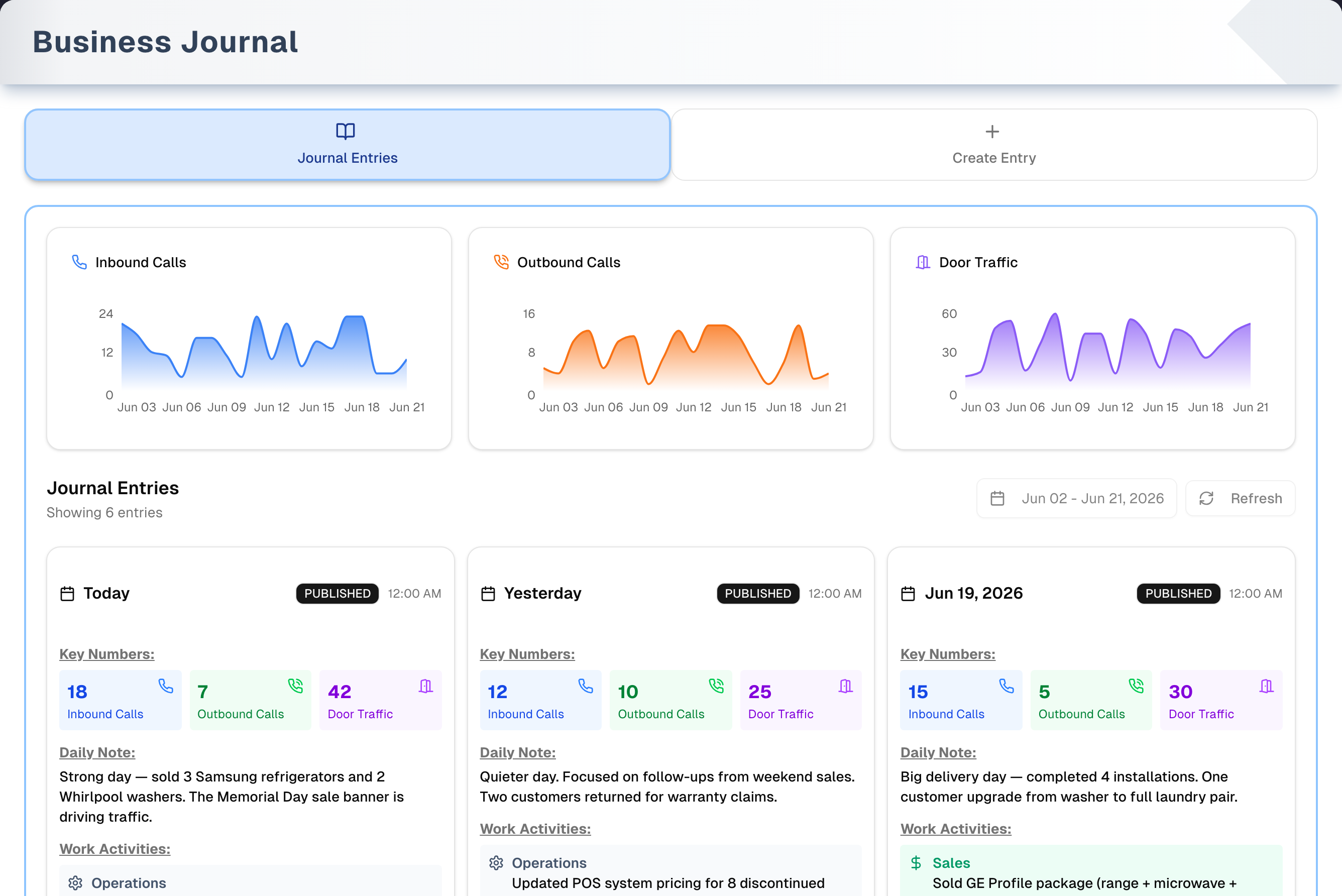
- Three trend charts: Inbound Calls, Outbound Calls and Door Traffic. Each plots daily totals for the whole store (all teammates and locations) over the date range, counting each person's day once. Days with no entry plot as 0.
- Date range (top right of the list): defaults to the last 20 days, ending on the store's today. It is required and can span up to 13 months. A longer pick is cut to 13 months, and an amber line under the button says which end date was used. It drives both the charts and the list.
- Entry cards, 7 per page and newest first. Each card shows the date, a status badge, Key Numbers, the Daily Note and any Work Activities. Click a card to open Edit Journal Entry. There is no separate Edit button.
- Refresh reloads the list and the three charts.
Create Entry
- Step 1 Entry Details: pick the date at the top right. It defaults to the store's today, and any day works. Write the Daily Note (required). Then fill Inbound Calls, Outbound Calls and Door Traffic (optional). If the Walk-ins log has visits that day, a Walk-in log: … — use link fills Door Traffic, and Inbound Calls when there were phone visits.
- Step 2 Work Activities (optional) unlocks once the Daily Note has text. It holds Operations, Marketing, Sales, Service and Management.
- Add Journal Entry saves the entry for the whole team to see and takes you back to Journal Entries. Mood is one optional word for how the day felt, up to 40 characters; it shows as a badge on the card.
Close of day
For whoever closes the store:
- Pick the day (no future days) and, with two or more locations, the location.
- Enter the visits nobody logged live in the grid. It is the same grid as Walk-ins → End of day.
- Confirm Door traffic, Inbound calls and Outbound calls. The first two are prefilled from the walk-in log.
- Save close of day saves the visits first. It then puts the counts, and an optional note, on your own journal entry for that day, creating the entry if you don't have one.
This tab needs at least one active location.
Step by step: log your day
- Open Create Entry.
- Check the date at the top right of Step 1.
- Write the Daily Note.
- Fill Inbound Calls, Outbound Calls and Door Traffic, or click Walk-in log: … — use to copy the walk-in numbers.
- Optionally, fill the Work Activities.
- Click Add Journal Entry.
Step by step: close the day
- Open Close of day, or click Daily Journal close of day on the Walk-ins End of day tab.
- Check the day and location in the toolbar.
- Read the list of visits already logged. Then add one grid row per visitor nobody logged live.
- Check the counts. Click Use … to take the walk-in log's number, or type a clicker count. Add a note if you like.
- Click Save close of day.
Tips & best practices
- Log consistently. Even a short daily note makes the trend charts meaningful.
- If your team uses Walk-ins, finish the day on Close of day, so the visits and the counts are saved together.
- You can use Create Entry and Close of day on the same day in either order, and they land on one entry. Create Entry first: Close of day adds its counts to that entry. Close of day first: Create Entry tells you the day already has your entry and sends you to the Journal Entries tab to edit it.
- Narrow the date range to a single week for a focused review.
Troubleshooting
| Issue | Fix |
|---|---|
| Entries don't appear | They're outside the date range, so widen it. The header says how many entries the range holds, such as "Showing 1–7 of 23 entries" |
| Charts are flat at 0 | No calls or door traffic were recorded in the range. Extend it or add numbers to entries |
| "Error Loading Charts" | Click Retry on the red card. The line under the heading says what went wrong — for example that you need to sign in again |
| Add Journal Entry is greyed out | The Daily Note is empty. If the button reads "Loading organization...", reload the page or sign in again |
| "An entry for this date already exists…" | You already logged that day. Open its card on Journal Entries and edit it |
| The Mood badge is missing on a card | Mood is optional, so an entry nobody gave one has no badge. Open the card and type one in |
| "An unexpected error occurred. Please try again." | Only shown when there is nothing more specific to say — other failures name the cause. On Journal Entries, click Try Again. On Create Entry your typing is kept, so click Add Journal Entry again. If it keeps happening, sign out and back in |
| A red message inside Edit Journal Entry | The save was refused and nothing was saved. Your changes are still in the boxes: deal with what the message says and click Save Changes again, or Cancel to drop them |
| A number box won't accept a decimal | Calls and door traffic are whole numbers. The browser shows its own warning (such as "Please enter a valid value") and nothing saves |
| Close of day says "Walk-in visits are logged per location…" | Add or reactivate a location in Settings |
| Save close of day is greyed out | The counts are still loading or failed to load. Click Retry in the Counts card |
| I can't delete an entry | There is no delete. Edit the entry instead |
| The page shows "403 - Forbidden" | Daily Journal is hidden in that person's menu. See Team & menu visibility |
What's next
- See it on your home page: Get Started → Dashboard
- Log visitors during the day: Sales → Walk-ins
- See what walked out: Reports → Lost Sales Report
- Tie activity to revenue: Reports → Sales Report
- Track service work: Reports → Services Report
Detailed reference
Every button, icon, field and message on this page, for when you need the exact detail. Each panel starts closed — open the one you need.
Page header and toolbar
| Control | Where | What it does | Notes |
|---|---|---|---|
| Title Business Journal and "View journal entries, analyze weekly trends, and create new entries." | Header | Page heading | The sidebar item is Reports → Daily Journal. It's the same page |
| Demo (Play icon, amber) | Header, right | Opens the page with sample entries and starts a guided tour | Everyone who can open the page. Nothing is saved. See the Demo mode panel and Demo mode |
| Tab Journal Entries (book icon, blue) | Tab bar | Shows the trend charts and the entry cards | Opens by default |
| Tab Create Entry (plus icon, green) | Tab bar | Shows the two-step form for a new entry | — |
| Tab Close of day (clipboard-check icon, amber) | Tab bar | Shows the close-of-day screen: missed visits plus the day's counts | Not in the demo |
| Switching tabs | Tab bar | Shows the other tab | The address bar doesn't change. Anything typed on Create Entry, and the counts and note typed on Close of day, are lost when you switch tabs. Close of day grid rows are kept, but Close of day goes back to today and your default location. The date range on Journal Entries is kept, but its list goes back to page 1 |
| Link to this page with Create Entry or Close of day open | Address bar | Adding ?tab=create or ?tab=close to the page address opens that tab | Any other value opens Journal Entries |
| Shared date range | Journal Entries | The same range drives the charts and the list | Resets to the last 20 days, ending on the store's today, when the page is reloaded |
| Sidebar Reports → Daily Journal | Sidebar | Opens this page | Hidden when turned off in that person's menu |
| Dashboard quick action Daily Journal (book icon, orange) | Dashboard | Opens this page | See Dashboard |
| Dashboard level 04 Informed link Daily Journal | Dashboard | Opens this page | — |
| Link Daily Journal close of day | Walk-ins → End of day tab, footer | Opens this page on Close of day | — |
Tab: Journal Entries
Trend charts
| Control | Where | What it does | Notes |
|---|---|---|---|
| Chart Inbound Calls (phone icon, blue) | Top, 1st card | Plots total inbound calls per day across the date range | Adds up every entry that day, from all teammates and locations. Days with no entry plot as 0. Every entry in the range is counted, however long the range and however big the team |
| Chart Outbound Calls (phone icon, orange) | Top, 2nd card | Same, for outbound calls | Same rules |
| Chart Door Traffic (door icon, purple) | Top, 3rd card | Same, for door traffic (walk-in visitors) | Same rules |
| Hover a point | Any chart | Shows that day's number and the chart name. Days read like "Sep 12" | View only. Clicking a chart does nothing |
| "Loading..." / "Loading chart..." (spinner) | Chart area | Placeholders while the chart data loads | Shown on first load, and again whenever the range changes or an entry is saved |
| Error Loading Charts | Chart area | Replaces all three charts and names what went wrong, for example "Unable to determine your organization. Please sign in again." | Has a Retry button that reads the chart data again without reloading the page |
| Automatic chart refresh | — | The charts reload when the range changes, after an edit, after Create Entry saves and after Close of day saves | Refresh reloads them too |
Entries header
| Control | Where | What it does | Notes |
|---|---|---|---|
| Heading Journal Entries and "Showing … entries" | Below the charts, left | How many entries the date range holds, and which of them this page shows | "Showing 5 entries" when they all fit on one page; "Showing 8–14 of 23 entries" when there are more pages. If the total can't be read it says "Showing 7 entries on this page" instead, and the list is unaffected |
| Date range button (calendar icon, e.g. "Aug 30 - Sep 18, 2026") | Header row, right | Opens a two-month calendar. Each click changes the range at once: a day before the start becomes the new start, and a day after the start becomes the new end. The list and charts reload after every click and the list returns to page 1 | Default: the last 20 days, ending on the store's today. The days you pick are whole days, so the same range shows the same entries to everyone, wherever they are. Required: it can't be cleared. Clicking the start day does nothing. There is no Apply button. Future days can be picked. The calendar stays open until you click outside or press Esc |
| Start day only ("Sep 01, 2026 - ...") | Date range button | Clicking the current end day makes it the new start with no end yet. The list then shows everything from that day on, and the charts run to today | Click another day to finish the range: an earlier day becomes the start, a later day the end, and the same day gives a one-day range |
| Range longer than 13 months | Calendar | The end is cut to 13 months after the start | An amber line appears under the date range button and in the calendar: "Date ranges are limited to 13 months, so this one ends …", naming the end date that was used. It clears as soon as a range that fits is picked |
| Calendar month arrows (left / right) | Inside the calendar | Move the two months shown back or forward | — |
| Hint "Required · up to 13 months" | Bottom of the calendar | Explains the rules | Always shown in the calendar |
| "Filter by date" | Date range button | Label when no range is set | Rarely seen, because a range always exists |
| Refresh (circular arrows; spinner while loading) | Header row, far right | Reloads the entries list for the current range and page, and the three charts above it | Greyed out while the list loads; the charts show their own placeholders |
Entry cards and pages
| Control | Where | What it does | Notes |
|---|---|---|---|
| "Loading journal entries..." (spinner) | List area | Shown while the first page loads | Only when no cards are on screen yet |
| No journal entries in this date range — "Pick a wider range to see older entries, or write one on the Create Entry tab." | List area | Shown when the date range has no entries | Entries outside the range are not counted, so widen it to find them. No button; use the Create Entry tab |
| Entry card | List grid: 1 column on a phone, 2 on a tablet, 3 on a computer | Click anywhere on the card to open Edit Journal Entry | Lists everyone's entries, newest date first. The card names the author but not the location. No Edit button or ⋯ menu. Hover adds a thick grey border |
| Card author and date (calendar icon), e.g. "Amy Nguyen · Sep 12, 2026" | Card header, left | Who wrote the entry, and the day it is for | Your own entries read You. Someone who has left the store reads Former team member. If the names can't be read the card shows the date alone — never the wrong name. The day is the same for everyone. "Today" and "Yesterday" are the store's, not your computer's, so a teammate in another time zone reads the same label you do |
| Status badge, e.g. PUBLISHED | Card header, right | The entry's status | Dark = PUBLISHED; grey = anything else. Every entry made on this page is PUBLISHED. An entry set aside as an older same-day duplicate is marked ARCHIVED and is no longer listed here or counted in the charts; its note and numbers were carried onto the entry that was kept — where the duplicate's figure was the higher one, the note on the kept entry also says what the figure was before ("Before a duplicate entry for this day was merged in, this entry recorded: visitors 12."). Nothing is deleted and nothing is lost — contact UpChannels support if you need one back |
| "Added Sep 12, 4:38 PM" | Card header, right of the badge | When the entry was written, in the store's time zone | The day the entry is FOR is the date on the left. This is when someone typed it, so an entry filled in the next morning says so |
| Key Numbers: Inbound Calls (blue), Outbound Calls (green), Door Traffic (purple) | Card body | The numbers on the entry | A tile shows only when that number was recorded. A recorded 0 shows; a blank is hidden. The section is hidden when no numbers were recorded |
| Daily Note: | Card body | The entry's note | Always shown. Can be empty on an entry that Close of day created without a note |
| Work Activities: Operations, Marketing, Sales, Service, Management | Card body | Each work log that has text | Each block shows only when filled. The section is hidden when none are |
| Mood badge | Card body, bottom | The entry's mood word | Only on entries that have one. Set it in Mood on Create Entry, or on the card's edit window |
| "Page …" | Below the cards, left | Current page number | The row is hidden when the page has no entries |
| Previous | Below the cards, right | Goes back one page (7 entries per page) | Greyed out on page 1 and while loading |
| Next | Below the cards, right | Goes forward one page | Greyed out while loading and when there are no more entries |
| Red message and Try Again (circular arrows) | Replaces the whole list area (header, date range, cards and pages) | Tries loading the list again | Only for a list that could not be read. The message names the cause, such as "Unable to determine your organization. Please sign in again." The charts stay. A failed Save Changes doesn't come here: it stays inside the dialog |
Tab: Create Entry
A two-step form. Step 2 stays greyed out until the Daily Note has text.
Fields:
| Field | Required | Default | Rules and error text |
|---|---|---|---|
| Date button (calendar icon, e.g. "September 18th, 2026"; "Pick a date" when cleared) | Yes | The store's today | Top right of Step 1. Opens a one-month calendar. Any day works, including future days. Clicking the selected day again clears it; saving then shows "Please select a date for the entry." The calendar stays open until you click outside or press Esc. The entry is filed under the day you picked, and reads as that day for every teammate |
Daily Note — placeholder Daily Note * — What happened in your business today? Key activities, insights, or observations... | Yes | Empty | Until it has text (spaces don't count), Step 2 stays locked and Add Journal Entry stays greyed out |
| Inbound Calls (number) | No | Empty | Blank = not recorded; 0 is kept as 0. No minimum or maximum is checked. Whole numbers only: the browser stops a decimal with its own warning (such as "Please enter a valid value") and nothing saves |
| Outbound Calls (number) | No | Empty | Same rules |
| Door Traffic (number) | No | Empty | Same rules |
| Operations — placeholder "Operations — daily operations, processes, improvements..." | No | Empty | Step 2 |
| Marketing — placeholder "Marketing — campaigns, content, social media..." | No | Empty | Step 2 |
| Sales — placeholder "Sales — calls, follow-ups, deals closed..." | No | Empty | Step 2 |
| Service — placeholder "Service — customer support, tickets, issues resolved..." | No | Empty | Step 2 |
| Management — placeholder "Management — team meetings, planning, strategy, decisions..." | No | Empty | Step 2, full width |
Controls:
| Control | Where | What it does | Notes |
|---|---|---|---|
| STEP 1 Entry Details (calendar icon) | Card 1 header, left | Step label | — |
| Link Walk-in log: … · … calls — use (amber). Tooltip: "Fill Door Traffic with the walk-in visitors your team logged that day (× party size, all locations) and Inbound Calls with phone visits" | Under Door Traffic | Copies the Walk-ins log's numbers for the chosen day into the boxes: walk-in visitors × party size, all locations, into Door Traffic, and phone visits into Inbound Calls. Nothing is saved until you click Add Journal Entry | Only when the log has at least one walk-in visitor or phone visit that day. The "· … calls" part shows only when phone visits were logged. Disappears when the date is cleared |
| STEP 2 Work Activities "(Optional)" (briefcase icon) | Card 2 header | Step label | A white veil covers the card until the Daily Note has text |
| "Loading organization..." (spinner), then the store name (briefcase icon) | Footer, left | Names the store the entry is saved to | Hover: "The store this entry is saved to". If the name can't be read, nothing shows there; saving still works |
| Add Journal Entry (plus icon); "Creating..." while saving | Footer, right | Saves a new PUBLISHED entry that the whole team can see. Resets the form to today, switches to Journal Entries and refreshes the list and charts | A message at the top right confirms the day it was saved for (see below). Greyed out while the Daily Note is empty, while saving and while the store loads. Reads "Loading organization..." until the store loads, and stays that way if your session has no store. The entry has no location |
| Green message "Journal entry saved for Sep 24, 2026." | Top right of the screen | Confirms the save and names the day the entry is for | Stays on screen after the page switches to Journal Entries, and closes by itself after a few seconds. If that day is outside the list's date range, widen the range to see the card |
| Red banner | Top of the form | Says why the save failed (see Messages) | Stays until the next save attempt |
| One entry per person per day | — | A second entry by the same person for the same date is refused: "An entry for this date already exists. Open it from the Journal Entries tab to edit it." | Each teammate can log the same day. An entry made by Close of day counts, so Add Journal Entry shows that message rather than making a second one. The charts count a person's day once |
| Mood (text) | No | Empty | Optional, up to 40 characters. One word for how the day felt |
Tab: Close of day
For whoever closes the store. Enter the visits nobody logged live, confirm door traffic and calls, and save both at once. The Visits you did not log live card sits on the left and Counts on the right on very wide screens; otherwise they stack.
Loading and setup
| Message | Where | What it means | Notes |
|---|---|---|---|
| "Loading the close of day…" (spinner) | Tab body | Loading the store, your account, time zone, locations and team | First time the tab opens |
| "Could not load the close of day: …" (red), with Try Again under it | Tab body | Loading failed, for example "Organization not found." when your session has no store | Click Try Again. If it keeps failing, sign in again |
| "Unable to determine your organization. Please sign in again." (red) | Tab body | Your signed-in account couldn't be read | Sign out and back in |
| "Walk-in visits are logged per location. Add a location in Settings to use the close of day." | Tab body | Shown instead of the screen | The store has no active location |
Toolbar
| Control | Where | What it does | Notes |
|---|---|---|---|
| Left arrow (label Previous day) | Toolbar, left | Moves back one day | Greyed out while saving |
| Day button (calendar icon, e.g. "Sat, Sep 12", plus "(today)" on today) | Toolbar | Opens a one-month calendar. Picking a day switches to it and closes the calendar | Opens on today in your business time zone (UTC until one is set). Future days are greyed out. Greyed out while saving |
| Right arrow (label Next day) | Toolbar | Moves forward one day | Greyed out while saving and on today: you can't move into the future |
| Location dropdown (map-pin icon, label Location) | Toolbar, right | Switches the location the visits and counts belong to. Lists active locations by name | Only with two or more active locations; otherwise the location name shows as plain text. Defaults to your Default Location (set in Team) if it's active, otherwise the first active location. Greyed out while saving |
Card: Visits you did not log live · … · …
The title shows the day and location. Description: "Each row is one visitor, saved as entered at close. Leave the time blank and it is spread across opening hours."
| Control | Where | What it does | Notes |
|---|---|---|---|
| "… logged live today · … already added at close" (or "yesterday", or "on Sat, Sep 12") | Summary box | Counts the visits already logged for that day and location | "Already added at close" shows only when earlier close-of-day visits exist. Records created from lost quotes are left out |
| "Check this list first so nobody is counted twice." / "Nothing logged yet, so every visit goes in the grid." | Summary box, right | Warns against entering a visit twice | Duplicates are not caught automatically |
| Visit chips, e.g. "2:10 PM · Stackable washer · Left · Out of stock ×2" | Summary box | A read-only list of the day's visits | Phone icon = phone visit. ~ before the time = entered at close. "No item noted" when empty. "×…" when the party was bigger than 1. Outcome text: Sold, Quote, Special order, "Left · reason", Left, Open. Colours: green = Sold; blue = Quote or Special order; amber = Left for a buyable reason; plain = Left for another reason; dashed grey = Open. Hover: "Logged live" or "Entered at close" · phone · "… people" · "source: …" · "handled by …". Chips can't be clicked |
| +… more | End of the chips | Shows every chip | Only with more than 24 visits |
| "Loading what was logged today…" (spinner) | Summary box | Loading | — |
| "Could not load the visits logged today: …" and Retry | Summary box | Retry loads the list again | — |
| Remove row (X icon, label "Remove row …") | Grid, last column | Deletes that row at once, with no confirmation (it wasn't saved yet). Removing the only row leaves a new empty row that keeps its Source, Handled by, Channel and Had it? | Hidden while saving |
| Row error "Row …: …" (red, under the row) | Under a row | Says what to fix | Shown only after a save attempt for this day and location |
| Add row (plus icon and Enter-key icon) | Below the grid | Adds a row and puts the cursor in its Time cell. The new row copies Source, Handled by, Channel and Had it? from the row above | Hidden while saving |
| "Enter moves down and adds a row at the bottom. A new row copies source, handled by, channel and had it? from the row above. Leave time blank and it is spread across opening hours." | Right of Add row | Explains keyboard use | Hidden while saving |
| Enter in Time, Asked for or Party | Grid | Moves to the same column in the next row; from Party it moves to the next row's Time. On the last row it adds a row | Tab moves across cells. Shift+Enter does nothing special |
| Blank rows | Grid | Rows with nothing filled in, such as the empty row at the bottom, are skipped on save | Setting Source, Handled by, Channel or Had it? by hand counts as filling the row in |
| Unsaved rows | Grid | Typed rows are kept for each day and location in this browser tab, through tab switches, day or location changes and reloads | Not shared with other devices or people. Lost when the browser tab closes. Shared with the Walk-ins End of day tab. The counts and note are not kept |
Grid columns (one row per visitor):
| Field | Required | Default | Rules and error text |
|---|---|---|---|
Time (approx) — placeholder ~ auto | No | Blank | Tooltip "Optional. 2:30pm, 14:30 or 3p. Blank rows get times spread across opening hours." Tidied to 24-hour time when you leave the cell ("3p" becomes 15:00, "1530" becomes 15:30). A bare 1 to 6 with no am/pm means afternoon. Blank rows get evenly spread times across that weekday's opening hours (10:00 to 18:00 when hours aren't set or the day is marked closed), never later than now when closing today. Red when unreadable: "Row …: "…" is not a time. Use 14:30 or 2:30pm, or leave it blank." |
| Asked for — placeholder "What they asked for" | No | Empty | Free text |
| Had it? Yes (green) / No (amber) | No | Copied from the row above | Click the lit button again to clear it |
| Outcome Sold (green) / Quote (blue) / Left (rose) | No | None, saved as Open | Click the lit button again to clear it. Choosing Sold or Quote clears the reason |
| Reason if left — "No reason" plus the store's reasons (defaults: Out of stock, Wrong size, Wrong finish / color, Price, Delivery timing, Financing, Just looking, Nobody free to help) | Yes, when Outcome is Left | "—", or red "Pick a reason" when Left has none | Tooltip "Picking a reason marks the visit Left": picking any reason sets Outcome to Left. "No reason" clears the reason. Buyable reasons are amber with a "buyable" tag, and the box turns amber when one is chosen. Error "Row …: Pick why they left." Reasons are managed in Settings → Lost sales; a reason hidden later still shows on rows that use it |
| Source — "Not known" plus the store's sources (defaults: Drove past, Google, Facebook ad, Referral, Repeat customer, Website, Other) | No | "—"; copied from the row above | Managed in Settings → Lost sales |
| Handled by — "You (whoever saves)" plus the team, and "Former team member" when the row points at someone no longer on the team | No | "You"; copied from the row above | Tooltip "Blank = whoever saves the grid" |
| Channel Walk-in / Phone | Always one | Walk-in; copied from the row above | Can't be cleared. Walk-in rows add to Door traffic; Phone rows add to Inbound calls |
| Party | No | 1 | Tooltip "How many people came in together (a couple is one visit, two people)". Digits only, 1 to 99. Cleared, it returns to the last value when you leave the cell. Door traffic counts people, not rows |
Card: Counts
Title Counts. Description: "Saved on your journal entry for Sat, Sep 12." (the day shown).
| Control | Where | What it does | Notes |
|---|---|---|---|
| "Could not load the walk-in counts or your journal entry, so nothing can be saved yet: …" and Retry | Top of the card | Retry reloads the prefill numbers and your entry | While shown, the count boxes and Save close of day are greyed out, so blank boxes can't wipe numbers already saved |
| Door traffic (placeholder "0") | 1st field | Walk-in visitors for the day | Shows, in order: what you typed, else the number already on your journal entry, else the walk-in log's number. The log's number = the saved walk-in visits' party sizes added up, plus the party sizes of the grid's filled Walk-in rows. It follows the grid as you add rows. It counts this location only |
| Caption "prefilled from … visits × party size · edit if you used a clicker" | Under Door traffic | Says the number came from the walk-in log | Only while the box shows the log's number |
| Caption "saved on your journal entry" | Under any count | Says the number is the one already on your entry | Only while the box shows the saved number |
| "walk-in log says …" and link Use … (amber) | Under Door traffic or Inbound calls | Puts the walk-in log's number in the box | Only when the box shows a different number, such as a clicker count. Greyed out while the boxes are locked |
| Inbound calls (placeholder "0"), caption "prefilled from … phone-channel visits" | 2nd field | Inbound calls for the day | Same order as Door traffic. The log's number = saved phone visits plus the grid's filled Phone rows, at this location only |
| Outbound calls (placeholder "0") | 3rd field | Outbound calls for the day | Not prefilled from the walk-in log. Shows your saved number, if any |
| "Use a whole number, 0 or more." (red) | Under a count | The box turns red | Anything that isn't a whole number from 0 to 1,000,000. An empty box is allowed and clears that number on the entry |
| Note for the journal (optional) — placeholder "Anything worth remembering about today?" | Counts card | Adds text to your entry's Daily Note | Goes below the existing note after a blank line; on a new entry it becomes the Daily Note. Cleared after a successful save. Greyed out while saving |
| "The Journal stays the end-of-day record; the dashboard's conversion KPI already divides orders by door traffic." | Counts card | Why door traffic matters | Static text |
| "Fix the marked fields first." (red) | Above the save button | Something in the grid or the counts is invalid | Only after a failed save attempt |
| Save close of day (save icon; spinner while saving) | Bottom of the card, full width | Step 1: saves each filled grid row, one at a time, as a Walk-ins visit marked as entered at close. Step 2: puts the three counts and the note on your journal entry for that day. It uses your entry at this location; otherwise your entry with no location, such as one from Create Entry; otherwise a new PUBLISHED entry for this location. Teammates' entries and archived entries are never changed. On success: a confirmation, the note clears, and the list and charts refresh | Greyed out while saving and while the counts are loading or failed to load. If any grid row fails, the counts are not saved |
| "Adds … visits from the grid and saves these counts." / "Saves these counts." | Under the save button | Says what the save will do | Depends on how many filled rows the grid has |
| Locked boxes | Counts card | The count boxes are greyed out while saving, while loading and after a load error. The day and location can't be changed while saving; a save belongs to the day it started on | — |
Dialog: Edit Journal Entry
Opens when you click an entry card on Journal Entries. Any team member can edit any entry.
Fields:
| Field | Required | Default | Rules and error text |
|---|---|---|---|
DAILY NOTE * | Yes | The entry's note | Empty: the browser shows "Please fill out this field." and nothing saves. An entry that Close of day created without a note needs one before it can be saved |
| INBOUND CALLS | No | The entry's number | A blank box clears the number and its tile leaves the card. 0 is saved as 0. No minimum or maximum is checked. Whole numbers only: the browser stops a decimal with its own warning and nothing saves |
| OUTBOUND CALLS | No | The entry's number | Same rules |
| DOOR TRAFFIC | No | The entry's number | Same rules |
| WORK ACTIVITIES: "Operations — daily operations, processes...", "Marketing — campaigns, content, social...", "Sales — calls, follow-ups, deals...", "Service — support, tickets, issues...", "Management — meetings, planning, strategy, decisions..." | No | The entry's text | Emptying one removes its block from the card |
Buttons:
| Control | Where | What it does | Notes |
|---|---|---|---|
| X (close), Esc, or a click outside | Dialog | Closes without saving | — |
| Cancel | Footer | Closes without saving | Greyed out while saving |
| Save Changes (save icon); "Saving..." while saving | Footer | Saves, reloads the list and charts, and closes the dialog | No pop-up confirmation. Greyed out while saving. If the save fails, nothing is saved and the dialog stays open with your changes still in the boxes: a red message appears above the buttons saying why, and Save Changes can be pressed again. The list, the date range and Refresh stay on screen behind it |
| Not editable | — | The entry's date, status and location can't be changed. There is no Delete | Mood can be changed here |
Messages you may see
| Message | When it appears | What to do |
|---|---|---|
| "Loading..." / "Loading chart..." | Charts loading | Wait |
| "Error Loading Charts" | Chart data couldn't be read. The line under the heading is the reason, such as "Unable to determine your organization. Please sign in again." | Click Retry. If it keeps happening, do what the message says |
| "Loading journal entries..." | First load of the list | Wait |
| "No journal entries in this date range" — "Pick a wider range to see older entries, or write one on the Create Entry tab." | No entries in the date range | Widen the date range, or add an entry on Create Entry |
| A red message with Try Again | Replaces the Journal Entries list when the list failed to load. The message is the reason, and "An unexpected error occurred. Please try again." only when there is nothing to go on | Click Try Again. If it keeps happening, sign out and back in |
| "You do not have permission to perform this action." | Inside Edit Journal Entry after Save Changes, when the store refused the change | Nothing was saved. Reload the page; if your role changed while it was open, sign in again |
| A red banner (no button) | Top of Create Entry when Add Journal Entry failed. It names the cause, such as a lost connection, and reads "An unexpected error occurred. Please try again." only when there is nothing to go on | Your typing is kept. Click Add Journal Entry again; if it keeps failing, reload or sign in again |
| "Please enter a valid value…" (browser bubble; wording depends on the browser) | A decimal typed in a number box on Create Entry or Edit Journal Entry | Use a whole number |
| "Showing … entries", "Showing 8–14 of 23 entries" | Journal Entries header | How many entries the range holds. "… on this page" means the total couldn't be read, so the number is this page's only |
| "Required · up to 13 months" | Date range calendar | A longer range is cut to 13 months |
| "Date ranges are limited to 13 months, so this one ends …" (amber) | Under the date range button, and in the calendar | The range you picked was longer, so the report used the end date named here |
| "Journal entry saved for …" (green, top right) | Create Entry saved | Nothing; the page moves to Journal Entries |
| "An entry for this date already exists. Open it from the Journal Entries tab to edit it." | Add Journal Entry for a day you already logged, including a day Close of day logged for you. It can also appear inside the Close of day pop-up "Counts not saved: …", if that save collides with an entry it then can't find | Open that day's card on Journal Entries and edit it |
| "Please select a date for the entry." | Create Entry saved with the date cleared | Pick a date |
| "Loading organization..." (footer and button) | Create Entry while the store loads. If your session has no store, the button keeps this label and stays greyed out | Reload. If that doesn't help, sign in again |
| "Failed to load organization" (or the underlying error) | Red banner on Create Entry when your session couldn't be read | Reload. If that doesn't help, sign in again |
| "Walk-in log: … · … calls — use" | Create Entry, when walk-ins were logged that day | Click it to copy the numbers in |
| "Please fill out this field." (browser bubble) | Edit dialog saved with an empty Daily Note | Type a note |
| "Loading the close of day…" | Close of day loading | Wait |
| "Could not load the close of day: …" | Close of day failed to load, for example "Organization not found." when your session has no store | Click Try Again under the message. If that doesn't help, sign in again |
| "Unable to determine your organization. Please sign in again." | Close of day couldn't read your signed-in account | Sign out and back in |
| "Walk-in visits are logged per location. Add a location in Settings to use the close of day." | No active location | Add or reactivate a location in Settings |
| "… logged live today · … already added at close" | Close of day summary | Check it before adding rows; duplicates aren't caught |
| "Check this list first so nobody is counted twice." / "Nothing logged yet, so every visit goes in the grid." | Close of day summary | — |
| "Loading what was logged today…" / "Could not load the visits logged today: …" with Retry | Close of day summary | Click Retry |
| "Row …: "…" is not a time. Use 14:30 or 2:30pm, or leave it blank." | After a save with an unreadable time | Fix or clear the time |
| "Row …: Pick why they left." | After a save with Outcome Left and no reason | Pick a reason or change the outcome |
| "Pick a reason" (red) | Outcome is Left with no reason | Pick a reason |
| "Use a whole number, 0 or more." | A count isn't a whole number from 0 to 1,000,000 | Fix or clear it |
| "prefilled from … visits × party size · edit if you used a clicker" / "prefilled from … phone-channel visits" / "saved on your journal entry" / "walk-in log says … Use …" | Count captions | Information only. Use … puts the log's number in |
| "Could not load the walk-in counts or your journal entry, so nothing can be saved yet: …" with Retry | Counts failed to load | Click Retry. Save stays greyed out until the counts load |
| "Fix the marked fields first." and the pop-up "Fix the marked fields, then save again." | Save with row or count errors | Fix the items marked in red |
| Pop-up "Saved … of … visits. … The rest are still in the grid. Counts were not saved." | A grid row failed partway through | Saved rows leave the grid. Fix the problem and save again; saved rows won't be entered twice |
| "Row … was saved, but not everything in it (…)." (inside the pop-up above) | A row's visit saved but a later step failed | That row counts as saved |
| Pop-up "Counts not saved: … The … visits were saved." | The visits saved but the journal entry couldn't be written | Save again; only the counts still need saving |
| Pop-up "Close of day saved for Sat, Sep 12: 3 visits added, door traffic 14, inbound calls 5." | Save succeeded | Nothing. Parts with nothing to report are left out. Outbound calls are saved but not listed |
| "Adds … visits from the grid and saves these counts." / "Saves these counts." | Under Save close of day | — |
| "403 - Forbidden" — "You do not have permission to view this page. Contact your organization owner." | Daily Journal is hidden in that person's menu | The owner can show it again in Team & menu visibility |
Who can use what
| Item | Rule |
|---|---|
| Plans | Every plan (Basic, Pro, Premium and the free trial). No add-on or switch |
| Opening the page | Any signed-in team member whose menu shows Reports → Daily Journal. If it's hidden for them, the page shows "403 - Forbidden". Nothing is blocked while the store has only one active person: people switched off or removed in Team don't count |
| Reading entries | Every team member sees all entries in the store, not just their own |
| Creating and editing | Any team member can create entries and edit anyone's entry. Owners and managers have no extra rights here |
| Deleting | No one: there is no delete on this page |
| One entry per day | Per person, per day, per location. Create Entry entries have no location; Close of day entries carry the location |
| Close of day visits | Any team member can add missed visits |
| Close of day counts | Always go on the signed-in person's own entry, never a teammate's |
| Close of day requires | At least one active location |
| Demo | Anyone who can open the page. Nothing is saved |
Demo mode (/journal/demo)
- Open it: the Demo button (Play icon, amber) at the top right of the Business Journal header.
- Header: "Business Journal — Demo" with "Sample journal entries populated with demo data. All actions are disabled." and Exit Demo Mode (left arrow), which goes back to the live page.
- Banner (eye icon): "Demo mode — journal entries are populated with sample data. All actions are disabled." Its Take a Tour button restarts the tour from step 1.
- Tour: starts by itself the first time the demo opens and switches to each step's tab. Progress dots and "… of 8"; Back (from step 2), Skip (ends the tour), Next, which reads Got it! on the last step. Keys: Esc closes; right arrow or Enter goes forward (on the last step either one closes the tour); left arrow goes back. Clicking the dark backdrop closes the tour. If a step's target never appears, the tour moves on.
- Still works: the Journal Entries and Create Entry tabs, Take a Tour, Exit Demo Mode, the tour controls and the chart hover values.
- Disabled: the date range button (it won't open), Refresh, Previous and Next, the Create Entry date button, every text and number box (read-only) and Add Journal Entry. Entry cards show the hover border but open nothing.
- Sample data: 6 entries chosen by your industry (Appliance, Furniture, Electronics, Liquidation or Apparel retail; HVAC, Plumbing or Appliance services; any other or none gets Electronics retail). The newest is dated today and the rest fall within about the last 10 days. All are PUBLISHED and each has a mood. The charts show 20 days of random numbers that change on every visit. Create Entry is pre-filled with an example note, the three numbers and all five work logs. The footer reads "Demo Organization".
- Leave: Exit Demo Mode.
| # | Tab | Tour step | What it points at |
|---|---|---|---|
| 1 | Journal Entries | Tab Navigation — ""Journal Entries" shows your logged entries with charts, and "Create Entry" adds a new daily record. This tour walks through both. The live page carries a third tab, "Close of day", which counts the till and the walk-ins at the end of a shift — it is not in the demo because it reads and writes real takings." | The tab bar |
| 2 | Journal Entries | Trend Charts — "Visualize your key metrics over time — Inbound Calls, Outbound Calls, and Door Traffic. Charts update automatically based on the selected date range." | The three chart cards |
| 3 | Journal Entries | Entries Header & Date Filter — "See how many entries are displayed, filter by date range — a range is required, and may span up to 13 months — and refresh data from the server." | The heading, count, date range button and Refresh |
| 4 | Journal Entries | Journal Entry Cards — "Each card shows a daily snapshot: key numbers (calls, traffic), your daily note, work activities by category (Operations, Marketing, Sales, Service, Management), and mood. Click any card to edit." | The entry cards |
| 5 | Journal Entries | Pagination — "Navigate through pages of journal entries. Each page shows up to 7 entries sorted by most recent first." | "Page 1" with Previous and Next |
| 6 | Create Entry | Create Entry — Details — "Start a new entry by writing a daily note about what happened in your business, then log key numbers: inbound calls, outbound calls, and door traffic." | The Step 1 card |
| 7 | Create Entry | Work Activities — "Once the daily note is filled, capture work done across Operations, Marketing, Sales, Service, and Management so each entry tells the full story of the day." | The Step 2 card |
| 8 | Create Entry | Save the Entry — "The store the entry is saved to is named on the left. Add Journal Entry saves your daily record to the timeline, and a message names the day it was saved for." | The footer: store name and Add Journal Entry |
Differences from the live page:
- The demo has no Close of day tab, which step 1 of the tour says; the live page has three tabs.
- Every demo entry shows a mood. On the live page a mood is optional, so some entries have none.
- Create Entry has no "Walk-in log … — use" link.
- The demo footer reads "Demo Organization"; the live footer names your store.
- The charts are random numbers, not totals of the sample entries.
- Demo card dates and times follow your computer's clock. On the live page every card date is the day the entry is for, the same for everyone, and "Added …" times are in the store's time zone.
Common questions
How do I set a mood on an entry? Type one word in Mood on Create Entry, or open the card and use the Mood box in the edit window. It is optional and holds up to 40 characters. An entry without one shows no Mood badge until somebody adds one.
Can I delete a journal entry? No. There is no delete on this page. Edit the entry instead: clear numbers or work logs, or rewrite the Daily Note.
What does the time on a card mean? It is when the entry was written, shown in your store's time zone — "Added Sep 12, 4:38 PM". The date beside it is the day the entry is for, which can be an earlier day.
Why do I get "An entry for this date already exists"? Each person can have one entry per day, including the one Close of day makes for them. Open that day's card on Journal Entries and edit it. Teammates can each log their own entry for the same day, and each card names its author, so two cards for one day are easy to tell apart.
What's the difference between Create Entry and Close of day? Create Entry is a free-form daily note with numbers and work logs. Close of day is for the person closing the store. It saves the missed walk-in visits and then puts the door traffic, calls and an optional note on that person's own entry. It updates their entry at that location, or their entry with no location from Create Entry, and makes a new one only if neither exists. Either order works: if Close of day made your entry first, a later Create Entry for the same day says "An entry for this date already exists. Open it from the Journal Entries tab to edit it." rather than making a second one.
Where does the Door traffic number on Close of day come from? From what you typed; else the number already on your journal entry ("saved on your journal entry"); else the walk-in log for that location: the party sizes of the saved walk-in visits plus those of the filled Walk-in rows still in the grid. If you counted with a clicker, type your number. Use … puts the log's number back.
I clicked Refresh but the charts didn't change. Why? Refresh reloads the charts as well as the list, so both are up to date. If the charts show a red card instead, click Retry on it — the line above the button says what went wrong.
Why does the demo leave out Close of day? Close of day saves real walk-in visits and writes the day's counts to a real journal entry, so the demo — which touches nothing — has no place for it. Step 1 of the tour mentions it. Everything else on the demo matches the live page, including the 13-month limit on the date range.