Walk-ins (Lost Sales & Callbacks)
Walk-ins is a log your team keeps, not a sensor. It records every person who walked in or called — including the ones who did not buy — what they asked for, and why they left. Nothing is installed, no camera counts heads, and every number on the page is an estimate from what your team logged.
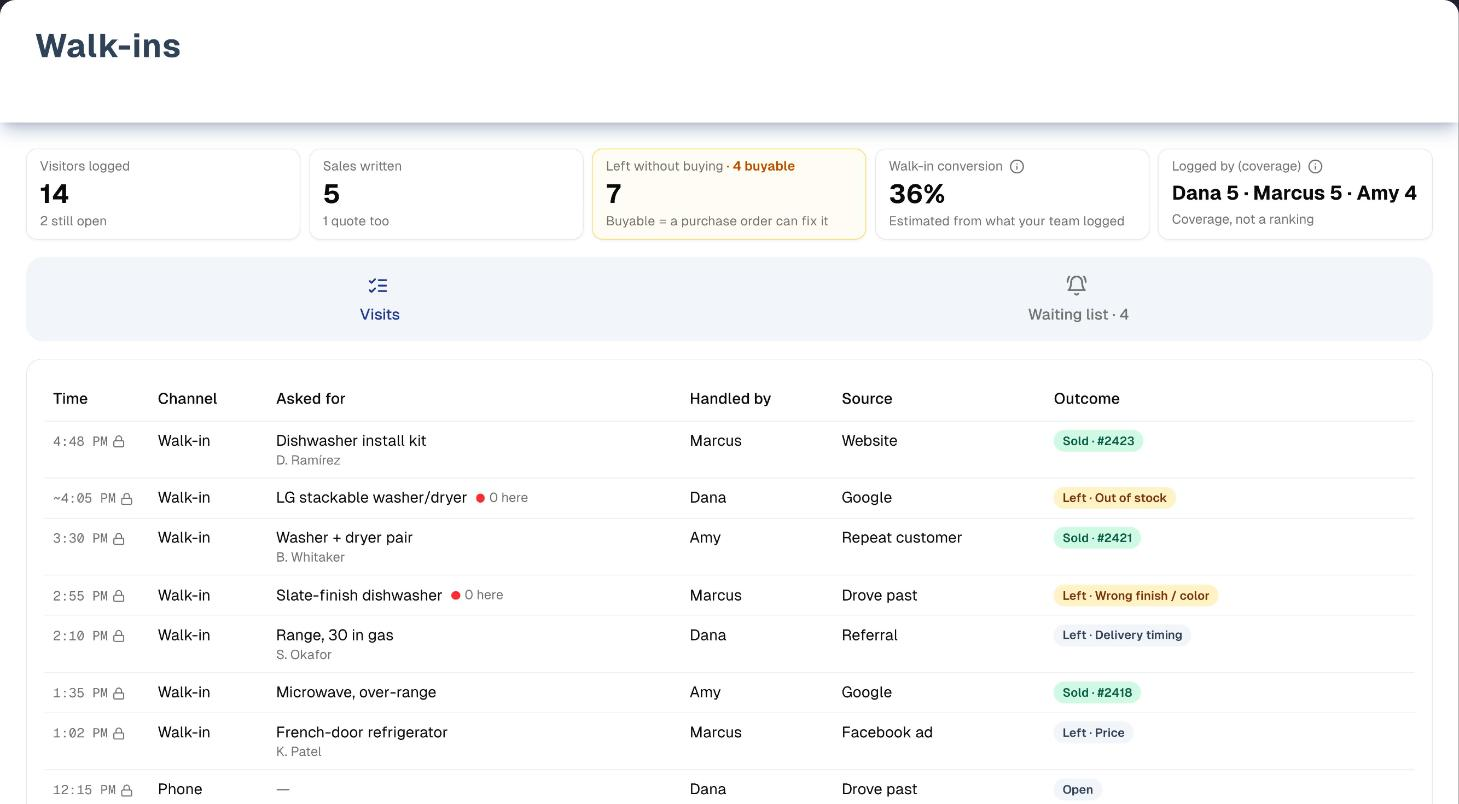
Overview
Open Sales → Walk-ins. The page has three tabs:
- Visits — the day's log, with a strip of numbers above it. Tap + Visitor the moment somebody walks in (or Phone call for a call): one tap creates the row. When they leave, tap Sold, Quote or Left and a reason. Everything else — who they are, what they asked for, where they heard of you — can wait: anyone can edit a visit for 24 hours after it was logged, and a manager or the owner can edit it at any time.
- Waiting list — everyone who asked for something you did not have and left a phone number, grouped by item, with who gets a text and who has to be rung.
- End of day — a grid for stores where nobody is near a screen at 2pm. Type the day's visitors in one go; blank times are spread across your opening hours and the rows are marked as entered at close of day (a
~before the time), so the reports can say so.
The header also has Counter mode — a full-screen, big-button version for a tablet at the counter — and Demo, which opens the page on sample data with a short guided tour.
There is no plan or add-on gate on Walk-ins. The lists your team picks from (reasons, sources) and the texting rules live in Settings → Lost sales. That pane opens for the owner and for the store's only active member, but saving needs the owner.
Step by step: log a visit in three taps
- Somebody walks in. Tap + Visitor (or Phone call for a call). The visit is logged now, at the store picked in the Location filter — with All locations picked, at your primary store.
- They ask for something. Tap Add details on the confirmation (or click the row) and search for the item. Search results show the stock at this store; once you pick an item it also shows stock at up to two other stores that have some, and Did you have it? is set to No when this store has none. Not in the catalog? Use Not in catalog? Describe it.
- They leave. Tap Sold, Quote or Left. Left asks why. The default reasons are Out of stock, Wrong size, Wrong finish / color, Price, Delivery timing, Financing, Just looking and Nobody free to help (your industry profile may set up different ones). The owner can rename, reorder, hide and add reasons in Settings → Lost sales; the first 8 visible reasons show as buttons.
That is the whole job. Sold offers Start order, which opens a new sale linked to the visit; once the order is saved the visit shows its order number.
If the customer wants to hear when the item arrives: open the visit, choose Left and a reason a purchase order can fix (amber, such as Out of stock). A Text them when it arrives? box appears. Add their phone number and, if they said yes to a text, tick Customer asked to be texted when it comes in. Saving puts them on the waiting list for every item not marked Did you have it? Yes. Without the tick they still go on the list, but on the Call list: someone phones them and no text is sent.
Step by step: work the waiting list
- Open Walk-ins → Waiting list. Items are ranked by how many people are waiting. The list follows the Location filter but not the date range: it shows every open ask.
- Each item shows what is on the shelf, the purchase order it is on, and, per person, whether a text will reach them or somebody has to call.
- When stock arrives, the text goes out by itself: receiving a product that had none free (Available at 0, or below 0 when orders are waiting for more than is on hand) sends one automatic SMS campaign, once the receipt leaves some free, to everyone who asked at that store and agreed to a text, inside your send window (09:00 to 20:00 unless the owner changed it). The owner can switch this off, or widen it to every location, in Settings → Lost sales.
- For anything the shelf count cannot see — a free-text ask, stock that arrived some other way, or automatic texts switched off — press It arrived — notify on the item. The texts are queued straight away; there is no confirmation step.
- Work the Call list for the people who never agreed to a text or whose number cannot take one. It says why, so you can fix it next time.
Key features
| Feature | What it does |
|---|---|
| Quick log | One tap logs a visitor; a second and third finish it with an outcome and a reason |
| Counter mode | Full-screen tablet view with big buttons, including a one-tap Just looking |
| End of day | Bulk entry for a whole day, marked as approximate |
| Waiting list | Who asked for what, who gets a text, who needs a call, and which estimate follow-ups are coming |
| Automatic callbacks | Stock arriving when none was free texts everyone who asked and agreed, as an SMS campaign with normal delivery stats. Units that only cover orders already waiting for them text nobody |
| Estimate follow-ups | When a quote is marked lost from its order (Mark lost…, with Follow up by text on), the customer is texted on day 7 and day 30 (set in Settings → Lost sales), and never again. Tapping Quote on a visit does not schedule these |
| Coverage nudge | From 1pm, an open store with nothing logged today gets a quiet reminder here and on the Dashboard. Hide for today hides it in that browser only |
| Demo | The page on sample data with a four-step guided tour |
Tabs, views & filters
| Control | Options |
|---|---|
| Range | Today (shows the date, e.g. "Today · Sat, Sep 12"), Yesterday (the morning huddle view), This week — the last 7 days including today, not the calendar week |
| Location | All locations, or one store. Only shown when you have more than one location; remembered in this browser. It also decides where + Visitor logs and which store End of day closes |
| Staff | All staff, or one person — narrows the list to visits that person handled |
| Outcome | All outcomes, Open, Sold, Quote, Special order, Left |
| Reason | All reasons, or one visible reason from Settings → Lost sales |
| Clear filters | Resets Staff, Outcome and Reason (not Range or Location) |
| Waiting list chips | Waiting, Texted, Fulfilled (last 90 days), Call list, Follow-ups due |
Staff, Outcome and Reason narrow the list only; the numbers above still count every visit in the range and location.
Tips & best practices
- Log the ones who did not buy. A log that only has buyers in it makes conversion look like 100% and tells you nothing.
- Put the tablet where people walk in. Counter mode exists because a log kept three steps away does not get kept.
- Agree on who logs. Every number on this page is an estimate from what was typed in, and the Logged by (coverage) card shows who typed what — that is coverage, not a scoreboard.
- Read yesterday at the morning huddle. Pick Yesterday: visitors, top asks you did not have, and who logged them, in three minutes.
- Tick the text box only when they say yes. The tick records when and by whom; without it the person goes on the call list.
Troubleshooting
| Issue | Fix |
|---|---|
| Conversion looks far too high | Somebody is only logging buyers. Check the Logged by (coverage) card above the tabs, or the Logged column on the Conversion tab of Reports → Lost Sales Report |
| Nobody is getting texts | The visit must be saved as Left with an amber (buyable) reason and a phone number, with Customer asked to be texted when it comes in ticked. The customer must allow SMS, not be a partner account, and have a full phone number. In Settings → Lost sales, Text automatically when stock arrives must be on, stock must arrive at the store where they asked (unless Who gets the text is Any of my locations), the receipt must leave some units free after the orders waiting for that product (a delivery that only fills a backorder texts nobody), and texts wait for the Send between window. Free-text items are never texted automatically — use It arrived — notify. SMS itself is set up in Growth → SMS Campaigns |
| Times on a day look wrong | Entries made at close of day are approximate and marked with a ~. Days and times follow your business time zone in Settings → Organization; until it is set they follow UTC and the page says so |
| The waiting list is empty but people asked | An ask from a visit reaches the waiting list only when the visit is saved as Left with an amber (buyable) reason, the item not marked Yes for Did you have it?, and a phone number. Rows typed in the End of day grid never go on it |
| I can't open or change an older visit | Visits lock for staff 24 hours after they were logged (lock icon). A manager or the owner can still edit them |
| There is no Text them when it arrives? box | It only appears for Left with a buyable (amber) reason. The owner sets a reason's Class to Buyable in Settings → Lost sales |
| A reason is missing from the Left buttons | Only the first 8 visible reasons show as buttons. The owner can move it up or hide others in Settings → Lost sales |
| Walk-ins shows "403 - Forbidden" | Walk-ins is hidden in that person's menu — see Team & menu visibility |
| Settings → Lost sales sends you to the Shortcuts page | Settings opens for the owner and the store's only active member; everybody else lands here. Ask the owner to make the change |
What's next
- Buy what people asked for: Inventory → Procurement
- Read the month: Reports → Lost Sales Report
- Confirm door traffic and calls: Daily Journal
- See how the texts were delivered: SMS Campaigns
- Handle what went wrong: Growth → Complaints
Detailed reference
Every button, icon, field and message on this page, for when you need the exact detail. Each panel starts closed — open the one you need.
Page header and toolbar
| Control | Where | What it does | Notes |
|---|---|---|---|
| Title Walk-ins and the line "Every person who walked in or called — including the ones who did not buy. A log your team keeps, not a sensor." | Header | Page heading | Always shown |
| Demo (Play icon, amber) | Header, first button | Opens the page on sample data with a guided tour | Everyone. See the Demo mode panel below and Demo mode |
| End of day (clock icon) | Header | Switches to the End of day tab | Stays on this page |
| Counter mode (tablet icon) | Header | Opens the full-screen counter view | See the Counter mode panel. Its address ends in ?mode=counter, so a counter tablet can bookmark it |
| Phone call (phone icon) | Header | Logs a phone visit right now, outcome Open. Confirmation "Phone call logged" with the time and store, plus Add details (opens the visit) and Undo (removes it: "Visit removed") | Logs at the store in the Location filter; with All locations, at your primary store, else the first |
| + Visitor (large button: plus icon and Visitor) | Header, right | Logs a walk-in right now: party of 1, outcome Open. Confirmation "Visitor logged" with the time and store, plus Add details and Undo | Same store rule. With no store location: "Add a store location first (Settings → Locations)." |
| Time-zone note "Walk-in days and times follow UTC until your business time zone is set in Organization settings." | Top of the page (amber) | The link opens Settings | Only when no business time zone is set |
| Range chip Today · … (e.g. "Today · Sat, Sep 12") | Filter row | Shows today's visits, by your business time zone | Default. Greyed out while an End of day save is running |
| Range chip Yesterday | Filter row | Shows yesterday and the "Opening huddle" caption; the End of day tab then closes yesterday | Greyed out while an End of day save is running |
| Range chip This week | Filter row | The last 7 days including today (not the calendar week). Times show the weekday, e.g. "Sat 2:10 PM" | Greyed out while an End of day save is running |
| Location select (All locations, or a store) | Filter row | Filters the list, the numbers, the waiting list and the coverage reminder to one store. Also decides where + Visitor and Phone call log and which store End of day closes | Only with more than one location. Remembered in this browser. First visit: your primary store, else the first. Greyed out while an End of day save is running |
| Staff select (All staff, or a team member) | Filter row | Narrows the list to visits that person handled | List only — the numbers do not change |
| Outcome select (All outcomes, Open, Sold, Quote, Special order, Left) | Filter row | Narrows the list to one outcome | List only. Special order finds the visits whose order was taken as a special order; an ordinary order marks the visit Sold, and a quote marks it Quote |
| Reason select (All reasons, plus each visible reason) | Filter row | Narrows the list to Left visits with that reason | Hidden reasons are not offered |
| Clear filters | Filter row, end | Resets Staff, Outcome and Reason to "All" | Only shown while one of them is on. Does not reset Range or Location |
| Caption "Opening huddle: yesterday's visitors, what they asked for that you didn't have, and who logged them." | Under the filter row | Explains the Yesterday view | Only when Range is Yesterday |
| Amber line "Asked for and didn't have today: … ×3 · …" | Under the numbers | The top 3 items people asked for that the store did not have, most asked first | Only when there is at least one. The wording follows the view: today, yesterday, in the last 7 days, or "in these visits" when a Staff, Outcome or Reason filter is on |
| Tab Visits (blue) | Tab bar | The visit log. Opens by default | Greyed out while an End of day save is running |
| Tab Waiting list (purple), later Waiting list · 4 | Tab bar | Everyone waiting for an item | The count (asks still waiting) appears once you have opened the tab. Greyed out while an End of day save is running. A link to the page ending ?tab=waiting opens on this tab |
| Tab End of day (amber) | Tab bar | The close-of-day grid | Stays usable during its own save. A link ending ?tab=end-of-day opens on this tab |
| Automatic refresh | Whole page | The list, the numbers and the reminder reload every 60 seconds and when you come back to the browser tab, so visits logged on another device appear | Nothing to click |
Numbers strip and coverage reminder
| Control | Where | What it does | Notes |
|---|---|---|---|
| Card Visitors logged | Strip, first card | Visits logged in the range: walk-ins, phone and online, live and close-of-day entries. Caption "… still open", or "Logged by your team, not measured" when none are open | Follows Range and Location only, never Staff, Outcome or Reason. Shows "—" while loading or if the numbers failed. Lost-sale records created from an order (a quote marked lost, or an out-of-stock line) are not counted as visitors |
| Card Sales written | Strip, second card | Visits that ended Sold. Caption "1 quote too" or "… quotes too" | Caption only when there are quotes |
| Card Left without buying · "… buyable" | Strip, third card | Visits that ended Left. Buyable = Left with a reason whose Class is Buyable. Caption "Buyable = a purchase order can fix it" | The "· … buyable" part, the caption and the amber colour appear only when at least one visit is buyable. Which reasons are buyable is set in Settings → Lost sales |
| Card Walk-in conversion with info icon (label "How walk-in conversion is estimated") | Strip, fourth card | Sales written divided by visitors logged, as a percentage. Tooltip "Estimated from what your team logged. UpChannels does not count foot traffic — no camera, no door sensor." Caption "Estimated from what your team logged" | "—" when there are no visitors. Phone and online visits count as visitors too |
| Card Logged by (coverage) with info icon (label "About coverage") | Strip, fifth card | How many visits each person typed in, most first, e.g. "Marcus 8 · Dana 6 · +2 more". Hover the value for the full list. Caption "Coverage, not a ranking". Tooltip "Visits logged per person, most first. This is coverage, not a ranking: someone who logs every visitor shows a lower conversion than someone who logs only buyers, so the number to grow is this one." | Counts who logged the visit, not who handled it. Unknown people show as "Unassigned" |
| "Could not load these numbers: …" | Under the strip (red) | Says the numbers could not be read; the cards show "—" | Reload the page |
| Coverage reminder "No visits logged at … since opening (10:00 AM). Someone near a screen?" — or "No visits logged at … yet today. Someone near a screen?" when the store has no opening hours on file | Below the numbers, one per store | A gentle reminder that nobody has logged a visit today. There is no push notification | From 1:00 PM business time, only while the store is open by today's hours, never on a day marked closed, and only when that store has no visits today. With All locations, only stores with opening hours on file for today are included. Checked again every minute |
| Log now (plus icon) | Inside the reminder | Logs a walk-in at that store, with the same confirmation, Add details and Undo as + Visitor | — |
| X (tooltip Hide for today) | Reminder, right end | Hides that store's reminder for the rest of the day | In this browser only — other devices and browsers still show it |
| The same reminder on the Dashboard | Dashboard | Log now logs a walk-in; confirmation "Visitor logged" with Open walk-ins and Undo. X hides it for today | Only once your business has logged at least one visit (live or at close of day), and then for every store with opening hours on file for today. Never on the demo dashboard |
Tab: Visits
Columns: Time, Channel (tablet and wider), Asked for (on phones it also shows the outcome), Handled by and Source (desktop), Outcome (tablet and wider), and an actions column. Newest first; up to 500 visits per range.
| Control | Where | What it does | Notes |
|---|---|---|---|
| Row click, or Enter / Space on a focused row | Any row | Opens Edit visit for that visit | Only rows you can still edit: anyone within 24 hours of when the visit was logged, managers and the owner always. Older rows are not clickable for staff. Clicking a chip or the menu inside the row does not open it |
| Time, e.g. "2:10 PM" | Time column | The visit time in your business time zone | ~2:10 PM (tooltip "Entered at close of day — the time is approximate") means the row came from End of day. With This week the weekday is added |
| Lock icon (tooltip "Older than 24 hours: read-only. A manager can still edit it.") | Time column | Marks a visit you can no longer change | Staff only; never shown to managers or the owner |
| Channel: "Walk-in", "Phone" or "Online", plus "· 3" for a party of 3 | Channel column | How they reached you, and the party size | Hidden on phones |
| Asked for: the first item, plus "+2" when two more were asked for; red dot with "0 here" or "didn't have it"; the customer's name underneath | Asked for column | What they asked for | "0 here" = stock at this store was 0 when it was logged. "didn't have it" = an item was marked No without a zero stock reading, such as a described item. "—" when nothing was noted |
| Handled by: first name, "Former teammate" or "—" | Handled by column | Who helped them | Desktop width only |
| Source, e.g. "Google", or "—" | Source column | Where the visitor came from | Desktop width only |
| Sold chip | Outcome column | Marks the visit Sold at once. Confirmation "Marked sold" with Start order, which opens a new sale (Sell tab) linked to this visit | Only on Open visits you can still edit. The chips grey out while saving |
| Quote chip | Outcome column | Marks the visit as a quote. Confirmation "Marked as a quote" | Same conditions. Does not schedule estimate follow-up texts |
| Left chip (down arrow) | Outcome column | Opens a small "Why did they leave?" list. Nothing is saved until a reason is tapped | Same conditions |
| Reason buttons in "Why did they leave?" | Left list | Marks the visit Left with that reason. Confirmation "Left · …"; for a buyable reason it adds "Add what they asked for, and a callback if they want a text when it arrives." with Add item (opens the visit) | The first 8 visible reasons, in Settings order. Amber = buyable (tooltip "A purchase order can fix this one"); footer "Amber = a reason a purchase order can fix." With none visible: "No reasons are set up. An owner can add them in Settings → Lost sales." |
| Outcome pill: "Sold · #2410 · Inv 5531", "Sold · #2410" or "Sold" (green); "Quote" (blue); "Special order · #2410 · Inv 5531", "Special order · #2410" or "Special order" (blue); "Left · …" (amber when buyable, grey otherwise); "Open" (grey) | Outcome column | How the visit ended. Sold and Special order both show the linked order number, and your invoice number when the order has one, so you can read the row straight through to the order. Special order appears when the order started from the visit was taken as a special order, and counts as a sale in the reports | Replaces the chips once a visit is finished, locked, or in a read-only view |
| Callback pill (blue) | Next to the outcome | A callback was recorded for an item on this visit: it went on the waiting list or the call list | Stays after the text has gone out or the item was bought |
| ⋯ button (label Visit actions) | Last column | Opens the row menu | Only on visits you can still edit |
| Edit details (pencil) | Row menu | Opens the visit | — |
| Delete (trash, red) | Row menu | Opens "Delete this visit?" | — |
| Note "Filters narrow this list only. The numbers above count every visit in the range and location." | Above the table | Explains why the numbers do not change | Only while a Staff, Outcome or Reason filter is on |
| Note "Open visits keep Sold / Quote / Left for 24 hours so they can be finished later. Amber = a reason a purchase order can fix." | Under the table | Explains the chips | When the list has rows |
| Empty list: "No visitors logged today." (or yesterday / in the last 7 days) with "Tap + Visitor the moment someone walks in — one tap creates the row. When they leave, tap Sold, Quote or Left and a reason. What they asked for, who they are and where they heard of you can wait: every visit stays editable for 24 hours." and a Visitor button | Table area | The button logs a walk-in, like + Visitor | — |
| "No visits match these filters." | Table area | Nothing matches the filters | Use Clear filters |
| "Loading visits…" / "Could not load visits: …" with Try again | Table area | Try again reloads the list | — |
Tab: Waiting list
Every open ask for the store in the Location filter (all stores with All locations). The date range and the Staff, Outcome and Reason filters do not apply. Items are grouped (a catalog product, or matching free text) with the most people waiting first.
| Control | Where | What it does | Notes |
|---|---|---|---|
| Waiting … chip | Chip row | People still waiting, grouped by item. Hint "Everyone who asked for something you did not have and is still waiting." | Default. The chip counts asks, so someone waiting for two items adds 2 here; the summary under the chips counts people. Items from a declined estimate with a follow-up text scheduled are listed here too |
| Texted … chip | Chip row | Asks already texted. Hint "Already texted. The message went out as an automatic SMS campaign, so its delivery shows in SMS campaigns." | — |
| Fulfilled … chip | Chip row | Asks that turned into an order. Hint "Asks that turned into an order, from the last 90 days." | Last 90 days only |
| Call list … chip | Chip row | People who have a phone number but cannot or should not be texted, oldest ask first. Hint "These people never agreed to a text, or their number cannot take one. Somebody has to ring them." | — |
| Follow-ups due … chip | Chip row | Declined estimates whose follow-up text is due now. The panel behind it also lists the ones scheduled for later, so its hint opens with both figures — for example "2 due now · 3 scheduled later." — before "Estimates that were declined. A text goes out on the days set in Settings › Lost sales, and never again after the last one." | The number counts only what is due, so a store with nothing to chase today reads 0 even with follow-ups booked for next week. With no follow-ups scheduled at all the hint is the plain sentence. These come from Mark lost… on a quote, not from the visit Quote chip |
| Summary "… people are waiting — … will get a text, … need a call, … have no phone on file. Receiving stock texts them by itself; the button is for anything the shelf count cannot see." | Under the chips | — | Waiting chip, when anyone is waiting. People are counted once each, however many items they wait for (a visit with no customer counts as one person). When someone waits for more than one item it reads "… people are waiting, for … items — … of those asks will get a text, … need a call…", and the text and call counts are per ask. The "no phone on file" part only when there are any. The verbs follow the numbers: "1 needs a call", "2 need a call", "1 has no phone on file" |
| Item header (click to fold or unfold) | Item card | Shows or hides the people table | Open by default. Waiting, Texted and Fulfilled chips |
| Item name, SKU and badges "… waiting", "… to call" (amber), "… texted", "… bought" | Item header | Counts for the item | The badges shown depend on the chip |
| Availability "… available at …" / "… available" / "Not in the catalog", then "PO #P-233 due Fri, Sep 18" | Item header | What is on the shelf, and the purchase order the item is on | "at …" only when one store is picked; otherwise the total across stores |
| It arrived — notify … (bell icon) | Item card, right | Queues one automatic SMS campaign to everyone waiting for this item who can be texted; they move to Texted. No confirmation step. Confirmation "1 text is queued for …." or "… texts are queued for …." with "It sends as an automatic SMS campaign, inside your send window." If nobody could be texted: "Nobody could be texted for that item. Check the call list." | Waiting chip only. Greyed when nobody waiting agreed to a text (tooltip "Nobody waiting for this agreed to a text — use the call list") or while sending. Works even when automatic texting is off, and for free-text items. Any team member can press it |
| People table: Customer (or "No customer"), Phone (tap to call, or "—"), Asked on (e.g. "Sat, Sep 12"; wider screens), Status | Item card | Who is waiting | — |
| Status: "Bought it" (green), "Texted", "Will be texted", or an amber phone icon with the reason a text is not possible | Status column | Whether a text will reach them | "Will be texted" needs the consent tick, a customer who allows SMS, not a partner account, and a full phone number |
| Reasons a text is not possible: "No customer on the visit", "Partner account", "Not opted in to texts", "Never asked for a text", "Phone number is not textable", "No phone number" | Status column, and Why not a text on the Call list | Tells staff why, so they can fix it next time | The Call list only holds people with a phone number who are not on a partner account, so there you see "Not opted in to texts", "Never asked for a text" or "Phone number is not textable" |
| Visit | End of each row, in every table | Opens that visit | Read-only for staff when it was logged more than 24 hours ago |
| "Sent as an “Automatic · Back in stock” campaign — delivery shows in Growth › SMS campaigns." | Item card | Where to see delivery | Texted chip, when a campaign exists |
| Call list table: Customer, Phone (tap to call), Asked for, Asked on, Why not a text, Visit | Call list chip | People to ring | People with no phone, no customer, or a partner account are not on it (they count as "have no phone on file") |
| Follow-ups table: Customer, Asked for, Next text (date, with a Due badge when due or overdue), How ("Text", or amber "Call them"), Visit | Follow-ups due chip | Every scheduled estimate follow-up: the ones due now first, then the ones booked for later, soonest first within each | Texts go out automatically in the 9 AM hour of your business time zone. "Call them" when the customer cannot be texted |
| Empty: "Nobody is waiting for anything. When a visit records an item you did not have and the customer says "text me", they show up here." / "Nothing has been texted yet." / "No waiting customer has bought their item in the last 90 days." / "Nobody needs a phone call — everyone waiting agreed to a text." / "No declined estimates are waiting for a follow-up." | Tab body | One per chip | — |
| "Loading the waiting list…" / "Could not load the waiting list: …" with Try again | Tab body | Try again reloads | — |
Tab: End of day
Closes one store for one day: today, or yesterday when Range is Yesterday; the store in the Location filter, or your primary store with All locations.
| Control | Where | What it does | Notes |
|---|---|---|---|
| "Closing …. Pick a location above to close another one." | Top of the tab | Says which store is being closed | Only with All locations |
| "There is no store location to close yet. Add one in Settings → Locations." / "Loading…" | Tab | — | No store yet, or still loading |
| Heading "Visits you did not log live · Sat, Sep 12 · …" and "For days when nobody was near a screen. Each row is one visitor, saved as entered at close; leave the time blank and it is spread across opening hours." | Top of the tab | — | — |
| Summary "… logged live today · … already added at close" with "Check this list first so nobody is counted twice.", or "Nothing logged yet, so every visit goes in the grid." | Above the grid | Shows what is already logged. There is no automatic duplicate check | Lost-sale records created from an order (a quote marked lost, an out-of-stock line) are left out |
| Visit chips, e.g. phone icon "2:10 PM · Stackable washer · Left · Out of stock ×2" | Summary | A read-only list of the day's visits. Hover for details ("Logged live · phone · 2 people · source: Google · handled by Marcus") | Colour = outcome. ~ = entered at close; "No item noted" when empty; "×2" = a party of 2 |
| +… more | Summary | Shows every chip | Only with more than 24 visits |
| "Loading what was logged today…" / "Could not load the visits logged today: …" with Retry | Summary | Retry reloads | — |
| Footer link Daily Journal close of day ("Door traffic and calls are confirmed in the Daily Journal close of day.") | Footer, left | Opens Daily Journal → Close of day | — |
| "Fix the marked rows first." | Footer | — | After a save with errors |
| Save … visits / Save 1 visit | Footer, right | Saves each filled row as a visit marked entered at close of day, one row at a time. Confirmation "Saved … visits for Sat, Sep 12." | Greyed with no filled rows or while saving. While it saves, the range chips, Location, and the Visits and Waiting list tabs are locked. Rows never create customers or callbacks, so they never reach the waiting list. Empty rows are ignored |
| Unsaved rows | Grid | Typed rows are kept for that day and store if you switch tabs or reload, in the same browser tab. Saved rows leave the grid | Not shared with other devices |
Grid columns:
| Field | Required | Default | Rules and error text |
|---|---|---|---|
Time (approx) — placeholder ~ auto | No | Blank | Tooltip "Optional. 2:30pm, 14:30 or 3p. Blank rows get times spread across opening hours." Accepts 2:30pm, 14:30, 3p, 1530, 11:30am; a bare 1 to 6 means afternoon. Tidied when you leave the cell. Blank times are spread across that day's opening hours (10:00 to 18:00 if none are set or the store is marked closed that day), never later than now when closing today. Red when unreadable: "Row …: "…" is not a time. Use 14:30 or 2:30pm, or leave it blank." |
| Asked for — placeholder "What they asked for" | No | — | Free text; no product search here |
| Had it? Yes / No | No | Copied from the row above | Tap again to clear |
| Outcome Sold / Quote / Left | No | None (Open) | Tap the chosen one again to clear it. Switching away from Left clears the reason |
| Reason if left — "No reason" plus visible reasons (buyable ones marked "buyable") | Yes, for Left | "—", or "Pick a reason" when Left has none | Tooltip "Picking a reason marks the visit Left". Amber for buyable reasons. Error "Row …: Pick why they left." |
| Source — "Not known" plus visible sources | No | Copied from the row above | — |
| Handled by — "You (whoever saves)" plus the team | No | "You"; copied from the row above | Tooltip "Blank = whoever saves the grid". "Former team member" when the person picked has left the team |
| Channel Walk-in / Phone | No | Copied from the row above | No Online option here |
| Party | No | 1 | Tooltip "How many people came in together (a couple is one visit, two people)". Digits only, 1 to 99 |
| X (label "Remove row …") | — | — | Removes the row (the last row is replaced by an empty one). Hidden while saving |
| Add row (plus and Enter icons) | — | — | Hint "Enter moves down and adds a row at the bottom. A new row copies source, handled by, channel and had it? from the row above. Leave time blank and it is spread across opening hours." Hidden while saving |
| Keyboard | — | — | Enter in Time, Asked for or Party moves down the column; on the last row it adds a row (from Party it lands on the next row's Time). Tab walks the cells |
Dialog: Log a visit / Edit visit
Opened from a row, ⋯ → Edit details, Add details or Add item on a confirmation, a Visit button on the waiting list, counter mode, and the Visits & wants tab on a customer's record (Log visit there opens Log a visit with the customer attached). The title is Log a visit for a new visit, Edit visit when you can change it, and Visit when it is read-only. Nothing is required except a store location, and a reason when the outcome is Left.
Fields:
| Field | Required | Default | Rules and error text |
|---|---|---|---|
| Header line, e.g. "10:42 AM · Conroe showroom · Marcus" | — | — | Time, store and who handled it. A saved visit adds the weekday ("Sat 10:42 AM"); a close-of-day entry also starts with ~. "Loading…" in the header and "Loading visit…" in the body while it loads |
| Channel Walk-in / Phone / Online | No | The visit's channel (Walk-in for a new visit) | Choosing Phone or Online sets the party back to 1 and hides the party counter |
| Party of … with minus (label "One fewer in the party") and plus (label "One more in the party") | No | 1 | 1 to 99. Walk-ins only. Minus is greyed at 1, plus at 99 |
| Product search — "Search products (name, SKU, model)"; "+ another item" after the first | No | — | Searches name, SKU, barcode, model, serial number and description, partial and case-insensitive. Needs 3 characters: "Type at least 3 characters to search...", "Start typing to search products...", "Searching...", "No products found." Results show stock at this store ("… available", "Out of Stock", "Out of stock at …", or "None free to sell at … — … promised to open orders" when the units here are all claimed by open orders). Picking an item twice: "… is already on this visit." Greyed out with no store location; not shown on a read-only visit |
| Not in catalog? Describe it → text box (placeholder "e.g. 24-inch stackable washer, white") and Add | No | — | Enter also adds. Add is greyed while the box is empty. The same text twice is not added. Added with Did you have it? = No. Not shown on a read-only visit |
| Item card: name and a stock badge, e.g. "0 at Conroe · 2 at Katy · +1 more" (tooltip "Available right now, from stock levels"), "Checking stock…", or "Not in catalog" | — | — | This store first, then up to two other stores that have some. Green dot = in stock here, red = none here |
| Item status: "On the waiting list", "Texted" or "Fulfilled" | — | — | Only on saved asks with that status |
| X (label "Remove …") | — | — | Removes the item. Not offered once the item was texted or fulfilled |
| Did you have it? Yes / No (reads No (0 available) when stock was 0) | No | Yes when this store has the item in stock (or its stock is not tracked); No when it has none, and for a described item | Items not marked Yes are the ones a callback covers and the ones counted as asked for and not had |
| "Nothing recorded." | — | — | A read-only visit with no items |
| How did it end? Still here / Sold → start order / Quote / Left | No | Still here (Open) | Sold → start order reads just Sold once the visit is sold or has an order. You cannot choose Special order to close a visit: it appears as a fifth chip, already selected, only on a visit whose order was taken as a special order, and it stays available on that visit if you pick another outcome and want to go back |
| Open a new order for them when I save | No | Ticked when you choose Sold | Only for Sold with no linked order. When ticked the save button reads Save & start order |
| "Order #2410 · Inv 5531 is linked to this visit." / "An order is linked to this visit." | — | — | Shown under Sold when an order is linked |
| Why did they leave? reason buttons | Yes, for Left | — | The first 8 visible reasons (a hidden or older reason already on the visit is added so it still shows). Amber = buyable, tooltip "A purchase order can fix this one"; hint "Amber = a reason a purchase order can fix." Picking a buyable reason shows the Text them when it arrives? box. Error "Pick why they left." With none visible: "No reasons are set up. An owner can add them in Settings → Lost sales." |
| Customer (optional) — "Attach an existing customer"; search "Search by name, phone, or email..." | No | — | "Type at least 2 characters to search...", "Searching your organization...", "No customers found in your organization." Attaching fills the callback phone and name and the Where from field. Customers you have archived are still offered, because a visit can be from a past customer; suppliers and Partners Network contacts are not. Errors "That customer could not be loaded." / "Could not load the customer: …" |
| X (label "Remove the customer from this visit") | — | — | Detaches the customer and clears the callback number and name |
| Where from | No | "Not asked". Attaching a customer fills in their customer source while this is still empty | Visible sources from Settings → Lost sales; a hidden one already on the visit still shows |
| Handled by | No | You, on a new visit | Team members. "Not set" when empty; "Former team member" for someone who has left |
| + Add a note → Notes (placeholder "Anything worth remembering about this visit") | No | — | The link is hidden on a read-only visit with no note |
Notes and buttons:
| Control | Where | What it does | Notes |
|---|---|---|---|
| "Logged more than 24 hours ago, so only a manager can change it now." | Top of the dialog | Explains why every field is greyed out | Staff opening an older visit, for example from the waiting list |
| Section label "What did they come in for?" (walk-in) / "What did they ask for?" (phone or online) | Items section | Heading only | — |
| Error box: "The visit was saved, but not everything with it (…). Save again to finish." / "Could not save the visit: …" / "There is no location to log this visit at. Add a location in Settings first." | Bottom of the dialog | Save problems | Saving again updates the same visit — no duplicate |
| Cancel (Close when read-only) | Footer | Closes without saving | Greyed while saving; the dialog cannot be closed mid-save |
| X (close) | Top right | Closes without saving, like Cancel | Does nothing while a save is running |
| Save visit / Save & start order | Footer | Saves. Confirmation "Visit logged" or "Visit updated", plus " · added to the callback list for …" (they will be texted) or " · on the call list for …" (someone must phone). Save & start order then opens a new sale linked to the visit; saving that order links it back ("Sold · #…") and marks their matching waiting-list asks as bought | Hidden when read-only. A problem shows as a message naming the first issue |
| "Could not open this visit." with "This visit was not found. It may have been deleted." and Close | Dialog | The visit could not be loaded | Usually a deleted visit |
Dialog: Log a visit / Edit visit — Text them when it arrives? box
An amber dashed box in the visit dialog. It appears only when the outcome is Left and the reason's Class is Buyable. Without it no callback can be recorded.
| Control | Where | What it does | Notes |
|---|---|---|---|
| Heading Text them when it arrives? | Top of the box | Captures a callback for the items they did not get | — |
| Phone field | Box, left | The number to text or call. Tidied to "(936) 555-0142" when you leave the field. A number no customer has creates a new customer on save; an existing customer's number attaches them | "Enter a 10-digit phone number, or leave the phone blank." for a partial number |
| Name (optional) | Box, right | Name for a new customer | Locked when the callback goes to the attached customer |
| Link "Use …'s number, (936) 555-0142" | Under the phone | Fills the attached customer's number in one tap | Only when the phone field is empty and that customer has a full number |
| Hint "…'s number on file, …, isn't a full phone number. Type it in to call or text them." | Under the phone | — | The attached customer's stored number is incomplete |
| Recipient line: "On …'s customer record." / "Looking up this number…" / "Existing customer: …." / "New customer — added to Customers when you save." | Under the phone | Says whose record the callback and the visit will be saved on | The lookup runs a moment after you stop typing. Amber "This number isn't on …'s record, so the visit goes to … instead." when the number belongs to someone else (or to a new customer) |
| Customer asked to be texted when it comes in | Checkbox | Records consent — the time and the staff member — for each item. Ticked with a textable number: they get an automatic text when stock lands. Unticked: they go on the call list, and no text is sent | "Add their phone number, or untick the text box." when ticked with no number |
| Consent notes: "Not ticked: they go on the call list and someone phones them. No text is sent." / "Unticked: saving withdraws the consent on record. They go on the call list and someone phones them; no text is sent." / "Consent is already on record for this visit. It does not cover …, added since: untick and tick again once they say yes to that too, or they go on the call list for it." | Under the checkbox | Explains what the tick means right now | Depends on what is already saved and whether a number is typed |
| Warning "Texts are off for …" (bell with a slash) with Turn texts back on — they asked to be texted | Rose box | Turns texts back on for that customer on save | Only for a customer whose texts are off. Greyed until the consent box is ticked ("Tick "Customer asked to be texted" first. Until then they go on the call list."). Otherwise: "Leave it unticked and they go on the call list: someone phones them, no text." |
| Hints "Add what they asked for above: the callback is kept per item." / "Every item is marked "had it". Mark the one they didn't get as No to put them on its waiting list." | Box | Explains why nobody would be on the waiting list | When a number is typed and there are no items, or every item is marked Yes |
| Footer "The text only says the item is in, with no promotion in it. We record when the box was ticked and by whom; replying STOP opts them out." | Bottom of the box | — | Always shown |
Dialog: Delete this visit?
Opened from ⋯ → Delete on a row. Text: "It comes off the log, the counts and the conversion estimate. Use this for a visit logged by mistake — a visitor who left without buying should stay, marked Left with a reason."
| Control | Where | What it does | Notes |
|---|---|---|---|
| Keep it | Footer | Closes without deleting | Greyed while deleting |
| Delete visit (red) | Footer | Removes the visit from the log and the numbers. Confirmation "Visit deleted"; on failure "Could not remove the visit: …" | Greyed while deleting |
Sub-page: Counter mode
Opened with Counter mode in the header. A full-screen view that covers the sidebar, with big touch targets, for a tablet by the door.
| Control | Where | What it does | Notes |
|---|---|---|---|
| Title "Counter · …" and "Sat, Sep 12 · logged in as … · … visitors today" | Header | Which store and how many visitors today | Re-read every minute and when the tablet wakes |
| Location select (label "Counter location") | Header | Switches the counter to another store. Remembered in this browser, shared with the main page | Only with more than one store. No All locations option |
| Exit counter mode | Header | Back to the Walk-ins page | — |
| + Visitor (huge button) | Main | Logs a walk-in. Confirmation "Visitor logged" with the time, Add details and Undo | Greyed with no store |
| Phone call | Main | Logs a phone visit. Confirmation "Phone call logged" | Same |
| Card "Last visitor · 2:10 PM · still open", with a button showing what they asked for, or "What did they ask for?" | Main | The newest Open visit logged live today at this store. The button opens the visit | Never picks a close-of-day row or yesterday's visitor |
| Sold / Quote / Left | Last visitor card | Finish that visitor, with the same confirmations as the list. Left opens the reason buttons in place; tapping a reason saves | — |
| Just looking (labelled with your first visible Browsing reason) | Last visitor card, or the empty card | One tap: finishes the open visitor as Left with that reason or, when nobody is open, logs a new visitor who already left for that reason (confirmation "Visitor logged · Just looking" with Undo) | Hidden when no visible reason has the Browsing class. Greyed until the counter has loaded |
| Empty card "No one waiting to be finished" — "Tap + Visitor when someone walks in, then finish them here when they leave. Someone browsed and left? One tap logs them:" | Main | — | No open live visitor today. The last sentence and the Just looking button only appear when a visible reason has the Browsing class |
| "Loading the visits here…" / "Could not load the visits here: … + Visitor still works." with Retry | Main | Retry reloads | — |
| Recent (tap to finish) tiles: time, item (or "—"), outcome pill | Bottom | The last 10 visits at this store in the past 24 hours. Tap a tile to open the visit | "Nothing logged here in the last 24 hours.", "Loading…", "Not loaded yet.", "Could not refresh: …" |
| "There is no store location to log visits at yet. Add one in Settings → Locations." | Main | — | No store yet |
| Footer "A log your team keeps, not a sensor. Every visit stays editable for 24 hours." | Bottom | — | — |
Sub-page: Daily Journal → Close of day
Reached from the Daily Journal close of day link on the End of day tab, or Reports → Daily Journal → Close of day. It holds the same grid as the End of day tab plus the day's counts. See Daily Journal.
| Control | Where | What it does | Notes |
|---|---|---|---|
| Tab Close of day | Journal tab bar | Enter missed visits and confirm door traffic and calls together | — |
| Left arrow (label "Previous day") | Toolbar | The day before | Greyed while saving |
| Date button, e.g. "Sat, Sep 12 (today)" | Toolbar | Opens a calendar to pick any past day | Future days cannot be picked. Greyed while saving |
| Right arrow (label "Next day") | Toolbar | The day after | Greyed on today and while saving |
| Location select | Toolbar | Which store to close | Only with two or more stores; otherwise shows the store name |
| Card "Visits you did not log live · … · …" | Left card | The same summary and grid as the End of day tab | Same grid rules |
| Card Counts — "Saved on your journal entry for …" and the note "The Journal stays the end-of-day record; the dashboard's conversion KPI already divides orders by door traffic." | Right card | Holds the day's counts | — |
| Door traffic (placeholder "0") | Counts card | Prefilled from the walk-in log (walk-in visits × party size, plus walk-in rows still in the grid) until you edit it: "prefilled from … visits × party size · edit if you used a clicker". A number already on your journal entry wins ("saved on your journal entry"); "walk-in log says … Use …" puts the log's number in | "Use a whole number, 0 or more." |
| Inbound calls | Counts card | Prefilled from phone visits: "prefilled from … phone-channel visits" | Same rules |
| Outbound calls | Counts card | Typed only | Whole number, 0 or more |
| Note for the journal (optional) — placeholder "Anything worth remembering about today?" | Counts card | Added to your journal entry's daily note | — |
| Save close of day — "Adds … visits from the grid and saves these counts." or "Saves these counts." | Counts card | Saves the grid rows first, then the counts on your journal entry for that day (made if needed). Confirmation "Close of day saved for …: … visits added, door traffic …, inbound calls …." | Greyed while saving or while the counts are loading or failed. With a bad count or a marked grid row: "Fix the marked fields first." under it and "Fix the marked fields, then save again." |
| "Could not load the walk-in counts or your journal entry, so nothing can be saved yet: …" with Retry | Counts card | Retry reloads | — |
| "Loading the close of day…", "Could not load the close of day: …", "Unable to determine your organization. Please sign in again.", "Walk-in visits are logged per location. Add a location in Settings to use the close of day." | Tab | Loading and setup messages | — |
| Link "Walk-in log: … · … calls — use" (tooltip "Fill Door Traffic with the walk-in visitors your team logged that day (× party size, all locations) and Inbound Calls with phone visits") | Journal → Create Entry, under Door Traffic | Fills Door Traffic and Inbound Calls from the walk-in log | Only when the log has walk-ins or calls that day |
Sub-page: Settings → Lost sales
Open Settings → Lost sales. The pane opens for the owner and for the store's only active member; saving needs the owner. Header "Lost sales" with "The lists your team picks from when they log a walk-in or a call — why a visit ended without a sale, and where the visitor came from — and how UpChannels texts people back when what they asked for arrives." One Save covers the whole screen.
| Control | Where | What it does | Notes |
|---|---|---|---|
| "Unsaved changes" (amber) | Header, right | Shows there are edits not yet saved | — |
| Reset to saved | Header, right | Throws away unsaved edits | Greyed when nothing changed or while saving |
| Save | Header, right | Saves what changed. Confirmation "Lost-sales settings saved." Errors show the reason, e.g. "Only the owner can change lost-sales settings", or "Could not save lost-sales settings." | Greyed when nothing changed, while saving, or while any problem is listed |
| Red problems box | Under the header | Lists everything that blocks Save (see Messages you may see) | Only when there is a problem |
| Card Reasons a visit ends without a sale ("Seeded from your industry profile") | Card 1 | "Staff pick one when they mark a visit Left. The quick log shows the first 8 visible reasons as buttons, in this order." | Defaults: Out of stock, Wrong size, Wrong finish / color (Buyable); Price; Delivery timing; Financing; Just looking (Browsing); Nobody free to help (Service) |
| Warning "… reasons are visible, but the quick log shows only the first 8 as buttons. … won't appear there: hide a reason above them or move them up." | Card 1 | — | More than 8 visible reasons |
| Up / down arrows (labels "Move … up", "Move … down") | Each row, left | Reorders the list — the order of the buttons everywhere | Greyed at the top and bottom |
| Label | Each row | Renames the option (up to 60 characters). Old visits show the new name | Red when empty |
| Code, with badges "Hidden", "New" (amber), "Not in quick log" (amber, tooltip "The quick log shows the first 8 visible reasons as buttons") | Each row | The option's permanent code | It never changes once saved |
| Class — Buyable, Price, Timing, Financing, Browsing, Service, Other | Reason rows | Drives the split in reports. Buyable (a purchase order can fix it) makes the reason amber, counts it as buyable, and shows the Text them when it arrives? box. The first visible Browsing reason is counter mode's Just looking | New reasons start as Other |
| Hide / Show | Row end, saved rows | Hides an option from the pickers. Saved options cannot be deleted; old visits keep their label | — |
| Remove (X) | Row end, new rows | Deletes a row added since the last save | Only on "New" rows |
| New entry box (placeholder "New reason, e.g. Wrong brand") with a preview "Code: …", or ""…" is hidden. Adding it shows it again." / ""…" is already in the list." | Under the list | Type a new option | — |
| Add reason | Under the list | Adds the row, or shows a hidden one with the same name again (""…" is showing again."). Duplicate: ""…" is already in the list." | Greyed when the box is empty. Enter also adds |
| Notes "Once saved, a code never changes and is never deleted, because visits point at it. Hide a reason you no longer use: it leaves the quick log, and old visits keep their label." / "Class drives the split in reports. Buyable marks the reasons a purchase order can fix, such as out of stock or wrong size; price, timing and financing are counted separately." | Card 1 | — | — |
| Card Where visitors came from | Card 2 | "An optional field on each visit. When a customer is created from a visit, the source is copied into their Customer source, so customers and visits are counted the same way." Same list tools; extra Customer source column (desktop) shows what a new customer gets. Box "New source, e.g. Yard sign", button Add source | Defaults: Drove past, Google, Facebook ad, Referral, Repeat customer, Website, Other. All sources may be hidden |
| Card Complaints ("Seeded from your industry profile") | Card 3 | The categories complaints are filed under, with the same list tools. Box "New category, e.g. Missing parts", button Add complaint category | At least one must stay visible. Defaults: Delivery window, Damaged on arrival, Product defect, Wrong item, Pricing / billing, Staff / service, Install / service quality, Communication, Other. See Complaints |
| Answer by (days) — Low, Normal, High, Urgent, Emergency | Card 3 | "A complaint is due this many days after it is logged. Past that it shows as overdue — on the list, and in the monthly review." | Defaults Low 10, Normal 5, High 2, Urgent 1, Emergency 1. Whole numbers 1 to 365 |
| Card Texting people back ("Counts against your SMS plan") | Card 4 | — | — |
| Text automatically when stock arrives (switch) | Card 4 | On (default): receiving stock for an item that had none free, or was never stocked, at a store texts everyone waiting who agreed, once the receipt leaves some free (units that only fill orders already waiting for them text nobody). Off: "Off: nothing is sent by itself. The waiting list keeps its “It arrived — notify” button for when you are ready." | — |
| Who gets the text — "Only where they asked" (default) / "Any of my locations" | Card 4 | "Stock received at one store texts the people who asked at that store." / "Stock received anywhere texts everyone who asked, at every location." | — |
| Send between 09:00 and 20:00 | Card 4 | Texts only go out in this window, by your business time zone. "Stock received at 8pm waits until the window opens the next morning." | The start must be before the end |
| Back-in-stock text | Card 4 | "Sent the day the item lands. Keep it informational — no offers: these people agreed to be told about an item, not to be marketed to." Default "Hi {name}, {store} here. The {item} you asked about is in. Reply STOP to opt out." Shows a character count out of 320 and a preview filled with sample values | Merge fields: {name} the customer's first name, {item} what they asked for, {store} your business name, {phone} the location's phone number. Must include {item}; up to 320 characters |
| Estimate follow-up text | Card 4 | Sent to someone who took an estimate and did not come back. Default "Hi {name}, {store} here. Still thinking about {item}? Call {phone} or reply and we will hold a time. Reply STOP to opt out." | Same merge fields and limits; must include {item} |
| Follow up after (days), e.g. "7, 30" | Card 4 | "Texted on day 7 and 30 after the estimate, and never again." Empty: "Empty: no follow-up texts are sent at all." | Whole numbers, up to 5 days, each 365 or less |
| "Loading lost-sales settings…" / "Could not load your lost-sales lists. Nothing was changed." with Retry | Screen | Retry reloads | — |
Messages you may see
| Message | When it appears | What to do |
|---|---|---|
| "Visitor logged" / "Phone call logged" — "2:10 PM · …" with Add details and Undo | After + Visitor, Phone call or Log now | Add details opens the visit; Undo removes it |
| "Visitor logged" with Open walk-ins and Undo | Log now on the Dashboard | Open walk-ins goes to this page |
| "Visitor logged · Just looking" with Undo | Just looking in counter mode when nobody is open | — |
| "Visit removed" | After Undo | — |
| "Add a store location first (Settings → Locations)." | Logging with no store location | Add a location in Settings → Locations |
| "Could not log the visit: …" | Quick log failed | Try again; check your connection |
| "Could not load locations: …" | Opening the page | Reload the page |
| "Marked sold" with Start order | Sold chip | Start order opens a new sale linked to the visit |
| "Marked as a quote" | Quote chip | — |
| "Left · …", plus "Add what they asked for, and a callback if they want a text when it arrives." with Add item for a buyable reason | Left and a reason | Add item opens the visit to add the item and the callback |
| "Could not update the visit: …" | Finishing a visit failed | Try again |
| "Visit deleted" / "Could not remove the visit: …" | Delete visit | — |
| "No reasons are set up. An owner can add them in Settings → Lost sales." | Left with no visible reasons | The owner adds or shows a reason |
| "Older than 24 hours: read-only. A manager can still edit it." | Lock icon tooltip | Ask a manager or the owner |
| "Logged more than 24 hours ago, so only a manager can change it now." | Staff opening an older visit. Also shown as "Could not update the visit: …" or "Could not remove the visit: …" if a change to an older visit — adding an item to one, or carrying an item onto one from somewhere else — is attempted any other way: the lock is applied by UpChannels itself, not only by the screens | Ask a manager or the owner |
| "Pick why they left." / "Row …: Pick why they left." | Saving a Left visit or grid row without a reason | Pick a reason |
| "There is no location to log this visit at. Add a location in Settings first." | Saving with no store location | Add a location |
| "Enter a 10-digit phone number, or leave the phone blank." | A partial callback phone number | Finish or clear the number |
| "Add their phone number, or untick the text box." | Consent ticked with no number | Add the number or untick |
| "… is already on this visit." | Picking the same item twice | — |
| "That customer could not be loaded." / "Could not load the customer: …" | Attaching a customer | Try again |
| "Visit logged" / "Visit updated", optionally " · added to the callback list for …" or " · on the call list for …" | Saving the visit dialog | "Callback list" means they will be texted; "call list" means someone must phone them |
| "Could not save the visit: …" | Save failed | Try again |
| "The visit was saved, but not everything with it (…). Save again to finish." | Part of a save failed | Press Save again — it will not duplicate |
| "This visit was not found. It may have been deleted." | Opening a deleted visit | — |
| "Could not load these numbers: …" | The numbers strip failed | Reload the page |
| "Could not load visits: …" with Try again | The list failed | Try again |
| "No visitors logged today." / "No visits match these filters." | Empty list | Log visits, or Clear filters |
| "Filters narrow this list only. The numbers above count every visit in the range and location." | A Staff, Outcome or Reason filter is on | — |
| "Walk-in days and times follow UTC until your business time zone is set in Organization settings." | No business time zone set | Set it in Settings → Organization |
| "No visits logged at … since opening (…). Someone near a screen?" / "No visits logged at … yet today. Someone near a screen?" | Coverage reminder from 1 PM | Log now, or hide it for today |
| "1 text is queued for …." / "… texts are queued for …." — "It sends as an automatic SMS campaign, inside your send window." | It arrived — notify | Delivery shows in Growth → SMS Campaigns |
| "Nobody could be texted for that item. Check the call list." | It arrived — notify with nobody textable | Use the Call list |
| "Nobody waiting for this agreed to a text — use the call list" | Tooltip on a greyed notify button | Use the Call list |
| "Could not load the waiting list: …" with Try again | Waiting list failed | Try again |
| "Saved … visits for …." | End of day save | — |
| "Saved … of … visits. … The rest are still in the grid." | End of day save stopped part-way | Save again; saved rows have left the grid |
| "Row … was saved, but not everything in it (…)." | Part of one grid row failed | — |
| "Fix the marked rows, then save again." / "Fix the marked rows first." | Grid errors | Fix the red rows |
| "Row …: "…" is not a time. Use 14:30 or 2:30pm, or leave it blank." | An unreadable time | Fix or clear it |
| "Close of day saved for …: … visits added, door traffic …, inbound calls …." | Daily Journal Save close of day | — |
| "Counts not saved: … The … visits were saved." | Journal counts failed after the rows saved | Save again — the rows will not duplicate |
| "Saved … of … visits. … The rest are still in the grid. Counts were not saved." | Daily Journal Save close of day stopped part-way through the grid | Save again; saved rows have left the grid |
| "Fix the marked fields, then save again." / "Fix the marked fields first." | Daily Journal Save close of day with a bad count or a marked grid row | Fix the red field or row |
| "Your organization or account could not be loaded." | Daily Journal Save close of day | Reload the page, or sign in again |
| "An entry for this date already exists. Open it from the Journal Entries tab to edit it." | Journal entry conflict | Edit it in the Journal Entries tab |
| "Use a whole number, 0 or more." | A bad count | Fix the number |
| "Lost-sales settings saved." | Settings saved | — |
| "Only the owner can change lost-sales settings" | Saving without the Owner switch or the owner role — the store's only active member can open the pane but not save on it | The owner saves |
| "Every reason needs a label." (also source, complaint category) | Settings | Fill in the name |
| "Two visible reasons are called "…". Rename or hide one." (also sources, complaint categories) | Settings | Rename or hide one |
| "Keep at least one reason visible: a visit that ends without a sale needs one." | Settings, every reason hidden | Show a reason |
| "Keep at least one complaint category visible: a new complaint is filed under one." | Settings, every complaint category hidden | Show a category |
| "Answer-by days have to be whole numbers between 1 and 365 (…)." | Settings | Fix the days for the priorities named in brackets (e.g. Low, High) |
| "The back in stock text cannot be empty." / "The follow-up text cannot be empty." | Settings | Write the text |
| "The … text is longer than 320 characters (two messages)." | Settings | Shorten it |
| "The … text uses …, which nothing fills in." | A merge field that does not exist | Use only {name}, {item}, {store}, {phone} |
"The … text should include {item} so the customer knows what it is about." | Settings | Add {item} |
| "Send window times look like 09:00 and 20:00." / "The send window has to start before it ends." | Settings | Fix the times |
| "Follow-up days are whole numbers, e.g. "7, 30"." / "Keep follow-ups to 5 or fewer: after the last one nobody is texted again." / "A follow-up day cannot be more than 365." / "A follow-up day has to be between 1 and 365." | Settings | Fix the days |
| ""…" is already in the list." / ""…" is showing again." | Adding a list entry | — |
| "Could not load your lost-sales lists. Nothing was changed." | Settings failed to load | Retry |
| "403 - Forbidden — You do not have permission to view this page. Contact your organization owner." | Walk-ins is hidden in that person's menu | The owner shows Walk-ins for them — see Team & menu visibility |
Who can use what
| Who | Can |
|---|---|
| Any team member with Walk-ins in their menu | Open the page; log visitors and calls; finish visits; open, edit and delete visits for 24 hours after they were logged; End of day; counter mode; the waiting list, including It arrived — notify; Daily Journal close of day |
| Managers — the owner and people with the Manager role | All of the above, plus edit and delete visits of any age (no lock icon) |
| The 24-hour lock itself | Applied by UpChannels to the record, not only to the screens: for anyone below manager, a change to an older visit, a change to what an older visitor asked for, adding a new item to an older visit, and carrying an item onto or off one are all refused however they are attempted. The clock cannot be reset either — the time a visit was logged is fixed for everyone the moment it is logged, so nobody can push their own lock back. Two things are deliberately not covered, because they are follow-up work rather than a rewrite: finishing a sale started from an older visit (it still marks the visit Sold and links the order), and working an older ask on the waiting list — marking it notified, arrived, fulfilled or cancelled. Cancelling an old ask does take it out of Reports → Lost sales → Requested items |
| Someone whose menu hides Walk-ins | The sidebar row goes and the page answers "403 - Forbidden". The Shortcuts page is unchanged — it has no Walk-ins card. See Team & menu visibility |
| Settings → Lost sales | The pane opens for the owner and the store's only active member (people switched off or removed in Team don't count); everyone else is sent to the Shortcuts page. Saving is narrower: the owner only. A save by the store's only active member who is not the owner is refused ("Only the owner can change lost-sales settings") |
| Plans and add-ons | No plan or add-on gate on Walk-ins. Callback and follow-up texts count against your SMS plan |
Demo mode (/walk-ins/demo)
- Open it: Demo (Play icon, amber) in the Walk-ins header.
- Header: "Walk-ins — Demo" — "Every person who walked in or called, including the ones who did not buy. Sample data; all actions are disabled." Exit Demo Mode (left arrow) goes back to Walk-ins.
- Banner: "Demo mode — the log is sample data for one trading day. All actions are disabled." with Take the tour, which restarts the tour at step 1.
- Tour: starts by itself the first time you open the demo. Progress dots and "… of 4", Back (from step 2), Skip (closes), Next, and Got it! on the last step. Clicking the dark backdrop closes it. Keys: Esc closes, right arrow or Enter goes on (and closes on the last step), left arrow goes back. When a step belongs to another tab, the page switches tab first.
- Still works: switching between Visits and Waiting list, the waiting-list chips, folding item cards, the info tooltips on the numbers, Take the tour, Exit Demo Mode, and the phone numbers on the waiting list (tap-to-call links to sample 555 numbers).
- The settings behind it: the Settings demo (Demo at the top right of Settings) has a Lost sales entry in its rail showing a short sample of that pane — sample complaint categories and an "Answer by (days)" value. Your own reasons, sources and texting rules are on the live Settings → Lost sales page.
- Disabled or absent: no + Visitor, Phone call, End of day or Counter mode buttons; no filter row; no End of day tab; no coverage reminder, "Asked for and didn't have" line or time-zone note; no Sold / Quote / Left chips (open visits show an "Open" pill); no ⋯ menu; no It arrived — notify; clicking a row or a Visit button opens nothing.
| # | Tab | Tour step | What it points at |
|---|---|---|---|
| 1 | Visits | The day so far — "Visitors, sold, quotes, lost — and the conversion those give. Every number is an estimate from what the team logged: nothing counts heads at the door, and the page says so." | The numbers strip |
| 2 | Visits | Two tabs, two jobs — "Visits is today’s log. Waiting list is everyone who asked for something you did not have. End of day (hidden in the demo) is for stores where nobody is near a screen at 2pm." | The tab bar |
| 3 | Visits | Three taps, and only when you have them — "One tap logs the visitor. When they leave, tap Sold, Quote or Left and a reason. Who they are and what they asked for can wait — a visit stays editable for 24 hours." | The visits table |
| 4 | Waiting list | The callback list is a recipient list — "Grouped by item, with what is on the shelf and the purchase order it is on. When stock lands, everyone who asked and agreed to a text gets one — as an ordinary SMS campaign, with normal delivery stats." | The waiting list |
Sample data: one day (Tue, Sep 15) at "Conroe showroom", team Marcus, Dana and Amy. 14 visits: 5 sold (pills such as "Sold · #2410"), 1 quote, 7 left (Just looking, Out of stock ×3, Price, Delivery timing, Wrong finish / color), 1 phone call still open, 1 close-of-day row at ~4:05 PM, and 2 visits with the Callback pill. No row shows the 24-hour lock: the demo shows what a manager sees. The strip shows 14 visitors (caption "1 still open"), 5 sales ("1 quote too"), 7 left (4 buyable with the default reason classes), 36% conversion, and "Dana 5 · Marcus 5 · Amy 4". The tab reads "Waiting list · 4": an LG stackable washer/dryer (3 waiting, 1 to call, "0 available at Conroe showroom · PO #P-233 due Fri, Sep 18"), a slate-finish dishwasher (1 waiting, 1 to call — "Phone number is not textable" — "Not in the catalog"), and a chest freezer (2 texted, "4 available at Conroe showroom"). Chips: Waiting 4, Texted 2, Fulfilled 0, Call list 2, Follow-ups due 0.
Differences from the live page: reason and source names come from your own Settings → Lost sales, and the buyable count follows your classes.
Common questions
Why don't the numbers change when I filter by staff, outcome or reason? Those filters narrow the list only. The numbers strip always counts every visit in the chosen range and location, and a note above the list says so while a filter is on.
The customer wants a text when it's back in stock, but there's no box for it. Why? The Text them when it arrives? box only appears when the visit's outcome is Left with a reason whose Class is Buyable (amber, like Out of stock). Choose Left and that reason in the visit, then add the phone number and tick Customer asked to be texted when it comes in. The owner decides which reasons are Buyable in Settings → Lost sales.
A customer asked to be texted but they're on the call list. Why? The Call list says why in Why not a text: the consent box was not ticked for that item ("Never asked for a text"), the customer has texts turned off ("Not opted in to texts"), or the number is not a full phone number ("Phone number is not textable"). Fix the cause, or ring them. Partner accounts, and asks with no customer or phone on the visit, are never texted and are not on the Call list; on the Waiting chip their status says why.
Does tapping Quote send the day 7 and day 30 follow-up texts? No. Follow-up texts are scheduled when a quote is marked lost from its order (Mark lost… with Follow up by text on). They then appear under Follow-ups due on the waiting list and go out in the 9 AM hour (your business time zone) on the days set in Settings → Lost sales, then never again.
Why can't I open a visit from yesterday? Staff can change a visit for 24 hours after it was logged; after that it shows a lock icon and cannot be clicked in the list. Managers and the owner can still edit it. From the waiting list it opens read-only with "Logged more than 24 hours ago, so only a manager can change it now." The lock is applied to the record itself, so an older visit, what that visitor asked for, and the list of items on it stay as logged whatever route a change comes by — including carrying an item onto an older visit from a newer one, and resetting the clock by changing when a visit was logged, which nobody can do once it is logged. That is what keeps the Lost Sales Report a true record of the day. Selling to somebody from an older waiting-list ask still works: the sale marks that visit Sold and links the order. So does working the waiting list days later — marking an older ask notified, arrived, fulfilled or cancelled is follow-up, not a rewrite, and stays open to everyone (a cancelled ask does drop out of Requested items on the Lost Sales Report).
A couple came in together. Is that one visitor or two? One visit. Open it and set Party of 2 (walk-ins only). Conversion counts visits, while the Daily Journal's door traffic multiplies by party size.
Why does the list show a Left visit that isn't counted in Visitors logged? Marking a quote lost, or using the order form's out-of-stock prompt, records a lost sale on the log. Those records appear in the list and count under Left without buying, but not as visitors, so a customer who was already logged at the door is not counted twice. A line the order form filled in from a want on this page never offers that prompt, for the same reason: the ask is already here.
Do the End of day rows put people on the waiting list? No. Grid rows never create customers or callbacks. To put someone on the waiting list, open their visit from the Visits tab and use Text them when it arrives?.