List (Order Management)
Order Management (Sales → List) lists your orders ten to a page, with order-type segments, a date range, filters and search, three views, and a details window for every order.
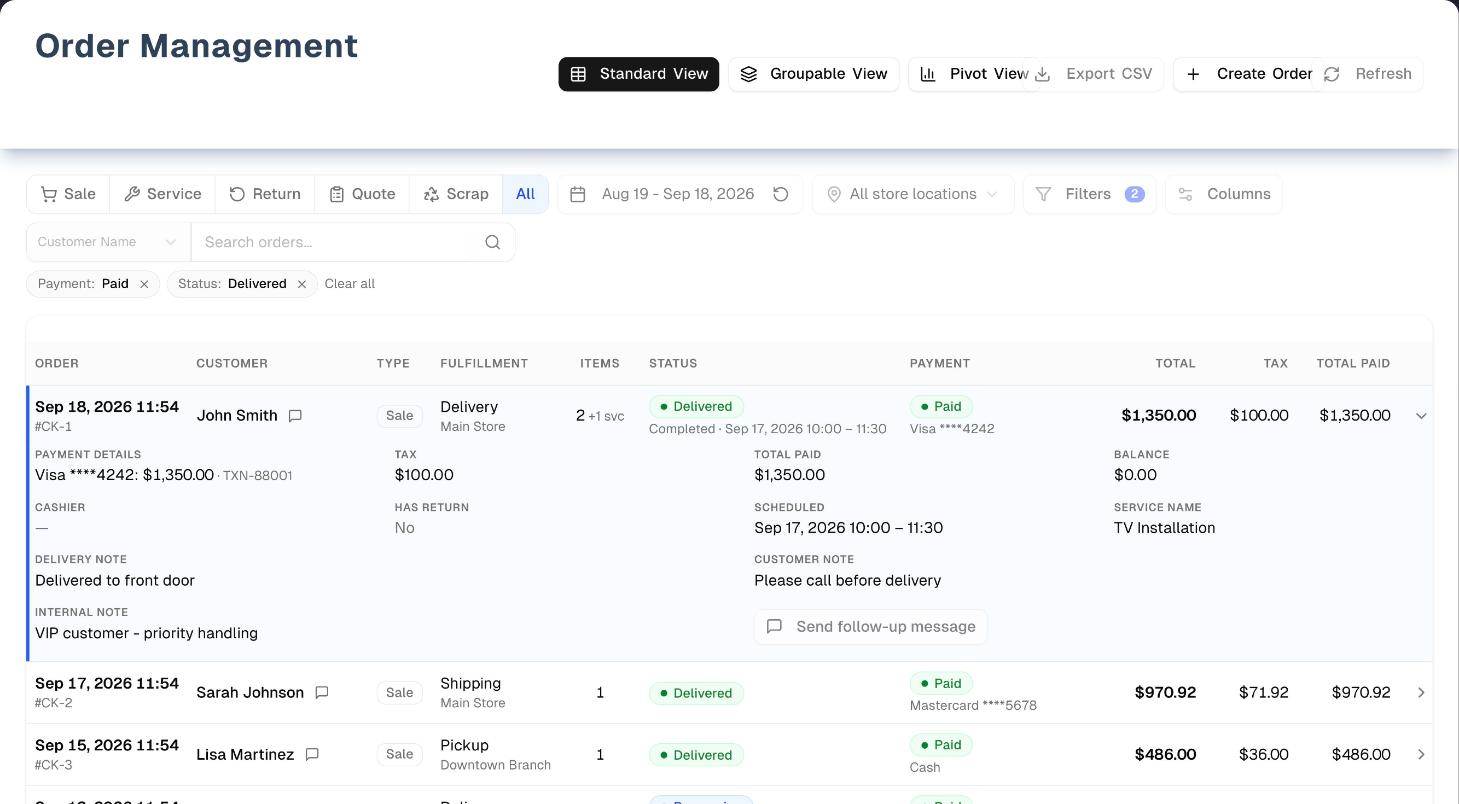
Overview
The list opens on Sale orders created in the last 30 days at your default location (each person's Default Location, set by the owner in Settings → Team; with none set, the first active location A–Z). Change the segment, widen the date range or pick All store locations before deciding an order is missing. Click any row to open the order.
Groupable View, Pivot View and Export CSV need the Premium plan — a free trial counts. Basic and Pro see an Unlock Premium Features card instead, over a sample grid made of demo orders: nothing in it can be clicked, and no order opens from it.
Tabs in detail
Order-type segments
One click each, one at a time: Sale (the default), Service (any order with at least one service line — not a separate order type), Return, Quote, Scrap, and All (Sale, Return, Quote and Scrap together).
A return is recorded on the original sale, not as a new order. So Return lists every sale that has had something returned on it, plus older stand-alone return orders. Its date range goes by the day the return was made, not the sale date: a return made today on a sale from two months ago shows in today's range. A sale shows once, dated by its latest return. The row is still the sale: its type reads Sale, and its status is Completed after a partial return, or Refunded once everything came back.
View: Standard
- Toolbar: the order date range (required, up to 13 months; the small reset arrow puts back the last 30 days), Location, Filters (Order status, Payment status, Service job status (with a Stage group for the stage of the service lines, see Service Intake), Cashier, Scheduled date — each one you set shows as a removable chip; the three status filters have a checkbox on every line, so you can tick several and see orders matching any of them, and Order status and Payment status use exactly the pills the Status and Payment columns show), Columns, and search.
- Search: first pick what to search in the grey box (Customer Name, Customer Phone, Customer Address, Product/Service, Service Name, Order Number, Invoice #), type at least 2 characters, then press Enter or the magnifier. The segment, date range, location and filters still apply.
- Columns: Order (date, time and a short #code), Invoice # (your store's own number, "—" when an order has none), Customer, Type, Fulfillment, Items, Status, Payment, Total. From Columns you can switch Invoice # off, and add Tax, Total Paid, Scheduled, Service Name, Stage or Cashier — remembered in this browser.
- Clicking a column header sorts ascending, again for descending, and a third time back to newest first. Order, Type, Total, Tax and Invoice # sort every matching order and go back to page 1; the other columns — including Fulfillment and Status, which are stored in a fixed order of their own rather than A–Z — sort only the 10 rows on screen, and a line under the table says so. Columns can't be resized, and there are no row checkboxes or bulk actions.
- The speech-bubble icon next to a customer's name sends them an SMS follow-up (Pro, Premium or trial, with SMS set up). It only appears where the text can go somewhere: not on scrap orders, orders with no customer, or a customer with no mobile or primary phone. The chevron at the end of a row expands payments, notes, cashier and schedule without opening the order.
- Page totals in the footer add up the current page only. Their total is net of returns. Each row keeps the sale's own total, with a small orange "−$X returned" note under it when something came back.
View: Groupable (Premium)
- Group by any of 17 fields — Order Type, Order Status, Payment Status, Location, Order Date, Month, Has Services, Delivery Status, Service Status, Service Name, Scheduled Date, Payment Method, Tax Range, Balance Status, Order Value Range, Quarter, Year — nested as many levels deep as you like. Each group shows its order count, Total, Avg, Items, Services, Tax, Paid and Balance. Total and Avg are net of returns: a sale counts for what the customer kept, so a fully returned sale counts $0.
- Every group, its figures and the Total Summary cover every order matching the Standard view's filters as they were when you switched — however many there are. Each order row shows its #code and Invoice #, as Standard view does. Click an order to open it.
- The orders listed under a group are the 1,000 newest that match. When more match, an amber line above the table says the totals cover all N orders and the rows listed are the newest loaded, and an open group says “Listing X of this group's N orders”. Narrow the Order Date Range or the filters to list the rest; the totals don't need it.
View: Pivot (Premium)
- Add Row Fields, Column Fields and Value Fields (8 measures, each as Sum, Average, Count, Min or Max), or start from a preset, then click Activate Pivot. Click a figure to reach the orders behind it: one order opens straight away, and several open a short list to pick from.
- Every figure and the Total row cover every matching order. The Total row is that column's own figure over all its orders — not the sum of the cells above it — so an Average, Min or Max total is right too. A cell no order falls in shows "-". Total Amount is net of returns, as in Groupable view.
- Clicking a figure lists the orders behind it from the 1,000 newest loaded; when the figure counts more, the list says how many of them it can show.
Order details window
Opens from any row in Standard or Groupable view, with tabs:
| Tab | What is on it |
|---|---|
| Overview | Order date, total, item count and returns; the order details — Location, Fulfillment (Store Pickup, Local Delivery, Shipping, Installation, Service, Mixed), your own Invoice #, Cashier (the team member the sale is credited to), Discount, Priority, Approval Status (only on orders that need approval) and any gift message — plus Order Status while you edit; and the customer's name, email, phone and address. Customer edits change the customer's record, not just this order |
| Items | Lines with SKU, price, quantity, tax and warranty. In edit mode anyone can add a product (not on returns, cancelled or refunded orders, or once the goods have left); the owner and managers can also Swap or Remove a line. The warranty editor holds price, Warranty Terms (the period), provider, information, notes and claim details. Tax is one order-wide rate, or Separate Tax per line |
| Payment (hidden for quotes and scrap) | Every payment with when it was taken, in your store's time zone, the method, status, loyalty redemption and the balance. Record cash, check and other payments through Edit (up to three payment methods). Setting a Completed payment's status to Refunded gives it back: the payment stays as it was, on the day it came in, and the refund is added as its own Refunded payment dated the day the money goes back — so the day the money came in keeps it, and the order owes that amount again. To undo a mistaken refund, set that Refunded payment's status back to Completed: the refund is voided (it stays in the history as cancelled) and the payment counts as paid again. Take card payment and Refund to card appear when card payments are set up |
| Delivery (only with Delivery & Routes on and Local Delivery or Mixed fulfillment) | Delivery appointments, proof-of-delivery photos, View signature, the activity log — and Reopen (owner only, with a reason) for a stop completed by mistake. Reopening doesn't change stock. Times here are the store's |
| Notes | Customer, Shipping / Delivery, and Internal notes |
Invoice # is your own numbering — the number your customer already knows the order by — kept alongside UpChannels' order number rather than replacing it. The list shows it in the Invoice # column, right after Order (Groupable view's rows and a Pivot figure's list of orders show it too), and sorts by it; choose Invoice # in the search box to search it. A store that doesn't use one can switch the column off under Columns.
The short #XXXX code on the list and in the window title is not the order number, so searching it usually finds nothing. Search the customer, the full order number, or your Invoice # instead.
Order actions
The buttons across the top of the order window:
| Button or menu | What it does |
|---|---|
| Print ▾ (not on scrap orders) | Print invoice (Print quote on quotes) opens a printable invoice with your store's letterhead. Service sheet prints a job sheet with sign-off lines (not on quotes or returns). Online invoice opens a shareable link, valid 30 days |
| Send ▾ (not on scrap orders) | Email invoice… and Text invoice…, each with an optional Include payment link when card payments are set up and a sale has a balance. Portal link… creates the customer's own portal link, and Request review asks for a review on Delivered or Completed orders — both only when the portal is on (Pro or Premium) |
| Convert to Sale (quotes) | Reserves stock for every line and turns the quote into a Pending sale. What a line can have is the total over every one of the product's stock records at the order's location (one per variant), taken oldest record first; a unit the line is tied to is reserved on its own record first, and held for the sale even when the product also has bulk stock. A quote holds no stock, so a unit it is tied to may have been sold, held, moved or written off since: then the conversion is refused and nothing changes (see Messages). Fails if any line is short of stock — including a product that tracks inventory but has no stock record at the order's location yet, which counts as none there. A product with Track inventory off and no stock record converts holding nothing |
| Edit | Changes the order in place; Save and Cancel replace the buttons until you finish |
| ⋯ → Mark lost… (quotes) | Records the reason the quote was lost and whether they said no or it ran out of time, with optional follow-up texts. The lines go to the Lost Sales Report. Everyone in the store can use it; it disappears once a quote has been converted to a sale |
| ⋯ → Log complaint… | Opens a complaint already linked to this order and customer |
| ⋯ → Schedule delivery… | Books a delivery window and driver for the Routes board (Delivery & Routes on, Local Delivery or Mixed orders) |
| ⋯ → Create return | Brings chosen items back into stock and records the refund, by card or another method, and refunds a service or a delivery fee on the order on its own if you pick it. Only units that left the store (sold at the counter, fulfilled or delivered) can come back. A cancelled order takes no return at all, so return what was delivered before you cancel the rest |
| ⋯ → Cancel order | Marks it Cancelled, releases reserved stock that hasn't left, cancels any active delivery appointment, and keeps the payment and audit records. Only while the goods are still with you — once an order is Shipped, Delivered or Completed, use Create return. Stock is released from the stock record it was reserved on, even if the order has since been moved to another location. A line whose units were reserved on two of the product's records (a sale takes from each variant's record in turn) gives each record back exactly its own part |
| ⋯ → Delete order | The owner and managers only. Permanently deletes the order and its payments, puts its stock back and reverses its ledger entries. Cannot be undone |
Cancelling keeps the history: reserved stock comes back and the payment records stay. Deleting erases the order and its payment records without refunding anyone, so refund first if money should go back. You don't have to cancel before deleting — any order can be deleted whatever its status, except one with proof-of-delivery records, which you cancel instead, and one whose payment or refund a bank match is still clearing, which says "This payment has been matched to a bank line (…). Unmatch it under Bank Reconciliation first." and leaves everything as it was. Orders whose goods have already left — Shipped, Delivered, Completed, or marked delivered by a driver — cannot be cancelled, and neither can a refunded or an already cancelled one: use Create return instead. If such an order is also still showing its stock as reserved — which happens with orders brought in from another system, where the sale was imported but the stock movement wasn't — Delete order is what frees that stock; it releases whatever the order was still holding.
Step by step: find an order
- Pick the order-type segment (All for every type), widen the date range, and set Location to All store locations if needed.
- To search, choose the field in the grey box at the left of the search bar (Customer Name by default), type at least 2 characters, and press Enter.
- Click the row to open the order, or click the chevron at the end of the row to peek at its payments and notes.
Step by step: export your orders
- Set up the Standard view the way you want it — segment, dates, location, filters and search.
- Click Export CSV (Premium or trial). From Standard view the file holds every matching order across all pages, up to 10,000. From Groupable view it holds the grouping you chose on screen, and from Pivot view the pivot you built — both after that view's Order Date Range. A short message names the file and how many rows it holds, or says why nothing downloaded.
Tips & best practices
- The list opens on Sale orders from the last 30 days at your default location; widen before concluding an order is missing.
- Use Filters → Scheduled date to pull service work for particular days. It searches every order in the date range, not just the page you're on, but it still only looks at orders created inside the order date range — widen that for work booked on older orders.
- Date filters follow your store's time zone, not your browser's, so a late-evening order counts on the day you sold it. If no business time zone is set, an amber banner asks you to set one.
- The date range here goes by the day each order was entered (on the Return tab, the day the return was made). A quote converted to a sale stays under the day the quote was written, while the Sales Report, the Dashboard, Profit & Loss and Labour % count it on the day it was accepted — so for a converted quote this list and those reports can show it in different weeks or months.
- Switching back to Standard View resets its filters, search, sort and page; your Columns choices stay.
- Open an order to see its full payment history; the list and the expanded row show completed payments only.
- When a customer brings goods back, use ⋯ → Create return: it puts them back into stock and records the refund, on the sale itself. The sale then shows on the Return tab. Lowering a line's quantity on a completed order also puts the units back into stock, but records no refund, so use it only to correct the order; if nothing actually came back, fix the stock with a count.
- Paid on this list is the money taken on the orders shown, by the month each order was entered — not revenue for a period. Revenue is the money received by the day it came in, on the Sales Report. The Balance column and the Unpaid and Partly paid payment filters are where to read what customers still owe on a sale.
- Use Groupable/Pivot for quick order analysis without leaving the page; their totals are order totals, net of returns, by the day each order was entered, not revenue.
Troubleshooting
| Issue | Fix |
|---|---|
| Groupable, Pivot or Export CSV shows Unlock Premium Features | These need Premium (a free trial counts). Basic and Pro are locked; the grid behind the card is sample data |
| An order is missing | Check the segment (default Sale), the date range (default last 30 days), the location (defaults to your own Default Location) and any Filters chips |
| A return isn't on the Return tab | That tab goes by the day the return was made, so include that day in the date range, and check the location. The row is the original sale: search by its customer, order number or Invoice # |
| Searching the #code finds nothing | The #XXXX code isn't the order number. Search by customer, the full order number, or Invoice # |
| A page shows fewer than 10 orders, or none, yet more pages exist | The last page is short by design. If an earlier page is short, reload the list |
| Payment shows Due $X, or the balance is red in the Payment tab | Money is still owed. Take a card payment, or click Edit → Payment to record it |
| Save seems to do nothing | Look under the order number: a save that was refused lists its reasons there in a red "This order could not be saved:" box, and an "Order not saved" message appears as well. The first checks — a status the order can't move to, a location change while it holds stock, an amount with no payment method — happen before anything is written, so fixing the reason and saving again is all it takes. A refusal that names stock, a refund or the order details arrives after the line changes have already been saved: reload the order and look at it before changing the same things twice |
| No Delete order, Remove or Swap | These are for the owner and managers only. Even for them, Remove and Swap disappear on returns, cancelled and refunded orders, and once the goods have left — the note under the Items table says why |
| Send is greyed out in the SMS follow-up | Type a message first. On Basic a plan card covers the dialog; if "Complete SMS setup to enable messaging" shows, finish SMS setup |
| A serial a customer took still shows Available, with no sale in its history | The serial's record was not marked sold. If the order is still open, completing or delivering it sells the serial. Otherwise contact support to correct it, or count the shelf |
| A serial that came back Damaged or Defective still shows Sold | A return brings a Damaged or Defective serial back held off sale (Reserved). If one still shows Sold, only its record is off; the counts are right. Contact support to correct the serial |
| A serial that was returned still shows Sold, and another serial of the same product is back on the shelf | A return brings back the unit the line sold. If two serials look swapped like this, the counts are right and only the two serials' records are off. Contact support to correct them |
What's next
- Create new orders: Sales → New
- Schedule service items: Sales → Schedule
- Analyze revenue: Reports → Sales Report
- Get it to the door: Routes board
- Take the balance by card: Finance → Accept Payments
- What customers receive from invoice, payment and portal links: Links you send customers
Detailed reference
Every button, icon, field and message on this page, for when you need the exact detail. Each panel starts closed — open the one you need.
Page header and toolbar
Page title Order Management, subtitle "Monitor, track, and manage all retail orders in one centralized dashboard." The header buttons are square tiles with the icon above the label; they have no tooltips.
| Control | Where | What it does | Notes |
|---|---|---|---|
| Demo (Play icon, amber tile) | Header, first | Opens this page with sample data and a guided tour | Everyone, any plan. See Demo mode |
| Standard View (table icon) | Header | Switches to the Standard table with toolbar, filters, search and pager | Default view, highlighted when active. Switching back to it resets its segment, date range, location, filters, search, sort and page to the defaults; your Columns choices are kept |
| Groupable View (layers icon) | Header | Switches to the grouped view | Premium or trial. Otherwise the Unlock Premium Features card appears over a sample grid. Clicking the button again brings the card back if you dismissed it |
| Pivot View (bar-chart icon) | Header | Switches to the pivot table | Same Premium gate as Groupable |
| Export CSV (download icon) | Header | Downloads a CSV file of the view you are in. Standard view: every order matching the current segment, date range, location, Filters and search — all pages, up to 10,000 orders — in a file named orders_standard_YYYY-MM-DD.csv. Groupable view: the grouping you set up on screen, at every level, with a summary row per group — its count and totals over every matching order — followed by the orders listed under it (orders_groupable_…csv). Pivot view: the pivot you built — your row and column fields and each measure, over every matching order — ending in the same Total row the table shows (orders_pivot_…csv) | Premium or trial; otherwise the upgrade card opens and nothing downloads. "Export ready" names the file and the number of rows. In Pivot view it adds that the figures cover all N matching orders; in Groupable view, when more match than were loaded, it adds that the group rows cover all N orders while the order rows under them are the newest loaded. "Nothing to export" appears if no orders match, in Pivot view if the pivot is not switched on yet, and in either view while the figures are still being worked out; "Export failed" if the file could not be written. Both advanced views follow their own Order Date Range. Ignores on-screen sorting and the Columns picker. The date in the file name is the UTC date |
| Create Order (plus icon) | Header | Opens Sales → New | Everyone |
| Refresh (circular arrows) | Header | Reloads what the view you are in is showing, with the current filters: the current page in Standard view, and the loaded orders behind Groupable and Pivot view | Greyed out while it spins, and it spins until the reload has finished |
| Amber time-zone banner (clock icon) | Above the list | Reads "Date ranges currently use each viewer's browser timezone (…). Set your business timezone in Organization settings so date filters and reports match across your team." | Only when the store has no business time zone. With one set, date filters use the store's time zone |
| Organization settings (link) | In the banner | Opens Settings to set the business time zone | Shown only with the banner |
| X (label Dismiss) | Banner, right | Hides the banner for good in this browser | Comes back in another browser or device, or after clearing site data |
| Link from Dashboard → Recent Activity | Arriving from the Dashboard | Opens the list with that order's window already open | The list underneath keeps its default filters (Sale, last 30 days, your location), so the order may not appear in the table. If the order can't be loaded, nothing opens and no message shows |
| Link from a customer's order history | Arriving from Customers | Opens the list in a new browser tab, searching that order number (the search box shows Order Number), with the order's window open | The default date range, segment and location still apply |
What's in the CSV files
| File | Columns |
|---|---|
| Standard view (28 columns) | Order ID (the full order number), Invoice #, Date & Time, Customer Name, Customer Phone, Customer Email, Location, Order Type, Product Items (product lines), Service Items (service lines), Total Items (lines), Has Service, Subtotal, Tax, Total, Payment Status (Paid / Partial / Unpaid), Delivery Status, Total Paid, Balance, Payment Methods, Delivery Note, Internal Note, Is Quote, Is Rush, Is Gift, Sales Person ID, Created At, Updated At |
| Groupable view | Row Type ("GROUP" for a group's total row, "ORDER" for an order), Group Level (1 for the outer grouping, 2 for the one nested inside it), Grouped By (which field that row groups on), Group (the full path, e.g. "Sale > Paid"), then the Standard columns, and on group rows Order Count and Average Amount. Every level you set up on screen is in the file, open or closed |
| Pivot view | One column per row field, then one column per column value and measure, named like "SALE - Total Amount (Average)", and a last row named Total holding the same figures the table's Total row shows |
Tab: Standard View
The default view: toolbar, filter chips, table, footer totals and pager.
Order-type segments — one active at a time (tinted blue). Each click returns to page 1 and reloads.
| Control | Where | What it does | Notes |
|---|---|---|---|
| Sale (cart icon) | Toolbar, segment 1 | Sale orders only | Selected by default |
| Service (wrench icon) | Toolbar, segment 2 | Sale, Return, Quote and Scrap orders that contain at least one service line | Not a separate order type. Every such order in the date range is found and counted, however many there are |
| Return (return-arrow icon) | Toolbar, segment 3 | Every sale that has had something returned on it, plus older stand-alone return orders | A return is recorded on the original sale (⋯ → Create return); it never creates a separate return order. On this tab the date range goes by the day of the sale's latest return, not the day the sale was entered, so a return made today on a sale from two months ago shows in today's range. An older stand-alone return order goes by its own date. Each sale shows once, however many returns it has had. The row is still the sale: Type reads Sale with the amber "N returned" line, Status is Completed after a partial return and Refunded once everything with a price came back, and the Order column shows the sale's own date. Groupable and Pivot view follow the same rule when you switch from this tab |
| Quote (clipboard icon) | Toolbar, segment 4 | Quotes only | |
| Scrap (recycle icon) | Toolbar, segment 5 | Scrap orders only | Scrap rows show Customer "N/A" |
| All (no icon) | Toolbar, segment 6 | Sale, Return, Quote and Scrap together | No other order types ever appear on this page |
Toolbar: date, location, Filters, Columns, search
| Control | Where | What it does | Notes |
|---|---|---|---|
| Order date range button (calendar icon, e.g. "Aug 19 - Sep 18, 2026") | Toolbar, after the segments | Opens a two-month calendar. Filters by the date the order was created — on the Return tab, by the date of the sale's latest return | Required — it can never be empty. Shows the year on both ends when the range crosses a year. Day boundaries use the store's business time zone, or the browser's if none is set |
| Calendar in the date popover | Date popover | First click picks the start day (nothing reloads yet); the second click picks the end day, applies the range, returns to page 1 and closes the popover | Ranges longer than 13 months are silently trimmed to 13 months after the start. Closing after only a start day throws that choice away |
| "Required · up to 13 months" | Under the calendar | Explains the rule | |
| Reset arrow (label "Reset date range", hover text "Reset to the default 30-day range") | Inside the date button, right end | Puts the range back to the last 30 days, returns to page 1 and reloads | Doesn't open the calendar |
| Location select (map-pin icon) | Toolbar | Shows one location's orders, or All store locations | Defaults to your Default Location, else the first active location A–Z. Non-store locations show their type in brackets after the name |
| Filters (funnel icon) with a blue count | Toolbar | Opens the Filters popover (see Dialog: Filters popover) | The blue number counts how many of the five filters are set; hidden at 0 |
| Columns (sliders icon) | Toolbar | Opens the optional-columns menu (see Dialog: Columns menu) | Saved in this browser |
| Search field selector (grey box, default Customer Name) | Search bar, left | Chooses what the search text is matched against | Changing it alone does not re-run the search — press Enter or the magnifier |
| Search: Customer Name | Field option | Partial match on the customer's display, first or last name | Not case-sensitive |
| Search: Customer Phone | Field option | Partial match on the customer's primary, mobile or business phone, as the number is stored | Formatting matters — if the full number finds nothing, try the last 4 digits |
| Search: Customer Address | Field option | Partial match on street line 1, city or postal code | Line 2 and state aren't searched |
| Search: Product/Service | Field option | Partial match on any line's description or SKU | |
| Search: Service Name | Field option | Keeps orders with a service whose name contains the text — the name the Service Name column shows | Searches every order in the date range, so the "of N orders" count and the page numbers follow it. Matches a service with a work order, one booked on a line, and one sold but not booked yet (by its service's name, or the line's description) |
| Search: Order Number | Field option | Partial match on the full stored order number, e.g. ORD-20260915-0002 | The #XXXX code on the list is not the order number, so searching it usually finds nothing |
| Search: Invoice # | Field option | Partial match on your store's own invoice number | Orders without one never match |
| Search box (placeholder "Search orders…") | Search bar | Runs only on Enter or the magnifier — not as you type | At least 2 characters; with 1 character a hint "Type 1 more character to search" shows. An empty box plus Enter clears the search. Every order that matches is found and counted, however many there are, and the pages and the "of N orders" count cover all of them |
| X (clear) | Inside the search box, right | Empties the box; if a search was applied, removes it and reloads page 1 | Shown only while the box has text |
| Magnifier button | Search bar, far right | Runs the search | Greyed out while the text is 1 character long |
Filter chips — a row under the toolbar, shown only when a Filters-popover filter is set.
| Control | Where | What it does | Notes |
|---|---|---|---|
| Status: … chip + X (e.g. "Pending or Processing") | Chips row | X clears the order-status filter | Names every order status ticked, joined by "or"; X clears them all. X label "Clear Status filter" |
| Payment: … chip + X (e.g. "Paid or Partly paid") | Chips row | X clears the payment filter | Names every payment status ticked, joined by "or"; X clears them all. X label "Clear Payment filter" |
| Service job: … chip + X (e.g. "Scheduled or In Progress") | Chips row | X clears the service-job filter | Names every service job status ticked, joined by "or"; X clears them all. X label "Clear Service job filter" |
| Stage: … chip + X (e.g. "Ready or On hold") | Chips row | X clears the Stage group of the Service job status filter | Names every stage ticked, joined by "or". See Service Intake |
| Cashier: … chip + X | Chips row | X clears the cashier filter | Shows "Selected" if the name can't be found. X label "Clear Cashier filter" |
| Scheduled: … chip + X | Chips row | X clears the scheduled-date filter | X label "Clear Scheduled filter" |
| Clear all (blue text) | End of the chips row | Resets all five Filters-popover filters | Does not reset the segment, date range, location or search |
Table columns — 8 always shown, plus Invoice # unless you switch it off, and up to 6 more from Columns. The column numbers below are with Invoice # on; switching it off moves the columns after it one place left. Click a header to sort ascending (blue ↑), again for descending (↓), and a third time to clear the sort and go back to newest first. Five columns — Order, Type, Total, Tax and Invoice # — are sorted across every matching order and put you back on page 1. The rest sort the 10 rows on screen only, either because they are worked out from the order after it is read or because they are kept in a fixed order of their own (Fulfillment, Status); hovering a header says which kind it is, and a line under the table names the column while such a sort is on. Columns can't be resized or dragged.
| Column | Where | What it shows | Notes |
|---|---|---|---|
| Order | Column 1 | Date and time created (e.g. "Sep 18, 2026 14:05", 24-hour, store time zone), with a short #XXXX code below | The code is the same one on the order window and printed invoice; it isn't the order number. Sorts by created date, across every matching order |
| Invoice # | Column 2 | Your store's invoice number, "—" if none | On unless switched off in Columns. Sorts across every matching order; orders with no invoice number come last either way |
| Customer | Column 3 | Customer name (else code, else "Unknown Customer"); Scrap orders show "N/A". Also holds the SMS icon, on the rows where a text can be sent | Sorts A–Z within the page on screen |
| Type | Column 4 | Sale, Quote, Return or Scrap, with an amber "N returned" line when N lines have had units returned | Sorts A–Z, across every matching order |
| Fulfillment | Column 5 | Pickup, Delivery, Shipping, Installation, Service, Mixed, or "-"; the location name below ("Unknown" if none) | Sorts A–Z within the page on screen. The location under it is not what it sorts on |
| Items | Column 6 | Total quantity of product lines; grey "+N svc" = total quantity of service lines | Sorts by product quantity, within the page on screen |
| Status | Column 7 | Coloured status pill, with a grey line for the service status and scheduled date and time, e.g. "Scheduled · Sep 20, 2026 09:00 – 11:00" | Cancelled and Refunded override Delivered/Shipped. Sorts within the page on screen, by the pill shown: Pending, Processing, Shipped, Delivered, Completed, Refunded, Cancelled, then any other (such as a quote's); click again to reverse |
| Payment | Column 8 | Paid (green), Due $X (amber — part-paid, $X still owed) or Unpaid (grey), with the methods of completed payments below, by the name the Payment tab uses ("Card (Stripe)", "SNAP Financing"). Quotes show "—" | Only completed payments count, and the pill reads the same rule as the Payment status filter, so the two always agree. Sorts by amount owed, within the page on screen |
| Total | Column 9 | Order total, with a small orange "−$X returned" under it when something came back on the order ($X is the value of what came back, tax included) | The figure itself stays the sale's own total. Sorts across every matching order |
| Tax (optional) | After Total | Order tax | Sorts across every matching order |
| Total Paid (optional) | After Total | Sum of completed payments | Sorts within the page on screen |
| Scheduled (optional) | After Total | Scheduled service date and time; Not scheduled (grey) when the order has service lines that aren't booked yet; "—" when it has no service | Sorts within the page on screen |
| Service Name (optional) | After Total | The booked service's name; when nothing is booked yet, the order's own service lines, two by name then "+N" (e.g. "Delivery within 20 miles, Installation +1"); "—" when it has no service | Sorts within the page on screen, by what it shows |
| Stage (optional) | After Total | The stage of the order's service line furthest from done, as a coloured chip, then "+N" for the other lines with a stage; "—" when no service line has one. On hold shows first | Sorts within the page on screen: On hold first, then the stage order, no stage last. See Service Intake |
| Cashier (optional) | After Total | The team member the sale is credited to — picked on Create Order, and editable on the order. Not necessarily the person who pressed Create Order: who saved the order is recorded separately and is not shown here | Names resolve for everyone who has ever been on your team, including people who have since left. A raw ID shows only when the stored id belongs to nobody in your store. An order whose Cashier was typed in as free text shows that text exactly as it was typed. Sorts A–Z within the page on screen |
Row controls
| Control | Where | What it does | Notes |
|---|---|---|---|
| Click anywhere on a row | Table row | Opens the order details window | If full details fail to load, the window opens with the row's summary. If the order no longer exists, nothing opens. Edits saved in the window update the row in place and the window stays open; deleting removes the row and closes the window |
| Speech-bubble icon (tooltip Send SMS follow-up) | Customer cell, right of the name | Opens Send SMS Follow-up for that order's customer; doesn't open the order | Only on rows where the text can actually be sent: not on Scrap orders, not on orders with no customer, and not when the customer has neither a mobile nor a primary phone (a business phone is not used for texts). The row is too narrow to say why, so the icon is simply absent — expand the row to see the reason |
| Chevron (label "Expand order details" / "Collapse order details") | Last column | Expands a detail panel under the row; click again to close | One row open at a time. Doesn't open the order |
| Payment details | Expanded row | Each completed payment as "Method: $amount · reference", the method named as on the Payment tab, or "No completed payments" | Pending or failed payments aren't listed |
| Tax, Total paid, Balance | Expanded row | Order tax, completed payments, amount still owed | Balance never goes below $0.00 |
| Invoice # | Expanded row | Your invoice number | Only when the order has one |
| Cashier, Has return ("N item(s)" or "No"), Scheduled, Service name | Expanded row | As labelled; empty values show "—" | |
| Delivery note, Customer note, Internal note | Expanded row | The order's three notes, "—" if empty | Read-only here; edit them in the order window |
| Send follow-up message (speech-bubble icon) | Expanded row, bottom | Opens the same Send SMS Follow-up dialog | Greyed out when the text cannot be sent, with the reason on hover: "A scrap order has no customer to text.", "This order has no customer to text." or "This customer has no mobile or primary phone. A business phone is not used for texts." |
Footer and pager
| Control | Where | What it does | Notes |
|---|---|---|---|
| Page totals · N orders | Table footer | Totals for the orders on this page: product quantity (+N svc), "$X paid · $Y due" (amber, only when above $0), and the total — plus Tax and Total Paid if those columns are on | Not a total for all pages or the whole date range. The total is net of returns: what the customers kept. When something came back on the page's orders, a grey "after $X returned" line sits under it |
| "Showing A-B of N orders" | Under the table, left | Where you are in the results | N counts every order the filters keep, service filters included |
| "Showing matches from the first 10,000 service jobs in this date range — narrow the dates to be sure every matching order is listed." | Under the count | The Service job status, Service Name or Scheduled filter looked through the first 10,000 service jobs only, so matching orders past them are missing from the list and the count | Only when the date range holds more than 10,000 service jobs. Narrow the dates |
| "Column name: sorted within this page — this column is worked out from the order, so it cannot be sorted across every page." | Under the count | Names the column being sorted and what the sort covers | Only while sorting on Customer, Fulfillment, Items, Status, Payment, Total Paid, Scheduled, Service Name, Stage or Cashier |
| Previous | Pager | Previous page | Greyed out on page 1. The pager appears only when there's more than one page |
| Page numbers (up to 5) | Pager | Jump to that page; the current page is filled | Shows a window of 5 pages around the current one |
| Next | Pager | Next page | Greyed out on the last page |
| Try Again | Error card in place of the table | Retries loading | Shown with "Error Loading Orders" and the error text; the toolbar is hidden while it shows |
Tab: Groupable View
Premium or trial. Groups and totals are worked out on the server over every order matching the Standard view's segment, date range, location, Filters and search as they were when you left Standard view. The order rows listed under the groups are the 1,000 newest of those. When more match, an amber line above the table reads “Every group, total and the Total Summary cover all N matching orders. The order rows listed under them are the 1,000 newest loaded — narrow the date range to list the rest.” While the totals are being worked out the table says "Working out the totals..."; if they can't be, it says "The group totals could not be worked out. Refresh to try again." and shows no figures. The toolbar isn't shown here, and groupings aren't saved — they reset when you leave the view.
| Control | Where | What it does | Notes |
|---|---|---|---|
| "Row Grouping" | Top card title | — | |
| Expand all / Collapse all | Row Grouping card, top right | Opens or closes every group at every level | Only when a grouping is set |
| Clear all | Row Grouping card, top right | Removes every grouping (flat list) | Only when a grouping is set |
| Order Date Range ("Select date range", calendar icon) | Row Grouping card | Narrows the view to a date range (store time zone) inside the Standard view's own range; shows "N matching orders in this range" | The groups and totals cover every order in the range; the rows listed come from what was loaded. Export CSV follows it |
| × | Next to the date picker | Clears this date range | Only when a date is set |
| Group by (layers icon, placeholder "Select column") | Row Grouping card | Adds a grouping level; pick again to nest deeper (e.g. Order Type → Payment Status). Fields: Order Type, Order Status, Payment Status, Location, Order Date, Month, Has Services, Delivery Status, Service Status, Service Name, Scheduled Date, Payment Method, Tax Range, Balance Status, Order Value Range, Quarter, Year | Fields already used are hidden. Payment Status has only Paid and Unpaid — part-paid orders count as Unpaid; use Balance Status for Fully Paid / Partially Paid / Unpaid. There is no Customer grouping |
| "Select a column to group your orders" | Card | Hint when nothing is grouped | |
| "Grouping hierarchy:" chips with → and X | Card | Shows the nesting order; X removes that level | Removing a level closes every open group |
| Group header row (or its chevron) | Table | Opens or closes the group. Shows the value, a "N orders" badge, Total, Avg, Items, Services, Tax, Paid and Balance (red when above $0, green at $0) — all over every matching order in the group. Total and Avg are net of returns: each sale counts for what the customer kept, and a fully returned sale counts $0 | Some values carry small icons, e.g. Delivered, Under $100. A Payment Method group reads by the name the Payment tab uses ("Card (Stripe)", "SNAP Financing"), as the Payment Methods column does. Groups are listed in order: dates and months oldest first, ranges smallest first, names (a payment method's included) A–Z as they read, an empty value last. Month, Quarter, Year and Order Date are the store's time zone. At the last level, a group holding more orders than were loaded ends with "Listing X of this group's N orders — the newest loaded. Narrow the Order Date Range to list the rest." If a level has more than 5,000 groups, only the 5,000 largest are shown there and a line says so; the levels above it and the Total Summary still count every order |
| Order row | Table | Opens the order details window | After any save, cancel, conversion, card payment or return in the window, it closes and the grid reloads (unlike Standard view, where it stays open) |
| Table columns | Table | Order ID (#code), Invoice # (your store's own number, "—" when an order has none, as in Standard view), Date, Customer, Location, Type (in capitals), Items (number of lines, not quantity), Services (service lines), Total (the order's own total, with the orange "−$X returned" note when something came back), Tax, Delivery Status, Total Paid, Balance, Payment Methods, Delivery Note, Internal Note, Actions (always empty) | Not sortable. Delivery Status and an Order Status or Service Status group read in Standard view's words: "Quote Sent", "In Progress", "No Show" |
| "Total Summary" | Table footer | Totals for every matching order in the view's range: items, services, total, tax, "N orders", paid, balance, "Avg Order: $X" | Not just the rows listed above it. The total and "Avg Order" are net of returns, as the group rows are |
Tab: Pivot View
Premium or trial. Every figure and the Total row are worked out on the server over every order matching the Standard view's filters, as in Groupable view; the orders a figure lists when you click it come from the 1,000 newest loaded. When more match, an amber line above the table reads “Every figure and the Total row cover all N matching orders. Clicking a figure lists the ones among the 1,000 newest loaded — narrow the date range to list the rest.” While a layout is being worked out the table says "Working out the figures..."; if it can't be, "The pivot figures could not be worked out. Refresh to try again." and no figures. "No orders found in the selected date range" is the server's answer too, not the loaded orders': a range older than every loaded order reads "Counting the orders in this range..." (or "Working out the figures...") until the server has counted it. The set-up isn't saved.
| Control | Where | What it does | Notes |
|---|---|---|---|
| "Pivot Configuration" | Top card title | — | |
| Reset (circular arrow) | Card, top right | Clears Row, Column and Value fields and turns the pivot off | |
| ▶ Activate Pivot (pulsing green) / ✓ Pivot Active (dark green) | Card, top right | Turns the pivot table on or off | Greyed out until at least one Value field is added. Presets fill the fields but you still click Activate Pivot |
| Order Date Range picker + × | Card, column 1 | Narrows the pivot by date (store time zone) inside the Standard view's own range; shows "N matching orders in this range" | Every figure covers every order in the range. Export CSV follows it |
| Row Fields chips (grip icon, label, X) + Add row field | Card, column 2 | Adds or removes row groupings | The grip icons are decorative — no drag and drop. A field used in Rows or Columns can't be picked twice |
| Column Fields chips + Add column field | Card, column 3 | Adds or removes column groupings | Choices: Order Type, Order Status, Payment Status (Paid/Unpaid only), Location, Month, Quarter, Delivery Status, Service Status, Service Name, Scheduled Date, Payment Method, Balance Status, Order Value Range, Tax Range, Year, Has Services |
| Value Fields (Measures) chips, e.g. "Total Amount (Sum)", + X | Card, column 4 | X removes that measure | |
| Aggregation select next to each measure (Sum / Average / Count / Min / Max) | Card, column 4 | Changes how that measure is combined | |
| Add measure | Card, column 4 | Adds a measure as Sum: Total Amount, Item Count, Service Count, Tax Amount, Paid Amount, Balance Amount, Item Quantity, Service Quantity | The same measure can be added more than once, e.g. with different aggregations. Total Amount is net of returns: each sale counts for what the customer kept, and a fully returned sale counts $0. Only Total Amount works this way: Order Value Range still places a sale by its full total |
| Agg select | Next to Add measure | Changes the aggregation of the most recently added measure | Does nothing when no measure has been added |
| "Add at least one value field to enable pivot view, or try a quick preset:" | Card | Hint | Only while no measure is set |
| Preset Monthly Sales by Type | Card | Rows Month, Columns Order Type, Sum of Total Amount | Replaces the current set-up; then click Activate Pivot |
| Preset Location Performance | Card | Rows Location, Columns Payment Status, Sum of Total Amount + Count | Same |
| Preset Payment Analysis | Card | Rows Delivery Status, Columns Balance Status, Sum of Paid Amount + Sum of Balance Amount | Same |
| Preset Value vs Tax Analysis | Card | Rows Order Value Range, Columns Tax Range, Average of Total Amount + Average of Tax Amount | Same |
| Pivot table | Below the card | One header per row field; column headers show the value, the measure and "(Aggregation)". A status reads in Standard view's words ("Quote Sent", "In Progress"). A cell no order falls in shows "-". A final Total row works each measure out over every order in that column | Rows and columns are in order: dates and months oldest first, ranges smallest first, names A–Z, an empty value last; Month, Quarter and Year are the store's time zone. Any figure with orders behind it is a button (dotted underline): one order opens the order window, several open a small list showing each order's #code, its Invoice # ("—" when it has none), date and total (with the orange "−$X returned" note when something came back) — picking one opens it. The list shows the loaded orders behind the figure, at most 50 ("Showing the first 50 of N orders."), and when the figure counts more than were loaded it adds "X of these N orders are among the newest loaded to list here. Narrow the Order Date Range to list the rest." (or "None of these N orders is…" when none was loaded). "-" cells and the Total row are not clickable. The Total of an Average is the average of every order in the column, not the average of the cells above it, and Min and Max are the column's own lowest and highest. A Count is shown as a plain number, never with a "$". A layout with more than 5,000 row-and-column combinations shows the 5,000 largest and says so; the Total row still covers every order |
| 'Configure pivot fields above and click "Activate Pivot" to see the pivot table' | Below the card | Placeholder | While the pivot is off |
Dialog: Filters popover
Opened by Filters in the Standard toolbar. Each change applies at once and returns to page 1. Every filter set here also shows as a chip under the toolbar.
Order status, Payment status and Service job status open a list with a checkbox on every line. Tick as many as you like: the list keeps an order that matches any of them (Pending or Processing), and the three filters still narrow each other (Unpaid and Pending). Within one filter every order is under exactly one option, the one its column shows, so the options never overlap. The closed box shows the one or two you ticked, or "3 selected" past that; Clear at the foot of the list unticks them all. Nothing ticked is "All". Order status and Payment status are matched over every order in the date range, so the count is always exact. The Groupable and Pivot views, search and the Return tab follow the same ticks.
| Control | Where | What it does | Notes |
|---|---|---|---|
| Order status (first): checkboxes for Pending / Processing / Shipped / Delivered / Completed / Refunded / Cancelled / Draft | Filters popover | Keeps the orders whose Status pill reads one of the ticked values: Cancelled and Refunded first, then marked delivered (Delivered), then marked shipped (Shipped), then the order's own status | Listed in the order the Status column sorts. An order shipped and delivered is only under Delivered; a refunded order that had shipped is only under Refunded |
| Payment status: checkboxes for Paid ("Paid in full") / Partly paid ("Shows as Due $… on the list") / Unpaid ("Nothing collected yet") | Filters popover | Keeps the orders whose Payment pill reads one of the ticked values: Paid = marked paid or collected in full; Partly paid = some completed payment, less than the total; Unpaid = nothing collected. Quotes, which show "—", are under none | The same rule as the Payment column, so the filter and the pill always agree. Balance due (a sale that can still take a payment and still owes money) appears here, ticked, only when you arrive from a Quick Facts "still owe" link, so you can see and untick it |
| Service job status: checkboxes for Scheduled / Rescheduled / In Progress / Completed / No Show / Cancelled | Filters popover | Keeps orders whose service job has one of the statuses ticked — the job's own status, not the order's | Searches every order in the date range, so the count and the page numbers follow it. A service booked on a line that has no work order yet has no status, so it is never kept by this filter |
| Cashier: All cashiers / each team member A–Z | Filters popover | Orders credited to that person | Lists every team member in the store, including anyone who has since left, so their past sales can still be found. It matches the team member on the order, so it misses only orders whose Cashier was typed in as free text |
| Scheduled date ("Any scheduled date", calendar icon) → two-month calendar | Filters popover | Keeps orders with a service scheduled in that range (store time zone) | The first click already filters from that day on; the second click sets the end day. Searches every order in the date range, so the count and the page numbers follow it, but it still only looks at orders created inside the order date range — widen that for services booked on older orders. Capped at 13 months |
| X | Next to Scheduled date | Clears the scheduled-date filter | Only when a scheduled date is set |
Dialog: Columns menu
| Control | Where | What it does | Notes |
|---|---|---|---|
| "Optional columns" | Menu heading | — | |
| Invoice # checkbox | Columns menu | Shows or hides the Invoice # column | Ticked until you untick it; the other six are off until you tick them. Once unticked it stays off in this browser. The menu stays open so you can tick several. Choices are saved per browser, not per person or store |
| Tax checkbox | Columns menu | Shows or hides Tax | |
| Total Paid checkbox | Columns menu | Shows or hides Total Paid | |
| Scheduled checkbox | Columns menu | Shows or hides Scheduled | |
| Service Name checkbox | Columns menu | Shows or hides Service Name | |
| Stage checkbox | Columns menu | Shows or hides Stage | |
| Cashier checkbox | Columns menu | Shows or hides Cashier |
Dialog: Send SMS Follow-up
Opened from a row's speech-bubble icon or Send follow-up message in an expanded row. The dialog doesn't show which customer or order it's for. The text goes to the customer's mobile phone, or their primary phone if there's no mobile.
| Control | Where | What it does | Notes |
|---|---|---|---|
| Message box (placeholder "Type your message...") | Dialog body | Your text; emptied each time the dialog opens | Greyed out on Basic or when SMS isn't set up. On Basic it shows the sample "Hi! Just following up on your recent order. Let us know if you have any questions!" |
| "Plain text only. Standard carrier rates may apply." | Under the box | — | |
| Start a new conversation (switch), with "Earlier messages with this customer stay in Messages." under it | Dialog body | On: closes the customer's current conversation and starts a new one with this message. The closed conversation keeps its messages in Messages, marked Closed. Off: adds the message to the current conversation | Off every time the dialog opens, including after a send that failed and when you open a different customer. Greyed out when gated or not set up. Nothing is ever deleted. If the old conversation can't be closed, nothing is sent |
| Cancel | Footer | Closes the dialog | Greyed out while sending |
| Send ("Sending…") | Footer | Sends the text | Greyed out when the box is empty, while sending, on Basic (not trialing), or when SMS isn't set up. May first open Confirm SMS consent. On success: "Message sent" with an Open button that jumps to the conversation in Messages |
| "Unlock Pro & Premium Features" card ("SMS, insights, finance tools & more") | Over the dialog | Upsell. Pro: "500 SMS/month + a dedicated phone #", "SMS campaigns & review invites", "Ads-vs-store insights", "Finance: expenses, assets, reports", "Customer Portal: tracking, payments, scheduling". Premium: "Everything in Pro", "2,000 SMS/month", "Advanced reporting (grouped/pivot)", "CSV / PDF data export", "Workforce: time clock, timesheets, pay runs" | Basic plan, not in a free trial |
| Check Details (green) | Plan card | Opens Billing | |
| "Complete SMS setup to enable messaging" | Over the dialog | — | The plan allows SMS but the store has no texting number or connection yet |
| Go to SMS Setup | Setup prompt | Opens SMS Campaigns to finish setup | See SMS campaigns setup |
| X (close), click outside, or Esc | Dialog | Closes |
Dialog: Confirm SMS consent
Opens when you send a text (SMS follow-up, Text invoice… or a portal link by text) to a customer who isn't marked as opted in to texts. If your plan or this month's allowance does not cover the text, you see the upgrade message instead — you are never asked to confirm an opt-in for a text that cannot be sent.
| Control | Where | What it does | Notes |
|---|---|---|---|
| "Confirm SMS consent" | Title | — | |
| "This customer isn't marked as opted in to SMS." + amber box "Only continue if this customer has agreed to receive text messages from you. Confirming sends this message and, once it has gone out, records their SMS opt-in. If they previously texted STOP, the carrier will still block delivery until they text START." | Body | — | |
| Cancel | Footer | Closes; nothing is sent | Greyed out while sending |
| Confirm opt-in & send ("Sending…") | Footer | Sends the message, then records the customer's SMS opt-in | The opt-in is only recorded once the text has actually gone out; a refused send leaves it as it was |
Dialog: Unlock Premium Features
| Control | Where | What it does | Notes |
|---|---|---|---|
| Card "Unlock Premium Features" / "Advanced reporting & data export" (lock icon) | Over Groupable or Pivot view | Upsell listing Premium: "Everything in Pro", "2,000 SMS/month", "Advanced reporting (grouped/pivot)", "CSV / PDF data export" | Stores without Premium — Basic and Pro. A free trial counts as Premium; if you bought a plan during your trial, that plan applies at once |
| Sample grid with an amber Demo Data badge | Behind the card | Groupable: 45 sample orders grouped Order Type → Payment Status, all open, with every grouping name as a tag. Pivot: Order Type × Order Status, Sum of Total Amount, with every field as a tag | Sample orders, not your data. Can't be clicked or changed |
| Dimmed area outside the card | Over the view | Click to hide the card; the sample grid stays and still can't be used | No close button. The card returns when you click Groupable View or Pivot View again |
| Check Details | Card header | Opens Billing | From the Export CSV version it also closes the card |
| Export CSV version (same card, centred) | Page | Appears instead of a download when a store without Premium clicks Export CSV | Click outside to close; no X, and Esc doesn't close it |
Dialog: Order details — header, menus and Save
Opens from a row click (Standard or Groupable view), from a Dashboard or customer link, or from an order in a customer's panel in Messages. There's no X button: click outside or press Esc to close. While you're editing, that asks first — Leave without saving? — and only if you have actually changed something. Everything the save would write counts, including the Discount box and the totals it moves. While a save is still running the question is a different one, A save is still running, and you can wait for it or close anyway.
Title line
| Control | Where | What it does | Notes |
|---|---|---|---|
| "Order #XXXX" | Title, left | The short order code — last 4 characters of the order's internal ID | Same code as the list, printed invoice, email subject and texts. The Cancel, Delete and Convert confirmations and their messages show the full order number instead (e.g. ORD-20260918-0003) |
| "Invoice # …" (grey) | After the code | Your store's own invoice number | Only when the order has one |
| Order-type chip (Sale, Quote, Return) | Title | The order type (grey outline) | Scrap orders show a red Scrap chip |
| Status pill (dot + label) | Title | The order's status | Hidden while editing. Green: Completed, Delivered, Quote Accepted, Quote Converted. Blue: Processing, Shipped, Quote Sent. Amber: Pending, Quote Pending, Refunded. Red: Cancelled, Quote Rejected. Grey: anything else (Draft, Saved, Quote Expired) |
Buttons and menus (view mode)
| Control | Where | What it does | Notes |
|---|---|---|---|
| Print ▾ (printer icon) | Header | Opens the print menu | Hidden on Scrap orders |
| Print ▾ → Print invoice / Print quote | Print menu | Opens a pop-up with the printable invoice and your store letterhead, and the browser's print dialog. A typical order of up to four lines prints on one letter page, terms included | "Print quote" on quotes. Pop-ups must be allowed. On failure: "Failed to open print preview. Please try again." If the store profile can't load, a placeholder letterhead "UpChannels Business" is used |
| Print ▾ → Service sheet | Print menu | Opens a printable Service Sheet: customer, type (fulfillment), status (Delivered / Shipped / Pending), items with model and serial, customer notes, delivery/service notes, special instructions, and sign-off lines "Service date / time", "Customer signature", "Service worker" | Not on quotes or returns. Same failure message as above |
| Print ▾ → Online invoice / Online link | Print menu | Creates a shareable online invoice link (valid 30 days) and opens it in a new tab | "Online link" on quotes. On failure a red "Online invoice not opened" message shows the reason or "Failed to open online invoice". See Links you send customers |
| Send ▾ (send icon) | Header | Opens the send menu | Hidden on Scrap orders |
| Send ▾ → Email invoice… | Send menu | Opens Send Invoice via Email, prefilled | |
| Send ▾ → Text invoice… | Send menu | Creates the online invoice link, then opens Send Invoice via SMS with it | If the link can't be created: a red "Text invoice not ready" message with the reason or "Failed to prepare SMS" |
| Send ▾ → Portal link… | Send menu | Opens Customer portal link | Only when the Customer Portal is live: owner switch on and a Pro or Premium plan |
| Send ▾ → Request review ("Requesting…") | Send menu | Creates a review invitation for this order and tries to send it to the customer | Portal live and order status Delivered or Completed. One invitation per order: clicking again asks the customer again on it, up to the two reminders the store allows, and once its 30-day link has run out it starts a fresh one |
| Convert to Sale (arrow icon) ("Converting…") | Header | Opens Convert Quote to Sale | On every quote, whatever its quote status |
| Edit (pencil icon) | Header | Switches the whole window to edit mode and loads the customer's loyalty balances | Every role, every order. Cancelled and refunded orders open in edit mode but most things are locked |
| ⋯ (label "More actions") | Header, far right | Opens the More actions menu | Shown only if at least one item applies. On a quote that is Mark lost… for everyone, plus Delete order for the owner and managers |
| ⋯ → Mark lost… | More menu | Opens Mark Quote #… lost | Quotes only, for every role. Gone once the quote has been converted to a sale. It stays available on a quote already set to Quote Rejected or Quote Expired, because setting that status alone files no lost sale — marking it then records one, and marking a quote lost twice updates the record it already has rather than filing a second |
| ⋯ → Log complaint… | More menu | Opens Log complaint with this order and customer attached | Any order except quotes, including cancelled and scrap orders |
| ⋯ → Schedule delivery… (truck icon) | More menu | Loads your drivers and opens Schedule delivery — #… | Delivery & Routes on; not a quote, scrap or return; Fulfillment is Local Delivery or Mixed |
| ⋯ → Create return | More menu | Opens Return Items from Order … | Any order except Return, Quote and Scrap. On a cancelled order it opens with the reason no return is possible and Process Return greyed out, whether or not anything was handed over first. On an order still waiting for delivery, only units already handed over can be returned |
| ⋯ → Cancel order | More menu | Opens Cancel Order | Not on returns, quotes or scrap. Only while the order is still holding its stock: hidden on Shipped, Delivered, Completed, Cancelled and Refunded orders, and on any order a driver has marked shipped or delivered. The Order Status list leaves Cancelled out on exactly the same orders, and the same rule is enforced when you confirm, so it can't be reached another way |
| ⋯ → Delete order (trash icon, red) | More menu, last (after a divider when Create return or Cancel order is listed) | Opens Delete Order | The owner and managers only |
Buttons (edit mode) — these replace the view-mode buttons.
| Control | Where | What it does | Notes |
|---|---|---|---|
| Cancel (X icon) | Header | Leaves edit mode and throws away every unsaved change — added, removed or swapped lines, quantities, notes, payments, warranty | Asks Leave without saving? first when you have changed something — any field the save would write, the Discount box and the order's totals included. While a save is running it asks A save is still running instead |
| Save ("Validating...") | Header | Checks everything it can check on its own, then saves all changes in one pass (see the next table) | Greyed out while saving. A refusal fills the red "This order could not be saved:" box under the header — visible from every tab — and raises an "Order not saved" message |
Banner and tab bar
| Control | Where | What it does | Notes |
|---|---|---|---|
| Amber "Credit due $X — this order has taken $Y against a total of $Z. Refund the difference or apply it to another order; this balance is not settled." | Under the header | Warns that the customer has paid more than the order now costs | When completed payments exceed the total by more than half a cent (e.g. after removing lines from a paid order). Never on quotes or scrap. Also previews live while editing |
| Overview | Tab bar | Summary, order details, customer | Always; the window always opens here |
| Items (+ count) | Tab bar | Lines, tax, totals | Always; the bubble counts lines |
| Payment | Tab bar | Payments, card payments, loyalty | Hidden on quotes and scrap |
| Delivery | Tab bar | Appointments, proof of delivery, activity | Delivery & Routes on, not a quote/scrap/return, Fulfillment Local Delivery or Mixed (also appears while editing if you change Fulfillment to one of those) |
| Notes | Tab bar | Customer, Shipping / Delivery, Internal notes | Always |
What Save does, in order — useful when a save only partly worked.
Everything Save can decide on its own is decided first, before anything is written: if it refuses at step 0, the order is exactly as it was. A refusal at a later step is different — the steps before it have already been saved, and the "If it fails" column says which. When one of those names a step past 1, reload the order before you change the same thing again.
| Step | What happens | If it fails |
|---|---|---|
| 0 | The checks that need nothing from the server: the status change (a change the order can't make), the location change (refused while the order holds or has used stock), and an amount typed with no payment method | The reasons are listed together in "This order could not be saved:" under the order number, with an "Order not saved" message. Nothing has been written |
| 1 | Line changes (added, removed and swapped lines, quantity, price and Warranty Price ($) edits) save together, all or nothing; stock is reserved or released by the difference. Raising a quantity is checked against what is free to sell at the order's location as well as what is on the shelf there, over every one of the product's stock records there (one per variant), and the extra is taken oldest record first (a unit the line is tied to, if it is back on the shelf, off its own record first); lowering it gives back the units taken last first, each to the record it came off, and the line's tied unit last, so a line lowered in part keeps it — on an order whose goods have already gone just as much as on one still holding them — so a line cannot take units another customer's open order is waiting for. A product with no stock record at the order's location counts as 0 there, so raising its line is refused (a quantity change has no Allow Oversell). A line that holds no stock (saved before the store had a stock record for it here) moves no stock when its quantity changes, up or down, or when it is removed: a raise is still checked against what is free, and its stock moves when it is delivered or completed. On an order whose goods have gone, a lower puts the units back at the order's location, as a return does, onto a stock record started at 0 at the line's cost when the product has none there (a product with Track inventory off and no record moves nothing), and a quantity change never changes how much of the line counts as handed over, so Create return can still take back the rest. A line keeps its warranty price through a quantity change, and the order's subtotal, tax and total are added up again from the lines including it | "This order could not be saved:" under the order number, e.g. "insufficient stock to reserve…" |
| 1b | If the other changes were accepted but not every added line | "The server accepted this order's other changes but added N of M new item(s). Reload the order to see what it now holds before changing it again — if the count is zero, this store's database is still missing the update that allows items to be added." |
| 2 | Per-line tax rates (Separate Tax) | "Tax rate not saved" (the order itself is saved, and the line keeps the rate it had) |
| 3 | The rest of the warranty — terms, provider, information, notes, claim. The price is not saved here; it travels with the line changes in step 1, so it can never land without the money moving with it — and the store refuses a warranty price sent any other way, for the same reason | "Warranty not saved" (the order itself is saved) |
| 4 | The status change's stock action: Shipped, Delivered or Completed takes the stock out; Cancelled releases the reservation; Refunded brings back every remaining line — the goods, the delivery fee and any service — restocks the goods and records the refund. A product with no stock record at the order's location gets one made there, at 0 and at the line's cost price, and taken below zero, so the sale is booked with its cost; a product with Track inventory off and no stock record moves no stock, and its line is closed as fulfilled. Taking the stock out also closes every other line the way a counter sale closes it: the delivery fee, and any line that is not a product or a service, is marked fulfilled and delivered in full with no stock moved (so the order leaves the Routes board's Unscheduled orders), while a service line is left for its job. A line typed in another casing by an older import ("Product") is treated as the product line it is. A product with Track inventory off that was already handed over at the door stays handed over, even if it has been received at that location since. A line the previous system had already fulfilled is not taken out of stock a second time. A line reserved before its order was moved to another location takes its units from the stock record it reserved on. A line reserved on two of the product's records settles each part on its own record; one that holds nothing takes its units from the product's records at the location oldest first | "Could not complete order: …", "Could not cancel order: …", "Could not refund order: …". The line changes from step 1 are already saved; the status is not |
| 5 | Order details saved (status, location, invoice #, fulfillment, cashier, discount, priority, approval, gift message, notes — with step 4's line about stock that was not free added to Internal Notes). The store checks the status change again here, so a status that would move stock without step 4 having done it is refused rather than written. The totals are not sent — they are worked out here, from the order's own items as they now stand after step 1, plus the tax, shipping and discount on the form: subtotal, total, cost and margin all come from the items, so what the order is worth can never be typed. A discount larger than the items are worth, tax larger than what the taxed lines come to (a line sold with Taxable unticked counts for nothing here, and neither does its share of the discount), a negative amount or a discount percentage outside 0–100 is refused with a plain sentence and nothing is written. The totals are only worked out again when the save really changes the items, the tax, the shipping or the discount — open an old order just to add a note and its stored total is left exactly as it was. An order's number, its customer and whether it is a quote are not part of this step at all — they are set when the order is filed. Whether the order is Paid is not sent either, but it is worked out again here whenever the total really moves: a paid order that gains tax or shipping stops reading Paid, and a part-paid one discounted down to what was collected starts reading it. It is worked out from the payments as they stand at the moment the save is written, so a payment taken at the till while you save is counted. A save that moves no money leaves the badge exactly as it was. Whether a sale came in with your store's imported history is fixed too: it decides how the sale is booked, so a save that tried to change it is refused and nothing is written. When the save does change the tax, the shipping or the discount, the order details and the totals are written in one step, which first checks that nobody changed the items or those amounts after this save read them; if someone did, it works the totals out again once on its own, and otherwise nothing is written and you are asked to press Save again | "This order could not be saved:" under the order number. The line changes from step 1, and the stock action from step 4, are already saved; the order details are not |
| 6 | Tax record brought in line with new totals | "Tax record not updated" (order saved) |
| 7 | Customer name, email, phone and address saved to the customer record | "Customer Update Warning" (order saved) |
| 8 | Payments saved: new ones created, changed ones updated. A cancelled order takes no new Completed, Pending or Processing payment at all — the Payment tab says so before you can type one, and the save is refused with "This order is cancelled, so it can no longer take a payment. Record a refund instead." if one is sent another way. Refunds on a cancelled order still go through. Correcting a payment's amount or method re-does its income and accounting entries at the new figures, so Finance reports never keep the old ones; changing only its reference or notes leaves the accounting alone. A payment that's no longer there is voided (kept as Cancelled, its accounting entries reversed) if it was Completed or Refunded, or deleted if it was Pending or Processing. Deleting one needs manager level or above; if it is refused the payment stays, still counts toward what has been paid, and the Payment tab shows it again straight away | "Payment Update Warning" (order saved) |
| 9 | Loyalty credit changes, saved in one step: a higher amount takes only the extra points (unexpired points only, never more than is left to pay), a lower amount or None gives back the points behind the credit removed (they keep the expiry date they had), and moving it to another program gives the first program's points back. Once items from the order have been returned, a change that would give points back (a lower amount, None or another program) is refused. The old loyalty payment is voided (kept as Cancelled) and the new amount recorded as one Completed loyalty payment | "Loyalty Updated", or "Loyalty credit not changed" with the reason; then neither the credit nor any points changed (the rest of the order is already saved) |
| 10 | Leaves edit mode | "Order Updated", or "Warranty not saved" / "Tax rate not saved" if step 2 or 3 failed, or "Order completed — stock did not cover it" when step 4 took a line out with stock that was not free ("Order shipped — …" or "Order delivered — …" when that was the new status; when step 2 or 3 failed as well, that sentence is added to the end of their message instead) |
Dialog: Order details — Overview tab
Summary strip (read-only)
| Control | Where | What it does | Notes |
|---|---|---|---|
| "ORDER DATE" | Summary strip | Date and time, store time zone | |
| "TOTAL" | Summary strip | Grand total, with "Subtotal $X · Tax $Y" below | Tax part only when above $0 |
| "ITEMS" | Summary strip | Number of lines, with "N unit(s) total" | |
| "RETURNS" | Summary strip | "None", or the amber value of returned items with "N item(s) returned" | Hidden on quotes and returns |
Order details
| Field | Where | What it does | Notes |
|---|---|---|---|
| Order Status (select) | Edit mode only | Changes the status on Save, with the stock action it implies | Only reachable statuses are listed. From Draft, Saved, Pending or Processing: Draft, Saved, Pending, Processing, Shipped, Delivered, Completed, Cancelled. From Shipped, Delivered or Completed: Shipped, Delivered, Completed, Refunded. Cancelled stays Cancelled; Refunded stays Refunded. Quotes: Quote Pending, Quote Sent, Quote Accepted, Quote Rejected, Quote Expired, Quote Converted — setting Rejected or Expired here does not create a lost-sale record (use ⋯ → Mark lost…). In view mode the status shows only as the title pill |
| Location (select "Select location"; items "Name (type)") / read "Location" | Order details | Moves the order to another location on Save | Read-only until locations load. View mode shows "Default Location" if none. Your store refuses the move while the order holds or has used stock — the window says so before it saves, and the server checks the move again when it saves, so the answer does not depend on which screen sent it — and in practice it only works for quotes, cancelled and refunded orders. A save that keeps the location it already has is not a move, and an order that has no location yet can always be given one |
| Fulfillment (select) | Order details | Store Pickup, Local Delivery, Shipping, Installation, Service, Mixed | Hidden on Scrap. View mode shows the stored value, e.g. "Delivery", "Pickup" (default Pickup) |
| Invoice # (placeholder "Store invoice number") | Order details | Your own invoice number | Up to 50 characters, free text, not checked for duplicates; blank clears it. View mode shows "—" when empty. Hidden on Scrap |
| Cashier (dropdown "Select a team member") | Order details | The team member the sale is credited to | Lists the team members who can still sign in — the same list Create Order offers. A name cannot be typed in: a sale is credited to someone the store can credit, so the Cashier filter and column above always find the order under that person. Two kinds of order carry a cashier who is not on that list, and both stay named in the box rather than leaving it looking empty: one credited to a colleague who has since left shows "… — no longer on the team", and one whose cashier was typed in as free text shows that text as "… — saved as text". Neither can be chosen again, and both are kept exactly as they are unless you pick somebody from the list. Only on one of those free-text orders does Save stamp the name into Internal Notes — see Internal Notes below. View mode shows the name or "—" |
| Discount ($) | Order details | Order-level discount; totals recompute at once | Hidden on Scrap. View mode "—" when zero |
| Priority Level (select) | Order details | Low / Normal / High / Urgent / Emergency | Hidden on Scrap. View mode label "Priority"; High in amber, Urgent and Emergency in red |
| Approval Status (select) | Order details | Pending / Approved / Rejected / Under Review | Only on orders marked as needing approval |
| Gift Message (placeholder "Gift message for recipient...") | Order details | Message for the gift recipient | When the order has a gift message, or in edit mode on a gift order |
Customer (hidden on Scrap orders) — edits here change the customer's record, so every order of theirs shows the change.
| Field | Where | What it does | Notes |
|---|---|---|---|
| Customer Name / "Name" | Customer | Edits the customer's display name | Shows "Customer Name" if none |
| Email (placeholder "customer@example.com") | Customer | Edits the email; view mode is a mail link or "No email" | Emptying it clears the email on the customer |
| Phone (placeholder "(123) 456-7890") | Customer | Edits the phone; view mode is a call link, formatted, or "No phone" | Emptying it clears it |
| Delivery Address (placeholder "Full address") | Customer | Edits street line 1 of the customer's first address; creates a "Primary Address" if none | Only street line 1 is editable here. View mode shows the full address or "No address on file" |
Dialog: Order details — Items tab
Items table
| Control | Where | What it does | Notes |
|---|---|---|---|
| Columns "Item", "SKU", "Quantity", "Unit Price", "Tax Rate", "Total" | Table header | — | Tax Rate only in Separate Tax mode; an actions column only in edit mode for people allowed to remove lines |
| Item details | Item column | Name, "Model: …", brand • category, "Serial: …" | |
| "N returned" + "Refund: $X" | Item column | Units returned from this line | When the line has returns |
| Warranty chips ("Warranty: …", provider, price) + "Info: …" | Item column | The line's warranty | When any warranty field is set |
| "New — saves with the order" (green) | Item column | Marks a line added in this edit | Until Save |
| Edit Warranty (info icon + chevron) | Under the item name, edit mode | Opens or closes the warranty editor under that line | Products only; not on lines marked for removal. New lines show "Save the order to add a warranty to this line." |
| Quantity (min 1) | Edit mode | Changes quantity; totals update live | Allowed on fulfilled orders too, but the server refuses going below units already fulfilled or returned, or above available stock. Lowering a line tied to a serial-numbered unit gives its other units back first, so the unit the customer picked stays on the order; no lower frees a unit another open order is tied to while any other unit will do. On an order whose goods have gone (Completed, Shipped or Delivered), lowering a line puts those units back into stock at the order's location, as a return does; if the product has no stock record there, one is started at 0 at the line's cost. The rest of the line still counts as handed over, so it can still be returned and refunded. When a customer brings goods back, use ⋯ → Create return, which also records the refund: lower a line only to correct the order, and if nothing came back, fix the stock with a count. View mode shows quantity, unit and "(N/pack)" |
| Unit Price ($) | Edit mode | Changes the line price | Allowed on fulfilled orders |
| Tax Rate (%, 0–100) | Edit mode, Tax Rate column | The line's own rate | Separate Tax only; empty uses the order rate. View mode "N%" |
| "Total" | Total column | Price × quantity | Read-only |
| Swap (two-arrow icon, tooltip "Replace this item with a different product") | Line actions, edit mode | Starts a swap: the row turns blue and the picker below becomes "Search for the replacement product". Click again to cancel | The owner and managers only, and only while lines can be added. Allowed on the last line |
| Remove (trash icon) | Line actions, edit mode | Marks the line for removal (struck through, "Will be removed when you save"); totals drop it at once; nothing is deleted until Save | The owner and managers only, and not on returns, cancelled or refunded orders, or once the goods have left. Greyed out on the last line, tooltip "An order must keep at least one item. Swap it for something else, or delete the whole order." (otherwise "Remove this item from the order") |
| Undo (undo icon) | Line actions on a marked line | Keeps the line | |
| "No items in this order" | Table | Empty state |
Warranty editor (row under a line)
| Field | Required | Default | Rules and error text |
|---|---|---|---|
| Heading "Warranty Information — …" and × (close) | — | — | × collapses the editor and keeps what you typed |
| Warranty Price ($) | No | "0.00" | Number. Typing here re-prices the line and the order at once: the Subtotal, Tax and Total in the summary box move as you type, and Save writes them |
| Warranty Terms ("Select warranty period") | No | — | No Warranty, 3 Months, 6 Months, 9 Months, 1 Year, 2 Years, 3 Years, 4 Years, 5 Years (plus the stored value if it's something else, e.g. imported) |
| Warranty Provider ("Select warranty provider") | No | — | Store, Manufacturer, Combination (See Note), Assurant, CPS, OnPoint, SquareTrade, Upsie, Clyde, Others |
| Warranty Information ("Additional warranty details, serial numbers, etc...") | No | — | Free text |
| Warranty Notes ("Additional warranty notes, claim details, special instructions...") | No | — | Free text |
| Warranty has been claimed (switch) | No | Off | |
| Warranty Claim Date | No | — | Date |
Add or swap a product (below the table, edit mode)
| Control | Where | What it does | Notes |
|---|---|---|---|
| Search "Add product to this order" (during a swap: "Search for the replacement product") | Below the table | Searches the catalog at the order's location. Picking adds a line (qty 1, retail price) or, in a swap, the replacement (quantity carries over, price starts from the new product's) | Only while lines can be added — not on cancelled, refunded or return orders, or once goods have left. Staff can add. Type at least 3 characters. Texts: "Start typing to search products...", "Type at least 3 characters to search...", "Searching...", "No products found.", "Search failed. Please try again." Result tags: "N available" / "Out of Stock", "Bulk Stock: N", "Trackable Stock: N", "Below Minimum", "Out of stock at …", and "None free to sell at … — … promised to open orders" when the units here are all claimed by open orders |
| Allow Oversell (small red button) | Out-of-stock result | Adds the product as a backorder | A plain click on a result with an empty shelf also adds it as a backorder. A plain click on one whose units are all promised to open orders does not: the line is added without the backorder permission, and "Nothing free to sell" explains that the save will refuse it until a unit is freed on the other order or you press Allow Oversell. On Scrap orders out-of-stock results can't be picked |
| Swap banner "Replacing … · SKU · qty × price" | Above the picker during a swap | Explains: "Pick the product that takes its place. The quantity carries over and the price starts from the new product's own. Nothing moves until you save — both halves go together, so the stock this line holds is only released once the replacement has taken its own." Serialized lines add: "The replacement is picked from stock on a first-in, first-out basis; you cannot choose its serial here." | |
| Cancel (label "Cancel the swap") | Swap banner | Cancels the swap |
Notices under the table
| Message | When | What it means |
|---|---|---|
| "Items can be added, but not removed or swapped. … Swapping an item replaces it, which means removing it, so it needs the same access." | Edit mode, staff | Remove and Swap need the owner or a manager |
| "Items are locked. …" | Edit mode, nothing can be added or removed (returns, cancelled or refunded orders, or goods already left) | The reason follows |
| "N item(s) will be removed when you save. The totals below already exclude it/them, and any stock reserved for it/them is released." | Lines marked for removal |
Tax settings and summary
| Control | Where | What it does | Notes |
|---|---|---|---|
| Tax Mode → Separate Tax (switch); view "Item-level tax" or "Unified tax" | Tax settings | Switches between one order-wide rate and per-line rates (adds the Tax Rate column) | View mode shows Item-level when lines have different rates |
| Tax Rate (%) (0–100); view "N%" | Tax settings | Order-wide rate; totals update live | Greyed out with "Set per item" in Separate Tax mode. The rate is charged on the lines that are taxed: a line sold with Taxable unticked is left out, and so is its share of the order discount, in either tax mode. Editing such an order — a quantity, a price, the discount, the rate — leaves that line untaxed, and the tax stays on the lines that carry it. An edit writes each line's tax at that line's own rate, which on a unified-tax order is nothing at all: the tax stays on the order, and the printed invoice keeps its single Tax line |
| "Tax Total" | Tax settings | Current tax total | Read-only |
| "Item-level tax mode: individual tax rates are set for each order item in the table above." | Under tax settings | Hint | Separate Tax on |
| Subtotal, Discount (−), Tax, Shipping, Total, then Paid with → Loyalty Credit (−) and Balance due | Summary box | The money breakdown | Hidden on Scrap. Discount and Shipping only when above $0. Total is what the order is worth, and reads the same whether you are editing it or not. A loyalty credit is a payment, not a discount, so it sits below the Total under Paid with, with Balance due — the total less every completed payment — beneath it; those three rows appear only when the order has loyalty credit (a voided loyalty payment doesn't count). While you are editing, the credit shown is the one you are setting up, so changing it moves the Balance due and never the Total. Subtotal is every line's price × quantity plus its Warranty Price ($), so a priced warranty is part of the total, the tax and the balance — including a warranty priced in the order window after the sale, which moves the Subtotal, Tax and Total with it |
Dialog: Order details — Payment tab
Hidden on quotes and scrap orders. There's no add-payment button in view mode: to record cash, check or other payments, click Edit, open Payment, fill a Payment Method, and Save.
View mode
| Control | Where | What it does | Notes |
|---|---|---|---|
| Take card payment card | Top of tab | Charge on a card reader or send a payment link (below) | Card payments switched on for the store (enabled by UpChannels plus the owner's switch) and the card account ready to charge; order is a Sale with a balance due. See Accept Payments |
| Refund to card card | Top of tab | Retry or issue a card refund (below) | A card account is connected, the order is a Sale, card money is still refundable, and the order still owes the customer money. How much is owed comes from the system, not the page, and it is one rule on every order: the money the store is holding beyond what the customer is still on the hook for — the goods still with them on a cancelled order, the order total less what has come back on any other — minus every refund already given, whether that was cash, a card refund or loyalty credit put back as points. So an order that was never paid owes nothing, and an order that was paid twice owes the overpayment even with no return behind it. On an order that is not cancelled and has nothing marked returned the card still appears and names that figure, but the refund it sends needs a return behind it, so use Create return first |
| "Payment N" card | Payment list | One card per payment, including voided ones | Chips: "Loyalty Redemption" on loyalty payments (a Cancelled one is an earlier loyalty credit that a later change replaced); "Bank-verified" (tooltip "Bank-verified — matched to a bank transaction during reconciliation") with the bank reconciliation add-on. Status pill: green Completed, blue Processing, amber Pending or Refunded, red Failed, grey otherwise (e.g. Cancelled = voided) |
| "Method", "Amount", "Taken", "Reference", "Notes" | Payment card | Method, by the name the pickers use ("Card (Stripe)" for a card taken on a reader or a payment link, "Loyalty Credit" for loyalty, "Not specified" if blank); Taken = when the payment was taken, store time zone; Reference "—" if none | Notes only when present |
| "Entered … — the tender is dated to the day it was taken." | Under a payment | Explains a back-dated payment | When the taken date differs from the entry date — a card reader's own date, or a manager moving the payment with Taken on in edit mode |
| "No payment records found for this order" | Payment list | Empty state | |
| "Total Order Amount", "Total Payments", "Total Paid (Completed)", "Remaining Balance" | Summary box | Balance = total − what was paid, never below $0: the completed payments, less the payments given back from this tab | Balance red when money is owed, green when settled. Failed and Cancelled payments are left out. A refund of a payment (a Refunded payment added by setting a Completed one to Refunded) comes off Total Paid; a return's refund doesn't, because the goods it paid for came back too. Both count in Total Payments |
Edit mode
A cancelled order takes no more money. Opening Payment in edit mode on one shows "This order is cancelled, so it can no longer take a payment. Record a refund instead." and keeps the read-only payment list: no tender fields, no loyalty redemption. Refunds are unaffected — use Refund to card or ⋯ → Create return.
| Field | Required | Default | Rules and error text |
|---|---|---|---|
| Enable multiple payment methods (switch) | — | On if the order already has more than one live payment besides its loyalty credit | Shows Payment Method 2 and 3 |
| "LOYALTY REDEMPTION" card | — | — | Only when the order has a customer. "Loading loyalty data...", "No loyalty memberships for this customer." See Loyalty program |
| Loyalty Program (items "Program N.NN pts", "… of … pts usable" when some points have expired, "(inactive: redeem only)" for a deactivated program, and None at the top) | No | The program of the order's current loyalty credit, else None | Changing it resets the redeem amount to 0. Picking None takes the credit off the order when you save |
| Redeem Amount ($) | No | The order's current loyalty credit, else 0 | Greyed out until a program is picked ("Select a program to redeem points"). Capped at what the program can pay ("Available: $X"): its unexpired points, plus the credit this order already holds from that program, and never more than is left to pay after the order's other Completed payments. "Expired points can't be redeemed." shows when the program's balance includes expired points. On an order with returned items, a change that would give points back is refused. The change is saved with the order (step 9 of What Save does, in order) |
| "Estimated Points Earned" | — | — | Per active program, "…: ~N pts", or "No earn rate configured". Editing an order earns no new points |
| "Current redemption: $X → $Y/None" | — | — | When the order already has loyalty credit |
| "PAYMENT METHOD 1" → Payment Method ("Select method") | Yes, if an amount is entered | The order's first existing payment other than the loyalty credit, if any | Cash, Credit Card, Debit Card, Bank Transfer, Check, Store Credit, Gift Card, Digital Wallet, Other. A payment taken another way (a card through Stripe, or Visa, Zelle or SNAP Financing from Create Order) shows its own method in the box, first in the list. No blank option. An amount without a method stops the save before anything is written, with "You entered a payment amount but didn't select a payment method…" in the box under the order number. Payment Method 1 (and 2 and 3) hold the order's existing payments in order, so changing a filled card edits that payment — to add another payment, use the next empty card. Taking a payment off an order (emptying its card) is a manager or owner action; anyone may still correct the method, amount or status of one that is there. The loyalty credit is never one of these cards: change it under Loyalty Redemption |
| Amount + Set to Total | No | The existing payment's amount, else 0 | Set to Total fills the order total. On Return orders amounts are stored as negative (a refund) and the placeholder reads "-0.00" |
| Status | No | Pending on an empty card | Pending / Processing / Completed / Failed / Refunded. Only Completed counts as paid. Changing a Completed payment to Refunded keeps that payment as it was and adds a separate Refunded payment for the same amount and method, dated the day of the save, with reference REFUND-… — the refund of a real receipt is its own event. The amount on the card can be lowered first to give back part of it. Saving the same refund twice adds only one. Setting that refund payment back to Completed, Pending or Processing voids the refund rather than making it a second payment; Failed is saved as Failed. Either way the payment it gave back counts as paid again, and can be refunded again later |
| Payment Notes ("Optional payment notes...") | No | — | |
| Taken on (date; "Entered on the wrong day? Managers can move a payment to another day of this month, up to today.") | No | The day the payment is on | Managers and the owner only, on a Completed payment, in each payment card. Moves the payment — and the revenue, sales tax and accounting entries behind it — to another day of the current month, up to today (your store's time zone). Not offered for a card taken through Stripe, for a payment the app wrote (a return's refund, loyalty or store credit, a payment given back) or for a payment taken in an earlier month: months already reported keep their payments. Refused on save with "Only … can change the day a payment was taken.", "A payment cannot be dated in the future.", "A payment can be moved to another day of this month only." or "This payment was taken in an earlier month, …" |
| "ADDITIONAL PAYMENTS" → "PAYMENT METHOD 2" / "PAYMENT METHOD 3" (Method, Amount, Status, Payment Notes "Optional notes...") | No | — | Only with multiple payment methods on. If the switch stays on after Edit → Cancel, these cards can show read-only with "Not set" / "No notes" |
| "Tip: Enable multiple payment methods to split payments across different methods (e.g., Cash + Credit Card)" | — | — | Under the summary while the switch is off; it goes once you turn the switch on |
Card: Take card payment
| Control | Where | What it does | Notes |
|---|---|---|---|
| "No card readers registered. Register one in Settings → Accept Payments to charge a card in the shop; a payment link works without one." | Card, under Amount | — | No readers registered. Amount and Create payment link stay, so a link can still be sent. Settings → Accept Payments is a link for everyone Settings opens for; for anyone else it is plain text and the message adds "Ask the owner to register one." |
| Reader ("Select reader"; "… (online/offline)") | Card | Picks the card reader | Defaults to the first online reader. Locked while charging |
| Amount + "Balance due: $X" | Card | Amount to charge, for the reader charge and the payment link alike | Always shown, with or without a reader. Kept between $0.50 (the card minimum) and the balance. Locked while charging |
| Charge on reader | Card | Sends the charge to the reader and waits up to 2 minutes | Greyed out with no reader or no balance. While waiting: "Waiting for the customer to tap or insert their card…" |
| Cancel | Card, while charging | Cancels the reader charge | "Payment cancelled." or "Could not cancel the payment…. The reader may still complete the charge — check the payments list." |
| Create payment link | Card, lower section | Creates a secure checkout link for the Amount, valid 24 hours: "Send a secure Stripe checkout link for $X (valid 24h)" | Works with or without a reader. Greyed out with no balance. The link disappears once paid or expired |
| Link box + Copy ("Copied!") | Card | Copies the link | On failure: "Copy failed — select the link text and copy manually" |
| Email link | Card | Opens Send Invoice via Email with subject "Payment link for Invoice #XXXX from …" and the link in the message; Include payment link starts on | |
| Text link | Card | Opens Send Invoice via SMS with "Hi …, here is your payment link for invoice #XXXX. Pay $X securely online: … (link expires …) Thank you!" | |
| "Link expires …" | Card | When the link stops working |
Card: Refund to card
| Control | Where | What it does | Notes |
|---|---|---|---|
| "This order still owes the customer money. If the card refund failed (or was skipped) during the return, issue it here — the amount is what the order owes, capped at what is still refundable on the original card payment(s)." | Card | — | |
| "Card payment $X (…) — $Y refundable" | Card | Each refundable card payment | |
| Amount + "Still owed to the customer: $X — $Y can go back to the card" | Card | Refund amount, capped | Only when something is refundable. Whatever you type, the amount sent is capped at what the system says the order owes |
| Refund to card (orange) | Card | Refunds to the card(s), oldest card payment first, and refreshes the order | Greyed out while busy, while the amount owed is still loading, or when the amount is $0 or less. The amount owed is read again after every refund |
Dialog: Order details — Delivery and Notes tabs
Delivery tab — only with Delivery & Routes on and Local Delivery or Mixed fulfillment (not quotes, scrap or returns). See Delivery.
| Control | Where | What it does | Notes |
|---|---|---|---|
| "Loading delivery history…" / red notice bar | Tab | Loading, or a message about a load, a Reopen or a photo removal that failed | The bar sits above the tab's sections and leaves them on screen. Dismiss (×) clears it; a load failure also offers Try again |
| "Delivery appointments" (truck icon) | Tab | This order's appointments, newest first | Read-only list |
| "No delivery appointments yet — use More actions (⋯) → "Schedule delivery…" at the top of this window, or the Routes board." | Tab | Routes board opens the Routes board | Only when there are no appointments |
| Delivery window, e.g. "Sep 20, 9:00 AM – Sep 20, 12:00 PM" | Appointment | The booked window | Shown in your store's time zone, named under the heading ("Times in your store's time zone (America/Chicago)"). With no time zone set it falls back to your browser's |
| Badges: "Follow-up", appointment status (confirmed, rescheduled, completed, cancelled, proposed), driver status (not started, en route, arrived, completed, partial, failed) | Appointment | Where the delivery stands | Follow-up = created by the system. Green completed, orange partial, red failed, grey cancelled |
| "Signed by …. …" / "Received by …. …" | Appointment | Who took the delivery, and the driver's notes | "Signed by" where a signature was captured; a name with nothing signed reads "Received by", which is what it proves (older deliveries only) |
| View signature | Appointment | Opens the signature image in a new tab (short-lived link) | When a signature exists. A failure says why under the button, for example "Could not open the signature: Forbidden", or that your browser blocked the new tab |
| Reopen ("Reopening…") | Appointment | Asks "Reopen this delivery? POD history is preserved; stock is NOT changed — use returns/adjustments for corrections. Reason (required):" then reopens the stop | Owner only, and only when the driver status is completed or partial. An empty reason does nothing |
| "Proof-of-delivery photos" (camera icon) + one button per photo "type · file name" | Tab | Opens each photo in a new tab | When photos exist. A photo that cannot be opened says why under its own button. A removed photo is not listed |
| × beside a photo (label "Remove … · …") | Tab | Asks "Remove … · …?" ("The picture is deleted for good, from this order and from the customer's tracking page. The Activity records who removed it."), then Remove deletes it for good or Keep it leaves it | For the person who added the photo, or a manager or the owner. The driver's own delivery photos record nobody who added them, so they are a manager's to remove. A photo cannot be edited once it is added, so a wrong one is removed. The Activity gets a "photo removed" line naming who and which photo |
| "Activity" / "No delivery activity." | Tab | The last 50 delivery events: time, event, who, and the reason, note or damage description | Times are in your store's time zone |
Notes tab
| Field | Required | Default | Rules and error text |
|---|---|---|---|
| Customer Notes ("Notes visible to customer on receipts and invoices..."; view "No customer notes") | No | — | Prints on the invoice and service sheet |
| Shipping / Delivery Notes ("Special delivery instructions, shipping requirements..."; view "No shipping/delivery notes") | No | — | Prints on the service sheet |
| Internal Notes ("Private notes for staff only..."; view "No internal notes") | No | — | Staff only. A note you type is saved exactly as typed. The one exception is an order whose Cashier is a name typed in as free text: there, when the note has text and does not already name a cashier, Save adds "… | Cashier: …" to it. An empty note is saved empty. When Complete (or Shipped or Delivered, which take the stock out the same way) takes stock that was not free, it adds a line of its own, for example "Completed Sep 24, 2026: Fridge took 2 units promised to other orders." ("Shipped …" or "Delivered …" for those), so the order keeps why the product went short; edit or clear it like any note |
| Clearing a note | — | — | Delete all the text and the box stays empty. Save then clears the saved note — all three of them, Internal Notes included. Until you save, the note on the order is unchanged, and Cancel puts the text back |
Dialog: Send Invoice via Email
Fields:
| Field | Required | Default | Rules and error text |
|---|---|---|---|
| To ("customer@example.com") | Yes | The customer's email | "Missing required fields" if empty |
| From (greyed; tooltip "Invoices are always sent from your business name") | — | Your business name: the order's location's Name on invoices, or the Organization Name when it has none | Can't be changed |
| Subject | Yes | "Invoice #XXXX from …" ("Quote #XXXX from …" on quotes) | |
| Message | No | "Hello, Please find your invoice attached as a PDF. Thank you for your business! Best regards, … Team" | |
| Send a copy to my business email (…) | No | Off | Only when your store profile has a business email |
| Include payment link for $X (switch) | No | Off (on when opened from Email link) | Creates or reuses a 24-hour payment link and adds "Amount due: $X. Pay securely online: … (link expires …)"; turning it off removes that text. Only when card payments are ready and the order is a Sale with a balance |
Buttons:
| Control | Where | What it does | Notes |
|---|---|---|---|
| "Invoice Preview" | Dialog | Scaled full-page preview; "Preparing preview…" while it builds | |
| Cancel | Footer | Closes | |
| Send Email ("Sending...") | Footer | Emails the invoice with the PDF attached | "Invoice Sent" or "Email Failed" |
Dialog: Send Invoice via SMS
Fields:
| Field | Required | Default | Rules and error text |
|---|---|---|---|
| To ("Customer phone number") | Yes | The customer's phone | Send SMS is greyed out while empty |
| Message | Yes | "Hi …, here is your invoice #XXXX: … Thank you!" ("your quote" on quotes) | Hint: "A link to the online invoice is included. Standard SMS rates may apply." |
| Include payment link for $X (switch) | No | Off | Adds "Pay $X securely online: … (link expires …)". Same conditions as email |
| Start a new conversation (switch) | No | Off | Closes the current conversation with this number and starts a new one with this text. The closed one keeps its messages in Messages. Off every time the dialog opens, so a later text from the same order window does not start yet another conversation |
Buttons:
| Control | Where | What it does | Notes |
|---|---|---|---|
| Cancel | Footer | Closes | |
| Send SMS ("Sending...") | Footer | Texts it from your store's texting number | Greyed out while sending or when To or Message is empty. May open Confirm SMS consent or show "Upgrade required" |
Dialog: Customer portal link
| Control | Where | What it does | Notes |
|---|---|---|---|
| "Creating link…" | Dialog | The link is being made as the dialog opens | |
| Failure text + Open portal settings / Upgrade to Pro | Dialog | Opens portal settings or Billing | "The customer portal is turned off for this organization", "The Customer Portal is included with Pro and Premium — upgrade your plan to use it", or "Failed to create the portal link" |
| Link (read-only) + Copy | Dialog | Copies the portal link. "The customer can open this link without logging in. It expires automatically." | "Link copied" / "Copy failed" |
| To ("Customer phone number") | Dialog | Phone to text | Prefilled |
| Message | Dialog | "Hi …, view your order #XXXX, track status and pay online here: …" | Prefilled |
| Close | Footer | Closes | |
| Send by text ("Sending...") | Footer | Texts the link | Greyed out if To or Message is empty. "SMS Sent — Portal link sent successfully." or "SMS Failed" |
Dialog: Convert Quote to Sale
| Control | Where | What it does | Notes |
|---|---|---|---|
| "Convert Quote to Sale" + "Are you sure you want to convert quote … to a sale order?" | Dialog | Shows the full order number | |
| Green list "This conversion will:" — Validate inventory availability for all N items; Reserve inventory quantities from available stock; Change order type from Quote to Sale; Update order status to "Pending"; Create audit trail for inventory movements | Dialog | — | |
| Yellow list "Important:" — Inventory will be reserved and unavailable for other orders; This action cannot be undone (order will need to be cancelled separately); Conversion may fail if insufficient inventory is available | Dialog | — | |
| Cancel | Footer | Closes | |
| Convert to Sale ("Converting...") | Footer | Reserves stock for every line (all or nothing), changes the type to Sale and the status to Pending | The dialog stays open until the conversion goes through, then closes. If it is refused, the dialog stays where it is with an Error: box naming the reason (e.g. "Insufficient inventory for …: Need N, Available M", or "Insufficient inventory for …: Need N, Available 0 — there is no stock record for it at this location yet. Receive it there first" for a product that tracks inventory and has never been stocked at the order's location), and a "Failed to Convert Quote to Sale" message appears as well. Reopening the dialog clears the last failure |
Dialog: Mark Quote lost
Title "Mark Quote #… lost" — "The quote's lines become a lost-sale record, so what they wanted still reaches Replenish and the Lost sales report." See Lost Sales Report.
Fields:
| Field | Required | Default | Rules and error text |
|---|---|---|---|
| Why was it lost? ("Pick a reason") | Yes | — | Your store's lost-sale reasons (defaults: Out of stock, Wrong size, Wrong finish / color, Price, Delivery timing, Financing, Just looking, Nobody free to help; hidden ones aren't offered). Mark lost stays greyed out until one is picked |
| What happened | Yes | They said no | "They said no" (quote becomes Quote Rejected) or "It ran out of time" (Quote Expired) |
| Follow up by text (switch) | No | Off | "Only if they agreed. Sent on day 7 and day 30 after today, and never again." (days come from your Lost Sales settings). Greyed out with "This quote has no customer attached, so there is nobody to text." Hidden if no follow-up days are set |
| Anything worth noting (placeholder "Went with the cheaper model from the big-box store.") | No | — | Free text |
Buttons:
| Control | Where | What it does | Notes |
|---|---|---|---|
| Cancel | Footer | Closes | |
| Mark lost | Footer | Sets the quote status, records a lost sale with the quote's lines (and any follow-up), then closes the order window | Greyed out until a reason is picked. Marking the same quote again updates the record it already has — the message then reads "Lost-sale record updated", and the Lost Sales Report still counts it once |
Dialog: Log complaint
The same complaint form as Complaints, opened from ⋯ → Log complaint….
| Control | Where | What it does | Notes |
|---|---|---|---|
| Title "Log complaint"; Customer (prefilled, "Search customer"); "Linked order #…" | Dialog | The complaint is already linked to this order, customer and location | The linked number is the Invoice # if set, else the order number |
| Category chips, Severity, Owner (you, with the whole team listed), Due, What happened ("Dent on the right door, noticed after the driver left."), Status, Came in by, What was done, Root cause | Dialog | The complaint's details | Covered in full on the Complaints page. The form reads your team itself here, so it may show "Loading…" for a moment before it opens |
| Close / Cancel | Footer | Closes. Nothing is saved | Reads Close until you change something, then Cancel |
| Save | Footer | Saves: "…logged" with "Due …". A new complaint stays open so you can add a Photo or note | "Pick a category.", "Write one line about what happened.", "Say what was done before marking it resolved." |
Dialog: Schedule delivery
Title "Schedule delivery — #…" with the full order number (e.g. #ORD-20260918-0003), not the short code.
Fields:
| Field | Required | Default | Rules and error text |
|---|---|---|---|
| Date | Yes | Today | |
| Window from / Window to | Yes | 09:00 / 12:00 | "The window end must be after its start" |
| Driver (optional) | No | Unassigned | Active drivers |
| Driver instructions (optional) ("Gate code, stairs, call on arrival…") | No | — |
When the order's last delivery visit was recorded as Not delivered and nothing else is booked, a red note at the top names it, for example "Not delivered Mon, Sep 21 · Not home. Scheduling books a new delivery and cancels that visit." — the same note the Routes board's Failed — reschedule row opens with.
Buttons:
| Control | Where | What it does | Notes |
|---|---|---|---|
| Cancel | Footer | Closes | |
| Schedule ("Scheduling…") | Footer | Creates the appointment for the lines not yet delivered, shows "Delivery scheduled — The appointment is on the Routes board." and switches to the Delivery tab. If the last delivery visit was recorded as Not delivered, that visit is cancelled as the new one is saved | Errors show in the dialog: "This order already has an active delivery appointment" (a visit recorded as Not delivered does not count), "Every product line is already delivered", "Everything on this order has come back to the store, so there is nothing to deliver.", "Cannot schedule a CANCELLED order", "Only DELIVERY or MIXED fulfillment orders can be scheduled for delivery", "Driver not found" |
Dialog: Return Items from Order
Title "Return Items from Order …" (full order number). Returns are recorded on this same order — no separate return order is created.
Only units that actually left the store can be returned: sold at the counter (Completed, Shipped or Delivered), fulfilled later, or handed over at the door. On such an order, every unit a line now has counts as handed over, even after its quantity was changed in the order window. Units still reserved on the shelf are not a return: remove them from the order or cancel it instead. A cancelled order takes no return at all, even for units handed over before it was cancelled: return the delivered units first, then cancel what is left. The same limit is checked again when you click Process Return.
Services and charges on the order — the delivery fee, an installation — are listed too, below or among the goods, with a Service or Charge badge and "Refund only — no stock moves". Returning one refunds its share of the money and moves no stock. A line priced at $0 has nothing to refund and isn't listed.
Fields:
| Field | Required | Default | Rules and error text |
|---|---|---|---|
| Return Reason ("Select a reason for return") | No | — | Defective product, Wrong item delivered, Not as described, Changed mind, Damaged in shipping, Other. Recorded on the stock movement and refund note; left blank, it's recorded as "Customer return" |
| Additional Notes (Optional) ("Any additional information about the return...") | No | — | "Saved with the return: on its stock record, and on the refund whenever one is recorded — cash, card or otherwise." It appears there after the condition and the reason. A return that pays nothing back — because the store is holding no money beyond what the customer still owes for the goods they keep — keeps the note on the stock record only. If a return has to be sent again after a lost connection, the note from the first try is the one kept |
| Amber note with the reason: "This order is cancelled, so it cannot take returns. If the customer is bringing something back that was handed over before the cancellation, it has to be returned on an order that is not cancelled — return the delivered items first, then cancel what is left." or "A quote holds no goods, so there is nothing to return." | — | — | Only on an order that takes no return — every cancelled order, and every quote. Every line and Process Return are greyed out |
| "Checking what can be returned…" | — | — | Shown while the dialog loads each line's limit. The lines appear when it's done |
| "Select Items to Return" table — header checkbox | No | — | Selects every line that still has something to return and fills its maximum quantity |
| Per-line checkbox | Yes, at least one | — | Fills the available quantity. Greyed out on a line with nothing to return ("Fully Returned", "Not handed over yet", "Rest not handed over yet", and on a cancelled order "Never handed over", "Cancelled — cannot be returned", "Rest never handed over"). "Please select at least one item to return" |
| Item cell (badge "Service" or "Charge" with "Refund only — no stock moves" on a line with no product; badge "Fully Returned", "Not handed over yet", "Rest not handed over yet", "Never handed over", "Cancelled — cannot be returned" or "Rest never handed over"; "SKU: …"; "N already returned"; "N of M handed over to the customer") | — | — | "Not handed over yet": nothing on the line has left the store. "Rest not handed over yet": everything handed over has come back and the rest never left. On a cancelled order a line that never left reads "Never handed over", one whose units did go out reads "Cancelled — cannot be returned", and one whose units went out and came back before the order was cancelled reads "Rest never handed over". "N of M handed over to the customer" shows when only part of the line has left |
| "Available Qty" | — | — | Units that left the store minus units already returned. On a service or a charge: the quantity on the order minus what was already returned |
| Return Qty (0 to available) | Yes | Available qty | Greyed out until the line is selected. More than can be returned is refused when you click Process Return (see Messages) |
| Condition | Yes, on goods | Used | New/Unopened, Used, Damaged, Defective. New and Used go back to available stock; Damaged and Defective go back on hand but are held — not available to sell. A service or a charge shows "—": nothing goes back on the shelf |
| "Unit Price" / "Return Amount" | — | — | |
| "Subtotal", "Tax (N.NN%)", "Total Refund Amount" (orange, negative) + "The value of the items coming back. The refund is only the money the customer has actually paid beyond the items they keep, and any part paid with loyalty credit comes back as credit and points; the message after Process Return says how much was recorded." + "Return Order" badge | — | — | Tax-inclusive, after each line's own discount, with each unit's share of any order-wide discount already taken off. It is a ceiling, not the figure recorded: the store never pays back money it never took in. On an order part-paid with loyalty credit, the credit's share comes back as credit and points and only the rest goes to the card |
| Refund $X to the customer's card via Stripe (checkbox) + card payment lines | No | On | Refunds to the original card(s), oldest first. "Only $X can go back to the card(s); the rest must be settled separately." Only when the order has refundable card payments |
| Refund method (Cash / Check / Other) + "How the $X refund is paid back to the customer." | Yes | Cash | Shown when not refunding to a card |
Buttons:
| Control | Where | What it does | Notes |
|---|---|---|---|
| Red error box | Top | Why the return could not be processed, for example "Please select at least one item to return" | The dialog stays open so you can fix it. What happened to the refund is reported after the dialog closes |
| Cancel | Footer | Closes | Greyed out while the return is processing |
| Process Return ("Processing...") | Footer | Restocks the lines, each unit on the stock record it left (a line sold off two of the product's records goes back onto each: the unit the line is tied to first, onto its own record, then the units that left last — on an order with a second line of the same product too), puts back on the shelf the serial-numbered units this order sold — the unit the line is tied to first, then the line's own, never a unit another order sold or another line of this order sold (a line whose sale took bulk stock gives back bulk stock; so does a whole order that sold no serial-numbered unit, and only a sale from before unit sales history began, which was on one day for every store, or one brought in from another system, brings back a Sold unit that no other sale claims) — and closes those units' sales in their history (goods that come back Damaged or Defective are held off sale, and so is their unit: it shows Reserved, in that condition, is sold to no one and is written off with the stock held off sale, until a manager puts it back on sale from Inventory → Snapshot → Product Details once it is repaired), records the returned quantities and the refund payment, and takes back the loyalty points the returned items earned. A product that tracks inventory but has no stock record at the order's location (an older sale, often an imported one) gets a record there at 0, at the line's cost price, and the goods go back into it; the stock movement says the record was only started then. A product with Track inventory off and no stock record records the returned quantity and moves no stock. The order becomes Refunded only when every line has come back: the goods, and any delivery fee or service with a price (a $0 line doesn't count). So when all the goods come back but the customer keeps a delivery fee or a service, leave that line unticked and the order stays Completed: the charge they kept is still a sale, and reports show the return beside it. Tick the fee or the service too to refund it, in this return or a later one; the order turns Refunded once every line with a price is back. Shipping charged on the order itself is not a line, so it can't be returned and doesn't hold the order back | Greyed out until a selected line has a quantity above 0. The refund comes only from money the customer actually paid: what they have paid beyond the items they still have, up to the value of the items coming back. So an order that was never paid refunds nothing ("No refund was due."), one paid with a deposit refunds at most the deposit, and a cancelled order behaves the same way. Where a loyalty credit paid part of the order, that share comes back as store credit and as points rather than as money, on its own line in the payments list. The dialog then closes and one message says what happened to the money: "Return Processed" when the refund went through, or a red warning with the amount still owed when a card refund failed or fell short (see Messages). That message names the two halves apart — the cash, check, other or card amount is the money that changed hands, and the loyalty credit is named after it — so the figure you hand over is the money one. Points come back from every program that earned on the order — each returned line's own share; the customer's balance stops at 0. See Loyalty program |
Dialog: Cancel Order
| Control | Where | What it does | Notes |
|---|---|---|---|
| "Are you sure you want to cancel order …?" + "This action will:" — Release all reserved inventory back to available stock; Mark the order as Cancelled; Keep the payment and audit records intact; Let you permanently delete the order afterward, if needed — and "Orders whose goods have already left — Shipped, Delivered or Completed — can't be cancelled, and neither can a refunded one. Use Create return for those." | Dialog | — | Shows the full order number |
| Keep Order | Footer | Closes | |
| Cancel Order (orange, "Cancelling...") | Footer | Releases stock that hasn't left, sets the status to Cancelled, keeps payments, and cancels any active delivery appointment. The serial-numbered units the order's lines hold go back on the shelf: the units they are tied to and the units held for them, never a unit another open order holds | Units already handed over are not put back in stock; an order part-delivered so far is cancelled with only its undelivered units released. The dialog stays open until the order really is cancelled, then closes. If it is refused, the dialog stays where it is with an Error: box naming the reason, for example "Cannot cancel an order with status SHIPPED; use the returns flow to restock", and a "Failed to Cancel Order" message appears as well. It cannot be closed while it is cancelling, and reopening it clears the last failure |
Dialog: Leave without saving?
| Control | Where | What it does | Notes |
|---|---|---|---|
| "Your changes to this order haven't been saved. Leaving now throws away the items, quantities, prices, payments and notes you have changed since you pressed Edit." | Dialog | — | Appears when you press Esc, click outside the order window or press Cancel while editing, and only when something has actually changed. Everything the save would write counts, including Discount and the totals a discount or a line edit moves |
| Keep editing | Footer | Closes the question and leaves everything as you had it | Also what Esc does here |
| Discard changes (red) | Footer | Throws the edits away. From Esc or a click outside, the order window closes too; from Cancel, it stays open in view mode | Nothing was saved, so the order is exactly as it was |
While a save is running the question is a different one, and it lets you close the window anyway.
| Control | Where | What it does | Notes |
|---|---|---|---|
| "A save is still running" — "This order is being saved right now. Wait a moment: if the save goes through, the window closes on its own; if it is refused, you stay here with the reason. Closing it now leaves the save to finish without you, and throws away anything it has not written yet." | Dialog | — | Appears when you press Esc, click outside or press Cancel while the button reads "Validating...". Keep waiting hides the dialog without withdrawing the request, so the window still closes itself once the save lands |
| Keep waiting | Footer | Goes back to the order window | When the save finishes the window closes by itself if that is what you asked for; if the save was refused you stay, with the reason under the order number |
| Close anyway (red) | Footer | Closes the window at once | The save carries on to the end on its own. Reopen the order to see what it saved |
Dialog: Delete Order
| Control | Where | What it does | Notes |
|---|---|---|---|
| "Are you sure you want to delete order …?" + "This action will:" — Permanently delete the order and all its items; Reverse all inventory calculations (restore stock levels); Create audit trail records for inventory changes; This action cannot be undone | Dialog | — | Shows the full order number |
| Orange caution: "$X has already been taken on this order. Deleting it removes the payment records along with the order — it does not send the money back. Refund the customer first if the money should go back." | Dialog | Warning only | When completed payments exist |
| Orange caution: "The goods on this order have already left. Deleting it puts them back in stock as though they never went out, and leaves no record of the sale. A refund or a return is what records goods actually coming back." | Dialog | Warning only | When the order is shipped, delivered or completed |
| "Any order can be deleted, whatever its status and whether or not it has been paid — the stock it is holding and the ledger entries it posted are reversed with it. The one exception is an order with proof-of-delivery records: cancel that one instead, so the signature survives." | Dialog | — | |
| Cancel | Footer | Closes | Greyed out while deleting; the dialog can't be closed mid-delete |
| Delete Order (red, "Deleting...") | Footer | Deletes the order, its items and payments, cancels its open delivery appointments (their stops come off the route) and reverses stock and ledger entries, all in one step; closes the order window. Serial-numbered units the order sold go back on the shelf — its own units, never another order's | The owner and managers only. On failure the dialog stays open with an "Error:" box and a message, and nothing changes: delivery appointments stay booked and on their routes |
Messages you may see
On the list
| Message | When it appears | What to do |
|---|---|---|
| "Loading orders..." | While the list or an advanced view loads | Wait |
| "No orders found" / "Try adjusting your filters or search criteria" | Standard view, nothing matches | Check the segment (default Sale), date range (default last 30 days), location (defaults to your own Default Location), Filters chips and search |
| "Error Loading Orders" + error text + Try Again | The list couldn't load | Click Try Again, then reload the page. If it persists, report the error text |
| "Type 1 more character to search" | Search box has 1 character | Type at least 2 characters |
| "Required · up to 13 months" | Date calendar | Pick 13 months or less; longer picks are trimmed |
| "Reset to the default 30-day range" | Hovering the date reset arrow | — |
| Status pill Delivered (green) / Shipped (blue) | Order marked delivered or shipped (unless Cancelled or Refunded) | — |
| Status pill Completed (green), Processing (blue), Pending (amber), Refunded (amber), Cancelled (red) | That order status | — |
| Grey status pill Draft, Saved, Quote Pending, Quote Sent, Quote Accepted, Quote Rejected, Quote Expired, Quote Converted, Unknown | Other statuses | — |
| Payment pill Paid (green) | Completed payments, less any given back on the Payment tab, cover the total to the cent. A $0 order with no payment is not Paid, from the moment it is saved at the till (an older one that was saved as Paid turns Unpaid the next time its items, amounts or Payment tab are saved). Taking a payment, saving the Payment tab and editing the order's items, tax, shipping or discount each work this out again on the spot, one after the other, so two at the same moment cannot leave it out of date | — |
| Payment pill Due $X (amber) | Some payment taken, $X still owed | Take the balance from the order's Payment tab |
| Payment pill Unpaid (grey) | Nothing collected (includes $0 orders not marked paid) | The Unpaid filter finds exactly these, as Paid and Partly paid find theirs |
| "—" in the Payment column | Quotes | Quotes aren't paid until converted |
| "N returned" (amber, under Type) | N lines have returned units | Open the order to see the return |
| "−$X returned" (orange, under Total) | Something came back on the order; $X is its value, tax included. Shown in Standard, Groupable and Pivot view | The row keeps the sale's own total; the page total and the Groupable and Pivot totals take $X off |
| "+N svc" | Items cell or footer | Quantity of service lines |
| "No completed payments" | Expanded row | — |
| "Page totals · N orders", "$X paid · $Y due" | Table footer | Totals are for this page only |
| "after $X returned" (grey, under the page total) | Something came back on the orders on this page | The page total above it is already net of $X |
| "Showing A-B of N orders" | Under the table | — |
| "Date ranges currently use each viewer's browser timezone (…). Set your business timezone in Organization settings so date filters and reports match across your team." | No business time zone set | Set it in Organization settings, or dismiss |
| Demo Data (amber badge) | Groupable or Pivot without Premium | Sample data. Upgrade to Premium to use your own |
| "Unlock Premium Features" / "Advanced reporting & data export" | Groupable, Pivot or Export CSV without Premium | Upgrade via Check Details |
| "Select a column to group your orders" | Groupable, nothing grouped | Pick a Group by field |
| "Grouping hierarchy:" | Groupable, grouping set | — |
| "Showing X of Y orders" | Groupable or Pivot with a date range set | — |
| "No orders found in the selected date range" / "No orders found" | Groupable or Pivot empty | Widen that view's date range, or the Standard view's filters |
| "Total Summary" / "Avg Order: $X" | Groupable footer | — |
| "Add at least one value field to enable pivot view, or try a quick preset:" | Pivot, no measures | Add a measure or use a preset |
| "Configure pivot fields above and click "Activate Pivot" to see the pivot table" | Pivot off | Click Activate Pivot |
| "Export ready" / "N rows saved to orders_…csv." | Export CSV finished | Check your browser's downloads |
| "Nothing to export" | Export CSV with no matching orders, or in Pivot view before Activate Pivot | Widen the filters, or switch the pivot on |
| "Nothing to export yet" / "The view is still loading. Try again in a moment." | Export CSV while a Groupable or Pivot view is still loading | Wait for the grid, then export |
| "Export failed" / "The file could not be created. Please try again." | Export CSV hit an error | Try again |
Texting (SMS follow-up, Text invoice, portal link)
| Message | When it appears | What to do |
|---|---|---|
| "Unlock Pro & Premium Features" / "SMS, insights, finance tools & more" | SMS follow-up on Basic, not trialing | Upgrade to Pro or Premium |
| "Complete SMS setup to enable messaging" | SMS not set up | Click Go to SMS Setup |
| "Message sent" — "Your SMS follow-up was sent (#…)." + Open | Follow-up sent | Open jumps to the conversation |
| "Send failed" — "This order's customer has no phone number. Add one on the customer, or text them from Customers." | The order has no customer, or that customer has no mobile or primary phone. Nothing was sent | Add a phone number to the customer. Scrap orders and orders without a customer always fail this way |
| "Send failed" — "That order could not be found in your store." | The order was deleted, or it belongs to another store | Refresh the list |
| "Send failed" — "Business phone not configured" or "Messaging is not configured for your organization" | Your store has no texting number, or the texting account is not connected | Finish SMS setup |
| "Send failed" — "No order or message was given." | The message box was empty | Type a message and send again |
| "Send failed" — "Couldn't close the current conversation with this customer, so nothing was sent. Try again." or "Couldn't start a new conversation with this customer, so nothing was sent. Try again." | Start a new conversation was on and the texting service couldn't close the old conversation or open the new one. Nothing was sent and the old conversation is unchanged | Try again, or turn the switch off |
| "Send failed" — "Couldn't add this customer to the new conversation, so nothing was sent. The earlier conversation is closed and its messages stay in Messages. Try again." | Start a new conversation was on. The old conversation was closed, but the customer couldn't be added to the new one. Nothing was sent | Try again. Your next text to this customer starts a new conversation, with the switch on or off |
| "Send failed" — "Couldn't add this customer to this conversation, so nothing was sent. Their number is still held by another conversation. Use 'Start a new conversation' on the customer to move them over." | The customer's number is tied to a different conversation, so nothing sent into this one could reach them. Nothing was sent | Turn Start a new conversation on and send again. Their earlier messages stay in Messages, marked Closed. This is not an SMS setup problem |
| "Send failed" — "This conversation can't reach the customer, so nothing was sent. Open their newest conversation, or use 'Start a new conversation' on the customer." | The conversation no longer holds the customer, and the app could not tell why. Nothing was sent | Try once more first — a brief problem at the texting service shows the same thing. If it repeats, turn Start a new conversation on and send again |
| "Send failed" — "Unauthorized" | Signed out or session expired | Sign in again |
| "Send failed" — "No organization associated with this account" | The account has no store | Contact support |
| "Upgrade required" — "Your plan does not include SMS. Upgrade to Pro or Premium to send messages." + Upgrade | Basic plan | Upgrade opens Billing |
| "Upgrade required" — "Your subscription is inactive or your trial has expired. Update billing to send SMS." | Expired trial, cancelled, past due or unpaid | Fix billing |
| "Upgrade required" — "No active subscription. Subscribe to Pro or Premium to send SMS." | No subscription | Subscribe |
| "Upgrade required" — "Monthly SMS limit reached (…). Upgrade your plan or wait for the next billing cycle to send more." | Monthly texts used up (Pro 500, Premium 2,000, plus any bought credits) | Upgrade, buy credits, or wait for the next cycle |
| "Confirm SMS consent" dialog | Customer not opted in to texts | Continue only if they agreed to texts |
| "SMS Sent" — "Invoice link sent successfully." / "Portal link sent successfully." | Text invoice or portal link sent | — |
| "SMS Failed" — the reason | Text invoice or portal link failed. The toast names the reason: "Business phone not configured", "Messaging is not configured for your organization", "No phone number or message was given.", or whatever the texting service reported. "Unable to send SMS" only appears when the browser could not reach the app at all | Read the reason: finish SMS setup for the first two, otherwise check the number and try again |
| "SMS Failed" — "Couldn't add this customer to this conversation, so nothing was sent. Their number is still held by another conversation. Use 'Start a new conversation' on the customer to move them over." or "This conversation can't reach the customer, so nothing was sent. Open their newest conversation, or use 'Start a new conversation' on the customer." | The text invoice or portal link could not reach the customer's conversation. Nothing was sent | In the Text invoice or Portal link dialog, turn Start a new conversation on and send again. Their earlier messages stay in Messages. SMS setup is not the problem |
In the order window
| Message | When it appears | What to do |
|---|---|---|
| "Order Updated" — "Order … has been successfully updated." | Clean save | — |
| "Order completed — stock did not cover it" ("Order shipped — …", "Order delivered — …" for those statuses) — "Order … was saved. The stock at this order's location did not cover it: Fridge took 2 units promised to other orders. Available there is now below zero. Restock it, or free the units on an order that was holding them." ("…Receive or count that stock there." when no other order's units were taken) | The order was moved to Completed (or Shipped or Delivered) and a line that had never reserved stock took units other open orders were holding, or more than was on the shelf. The goods have gone, so it is not refused; proof of delivery says the same in a delivery note, and the order keeps a line saying it in Internal Notes ("Completed Sep 24, 2026: Fridge took 2 units promised to other orders.", or "Shipped …" / "Delivered …") | Restock the product, or free the units on the order that was holding them. Inventory → Snapshot → Audit names those orders |
| "Warranty not saved" — "The order was saved, but the warranty for … could not be: …" | Warranty couldn't save | Edit, re-enter the warranty, Save again |
| "Tax record not updated" — "The order saved, but its tax breakdown could not be brought in line with the new total: …" | Tax record couldn't update | Totals are saved; save again later |
| "Customer Update Warning" — "Order saved successfully, but customer information could not be updated. Please update customer details separately if needed." | Customer record couldn't update | Edit the customer in Customers |
| "Order not saved" — "You entered a payment amount but didn't select a payment method. Please select a payment method (Cash, Credit Card, etc.) from the dropdown." (also listed in the red box under the order number) | Save with an amount but no method. Nothing at all was saved | Pick a method, Save again |
| "Payment Update Warning" — "Payment information could not be saved: …. Please check the payment details and try again." | Payments couldn't save | Recheck the payment slots, Save again |
| "This order is cancelled, so it can no longer take a payment. Record a refund instead." | Shown in the Payment tab of a cancelled order in edit mode, and returned by the save if a payment is sent for one another way | Nothing was recorded. Use Refund to card or ⋯ → Create return if money should go back |
| "Someone saved this order or received goods on it at the same moment. Press Save again." (in the red box under the order number) | Step 5 changed the tax, the shipping or the discount, and someone else changed the order's items or amounts while it was saving. The store already worked the totals out again once on its own. The order details and the totals were not written | Press Save again: your edits are still in the window, and the totals are worked out from the order as it now is |
| "Changing an order from … to … moves stock, which this path cannot do." | The status in step 5 would move stock and step 4 did not do it — normally only when the order changed in another tab while yours was open | Reload the order and make the change again. Nothing in step 5 was saved |
| "Pick the cashier from the list. A sale can only be credited to someone on your team who can still sign in." | The Cashier on an order that was credited to a team member was changed to somebody the store cannot credit — normally only when that person was turned off, removed or moved to another store while your window was open | Pick somebody from the list and save again. Nothing at all was saved. An order that was credited to nobody, or to a name typed in as free text, is never refused this way: it simply keeps what it had |
| "An order's totals are added up from what is on it." / "An order's status is changed by the order itself…" / "How much of a line has come back is recorded by the return itself…" | Only ever from outside the app: an order's status, its totals and how much of a line has been returned are written by the order's own actions, so none of them can be set by a request made by hand | Change the order's items, discount, shipping or tax and Save; use the order's actions — complete, cancel, refund or receive; and use ⋯ → Create return to send goods back |
| "Payment Update Warning" — "…This payment was not deleted. Deleting is limited to managers and the store owner, and it may also have been removed by someone else already. Reload the page to see what is there now." | Someone below manager emptied a payment card, or the payment had already gone | Ask a manager to take the payment off the order. The Payment tab puts the payment back on screen at once, so nothing is lost |
| "Loyalty Updated" — "Applied $X loyalty credit." / "Loyalty credit removed and its points given back." | Loyalty credit changed, with its points | — |
| "Loyalty credit not changed" — "Insufficient loyalty points in "…": $… more credit needs … points, but only … unexpired points ($…) can be redeemed." | A higher Redeem Amount than the program's unexpired points cover. Nothing about the credit or the points changed | Lower the amount, or pick another program |
| "Loyalty credit not changed" — "Loyalty credit of $… is more than the $… left to pay on this order." | The credit plus the order's other Completed payments would pay more than the order total | Lower the amount, or lower another payment first |
| "Loyalty credit not changed" — "Items from this order have been returned, and their refund already paid back the part the loyalty credit covered, so the credit can't be lowered, removed or moved to another program now." | A lower amount, None or another program on an order with returned items. The return refunded those items in full, so giving the points back would pay the customer twice | None: keep the credit as it is |
| "Loyalty credit not changed" — "A cancelled order can't use loyalty credit. Set the Redeem Amount to 0." / "A quote can't use loyalty credit." | Loyalty credit added to a cancelled order or a quote. Removing credit from a cancelled order still works and gives the points back | Set the amount to 0 |
| "Loyalty credit not changed" — "The customer is not a member of the loyalty program "…"." / "Loyalty needs a customer on the order." / "Could not change the loyalty credit" | The program or customer changed, or the change could not be saved | Reload the order and try again |
| "Same product" — "… is already what this line sells, so its price was updated instead of swapping it." | Swapped a line for the same product | — |
| "Already on this order" — "… is already a line on this order — change that line's quantity instead." | Added a product already on the order | Change that line's quantity |
| "The server accepted this order's other changes but added N of M new item(s)…" | Not every added line saved | Close and reopen the order before editing again |
| "Tax rate not saved" — "The order was saved, but one line kept its old tax rate: Failed to save tax rate for …" | A per-line tax rate couldn't save. The rest of the order did save | Save again |
| "Use "Convert to Sale" to turn this quote into an order — it reserves the stock. Changing the status alone would leave the sale holding nothing." | Saving a quote with a sale status. Rare: a quote's Order Status list only offers quote statuses | Use Convert to Sale |
| "This order’s goods have already left the store, so cancelling would not bring them back. Use Create return to restock them." | Saving Cancelled on an order a driver has marked shipped or delivered, whose status still reads Pending. Rare: the Order Status list leaves Cancelled out on those orders too. Listed under the order number; nothing was saved | Use Create return for the units that came back |
| "An order that already holds stock cannot be turned back into a quote. Cancel it instead, then create a new quote." / "Nothing has been delivered yet, so there is nothing to return. Cancel the order to release its stock, or complete it first and then refund." / "The goods have already left, so cancelling would not bring them back. Use Refunded to restock them through the returns flow." / "This order has already been fulfilled — its stock is gone and cannot be un-fulfilled (those units may since have been sold to someone else). Refund it to restock, then create a new order." / "A cancelled order released its stock and cannot be reopened. Duplicate it into a new order, which will reserve stock again." / "A refunded order is final — its goods are already back in stock. Create a new order instead." | Saving a status change the order can't make. Rare: the Order Status list only offers the statuses the order can reach. Listed under the order number; nothing was saved | Close and reopen the order, then pick from the list again; for goods that came back use Create return |
| "This order is holding stock at its current location. Cancel and re-create it at the other location, or transfer the stock first — moving the order alone would leave the reservation behind." | Location changed on an order holding stock. Listed under the order number; nothing was saved | Put the location back, or cancel and re-create the order |
| "This order has already been fulfilled from its current location. Changing it now would send any future return to the wrong store." | Location changed on a fulfilled order. Listed under the order number; nothing was saved | Put the location back |
| "The location this order is filed at is not one of your store's. Pick one of your own locations and save again." | The save moved the order to a location that belongs to another store — normally only a program sending the save in, since the picker lists your own locations. Asked of every order, a quote or a cancelled one included. A location the order already had is not judged. Listed under the order number; nothing was saved | Pick one of your own locations |
| "Could not complete order: …" / "Could not cancel order: …" / "Could not refund order: …" | The stock step of a status change failed | Read the reason; fix the stock |
| "Nothing on this order is left to refund. Use Create return for a partial refund." | Refunded with nothing left to return | — |
| "insufficient stock to reserve N more unit(s) of "…": available N, requested N — N unit(s) are promised to open orders. Free a unit on the order holding them, or lower the quantity." / the same sentence starting "insufficient stock to fulfill N more unit(s) of …" | The new quantity needs more than is free to sell at this location. The units may all be on the shelf and every one of them promised to other open orders — that counts as none free, on a Completed, Shipped or Delivered order as well as a Pending one. There is no way past this on a quantity change: Allow Oversell is offered when you add a line, never when you raise one | Lower the quantity, free a unit by cancelling or reducing the order holding it, or receive more stock. Taking the line off and adding it again with Allow Oversell is not a way out here: on a Completed, Shipped or Delivered order neither Remove nor Add product is offered at all, and on an order still holding its stock Remove needs manager access. For an extra unit on an order whose goods have left, start a new order |
| "insufficient stock to fulfill N more unit(s) of "…": N on the shelf at this location, N requested." | The new quantity needs more units than are physically at this location | Receive stock or lower the quantity |
| "insufficient stock to reserve N more unit(s) of "…": available 0, requested N — it has no stock record at this location yet. Receive it there first, or lower the quantity." / "insufficient stock to fulfill N more unit(s) of "…": 0 on the shelf at this location, N requested — it has no stock record here yet. …" | The product tracks inventory and has never been stocked at the order's location, so a raise counts it as 0 there. A quantity change has no Allow Oversell, so no stock record is started for it (adding a new line with Allow Oversell does start one) | Receive it at that location, or transfer some in, then raise the quantity; or lower it |
| "Available is below zero at this location: more is promised or sold than is on hand. Receive the stock, correct the count, or free units on an order holding them; Inventory → Snapshot → Audit names those orders." (added to the end of the refusal above) | The location's available count is below zero: more of the product is promised or sold there than is on hand, so none of it can be sold until that is resolved | Open Inventory → Snapshot → Audit to see the orders holding it, then receive the stock, correct the count, or free units on one of those orders |
| "Available is below zero at this location because its stock counts disagree with each other (on hand …, promised to orders …, held off sale …, Available …), so the figures above are not what the shelf holds. …" (added to the end of the refusal above) | The location's counts for the product don't add up (Available should be on hand less what is held and promised), so its available figure is wrong, not the shelf | Open Inventory → Snapshot → Audit and apply Recompute available on its Available mismatch finding. If Available is still below zero after that, free units or receive stock as in the row above |
| "cannot set quantity below the already fulfilled/returned amount for item …" | Quantity lowered too far | — |
| "an order must keep at least one item — delete the order instead of removing its last line" | Removing the last line | Swap it, or delete the order |
| "removing an item from an order requires manager access — ask the owner or a manager to remove "…"" | Staff removing a line | Ask a manager |
| "cannot remove "…" from an order that is already fulfilled — change the order status first, or create a return" / "cannot remove "…" — it has already been fulfilled or returned in part" | Removing a fulfilled line | Use Create return |
| "cannot remove "…" — it is on delivery appointment …. Cancel or amend that appointment first" | Line is on a delivery | Change the delivery first |
| "cannot add "…" to an order that is already fulfilled — change the order status first, or start a new order" | Adding to a fulfilled order | Start a new order |
| "cannot add "…" — 0 unit(s) available at this location, N requested: it has no stock record here yet (turn on Allow Oversell to backorder, or receive it there first)" | A product that tracks inventory and has never been stocked at the order's location, added without Allow Oversell | Add it with Allow Oversell: a stock record is started there at 0, at the line's cost, and the line is reserved on it below zero and marked backordered. Or receive it there first |
| "cannot add "…" — it has no stock record at this order's location, so there is nothing to reserve. Receive it there first" | The order has no store location (an older, imported order), so there is nowhere to hold the stock | Add the product to a new order |
| "cannot add "…" — N unit(s) available at this location, M requested (turn on Allow Oversell to backorder)" | Not enough stock. If the units are on the shelf but promised to open orders, the window says "Nothing free to sell" when you add the line, before you save | Free a unit on the other order, or remove the line and add it again with Allow Oversell |
| "cannot add "…" — this service is not in your store" | Only ever from outside the app: the Items tab adds products, not services, so only a program sending the save in can add a service line, here one naming another store's service | Name one of your own services |
| "cannot add "…" — this service has been switched off. Switch it back on in Catalog -> Services, or pick another service" | Only ever from outside the app, as above: a program added a service line naming a service switched off in Catalog → Services. Only the line being added is refused: service lines already on the order keep their service | Switch it back on in Catalog → Services, or name another service |
| "cannot edit items on a … order" | Order status doesn't allow line edits | — |
| "Removing an item from an order needs manager access. Ask the owner or a manager to remove it." | Staff in edit mode | Ask a manager |
| "Return orders record what came back — edit the original order instead." / "…add the item to a new order instead." | Return order in edit mode | — |
| "A cancelled order has already released its stock and can no longer be changed." | Cancelled order in edit mode | — |
| "A refunded order is final — its goods are already back in stock." | Refunded order in edit mode | — |
| "The goods on this order have already left, so its items can no longer be removed (an order cannot be un-fulfilled). Refund the order to restock it, or create a return for the items that came back." | Shipped, delivered or fulfilled order in edit mode | — |
| "The goods on this order have already left, so nothing more can be added to it. Start a new order for anything else the customer is taking." | Same | Start a new order |
| "Credit due $X — …" | Order is overpaid | Refund the difference or apply it to another order |
| "Order Cancelled" — "Order … has been cancelled and its inventory released. You can now delete it if needed." | Cancel succeeded | — |
| "Failed to Cancel Order" — "Error: …" (e.g. "Order is already cancelled", "Cannot cancel an order with status SHIPPED; use the returns flow to restock", "Cannot cancel this order: its goods have already left the store; use the returns flow to restock") | Cancel refused. The same text stays on screen in the dialog's Error: box | Use Create return |
| "Order Deleted" — "Order … has been successfully deleted." | Delete succeeded | — |
| "Failed to Delete Order" — "Error: …" (e.g. "You do not have permission to delete orders. A manager or owner role is required.", "Order has proof-of-delivery records; cancel it instead of deleting.", "Order … was not found in your organization (it may already be deleted).", "This payment has been matched to a bank line (…). Unmatch it under Bank Reconciliation first.") | Delete refused | Follow the text |
| "Invalid Operation" — "Only quote orders can be converted to sales." | Converting a non-quote | — |
| "Quote Converted to Sale" — "Order … has been successfully converted to a sale order with inventory reserved." | Conversion succeeded | — |
| "Failed to Convert Quote to Sale" — "Error: …" (e.g. "Insufficient inventory for …: Need N, Available M") | Conversion refused. The same text stays on screen in the dialog's Error: box | Receive stock or edit quantities |
| "Failed to Convert Quote to Sale" — "Error: Insufficient inventory for …: Need N, Available 0 — there is no stock record for it at this location yet. Receive it there first" | The product tracks inventory and has no stock record at the order's location, so there is nothing there to reserve | Receive it at that location, or transfer some in, then convert again |
| "Failed to Convert Quote to Sale" — "Error: Unit SN-1 of Dryer is no longer available at Katy: it was sold on order 1043. Remove the line from the quote, add the product again and convert." — or "…: it is held for order …", "…: it is held off sale (a damaged or defective return)", "…: it is at …" (another location), "…: it is marked Not Available", "…: it has been written off", "…: it is already on another line of this sale" | A quote line is tied to a serial-numbered unit that has been sold, held, moved or written off since the quote was written, or two of its lines are tied to one unit. Nothing is converted | A quote line's unit can't be changed: edit the quote, remove the line, add the product again (the sale then takes a unit when it converts) and convert again |
| "Quote #… marked rejected" / "…marked expired" — "N item(s) logged as a lost sale." on the first one, or "Lost-sale record updated: N item(s)." when the quote already had one (both add ", with a follow-up text in 7 days" when follow-up is on) | Mark lost succeeded | — |
| The reason, or "Could not mark the quote lost." | Mark lost failed | Try again |
| "Return Processed" — "Items returned for order …. A $X cash refund was recorded." (or check, or other), or "… $X was refunded to the customer's card." Where a loyalty credit paid part of the order the same sentence goes on ", and $Y of loyalty credit went back as points."; where the credit paid for all of it the whole sentence is "$Y of loyalty credit went back as points, and no money was refunded."; "No refund was due." when nothing was booked | Return succeeded and the refund went through. $X is the money half only — the part a loyalty credit paid is named separately, because it goes back to the customer as points and never out of the drawer. The money figure is what the return booked: the value of the items coming back, discounts taken off, but never more than the money the store is holding beyond what the customer still owes for the goods they keep, less every refund already given. So an order that was never paid books nothing, and one paid with a deposit books at most what is left of it. A card refund is never more than that figure either | — |
| "… Damaged or defective items are held back, not available to sell. …" | Part of the return message when a line came back Damaged or Defective | Once it is repaired or found sound, a manager puts it back on sale: Inventory → Snapshot, open the product's row, Put back on sale. Stock that cannot be sold is written off with Scrap, on the Others tab of Sales → New |
| "Return processed, card refund failed" (red) — "Items returned for order …. … the card refund of $Y on … failed: …. $Z is still owed to the customer. Retry it with Refund to card on the Payment tab." Adds "$C of loyalty credit went back as points and is not part of that." where a loyalty credit paid part of the order | Card refund failed during a return. The order opens on its Payment tab | Payment tab → Refund to card |
| "Return processed, refund not finished" (red) — "Items returned for order …. $X was refunded to the customer's card. The other $Z could not go back to the card because nothing more is refundable on it, so it is still owed to the customer. Pay it back another way, such as cash or check." Adds "$C of loyalty credit went back as points and is not part of that." where a loyalty credit paid part of the order | Card can't cover the whole refund | Pay the rest another way |
| "Return already recorded" — "This return was already recorded for order …, so nothing was returned or refunded again. Its $X cash refund is on the Payment tab." (or check, or other), or, where a loyalty credit paid part of the order, "Its $X cash refund and the $Y of loyalty credit it gave back as points are both on the Payment tab." Where the credit paid for all of it: "The $Y of loyalty credit it gave back as points is on the Payment tab." Also "No refund was due." when the first try booked none, and "Its refund is on the Payment tab." when the amount isn't known | Process Return clicked again for the same items after an error, the first try had gone through, and its refund was cash, check or other. The retry is sent exactly as the first try was, even if Return Reason, Refund method or the card box changed in between, so the refund follows the first try's choice. (When the first try was a card refund, the retry sends the card refund it never made and reports it like any other card refund) | Check the Payment tab |
| "This return was already recorded with other details, so it was not sent again. Close this window and check the Payment tab: a card refund that did not go through can be sent there with Refund to card." | Rare: Process Return clicked again after an error, and none of this window's earlier tries matches the return that was recorded | Close the window, check the Payment tab, and use Refund to card if a card refund is still owed |
| The return message plus "The order details could not be refreshed: close and reopen this order." (red) | Return saved, window didn't refresh | Close and reopen the order |
| "Please select at least one item to return" | No line selected | Tick a line |
| "This order is cancelled, so it cannot take returns. If the customer is bringing something back that was handed over before the cancellation, it has to be returned on an order that is not cancelled — return the delivered items first, then cancel what is left." | Process Return on any cancelled order, whether or not anything was handed over first | None on this order. Return the delivered units on an order that is not cancelled — in practice, return first and cancel what is left |
| "A quote holds no goods, so there is nothing to return." | A return against a quote | None |
| '"…" has not left the store yet, so it can't be returned. Units that never left are not a return: remove them from the order or cancel it instead.' | Returning a line that was only reserved | Remove the line or cancel the order instead |
| 'Only N of the M "…" left the store, so at most K can be returned. Units still in the store are not a return: remove them from the order or cancel it instead.' (adds "and R already came back" when some did) | Returning more units than were handed over | Lower Return Qty |
| 'R of "…" already came back, so at most K more can be returned.' | Returning more than is left to return | Lower Return Qty |
| 'A return can't be given the reason "…": the stock system writes that reason on its own movements. Pick the reason the customer gave, such as Changed mind.' | Only from outside the app: a return sent with a reason such as "Order reservation", which the stock system writes on its own movements. The Return Reason list never offers one. Nothing was recorded | Pick a reason from the Return Reason list |
| "Refunded $X to the customer's card." / "$X was refunded, but the refund of $Y on … failed: …" | Refund to card | Retry the failed part |
| "Payment of $X completed." | Reader charge succeeded | — |
| "Payment failed: …" / "Payment was cancelled." / "Timed out waiting for the reader. Check the Payments list — if the charge went through it will appear there shortly." / "Could not reach the server" / "Could not start the reader payment: …" | Reader charge didn't complete | Check the payment list before charging again |
| "Card charges are only supported on sale orders", "Order status … cannot take a payment", "This order has no chargeable balance", "Reader not found", "Stripe is not ready to take payments yet (finish onboarding first)", "The Stripe payments add-on is not enabled for this organization", "Stripe payments are not enabled for this organization" | Reader charge or payment link refused | See Accept Payments |
| "Could not create the payment link" / "Payment Link Failed" | Payment link couldn't be created | Try again |
| "Invoice Sent" — "The invoice email was sent successfully." / "Email Failed" — "…" (e.g. "Missing required fields", "Failed to send invoice", "Unable to send email") | Email invoice | Fill in To and Subject, then try again |
| "Link copied" / "Copy failed" — "Select and copy the link manually." | Portal link Copy | — |
| "Review request sent" — "The customer got a link to leave a review by email." (or "by text"); "Review request sent again" — "The customer has been asked again by email." (or "by text") | Request review | — |
| "Not sent" or "Still could not be sent" — with the reason, for example "There is no working email address and no consent to text. The link is on the Reviews page — copy it and send it yourself."; "Nothing to send" — "This customer has already answered, or asked not to be contacted." | The invitation exists but nothing carried it, or the customer has been asked as often as the store allows. Nothing to send: the customer already answered, or opted out | Copy the link from Review requests on Reviews and send it yourself (not after Nothing to send). Links you send customers lists every reason |
| "Review request failed" — "…" or "Could not create the review request" | Request review failed | Try again |
| "Delivery scheduled" — "The appointment is on the Routes board." | Schedule delivery succeeded | — |
| "Only the organization owner can reopen a delivery" / "A reason is required to reopen a delivery" / "Reopen failed" | Delivery Reopen refused | Ask the owner; enter a reason |
| "Failed to open print preview. Please try again." (browser alert) | Print invoice or service sheet failed | Allow pop-ups and retry |
| "Online invoice not opened" / "Text invoice not ready" (red message, with the reason, "Failed to open online invoice" or "Failed to prepare SMS") | Online invoice or Text invoice couldn't start | Try again |
Who can use what
| Capability | Who / condition |
|---|---|
| See the list, filter, search, expand rows, open orders | Anyone who can open the page — there are no role checks on the list. Every order in the store is visible, subject to the filters |
| Groupable View, Pivot View, Export CSV | Premium, or a free trial — unless Basic or Pro was chosen during the trial, which applies at once. Basic and Pro see Unlock Premium Features |
| Send SMS follow-up, Text invoice, portal link by text | Pro, Premium or trial, with SMS set up, texts left this month, a customer phone, and the customer opted in (or you confirm consent). On Basic the SMS follow-up dialog shows a plan card; other texts are refused with "Upgrade required" |
| Default location on the list | Per person: their Default Location from Settings → Team (set by the owner), else the first active location A–Z |
| Columns choices, time-zone banner dismissal | Remembered per browser, not per person or store |
| Open an order, Print, Send ▾ email/text, Edit and Save, change quantity, price, warranty, tax, payments and notes, add lines, Convert to Sale, Create return, Cancel order, Log complaint | Every signed-in user of the store |
| Delete order | The owner and managers. The server enforces the same rule |
| Remove or Swap a line | The owner and managers. Staff see "Items can be added, but not removed or swapped…" |
| Mark lost… on a quote, and the ⋯ menu that holds it | Every signed-in user of the store |
| Delivery tab Reopen | Store owner only |
| Delivery tab and Schedule delivery… | Delivery & Routes switched on (owner setting); order is Local Delivery or Mixed, and not a quote, scrap or return |
| Portal link… and Request review | Customer Portal owner switch on and a Pro or Premium plan; Request review also needs status Delivered or Completed |
| Take card payment and Include payment link | Card payments enabled for the store by UpChannels, the owner's switch on, and the card account ready to charge; a Sale with a balance due |
| Refund to card | Any connected card account (the switch isn't needed), a Sale, refundable card money, and money the order still owes the customer — which needs no return behind it: a cancelled order holding money beyond the goods kept, or an order that was paid twice, counts |
| "Bank-verified" chip on payments | Bank reconciliation add-on. See Reconciliation |
| Demo | Everyone, any plan |
Per order type in the order window:
| Order type | Differences |
|---|---|
| Quote | No Payment tab; Convert to Sale button; Print quote and Online link; no Service sheet; no Returns figure; ⋯ holds Mark lost… for everyone (until the quote is converted) and Delete order for the owner and managers; no Log complaint, Create return or Cancel order |
| Scrap | Red Scrap chip; no Print or Send menus; no Payment tab; Overview hides Fulfillment, Invoice #, Discount, Priority and the whole Customer section; no money summary on Items; out-of-stock products can't be picked; ⋯ holds Log complaint… (and Delete order for managers) |
| Return (an older stand-alone return order; a return made today is recorded on its sale) | No Service sheet; no Create return or Cancel order; payments are entered as negative amounts; lines can't be added or removed |
| Sale and others | Everything, depending on status |
Demo mode (/orders/demo)
- Open it: the Demo tile (Play icon, amber) — the first of the buttons on the right of the Order Management header.
- Title: "Order Management — Demo", subtitle "Sample orders populated with demo data. All actions are disabled."
- Banner: "Demo mode — orders are populated with sample data. All actions are disabled." with Take a Tour (restarts the tour from step 1).
- Still works: Standard View, Groupable View and Pivot View (tooltips: "Table with 8 core columns, optional columns, and expandable rows for full detail" · "Group orders by type, status, location, or any field" · "Pivot table for cross-tabulation and aggregate analysis"; on small screens the word "View" is hidden); each row's chevron (also Enter or Space) to expand payment details, tax, total paid, balance, invoice # (when the sample order has one), cashier, has return, scheduled, service name and notes; clicking a Groupable group's header row to open or close it; the tour. Create Order (tooltip "Create a new sale, service, or return order") is not disabled — it goes to the real New order page.
- Disabled: Export CSV (tooltip "Export filtered orders to a CSV file"), Refresh (tooltip "Reload orders from the server"), the SMS icon, Send follow-up message, the pager, and every Groupable and Pivot setting. The toolbar is a static picture: segments, date button, "All store locations", Filters with a "2" badge, Columns and the search box all do nothing.
- Leave: Exit Demo Mode (left arrow, the first item in the header's button row) returns to the real list.
The tour starts by itself the first time the demo opens. Each card shows progress dots, "N of 5", Back (from step 2), Skip, Next ›, and Got it! on the last step. Esc closes; → or Enter goes forward (Enter on the last step closes); ← goes back; clicking the dark backdrop closes. The steps don't switch views: steps 3–5 point at the Standard view, so if the tour starts while Groupable or Pivot is showing, steps 3 and 4 skip themselves after about 3 seconds and step 5's card sits in the wrong place — switch to Standard View first.
| # | Tab | Tour step | What it points at |
|---|---|---|---|
| 1 | Any (header) | View Modes — "Switch between three views: Standard shows a clean 8-column table with expandable rows and a Columns menu for optional fields, Groupable groups orders by any field, and Pivot provides cross-tabulation analysis." | Standard / Groupable / Pivot View buttons (card below) |
| 2 | Any (header) | Quick Actions — "Export your filtered orders to CSV, create a new sale/service/return order, or refresh data from the server." | Export CSV, Create Order, Refresh (card below) |
| 3 | Standard View | Order Type Filters — "One segmented control filters by order type — Sale, Service, Return, Quote, or Scrap. Click "All" to reset and see everything." | The order-type segments (card below) |
| 4 | Standard View | Filters & Search — "A single toolbar for date range, location, and the Filters popover (payment, order and service status, cashier, scheduled date). Active filters surface as removable chips, and search runs by any field." | The whole toolbar including chips (card below) |
| 5 | Standard View | Orders Table — "Eight core columns, plus optional ones you can toggle from the Columns menu. Click the chevron to expand a row for payment details, notes, cashier, and scheduling; the footer summarizes page totals." | The orders table (card above) |
Differences from the live page: 45 sample orders, of which only the first 10 can be seen. All is highlighted (the live page opens on Sale). The "Payment: Paid" and "Status: Delivered" chips and Clear all are decoration — the table isn't filtered by them. Invoice #, Tax and Total Paid columns are on (some sample orders have no invoice number, so they show "—"), and the first row is already expanded. Cashier is always "—". There's no Invoice # search option. Headers don't sort. Clicking a row does nothing, and a pivot figure is plain text rather than a button that opens the orders behind it — there's no order details window in the demo, so none of its tabs, dialogs or actions can be tried there. No time-zone banner, Premium gates or SMS dialog.
Common questions
I know an order exists but it isn't in the list. Why? The list opens on Sale orders created in the last 30 days at your default location. Switch the segment to All, widen the date range (up to 13 months at a time), set Location to All store locations, and clear any Filters chips. Search also respects all of these.
I made a return but it isn't under the Return tab. Why? A return is recorded on the original sale, so the tab shows that sale, not a new order. The tab's date range goes by the day the return was made, not the day of the sale, so make sure the range includes that day, and set Location to All store locations if needed. The row's type reads Sale. Its status is Completed after a partial return, or Refunded once everything came back.
Why did my sales totals go down after a return? The page total, Groupable's Total and Avg, and Pivot's Total Amount count each sale net of returns: what the customer kept. A fully returned sale counts $0 there. The sale stays on its own date, and each row still shows its full total with "−$X returned" under it.
Why does searching the #code from the list find nothing? The #XXXX code is the last 4 characters of an internal ID, not the order number. Choose Customer Name, Order Number (the full number, like ORD-20260915-0002) or Invoice # in the grey box, type at least 2 characters and press Enter.
We pay for Pro — why are Groupable, Pivot and Export CSV locked? They're Premium features. Pro and Basic see Unlock Premium Features; a free trial unlocks them unless you've already chosen Basic or Pro during the trial. Check Details opens Billing.
How do I record a cash or check payment on an existing order? Open the order, click Edit and go to the Payment tab. If the order has no payment yet, fill Payment Method 1; if it already has one, that payment sits in Payment Method 1 — turn on Enable multiple payment methods and fill the next empty card instead, so you don't overwrite it. Choose the Payment Method, enter the Amount (or Set to Total), set Status to Completed, and click Save. Only Completed payments count toward Paid.
I clicked Save and nothing seemed to happen. If the button read "Validating..." and the window stayed in edit mode, look under the order number: every reason the save was refused is listed in the red "This order could not be saved:" box, from whichever tab you are on, and an "Order not saved" message says the same thing. The checks the window makes on its own — a status the order can't move to, a location change while it is holding stock, an amount with no payment method — happen before anything is written, so fix what they name and save again. A message about stock, a refund or the order details comes from a later step, and the line changes have already been saved by then: reload the order and see what it holds before repeating the edit. "What Save does, in order" above says which step each message comes from.
Why can't I see Delete order, Remove or Swap? Those need the owner or a manager. Staff can still edit, add lines, cancel orders, create returns and mark a quote lost. If Mark lost… is missing from a quote, that quote has already been converted to a sale.
Why can't I return anything from this order? Only units that left the store can come back, and a cancelled order takes no return at all — not even units handed over before the cancel. The dialog says so and greys everything out. Do it the other way round: return the delivered units while the order is still live, then cancel what is left. Units handed over at the door count even when the product has no stock record at the store. On an order still waiting for delivery, a line shows "Not handed over yet" until its units are delivered; remove it from the order or cancel the order instead. A partly delivered line can return the units handed over.
The order was cancelled and the customer still has the goods. Now what? They cannot come back on that order. Create a new order for the units the customer is bringing back and return them there, or, better, avoid it next time: return the delivered units first and cancel only what is left. Money the store is holding beyond the goods the customer keeps can still go back without a return behind it — Refund to card on the Payment tab names that figure.
What's the difference between Cancel order and Delete order? Cancel order keeps the order as Cancelled, releases stock that hasn't left, cancels any delivery, and keeps payments. Delete order (managers and up) erases the order and its payment records, reverses stock and ledger entries, and doesn't refund anyone. You don't need to cancel first, but orders with proof-of-delivery records can only be cancelled. Orders whose goods have already left — Shipped, Delivered or Completed — can't be cancelled, and neither can a refunded one: use Create return.
Does the Service status filter search every order, or only the page I'm looking at? Every order in the date range. Service status, Scheduled date and the Service Name search are applied before the list is cut into pages, so "Showing A-B of N" counts the matches and every page is full until the last one. They still only look at orders created inside the order date range, so widen that for work booked on older orders.