Messages
Messages is your store's shared SMS inbox. In the sidebar it is Growth → Communications Hub, and the page itself is titled Messages. It has three panes side by side: Threads (left), Conversation (center) and Customer Info (right). New texts appear by themselves, without reloading.
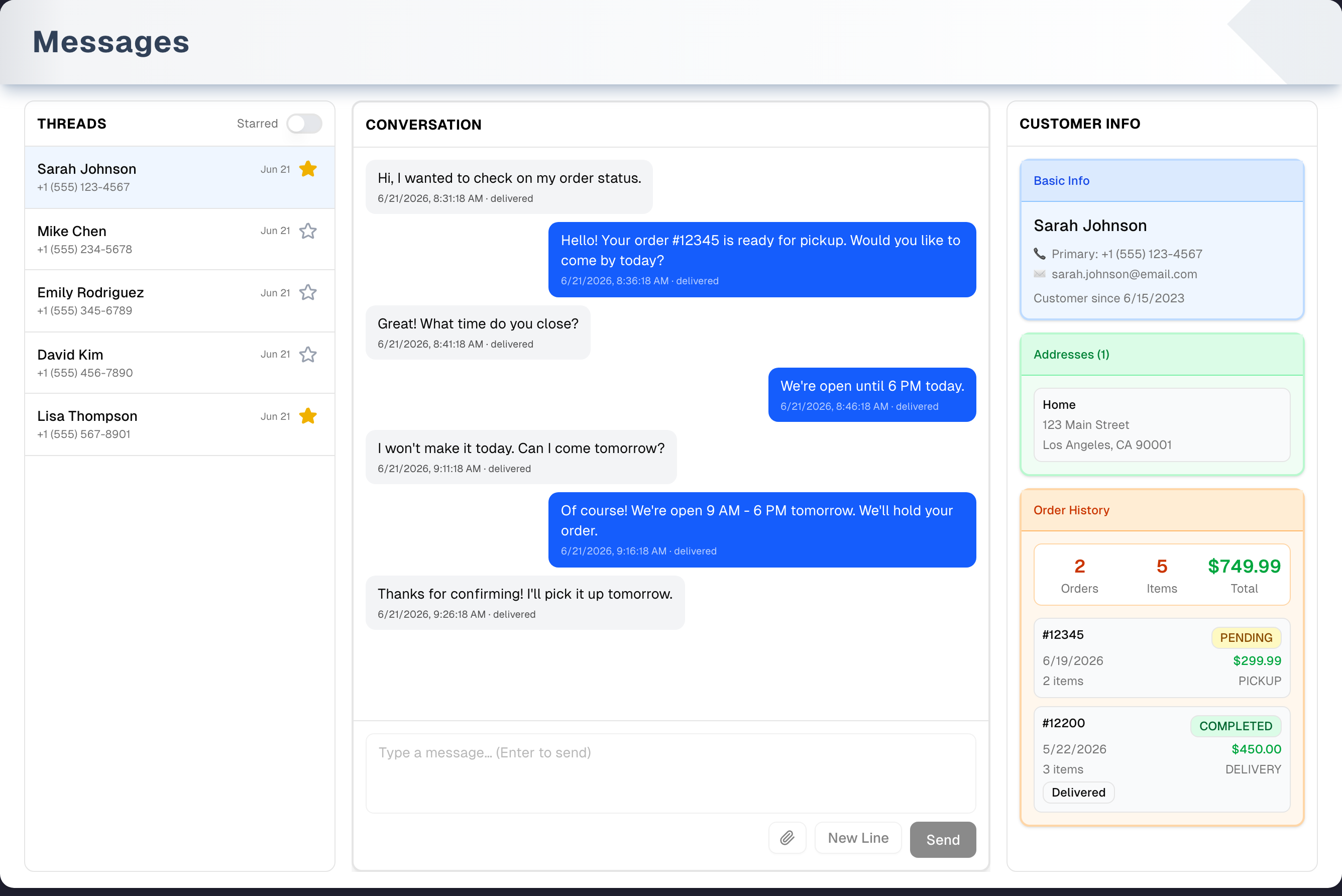
Overview
- Everyone in your store shares one inbox. Anyone signed in to your store can read every conversation, reply, and star threads. Stars are shared, so everyone sees the same ones.
- Plan: the inbox needs a Pro or Premium plan, or a free trial that is still running. On Basic, the page shows sample conversations behind an Unlock Pro & Premium Features card, and the sidebar item carries a small Pro tag. The Demo button still works.
- Replies use up your SMS allowance. A reply you type here counts like every other text you send: it is checked against your plan and your monthly texting allowance before it goes out, and it is added to the usage ledger in Settings → SMS afterwards. Once the allowance is used up, a reply shows "Monthly SMS limit reached (…)" with an Upgrade button and is not sent. See SMS Campaigns Setup for the full list of what counts.
- SMS must be connected. Until your store's texting number is set up, a green SMS Platform Integration Status card with a red Not setup badge appears and the three panes are faded and cannot be clicked. The UpChannels team connects the number for you: click Contact Sales on that card.
- Header buttons: Demo (sample inbox with a guided tour), Clear Cache and Refresh.
- What the inbox does not have: no search box, no filters other than Starred, no message preview in the list, no templates or scheduled sends, no delete, archive or assign, and no button to start a new conversation. To text someone new, use Send on Customers, a text from an order, or an SMS campaign. The conversation then shows up here.
Panes in detail
Threads (left)
- One row per conversation: the customer's name, the date of the last activity and the phone number. If the number is not on a saved customer, the phone number is shown as the name. There is no message preview.
- The thread at the top of the list opens by itself when the page loads. Click another row to switch.
- Starred switch: shows only starred threads. The star icon on each row stars or unstars that thread for the whole team.
- The most recently active conversations are at the top, whenever the thread was first started. Threads load 30 at a time; scroll to the bottom for more.
- A thread marked Closed is an earlier conversation with that customer. It was closed when someone texted them with Start a new conversation on (from Customers, an order or the schedule). Nothing was deleted: open it to read its messages. Replies go in the customer's newest thread.
- A closed conversation with no messages in it is not listed. Those are left behind when a text could not be sent at all, and there is nothing in them to read.
- When a text arrives or a teammate replies, the list reloads and the thread flashes a blue ring for 5 seconds. A blue dot marks threads that got a new text while you were on the page. The dot is not saved and goes away when you open the thread or reload.
Conversation (center)
- The customer's texts are on the left in grey and yours are on the right in blue. Each bubble shows the date and time, and a delivery status when one is available. Click a picture to open it full size in a new tab. Scroll up to load 30 older messages.
- Compose: Enter sends. Shift+Enter or the New Line button adds a line break. The paperclip attaches up to 10 pictures (JPEG, PNG or GIF). Each picture is shrunk and sent as its own picture message (MMS), and your text goes with the first one. A note under the pictures reads "Images are retained for 30 days".
- If the customer is not marked as agreeing to texts, Confirm SMS consent opens instead of sending. Confirm only if they have agreed. Their agreement is saved once the text has gone out, so a send that fails saves nothing.
- A Closed thread shows its messages with a note in place of the reply box: "This conversation was closed when a new one was started with this customer. Its messages stay here. Reply in their newest conversation."
- If a send fails, a red Not delivered bubble with Retry appears, and a red bar reads "A message failed to send. It was not delivered to the customer." When the thread cannot reach the customer at all — their number is held by another conversation, or the conversation no longer lists them — the bar says so and tells you to use Start a new conversation on the customer. There is no red bubble and no Retry then: retrying would send to the same thread and be refused again. Your text stays in the box so you can move it to the new conversation.
- Each conversation keeps its own draft. Your typed text, attached pictures and red Not delivered bubbles stay with the conversation you wrote them in. They don't show in other threads, and they come back when you switch back. A send that is still going when you switch finishes in its own conversation. Drafts are not kept after you reload the page.
Customer Info (right)
- Log complaint opens the complaint form with this customer, "Text" as the channel and this conversation attached, and it saves from here. If the number is not a saved customer, the complaint still saves — without a customer, unless you pick one in the form.
- Basic Info card: name, business name, phone numbers, emails and "Customer since". Click it to open Customer Details right here, without leaving the conversation — edit and save, or archive the customer. Clicking an address opens the customer's record on the Customers page in a new browser tab instead.
- Addresses card: the customer's saved addresses, if any.
- Order History card: the customer's 20 most recent orders (any status) with a summary of Orders, Items and Total. Click an order to open the full order details window.
- The panel does not show customer type, tier, lifetime value or loyalty.
Status and notifications
- SMS Platform Integration Status card (only when SMS is not connected): lists what SMS unlocks and has a Contact Sales button that opens a short form inside the card.
- Blue banner "Enable desktop notifications to get alerted when new messages arrive": Enable asks your browser for permission, and X hides the banner for good on this browser. Desktop alerts only appear while the Messages page is open in a tab or window you are not looking at, are headed by the customer's name when their number is saved against one, and open that conversation when you click them. Live updates on the page work without them.
Step by step: reply to a customer
- Open Growth → Communications Hub. The conversation at the top of the list opens by itself. Click another thread to switch.
- Read the thread. The Customer Info pane loads the customer's details and orders.
- Type your reply. To add pictures, click the paperclip.
- Press Enter or click Send.
- If Confirm SMS consent opens, click Confirm opt-in & send only if the customer has agreed to receive texts. Otherwise click Cancel.
- If a red Not delivered bubble appears, click Retry.
Tips & best practices
- Star urgent conversations and turn on Starred to see only those. Your teammates see the same stars.
- You can switch threads in the middle of a reply. Your half-written draft and pictures wait in that conversation until you come back (until you reload the page).
- Refresh fetches the latest threads and messages. Clear Cache only removes this browser's copies of conversations that have not been texted in 90 days, tells you how many conversations went, then refreshes. It never deletes messages.
- Allow desktop notifications and keep Messages open in its own tab so new texts alert you.
- Save customers' phone numbers in Customers so threads show names and order history.
- Want a look before SMS is set up, or on Basic? Click the amber Demo button for a guided tour of a sample inbox.
Troubleshooting
| Issue | Fix |
|---|---|
| Green SMS Platform Integration Status card with Not setup, panes faded, "No conversations" | Your store's SMS is not connected. Click Contact Sales on the card and the UpChannels team connects a texting number for you. See SMS Campaigns Setup |
| Page dimmed behind Unlock Pro & Premium Features | Your store is on Basic. Click Check Details to see plans in Plan & Billing. Demo still works |
| New texts don't show up | Click Refresh. Live updates reconnect by themselves after sleep or a network drop. They don't need notification permission |
| No desktop alerts | Click Enable on the blue banner and allow notifications. Alerts only appear while Messages is open in a tab or window you are not looking at. If you blocked them, allow them again in your browser's site settings |
| An alert shows a phone number instead of a name | That number is not saved against a customer yet. Add it to the customer's record (Growth > Customers) and the next alert uses their name, the same one the thread list shows |
| A thread shows a phone number instead of a name, and "No orders found for this customer." | The number is not the primary, mobile or business phone of a saved customer. How it is written there does not matter — (512) 555-0143 and +15125550143 are the same number. Add it in Customers |
| Confirm SMS consent keeps appearing | The customer isn't marked as agreeing to texts. Confirming sends the text and, once it has gone out, records their agreement — so if the sends keep failing, nothing is recorded and the question comes back. A customer who texted STOP must text START before carriers deliver again |
| Red Not delivered bubble | Click Retry. If it keeps failing, check your SMS setup, or the customer may have texted STOP |
| Picture thumbnail with a red mark | That picture failed to upload and was not sent. Hover the mark to see why. Click × to remove it, or Send to try it again (pictures already sent don't go again). Try a smaller picture if it is too large |
| Older messages missing | Scroll up in the conversation to load 30 more at a time |
| Log complaint won't save | Read the red message in the form. A complaint needs one line in What happened, and Resolved needs What was done |
What's next
- Manage who you text: Growth → Customers
- Send to many at once: Growth → SMS Campaigns
- Request reviews by text: Growth → Reviews
- Track problems customers text you about: Growth → Complaints
Detailed reference
Every button, icon, field and message on this page, for when you need the exact detail. Each panel starts closed — open the one you need.
Page header and toolbar
The page has no tabs. On a phone the three panes stack one above the other.
| Control | Where | What it does | Notes |
|---|---|---|---|
| Sidebar Growth → Communications Hub | Sidebar | Opens this page | A small Pro tag shows beside it on a Basic plan (not during a trial) |
| Title Messages and "Manage SMS conversations with customers. Select a thread to view and reply." | Header | — | — |
| Demo (Play icon, amber) | Header, first button | Opens the sample inbox with a guided tour | Everyone. On Basic, a floating amber Demo sits at the top right over the plan lock instead. See Demo mode |
| Clear Cache (trash icon), tooltip "Remove cached messages older than 90 days", caption "Remove cache older than 90 days" | Header, middle | Removes this browser's copy of every conversation whose newest message is more than 90 days old, and takes those threads out of the saved list. Then it refreshes like Refresh | It goes by how old the messages are, not by when the copy was saved, so a busy thread is never dropped and a dormant one always is. It then says either "Removed N conversations older than 90 days from this browser." or "Nothing on this browser was older than 90 days.", counting each conversation once however many of its copies went. Nothing on the server is deleted |
| Refresh (circular arrows) | Header, right | Fetches the first 30 threads and the open thread's latest 30 messages fresh from the server and scrolls the thread to the bottom | No message. Older messages you loaded by scrolling up are dropped until you scroll again |
| Other ways in | Elsewhere in the app | The Inbox tile on SMS Campaigns, the Messages button on the SMS usage page, and on the Dashboard the Communication Hub quick action, the Conversations figure and the Messages link in the Connected level also open this page | — |
Section: SMS status card and Contact Sales form
Shown above the panes only when your store's SMS is not connected, or when the app cannot check. While it shows, the three panes are faded and cannot be clicked. The Demo button still works.
| Control | Where | What it does | Notes |
|---|---|---|---|
| SMS Platform Integration Status, "SMS campaign integration with webhooks and auto-responses", Status with a red Not setup badge | Green card above the panes | Tells you SMS is not connected | Not shown while the check runs or on the Basic plan lock. Connected needs two things to be true: the store's credentials and texting number are saved, and Twilio is really sending incoming texts to UpChannels — the second is asked of Twilio, the same check Run Verification on SMS Campaigns Setup runs, so the badge cannot read Connected while replies would go nowhere |
| How to Enable SMS features tiles: "SMS marketing campaigns — Launch targeted SMS blasts and measure results.", "SMS follow-up — Automate reminders and post-visit follow-ups.", "SMS communication hub — Centralize 2-way texting across your team.", "1-click SMS in workflows — Text customers from orders and schedules instantly." | Inside the card | Information only | Not clickable |
| Contact Sales | Bottom of the card | Opens the Contact Sales form inside the card | The button hides while the form is open |
| Form title Contact Sales, "Interested in SMS messaging? Fill out the form and we'll get back to you." | Inside the card | Sends your details to the UpChannels sales team | Your email, name, store name and phone are filled in from your account |
| Close Form | Above the form, right | Hides the form. Contact Sales comes back | What you typed is lost |
| Submit ("Submitting..." while sending) | Form footer | Sends the form. On success the form is replaced by a green check, "Thank you!" "We've received your message and will get back to you shortly.", a line saying whether a copy was emailed to you ("A copy has been sent to …", or "No confirmation email was sent …" — a copy goes only to the email you sign in with, once a day) and a Close button | All fields are locked while sending. On failure a red box shows the reason: the server's message, "Your request didn't reach UpChannels. Check your connection and try again." when the connection dropped, "Your request wasn't sent: UpChannels answered with an error (…). Please try again in a moment." when an error page came back instead, or "Something went wrong. Please try again." What you typed stays in the form |
Fields (all required; an empty field gets your browser's own "fill out this field" prompt):
| Field | Required | Default | Rules and error text |
|---|---|---|---|
| Company Name ("Your company name") | Yes | Your store's name | — |
| Business Location ("e.g., San Francisco, CA"), hint "City, State or full address" | Yes | Empty | — |
| Your Name ("Your full name") | Yes | Your name | — |
| Phone Number ("+1 (555) 123-4567") | Yes | Your phone, if saved | Digits with spaces, dashes, brackets, dots and a plus sign in front only, and 7 to 20 digits. Otherwise "Please provide a valid phone number. Digits and + ( ) - . only, and no extension." shows under the box and nothing is sent |
| Email ("you@company.com") | Yes | Your email | Your browser checks it looks like an email |
| Business Challenges & Goals ("Tell us about your business challenges and what you're hoping to achieve...") | Yes | Empty | Your username is added to the end when sent |
| Previous Vendor ("What software/vendor are you currently using?") | Yes | Empty | — |
Section: Notifications banner and desktop alerts
| Control | Where | What it does | Notes |
|---|---|---|---|
| Bell icon, "Enable desktop notifications to get alerted when new messages arrive" | Blue banner above the panes | Invites you to allow desktop alerts | Only when SMS is connected, this browser has not been asked yet, and the banner was not dismissed on this browser. Not shown on the Basic plan lock |
| Enable ("Requesting..." while the browser asks) | Banner, right | Opens your browser's permission prompt. Allow hides the banner. Block hides it for good on this browser | If the browser doesn't support notifications, it acts like Block |
| X (aria-label "Dismiss notification banner") | Banner, far right | Hides the banner for good on this browser | Does not change the browser's permission |
| Desktop alert: the title is the customer's name, or their phone number when they are not saved as a customer; the text is the first 50 characters of the message (or "You have a new message", for example for a picture) | Your computer's notification area | Alerts you to a new customer text | Only while the Messages page is open in a tab or window you are not looking at, and permission is allowed. Not for replies sent by your team. Closes after 5 seconds. Clicking it brings the browser window forward and opens that conversation |
Section: Threads pane
| Control | Where | What it does | Notes |
|---|---|---|---|
| Title THREADS | Top of the left pane | — | — |
| Starred switch | Top right of the pane | On: shows only starred threads. Off: shows all loaded threads. Clicking the word "Starred" also flips it | Only filters threads already loaded (30 at a time). Resets to off when you reload |
| Thread row | Each row | Opens the thread in Conversation, loads the customer in Customer Info, clears the blue dot, and shades the row light blue | The top thread opens by itself when nothing is selected |
| Row text: name (or phone number, or "Unknown"), date of last activity (for example "Sep 18"), phone number on a second line | Each row | — | The name comes from a saved customer whose primary, mobile or business phone matches. The phone line shows only when a name was found. The date is the latest activity your store knows of, whether that was a text in, a reply out, or both. Dates use your store's time zone. No message preview |
| Closed tag (hover: "An earlier conversation. Its messages stay here; replies go to the customer's newest conversation.") | Next to the name | Marks an earlier conversation, closed when a text was sent with Start a new conversation on | Open it to read its history. The customer's newest conversation is a separate row. A closed conversation with no messages in it is not listed at all |
| Blue dot | Left of the name | Marks a thread that got a new text (or a teammate's reply) while you were on the page and weren't viewing it | Not saved. Gone when you open the thread — by clicking the row or by clicking its desktop alert — or when you reload. Older unread texts get no dot |
| Blue ring | Around a row, for 5 seconds | Flashes when a thread gets a new text or a teammate's reply | Only while the page is open |
| Star icon (aria-label "Flag conversation" / "Unflag conversation") | Right end of each row | Stars or unstars the thread. Yellow filled = starred | Shared with your whole team. If saving fails the star flips back and a pop-up says why — "This conversation's details can't be read, so it wasn't changed." when the thread was deliberately left alone, otherwise "Could not change the star." |
| Scroll to the bottom | Threads pane | Loads the next 30 threads ("Loading more...") | Only while there are more threads. The first batch is your most recently active conversations, so a thread started long ago that has just been texted is at the top. Later batches also bring in older conversations your store has never replied to |
| Which conversations are listed | Whole list | Every conversation your store has a record of (the app keeps one for each customer on each of your store's numbers), whatever number or sending group it is on; every conversation marked with your store; and an older conversation with neither, unless Twilio shows it isn't your store's: it is in a sending group that isn't your store's, or, for a store without a sending group of its own, it is on numbers none of which is your store's | The conversation screen opens by the same rule, so every row listed opens. So texts other software sent on the same Twilio account from another sending group or another number are not listed, and neither is an older unmarked conversation on a number your store no longer has on file (it would say "Conversation not found" when opened). A conversation that names no sending group, or whose numbers Twilio could not read, is listed |
| Live updates | Whole list | When a text arrives or anyone on your team sends one, the list updates and scrolls to the top. After sleep or a network drop it reconnects by itself and catches up | Works without notification permission. Threads you loaded by scrolling down stay loaded: the update refreshes the threads it knows about, adds any new one at the top and leaves the older ones alone, and the next scroll carries on from where you were. A recent thread that has since gone (one closed by Start New Conversation in another tab, say) drops out instead of lingering |
| Quick start from this browser | Page load | The list first shows the copy this browser saved for you and your store (the newest 90 threads at most), then refreshes from the server. In the background the app also fetches the latest messages of every listed thread so switching is instant | Pictures always reload from the network |
| "Loading…", "No conversations", "No starred conversations", "Loading more..." | Pane body | Status text | "No conversations" also shows when SMS is not connected or the list could not load. No error text appears in this pane |
Section: Conversation pane
| Control | Where | What it does | Notes |
|---|---|---|---|
| Title CONVERSATION | Top of the center pane | — | There is no customer name, phone or status header here. Use the highlighted thread and Customer Info to see who you are texting |
| Message bubbles | Center | Customer texts on the left (grey), yours on the right (blue). Line breaks are kept. Under each: date and time in your store's time zone, a dot, then a delivery status when one is available | Your reply shows "sending" while it is on its way. Replies typed here stay on your side after a refresh too. A picture the app cannot locate shows "Attachment could not be loaded" in its place |
| Picture in a bubble | Bubble | Click to open the full picture in a new browser tab | "Loading Image ..." shows until it loads |
| Scroll to the top | Center | Loads 30 older messages ("Loading older messages...") without jumping you to the bottom | Only while older messages exist. Opening a thread shows the newest 30 |
| Red bubble "Not delivered" with Retry | Bottom of the thread, right | A reply the app could not send stays visible in red (with its picture, if any). Retry sends it again | Greyed out while a send is running in this conversation. Only for sends that failed in the app; a text the carrier rejects later gets no Retry. A red bubble belongs to the conversation it was sent in: it doesn't show in other threads, comes back when you return, and Retry always sends to that conversation. It stays until the retry goes through; the box then clears if it still holds that same text, so it can't go out twice, and anything you typed in the meantime is kept. Reload the page to clear them. A send refused because the thread cannot reach the customer adds no bubble at all — there would be nothing to retry — so pressing Send again never stacks them up. Once a send or Retry in this conversation has been refused that way, Retry on the red bubbles already there is greyed out too (hover shows why), until a text from this conversation goes out again |
| Red bar "A message failed to send. It was not delivered to the customer." | Between the thread and the compose box | Appears after a failed send | Clears when you switch threads or the next load succeeds. The reason is usually not shown. The case that names itself is a thread that cannot reach the customer: the bar then carries that sentence instead, and no red bubble is added |
| Red bar "Failed to load messages. Tap Refresh to retry." | Same place | The thread could not be loaded and there was no saved copy | Click Refresh |
| Grey note "This conversation was closed when a new one was started with this customer. Its messages stay here. Reply in their newest conversation." (plus "Your unsent text: …" if you had typed something) | In place of the compose box | Shown on a Closed thread: it keeps its messages but takes no new ones | The compose box, paperclip, New Line and Send are hidden, and Retry on red bubbles is greyed out. If the thread is closed while you are writing (from another tab or by a teammate), pressing Send shows this note, keeps your text and adds no red bubble. Copy your text into the customer's newest thread |
| Compose box ("Type a message… (Enter to send)") | Bottom of the pane | Type your reply. Enter sends. Shift+Enter adds a new line | Enter does nothing when the box is empty with no pictures, or while this conversation is sending. Each conversation keeps its own draft: another thread shows its own draft (or an empty box), and switching back brings yours back. Drafts are lost when you reload. Greyed out when no thread is open |
| Paperclip icon (tooltip "Attach images (up to 10)", or "Maximum 10 images" when full) | Compose footer, first button | Opens a file picker for pictures (JPEG, PNG or GIF). You can pick several at once | Greyed out while sending or when 10 pictures are attached |
| "… image(s) selected (… more allowed)" and small thumbnails | Tray under the compose box | Previews the pictures you will send | Only when at least one picture is attached |
| × on a thumbnail (aria-label "Remove image …") | Thumbnail corner, on hover | Removes that picture before sending | On pictures not yet sent, including ones with a red mark. Not while sending |
| Thumbnail status: spinner with "Upload", then a green ✓ (sent) or a red mark (failed; hover shows the reason) | Over each thumbnail | Shows each picture's progress during a send | After the send, pictures that went out leave the tray and are never sent again. A picture that failed to upload stays with a red mark: the next Send tries only the pictures still in the tray, or remove it with ×. A picture that uploaded but wasn't delivered leaves the tray and becomes a red Not delivered bubble with Retry. Each conversation has its own tray |
| "Images are retained for 30 days" (amber) | Bottom of the tray | Tells you sent pictures are kept for 30 days | Only while pictures are attached |
| Red line with a warning icon, for example "Only image files (JPEG, PNG, GIF) are supported" | Under the compose box and picture tray | Explains why pictures you picked were not added | Clears when you pick again or remove a picture. See Messages you may see |
| New Line | Compose footer, middle | Adds a line break where your cursor is | Same as Shift+Enter |
| Send ("Sending…" while sending) | Compose footer, right | Text only: sends one text. With pictures: each picture is shrunk (to JPEG, at most 1920 pixels and about 1 MB) and sent as its own picture message, one after another. Your text goes with the first picture that uploads, or on its own after the pictures if none of them uploaded. On success the box clears (anything you typed while it was sending is kept). On failure your text stays and a red Not delivered bubble appears | Greyed out while this conversation is sending, or when there is no text and no picture. Always sends to the conversation it was pressed in: if you switch threads while it is sending, it finishes there, and a failure shows as a red bubble in that conversation plus a pop-up "A message in another conversation was not delivered. Open that conversation to retry it." If the customer isn't marked as agreeing to texts, Confirm SMS consent opens instead — but only once the plan and allowance check has passed, so a store over its allowance sees "Upgrade required" rather than the consent question. A reply that the plan or the allowance doesn't cover shows the Upgrade required pop-up and the reason above the box, your text stays in the box, and no red Not delivered bubble is added (retrying could only be refused again) |
Section: Customer Info pane
| Control | Where | What it does | Notes |
|---|---|---|---|
| Title CUSTOMER INFO | Top of the right pane | — | — |
| Log complaint (warning-bubble icon) | Top of the pane | Opens Log complaint with this customer, "Text" as Came in by, and this conversation attached | Shown whenever a thread is open. For a number that is not a saved customer the complaint is still logged, with no customer attached unless you pick one in the form |
| Basic Info card | Blue card | Click anywhere on it to open Customer Details in a dialog over the thread. Saving writes to the customer's record; Archive archives them and clears the panel | Shows the name (or business name, first and last name, or "Unknown Customer") with an arrow, the business name if different, Primary, Mobile and Business phones (each only if different), Fax, primary and secondary email, and "Customer since …". Clicking an address opens the Customers page in a new browser tab instead. For a number that isn't a saved customer, the name is the phone number, there is no arrow and clicking does nothing: the line "This number isn’t a saved customer yet…" says so, and you can add them in Customers |
| Addresses (…) card, each address | Green card | Click an address to open the same Customers tab | Only when the customer has addresses. Shows the label (or "Address"), street, city, state and ZIP, country if not US, and the address's own phone and email. Scrolls after a few |
| Order History summary: Orders, Items, Total | Orange card, top | Count of orders, count of line items and the money total of the listed orders | Covers only the 20 most recent orders, of any status (cancelled orders and quotes included). Hidden when there are no orders |
| Order row: "#" and order number with an arrow, status badge, date, total (or "No total"), "… item(s)" (or "No items"), order type, Shipped and Delivered badges | Order History list | Opens the full order details window, the same one as on Order Management. "Loading order details..." shows meanwhile | Badge colours: green for completed or delivered, yellow for pending, red for cancelled, blue for shipped, grey for anything else. If the full order can't be loaded, a basic version without items opens. Deleting the order there removes it from this list. Saving shows the new status, total, item count and Shipped/Delivered badges in the window and in this list straight away |
| "No orders found for this customer." | Order History | Empty state | Also for numbers that aren't saved customers |
| "Loading customer details...", "Failed to load customer details", "Select a conversation to load customer details." | Pane body | Status text | — |
Dialog: Confirm SMS consent
Opens when you press Send or Retry and the number belongs to a saved customer who is not marked as agreeing to texts. The customer is recognised however their number was saved, (978) 218-9551 or +19782189551. If more than one of your customer records has the number — an archived one counts too — it opens unless every one of them is marked as agreeing, and confirming marks them all. A number that isn't a saved customer never opens it. The same dialog appears when texting from Customers or an order. The app cannot tell "texted STOP" apart from "never agreed", so it asks you to confirm. If your plan or this month's allowance does not cover the text, you see the upgrade message instead — you are never asked to confirm an opt-in for a text that cannot be sent.
| Control | Where | What it does | Notes |
|---|---|---|---|
| Title Confirm SMS consent, "This customer isn’t marked as opted in to SMS." and the amber note "Only continue if this customer has agreed to receive text messages from you. Confirming sends this message and, once it has gone out, records their SMS opt-in. If they previously texted STOP, the carrier will still block delivery until they text START." | Dialog body | Explains the choice | — |
| Cancel | Footer | Closes. Nothing is sent and your draft and pictures stay as they were. No red bubble is added | Greyed out while sending. X, Esc or clicking outside also close it (not while sending). If the dialog came from Retry, the red bubble stays so you can retry later |
| Confirm opt-in & send ("Sending…" while sending) | Footer | Sends the message again and, once it has gone out, marks the customer as agreeing to texts (saved on their customer record). A refused send records nothing. After Send, the sent text clears from the box. After Retry, the red bubble goes and the box clears if it still holds that same text, so it can't go out twice; anything you typed in the meantime is kept | With pictures, sending stops at the first blocked picture, and confirming sends it and every picture and text still unsent. If this resend fails, a red Not delivered bubble appears, as for any failed send |
Dialog: Log complaint
The same form as on Complaints, which documents every field. From Messages it opens with the customer filled in, Came in by set to Text, and the conversation linked.
| Control | Where | What it does | Notes |
|---|---|---|---|
| Title "Log complaint", "Category, severity, owner and one line about what happened." | Header | — | X (close), Esc or clicking outside closes it like Cancel |
| "This category, last 90 days: … complaints" (plus "· … of them …" and a weekday when several fell on today's weekday) | Top of body | Warns about a pattern | Only when the chosen category has more than one complaint in 90 days |
| Customer ("Search customer") and Clear customer | Body | Filled in with this customer. You can change or clear it | For a number that isn't a saved customer it starts empty, and the complaint saves without one. Search for the customer here if you have them under another number |
| Linked order: "None — log it from the order to link one" | Body | Read-only | From Messages no order is linked |
| Category chips | Body | Pick one. The first is preselected | The list comes from Settings → Lost sales (defaults: Delivery window, Damaged on arrival, Product defect, Wrong item, Pricing / billing, Staff / service, Install / service quality, Communication, Other) |
| Severity (Low, Normal, High, Urgent, Emergency; default Normal) | Body | Sets priority and the due date | — |
| Owner | Body | Who owns the complaint | Starts at you, with the whole team listed and "Nobody yet" at the top. The form reads your team itself here, so it may show "Loading…" for a moment before it opens |
| Due ("due in … days") | Body | Read-only | Defaults: Emergency 1, Urgent 1, High 2, Normal 5, Low 10 days |
| What happened ("Dent on the right door, noticed after the driver left.") | Body | Required, up to 2,000 characters | Left empty, it is listed in red above the buttons and Save names it |
| Status (Open, Waiting on customer, On hold, Escalated, Resolved, Closed; default Open) | Body | — | Resolved needs What was done |
| Came in by (In store, Phone, Text, Email, Review, Customer portal) | Body | Preset to Text | — |
| What was done ("Redelivered Sat 9–11, $50 credit.") and Root cause ("Saturday route overbooked."), with the hint "One line here is what turns eleven complaints into one fix." | Body | Optional | What was done is required when Status is Resolved |
| Close / Cancel | Footer | Closes the form. Nothing is saved | Reads Close until you change something, then Cancel. With unsaved changes it asks "Leave without saving?" first |
| Save | Footer | Creates the complaint, attached to this text conversation | Anything missing — What happened empty or over 2,000 characters, no category, or Resolved with no What was done — is listed in red above the buttons, and Save repeats the first one and puts the cursor in it. Greyed out only while saving, or on a saved complaint with no changes. The complaint is saved whether or not the number belongs to a saved customer. Photos, notes and Remove only appear on a saved complaint, so they show once it has been saved; Remove needs a manager or the owner |
Plan lock (Basic plan)
Shown when your store is on Basic and not in a trial. A store that picks Basic during its trial is locked straight away. While the plan is still loading, or if it can't be read, the page opens normally.
| Control | Where | What it does | Notes |
|---|---|---|---|
| Sample inbox (Sarah Johnson, Mike Chen, Emily Rodriguez, David Kim, Lisa Thompson), dimmed | Whole page | A preview of the feature | Cannot be clicked. No SMS card or notification banner |
| Card (lock icon) Unlock Pro & Premium Features, "SMS, insights, finance tools & more" | Center of the page | — | — |
| Check Details (green) | Card header | Opens Plan & Billing. See Plan & Billing | The card's only button |
| Pro list: "500 SMS/month + a dedicated phone #", "SMS campaigns & review invites", "Ads-vs-store insights", "Finance: expenses, assets, reports", "Customer Portal: tracking, payments, scheduling". Premium list: "Everything in Pro", "2,000 SMS/month", "Advanced reporting (grouped/pivot)", "CSV / PDF data export", "Workforce: time clock, timesheets, pay runs" | Card body | Information only | — |
| Demo (floating, amber) | Top right of the page | Opens the sample inbox with the guided tour | Works while the page is locked |
Sub-page: Single conversation page
A full-screen view of one conversation, without the thread list or customer panel. It opens from History on a customer row in Customers, and from the Open button on the "Message sent" confirmation after you text a customer from Customers or from the order list. The inbox itself does not link here. It is not behind the plan lock.
| Control | Where | What it does | Notes |
|---|---|---|---|
| Left-arrow button (no label) | Header, far left | Goes back to the previous page | — |
| Person icon, name (customer name, else formatted phone, else "Customer"), phone icon and number | Header | — | The phone line shows only when both a name and a phone are known |
| Load older messages | Top of the thread | Loads 20 older messages ("Loading older messages..."). Scrolling near the top does the same | Only while older messages exist. Older messages you load stay on screen: the 10-second refresh adds anything new to what is already there and never takes history away, and the next Load older messages carries on from where the last one stopped |
| Date separators "Today", "Yesterday", or a date such as "Mon, Sep 14" (year added if not this year) | Between groups of messages | Groups messages by day in your store's time zone | — |
| Message bubbles | Thread | Time, then a delivery status when available. Pictures open full size in a new tab | — |
| Compose box ("Type a message..."), hint "Press Enter to send, Shift+Enter for new line" | Bottom | Enter sends. Shift+Enter adds a new line | No pictures on this page. Replaced by the closed-conversation note on a conversation that was closed (see below) |
| Send button (paper-plane icon; spinner while sending) | Right of the compose box | Sends the text, clears the box and reloads | Greyed out while sending or when the box is empty. If the send is refused, the reason appears in a red line just above the compose box; the conversation stays on screen and your draft stays in the box. The line goes when you change the text or the next send works. A customer not marked as agreeing to texts opens Confirm SMS consent, the same as the inbox: Confirm opt-in & send sends this text and then records their agreement, so a refused send records nothing. Like a reply in the inbox, this send is checked against your plan and your monthly SMS allowance and counted towards it; when it isn't covered, the Upgrade required pop-up shows and the reason appears in that same red line |
| Automatic refresh | Whole page | Checks for new messages every 10 seconds and adds them to the thread | Not instant like the inbox. Nothing already on screen is removed, and a message already shown is not repeated |
| "Loading messages...", "No messages yet. Start the conversation below.", Error loading conversation with a reason | Thread area | Status text | Error loading conversation is only about reading the thread. A refused send never replaces the messages |
| Closed conversation note, "This conversation was closed when a new one was started with this customer. Its messages stay here. Reply in their newest conversation." | Bottom, in place of the compose box | Tells you this older conversation takes no new messages | Same as the inbox. Every message stays readable. If a teammate closes the conversation while you have it open, the note appears at the next refresh, or as soon as a send is refused — and anything you had typed is shown under the note as "Your unsent text:" so you can copy it into the newest conversation |
Sub-page: Unified Communications Hub (coming soon)
A "coming soon" page for a future voice and messaging hub. It is not in the menu and nothing in the app links to it. It opens only if you type its address. The sidebar's Communications Hub item opens the Messages inbox, not this page. It is not behind the plan lock, and it belongs to no menu item, so hiding Communications Hub does not close it.
| Control | Where | What it does | Notes |
|---|---|---|---|
| New Feature badge and SMS badge Checking SMS... then SMS Active (green) or SMS Not Setup (red) | Top of the page | Shows whether your store's SMS is connected | — |
| Unified Communications Hub, "Multichannel messaging, team + customer threads, call tracking, redirecting, recording, and transcripts — seamlessly integrated." and chips (Twilio Conversations, Twilio Voice, Recording & Transcript, Native Integration) | Top of the page | Information only | — |
| Get early access email box ("your@email.com") and Join waitlist ("Joining…" while sending), "We’ll email you when it’s ready. No spam." | Top right | Adds your email to the waitlist and shows "You're on the list!" "We will notify you at launch." | A bad email shows "Invalid email" "Please enter a valid email address.". A failure shows "Submission failed" with the reason or "Please try again later." |
| SMS Integration Required card, "To enable the Communications Hub, you need to complete the SMS integration setup first." with a list of what's needed | Yellow card | Information. The feature cards below are faded and their links don't work while it shows | Only when SMS is not connected |
| Go to SMS Setup | Yellow card | Opens the SMS Campaigns page | Same condition |
| Learn More | Yellow card | Opens the SMS provider's messaging documentation in a new tab | Same condition |
| Cards Multichannel Messaging ("Conversations API" link), Voice & Numbers ("Voice", "Phone Numbers" links), Seamless Integration ("Docs" link), What you can build, How it integrates | Page body | The links open the SMS provider's website in a new tab. The rest is text | — |
Messages you may see
| Message | When it appears | What to do |
|---|---|---|
| SMS Platform Integration Status card with Not setup | Your store's SMS isn't connected, or the check failed | Click Contact Sales on the card so the UpChannels team can connect a number. See SMS Campaigns Setup |
| "Enable desktop notifications to get alerted when new messages arrive" | SMS is connected and this browser hasn't been asked yet | Click Enable and allow, or dismiss with X |
| "Unlock Pro & Premium Features" / "SMS, insights, finance tools & more" | Basic plan, not in a trial | Check Details to see plans, or open Demo |
| "Loading…" / "Loading more..." | Thread list loading | Wait |
| "No conversations" | No threads yet, SMS not connected, or the list couldn't load | Check SMS setup, then click Refresh |
| "No starred conversations" | Starred is on and none of the loaded threads are starred | Turn Starred off, or scroll to load more |
| Pop-up "This conversation's details can't be read, so it wasn't changed." | You starred a thread whose saved details can't be read. Starring would rewrite them and lose the store the thread belongs to, so nothing was changed and the star flipped back | Nothing to fix from here. The thread still works; contact support if you need it starred |
| Pop-up "Could not change the star." | The star could not be saved and the thread was left as it was | Try again. If it keeps happening, click Refresh |
| "Loading messages…" / "Loading older messages..." | A thread is loading | Wait |
| "No messages in this conversation" | The thread has no messages | — |
| "This conversation was closed when a new one was started with this customer. Its messages stay here. Reply in their newest conversation." | You opened a Closed thread, an earlier conversation with this customer | Read its history here. Reply from the customer's newest thread |
| "Loading Image ..." | A picture in a bubble is still loading | Wait. Click it to open full size |
| "Failed to load messages. Tap Refresh to retry." | The thread couldn't load and there was no saved copy | Click Refresh |
| "A message failed to send. It was not delivered to the customer." | A send failed | Click Retry on the red bubble. If it keeps failing, check your SMS setup or whether the customer texted STOP |
| "Couldn't add this customer to this conversation, so nothing was sent. Their number is still held by another conversation. Use 'Start a new conversation' on the customer to move them over." | This thread no longer holds the customer, so nothing sent from it can reach them. Nothing was sent | Text the customer with Start a new conversation on (from Customers, an order or the schedule). Their reply thread is the new one. No red bubble and no Retry appear: your text stays in the box to copy across |
| "This conversation can't reach the customer, so nothing was sent. Open their newest conversation, or use 'Start a new conversation' on the customer." | Same refusal, where the app could not tell why the conversation no longer holds the customer | Look for a newer conversation with that customer and reply there. If there is none, text them with Start a new conversation on. Worth one more Send first: a brief problem at the texting service can also produce this |
| "Not delivered" with Retry | Red bubble for a reply that failed | Click Retry |
| "… image(s) selected (… more allowed)" | Pictures are attached | — |
| "Images are retained for 30 days" | Pictures are attached | Information only |
| "Only … more image(s) can be added (max 10)" | You picked more files than there are free slots. The extra files are left out | — |
| "Only image files (JPEG, PNG, GIF) are supported" | You picked a file that isn't a picture. None of the files from that pick are added | Pick only JPEG, PNG or GIF files |
| Hover text on a red thumbnail: "Image too large after compression (…)" (still over 5 MB after shrinking), "Failed to upload image", "Upload failed", or the reason the upload was refused | A picture failed to upload during a send, so it was not sent | Remove it with ×, or press Send to try it again. Try a smaller or different picture |
| Pop-up "A message in another conversation was not delivered. Open that conversation to retry it." | A send you started failed after you switched to another thread | Open the conversation you sent from and click Retry on its red bubble |
| Confirm SMS consent / "This customer isn’t marked as opted in to SMS." | You replied to a customer not marked as agreeing to texts | Confirm only if the customer agreed to receive texts. Their Service Updates turns to Yes only once the reply has actually gone out |
| Pop-up "Upgrade required" — "Monthly SMS limit reached (…/…). Upgrade your plan or wait for the next billing cycle to send more." + Upgrade | You replied after this cycle's texts were used up. Nothing was sent | Buy credits in Settings → SMS, upgrade, or wait for the reset date. The same sentence also shows above the compose box; your text stays in the box and there is no red bubble to retry |
| Pop-up "Upgrade required" — "Your plan does not include SMS. Upgrade to Pro or Premium to send messages." / "Your subscription is inactive or your trial has expired. Update billing to send SMS." / "No active subscription. Subscribe to Pro or Premium to send SMS." + Upgrade | You replied from a store whose plan, trial or subscription doesn't cover texting. Nothing was sent | Upgrade opens Plan & Billing |
| "Loading customer details..." / "Failed to load customer details" / "Select a conversation to load customer details." | Customer Info states | Wait, click Refresh, or pick a thread |
| "Unknown Customer", or the phone number shown as the name | The number isn't on a saved customer, or the customer has no name | Add or update the customer in Customers |
| "No orders found for this customer." | No orders for that customer | — |
| "Loading order details..." | You clicked an order | Wait for the order details window |
| "No total" / "No items" | An order with a $0 total or no line items | — |
| "That customer is not in this store's customer list…", "The owner you picked is not a member of this store any more…" or "The text conversation this came from is not one of this store's." | Saving a complaint whose customer, owner or thread is not one of your store's records — for example a customer archived or removed while the form was open | Re-pick the customer or owner and save again |
| "Thank you!" / "We've received your message and will get back to you shortly." / "A copy has been sent to …" or "No confirmation email was sent …" | The Contact Sales form was sent. The last line says whether a copy was emailed to the address you sign in with | — |
| Red box with a reason such as "Your request didn't reach UpChannels. Check your connection and try again." or "Something went wrong. Please try again." | The Contact Sales form failed | Click Submit again, or try later |
| Error loading conversation with a reason, on the single conversation page | The thread could not be read | Reasons include "Conversation not found", "Messaging is not configured for your organization. Contact UpChannels support to set up texting." and "Unauthorized". It refreshes itself every 10 seconds. For the messaging one, click Contact Sales on the inbox status card to have your texting number connected |
| A red line above the compose box, on the single conversation page | A send was refused there. The conversation and your draft stay put | Reasons include "This conversation was closed when a new one was started with this customer. Reply in their newest conversation.", the plan and allowance sentences, and "Failed to send (…)". A customer who is not opted in opens Confirm SMS consent instead |
| "No messages yet. Start the conversation below." | Empty thread on the single conversation page | Type below |
| "403 - Forbidden" / "You do not have permission to view this page. Contact your organization owner." | The owner has hidden Communications Hub from your menu, in a store with more than one active person. It shows on the inbox and on a single conversation, from a link in the app, a bookmark or a typed address alike | Ask the owner to show it again in Settings → Team |
| "Invalid email" / "You're on the list!" / "Submission failed" | Waitlist form on the Unified Communications Hub page | — |
Who can use what
- Plan: Pro or Premium, or a free trial that is still running, gets the full inbox. Basic (not in a trial) gets the dimmed sample preview, the Unlock Pro & Premium Features card and a floating Demo. Picking Basic during a trial locks the page straight away. While the plan is loading or can't be read, the page opens normally. The sidebar shows a Pro tag on Communications Hub for Basic stores.
- Single conversation page: opened from Customers → History or an Open button, it is not behind the plan lock, so a store on Basic that already has a conversation can open that page and read the history. Sending from it is a separate rule: a reply there goes through the same plan and allowance check as any other text, so on Basic it is refused with Upgrade required — the pop-up says why (your plan, your subscription or your monthly allowance), the same reason appears in a red line above the compose box, and the conversation and your draft stay where they are.
- SMS allowance: replying to an existing conversation — here or on a single conversation page — is checked against your plan and your monthly texting allowance and counted towards it, exactly like every other way of texting a customer. So a store on Basic, or one that has used its allowance up, cannot reply until it upgrades, buys credits or the allowance resets. Full list in SMS Campaigns Setup.
- SMS setup: your store needs its own texting number connected. The UpChannels team connects it; ask with Contact Sales on the status card. Without it the status card shows and the panes are faded. No one in the store can add or change the store's texting numbers: contact UpChannels support to have them changed. See SMS Campaigns Setup.
- Roles: there are no owner, manager or staff differences on this page. Anyone signed in to your store can read every thread, star and unstar, reply, attach pictures, confirm SMS consent and open Log complaint. Stars are shared by the whole team.
- Menu Visibility: if the owner hides Communications Hub for a user in Settings → Team, that user gets "403 - Forbidden" on the inbox and on the single conversation page behind it, however they open them — a link in the app, a bookmark or a typed address. The sidebar row goes for them too. Nothing changes on the Shortcuts page: it has no Communications Hub card to take away. The demo page is exempt, so it still opens, and so is the "coming soon" Unified Communications Hub page, which belongs to no menu item. A store with only one active person is never blocked; someone switched off or removed in Team doesn't count as that person.
- Consent: replying to a customer who isn't marked as agreeing to texts needs your confirmation — in the inbox and on the single conversation page alike. Confirming sends the text and, once it has gone out, records their agreement; a refused send records nothing. A customer who texted STOP must text START before carriers deliver again.
- STOP and START: a customer who texts STOP (or STOPALL, UNSUBSCRIBE, CANCEL, END, QUIT) is marked as not agreeing to texts, and START (or UNSTOP, YES) marks them as agreeing again — on every one of your customer records with that number, archived ones included, however the number was saved there. Records in other stores are never touched.
- Desktop alerts: set per browser, and only while the Messages page is open somewhere in that browser.
- Saved copies: each browser keeps its own copy per store and user. Opening Messages clears copies saved on that browser for other users or stores.
Demo mode (/messages/demo)
- Open it: the amber Demo button (Play icon), first in the Messages header, or the floating amber Demo at the top right on the Basic plan lock. Not behind the plan lock, and works without SMS set up.
- Header: Messages — Demo, "Sample messages populated with demo data. All actions are disabled." There is no Clear Cache or Refresh.
- Banner: "Demo mode — messages are populated with sample data. All actions are disabled." with Take a Tour, which restarts the tour at step 1.
- Tour: starts by itself the first time you open the demo. The rest of the page darkens around the highlighted area, and the card sits below it (above it on steps 3 and 5), always inside the window. Footer: progress dots, "… of 6", Back (from step 2), Skip (closes), Next, and Got it! on the last step. Clicking the dark backdrop closes it. Keys: Esc closes, right arrow or Enter goes on (and closes on the last step), left arrow goes back.
- Still works: clicking a thread switches the conversation and customer panel, the tour, Take a Tour and Exit Demo Mode.
- Disabled: the compose box, paperclip, New Line and Send. The Starred switch does not turn on; tour steps 1 and 6 say it works in the live inbox. Stars are just icons (clicking one selects the row). The Basic Info, address and order cards are not clickable.
- Leave: Exit Demo Mode (left arrow) at the top right goes back to Messages.
| # | Pane | Tour step | What it points at |
|---|---|---|---|
| 1 | Threads | Conversation Threads — "All your SMS conversations appear here. Threads are sorted by most recent message. Click any thread to view the full conversation. In the live inbox the Starred switch shows only flagged conversations; it is switched off in this demo." | The Threads pane |
| 2 | Conversation | Message View — "The center panel shows the selected conversation. Inbound messages appear on the left, outbound on the right — just like a standard messaging app. Each message shows delivery status and timestamp." | The Conversation pane |
| 3 | Conversation | Compose Messages — "In the live workspace you type your reply here and press Enter to send (Shift+Enter for new line), and the paperclip button lets you attach images. The compose box is disabled in this demo." | The compose area |
| 4 | Customer Info | Customer Information — "The right panel shows the customer's profile — name, phone numbers and email, how long they have been a customer, and their addresses. In the live workspace, clicking the customer name opens their full profile page in a new tab." | The Customer Info pane |
| 5 | Customer Info | Order History — "View the customer's order history with summary stats — total orders, items, and revenue. In the live workspace, clicking an order opens the full order details modal with payment, delivery, and item information." | The Order History card |
| 6 | Threads | Star & Flag Conversations — "A yellow star marks a flagged conversation. In the live inbox, clicking the star on any thread flags it for the whole team, and the Starred switch at the top of the list shows only flagged ones." | The star on Sarah Johnson's thread |
Sample data: five threads. Sarah Johnson (starred, open by default, 7 messages, 2 orders, 1 address), Mike Chen (3 messages, 1 order), Emily Rodriguez of "Rodriguez Interiors" (5 messages, 2 orders, 1 address), David Kim (3 messages, 1 order) and Lisa Thompson (starred, mobile number shown, 7 messages, 2 orders including a $0 service order that shows "No total", 1 address).
Differences from the live page: no Log complaint button, no arrows beside the customer name and order numbers, no Business phone, Fax or second email lines, and no phone or email on addresses. No pictures, red Not delivered bubbles, error bars or picture tray. No SMS status card, notification banner, blue dots or live highlights. Step 4 says clicking the customer name opens their profile in a new tab; on the live page clicking the Basic Info card opens Customer Details over the thread, and clicking an address opens the Customers page in a new tab.
Common questions
How do I start a text to a customer who isn't in the inbox? The inbox has no "new conversation" button. Use Send on the customer's row in Customers, text from an order, or send an SMS campaign. Once a message goes out, the conversation appears in the inbox.
If I switch threads halfway through a reply, where does my draft go? It stays with the conversation you typed it in, along with any pictures you attached and any red Not delivered bubbles. The other thread shows its own draft, and yours is back when you return. Send and Retry only ever send to the conversation they belong to. Drafts are cleared when you reload the page.
What happens to the old messages when someone uses "Start a new conversation"? Nothing is deleted. The customer's current conversation is closed and the new text starts a fresh one. The closed conversation stays in the thread list, tagged Closed, with its messages. It can't take new messages, so reply in the customer's newest thread (the one without the tag). Conversations, open or closed, are held by the texting service rather than copied into UpChannels (pictures for 30 days), so anything you need to keep for good — an address, a price you agreed, a promise you made — belongs on the order or the customer record too.
Do replies from the inbox use up my monthly SMS allowance? Yes. A reply into a conversation that already exists — in the inbox or on a single conversation page — is checked against your plan and your allowance before it goes out, and appears in the usage ledger in Settings → SMS afterwards, just like a text started from Customers, from an order, from the schedule or as a campaign. Incoming texts are still free. If the allowance is used up, the reply is refused with "Monthly SMS limit reached (…)" and an Upgrade button; buy credits, upgrade, or wait for the reset date. The SMS/MMS Usage Statistics figures can still be higher, because they come from your texting service and count incoming texts too.
Can staff read every conversation? Do they see my stars? Yes. Everyone signed in to your store sees every thread and can reply. Stars are saved on the conversation, so the whole team sees the same stars.
Why does a thread show a phone number instead of the customer's name? Names come from saved customers whose primary, mobile or business phone matches the number. If no customer matches, the number is shown, Customer Info shows it as the name and "No orders found for this customer." Save or fix the phone number in Customers.
Why did "Confirm SMS consent" pop up when I pressed Send? The customer isn't marked as agreeing to texts. Click Confirm opt-in & send only if they have agreed. That sends the text and then saves their agreement, so if the send is refused nothing is saved. Cancel sends nothing and keeps your draft. If they texted STOP in the past, carriers still block the text until they text START.
Why am I not getting desktop alerts? Alerts need your browser's permission (Enable on the blue banner), and they only appear while the Messages page is open in a tab or window you are not looking at. Replies sent by your team never alert. If you blocked notifications or dismissed the banner, allow notifications again in your browser's site settings. When one does arrive, clicking it brings the window forward and opens that conversation.
Where does an old conversation go when the customer replies to it? To the top. The list is ordered by the latest activity on each thread, so a conversation started months ago comes back to the top the moment the customer texts, and replying to it keeps it there. If a thread still seems to be missing, scroll the list: threads your store has never texted from load 30 at a time, oldest batches last.
Is there a search box? No. The only filter is the Starred switch. Scroll the thread list to load more conversations, 30 at a time.
What does Clear Cache delete? Only this browser's copies of conversations that have not been texted in 90 days — judged by the newest message in each, not by when the copy was saved. It then tells you how many conversations went, or that nothing was that old, and refreshes. Copies saved on this browser for another user or store are cleared separately, every time the Messages page opens. No message is deleted from your account, and older history is always available by scrolling up in a thread.
Can I log a complaint straight from a text? Yes. Log complaint at the top of the Customer Info panel opens the form with the customer, the conversation and Came in by set to Text already filled in, and Save creates it. If the number is not a saved customer, the complaint is logged without one — or search for the customer in the form first. It then shows up in Complaints and on the customer's Complaints tab like any other.