Customers
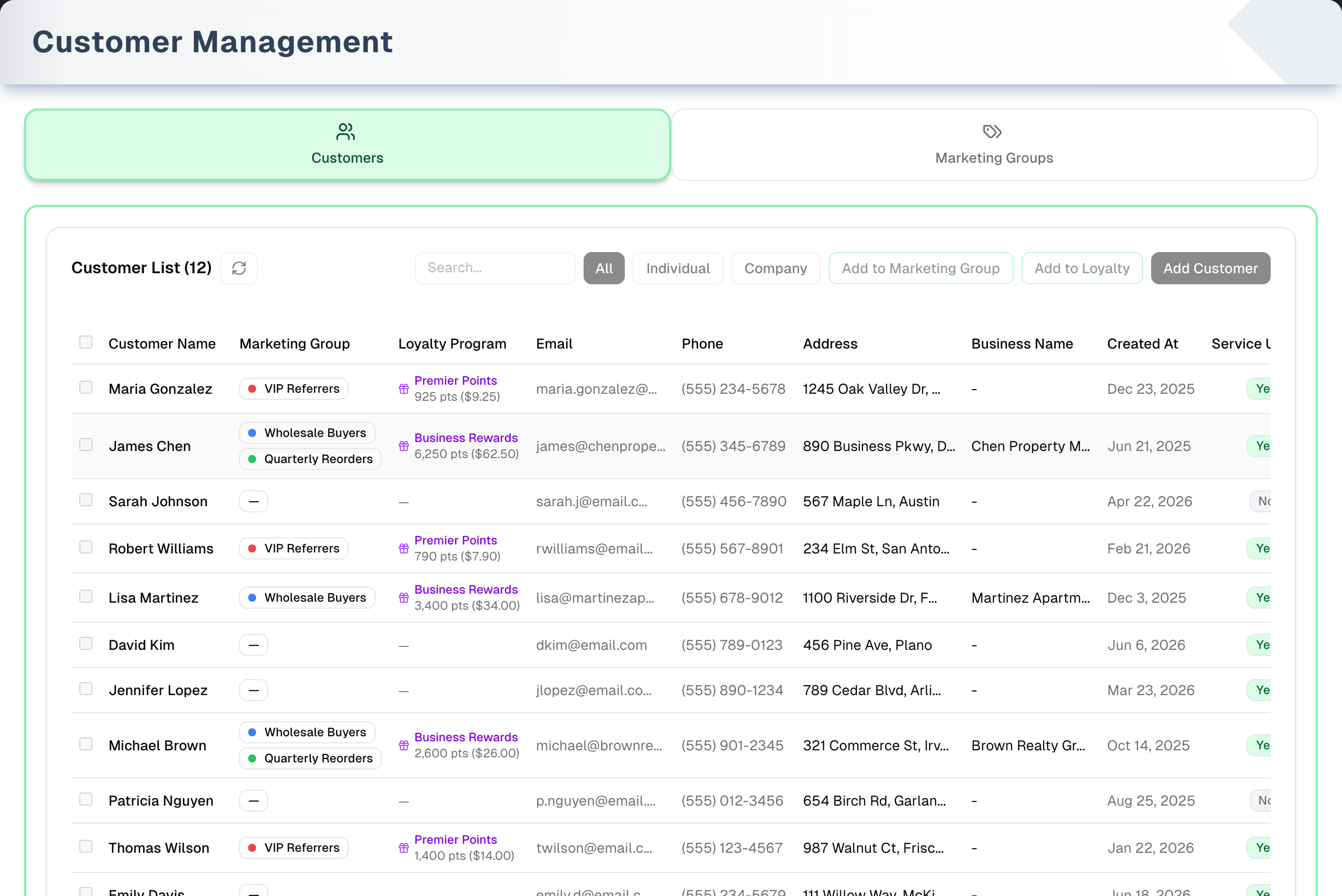
The Customers page is your customer list. In the sidebar it is Growth → Customers Nurturing, and the page itself is titled Customer Management. It has two tabs, Customers and Marketing Groups, and it feeds your campaigns and messaging. Click any customer to open their full record.
Overview
- Customers tab: a searchable list, 20 per page, newest first. Tick customers to add them to a marketing group or a loyalty program in one go. Use Send and History on each row to text a customer.
- Marketing Groups tab: create a group empty (then add people) or build one from order history, then edit or delete it.
- Customer Details: click a row to open a customer's record. It has four tabs: Customer Details (the edit form), Order History, Visits & wants and Complaints.
- Demo (amber button, top right): opens a sample-data copy of the page with a guided tour.
Anyone signed in to your store can use this page. Two things depend on your role: on the Visits & wants tab a visit older than 24 hours can only be changed by an owner or manager, and Delete on Marketing Groups is only shown to managers and the store owner. The only plan gate is texting: Send needs a Pro or Premium plan (or a running trial) and SMS set up.
Tabs in detail
Customers
- Search matches name, email and business name as you type. Phone numbers match on the digits alone, so type a number however you like —
(555) 234-5678,555 234 5678,5552345678,+1 555 234or just the last few digits all find the same customer. - All / Individual / Company quick filters split customers by whether Business Name is filled in. They do not look at any other customer type. The count in the card title, the select-all tick and the bulk buttons all follow the filter, so a bulk action only ever touches customers you can see.
- Columns: Customer Name, Marketing Group, Loyalty Program, Email, Phone, Address, Business Name, Created At, Service Updates, Marketing, and Messages (Send / History).
- Service Updates and Marketing show Yes or No: whether the customer agreed to service texts and to marketing. Change them in the customer's record.
- The Loyalty Program column shows the program a customer joined first, their points and what those points are worth, plus "+1" when they are in another program too. It shows "—" for customers who are in none.
- Tick rows, then use Add to Marketing Group (n) or Add to Loyalty (n). Add Customer opens the create form, and the circular-arrow icon reloads the list.
Marketing Groups
- Add new empty marketing group creates a named group with no members. You then add people from the Customers tab.
- Add new marketing group from segment builds a group from order history: keywords, a purchase date range, an order value range and marketing opt-in. The group gets exactly the customers Estimated reach counted.
- The table shows each group's colour and name (plus a few recent members), description, member count, Of Total (share of your customer list), created date and a short ID. Click a row or Edit to rename the group or remove members. Delete (managers and the owner only) removes the group, not the customers in it.
- Member counts leave out archived customers. They stay in the group, so restoring one puts them back in it and in the count.
Customer Details dialog
- Customer Details tab: edit name, business name, email, phone, Customer Tier, address, notes, the two consent checkboxes, marketing groups and loyalty enrolment. Update Customer saves it all, shows "Customer updated" and closes the dialog. If the save is refused, the dialog stays open with your edits and a message appears saying why.
- Order History: totals and the 5 most recent orders. Click an order to open it in a new tab. Lifetime Value and Total Spent are what the customer has paid, less refunds, on any of their orders whatever its status — a deposit on an order not yet delivered counts, a completed sale they haven't paid for does not. When anything went back, a line under the total says what came in and what was refunded — "$X received − $Y refunded" — and the refund is already taken off, the way the Sales Report shows its revenue. Avg sale is the average completed sale: what their Completed, Delivered or Shipped sales came to, divided by how many there are.
- Visits & wants and Complaints: what this customer came in for and what they complained about. Log visit and Log complaint add new entries with the customer already attached.
- Delete asks you to confirm, then archives the customer. They leave the list, but their orders and loyalty history are kept. Their phone and email stay on file, so adding them again is refused — the refusal says they are archived and offers Restore customer, which brings them and their history straight back.
Adding a customer
Add Customer opens Create New Customer. Switch between Individual and Company. Create Customer / Create Company stays greyed out until every required field is valid, and a full US address is required. New customers start with Service Updates and Marketing set to No. Tick them in the customer's record once the customer agrees.
Everything you fill in is kept: the emergency contact, the link to a company, Tax ID, Website, a separate shipping address, job title, department, work email and work phone. The primary contact of a company is saved as a customer of their own, attached to that company. Open a customer from the list to see the emergency contact, Website and Tax ID again, under More details.
Step by step: build a marketing group
- On Marketing Groups, click Add new empty marketing group, name the group (e.g. "VIP Customers"), pick a colour and click Create Group.
- On Customers, search or use the quick filters to find your audience.
- Tick the customers and click Add to Marketing Group (n).
- Tick the group and click Add to Marketing Groups.
To build a group from order history instead, click Add new marketing group from segment, set the filters, click Search, check Estimated reach, then click Create Group (n). The group gets those n customers — the ones with a matching sale who allow texts and pass the Marketing Opt-in rule. Only sales count as a purchase: quotes and cancelled or refunded orders are left out, while a sale still waiting for delivery counts. The group is filled once, when you create it: later sales do not change it.
Step by step: enroll customers in loyalty
- On Customers, tick one or more customers.
- Click Add to Loyalty (n) and choose a program. Only active programs are listed.
- Click Assign. Customers start with 0 points.
To enroll one customer, open them, pick a program under Assign Program and click Update Customer.
Step by step: text a customer
- Click Send on the customer's row. If it is greyed out, hover over it to see why.
- Type the message and click Send.
- If Confirm SMS consent appears, the customer is not marked as agreeing to texts. Click Confirm opt-in & send only if they have agreed.
Tips & best practices
- Phone numbers are saved as
+1and 10 digits whichever screen you use, and phone search ignores brackets, spaces and dashes on both sides — so you can type a number however you like and still find the customer. - Check the Service Updates and Marketing columns before you target a group. Only customers who agreed should get texts or promotions.
- Enroll high-value customers in loyalty in bulk rather than one at a time.
- Before you add a new customer, search by phone first. The create form refuses duplicates, and a number saved in another format — as
(512) 555-0143, say — counts as the same number. If the match is an archived customer, it says so and offers Restore customer instead of leaving you stuck.
Troubleshooting
| Issue | Fix |
|---|---|
| Send greyed out | Hover to see why: no phone number, the Basic plan outside a trial, or SMS not set up. Add a phone, set up SMS, or upgrade in Plan & Billing |
| "Confirm SMS consent" appears when sending | The customer's Service Updates is No. Confirm only if they agreed to texts. Confirming sends the text and turns Service Updates on once it has gone out — a refused send leaves it No |
| Loyalty Program column shows "—" | That customer is not in a loyalty program. Open them and use Assign Program, or tick several rows and use Add to Loyalty (n). If there is no program yet, create one in Loyalty Program |
| "A customer with this phone or email already exists" when creating | The match is a customer you still have. Search the list for them and edit that record instead |
| "This customer is archived" when creating | You archived them before; their phone and email are still on file. Click Restore customer in the message to bring them back, with their orders and loyalty history |
| "… was created, but the rest of the form was not saved" | The business record exists; its address or primary contact did not save. Open it from the customer list and add what's missing — creating it again only gives you the duplicate message |
| Create Customer stays greyed out | Fill every required field, including street, city, state and ZIP. The phone must be a 10-digit US number |
| A phone search finds nobody | Any spelling works — (555) 234-5678, 555 234 5678, 5552345678 or the last few digits — so check the digits themselves, and that the customer is not archived |
| My ticks disappeared | A tick is dropped as soon as its row leaves the list — when you change the search or switch between All, Individual and Company. That is deliberate: a bulk action can then only reach customers you can see. Ticks are kept while you page through one filtered list |
| A group's count is lower than its member list | The count leaves out archived customers. Edit Marketing Group still lists them, tagged Archived. Remove them there if they should go, or restore them to count them again |
What's next
- Message customers: Growth → Communications Hub
- Target a campaign: Growth → SMS Campaigns
- Reward repeat buyers: Growth → Loyalty Program
- Track complaints: Growth → Complaints
- Log walk-ins and callbacks: Sales → Walk-ins
Detailed reference
Every button, icon, field and message on this page, for when you need the exact detail. Each panel starts closed. Open the one you need.
Page header and toolbar
Ways to get here
| Entry point | What happens | Notes |
|---|---|---|
| Sidebar Growth → Customers Nurturing | Opens the page on the Customers tab | Everyone |
| Shortcuts page: Customers List and Management / Customer Group Management | Opens the Customers / Marketing Groups tab | — |
| Shortcuts page: Add Customer | Opens the standalone Add Customer page (see Sub-page panel) | — |
| Shortcuts page: Add New Empty Group | Opens Marketing Groups with Add Marketing Group open | — |
| Shortcuts page: Add New Group from Segment | Opens Marketing Groups with Create Marketing Group From Segments open | Name pre-filled "Segment Group" plus the date and time |
| Dashboard: Customers or Repeat rate card | Opens this page | — |
| Growth → Communications Hub, customer panel, click the customer | Opens this page in a new tab with that customer's Customer Details open | Nothing opens if the customer is archived (archived customers are not in the list). The link also carries the phone number, so closing the dialog can open it again once |
| Growth → SMS Campaigns, campaign detail, click a recipient | Opens this page in a new tab with that customer open | Same archived-customer rule |
A link ending ?tab=groups or ?tab=customers | Opens that tab | Any other tab name is ignored |
A link with ?customerId=, ?phone= or ?email= | Opens Customer Details for the first match, by customer, then exact stored phone, then exact email | Does nothing if no active customer matches. Closing the dialog with X, Esc or a click outside removes the customer from the address bar. While the link is still in the address bar, the dialog opens again after the list reloads, for example after Update Customer |
Header and tabs
| Control | Where | What it does | Notes |
|---|---|---|---|
| Title "Customer Management" and "View and manage customer information with advanced filtering and analysis." | Page header | Static text | — |
| Demo (Play icon, amber) | Header, right | Opens the page with sample data and a guided tour | Everyone. See Demo mode |
| Tab Customers (people icon, green) | Tab bar | Shows the customer list | Default tab |
| Tab Marketing Groups (tags icon, purple) | Tab bar | Shows the marketing groups | There are only these two tabs. The page has no Analytics tab |
| "Loading organization..." then "Loading customers..." (spinner) | Whole page | Shown while your store and customers load for the first time | The header breadcrumb shows "Marketing" / "Customer Management" meanwhile. A later reload does not replace the list: the rows stay on screen and the circular-arrow icon spins instead |
| "Error: …" and Retry (circular-arrow icon) | Whole page | Shown if the list fails to load. Retry loads your store and then the list | The text is the underlying error, e.g. "User has no organization assigned". Retry works even then: it looks your store up again first, so a passing failure clears without reloading the browser. If the same error comes back, your account may not be linked to a store |
Tab: Customers
Toolbar
| Control | Where | What it does | Notes |
|---|---|---|---|
| "Customer List (…)" | Card title | Number of customers on screen: the search box and the Individual / Company quick filter together | — |
| Circular-arrow icon (tooltip Refresh) | Next to the card title | Reloads the customer list | The rows stay on screen while it reloads; the icon spins and cannot be clicked again until it finishes. Afterwards you are still on the page you were reading, the search text and the quick filter are kept, and so are ticks whose customer is still listed |
| Search box ("Search...") | Card header, right | Filters as you type. Name, email and business name match any part, in any case | Phone matches on the digits alone, so brackets, spaces, dashes and a leading +1 are ignored on both sides: "(555) 234-5678", "555 234 5678", "5552345678" and "2345678" all find the same customer. A search with no digits in it never matches on phone. Returns to page 1 |
| X (clear search, no tooltip) | Inside the search box | Empties the search | Only shown when there is text |
| All | Quick filters | Shows every customer | Default. The selected filter is the dark, filled button |
| Individual | Quick filters | Shows customers with no Business Name | Based on the Business Name field only |
| Company | Quick filters | Shows customers with a Business Name | Same |
| Add to Marketing Group / Add to Marketing Group (n) | Toolbar, green | Opens Add n Customer(s) to Groups for the ticked customers | Greyed out until a row is ticked. n counts the ticked customers on the filtered list, including ticked rows on its other pages. Customers hidden by the search or the quick filter are never included |
| Add to Loyalty / Add to Loyalty (n) | Toolbar, green | Opens Assign to Loyalty Program for the ticked customers | Greyed out until a row is ticked. Same count as above: only customers on the filtered list |
| Add Customer | Toolbar, right (dark) | Opens Create New Customer | Always available |
Table
| Control | Where | What it does | Notes |
|---|---|---|---|
| Select-all checkbox | Header, first column | Ticks every customer on the filtered list, on every page of it, or clears all ticks | Follows the Individual / Company filter, so with Company on it ticks companies only. Shows as ticked only when every listed customer is ticked, and never on an empty list |
| Row checkbox | Each row, first column | Ticks or unticks one customer | Ticks are kept as you page through the list, and ticking a row keeps you on the page you are on. A tick is dropped when its row leaves the list, for example when you change the search or the quick filter. Clicking it does not open the customer |
| Click a row | Anywhere except the checkbox and Messages cells | Opens Customer Details | — |
| Customer Name | Column | The customer's name | — |
| Marketing Group | Column | Up to 4 group badges (colour dot and name), plus "+n" if in more; a "—" badge if in none | Kept up to date by the page: renaming a group, removing a member, deleting a group and adding customers to groups all refresh these badges straight away |
| Loyalty Program | Column | The program the customer joined first, their points and what the points are worth (e.g. "Gold" / "1,200 pts ($12.00)") | "+1" after the name means they are in one more program; open the customer for the full picture. "—" means no program, or that this customer's loyalty could not be read just now — reload the page to try again; the rest of the list is unaffected. A membership whose program can no longer be read shows as "Loyalty" with the points but no cash value. The figure is the points on record, not what can be spent today: points close to expiry are still counted here. A program that has been switched off still shows the points already banked |
| Column | Primary email, cut to 15 characters | Hover to see it in full | |
| Phone | Column | Primary phone as stored (e.g. +15552345678), or "-" | — |
| Address | Column | Street and city, cut to 20 characters | Hover to see street, city, state and postal code |
| Business Name | Column | Business name, cut to 15 characters, or "-" | Hover to see it in full |
| Created At | Column | Date the customer was added | Uses your store's date format |
| Service Updates | Column | Yes (green) or No (grey): customer agreed to order and service texts | Same setting as Service Updates (SMS) in Customer Details |
| Marketing | Column | Yes or No: customer agreed to marketing | Same setting as Marketing Updates in Customer Details |
| Send (speech-bubble icon) | Messages column | Opens Send SMS to … | Greyed out when the customer has no phone, on the Basic plan outside a trial, or when SMS is not set up |
| Send tooltip | Hover on Send | "No phone number available", "SMS requires Pro or Premium plan", "SMS integration not configured", or "Send SMS to …" | The first reason that applies, in that order |
| History (clock icon) | Messages column | Opens your text conversation with this customer in Communications Hub. If none exists, shows "No conversation found" | Greyed out when the customer has no phone. Works on every plan |
| History tooltip | Hover on History | "No phone number available" or "View message history with …" | — |
| Sort order | Table | Newest customer first | Columns cannot be sorted |
| Empty list | Table body | Headers only, no message | Also when a search matches nobody |
| "Showing … to … of … customers" | Below the table | Rows on this page. The total respects the search and the quick filter | The pagination bar only appears with more than 20 customers (20 per page) |
| Previous / page numbers (up to 5) / Next | Pagination | Move between pages | Previous greyed out on page 1, Next on the last page. Changing the search, the quick filter or any filter returns to page 1. Reloading the list does not, and neither does ticking a row or opening a customer. If the list gets shorter while you are reading it, you are moved back to the last page that still exists rather than shown a blank one |
Archived customers and Partners Network contacts are never listed here.
Tab: Marketing Groups
| Control | Where | What it does | Notes |
|---|---|---|---|
| "Marketing Groups" and "Organize customers into targeted marketing groups for campaigns, loyalty programs, and personalized communications." | Tab header | Static text | — |
| Add new empty marketing group (Plus icon, blue) | Tab header, right | Opens Add Marketing Group | — |
| Add new marketing group from segment (Plus icon, purple) | Tab header, right | Opens Create Marketing Group From Segments | Name pre-filled "Segment Group" plus the date and time; a random colour is picked |
| Marketing Group | Column | Colour dot and name. On wider screens, "Recent:" and up to 3 member names, then "+n more" | Newest group first. Archived members are not named |
| Description | Column | The description, or "-" | Cut short if long |
| Customers | Column | Number of members | Archived customers still in the group are not counted |
| Of Total | Column | Members as a rounded % of the customers in your list | Both sides leave archived customers out |
| Created | Column | Date the group was created | — |
| ID | Column (medium screens and wider) | First 8 characters of the group's ID | — |
| Click a row | Each group | Opens Edit Marketing Group | — |
| Edit | Actions column | Opens Edit Marketing Group | — |
| Delete (red) | Actions column | Opens Delete Marketing Group | Only shown to managers and the store owner, who are the ones allowed to delete a group |
| "No marketing groups yet. Click "Add new empty marketing group" to create one." | Table body | Shown when you have no groups | — |
Dialog: Send SMS to …
Opened by Send on a customer row. The title is "Send SMS to" plus the customer's name ("Send SMS to Customer" if there is none).
| Control | Where | What it does | Notes |
|---|---|---|---|
| "Sending to: …" | Top of dialog | The number the text goes to | "N/A" if no phone |
| Message box ("Type your message...") | Dialog body | The text to send | Greyed out on the Basic plan outside a trial (then it shows the sample "Hi! Just following up with you. Let us know if you have any questions!") or when SMS is not set up |
| "Plain text only. Standard carrier rates may apply." | Under the message box | Hint | — |
| Start a new conversation (switch), with "Earlier messages with this customer stay in Messages." under it | Dialog body | When on, the customer's current conversation is closed and this message starts a new one. Nothing is deleted: the closed conversation keeps all its messages in Messages, marked Closed | Off every time the dialog opens, including after a send that failed and when you open a different customer. If the current conversation can't be closed, nothing is sent and you see "Couldn't close the current conversation with this customer, so nothing was sent. Try again." |
| Cancel | Footer | Closes without sending | Greyed out while sending |
| Send / "Sending..." | Footer | Sends the text. On success, "Message sent" appears with an Open button to the conversation, and the dialog closes | Greyed out while the message is empty, while sending, on the Basic plan outside a trial, or when SMS is not set up |
| "Unlock Pro & Premium Features" / "SMS, insights, finance tools & more" (lock icon) | Over the dialog | Upgrade card. Pro: "500 SMS/month + a dedicated phone #", "SMS campaigns & review invites", "Ads-vs-store insights", "Finance: expenses, assets, reports", "Customer Portal: tracking, payments, scheduling". Premium: "Everything in Pro", "2,000 SMS/month", "Advanced reporting (grouped/pivot)", "CSV / PDF data export", "Workforce: time clock, timesheets, pay runs" | Basic plan outside a trial. You normally never see it here, because Send on the row is already greyed out |
| Check Details | Upgrade card | Goes to Plan & Billing | The card's only button |
| "SMS Not Configured" / "Please configure your SMS integration in settings to send messages." (lock icon) | Over the dialog | Explains that SMS is not set up | When the plan allows SMS but setup is missing |
| Ask UpChannels to set up texting | SMS Not Configured card | Goes to SMS Campaigns Setup, which shows you the Contact Sales form | — |
| X (close) | Dialog corner | Closes | — |
What can happen after you click Send:
- The customer is not marked as agreeing to texts: Confirm SMS consent opens (next panel).
- Plan or billing blocks the send: an "Upgrade required" message with an Upgrade button to Plan & Billing (see Messages you may see).
- Your business number or messaging account is not set up: "Send failed" / "Business phone not configured" or "Messaging is not configured for your organization".
- The customer's number belongs to a different conversation, or the conversation no longer holds them: the message says so and nothing is sent. Turn Start a new conversation on and send again (see Messages you may see).
Dialog: Confirm SMS consent
If your plan or this month's allowance does not cover the text, you see the upgrade message instead — you are never asked to confirm an opt-in for a text that cannot be sent.
| Control | Where | What it does | Notes |
|---|---|---|---|
| "Confirm SMS consent" / "This customer isn’t marked as opted in to SMS." | Dialog | Explains why the send stopped | Appears when the customer's Service Updates is No |
| Amber note: "Only continue if this customer has agreed to receive text messages from you. Confirming sends this message and, once it has gone out, records their SMS opt-in. If they previously texted STOP, the carrier will still block delivery until they text START." | Dialog | Warning | — |
| Cancel | Footer | Closes. Nothing is sent or changed | Greyed out while sending |
| Confirm opt-in & send / "Sending…" | Footer | Sends the message, then records the customer's text opt-in (their Service Updates becomes Yes) | The opt-in is only recorded once the text has actually gone out. If the send is refused — your plan, this month's allowance, no texting number, or a problem at the texting service — Service Updates stays No |
Dialog: Customer Details (tab bar)
Opened by clicking a customer row or by a link to a customer. Title "Customer Details". Closing it in any way (X, Esc, clicking outside, Cancel) throws away unsaved edits without asking.
| Control | Where | What it does | Notes |
|---|---|---|---|
| Tab Customer Details (person icon, blue) | Dialog tab bar | The edit form | Default tab |
| Tab Order History (cart icon, green) | Dialog tab bar | Order totals and recent orders | — |
| Tab Visits & wants / "Visits & wants · n" (door icon, amber) | Dialog tab bar | Visits logged with this customer | The count appears once loaded and is hidden when 0 |
| Tab Complaints / "Complaints · n" (warning-bubble icon, rose) | Dialog tab bar | Complaints from this customer | The count is hidden when 0 |
| X (close) | Dialog corner | Closes the dialog | Also removes the customer from the address bar |
Dialog: Customer Details — Customer Details tab
Fields:
| Field | Required | Default | Rules and error text |
|---|---|---|---|
| Customer Name | Yes | Current name | Browser blocks saving when empty. Placeholder "Enter customer name" |
| Business Name | No | Current value | Filling it moves the customer under Company. Clearing it moves them under Individual. Placeholder "Enter business name" |
| No | Current email | Browser checks the email format when you save. No duplicate check. Placeholder "Enter email address" | |
| Phone | No | Current phone | Saved as +1 and 10 digits however you type it, the same as Add Customer. A number that is not a 10- or 11-digit US one is saved as typed. Emptying the box clears the number. Placeholder "Enter phone number" |
| Customer Tier | No | Current tier (Standard if none) | Standard, Premium, Wholesale or Retail. Not shown in the list or used by any filter |
| Street Address | No | Saved address | Placeholder "Enter street address" |
| City | No | Saved address | Placeholder "Enter city" |
| State/Province | No | Saved address | Free text. Placeholder "Enter state or province" |
| Postal Code | No | Saved address | Free text. Placeholder "Enter postal code" |
| Country | No | United States | United States, Canada, United Kingdom, Australia, Germany, France. Clearing street, city, state and postal code, then saving, removes the customer's address |
| Notes | No | Current notes | Internal notes. Placeholder "Enter customer notes..." |
| Service Updates (SMS): "Receive order and service updates via text message" (under Communication Preferences) | No | Current consent | The customer's agreement to texts, shown in the list's Service Updates column. When it is off, sending a text asks you to confirm consent first. SMS campaigns only reach customers with it on |
| Marketing Updates: "Receive promotional offers and marketing communications" (under Communication Preferences) | No | Current consent | The customer's agreement to marketing, shown in the list's Marketing column |
| Marketing group checkboxes (colour dot and name) | No | The customer's current groups | Tick to add, untick to remove. The ticked set replaces the customer's groups when you click Update Customer. Footnote: "Marketing groups are saved when you click Update Customer." |
| Assign Program ("Select a program...") | No | None | Only shown when the customer has no loyalty membership. Lists active programs. The customer is enrolled at 0 points when you click Update Customer ("Assigned on Update Customer"). If the enrolment can't go through — the program has been deactivated, or the customer has been archived — a message says why and no points account is opened |
Other controls and displays:
| Control | Where | What it does | Notes |
|---|---|---|---|
| Avg sale card (dollar icon) | Top left | Average of the customer's completed sales: what they came to ÷ how many there are | Counts sales that are Completed, Delivered or Shipped. Quotes and cancelled or refunded orders are not counted. Spinner while loading |
| Lifetime Value card (trend icon) | Top right | What the customer has paid, less refunds, all time | Read-only. Every payment on any of their orders, whatever its status, less the money handed back. "$X received − $Y refunded" under the figure when anything went back; no line when nothing did. Sales booked before your store switched to counting revenue as the money received count at their total less what came back. Hover: "What the customer has paid, less refunds, on any of their orders whatever its status, from your books. Orders and the average sale count completed, shipped and delivered sales." |
| "Address Information" Refresh / "Loading..." | Address section, right | Reloads the saved address and throws away unsaved address edits | Greyed out while loading. The section shows "Loading address..." meanwhile. If the address cannot be read, an amber note takes the place of the boxes — "This customer's address could not be loaded, so it cannot be edited here. Press Refresh to try again. Saving now leaves the address exactly as it is." — and everything else in the dialog still saves. A Refresh that fails after the address has already loaded once leaves the boxes as they were |
| "Marketing Groups" and "Selected: n" | Groups section | How many groups are ticked | — |
| "Search marketing groups..." | Groups section | Narrows the group checkboxes by name | — |
| "Loyalty Program" → "Current Membership" | Loyalty card, left | Each program with a tick, "… pts (~$…)" and "• Earn: … pts/$", plus "Total credit: $…" | "Not enrolled in any program" when none. It also shows briefly while loading. The points and both money figures are what can be REDEEMED now: points that have run out of time are left out and counted beside them as "• n expired", so the card never offers credit the till would refuse |
| "Program Management" / "Contact UpChannels support to change program" | Loyalty card, right | Information only | Shown when the customer already has a program. "Contact UpChannels support to change program" also shows briefly under "Assign Program" while the card loads. You cannot change or remove a program from here |
| "Earnings based on subtotal excluding discounts, redeemed credit, tax, shipping, and gift cards." | Loyalty card footer | Explains how points are earned | Only when enrolled |
| Delete (trash icon, red) | Footer, left | Opens Archive Customer | — |
| Cancel | Footer, right | Closes without saving | — |
| Update Customer (pencil icon) / "Updating..." | Footer, right | Saves marketing groups, then loyalty enrolment, then the customer's details and address. On success it shows "Customer updated" / "…'s details were saved.", closes and reloads the list | If the details are refused, the dialog stays open with your edits and a message appears saying why — "That email, phone or code already belongs to another customer in your store. Nothing was saved …" for a clash, or the reason the store gave. A group-save failure shows "Failed to update groups: …", but the other changes still save and the dialog still closes. The address is only written once it has been read back: if "Address Information" could not load, the section says so in place of the boxes and the customer's saved address is left exactly as it is. After the reload you are still on the page you were reading, and the search and quick filter are kept |
Dialog: Archive Customer
Opened by Delete in Customer Details.
| Control | Where | What it does | Notes |
|---|---|---|---|
| "Archive Customer" / "Are you sure you want to archive this customer? They will be removed from the active customer list, but their order and loyalty history is preserved." | Dialog | Explains the action | — |
| Cancel | Footer | Closes. Nothing changes | — |
| Archive (red) | Footer | Archives the customer and removes them from the list. Their status is left as it was. Orders and loyalty history stay. Shows "Customer archived" / "… has been archived. Order history is preserved." | On failure: "Error" / "Failed to archive customer. Please try again." Their phone and email stay on file: adding the same person again is refused with "This customer is archived", and that message's Restore customer button brings them back |
Dialog: Customer Details — Order History tab
| Control | Where | What it does | Notes |
|---|---|---|---|
| "Loading order summary..." | Tab body | Shown while loading | — |
| Total Orders, Total Spent, Avg sale cards | Top | Total Orders and Avg sale: the customer's completed sales (Completed, Delivered or Shipped). Total Spent: what they have paid, less refunds, on any of their orders | Quotes, scrap and cancelled or refunded orders are not counted as sales, but money kept on them is spend. Refunds are taken off Total Spent, and "$X received − $Y refunded" under it says what came in and what went back. The figures come from the same calculation as the two tiles on Create Order, so they agree, and they cover the customer's whole history however long it is |
| "Recent Orders" cards | Below | The 5 most recent orders of any type or status. Each shows the order number, a type badge in capitals (SALE, RETURN, QUOTE or SCRAP), a grey status badge (e.g. Completed), "Order ID:" (last 4 characters), the total, "Items:" (up to 3 names with quantities, then "+n more"), the date and item count, and "Cashier:" with the person's name — including someone who has since left the store, whose past sales still carry their name | — |
| Click a recent order | Recent Orders | Opens that order in Order Management in a new browser tab, already searched for | — |
| "No orders found for this customer" | Recent Orders | The customer has no orders | Also what you see, with $0.00 totals, when the orders could not be loaded. If you expect orders, close and reopen the customer |
| "Failed to load order summary" | Tab body | Fallback when there is no summary at all | Rarely seen: a failed load normally shows the zero totals above instead |
Dialog: Customer Details — Visits & wants tab
| Control | Where | What it does | Notes |
|---|---|---|---|
| "Visits & wants" and subline | Tab header | "Every visit logged with this customer attached, newest first." when empty. Otherwise e.g. "3 visits logged · 1 waiting for a text · 1 on the call list" | "Waiting for a text" means a wanted item is waiting, consent to text was recorded on the visit and the customer's Service Updates is on. Every other waiting item is "on the call list" |
| Log visit (Plus icon) | Tab header, right | Opens Log a visit with this customer attached | — |
| Date | Column | Day and time in your store's time zone. "≈ …" with "Entered at close, time approximate" for end-of-day entries. "Logged from an order" for visits created from an order | — |
| Channel | Column | "Walk-in", "Walk-in · n people", "Phone" or "Online", plus how they heard about you | — |
| Asked for | Column | Each item wanted ("… ×n"). An amber hint "· 0 here" or "· didn't have it" when you had none. Visit notes in italics | — |
| Outcome | Column | "Sold · #…" (green, with "Invoice …" below), "Left · …" (amber if a purchase order could have fixed it, otherwise grey), "Quote", "Special order" or "Open", then "Order #…" and "by …" (staff) | — |
| Callback / follow-up | Column | Per item: Waiting (hover: "On the callback / follow-up list"), Notified ("The customer was texted"), Fulfilled ("The customer bought it") or "—". Also "PO #…", "follow-up …" and a tick "consent" (hover: "Consent to text recorded …") | — |
| Pencil icon (label "Edit visit from …") | Last column | Opens Edit visit | Only for visits logged in the last 24 hours, unless you are an owner or manager |
| "Loading visits…" | Tab body | Loading | — |
| "Could not load visits." and Try again | Tab body | Try again reloads | — |
| "No visits logged for … yet." / "Visits logged on the Walk-ins page with … attached show up here, with what they asked for and how the visit ended." | Tab body | Empty state | — |
| "The visit was saved, but the list could not refresh." | Message after saving | The visit saved but the list did not reload | Close and reopen the customer |
Dialog: Log a visit / Edit visit
The same dialog as on Walk-ins, opened with this customer already attached.
| Control | Where | What it does | Notes |
|---|---|---|---|
| Title "Log a visit" (new), "Edit visit", or "Visit" (read-only) | Header | — | "Visit" when you can no longer change it |
| "Logged more than 24 hours ago, so only a manager can change it now." | Top of body | Explains why it is read-only | Staff who are not managers, for visits older than 24 hours |
| Channel, party size minus and plus ("One fewer in the party" / "One more in the party"), wanted items, outcome, callback, customer, details and notes | Body | Same fields as on Walk-ins | The remove-customer button reads "Remove the customer from this visit" |
| Cancel / Close | Footer | Closes | Close when read-only |
| Save visit / Save & start order | Footer | Saves. Shows "Visit logged" or "Visit updated", sometimes with "· added to the callback list for …" or "· on the call list for …" | Save & start order when the outcome starts an order |
| "Visit" / "Could not open this visit." and Close | Dialog | The visit failed to load | — |
Dialog: Customer Details — Complaints tab
| Control | Where | What it does | Notes |
|---|---|---|---|
| "Everything … has complained about, and where each one stands." | Tab header | Intro text | — |
| Log complaint (Plus icon) | Tab header, right | Opens Log complaint with this customer filled in | — |
| Columns #, Category (with description), Severity (Low, Normal, High, Urgent or Emergency), Owner (medium screens and wider), Order (large screens), Status (Open, Pending, Waiting on customer, Resolved, Closed, Escalated, On hold or Transferred), Due / took ("due in …", "overdue by …" in red, "due …", "took …" or "no due date") | Table | Read-only list | — |
| Click a row | Table | Opens that complaint | — |
| "Loading complaints…" | Tab body | Loading | — |
| "Could not load complaints: …" and Try again | Tab body | Try again reloads | — |
| "No complaints from this customer. If one comes in, log it here — the categories only tell you anything once there are a few months of them." | Tab body | Empty state | — |
Dialog: Log complaint / complaint detail
The same dialog as on Complaints.
| Control | Where | What it does | Notes |
|---|---|---|---|
| Title "Log complaint" (new) or the complaint number, category and a status badge | Header | — | — |
| "This category, last 90 days: … complaints · … of them …" (a weekday, e.g. "8 of them Saturday") | Top of body | Warns about a pattern | When there is more than one complaint in the category in 90 days. The weekday part shows only when more than one fell on the same weekday |
| Customer, Category chips, Severity, Owner ("Nobody yet"), Due, What happened, Status, Came in by, What was done, Root cause, Linked order; timeline notes and photos on existing complaints | Body | Same fields as on Complaints | — |
| Remove (trash icon) | Footer, left | Asks "Remove C-…?" first, then removes the complaint and shows "… removed" | Existing complaints only, and only for a manager or the owner |
| Photo (camera icon) | Footer, left | Adds a photo and shows "Photo added" | Existing complaints only. Greyed out while a photo uploads |
| Close / Cancel | Footer, right | Closes | Reads Close until you change something, on a new complaint or a saved one, then Cancel |
| Save | Footer, right | Saves. A new complaint stays open after saving so you can add a note or photo | Greyed out only while saving, or on a saved complaint with nothing changed. When something required is missing it stays clickable and names what is missing in red above the buttons |
Dialog: Assign to Loyalty Program
Opened by Add to Loyalty (n).
Fields:
| Field | Required | Default | Rules and error text |
|---|---|---|---|
| Loyalty Program ("Select a loyalty program") | Yes | None | Lists active programs only. With no active programs the list is empty and no message is shown. Create one in Loyalty Program first |
Buttons:
| Control | Where | What it does | Notes |
|---|---|---|---|
| "Selected customers: n" | Body | How many customers are ticked | — |
| Cancel | Footer | Closes | Greyed out while assigning |
| Assign / "Assigning…" | Footer | Enrolls each ticked customer at 0 points. Shows "Customers enrolled" / "n customer(s) added to the loyalty program.", clears the ticks and closes | Greyed out until a program is chosen. A customer already in that program counts as a success. Unlike Customer Details, this can add a customer to a second program. A customer who has been archived, or who is no longer one of your customers, is counted in the failed number instead, and the message says why: "Some assignments failed" / "… enrolled, … failed. This customer has been archived." When no reason comes back it ends "Please retry the failed customers." instead. The dialog stays open and the ticks are kept. Very large selections are sent in batches of 500, so if it stops part-way the earlier customers are already in; clicking Assign again is safe, because anyone already in the program counts as enrolled rather than being added twice. If the program was deactivated after the page loaded, nobody is enrolled and the message says the program is not active |
Dialog: Add n Customer(s) to Groups
Opened by Add to Marketing Group (n).
| Control | Where | What it does | Notes |
|---|---|---|---|
| "Select Customer Groups" and one checkbox per group | Body (scrolls) | Choose the groups to add the customers to | Nothing is ticked at first. With no groups the list is empty and no message is shown |
| Cancel | Footer | Closes | — |
| Add to Marketing Groups | Footer | Adds the ticked customers to the ticked groups. Existing memberships are kept, never removed. Shows "Added to marketing groups" / "n customer(s) updated.", clears the ticks, closes and reloads the list | Greyed out until at least one group is ticked, with "Tick at least one group." under the list saying why. The number in the message is the customers the store actually took. If some fail: "Some customers were not added" / "… added, … failed. Please retry." |
Dialog: Add Marketing Group
Opened by Add new empty marketing group.
Fields:
| Field | Required | Default | Rules and error text |
|---|---|---|---|
| Group Name | Yes | Empty | Browser asks you to fill it in if empty. Placeholder "Enter group name". Two groups may share a name |
| Description | No | Empty | Placeholder "Enter group description" |
| Color (20 colour circles, labels "Choose color …") | No | Blue | A ring marks the chosen colour. "Selected: …" shows its colour code |
Buttons:
| Control | Where | What it does | Notes |
|---|---|---|---|
| Cancel | Footer | Closes | — |
| Create Group | Footer | Creates the empty group. The dialog closes, the table refreshes and a Group created message says to add customers from the Customers tab | If it fails, Group not created shows the reason the store gave and the dialog stays open with what you typed still in it |
| "After creating this group, go to the Customers tab to select customers and add them to this group." | Below the form | Next-step hint | — |
Dialog: Edit Marketing Group
Opened by clicking a group row or Edit.
| Control | Where | What it does | Notes |
|---|---|---|---|
| Group Name, Description, Color | Form | Same as Add Marketing Group, filled in with the current values | — |
| Cancel | Form footer | Closes the dialog | — |
| Update Group | Form footer | Saves the name, description and colour. The dialog stays open, the table refreshes and Group updated confirms it | On failure, Group not updated shows the reason and nothing is saved |
| "Members in this group" table: Customer, Phone, Address, ID (medium screens and wider) | Below the form | Lists the members, archived customers included, each archived one with a grey Archived tag | Address is the member's default address. The Customers count on the Marketing Groups tab leaves the archived ones out, and a line under the table says so: "N archived customer(s) … still in this group but left out of its Customers count. Remove them here if they should go, or restore them from Customers to count them again." |
| Trash icon (tooltip Remove from group, red) | Each member row, first column | Removes that customer from the group at once, with no confirmation, and says Removed from group. The table refreshes | On failure, Could not remove that customer shows the reason and the row stays where it is, because they are still a member. The Customers tab's Marketing Group column is updated at the same time, so the badge goes with the membership |
| "No members in this group." | Members area | Empty state | — |
| "Go to the Customers tab to select customers and add them to this group." | Bottom | Hint | — |
Dialog: Delete Marketing Group
| Control | Where | What it does | Notes |
|---|---|---|---|
| "Delete Marketing Group" / "Are you sure you want to delete the marketing group "…"? This action cannot be undone." | Dialog | Confirmation | — |
| Cancel | Footer | Closes. Nothing changes | — |
| Delete (red) | Footer | Permanently deletes the group and all its memberships. The customers themselves are not deleted. The table refreshes and Group deleted names the group | Deleting a group is for managers and the store owner. On failure, Group not deleted shows the reason and this confirmation stays open. Group deleted is only ever shown for a group that really went |
Dialog: Create Marketing Group From Segments
Opened by Add new marketing group from segment. It builds a group from order history, using the same filters as the audience builder in SMS Campaigns.
Fields:
| Field | Required | Default | Rules and error text |
|---|---|---|---|
| Group Name | Yes | "Segment Group" plus the date and time | Create Group stays greyed out while blank. Placeholder "e.g. High Value Recent Buyers" |
| Color (dropdown of 20 colours) | No | A random colour (indigo when opened from the Shortcuts page) | — |
| Description | No | Written for you from the filters, e.g. Keywords: "HVAC". Marketing opt-in only. Purchases: 08/19/2026 - 09/18/2026. Value: $500+. | The marketing part reads "Marketing opt-in only", "Any marketing consent" or "Marketing opt-out only", matching the button you chose. You can edit it, but changing any filter rewrites it. Placeholder "Describe this audience-derived group" |
| Marketing Opt-in ("Opted in, Any, or only those not opted in"): Opted in, Any and Not opted in buttons | No | Opted in | Opted in counts only customers who allowed marketing. Any drops the marketing rule and counts both. Not opted in counts only customers who did not allow marketing. All three still require the customer to allow texts |
| Product Keywords ("e.g. HVAC, tune-up") | No | Empty | Matches sales with a line whose description or SKU contains the text. A badge shows "n sales" matched |
| Recent Purchase (date range): start date and end date | No | The last 30 days | Sales made in this range, read on your store's own clock — so everyone building the same segment gets the same people, wherever they are sitting. If the start is after the end, they are swapped. A quote that was turned into a sale counts from the day it became a sale, not the day it was quoted. A quote with no recorded conversion day counts from the day it was quoted. A sale counts whether it is saved, a draft, still pending, being processed or awaiting delivery, or already shipped, delivered or completed. Quotes and cancelled or refunded orders never count |
| Purchase Value ($): Min and Max | No | Empty | Each sale's total must fall in the range. It is per sale, not lifetime spend, and a quote's total never matches |
Other controls:
| Control | Where | What it does | Notes |
|---|---|---|---|
| Red box | Top | Shows why the group could not be finished: "Added X of Y customers to “…”. The group was created — try again to add the rest." followed by the reason, or "Failed to create group from segments" (or the underlying error) | The dialog stays open so you can try again |
| "Build Audience" / "Set the filters below. The count updates by itself as you change them, and Create Group adds exactly the customers it counts." | Section header | Instruction text | — |
| "Estimated reach: n customers" / "Updated automatically as you change filters"; "Calculating" spinner | Audience builder | Customers with a matching sale who allow texts and pass the Marketing Opt-in rule (archived customers and Partners Network contacts left out) | Calculated when the dialog opens. It also recalculates shortly after you change a filter, and Search forces it. Every matching sale is read, however many there are, and every customer who qualifies is counted. These are exactly the people Create Group adds. Change a filter while it is still calculating and only the newest calculation counts: one started for the earlier filters that finishes late is dropped, as is its error, so the number and Create Group always match the filters on screen |
| Search / "Searching…" | Audience builder | Recalculates with the current filters | Greyed out while calculating |
| "Failed to load audience" | Message | The calculation failed. Estimated reach goes back to 0 and Create Group is greyed out | Try Search again |
| Cancel | Footer | Closes | Greyed out while creating |
| Create Group (n) / "Calculating…" / "Creating..." | Footer | Creates the group and adds exactly the n customers in Estimated reach, then closes and refreshes the groups | Greyed out while calculating or creating, while the name is blank, and whenever n is 0. The members are the same set the number counts: a matching sale, allows texts, passes the Marketing Opt-in rule, not archived, not a Partners Network contact. Only sales count — quotes, cancelled and refunded orders are left out — and every matching sale is read. The group is filled once, when it is created. If the group is created but some members can't be added — a dropped connection, say — the red box says "Added X of Y customers to “…”. The group was created — try again to add the rest." and the dialog stays open; clicking Create Group again fills that same group rather than making a second one with the same name. No success message. The Customers tab picks up the new badges straight away |
Dialog: Create New Customer
Opened by Add Customer. A wide, scrolling dialog.
Customer Type card
| Control | Where | What it does | Notes |
|---|---|---|---|
| "Customer Type" / "Choose whether to create an individual or company customer" | Top card | Heading | — |
| Switch between Individual (person icon) and Company (building icon) | Top card | Off shows the Individual form, on shows the Company form | Default Individual. Each form keeps what you typed when you switch back and forth |
Individual form fields
| Field | Required | Default | Rules and error text |
|---|---|---|---|
| First Name | Yes | Empty | "First name is required"; "First name must be less than 50 characters" |
| Last Name | Yes | Empty | "Last name is required"; "Last name must be less than 50 characters" |
Email Address (customer@email.com) | No | Empty | "Please enter a valid email address" |
| Phone Number ("(555) 123-4567") | Yes | Empty | Formats as (XXX) XXX-XXXX while you type. Must be a 10-digit US number: "Please enter a valid phone number". Saved as +1 and 10 digits |
| Date of Birth | No | Empty | Date picker. Saved |
| Customer Source ("Select source") | No | None | Walk-in, Online, Phone, Referral, Advertisement, Social Media, Email Campaign, Trade Show, Cold Call, Existing Customer. Saved |
| Street Address ("123 Main Street") | Yes | Empty | "Street address is required"; up to 100 characters |
| Apartment/Suite ("Apt 2B") | No | Empty | Up to 100 characters |
| City | Yes | Empty | "City is required"; up to 50 characters |
| State (US states) | Yes | None | "State is required" |
| ZIP Code ("12345") | Yes | Empty | "Please enter a valid ZIP code (12345 or 12345-6789)". There is no country field: the address is always in the US |
| Emergency Contact switch: Contact Name, Relationship (Spouse, Parent, Child, Sibling, Friend, Colleague, Other), Phone Number, Email Address | Name, relationship and phone once the switch is on | Off | "Emergency contact name must be at least 2 characters", "Relationship is required", "Please enter a valid phone number". Saved on the customer and shown under More details when you open them from the customer list |
| Company Association switch: Select Company ("Search for company...", search "Search companies...", "No companies found."), + Create new company, "Selected Company" summary (Company, Industry, Phone, Email), Job Title, Department, Work Email ("work@company.com"), Work Phone ("(555) 123-4567") | No | Off | Select Company is marked with a star, but you can create the customer without choosing one. Turning the switch off clears these fields, and the customer is then saved with no company. The list is your own company customers, A to Z, 25 at a time; typing searches all of them by name, not just the 25 on screen. The company you pick is saved on the customer, as are Job Title, Department, Work Email and Work Phone. "Please enter a valid work email address". Work Phone takes a plain number, without an extension |
| Notes ("Any additional notes about this customer...") | No | Empty | "Notes must be less than 1000 characters" |
Company form fields
| Field | Required | Default | Rules and error text |
|---|---|---|---|
| Company Name ("Enter company name") | Yes | Empty | Becomes both the customer name and the business name, so the customer lists under Company. "Company name is required"; up to 100 characters |
| Legal Name ("Legal business name") | No | Empty | Saved. Up to 100 characters |
| Tax ID (EIN) ("XX-XXXXXXX") | No | Empty | "Please enter a valid Tax ID (XX-XXXXXXX)". Saved on the customer and shown under More details |
| Industry ("Select industry") | No | None | Technology, Healthcare, Finance, Education, Retail, Manufacturing, Construction, Real Estate, Food & Beverage, Transportation, Government, Non-Profit, Other. Saved |
Website (https://company.com) | No | Empty | "Please enter a valid website URL". Saved on the customer and shown under More details |
| Customer Source | No | None | Same list as Individual. Saved |
Company Email (info@company.com) | Yes | Empty | "Please enter a valid company email address" |
| Company Phone ("(555) 123-4567") | Yes | Empty | Formats while you type. "Please enter a valid company phone number" |
| Billing Address: Street Address, Suite/Floor, City, State, ZIP Code | Street, City, State, ZIP | Empty | Same rules and messages as the Individual address. Saved as the customer's address |
| Shipping Address with Same as billing switch: Street Address, Suite/Floor ("Loading Dock A"), City, State, ZIP Code | Street, City, State, ZIP when the switch is off | Switch on | Turning the switch off shows the fields, filled in from billing. With the switch on, the billing address is used for deliveries too; with it off, both addresses are saved and deliveries go to the shipping one |
| Primary Contact switch: First Name, Last Name, Email Address, Phone Number, Job Title, Department | First name, last name and phone once on | Off | Same messages as above. Saved as a customer of their own, attached to this company, and recorded as the company's primary contact |
| Notes ("Any additional notes about this company...") | No | Empty | "Notes must be less than 1000 characters" |
Buttons
| Control | Where | What it does | Notes |
|---|---|---|---|
| Reset Form (circular-arrow icon) | Footer, left | Clears the form you are on (Individual or Company) | Greyed out while creating |
| Cancel | Footer, left | Closes the dialog | Greyed out while creating. Not on the standalone Add Customer page |
| Create Customer / Create Company (check-document icon) / "Creating..." | Footer, right | Checks for an existing customer with the same phone or email — the same phone however either one was saved, in the primary, mobile or business phone — then creates the customer and address. The dialog closes and the list reloads with the new customer at the top | Greyed out until every required field is valid. No success message in the dialog. New customers start with Service Updates and Marketing set to No, tier Standard |
| "Please fix the form errors above before submitting." (warning icon) | Footer | Points at something you have entered that is not accepted | Only once you have entered something invalid or pressed Create Customer. It never appears on a fresh, untouched form, nor when you switch between Individual and Company without typing anything, and it goes again when you press Reset |
| Field messages | Under each field | The messages listed above | Checked as you type |
Dialog: Create Company
Opened by + Create new company in the Individual form's Company Association section.
Fields:
| Field | Required | Default | Rules and error text |
|---|---|---|---|
| Company Name ("Acme Corp") | Yes | Empty | Must not be empty |
| Company Phone ("(555) 123-4567") | Yes | Empty | Formats while you type. Must not be empty |
Company Email (info@company.com) | Yes | Empty | Must not be empty. The format is not checked |
Buttons:
| Control | Where | What it does | Notes |
|---|---|---|---|
| "Create Company" / "Enter minimal details to create a company. You can edit full details later in the customer information." | Header | — | — |
| Red box | Body | Shows the duplicate message, "Failed to create company", or — if the company was created but something after it wasn't — a message naming the company and telling you to finish it in Growth → Customers | — |
| Cancel | Footer | Closes | Greyed out while creating |
| Create / "Creating..." | Footer | Creates a real company customer (it appears in your customer list) and selects it in the picker | Greyed out until all three fields are filled. The person you are creating is saved against this company |
Dialog: Error Creating Customer
| Control | Where | What it does | Notes |
|---|---|---|---|
| "Error Creating Customer" (warning icon) and a message | Dialog | Says why the customer was not created | Usually "A customer with this phone or email already exists: …. Please search for the existing record instead of creating a duplicate." The check matches any customer you still have whose name, phone or email contains the new phone or email. Partners Network contacts and archived customers are not treated as duplicates of that kind: an archived match gets its own message instead (next row). Other messages: "Unable to determine your organization. Please sign in again before creating a customer." and "Failed to create client: …" |
| "This customer is archived: …. Their phone and email are still on file, so they cannot be added again. Restore them instead — their orders and loyalty history come back with them." | Dialog | Says the customer in the way is one you archived | Only when no customer you still have matches |
| Restore customer / "Restoring…" | Footer, left of Close | Brings the archived customer back, with the status they had, and opens their record. A customer whose status reads Inactive comes back Active | Only shown for the archived message. Anyone signed in to your store can use it. If it fails, a red line above the buttons says why in plain words — "This customer could not be brought back. They may already have been restored, or they are no longer in your store." — and nothing changes |
| Close | Footer | Closes. The form keeps what you typed | — |
Sub-page: Add Customer page
Reached from the Shortcuts page's Add Customer. It is a page of its own, not a dialog. It belongs to Customers Nurturing: if the owner has hidden that item for you, this page shows "403 - Forbidden" too, and the Add Customer card on Shortcuts goes with it.
| Control | Where | What it does | Notes |
|---|---|---|---|
| Whole page | — | The same form as Create New Customer: Customer Type card, Individual and Company forms, Reset Form, Create Customer / Create Company | No Cancel button and no page header or back link. Shows a "not found" page if your session has no store |
| "Customer Created Successfully!" with "Customer ID:", "Type:", "Name:" or "Company:", and "Phone:" | Dialog after creating | Confirms the new customer | Only on this page. The dialog version closes instead |
| Create Another | Success dialog | Closes and clears the form | — |
| Close | Success dialog | Closes. The form keeps what you typed | — |
Messages you may see
| Message | When it appears | What to do |
|---|---|---|
| "Loading organization..." / "Loading customers..." | The page is loading for the first time | Wait. A later reload leaves the rows on screen and spins the circular-arrow icon instead |
| "Error: …" with Retry | The list failed to load, e.g. "User has no organization assigned" | Click Retry: it looks your store up again and then loads the list. If the same error keeps coming back, sign out and back in — your account may not be linked to a store |
| "Message sent" / "Your SMS was sent to … (#…)." with Open | A text was sent | Open goes to the conversation |
| "Send failed" / the reason | The text failed. The toast names the reason: "Business phone not configured" or "Messaging is not configured for your organization" for a store that is not set up, "No phone number or message was given." for an empty message, otherwise whatever the texting service reported. "Failed to send message" only appears when the browser could not reach the app at all | Check SMS Campaigns Setup for the first two. When the message names another reason, read the rows below first — several have nothing to do with setup |
| "Send failed" / "Couldn't close the current conversation with this customer, so nothing was sent. Try again." or "Couldn't start a new conversation with this customer, so nothing was sent. Try again." | Start a new conversation was on and the texting service couldn't close the old conversation or open the new one. Nothing was sent and the old conversation is unchanged | Try again, or turn the switch off to add the text to the current conversation |
| "Send failed" / "Couldn't add this customer to the new conversation, so nothing was sent. The earlier conversation is closed and its messages stay in Messages. Try again." | Start a new conversation was on. The old conversation was closed, but the customer couldn't be added to the new one. Nothing was sent | Try again. Your next text to this customer starts a new conversation, with the switch on or off |
| "Send failed" / "Couldn't add this customer to this conversation, so nothing was sent. Their number is still held by another conversation. Use 'Start a new conversation' on the customer to move them over." | The customer's number is tied to a different conversation, so nothing sent into this one could reach them. Nothing was sent | Turn Start a new conversation on and send again. Their earlier messages stay in Messages, marked Closed. This is not an SMS setup problem |
| "Send failed" / "This conversation can't reach the customer, so nothing was sent. Open their newest conversation, or use 'Start a new conversation' on the customer." | The conversation no longer holds the customer, and the app could not tell why. Nothing was sent | Try once more first — a brief problem at the texting service shows the same thing. If it repeats, turn Start a new conversation on and send again |
| "Upgrade required" / "Your plan does not include SMS. Upgrade to Pro or Premium to send messages." with Upgrade | Basic plan | Upgrade in Plan & Billing |
| "Upgrade required" / "No active subscription. Subscribe to Pro or Premium to send SMS." | No subscription | Subscribe |
| "Upgrade required" / "Your subscription is inactive or your trial has expired. Update billing to send SMS." | Trial expired, or the subscription is cancelled or past due | Update billing |
| "Upgrade required" / "Monthly SMS limit reached (…/…). Upgrade your plan or wait for the next billing cycle to send more." | This month's texts are used up (Pro 500, Premium 2,000, plus any purchased credits) | Upgrade, buy credits, or wait for the next billing cycle |
| "Confirm SMS consent" / "This customer isn’t marked as opted in to SMS." | The customer's Service Updates is No | Confirm only if they agreed to texts. Confirming sends the text and turns Service Updates on once it has gone out; a refused send leaves it No |
| "No conversation found" / "No message history found for …. Send them a message first to start a conversation." | History clicked, but there is no conversation with that phone | Send a first message |
| "Error" / "Customer phone number or organization not available." | History could not run | Add a phone number to the customer |
| "Error" / "Failed to load message history." (or the underlying error) | History could not look up the conversation | Try again, or open Communications Hub and search for the customer |
| "No phone number available" (tooltip) | Hover on a greyed-out Send or History | Add a phone in Customer Details |
| "SMS requires Pro or Premium plan" (tooltip) | Hover on a greyed-out Send, Basic plan outside a trial | Upgrade |
| "SMS integration not configured" (tooltip) | Hover on a greyed-out Send | Set up SMS in SMS Campaigns Setup |
| "SMS Not Configured" / "Please configure your SMS integration in settings to send messages." | Send dialog, SMS not set up | Click Ask UpChannels to set up texting and send the Contact Sales form |
| "Unlock Pro & Premium Features" | Send dialog, Basic plan outside a trial | Check Details, the card's only button, goes to Plan & Billing |
| "Customers enrolled" / "n customer(s) added to the loyalty program." | Bulk loyalty enrolment worked | — |
| "Some assignments failed" / "… enrolled, … failed." followed by the reason ("This customer has been archived.", "This customer was not found in this store.") or, when no reason came back, "Please retry the failed customers." | Some of the ticked customers were not enrolled | The dialog stays open. A customer with a reason can't join, so retrying won't help; click Assign again only for the ones with no reason given |
| "Error" / "That loyalty program is not active in this store, so the customer can't join it." | Assign, with a program that was deactivated after the page loaded. Nobody is enrolled | Close the dialog, reload the page and pick a program that is still running |
| "Error" / "Failed to assign customers to the loyalty program." (or the reason the store gave) | Bulk enrolment failed | Try again |
| "Added to marketing groups" / "n customer(s) updated." | Bulk add to groups | The number counts the customers that were actually added |
| "Tick at least one group." | Under the group list, whenever none is ticked | Add to Marketing Groups stays greyed out until you tick one |
| "Some customers were not added" / "… added, … failed. Please retry." | Some bulk group adds failed | Try again |
| "Customer archived" / "… has been archived. Order history is preserved." | Archive confirmed | The customer leaves the list |
| "Error" / "Failed to archive customer. Please try again." | Archive failed | Try again |
| "Customer enrolled in loyalty program" | Update Customer with a program chosen | — |
| "This customer has been archived." or "This customer was not found in this store." | Update Customer with a program chosen, for a customer who has since been archived or removed | Nothing is enrolled. Reopen the customer from the list and try again |
| "That loyalty program is not active in this store, so the customer can't join it." | Update Customer with a program that was deactivated after the dialog opened | Nothing is enrolled. Reload the page and pick a program that is still running |
| "Failed to enroll in loyalty program" | Enrolment from Customer Details hit an error with no reason given | Try again, then reopen the customer and check the Loyalty Program card |
| "Failed to update groups: …" / "Failed to update customer groups" | Group changes failed during Update Customer | The other changes still save and the dialog closes. Reopen the customer and tick or untick the groups again |
| Group created / Group updated / Group deleted / Removed from group | The marketing-group change went through | Nothing to do |
| Group not created / Group not updated / Group not deleted / Could not remove that customer, with the reason underneath | The change was refused | Nothing was changed. Fix what the reason names and try again |
| Group not deleted / "This customer group was not deleted. Deleting is limited to managers and the store owner, and it may also have been removed by someone else already. Reload the page to see what is there now." | You are not a manager or the owner, or someone else deleted the group first | Ask a manager or the owner, or reload the page to see whether it is already gone |
| Group not updated (or Could not remove that customer) / "That marketing group is no longer in your store — someone may have deleted it. Reload the page to see what is there now." | The group was deleted while you had it open, so there was nothing left to change | Reload the page. The group and its memberships are gone; the customers themselves are untouched |
| "Archive Customer" / "Are you sure you want to archive this customer? …" | Delete clicked in Customer Details | Confirm with Archive, or Cancel |
| "Delete Marketing Group" / "Are you sure you want to delete the marketing group "…"? This action cannot be undone." | Group Delete clicked | The customers are not deleted |
| "No marketing groups yet. Click "Add new empty marketing group" to create one." | No groups yet | Create one |
| "No members in this group." | Edit Marketing Group, no members | Add members from the Customers tab |
| "Not enrolled in any program" / "Contact UpChannels support to change program" / "Assigned on Update Customer" | Customer Details loyalty card | — |
| "Marketing groups are saved when you click Update Customer." | Customer Details groups section | Click Update Customer |
| "Loading order summary..." / "No orders found for this customer" / "Failed to load order summary" | Order History tab. A failed load usually shows $0.00 totals and "No orders found for this customer" | If you expect orders, close and reopen the customer |
| "Loading visits…" / "No visits logged for … yet." / "Could not load visits." | Visits & wants tab | Click Try again |
| "The visit was saved, but the list could not refresh." | Visit saved, list did not reload | Close and reopen the customer |
| "Logged more than 24 hours ago, so only a manager can change it now." | Visit dialog, not a manager, visit older than 24 hours | Ask an owner or manager |
| "Loading complaints…" / "No complaints from this customer. …" / "Could not load complaints: …" | Complaints tab | Click Try again |
| "C-118 logged" or "C-118 updated" | Complaint saved from this tab | The complaint's own message; there is no second one |
| "Added X of Y customers to “…”. The group was created — try again to add the rest." followed by the reason / "Failed to create group from segments" (or the underlying error) | Segment group dialog. The group could not be created, or was created but could not be filled | Click Create Group again — a retry fills the same group instead of making a second one |
| "Failed to load audience" | The segment calculation failed. The estimate is cleared | Try Search again |
| "Estimated reach: n customers" / "Updated automatically as you change filters" | Segment group dialog | Check the number before Create Group (n) |
| "Please fix the form errors above before submitting." | Something you entered on the create form is not accepted, or you pressed Create Customer before the form was complete | Fix the fields marked in red and fill every required one |
| "Error Creating Customer" / "A customer with this phone or email already exists: …. Please search for the existing record instead of creating a duplicate." | A customer you still have matches the phone or email, in part or in full | Search for the existing record and edit it |
| "Error Creating Customer" / "This customer is archived: …. Their phone and email are still on file, so they cannot be added again. Restore them instead — their orders and loyalty history come back with them." | The only match is a customer you archived | Click Restore customer. It brings them back and opens their record |
| "Unable to determine your organization. Please sign in again before creating a customer." | Your session has no store | Sign in again |
| "Customer Created Successfully!" | Standalone Add Customer page | Create Another or Close |
| Field messages: "First name is required", "Last name is required", "… must be less than 50 characters", "Please enter a valid email address", "Please enter a valid phone number", "Street address is required", "City is required", "State is required", "Please enter a valid ZIP code (12345 or 12345-6789)", "Company name is required", "Please enter a valid company email address", "Please enter a valid company phone number", "Please enter a valid Tax ID (XX-XXXXXXX)", "Please enter a valid website URL", "Please enter a valid work email address", "Emergency contact name must be at least 2 characters", "Relationship is required", "Notes must be less than 1000 characters" | Create form | Correct the field |
Who can use what
| Topic | Rule |
|---|---|
| The page | Anyone signed in to your store. The list, groups, loyalty, archive and create are open to all, whatever their role. Two things depend on your role. Deleting a marketing group is for managers and the store owner, and the Delete button is only shown to them; if it is reached anyway, Group not deleted gives the reason and the group stays. And a visit older than 24 hours can only be changed by an owner or manager (see Editing visits below) |
| Menu visibility | In a store with more than one active person, the owner can hide Customers Nurturing for someone in Settings → Team. That person then gets "403 - Forbidden" here and on the separate Add Customer page, however they reach it: a link in the app, a saved link or a typed address. The sidebar row goes, and so do their five Shortcuts cards — Customers List and Management, Customer Group Management, Add Customer, Add New Empty Group and Add New Group from Segment — so neither page can be opened from Shortcuts at all. The demo page is exempt and still opens. Owners, and the one active person left in a store, are never blocked |
| Plan | The page works on every plan. Only texting is gated |
| Send (text a customer) | Greyed out on the Basic plan unless a trial is running, when SMS is not set up, or when the customer has no phone. Sending is also refused if the subscription is inactive, the trial has expired or this month's texts are used up |
| History | Everyone, on every plan. Needs a phone number |
| Editing visits (Visits & wants) | Anyone within 24 hours of the visit being logged. After that, owners and managers only |
| Loyalty enrolment | Anyone signed in to your store. Only active programs can be chosen, and the program has to still be active when you click the button. Customer Details enrolls only customers with no program yet. Bulk Add to Loyalty can add a second program. Enrolment always opens the account at 0 points: nobody, not even the owner, can type a points balance anywhere in the app |
Demo mode (/customers/demo)
- Open it: click Demo (amber, Play icon) at the top right of the Customers page.
- Title: "Customer Management — Demo" / "Sample customers populated with demo data. All actions are disabled."
- Banner: "Demo mode — customers are populated with sample data. All actions are disabled." with Take a Tour (question-mark icon), which restarts the tour from step 1.
- The tour starts by itself the first time you open the demo. Each step switches to its tab.
- Disabled: everything inside the tabs is greyed out: search (read-only), All / Individual / Company, Add to Marketing Group, Add to Loyalty, Add Customer, Refresh, checkboxes, Send, History, pagination, the add-group buttons, Edit and Delete. Clicking a customer or group row does nothing.
- Still works: the Customers / Marketing Groups tabs, Take a Tour, the tour controls and Exit Demo Mode.
- Leave: click Exit Demo Mode (back-arrow icon, blue) at the top right.
| # | Tab | Tour step | What it points at |
|---|---|---|---|
| 1 | Customers | Tab Navigation | The tab bar: "Switch between the Customers list and Marketing Groups. Each tab provides a different view of your customer data — this tour walks through both." |
| 2 | Customers | Customer Actions | The toolbar, from search to Add Customer: "Search customers, filter by type (All, Individual, Company), add customers to marketing groups or loyalty programs, and create new customers." |
| 3 | Customers | Customer Table | The customer table: "View all customer details including name, email, phone, marketing groups, loyalty programs, and messaging preferences. Click any row to view full details." |
| 4 | Customers | SMS Messaging | The Messages column: "Send SMS messages directly to customers or view their message history. Requires SMS integration to be configured." |
| 5 | Marketing Groups | Marketing Groups | The groups heading: "Organize customers into targeted marketing groups for campaigns, loyalty programs, and personalized communications." |
| 6 | Marketing Groups | Create Groups | The two add-group buttons: "Add a new empty marketing group and add customers manually, or build one automatically from an audience segment." |
| 7 | Marketing Groups | Manage Groups | The groups table: "Every group in one place — name, description, member count, share of your total customers, and creation date. Edit or delete any group from here." |
Tour controls: progress dots, "n of 7", Back (from step 2), Skip (ends the tour), Next, and Got it! on the last step. Clicking the dark background ends the tour. Keys: Esc ends it, the right arrow or Enter goes forward (Enter on the last step ends it), the left arrow goes back.
Differences from the live page:
- 12 fixed sample customers from an appliance store (e.g. Maria Gonzalez; James Chen of Chen Property Management; Carlos Rodriguez of Rodriguez Home Builders). Every industry sees the same set.
- 5 sample groups: VIP Referrers, Wholesale Buyers, Quarterly Reorders, Builder Program, Holiday Campaign 2025.
- The Loyalty Program column shows values ("Premier Points" or "Business Rewards" with points and dollar value) for some sample customers. The live page fills the same column from your own loyalty programs.
- The bulk buttons never show a count, the search has no clear X, and Send / History have no tooltips.
- The pagination bar always shows ("Showing 1 to 12 of 12 customers", Previous, 1, Next). The live page shows it only above 20 customers.
- The Marketing Groups table has no empty-state message.
- The demo has no Customer Details, Send SMS, group dialogs, segment builder or create form.
Common questions
Why does the Loyalty Program column show "—" for a customer I enrolled? That customer is not in a program yet — the column fills in as soon as they are. It names the program they joined first, their points and what the points are worth, with "+1" when they are in another program too. It counts the points on record rather than what can be spent today, so open the customer for the full picture: the Loyalty Program card shows every program and the credit that is usable now.
How do I delete a customer, and can I get them back? Open the customer, click Delete, then Archive. The customer leaves the list, but their orders and loyalty history are kept. To get them back, start adding them again with the same phone or email: the form recognises the archived record, says "This customer is archived" and offers Restore customer, which returns them to the list with everything attached.
Why do I get "A customer with this phone or email already exists" when adding someone? The create form checks the customers you still have for the same phone or email. Search the list for that record and edit it instead. Partners Network contacts are not customers, so a supplier on the same number does not block you. If the only match is one you archived, the message says "This customer is archived" and offers Restore customer instead.
Why is the Send button greyed out? Hover over it. "No phone number available" means you need to add a phone in the customer's record. "SMS requires Pro or Premium plan" means you are on Basic without a trial. "SMS integration not configured" means SMS still needs to be set up in SMS Campaigns Setup.
Does my segment group hold exactly the people "Create Group (n)" counted? Yes. The group gets the same n customers the Estimated reach number counts: a matching sale, allows texts, passes the Marketing Opt-in rule, not archived, not a Partners Network contact. The button is greyed out when n is 0. Only sales count as "a matching sale": a customer who was only quoted, or whose order was cancelled or refunded, is left out, while a sale still waiting for delivery counts. Every matching sale is read, however long the history. The group is filled once, when you create it. If the group is created but some members can't be added, the red box says "Added X of Y customers to “…”. The group was created — try again to add the rest.", so you know the group is short; clicking Create Group again tops up that same group.
How do I take a customer out of a marketing group? Either open the customer, untick the group and click Update Customer, or open the group on Marketing Groups and click the red trash icon next to the member. The trash icon works immediately, with no confirmation, and says Removed from group when it is done.
What counts toward Lifetime Value and Total Spent? What the customer has paid, less what was handed back: every payment on any of their orders, whatever its status — a deposit on an order still being delivered, money kept on a cancelled one — less the refunds. A sale they have not paid for adds nothing until they pay. Sales booked before your store switched to counting revenue as the money received count at their total, less what came back on them. When anything went back, a line under the figure — "$X received − $Y refunded" — says what came in and what went back, the same way the Sales Report shows its revenue. Total Orders and Avg sale still count the completed, delivered and shipped sales. The figures cover the customer's whole history, however long, and come from the same calculation as the two tiles on Create Order, so the two screens agree. The Recent Orders list still shows the latest 5 orders of any kind.
I searched for a phone number and nothing came up. Why? Not because of how you typed it: the search compares the digits alone, so "(555) 234-5678", "555 234 5678", "5552345678", "+15552345678" and the last few digits all find the same customer, whichever way that customer's number happens to be written on their record. Check the digits, and check the quick filter — Individual and Company hide each other's customers. An archived customer is not in the list at all; the create form recognises their number and offers Restore customer.