Reviews
Open Growth → Reviews Booster (the page is titled Review Management). Connect your Google Business Profile once, pick the locations to follow, and your Google reviews appear here with a 30-day summary and a reply box on every unanswered review. Ratings from Customer Portal review invitations show underneath.
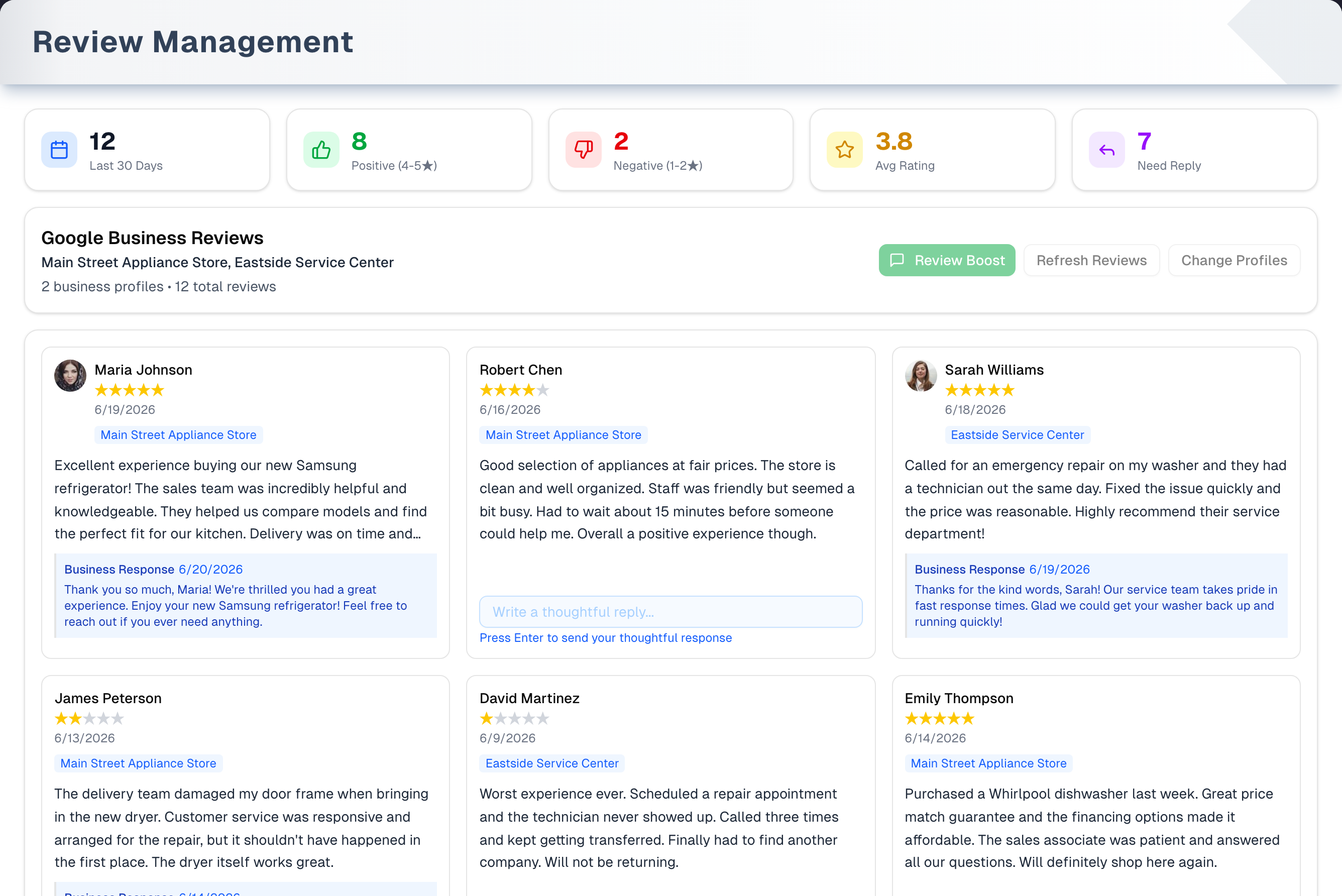
Overview
The page has no tabs. What you see depends on where you are:
| Screen | When it shows |
|---|---|
| Connect Your Google Business Account | No Google connection yet, or right after Disconnect/Reconnect |
| Select Business Profiles | Straight after connecting, when no locations are saved, or after Change Profiles |
| Reviews | Once locations are saved: the 30-day cards, the Google Business Reviews bar and the review cards |
| We could not read your locations from Google | Connected, but Google would not list your locations — most often because the Google account you signed in with manages no Business Profile |
| "Loading your reviews..." | While the page loads, and on every change of page |
The header, the Demo button and the Review requests table are on every one of those screens, so nothing that goes wrong takes the page away from you.
The Dashboard's Avg rating and Reviews to reply tiles also open this page.
Areas in detail
Connection & profile selection
- Not connected: an explainer card and Connect Google Business, which takes you to Google to sign in and allow access. Finish on Google within 10 minutes. While it is starting the button reads Connecting...; if the sign-in link cannot be made, the reason appears in red under the button and the button comes back.
- Back from Google: Success!, then after 2 seconds Select Business Profiles with every location of that Google account ticked. Only the first Google Business account that Google user can reach is read. Unverified locations are listed too; ✓ Verified is only a badge.
- Click a card (or its checkbox) to tick or untick it, then Continue with N Profiles to save the list.
- Later: Change Profiles opens with the locations UpChannels already knows about. Refresh asks Google again, so a location you added on Google — or one you unticked before — comes back into the list, and a message says how many are new. Your ticks are kept, except for a location Google no longer lists. Disconnect/Reconnect (no confirmation) is still there for switching Google account.
30-day summary cards
Last 30 Days, Positive (4-5★), Negative (1-2★), Avg Rating and Need Reply. They count only reviews written in the last 30 days, across all tracked locations and every page, so they stay the same while you page. 3★ reviews count as neither positive nor negative, and unanswered reviews older than 30 days are not in Need Reply.
Review cards
- 3-column grid, 20 per page, newest activity first: reviewer photo and name ("Anonymous" if Google has none), stars, date, the location, and the review text (cut off after 4 lines).
- A review you have answered shows your Business Response in a blue box. UpChannels cannot edit or delete it.
- An unanswered review has a reply box: type, then press Enter or click Send. The reply posts straight to Google with no approval step, and the card then shows your Business Response. While it is posting the box is locked, the button reads Sending... and the other reviews' Send buttons wait their turn. If Google refuses it, the reason appears in red under that one box, your words stay where you typed them, and every other review is untouched.
- Up to about 200 of the most recent reviews per location are read for the list and the 30-day cards. The total at the top is Google's own all-time count for your locations, with Google's star average, so it matches your Google profile even when a location has more than 200 reviews. When a location cannot be read at all — Google is limiting how often we may ask, or it answers with an error — an amber line above the counts names it and says how many of your locations are missing. The same line says so when Google stopped answering part-way through a location, so only some of its reviews are counted. When a location has more than 200 reviews, the line says "Only the most recent 200 reviews are listed for …. The total is Google's own count." (or "… are counted for …" when Google sent no count for it). A short total never passes for the whole picture.
Google Business Reviews bar
- Review Boost opens SMS Campaigns → Create with a review-request message filled in. Nothing is sent from Reviews: you choose who gets it and send it there. The campaign page puts your Google review link into the message when it finds a connected location with a Google Place ID; otherwise the link still reads
PLACE_IDand must be replaced before you send. SMS Campaigns is a Pro feature. - Refresh Reviews reads the reviews from Google again and recounts the cards.
- Change Profiles opens Select Business Profiles.
- Fix Business Names appears when a review's location reads "Business Location …". It reads your locations from Google again, saves the ones you track under their real names and reloads the reviews, so the chips stop reading "Business Location …". If Google still has no name for a location, the message says so.
Review requests from the Customer Portal
Below the review cards, once your store has at least one portal review invitation, the Review requests table lists the latest 50: customer and comment, where it was sent, status (Pending, Sent, Link clicked, Review submitted), rating, date sent and reminders. A rating of 3★ or less gets Open complaint, which opens Log complaint filled in from the review (see Complaints); once one has been logged, the button shows that complaint's number and re-opens it rather than starting a second. The table shows on every screen of this page, so a store that collects portal ratings and never connects Google still sees its ratings and can open complaints from them.
Automatic review invitations from the Customer Portal
If you run the Customer Portal, completed orders can ask for the review themselves. The owner switches on Review request after completion in Settings → Customer Portal (it is off by default). About a day after an order becomes Delivered or Completed (UpChannels looks for orders last changed 24 to 72 hours ago), the customer gets an email with Leave a quick review. If no email goes out, they get a text instead, as long as they have agreed to texts. Up to 2 reminders follow, 3 days apart, until they answer. To ask right away for one order, use Send → Request review in the order window. Reminders have their own switch, Remind customers who have not answered, which is on by default and covers invitations you send by hand as well as the automatic ones.
The invitation opens a small page: 1 to 5 stars, an optional comment and Send feedback. After sending, every customer, whatever their rating, sees Review us on Google, but only if a Google review link is saved on a location (Settings → Locations). Invitation links last 30 days.
This runs per order and does not need a campaign; Review Boost remains the way to ask a whole list at once. Both need Pro or Premium.
Step by step: connect and reply
- Open Growth → Reviews Booster and click Connect Google Business.
- On Google, sign in with the account that manages your Business Profile and allow access, within 10 minutes.
- After Success!, Select Business Profiles opens with every location ticked. Untick any you don't want and click Continue with N Profiles.
- On an unanswered review, type your reply and press Enter (or click Send). It is on Google straight away.
Tips & best practices
- The cards cover the last 30 days only. Page back through older reviews for unanswered ones that Need Reply leaves out.
- Read a reply twice before pressing Enter or Send. It is public on Google at once, and UpChannels cannot edit or delete it.
- Save a Google review link on every location before switching on review requests, so happy customers have somewhere to go next.
- Use Review Boost to ask a list of customers at once, and Request review on a single order right after a good job.
- A 1 to 3★ portal rating is a customer telling you something went wrong. Open complaint keeps the review, the customer and the order together.
Troubleshooting
| Issue | Fix |
|---|---|
| A message bar at the top of the page | Something failed while the page was loading. Read it, use Try again if it is offered, and close it with the ✕. The rest of the page keeps working. The Messages you may see panel below explains each message |
| A message in the corner after a button | A button could not finish. The screen stays as it was, so you can read the message and try again |
| Connect Google Business shows a red line under it | The Google sign-in link could not be made — the line says why (for example you were signed out, or your account has no store). Fix that and click it again. If it keeps happening, contact UpChannels support |
| We could not read your locations from Google | Google would not list your locations. Use Try again, or Disconnect/Reconnect and sign in with the Google account that manages your Business Profile |
A page of plain text such as {"error":"State expired. Please try again."} after Google | You cancelled or refused on Google's screen, or took more than 10 minutes. Go back to Reviews and click Connect Google Business again |
| Reviews show "Business Location …" names | Click Fix Business Names. If it says Google still has no name for a location, add a name to that location in your Google Business Profile |
| A location is missing from Change Profiles, or a new one never appears | Click Change Profiles, then Refresh: it asks Google again and adds anything new. Tick it and Continue |
| Select Business Profiles lists no locations | The Google account you connected has no locations under its first Business account. Disconnect/Reconnect and sign in with the Google account that manages your Business Profile |
| A reply would not post | The reason is in red under that reply box and your words are still there. Fix what it says and press Enter or Send again |
| "No reviews found." | The locations have no reviews yet, no locations are saved, or the Google account has no Business account. A load that FAILED says "Your reviews could not be loaded." instead, with the reason and a Try again at the top of the page |
| Totals are lower than on Google Maps | Read the amber line above the counts: it names any location that could not be read this time, and any location Google stopped answering for part-way through. The "… total reviews on Google" figure is Google's own count; when Google does not send it, the figure is the reviews read, up to ~200 per location, and reads "… total reviews" without "on Google". The list shows only the ~200 most recent reviews per location (the same line says when that happened), and the cards count only the last 30 days. Answer an older review on Google itself |
| "Google authentication expired…" | Click Change Profiles, then Disconnect/Reconnect, and connect again |
The Review Boost message still says PLACE_ID | The campaign page found no connected location with a Google Place ID. Pick your business profile on that page, or paste your own Google review link in place of the link |
| A customer never saw Review us on Google | No Google review link is saved on a location. Add one in Settings → Locations |
| No Review requests table | It appears once your store has a portal review invitation. It does not need Google: it is on every screen of this page |
What's next
- Request reviews by text: Growth → SMS Campaigns
- Handle replies that come back: Growth → Messages
- Work through low ratings: Growth → Complaints
- Set up review invitations: Customer Portal
- Track ad-driven traffic: Growth → Ads & Sales
Detailed reference
Every button, icon, field and message on this page, for when you need the exact detail. Each panel starts closed — open the one you need.
Page header and toolbar
The page has no tabs. It shows one screen at a time: loading, connect, Select Business Profiles, We could not read your locations from Google, or the reviews screen. The header, the Demo button and the Review requests table sit around whichever screen is showing, so no failure can take them away.
| Control | Where | What it does | Notes |
|---|---|---|---|
| Sidebar Growth → Reviews Booster (star icon) | Sidebar | Opens this page | Every plan. No Pro tag |
| Dashboard tiles Avg rating (star) and Reviews to reply | Dashboard | Both open this page | Until Google is connected both show "—", and Avg rating has the hint "Connect Google". Connected, Avg rating shows Google's own star average and its hint ("… reviews") Google's own count, as the bar above the reviews does; when Google does not send them, the average of the most recent reviews and the count of reviews read. Reviews to reply has no hint and is highlighted when above 0 |
| Title Review Management, "Monitor and respond to customer reviews from Google Business in one centralized dashboard." | Header, left | — | On every screen |
| Demo (Play icon, amber) | Header, right | Opens the sample page with a guided tour | Everyone, on every screen. See Demo mode |
| Spinner card "Loading your reviews..." / "Please wait while we fetch your Google Business data" | Page body | Shows while the page checks the connection and loads locations and reviews | Also replaces the page body on every Previous, Next or page-number click until that page arrives |
| Message bar (red) | Top of the page body, under the header | Shows what went wrong while the page was loading | Only the page load uses it. It has a ✕ (Dismiss) and, where trying again can help, a Try again button. Everything under it — the screen, the buttons, the Review requests table — keeps working |
| Message in the corner | Bottom right | Shows what a button did or could not finish: Refresh, Continue, Disconnect/Reconnect, Refresh Reviews, Fix Business Names or a page button | The screen does not change, so you can read it and try again |
Section: Connect screen
Shown when your store has no active Google connection, and also when that check could not be made — in which case the message bar above says why and offers Try again, so a connected store is never dropped here without an explanation.
| Control | Where | What it does | Notes |
|---|---|---|---|
| Card Connect Your Google Business Account (sparkles icon), "Link your Google Business Profile to manage and respond to customer reviews directly from this dashboard." | Body | Explains the feature | Information only |
| "What you can do:" list: "View all customer reviews across your business profiles", "Respond to reviews quickly and professionally", "Track review ratings and customer feedback", "Manage multiple business locations from one place" | Inside the card | Information only | Not clickable |
| Connect Google Business ("Connecting..." while it starts) | Below the card | Takes you to Google's sign-in and consent screen, asking to manage your Business Profile. Google always shows the consent screen | Greyed out while it is starting. If the sign-in link can't be made (signed out, no store on the account, server setup problem), the reason appears in red under the button and the button comes back, so you can fix it and click again. The request expires after 10 minutes |
Section: Select Business Profiles
It shows right after connecting, when a connection exists but no locations are saved, and after Change Profiles.
- First time: every location under the first Google Business account the signed-in Google user can reach, all ticked. They are already tracked at this point, so leaving without Continue keeps all of them.
- After that: the locations UpChannels already knows about, with the ones you track ticked. Refresh asks Google for the current list, so a new location, or one you unticked before, appears here again. With more than one location, a filter box and Select all / Clear all sit above the cards, so a long list can be narrowed and ticked in one go.
| Control | Where | What it does | Notes |
|---|---|---|---|
| Heading Select Business Profiles, "Choose which business profiles you want to manage reviews for:" | Card top | — | — |
| Refresh (circular arrows; "Refreshing..." with a spinning icon) | Card top right | Asks Google for this account's locations again, adds any that are new and keeps the ticks that still exist | A message says "N new location(s) found" or "No new locations found", with how many Google lists for the account. A location Google no longer lists drops out of the list and out of your ticks; nothing is saved until you press Continue. Greyed out while refreshing. If it fails, a message shows in the corner and the screen stays as it is |
| Disconnect/Reconnect (red, log-out icon; "Disconnecting..."), tooltip "Disconnect your Google Business account and return to the connection screen" | Card top right | Ends the store's Google connection in UpChannels, forgets the saved locations and returns to the connect screen | No confirmation. It does not remove UpChannels' access on Google's side. Connecting again ticks every location. Only on this screen: reach it with Change Profiles |
| Filter box ("Filter by name, address or category") | Above the cards, with more than one location | Shows only the locations whose name, address or category contains every word you type, in any order | Ticks on the locations it hides are kept, so Continue still saves them. "No locations match that filter." when nothing matches |
| "N locations" or "Showing N of M locations" | Under the filter box | How many cards the filter is showing | — |
| Select all / Clear all (Select shown / Clear shown while filtering) | Under the filter box, right | Ticks, or unticks, every card on show | Leaves the hidden locations' ticks alone. Greyed out when the filter shows nothing |
| Location card | List, one per location | Click anywhere on it to tick or untick. A ticked card has a blue border | — |
| Card contents: name, ✓ Verified, address, category | Each card | Name is the Google title (else the first address line, else "Business Location"). Address, or "Address not available". Category is the main Google category, else the first other category, else "Business" | ✓ Verified shows only on Google-verified locations. Unverified locations can be ticked too |
| Checkbox | Card, right | Same as clicking the card | — |
| Continue with N Profile(s) ("Select at least one profile to continue" with nothing ticked; "Saving..." while saving) | Card footer | Saves the ticked locations, closes the screen, loads page 1 of reviews ("Loading reviews..." / "Fetching your reviews from Google Business") and recounts the cards | Greyed out with nothing ticked and while saving. If it fails, a message shows in the corner ("Locations not saved") and the screen stays as it is |
| Cancel | Card footer, right | Closes the screen without saving | Only when reviews are already showing. With no reviews loaded there is no Cancel: Continue or reload. Greyed out while saving |
Section: We could not read your locations from Google
Shown when your store is connected to Google but Google would not list its locations — most often because the Google account that was signed in manages no Business Profile.
| Control | Where | What it does | Notes |
|---|---|---|---|
| Heading We could not read your locations from Google, then the reason Google or UpChannels gave | Card top | Says exactly what came back, for example "No Google Business accounts found" | The wording is whatever the answer was, not a fixed sentence |
| "The commonest reason is that the Google account you signed in with does not manage a Business Profile. Use Disconnect/Reconnect and sign in with the Google account that does." | Card body | Explains the usual cause | Information only |
| Try again | Card footer | Asks Google for your locations again | Use it for a passing problem, such as Google being busy |
| Disconnect/Reconnect (red, log-out icon; "Disconnecting...") | Card footer | Ends the store's Google connection in UpChannels and returns to the connect screen, so you can sign in with another Google account | No confirmation. It does not remove UpChannels' access on Google's side |
Section: 30-day summary cards
Shown only when the current page has at least one review. The cards count every review read from Google (all pages, up to about 200 per location) that was written in the last 30 days, so they don't change as you page. If the count can't be loaded, the cards keep their last numbers (or 0) and no message shows.
| Card | Where | What it shows | Notes |
|---|---|---|---|
| Last 30 Days (calendar, blue) | Card 1 | Reviews written in the last 30 days | Not a lifetime total |
| Positive (4-5★) (thumbs up, green) | Card 2 | Of those, reviews with 4 or 5 stars | — |
| Negative (1-2★) (thumbs down, red) | Card 3 | Of those, reviews with 1 or 2 stars | 3★ reviews count in neither Positive nor Negative |
| Avg Rating (star, yellow) | Card 4 | Average stars, one decimal | "0.0" when there are none |
| Need Reply (reply arrow, purple) | Card 5 | Reviews from the last 30 days without your reply | Older unanswered reviews are not counted |
Section: Google Business Reviews bar
| Control | Where | What it does | Notes |
|---|---|---|---|
| Heading Google Business Reviews, the tracked location names, "N business profile(s) • M total review(s) on Google • 4.6 stars" | Bar, left | Shows what is tracked, Google's own all-time review count for those locations and its star average | Google sends the count and average with the first batch of reviews. When a location's count does not come back, the bar falls back to "• M total review(s)", the reviews read. With more than one location, a smaller line under it gives each location's own figures, such as "Main Street: 812 reviews, 4.6 stars". "• … total reviews" only when above 0. "No business profiles selected" when none are tracked. There is always one name per tracked location, even after Google stops listing one: a location with no name from Google reads "Business Location …", so the names and the count can never disagree |
| Review Boost (message icon, green), tooltip "Create an SMS campaign to request more customer reviews" | Bar, right, first | Opens SMS Campaigns → Create, names the campaign Google Review Request and, if the message box is empty, fills it with Hi {{firstName}}! Thanks for your recent visit. Could you share your feedback? It really helps us grow: https://search.google.com/local/writereview?placeid=PLACE_ID | Nothing is sent from Reviews: you choose the audience and send on the campaign page. That page picks a connected location and swaps PLACE_ID for its Google Place ID ("Review link will use Place ID: …"); if none is found, replace the link before sending. SMS Campaigns is a Pro feature, and sending needs your texting number and SMS allowance. See SMS Campaigns |
| Refresh Reviews ("Refreshing..." while busy) | Bar, right | Reads the current page from Google again and recounts the cards | Greyed out while refreshing. If it fails, a message shows in the corner ("Could not refresh reviews") and the reviews already on screen stay |
| Change Profiles | Bar, right | Opens Select Business Profiles with your saved locations | Always shown on the reviews screen |
| Fix Business Names (amber outline; "Fixing names...") | Bar, right, last | Reads your locations from Google again, saves the ones you track under their current names and reloads the reviews | Only when a review on the current page shows its location as "Business Location …". Greyed out while it works. A message reports the result, including any saved location Google no longer lists (dropped from your choice) and any location Google still has no name for. If it fails, the message says why and the reviews stay on screen |
Section: Review cards and pages
| Control | Where | What it does | Notes |
|---|---|---|---|
| "Loading reviews..." / "Fetching your reviews from Google Business" | Reviews card | Shows while a new location choice is saved and loaded | — |
| "No reviews found." / "Reviews will appear here once they are available for the selected business profiles." | Reviews card | Nothing came back | Also shown when no locations are saved or the Google account has no Business account. A load that failed reads "Your reviews could not be loaded." here instead, with the reason and Try again at the top of the page — an empty list is never presented as "this store has none" |
| Reviewer photo | Card, top left | The reviewer's Google photo | Only when Google has one |
| Reviewer name | Card header | Google display name | "Anonymous" if there is none. One line |
| Stars | Card header | Yellow stars show the rating, grey the rest | All grey if Google's rating can't be read |
| Date | Card header | When the review was written | In your store's date format |
| Location chip (blue) | Card header | Which tracked location the review belongs to | Can read "Business Location …" (see Fix Business Names) |
| Review text | Card body | The customer's words | Cut off after 4 lines, with no way to expand. Empty for star-only reviews |
| Business Response box and its date | Below the text, blue with a left bar | Your existing reply on Google | Cut off after 3 lines. Cannot be edited or deleted in UpChannels |
| Reply box, "Write a thoughtful reply...", hint "Press Enter or click Send to post your reply" | Card bottom | Enter or Send posts the reply straight to Google. Once Google has taken it the box empties, a message says "Reply posted to Google", the list and cards refresh, and the card shows Business Response | Only on reviews without a reply. Blank text is ignored, and Send is greyed out until you type something. While it posts, the box is locked and the button reads Sending.... If it fails, the reason appears in red where the hint was, your words stay in the box, and no other review is affected; the red line goes as soon as you edit the words, and the hint comes back. No approval step |
| The line under the reply box | Below the box, one line | Tells you where that reply stands: the blue hint "Press Enter or click Send to post your reply" normally, blue "Posting your reply to Google..." on the box that is posting, amber "Wait for the reply being posted to finish" on every other box while that one posts, and the reason in red if Google refused | The red reason wins over the others and stays until you edit the words |
| Send | Beside the reply box | Posts the reply, exactly as Enter does | Greyed out while the box is empty, and on every review while a reply is posting — one reply goes to Google at a time. While it is greyed for that reason, the line under that box reads "Wait for the reply being posted to finish", so you can see why without hovering |
| Card order | Grid | Newest activity first, across all tracked locations | About 200 most recent reviews per location. A location that cannot be read is left out of this load, and one Google stopped answering for part-way through is only partly in it; the amber line above the counts names both |
| "Showing … to … of … reviews" | Below the grid, left | The range on screen | Only with more than 20 reviews |
| Previous | Below the grid, right | Loads the page before, 20 per page | Greyed out on page 1. The page body shows the loading card while it loads |
| Page numbers (up to 5) | Between Previous and Next | Jumps to that page. The current page is solid | The row starts two pages before the current one (never before page 1). Fewer numbers near the end |
| Next | Below the grid, right | Loads the next page | Greyed out on the last page |
Section: Review requests
Below whichever screen is showing, once your store has at least one Customer Portal review invitation. Google does not have to be connected. Hidden if it can't be loaded. Shows the 50 most recent, newest first. Rows are not clickable, but each one carries the customer's own review link and a way to ask them again.
| Control | Where | What it does | Notes |
|---|---|---|---|
| Title Review requests (paper-plane icon) | Card header | — | The whole card is hidden with no invitations |
| Customer | Column | The customer's name ("Customer" if none), with their comment underneath in quotes | The comment is cut to one line and appears only after they submit |
| Contact | Column | The email the invitation went to, or the phone if there was no email | — |
| Status chip | Column | Pending (grey); Sent, Delivered and Link clicked (amber); Review submitted (green); Failed, Expired and Opted out (red) | In practice an invitation goes Pending (created, not yet sent), Sent, Link clicked, Review submitted. A Pending one is tried again by the automatic check three days after the last attempt — the same rhythm as a reminder — and Request review tries it at once. It turns Expired 30 days after it was made, which is what lets a fresh one be created for that order |
| Rating | Column | Star and "N/5", or "—" before they answer | — |
| Sent | Column | Date first sent, or "—" | — |
| Reminders | Column | Reminders sent so far, 0 to 2 | — |
| Copy link (copy icon) | Link column | Copies the customer's own review link, so you can send it yourself | Asks for the link first, so one that is close to its 30 days is renewed before it reaches the clipboard and still works when the customer opens it. Says "Copied" for a couple of seconds. Greyed out on a row that has no link yet, and on one whose link no longer opens the review form — Expired or Failed — where copying it would only send the customer to "This link has expired". Also greyed out on an Opted out row: a link the customer kept still opens the review form until its 30 days are up, but the store sends them nothing more. Hover the greyed-out button for the reason |
| Send again (paper-plane icon; "Sending…") | Link column | Asks this customer again now, on their email or text | Only on a row that came from an order. A message says what happened: sent, sent again, or why not — the customer has answered, the link has run out, or they have already been asked as many times as the store allows |
| Open complaint (warning bubble icon) | Last column | Opens Log complaint filled in from this review | Only on ratings of 1 to 3★. Once a complaint has been logged from that review the button reads its number instead (for example C-118) and re-opens that complaint, so a second click cannot start another. Hover it for "C-118 was already logged from this review. Opens it instead of starting another." Removing the complaint puts Open complaint back — and so does opening a number whose complaint somebody else has already removed: the form says "Complaint not found" and the row goes back to Open complaint when you close it |
Section: How review invitations are sent
| Control | Where | What it does | Notes |
|---|---|---|---|
| Switch Review request after completion, "Invite the customer to leave a review about a day after the order completes. Once they rate, every customer is offered your Google review link, whatever score they gave." | Settings → Customer Portal → Automatic customer notifications | Turns on automatic invitations | Off by default. It decides only whether invitations are created for you; following up an invitation that exists is the switch below it. Settings opens wider than this switch works: it works only for someone whose Owner switch is on, and everyone else sees it greyed out with "Only the organization owner can change this." The card shows only while the portal is on. The Google button appears after the customer rates, and only if a location has a Google review link — when none is saved, an amber note under the switch says so |
| Automatic check (every 5 minutes) | Behind the scenes | Invites the customer of each Delivered or Completed order that was last changed 24 to 72 hours ago. One invitation per order | Needs the portal on and Pro, Premium or a running trial. Timing follows the order's last change, so an order edited after it was completed is invited later |
| Switch Remind customers who have not answered, "Follow up a review invitation up to 2 times, 3 days apart, until they answer. Covers invitations you send by hand from an order or from Growth → Reviews, not only the automatic ones." | Settings → Customer Portal → Automatic customer notifications | Turns follow-ups on or off | On by default, and independent of the switch above it, so an invitation you send by hand is followed up whether or not automatic invitations are on. Owner only, like its neighbours |
| Reminders | Behind the scenes | Sends again to invitations still Pending, Sent, Delivered or Link clicked, 3 days after the last attempt, at most 2 reminders. Heading "How did we do?", text "A quick reminder from … — we'd love your feedback on … #…. It takes under a minute." | While Remind customers who have not answered is on, whatever created the invitation. Stops once the customer answers. A Pending one — made, but never sent — is a first attempt rather than a reminder, so it is retried on the same rhythm and does not use up the two reminders |
| Expiry | Behind the scenes | Marks an invitation Expired 30 days after it was made, unless the customer has answered or opted out | Runs with the same check, whatever Remind customers who have not answered is set to — it is housekeeping, not a message. Once it is Expired, Request review on that order creates a fresh invitation with a new link. An opted-out invitation is never replaced: that order gets no new request, and the link the customer kept works until its 30 days are up |
| The invitation | Email, or text | Email subject "How did we do? — …", heading "Thanks for choosing …!", text "How did we do with your … #…? We'd love your feedback — it takes under a minute.", button Leave a quick review. The text message is the same sentence plus the link | Email first. A text only when no email went out, the customer has agreed to texts and hasn't opted out, your SMS allowance has room and a texting number is set up |
| Request review (star icon; "Requesting…") | Order window → Send menu | Creates and sends an invitation for this order now, or asks again on the one it already has | Only on Delivered or Completed orders, with the portal on and Pro, Premium or a running trial. Not on scrap orders. Works whether or not the automatic switch is on, and the two reminders follow either way unless the store has turned Remind customers who have not answered off. Clicking again asks again at once, without waiting for the three days, until the customer has been asked as many times as the store allows. See Order Management |
Google review link, placeholder https://g.page/r/…/review, help "Shown to customers after they leave feedback in the customer portal. Find it in your Google Business Profile under "Ask for reviews"." | Settings → Locations → add or edit a location | Where Review us on Google points | Must start with https:// ("Google review link must start with https://"). Saving the location needs the owner, so the store's only active member who is not the owner can open the section but not save. The order's location is used first, else any active location that has one |
Dialog: Log complaint
The same form as on Complaints, which documents every field. From Open complaint it opens as a new complaint with the customer filled in, Came in by set to Review, What happened set to "From a N/5 review: “…”" (or "From a N/5 review." when there was no comment), and the order and the review invitation attached in the background. When the button shows a complaint number instead, the same form opens on that saved complaint.
| Control | Where | What it does | Notes |
|---|---|---|---|
| Title "Log complaint", "Opened from order #2402" | Header | — | The order number is looked up as the form opens, so the line reads "Category, severity, owner and one line about what happened." for a moment, and for a review with no order it keeps that wording. After a save the title becomes the complaint number, category and a status badge, and the subtitle lists the owner, the order, the customer and the date opened (plus "resolved …" once it is) |
| X (close) | Header, right | Closes the form without saving | With unsaved changes it asks "Leave without saving?" first — Keep editing returns to the form, Discard changes closes it. Esc and a click outside do the same |
| "This category, last 90 days: … complaints." | Top of body, amber | Warns about a pattern | Only when the chosen category has more than one complaint in 90 days. Adds "· … of them …" (a weekday) when more than one fell on the same weekday as this one |
| Customer ("Search customer") and Clear customer | Body | Filled in from the review. Change or clear it | Clear customer shows only while a customer is set |
| Linked order | Body | Read-only | Shows the review's order number, for example "#2402". It is looked up as the form opens ("Order linked — reading its number…" while it does). "Order linked (number unavailable)" means the order is attached but its number could not be read; "None — log it from the order to link one" means the review had no order |
| Category chips | Body | Pick one. The first is preselected | The list comes from Settings → Lost sales (defaults: Delivery window, Damaged on arrival, Product defect, Wrong item, Pricing / billing, Staff / service, Install / service quality, Communication, Other) |
| Severity (Low, Normal, High, Urgent, Emergency; default Normal) | Body | Sets the due date | Default days: Emergency 1, Urgent 1, High 2, Normal 5, Low 10 (changeable in Settings → Lost sales) |
| Owner | Body | Who owns the complaint | Starts at you, with the whole team listed and "Nobody yet" at the top. The form reads your team itself here, so it may show "Loading…" for a moment before it opens |
| Due | Body | Read-only: "due in … days" | Later it reads "due …", "overdue by …", "took …" or "no due date" |
| What happened ("Dent on the right door, noticed after the driver left.") | Body | Required, up to 2,000 characters | Prefilled from the review |
| Status (Open, Waiting on customer, On hold, Escalated, Resolved, Closed; default Open) | Body | — | Resolved needs What was done |
| Came in by (In store, Phone, Text, Email, Review, Customer portal) | Body | Preset to Review | — |
| What was done ("Redelivered Sat 9–11, $50 credit.") | Body | What you did about it | Required only for Resolved |
| Root cause ("Saturday route overbooked."), hint "One line here is what turns eleven complaints into one fix." | Body | Optional | — |
| Photos with Add photo (camera icon) | Body | Adds a JPEG, PNG or WebP picture. Clicking a photo opens it in a new tab; the X beside one asks first and then deletes it for good | Only after the first save. The X is offered to whoever added the photo, and to a manager or the owner. Empty: "No photos. A picture of the damage saves a paragraph." |
| Timeline, note box ("Driver confirmed a 2-hour window for the redelivery."), Add note | Body | Adds a note to the timeline | Only after the first save. Add note is greyed out while the box is empty. Empty: "Nothing recorded yet. Status changes, reassignments and notes appear here as they happen." |
| Remove (trash icon) | Footer, left | Asks "Remove C-118?" first, then removes the complaint and closes the form ("… removed", "A manager can put it back from the Removed tab.") | Saved complaints only, and only for a manager or the owner |
| Photo (camera icon) | Footer, left | Same as Add photo | Saved complaints only |
| Close / Cancel | Footer, right | Closes without saving | Reads Close until you change something (what the review filled in does not count), then Cancel. With unsaved changes it asks "Leave without saving?" first |
| Save | Footer, right | Creates the complaint: "… logged" with "Due …". The form stays open so you can add a photo or note. Saving later changes shows "… updated" and closes it | Anything missing is listed in red above the buttons, and Save repeats the first one — a review comment longer than 2,000 characters says so. Greyed out only while saving, or on a saved complaint with no changes |
Sub-page: Return from Google
The page Google sends you back to after Connect Google Business.
| Control | Where | What it does | Notes |
|---|---|---|---|
| Spinner, Processing Connection, "Processing Google Business connection..." | Centered card | Shows briefly while the answer is read | — |
| Green check, Success!, "Google Business connection created successfully!", "Redirecting to reviews page..." | Centered card | After 2 seconds opens Reviews on Select Business Profiles, every location ticked | — |
| Red cross, Error, and one of: "Missing access token from Google OAuth", "Could not retrieve Google account email", "Failed to process Google callback", "Failed to connect Google Business account", "Invalid callback. Please try connecting again." | Centered card | The connection did not finish | — |
| Go to Reviews (blue) | Error card | Back to Reviews to try again | Error only |
Plain text instead of a page: {"error":"Invalid code or state"}, {"error":"Invalid or tampered state"}, {"error":"State expired. Please try again."}, {"error":"Unknown authentication flow"} | Whole browser tab | Google's answer couldn't be used: you cancelled or refused on Google, took more than 10 minutes, or the link was changed | Go back to Reviews and click Connect Google Business again |
Sub-page: Customer review page
What the customer sees from an invitation's Leave a quick review link. No sign-in. The Customer Portal page covers it too.
| Control | Where | What it does | Notes |
|---|---|---|---|
| Store logo and name | Header | — | Logo only if one is set in your branding |
| "How was your experience with …?" | Form | — | — |
| 5 stars (read aloud as "1 star" to "5 stars") | Form | Click to pick the rating. Hovering previews it | A rating is required |
| Comment box, "Tell us more (optional)…" | Form | Optional comment | Up to 1,000 characters. Formatting is stripped |
| Send feedback ("Sending…") | Form | Saves the rating and comment. The status becomes Review submitted | Greyed out until a star is picked. Red errors: "This link is no longer valid", "The portal is not available for this store", "Could not save your review", "Rating must be a whole number from 1 to 5" |
| "Thanks for the feedback!" / "We really appreciate you taking the time." and Review us on Google | Replaces the form | The button opens your Google review page in a new tab | Shown for every rating, but only when a Google review link is saved on the order's location or another active location. Never shown before the customer rates |
| "Thanks for the feedback!" / "You've already shared your experience with us." and Review us on Google | Page | Shown when a used link is opened again | Same Google-link rule |
| "Secure link provided by …." | Footer | — | — |
| This link isn't valid, "The link may have been copied incompletely. Contact the store for a new one." | Whole page | Bad or altered link | — |
| This link has expired, "For your security, portal links expire after a while. Contact the store for a new one." | Whole page | The invitation is more than 30 days old, or Request review has replaced it with a new one | Reminders re-sign the link when fewer than 5 days are left, but never past the invitation’s own 30 days; once it has run out or been replaced, every copy of it shows this page |
| Portal unavailable, "… doesn't have the customer portal turned on right now. Contact the store directly about your order." | Whole page | Portal switched off, or the plan is below Pro | Old links work again once the portal is back on |
| First open | Behind the scenes | The status changes from Sent to Link clicked | — |
| Rating on the service job | Behind the scenes | The rating and comment are also saved on the order's most recent completed service job | Only if the order has one |
Short links containing /r/ | — | These are receipt links, not review invitations | — |
Messages you may see
| Message | When it appears | What to do |
|---|---|---|
| "Loading your reviews..." / "Please wait while we fetch your Google Business data" | Page load and every page change | Wait. Many locations take longer |
| "Loading reviews..." / "Fetching your reviews from Google Business" | After Continue | Wait |
| "No reviews found." / "Reviews will appear here once they are available for the selected business profiles." | Nothing came back from Google, and the request itself was fine | Check your locations. A failed request says so instead, at the top of the page |
| Message bar: "We could not work out which store you are signed in to. Reload the page, or sign out and in again." | Your store couldn't be identified when the page opened | Reload. Sign out and in again |
| Message bar with Try again: "We could not check your Google Business connection." or the reason the check gave | The check for a Google connection could not be made when the page opened, so the page fell back to the connect screen | Try again. If it keeps happening, reload, or sign out and in again |
| We could not read your locations from Google with "No Google Business accounts found" | Your locations couldn't be read, for example because the Google account you connected has no Business Profile | Try again, or Disconnect/Reconnect and sign in with the Google account that manages your Business Profile |
| We could not read your locations from Google with "Google Business Profile API Access Required: The Google Business Profile APIs require approval from Google before use in production. …" | Google refused the location lookup for UpChannels. Refresh, Try again and Fix Business Names each ask Google, so any of them can end here | Contact UpChannels support |
| Under Connect Google Business: "No organization associated with this account", "Unauthorized", "Could not start Google sign-in (HTTP …)", "Google did not return a sign-in link. Please try again." or "Could not reach UpChannels to start Google sign-in. Check your connection and try again." | The sign-in link could not be made | Fix what it names, then click Connect Google Business again |
| Corner: N new location(s) found or No new locations found, "Google lists N location(s) for this account." | Refresh on Select Business Profiles finished | Tick anything new and press Continue |
| Corner: Could not refresh your locations | Refresh on Select Business Profiles failed | Read the reason under the title and try again |
| Corner: Location names updated from Google, "The names on your reviews now match Google." (or "… saved location(s) Google no longer lists … dropped." / "Google still has no name for … location(s).") | Fix Business Names finished | Nothing, unless it names a location Google has no title for — add one in your Google Business Profile |
| Corner: Could not update the location names | Fix Business Names failed | Read the reason and try again. The reviews on screen are untouched |
| Corner: Google no longer lists your saved locations | Fix Business Names found none of your tracked locations on Google any more | Use Change Profiles and pick from the list Google returns now |
| Corner: Locations not saved | Continue failed | Try again. The ticks you made are still on screen |
| Corner: Could not refresh reviews with "Google authentication expired. Please reconnect your Google Business account." | Google access lapsed | Change Profiles, Disconnect/Reconnect, then Connect Google Business |
| Corner: Could not refresh reviews or Could not load that page with "Failed to fetch reviews" | Any other problem reading reviews | Try again. Contact support if it persists |
| Corner: Could not disconnect with "No active Google Business connection found" or "Failed to disconnect Google Business account" | Disconnect/Reconnect failed | Try again. It may already be disconnected |
| "No Google Business integration found" (also "… Please connect your Google Business account first." under a reply box) | The connection was removed in the meantime | Reload and connect again |
| Red line under a reply box: "Google did not take the reply: …" (Google's own words after the colon), "Google did not take the reply (HTTP …). Please try again.", "Reply text cannot be empty.", "That review is not on one of your chosen business locations. Refresh the page and try again." or "No Google Business integration found. Please connect your Google Business account first." | The reply was refused | Your words are still in the box. Fix what the line says — a wording Google rejects, a location you no longer manage, a lapsed connection — and press Enter or Send again. The chosen-locations one means the page was open when the location list was narrowed: reload it. The line clears as soon as you change the words |
| Corner: Reply posted to Google, "It is public on your review now." | The reply went through | — |
| Corner: One reply at a time, "Wait for the reply being posted to finish, then send this one." | You pressed Enter on a second review while the first reply was still posting | Wait for the first to finish, then send this one. Nothing was lost |
| Success! / "Google Business connection created successfully!" / "Redirecting to reviews page..." | Back from Google, connected | Wait 2 seconds, then pick locations |
| Error with "Failed to connect Google Business account", "Missing access token from Google OAuth", "Could not retrieve Google account email", "Failed to process Google callback" or "Invalid callback. Please try connecting again." | Back from Google with a problem | Go to Reviews, then Connect Google Business again and allow access |
{"error":"Invalid code or state"} | You cancelled or refused on Google's screen | Go back to Reviews and connect again |
{"error":"State expired. Please try again."} | More than 10 minutes on Google's screen | Connect again |
{"error":"Invalid or tampered state"} / {"error":"Unknown authentication flow"} | The return link was changed or broken | Connect again |
| Review request sent, "The customer got a link to leave a review by email." (or "by text") | Request review sent an invitation that had not gone out before | — |
| Review request sent again, "The customer has been asked again by email." (or "by text") | Request review on an order whose invitation had already gone out | — |
| Review request sent, "The last link had run out, so the customer got a new one by email." (or "by text") | Request review on an order whose 30-day link had expired — a fresh invitation replaces it | Any copy of the old link no longer works; use Copy link on the new row if you are sending it by hand |
| Still could not be sent, "There is no working email address and no consent to text. The link is on the Reviews page — copy it and send it yourself." | There was no channel to try | Add an email, or get the customer's agreement to texts; meanwhile copy the link from Review requests |
| Still could not be sent, "The email or text could not be delivered just now. The link is on the Reviews page: copy it and send it yourself, or try again later." | A channel was tried and the provider or the network failed | Try again later; the automatic check tries again three days later |
| Still could not be sent, "This customer has opted out of texts from the store, and there is no email address that worked…" | The customer opted out of the store's texts (in the app, or by replying STOP), and no email went | Send the link another way. The automatic check stops asking; Request review still tries |
| Still could not be sent, "The email provider will not take this customer’s email address…" | The email address itself was refused | Correct the customer's email. The automatic check stops asking until Request review gets through |
| Still could not be sent, "This customer’s phone number cannot take texts…" | The text provider says the number is not a mobile number, or not a valid one | Correct the customer's phone. The automatic check stops asking until Request review gets through |
| Still could not be sent, "The store’s plan does not include texting…" / "The store has used this month’s texts…" / "The store’s texting number is not set up, or is not working…" | No email went, and the store could not text | Fix the plan, the text allowance or SMS setup; the automatic check tries again three days later |
| Still could not be sent, "The store's details could not be read, so nothing was sent…" | The store record could not be loaded | Try again in a moment |
| Not sent, "This customer has already been asked as many times as the store allows. Copy the link from the Reviews page and send it yourself." | The two reminders are used up | Copy the link from Review requests |
| Nothing to send, "This customer has already answered, or asked not to be contacted." | The customer reviewed or opted out | — |
| Review request failed with "Order not found", "This order has no customer to invite", "Customer not found", "Customer has no email or phone on file", "The organization has no active location", "Could not create the review invitation", "The Customer Portal is included with Pro and Premium — upgrade your plan to use it" or "The customer portal is turned off for this organization" | Request review failed | Fix the named cause: add a customer or contact, add a location, switch the portal on, or upgrade |
| "Google review link must start with https://" | Saving a location | Paste the full link, starting with https:// |
| Customer sees This link isn't valid, This link has expired or Portal unavailable | Bad, old or switched-off link | Send a new request from the order, or switch the portal back on |
| Customer sees "This link is no longer valid", "The portal is not available for this store", "Could not save your review" or "Rating must be a whole number from 1 to 5" | Send feedback failed | The customer can try again. Check that the portal is on |
| Customer sees "Thanks for the feedback!" with "We really appreciate you taking the time." or "You've already shared your experience with us." | After sending, or reopening a used link | — |
| "… logged" (with "Due …"), "… updated", "… removed", "Photo added", "Could not start the upload.", "The photo did not upload.", "Could not open that photo." | Log complaint | Follow the message |
| "Leave without saving?", "Your changes to this complaint have not been saved." | Closing Log complaint with unsaved changes | Keep editing or Discard changes |
| "Complaint not found", "It is no longer on the list. Someone may have removed it. Close this and refresh the page." | Opening a complaint number whose complaint has been removed | Close it; the row offers Open complaint again |
| "Demo mode — reviews are populated with sample data. All actions are disabled." | The demo page | Click Exit Demo Mode to go back |
Who can use what
- Plan: the Reviews page, the Google connection and replies work on every plan. Review Boost leads to SMS Campaigns, a Pro feature (the sidebar shows a Pro tag on it for Basic stores). Portal review invitations, automatic or Request review, need the Customer Portal switched on and Pro, Premium or a running trial.
- Roles: no owner, manager or staff differences on this page. Anyone signed in who sees Reviews Booster can connect Google, choose locations, reply, open complaints and disconnect. The Google access comes from whoever signs in on Google's screen.
- Owner only: the Review request after completion switch and the Google review link on a location. Both live in Settings, which opens for the owner and for the store's only active member (people switched off or removed in Team don't count). Changing them is narrower than getting in: the switch works only for someone whose Owner switch is on — everyone else sees it greyed out with "Only the organization owner can change this." — and saving a location needs the owner, or the save ends with "Nothing was changed: only the store owner can change locations. If you are the owner, reload the page and try again."
- Menu Visibility: if the owner hides Reviews Booster for a user in Settings → Team, that user gets "403 - Forbidden" on this page however they reach it — a link in the app, a bookmark or a typed address — and the sidebar row is gone for them too. The Shortcuts page has no Reviews Booster card, so nothing disappears there. A store with only one active person is never blocked; someone switched off or removed in Team doesn't count as that person.
- Demo: everyone, on every plan, from every screen. The demo page is exempt from menu visibility, so hiding Reviews Booster closes the Reviews page but not its demo.
Demo mode (/reviews/demo)
- Open it: the amber Demo button (Play icon) at the right of the Reviews header. It is on every screen, and works without Google connected.
- Header: Review Management — Demo, "Sample reviews populated with demo data. All actions are disabled."
- Banner (eye icon): "Demo mode — reviews are populated with sample data. All actions are disabled." with Take a Tour (question-mark icon), which restarts the tour at step 1.
- Tour: starts by itself the first time you open the demo. The rest of the page darkens around the highlighted area. The card stays inside the window, however close to the bottom the highlighted area is. It shows progress dots, the title, the text, "… of 6", Back (from step 2), Skip (closes), Next, and Got it! on the last step. Clicking the dark backdrop closes it. Keys: Esc closes, right arrow or Enter goes on (and closes on the last step), left arrow goes back.
- Disabled: Review Boost (does not open SMS Campaigns), Refresh Reviews, Change Profiles, and the reply boxes (read-only).
- Still works: the tour, Take a Tour and Exit Demo Mode.
- Leave: Exit Demo Mode (left arrow) at the top right goes back to Reviews.
| # | Area | Tour step | What it points at |
|---|---|---|---|
| 1 | Summary cards | 30-Day Review Summary — "At-a-glance metrics for the last 30 days: how many reviews came in, how many were positive and negative, the average star rating, and how many still need a reply." | The five 30-day cards |
| 2 | Google Business Reviews bar | Business Profile Overview — "See which Google Business profiles are connected, the total number of reviews, and quick-action buttons to request more reviews, refresh data, or switch profiles." | The Google Business Reviews bar |
| 3 | Google Business Reviews bar | Review Boost Campaign — "Start an SMS campaign asking your recent customers for a review. In the live app it opens the SMS campaign builder with the review request filled in; nothing is sent or saved until you do it there." | The Review Boost button |
| 4 | Review cards | Customer Reviews — "Browse all your Google Business reviews in a responsive 3-column grid. Each card shows the reviewer name, star rating, date, business profile, and the full comment." | The review grid |
| 5 | Review cards | Reply to Reviews — "Reviews without a response show a reply input. Type a thoughtful reply and press Enter to respond directly from this dashboard — no need to visit Google." | The reply box on the second card (Robert Chen) |
| 6 | Review cards | Business Responses — "Reviews that already have a reply display the business response with a timestamp. This helps you track which reviews have been addressed." | The Business Response on the first card (Maria Johnson) |
Sample data: two locations, "Main Street Appliance Store" (1234 Main St, Austin, TX 78701) and "Eastside Service Center" (5678 Commerce Dr, Austin, TX 78745), and 12 reviews from the last 25 days. The cards read Last 30 Days 12, Positive 8, Negative 2, Avg Rating 3.8, Need Reply 7, and the bar reads "2 business profiles • 12 total reviews".
Differences from the live page: no connect, Select Business Profiles or loading screens; no Fix Business Names; no Review requests table, so no Open complaint; no Send button beside the reply boxes; no page buttons (all 12 reviews fit on one page).
Common questions
Can I edit or delete a reply I posted? Not in UpChannels. A reply goes to Google the moment you press Enter or click Send, and the card then shows it as Business Response with no edit or delete. Change it on Google itself.
Why is Need Reply lower than the number of reviews I haven't answered? Need Reply counts only reviews written in the last 30 days. Older unanswered reviews still have a reply box on their card; page back through the grid to find them.
A location is missing, or I added a new one on Google. How do I get it into Reviews? Click Change Profiles, then Refresh. That asks Google for the account's locations again and adds anything new — including one you unticked before — and says how many are new. Tick it and press Continue. You only need Disconnect/Reconnect to sign in with a different Google account.
Something failed. What happens to the page? It stays where it is. A failure while the page loads shows as a message bar at the top, with Try again where that helps and a ✕ to close it. A button that could not finish says so in the corner and leaves the screen exactly as it was. A reply that Google refused says so under that one reply box and keeps your words. The Messages you may see panel says what each message means.
Does Review Boost send texts to my customers?
No. It opens SMS Campaigns → Create with a review-request message filled in. You choose the audience and send or schedule it there. Check that the link in the message no longer says PLACE_ID before sending.
Why didn't my customer see Review us on Google? The button appears only after the customer sends a star rating, and only when a Google review link is saved on the order's location or another active location in Settings → Locations. Every rating gets the button once a link is saved.
The order said the review invitation still could not be sent. Where do I find the link? In Review requests on this page: the row has a Copy link button, so you can send it however you like, and the link is renewed before it is copied if it was near its 30 days. The invitation stays Pending and is tried again by the automatic check three days after the last attempt, and Request review tries it again at once — so fixing the customer's email, or getting their agreement to texts, is usually enough. The message says which kind of problem it was: no email address and no consent to text, or a message that was sent and could not be delivered.
Why can't I see the Review requests table? It appears once your store has at least one Customer Portal review invitation. Google does not have to be connected — the table is on every screen of this page. Portal invitations need the portal switched on and Pro or Premium.