Local Vibes
Local Vibes (sidebar Growth → Local Vibes) shows recent local news and event coverage for your city on two tabs, Local Relevant News and Events, with a location bar to look at any other city. Everything comes from Google News: articles from the last 30 days, up to 30 per category, newest first. Click a card to read the article on the publisher's site in a new tab.
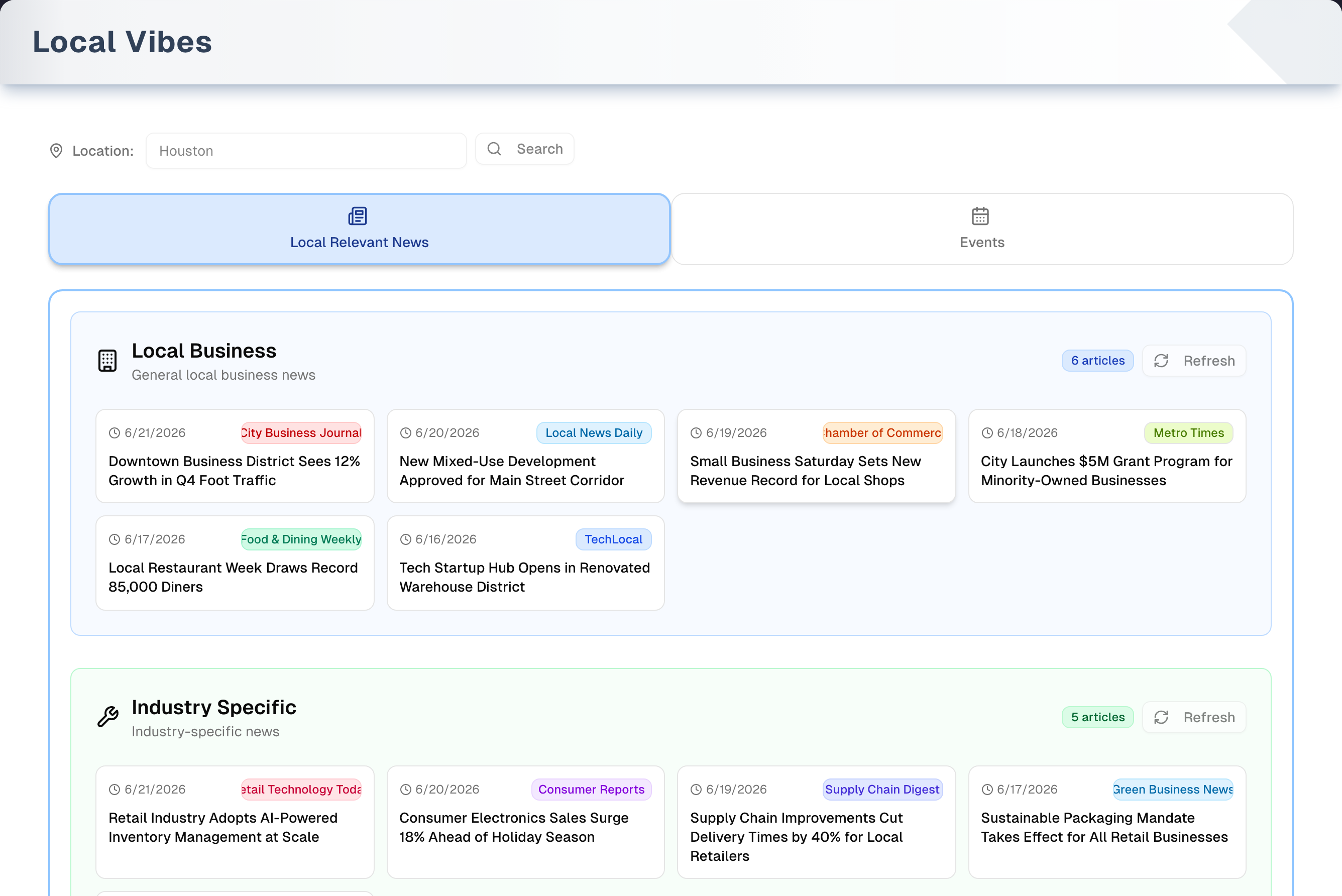
Overview
- Your city: the location bar starts with the city from your store's business address, which the owner enters in Onboarding. Nothing is auto-detected. You can search any other city, but it isn't saved: reloading the page goes back to your store's city.
- Categories come from your Business Type. Every category your Business Type has Local Vibes keywords for uses those keywords; any it hasn't filled in uses UpChannels' general local keywords instead, so the page always has something to show. With no Business Type set at all, a yellow strip says so and every category uses the general keywords. The owner picks the type in Settings → Business Type.
- Events are news articles, not a calendar. The Events tab shows articles about festivals, games, concerts and women's events in your city. The date on a card is when the article was published, not when the event happens. Open the article to find the event date.
- Results are kept for 4 hours in your browser, separately for each city and tab. A panel that failed is never kept, so reopening the page asks Google again. Refresh on a panel, or Refresh All News / Refresh All Events, fetches new results straight away.
- Plan: available on every plan, and nothing on the page changes your store's data. The Demo button in the header opens a sample version with a guided tour.
Tabs in detail
Location search
Type a city in the box and click Search or press Enter. Both tabs reload for that city. Search is greyed out while the box is empty or still shows the city you are already looking at. Reset to [your city] appears while you are looking at another city and takes you back. If your store's address has no city there is nothing to go back to, so it doesn't appear.
Local Relevant News
Up to three color-coded panels, always open: Local Business (blue), Industry Specific (green) and Economic Context (purple). For each panel, the page searches Google News for your city plus each of the first three keywords your Business Type lists for that category. The panel header shows a count ("… articles") and a Refresh button. Each card shows only the publish date, a publisher badge (the same publisher always gets the same color) and the headline. There is no summary. Refresh All News at the bottom reloads every panel.
Events
A line at the top of the tab says it plainly: "These are recent news articles about local events, not a calendar — open an article for the event date." Below it are four panels: Fairs and Festivals, Sports Events, Music Events and Women Events. Each searches your city plus the first three keywords your Business Type lists for that category, or the general ones where it lists none. Each panel header counts its "… articles". Cards show "Published" and the article's date, a publisher badge and the headline. They don't show a category or location. Refresh All Events at the bottom reloads every panel.
Step by step: explore your market
- Open Growth → Local Vibes. Local Relevant News loads for your store's city.
- Scan the panels and click any card to read the article in a new tab.
- Switch to Events for recent coverage of local festivals, games, concerts and women's events. Open an article to see when the event happens.
- To research another area, type a city and click Search, or press Enter. Reset to … brings you back to your own city.
- To get new results before the 4 hours are up, click Refresh on a panel or Refresh All News / Refresh All Events.
Tips & best practices
- Check weekly. Only the last 30 days of articles are shown, so older coverage drops off. An article about a coming festival or game can give you time to plan a sponsorship or promotion.
- The search is simply your city text plus each keyword. For a common city name, add the state (for example "Springfield IL").
- Small towns can return little. Try the nearest larger city. The search uses Google News for the US, in English.
- Make sure your Business Type matches your store. It decides which keywords both tabs search with; without one, general local keywords are used.
- Use the location search to scope out adjacent or expansion markets.
Troubleshooting
| Issue | Fix |
|---|---|
| The results are generic, and a yellow or blue strip is showing | Your store has no Business Type (yellow), or its Business Type has no Local Vibes keywords (blue), so the general local keywords are being used. The owner picks a type in Settings → Business Type → Save Business Type. For the blue strip, pick another type or contact support |
| "No Location Set" and "Please enter a city name to see local news and events." | Your store's business address has no city. Type a city and click Search. To make it the default, the owner updates the address in Onboarding |
| "No local business articles found." (or another "No … found." message) | Nothing matched in the last 30 days. Check the spelling, add the state, try a nearby larger city, or click Refresh |
| "Error: Failed to fetch RSS feed: 401" or "Error: Failed to fetch events: 401" (sometimes followed by "Unauthorized") | Your sign-in has ended. Sign in again, then click Try Again. A failed panel is not saved, so reopening the page asks again by itself |
| "Error Loading Profile" | Click Retry. If it says "No authenticated user. Please login first.", sign in again |
| Event dates are in the past | The date is when the article was published. Open the article for the event date |
| Results didn't change after the Business Type was changed | The page reads your Business Type when it opens. Reopen Local Vibes: the saved results belong to the old keywords, so new ones are fetched. Panel names, descriptions and colours always come from the Business Type you have now, never from a saved copy. Refresh All News and Refresh All Events fetch again straight away |
| The city I searched is gone after a reload | Searched cities aren't saved. The page always opens on your store's city |
| "403 - Forbidden" when opening the page | The owner has hidden Local Vibes from your menu in Settings → Team. Ask the owner |
What's next
- Find partners for those events: Growth → Partners
- Watch competitor moves: Growth → Competitors
- Promote around an event: Growth → SMS Campaigns
Detailed reference
Every button, icon, field and message on this page, for when you need the exact detail. Each panel starts closed — open the one you need.
Page header and toolbar
Local Vibes has no dialogs, drop-down menus or row menus. Everything is on the page itself: the header, the location bar, two tabs, category panels and article cards.
Ways in:
| Control | Where | What it does | Notes |
|---|---|---|---|
| Growth → Local Vibes (map-pin icon) | Sidebar, Growth group | Opens this page on Local Relevant News | Not shown to anyone the owner has hidden it from in Settings → Team |
| Local Relevant News (book icon) | Shortcuts page, Growth group | Opens this page on Local Relevant News | Shown only when Local Vibes is visible in your menu |
| Local Events (calendar icon) | Shortcuts page, Growth group | Opens this page straight on Events | Shown only when Local Vibes is visible in your menu |
| Local Vibes card, value "Explore" (map-pin icon) | Dashboard, level 07 Intelligent | Opens this page | The same level's quick links also include Local Vibes |
Header and page states:
| Control | Where | What it does | Notes |
|---|---|---|---|
| Title Local Vibes, "Discover local news and events tailored to your business." | Header | — | Always shown, even while loading |
| Demo (Play icon, amber) | Header, right | Opens the demo copy of this page with sample data, in the same browser tab. The guided tour starts by itself the first time | Everyone, every plan. See the Demo mode panel below and Demo mode |
| Three grey placeholder bars | Page body | Shown while your store's city and Business Type load | Replaced by the page, or by the error box |
| Red box Error Loading Profile with the error text | Page body | Your store's details couldn't be loaded. The whole page body is replaced by this box | Usually "No authenticated user. Please login first." when your sign-in has ended |
| Retry (red) | Inside the Error Loading Profile box | Reloads the whole browser page | Only in the error state |
| Yellow strip "No Business Type is set for your store, so Local Vibes is showing UpChannels' general local keywords. Pick your Business Type in Settings → Business Type for news and events that match what you sell." (warning icon) | Above the location bar | Your store has no Business Type | All seven categories still appear, searched with the general keywords. The owner sets a Business Type in Settings → Business Type → Save Business Type for results that match the store |
| Blue strip "… has no Local Vibes keywords yet, so UpChannels' general local keywords are used instead." (your Business Type's name, information icon) | Above the location bar | Your Business Type has no Local Vibes keywords | All seven categories still appear, searched with the general keywords. Stores can't add keywords themselves: pick a different Business Type, or contact support |
Location bar:
| Control | Where | What it does | Notes |
|---|---|---|---|
| Map-pin icon and "Location:" | Location bar, left | Label | — |
| City box (placeholder "Enter city name") | Location bar | Type a city to research. Starts with the city from your store's business address | Typing alone changes nothing until you click Search or press Enter. Spaces at the start and end are ignored. Not saved: a reload goes back to your store's city. Results are kept separately for each exact city text, so "houston" and "Houston" are fetched and saved separately |
| Enter key in the city box | Location bar | Same as Search: makes the typed city the active location and reloads both tabs | Ignored while the box is empty. Also works when the box shows the current city: the page looks again, and shows the saved results if they are under 4 hours old |
| Search (magnifier icon) | Location bar, right of the box | Makes the typed city the active location. Both tabs reload for that city | Greyed out while the box is empty or only spaces, or while it shows exactly the city you are already looking at |
| Reset to … (for example Reset to Houston) | Location bar, far right | Goes back to your store's own city and reloads | Only while you are looking at another city, and only when your store's address has a city |
| Yellow box "Please enter a city name to see local news and events." | Under the location bar | No city is active | Your store's address has no city and you haven't searched one |
Tabs:
| Control | Where | What it does | Notes |
|---|---|---|---|
| Local Relevant News (newspaper icon, blue) | Tab bar, 1st | Shows the news tab | Default tab |
| Events (calendar icon, green) | Tab bar, 2nd | Shows the events tab | Its results load the first time you open it |
| Left and right arrow keys | Tab bar | Move between the two tabs when a tab has keyboard focus | — |
| Switching back to a tab | Tab bar | Shows that tab's saved results if they are under 4 hours old, so nothing is fetched again | Results are saved only once every panel on the tab has finished loading. Leave a tab before that and it fetches again when you come back. The tabs have no badges or hover text |
Tab link ?tab=events or ?tab=updates | Address bar | Opens this page on Events or on Local Relevant News | Read once when the page opens. Clicking a tab doesn't change the address |
Tab: Local Relevant News
Three color-coded panels, always open (they don't collapse), then a refresh area at the bottom. Each searches your Business Type's keywords for that category, or UpChannels' general local keywords where it has none.
| Control | Where | What it does | Notes |
|---|---|---|---|
| Panel Local Business (building icon, blue), "General local business news" | 1st panel | Articles found for your city plus each of the first three Local Business keywords | Falls back to the general words "local business", "small business" and "main street business" when your Business Type has none |
| Panel Industry Specific (wrench icon, green), "Industry-specific news" | 2nd panel | Same, with the Industry Specific keywords | Falls back to "local services", "local shopping" and "local deals" |
| Panel Economic Context (upward-trend icon, purple), "Local economic developments" | 3rd panel | Same, with the Economic Context keywords | Falls back to "consumer spending", "local economy" and "small business trends" |
| "… articles" badge | Each panel header, right | Number of articles in the panel, 0 to 30 | Hidden while the panel loads and when it failed, so it only ever counts what is on screen |
| Refresh (circular-arrow icon) | Each panel header, right of the badge | Fetches that one category again from Google News, skipping the saved copy. What is already saved is only replaced if the new results arrive; a refresh that fails leaves it where it was | Greyed out, with a spinning icon, while that panel loads. Results that arrive are saved, whether the page was showing fresh or saved results when you clicked. On fresh results the "Cached data" countdown at the bottom restarts at 4 hours; on saved results it keeps counting from when they were first saved, because the other two panels are that old. A refresh that fails leaves both the saved results and the countdown untouched |
| "Loading local business news...", "Loading industry specific news..." or "Loading economic context news..." (spinning icon) | Panel body | That category is being fetched | — |
| "Some of the searches for this panel could not reach Google News, so it may be missing articles. Refresh to try again." (amber) | Panel, under the header | Some of this panel's searches failed and the rest came back, so the panel may be short | A panel like this is not saved, so the next visit asks again. Click Refresh to try now |
| Red "Error: …" line | Panel body | The fetch for that category failed. See Messages you may see | A failed panel is never saved, so reopening the page or coming back later asks again. Any good results saved earlier are left alone and simply age out. Click Try Again to retry now |
| Try Again (circular-arrow icon) | Panel body, under the error | Same as the panel's Refresh | Only after an error |
| Newspaper icon and "No local business articles found.", "No industry specific articles found." or "No economic context articles found." | Panel body | Nothing matched in the last 30 days | An empty result is also saved for 4 hours unless you refresh |
| Refresh (circular-arrow icon, under the empty message) | Panel body | Same as the panel's header Refresh | Only when the panel is empty |
| Article card | Panel grid, 1 to 4 columns depending on screen width | The whole card is a link: opens the article in a new browser tab. The link goes through Google News to the publisher | Newest first |
| Date (clock icon) | Card, top left | The article's publish date, as a date only (for example 9/18/2026) | Shown in your business time zone, or your browser's if none is set |
| Publisher badge (for example "Houston Chronicle") | Card, top right | Who published the article. The same publisher always gets the same color | "Google News" when the publisher is unknown. Long names are cut off |
| Headline | Card body | The article's headline, up to 3 lines, with the publisher name removed from the end | No summary and no keywords are shown |
| "Cached data (refreshes in …)" (for example "3h 59m", or "45m" under an hour) | Bottom of the tab | How long until the saved results expire | Shows while there is a saved copy for this city — once results have been saved or read from your browser. A refresh that fails leaves the copy, so the line stays |
| Refresh All News (circular-arrow icon) | Bottom of the tab, centred | Fetches every category again from Google News, skipping the saved copy | Always clickable. The saved news is replaced only by results that arrive, so a refresh that fails doesn't throw away what you already had |
| Large map pin, "No Location Set", "Enter a city name above to see local business news." | Whole tab | No city is active | Type a city and click Search |
How the news search works:
- For each category, the page takes the first three keywords your Business Type lists and searches Google News for your city followed by each keyword (for example "Houston appliance store"). A keyword written with a comma in it counts as one keyword, not two.
- Google News for the US, in English. Cities outside the US may return few or US-centric results.
- Only articles published in the last 30 days are kept. Repeats of the same link are removed, the rest are sorted newest first, and each category shows at most 30.
- If one of the three searches fails and the others come back, the panel shows what they found with an amber note: "Some of the searches for this panel could not reach Google News, so it may be missing articles. Refresh to try again." A panel like that is not saved. Only when every search fails does the panel show an error.
- Results are saved in your browser for 4 hours, separately for each tab, each exact city text and each set of keywords. Other people, and your other devices, don't share them. An empty result is saved; a panel that failed, or that some searches failed for, is not, and one such panel holds the whole set back, because the panels are saved and restored together. Only the results are restored — each panel's name, description and colour are drawn fresh from your Business Type, and a saved set that no longer has the same number of panels is ignored. A change to your Business Type's keywords doesn't match the saved copy, so the next visit fetches fresh results rather than waiting out the 4 hours.
Tab: Events
Four color-coded panels, always open, then a refresh area at the bottom. Each searches the first three event keywords your Business Type lists for that category. Where it lists none, these general words are used instead:
- Fairs and Festivals: community events, local festivals, street fair
- Sports Events: local sports, high school sports, community sports league
- Music Events: live music, concerts, local music festival
- Women Events: women in business, women entrepreneurs, women networking
Each word is searched together with your city (for example "Houston community events"), on Google News for the US, in English. As on the news tab, only articles from the last 30 days are kept, repeats are removed, the newest come first and each panel shows at most 30. These are news articles, not event listings, and the tab says so above the panels. The date on a card is prefixed "Published" because it is the article's publish date, not the event date.
| Control | Where | What it does | Notes |
|---|---|---|---|
| Panel Fairs and Festivals (calendar icon, blue), "Local fairs, festivals, and community celebrations" | 1st panel | Articles for your city plus your Business Type's first three Fairs and Festivals keywords | Uses the general words when your Business Type has none |
| Panel Sports Events (trophy icon, green), "Sports games, tournaments, and athletic events" | 2nd panel | Articles for your city plus your Business Type's first three Sports Events keywords | Uses the general words when there are none |
| Panel Music Events (music-note icon, purple), "Concerts, music festivals, and live performances" | 3rd panel | Articles for your city plus your Business Type's first three Music Events keywords | Uses the general words when there are none |
| Panel Women Events (people icon, pink), "Women-focused events, networking, and empowerment" | 4th panel | Articles for your city plus your Business Type's first three Women Events keywords | Uses the general words when there are none |
| "… articles" badge | Each panel header, right | Number of articles in the panel, 0 to 30 | Hidden while the panel loads and when it failed, so it only ever counts what is on screen |
| "These are recent news articles about local events, not a calendar — open an article for the event date." | Top of the tab, above the panels | Says what this tab really contains | Always shown, including in the demo |
| Refresh (circular-arrow icon) | Each panel header, right of the badge | Fetches that one category again, skipping the saved copy. What is already saved is only replaced if the new results arrive; a refresh that fails leaves it where it was | Greyed out, with a spinning icon, while that panel loads. Results that arrive are saved, whether the page was showing fresh or saved results when you clicked. On fresh results the "Cached data" countdown restarts at 4 hours; on saved results it keeps counting from when they were first saved, because the other three panels are that old. A refresh that fails leaves both the saved results and the countdown untouched |
| "Loading fairs and festivals...", "Loading sports events...", "Loading music events..." or "Loading women events..." | Panel body | That category is being fetched | — |
| "Some of the searches for this panel could not reach Google News, so it may be missing articles. Refresh to try again." (amber) | Panel, under the header | Some of this panel's searches failed and the rest came back | Not saved, so the next visit asks again. Click Refresh to try now |
| Red "Error: …" line | Panel body | The fetch failed. See Messages you may see | Never saved: reopening the page asks again. Click Try Again to retry now |
| Try Again (circular-arrow icon) | Panel body, under the error | Same as the panel's Refresh | Only after an error |
| Calendar icon and "No recent articles about fairs and festivals found.", "No recent articles about sports events found.", "No recent articles about music events found." or "No recent articles about women events found." | Panel body | Nothing matched in the last 30 days | An empty result is an answer, so it is saved for 4 hours. Refresh asks again straight away |
| Refresh (circular-arrow icon, under the empty message) | Panel body | Same as the panel's header Refresh | Only when the panel is empty |
| Event card | Panel grid, 1 to 4 columns depending on screen width | The whole card is a link: opens the source article in a new browser tab | Newest first |
| "Published" + date (clock icon) | Card, top left | The article's publish date, not the event date, as a date only | The word "Published" is there so the date is never read as an event date. Shown in your business time zone, or your browser's if none is set |
| Publisher badge | Card, top right | Who published the article. Same publisher, same color | "Google News" when unknown. The card shows no category or location |
| Headline | Card body | The article's headline, up to 3 lines | — |
| "Cached data (refreshes in …)" | Bottom of the tab | Time left on the saved events | Same rules as the news tab. Events and news are saved separately |
| Refresh All Events (circular-arrow icon) | Bottom of the tab, centred | Fetches every category again, skipping the saved copy | Always clickable. The saved events are replaced only by results that arrive, so a refresh that fails doesn't throw away what you already had |
| Large map pin, "No Location Set", "Enter a city name above to see local events." | Whole tab | No city is active | Type a city and click Search |
How the events search works:
- Each panel searches your city plus each of the first three event keywords your Business Type lists for that category, or the general words above where it lists none. A keyword written with a comma in it counts as one keyword, not two.
- Only items published in the last 30 days are kept, newest first.
- Results are saved in your browser for 4 hours, separately for each city and each set of keywords, exactly as on the news tab.
Messages you may see
| Message | When it appears | What to do |
|---|---|---|
| "Error Loading Profile" with "No authenticated user. Please login first." (or another error) | Your store's details couldn't be loaded, usually because your sign-in ended | Click Retry. If it repeats, sign in again |
| "No Business Type is set for your store, so Local Vibes is showing UpChannels' general local keywords. Pick your Business Type in Settings → Business Type for news and events that match what you sell." | Your store has no Business Type. Every category still appears, searched with the general keywords | The owner picks a type in Settings → Business Type → Save Business Type |
| "… has no Local Vibes keywords yet, so UpChannels' general local keywords are used instead." | Your Business Type has no Local Vibes keywords. Every category still appears, searched with the general keywords | Pick a different Business Type, or contact support to have keywords added to yours |
| "Please enter a city name to see local news and events." | No city is active | Type a city and click Search or press Enter |
| "No Location Set" / "Enter a city name above to see local business news." | News tab with no city | Same |
| "No Location Set" / "Enter a city name above to see local events." | Events tab with no city | Same |
| "Loading local business news...", "Loading industry specific news...", "Loading economic context news..." | A news category is being fetched | Wait |
| "Loading fairs and festivals...", "Loading sports events...", "Loading music events...", "Loading women events..." | An event category is being fetched | Wait |
| "No local business articles found.", "No industry specific articles found.", "No economic context articles found." | No matching news in the last 30 days | Check the city spelling, add the state, try a nearby larger city, or click Refresh |
| "No recent articles about fairs and festivals found.", "No recent articles about sports events found.", "No recent articles about music events found.", "No recent articles about women events found." | No matching articles in the last 30 days | Same |
| "Error: Failed to fetch RSS feed: …" (for example "401", sometimes followed by "Unauthorized") | The news request was refused, usually because your sign-in ended | Sign in again, then click Try Again |
| "Error: Failed to fetch news: …" | The news search hit an unexpected problem | Click Try Again later |
| "Could not reach Google News. Please try again." | Every search that panel tried failed to reach Google News — a connection problem rather than a quiet week | Click Try Again. This is not saved, so simply reopening the page tries again too |
| "Some of the searches for this panel could not reach Google News, so it may be missing articles. Refresh to try again." | Some of that panel's searches failed and the rest came back, so what it shows may be short | Click Refresh. A panel like this is not saved, so reopening the page tries again too |
| "Error: Failed to fetch events: …" (for example "401", sometimes followed by "Unauthorized") | The events request was refused, usually because your sign-in ended | Sign in again, then click Try Again |
| "Error: Failed to fetch events" | The events search hit an unexpected problem | Click Try Again later |
| "… articles" / "… events" | Panel header badge | Information only. The most is 30 |
| "Cached data (refreshes in …)" | Results were saved in or read from your browser | Click Refresh All News or Refresh All Events for new results now |
| "403 - Forbidden", "You do not have permission to view this page. Contact your organization owner." | The owner has hidden Local Vibes from your menu | Ask the owner to show it again in Settings → Team |
| "Demo mode — page is populated with sample data. All actions are disabled." | On the demo page | Click Exit Demo Mode to go back to your live page |
Who can use what
- Opening the page: anyone signed in to your store whose menu shows Local Vibes. If the owner hides it for someone in Settings → Team, that person gets "403 - Forbidden" here however they reach it — a link in the app, a bookmark or a typed address — and the sidebar row goes for them, together with both Shortcuts cards, Local Relevant News and Local Events. The demo page is exempt, so it still opens. The one active person left in a store is always let in; someone switched off or removed in Team is not that person.
- Plan and add-ons: none. Every plan gets the whole page.
- Roles: no owner, manager or staff differences on the page. Everyone in the store sees the same city and categories, and can search and refresh.
- Nothing is saved to your store. Searching and refreshing only change what your own browser keeps for 4 hours.
- Business Type: it is changed in Settings → Business Type, or in the Business Type step of the Onboarding wizard. Getting in and saving are two different rules. Settings opens for the owner and for the store's only active member (people switched off or removed in Team don't count). Saving the Business Type is narrower: it needs the owner, so the store's only active member who is not the owner can open the section, pick a type and click Save Business Type, and is refused in the section's red box with "Nothing was changed: only the store owner can change the business type. If you are the owner, reload the page and try again." The wizard step is the same tier — anyone else sees "Owner Access Required" and "Please switch to an owner account to edit the organization profile settings." The Business Type decides which keywords each category searches with. Reload Local Vibes after changing it: the page reads your Business Type once, when it opens, and the new keywords fetch fresh results rather than reusing the saved ones.
- Keywords: each Business Type's Local Vibes keywords are part of UpChannels' shared Business Type templates. Stores can't edit them. Any category a Business Type hasn't filled in — and every category for a store with no Business Type — uses UpChannels' general local keywords. Contact support if yours are missing or unhelpful.
- Default city: the city on your store's business address, which only the owner can set, in the Onboarding wizard (Get Started → Step 2. Profile Setting). Everyone else sees "Owner Access Required" in that step.
- Sign-in: every search needs an active sign-in. If yours has ended, panels show "Error: Failed to fetch RSS feed: 401" or "Error: Failed to fetch events: 401".
Demo mode (/local-vibes/demo)
- Open it: the amber Demo button (Play icon) at the top right of Local Vibes. Works on every plan.
- Header: Local Vibes — Demo, "Sample local news and events populated with demo data. All actions are disabled."
- Banner: eye icon and "Demo mode — page is populated with sample data. All actions are disabled." with Take a Tour (question-mark icon) at its right end, which restarts the tour from step 1.
- Tour: starts by itself the first time the demo opens. Each step switches to its tab first and darkens the page around the highlighted area. The tooltip shows progress dots (not clickable), "… of 10", Back (from step 2), Skip (closes the tour) and Next, which reads Got it! on step 10 and closes the tour. Clicking the dark backdrop closes it. Keys: Esc closes, right arrow or Enter goes on (and closes on the last step), left arrow goes back. If a step's target can't be found within about 3 seconds, the tour moves on. Closing it resets it to step 1.
- Still works: the two tabs, Take a Tour, the tour controls and Exit Demo Mode.
- Disabled: the city box (fixed at "Houston", read-only), Search, every panel Refresh, Refresh All News and Refresh All Events. There is no Reset to … button. Cards are not links, so clicking one does nothing; tour steps 4 and 8 say so.
- Leave: Exit Demo Mode (left-arrow icon) at the top right goes back to the live Local Vibes page.
| # | Tab | Tour step | What it points at |
|---|---|---|---|
| 1 | Local Relevant News | Location Search: "Enter any city name to discover local news and events. The system pulls real-time RSS feeds from Google News tailored to your area." | The location bar ("Location:", city box and Search) |
| 2 | Local Relevant News | Content Tabs: "Switch between two views: Local Relevant News shows business, industry, and economic news grouped by category. Events shows recent news coverage of local happenings, grouped by type." | The tab bar |
| 3 | Local Relevant News | News Categories: "News is organized into groups based on your industry profile keywords — Local Business, Industry Specific, and Economic Context. Each group fetches from different keyword combinations." | The first news panel, Local Business |
| 4 | Local Relevant News | News Cards: "Each card shows the article title, publication date, and source. On your live page, clicking a card opens the full article in a new tab; these sample cards open nothing. Sources are color-coded for quick identification." | The first article card |
| 5 | Local Relevant News | Refresh Controls: "Refresh individual news categories or all at once. Data is cached for 4 hours to minimize API calls. Force-refresh bypasses the cache." | The first panel's "… articles" badge and Refresh button |
| 6 | Local Relevant News | Global Refresh: "Use the global refresh button at the bottom to reload all news groups simultaneously. Cache status is displayed when data is served from local storage." | The "Cached data" line and Refresh All News (tooltip shows above) |
| 7 | Events | Event Categories: "The Events view groups local happenings by type — community gatherings, sports, music, and more. Each group collects recent articles about them in your city. Open an article to find out when the event itself is." | The first event panel, Fairs and Festivals |
| 8 | Events | Event Cards: "Each card shows the headline, the date the article was published and who published it. On your live page, clicking a card opens the article in a new tab; these sample cards open nothing. The color-coded source badges show where it came from." | The first event card |
| 9 | Events | Per-Category Refresh: "Refresh any individual event category on demand. Results are cached to limit API calls, and each group can be reloaded without affecting the others." | The first event panel's "… articles" badge and Refresh button |
| 10 | Events | Refresh All Events: "Reload every event group at once from the global refresh button. The cache status shows how long until the data refreshes automatically." | The "Cached data" line and Refresh All Events (tooltip shows above) |
Sample data: Houston. News: Local Business 6 articles, Industry Specific 5, Economic Context 6, dated today back to about a week ago. Events: Fairs and Festivals 5, Sports Events 5, Music Events 5, Women Events 4. The "Cached data" line always reads "Cached data (refreshes in 3h 45m)". The screenshot at the top of this page is taken from the demo.
Differences from the live page: the demo always shows all three news panels and all four event panels, whatever your Business Type. Demo event cards are dated 2 to 25 days ago, the same way live ones are dated by when the article was published. The demo has no loading, error, empty, "No Location Set" or Business Type warning states, and it ignores ?tab= in the address.
Common questions
Why do my results look generic, with a yellow or blue strip at the top? The keywords come from your store's Business Type. If none is set (yellow strip), or the type has no Local Vibes keywords (blue strip), every category is searched with UpChannels' general local keywords instead — so you still get news and events, just not ones aimed at what you sell. The owner picks a Business Type in Settings → Business Type and clicks Save Business Type. Stores can't edit the keywords themselves, so for the blue strip pick another type or contact support.
Are these upcoming events? Why are the dates in the past? The Events tab shows news articles from the last 30 days about festivals, games, concerts and women's events in your city. It isn't an events calendar. The date on each card is when the article was published. Open the article to find when the event takes place.
Why haven't my results changed? Your browser keeps results for 4 hours, separately for each city, each tab and each set of keywords. The "Cached data (refreshes in …)" line shows how long is left. Click Refresh on a panel, or Refresh All News / Refresh All Events, to fetch new results now. Only the articles are kept: panel names, descriptions and colours always come from the Business Type you have now. A panel that failed is never kept, so a moment's trouble with Google doesn't follow you across reloads. A change to the Business Type's keywords doesn't match the saved copy, so reopening the page is enough after that.
How do I change the city the page opens on? The page uses the city on your store's business address, the address entered in the Location & Tax step of setup. The owner changes it in the Onboarding wizard (Get Started → Step 2. Profile Setting): press Edit Setup, change the city in the Location & Tax step and press Complete Setup. Then reload Local Vibes. A city you type in the location bar is only for that visit and isn't saved.
Can I choose my own keywords? No. Both tabs use the first three keywords of each category in your Business Type, and UpChannels' general local keywords for any category it hasn't filled in. Keywords are set on UpChannels' shared Business Type templates. Contact support if yours don't fit your store.
What does "Error: Failed to fetch RSS feed: 401" mean? Your sign-in has ended. Sign in again, then click Try Again on the panel. The error itself is never saved, so reopening the page asks Google again rather than showing it a second time.
Does searching another city change anything for my team? No. Nothing on this page is saved to your store. The searched city and the results live only in your own browser.
Why does clicking a card do nothing in the demo? Demo cards are sample data and aren't links. On the live page, clicking a card opens the article in a new tab.