Loyalty Program
The Loyalty Program page (sidebar Growth → Loyalty Program, page title Loyalty Program Management) is where you set up points-based rewards. It has two tabs, Manage Programs and Create Program. You enroll customers on the Customers page or while ringing up a sale. Members earn points on their orders and can spend them on later orders.
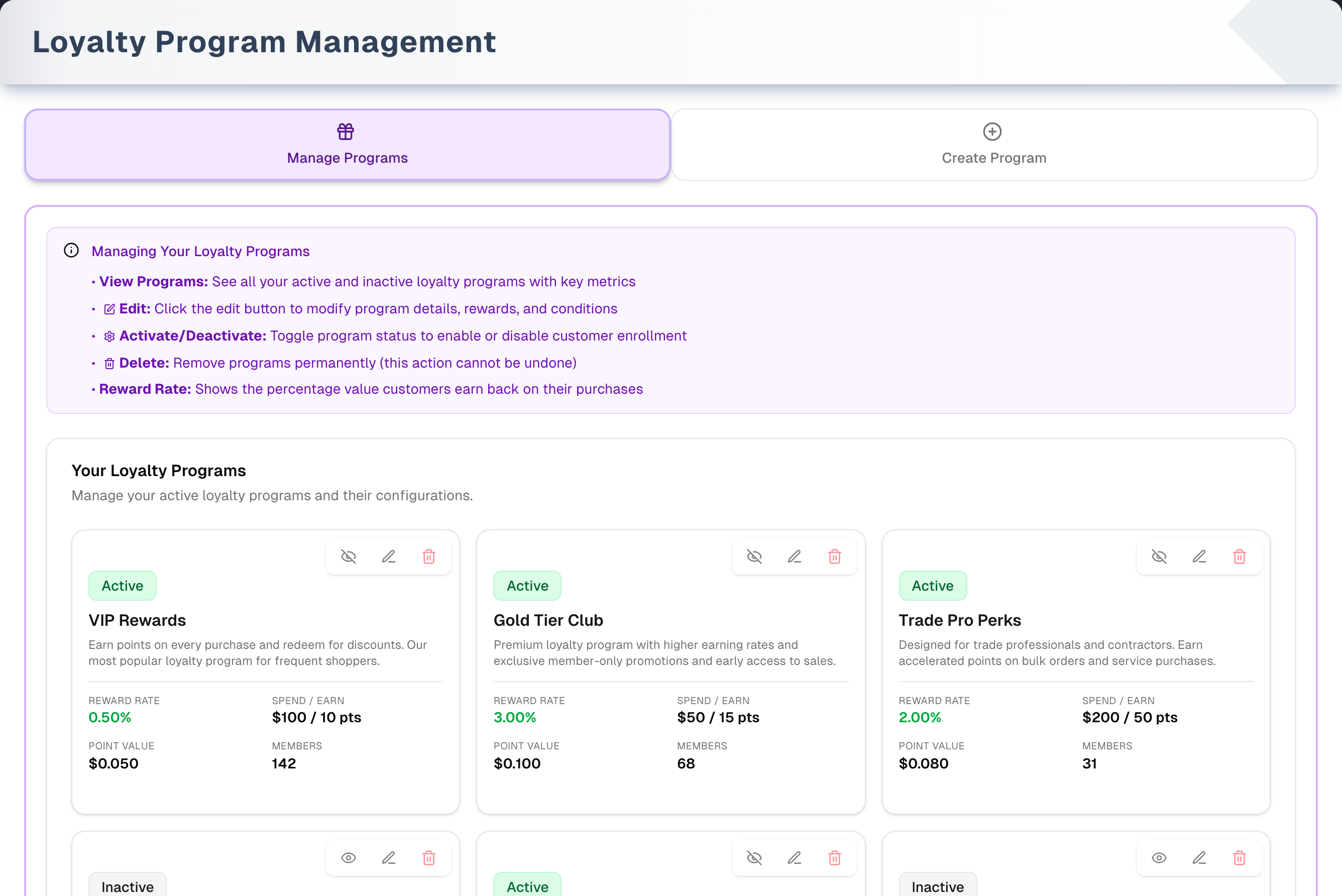
Overview
- One program is one earning rule. Spend ($) and Points Earned set how fast points build up. Value ($) is what one point is worth when it is redeemed. Expiration is how long points last. The page shows the result as a reward rate: (Points Earned × Value) ÷ Spend × 100.
- Points are earned in proportion to spend. Spend is not a minimum. "$100 / 10 pts" means 0.1 point per dollar, so a $150 order earns 15 points and a $50 order earns 5. Points are earned on the order subtotal after discounts, minus any loyalty credit used. Tax, shipping and delivery fees don't count. Only active programs earn.
- Where programs are used: enroll customers with Add to Loyalty (n) or the Loyalty Program card on Customers, or with Enroll on submit on Sales → New. Members earn on each order and can pay with points on Sales → New. The Dashboard's Loyalty members card shows the total number of members.
- What this page doesn't have: a member list, points history, reward catalog or manual points adjustment. The app has no way to remove a member from a program or move them to another one. Points only ever move with an order — a sale, a quote accepted, a return, a cancellation, a deletion, or a change to a saved order's loyalty credit — and there is no way for anyone in your store, whatever their role, to type a points balance.
- Joining a program is a separate step from earning. Whichever way you enroll someone, the account opens at 0 points, and the program has to still be active at the moment you click the button.
- Who can use it: anyone in your store can create, edit, activate and deactivate programs. Only the owner or a manager can delete one, and the trash icon is shown only to them. No plan or add-on is needed.
Tabs in detail
Manage Programs
- Every program appears as a card, newest first. Active and inactive programs are both listed. Each card shows an Active (green) or Inactive (grey) badge, the name, the description, Reward Rate, Spend / Earn, Point Value and Members. The expiration is not on the card. Open Edit to see it.
- Three icon buttons at the top right of each card. Hover one to see its name — Deactivate program (or Activate program), Edit program and Delete program — which is also what a screen reader reads out:
- Eye with a slash (on an active program) or eye (on an inactive one) deactivates or activates the program straight away, with no confirmation. Inactive programs drop out of every enrollment list and stop earning. Existing members keep their points and can still redeem them.
- Pencil opens Edit Program, with the name, description, three numbers and expiration. Active/Inactive is not changed here.
- Red trash opens Confirm Deletion. You can only delete a program with 0 members. If it has members, the button in the dialog becomes Deactivate Instead — or, for a program that is already inactive, the dialog just says it can't be deleted.
- What an edit changes for existing members: a new Value ($) changes what every member's current points are worth. New Spend/Points Earned numbers apply to future orders. A new Expiration applies only to points earned after the change.
Create Program
- Fields: Program Name (required), Description (optional), Spend ($) (default 1), Points Earned (default 1), Value ($) per point (default 0.01), and Expiration (6 Months / 1 Year default / 2 Years / Never).
- Reward Rate updates as you type. With the defaults it reads "1.00% back".
- Create Program stays greyed out until you enter a name and all three numbers are greater than 0. The new program starts Active. The form clears and you stay on this tab, so switch to Manage Programs to see the new card.
- There is no Reset button. The form clears itself after each successful create.
- If you empty a number field, it goes back to 0 and the button greys out. Select the value and type over it instead.
How members earn and spend points
- Earning: each time you create a sale on Sales → New for a member, they earn points in every active program they belong to. That includes the order that enrolls them with Enroll on submit: they join and earn on that order. The points are added when the order is created. A quote earns nothing while it is a quote; when you convert it to a sale it earns then, once. An order created as cancelled earns nothing (a customer who asked to join with Enroll on submit still joins on it), and cancelling or deleting an order afterwards takes back the points it earned. Points the customer spent on it come back too — all of them when the order is deleted, and when it is cancelled, as much of the credit as the store still owes: goods already with the customer hold that much back, exactly as they do on a refund.
- Expiry: each batch of points expires the chosen number of months after the order that earned it. Never means the points don't expire. Points in a balance that no order earned (for example a balance brought over from another system) don't expire. Points given back when an order's loyalty credit is lowered or removed keep the expiry date they had: if they expired in the meantime, they come back expired. Only points that haven't expired can be redeemed. Expired points still count in a member's balance, but the credit shown on Sales → New is for unexpired points only.
- Redeeming: on Sales → New, turn on Redeem points for a program, or choose the program and a Redeem Amount ($) in the Loyalty Redemption box. When the order is created, the credit is recorded as a store-credit payment and the points come off the balance together. Your books post that payment to Store Credit, a liability on Assets & Liabilities, not to Cash: no money came in. A refund or cancel that gives the credit back posts to the same account. If they can't, the order isn't created and a message says why: not enough unexpired points, or no program chosen for a customer who has points in more than one. A customer with points in only one program redeems from that one.
- Returns and edits: to change the credit on an order that is already saved, open it, click Edit and use Loyalty Redemption on the Payment tab. The points move with the credit when you save: a higher amount takes only the extra points (unexpired ones only, and never more than is left to pay on the order), a lower amount or none gives back the points behind the credit removed, and moving the credit to another program gives the first program's points back. Once items from the order have been returned, the credit can still be raised, but a change that would give points back (a lower amount, none, or another program) is refused: the return has already given the credit's points back itself. If the change isn't allowed, nothing changes and a message says why. When items are returned, the points they earned are taken back in every program that earned on the order — each returned line's own share, worked out when the points were earned, so swapping a line on the order afterwards can't make a return take back more than that line earned. If the order was part-paid with loyalty credit, the credit's share of the refund comes back as store credit and as points, in the lots they came from and with the expiry date they had — and that happens whether the money goes back in cash, by check or to the card. A card refund covers only the money part: the card company never took the credit, so it cannot give it back. Each partial return takes back its own share. A balance never goes below 0: if the customer has already spent the points, only what is left is taken back.
- Deactivated programs: new customers can't join them and members stop earning in them. Members keep their points and can still redeem them on Sales → New.
Step by step: create a loyalty program
- Go to Growth → Loyalty Program and click the Create Program tab.
- Enter a Program Name and, if you like, a Description. The name shows on each member's customer record and in the enrollment lists staff pick from.
- Set Spend ($), Points Earned and Value ($). Check the Reward Rate as you go.
- Choose an Expiration.
- Click Create Program. "Loyalty program created successfully." appears and the form clears.
- Click Manage Programs to see the new card, then enroll customers from Growth → Customers with Add to Loyalty (n).
Tips & best practices
- Start with a modest rate. The defaults give 1.00% back. As the help card says, higher reward rates attract more customers but reduce profit margins.
- A 1-year expiration (the default) encourages customers to use their points and limits how much credit you owe.
- Think before changing Value ($). It changes what every member's existing points are worth, not just future points.
- Deactivate a program you no longer want rather than deleting it. A program with members can't be deleted anyway, and deactivating keeps members' points.
- Use a clear, customer-friendly name. It is what staff pick from when enrolling someone.
Troubleshooting
| Issue | Fix |
|---|---|
| Create Program or Save Changes is greyed out | Spend, Points Earned and Value ($) must all be greater than 0, and the program needs a name (spaces alone don't count). An emptied number field turns back into 0, so type over the value |
| "Failed to update loyalty program." (or "Failed to create…", "Failed to toggle program status.") | The save didn't go through. Try again |
| No Delete button, only Deactivate Instead | The program has members, and a program with members can't be deleted. Deactivate it so no one new can join. An inactive program with members offers neither: it already earns nothing |
| "This loyalty program was not deleted…" | Your access changed while the page was open, or someone else deleted the program first. Reload the page; if the card is still there, ask the owner or a manager, or switch the program off with the eye icon |
| Member count is 0 | This is expected until customers are enrolled. Use Add to Loyalty (n) or the customer's Loyalty Program card in Growth → Customers, or Enroll on submit on Sales → New. "—" means the count is still loading |
| A program is missing from the enrollment list | Only active programs are listed. Click the eye button on its card to activate it |
| "Failed to fetch loyalty programs." | The programs didn't load. Click Try again next to the message |
What's next
- Enroll customers: Growth → Customers
- Promote the program: Growth → SMS Campaigns
- Earn and redeem points at checkout: Sales → New
Detailed reference
Every button, icon, field and message on this page, for when you need the exact detail. Each panel starts closed — open the one you need.
Page header and toolbar
| Control | Where | What it does | Notes |
|---|---|---|---|
| Sidebar Growth → Loyalty Program | Sidebar | Opens this page | The Dashboard's Loyalty members card also opens it |
| Title Loyalty Program Management, "Create and manage loyalty program rules to reward your customers." | Header, left | — | Shown once programs have loaded |
| Demo (Play icon, amber border) | Header, right | Opens the demo page (sample programs and a guided tour) in the same tab | Everyone. Nothing is saved. See Demo mode |
| Spinning circular-arrow icon | Whole page | Shows while the page is opening and your programs are read for the first time. No tabs are visible yet | Only on the first load. A create, save, activate, deactivate or delete leaves the list where it is and shows a small Updating… line above it instead |
| Updating… with a small spinning icon | Above the tabs | The list is being read again after a change | The programs stay on screen and can still be read while it runs |
| Shop icon with "This account isn't linked to a store yet." and "Finish setting up your store, or ask the owner to add you to theirs. Then reload this page." | Whole page | Shown instead of the tabs when your account belongs to no store | — |
| Red alert icon with "Failed to fetch loyalty programs." and Try again | Whole page, instead of the tabs | The very first read of your programs failed. A red "Error" message "Could not load loyalty programs." also appears | Click Try again: no browser reload is needed, and a read that works clears the message. If programs had already loaded, the same message appears as a red strip above the list instead, with its own Try again, so the list you were reading stays on screen |
| Tab Manage Programs (gift icon, purple) | Tab bar, left | Shows the help card and the program cards | Opens by default. Clicking it changes the address to end in ?tab=manage-programs |
| Tab Create Program (plus-in-circle icon, orange) | Tab bar, right | Shows the help card and the create form | Clicking it changes the address to end in ?tab=create-program |
| Direct link to a tab | Address bar | /loyalty?tab=create-program opens straight on Create Program. /loyalty?tab=manage-programs opens Manage Programs | Read only when the page first opens. Four short forms work too, so an older link still lands on the right tab: ?tab=create and ?tab=new open Create Program, ?tab=manage and ?tab=programs open Manage Programs. Any other value opens Manage Programs |
| Arrow keys | Tab bar | Move between the two tabs | Standard tab keyboard behaviour |
Tab: Manage Programs
| Control | Where | What it does | Notes |
|---|---|---|---|
| Help card Managing Your Loyalty Programs (info icon, purple) | Top of the tab | Information only. "View Programs: See all your active and inactive loyalty programs with key metrics". "Edit: Change the program name, description, rewards and conditions.". "Activate/Deactivate: Switch the program off so it stops earning points. Customers keep the points they already have and can still spend them. Switch it back on at any time.". "Delete: Remove the program permanently. This cannot be undone.". "Reward Rate: Shows the percentage value customers earn back on their purchases" | Each line shows the same icon as the button it describes — the eye, the pencil and the bin. A program with members can't be deleted at all |
| Your Loyalty Programs, "Manage your active loyalty programs and their configurations." | Main card header | — | Inactive programs are listed here too |
| Large gift icon, No Loyalty Programs Yet, "Use the 'Create Program' tab to add your first loyalty program." | Main card | Shows when your store has no programs | The text isn't a link. Click the Create Program tab |
| Program cards | Main card | One card per program, newest first. 1 column on a phone, 2 on a tablet, 3 on a computer | Active and inactive programs both appear. Clicking the card itself does nothing |
| Active (green) / Inactive (grey) badge | Card, top left | Shows whether the program is on | Change it with the eye button |
| Program name | Card | — | Long names are cut off with "…" |
| Description | Card, under the name | Up to 2 lines | "No description provided." when empty |
| Reward Rate (green) | Card, bottom grid | (Points Earned × Value) ÷ Spend × 100, with 2 decimals, for example "0.50%" | "—" if Spend is 0 |
| Spend / Earn | Card, bottom grid | For example "$100 / 10 pts" | No thousands separators |
| Point Value | Card, bottom grid | Value of one point with 3 decimals, for example "$0.050" | — |
| Members | Card, bottom grid | Number of customers enrolled, counted when the page opens | "—" while counting. Shows 0 if the count fails. Members with 0 points are counted. The expiration is not shown on the card |
| Eye with a slash, Deactivate program | Card, top right, 1st button, on active programs | Deactivates the program straight away. No confirmation. Message "Success" / "Program deactivated." The badge changes to Inactive after the list reloads | The program leaves every enrollment list (Customers Add to Loyalty, the customer's Loyalty Program card, Sales → New Enroll on submit) and stops earning. Members keep their points and can still redeem them on Sales → New. On failure: "Error" / "Failed to toggle program status." |
| Eye, Activate program | Card, top right, 1st button, on inactive programs | Activates the program straight away. Message "Success" / "Program activated." | Same failure message as above |
| Pencil, Edit program | Card, top right, 2nd button | Opens Edit Program with the current values | Works on active and inactive programs |
| Red bin, Delete program | Card, top right, 3rd button | Opens Confirm Deletion and re-counts the members | Only a program with 0 members can be deleted |
Tab: Create Program
| Control | Where | What it does | Notes |
|---|---|---|---|
| Help card Creating a New Loyalty Program (info icon) | Top of the tab | Information only. "Program Name: Choose a memorable name for your loyalty program (e.g., "VIP Rewards")". "Description: Explain the benefits and value proposition to your customers". "Spend Amount: Set the dollar amount customers need to spend to earn points". "Points Earned: Define how many points customers receive per spend amount". "Point Value: Set the monetary value of each point when redeemed". "Expiration: Choose when points expire to encourage timely redemption". "💡 Tip: Higher reward rates attract more customers but reduce profit margins" | "Spend Amount" sounds like a minimum, but it is a rate. A customer earns points on any amount, in proportion to it |
| Create New Loyalty Program, "Define the rules for a new loyalty program." | Form card header | — | — |
| Reward Rate, "… % back" | Grey box under the fields | Live preview: (Points Earned × Value) ÷ Spend × 100, 2 decimals. "1.00% back" with the defaults | Display only. "0.00% back" when Spend is 0 |
| Create Program (plus icon) | Form footer (full width on a phone) | Saves the program as Active. Message "Success" / "Loyalty program created successfully." The form goes back to its defaults and the program list reloads | You stay on this tab. Greyed out while the name is empty, while any number is 0 or less, and while saving ("Creating..." with a spinner). On failure: "Error" / "Failed to create loyalty program." The form has no Reset or Clear button |
Fields:
| Field | Required | Default | Rules and error text |
|---|---|---|---|
| Program Name ("e.g., VIP Rewards") | Yes | Empty | Create Program is greyed out while it is empty or only spaces. Duplicate names are allowed. Spaces around the name are dropped when it is saved |
| Description ("Describe the program benefits...") | No | Empty | One line. Shown on the program card |
| Spend ($) | Yes | 1 | Must be greater than 0. The dollar side of the earning rate |
| Points Earned | Yes | 1 | Must be greater than 0. Points given per Spend amount. Decimals are allowed |
| Value ($) | Yes | 0.01 | Must be greater than 0. What one point is worth when redeemed |
| Expiration | Yes | 1 Year | 6 Months, 1 Year, 2 Years or Never. Each batch of points expires that long after the order that earned it |
Emptying any number field puts 0 back in it, which greys out the button. Select the value and type over it.
Dialog: Edit Program
Opens from the pencil button on a card. The title is Edit Program: followed by the program's name (pencil icon). On a short screen the dialog scrolls.
Fields:
| Field | Required | Default | Rules and error text |
|---|---|---|---|
| Program Name | Yes | Current name | Save Changes is greyed out while it is empty or only spaces. Spaces around the name are dropped when it is saved |
| Description | No | Current description | One line |
| Spend ($) | Yes | Current value | Must be greater than 0. Applies to future orders |
| Points Earned | Yes | Current value | Must be greater than 0. Applies to future orders |
| Value ($) | Yes | Current value | Must be greater than 0. Changes the value of every member's existing points too, because balances are always valued at the current point value |
| Expiration (6 Months / 1 Year / 2 Years / Never) | Yes | Current setting | Applies only to points earned after the change. Points already earned keep their original expiry date |
Buttons and readouts:
| Control | Where | What it does | Notes |
|---|---|---|---|
| Reward Rate, "… % back" | Under the fields | Live preview of the rate | "— back" when Spend is 0 or less |
| X (close) | Top right | Closes without saving | Esc and clicking outside the dialog also close it without saving |
| Cancel | Footer | Closes without saving | — |
| Save Changes (floppy-disk icon) | Footer | Saves the name, description, three numbers and expiration. Message "Success" / "Loyalty program updated successfully." The dialog closes and the list reloads | Greyed out while the name is empty, while any number is 0 or less, and while saving ("Saving..."). On failure: "Error" / "Failed to update loyalty program." Active/Inactive can't be changed here. Use the eye button on the card |
Dialog: Confirm Deletion
Opens from the red trash button. It is an overlay card: Esc and clicking outside do nothing, so close it with a footer button.
| Control | Where | What it does | Notes |
|---|---|---|---|
| Confirm Deletion (red alert icon) | Top | — | — |
| "Are you sure you want to delete the program "…"? This action cannot be undone." | Body | Confirmation text with the program's name | Always shown |
| Spinner, "Checking for members…" | Body | Shows while the member count is refreshed | The action button is greyed out during the check |
| Amber box: "This program has … member(s). Deleting it would orphan their points and outstanding balances. Deactivate it instead to stop earning while preserving member points." | Body | Explains why the program can't be deleted | Only when an active program has 1 or more members. The app can't remove members, so a program that has ever had a member can't be deleted |
| Amber box: "This program has … member(s), so it can't be deleted. It is already inactive: it earns nothing new, and its members keep their points." | Body | Says there is nothing left to do | Only when an inactive program has 1 or more members. The footer then has only Close |
| Cancel (Close on an inactive program with members) | Footer | Closes the dialog. Nothing changes | — |
| Delete (red) | Footer, only when the program has 0 members | Deletes the program permanently. Message "Success" / "Loyalty program deleted successfully." The list reloads | Greyed out while checking or saving ("Deleting..." with a spinner). On failure the toast says why, for example "This loyalty program was not deleted…". The success message only shows when the program really went |
| Deactivate Instead | Footer, replaces Delete when an active program has members | Makes the program Inactive. Message "Program deactivated" / "Members keep their points; the program stops earning." The dialog closes and the list reloads | Not offered for a program that is already inactive. "Deactivating..." while saving. On failure: "Error" / "Failed to deactivate loyalty program." Members of an inactive program earn no new points and can still redeem the points they have |
| Safety stop | — | If a delete is tried on a program with members: "Cannot delete" / "This program has members. Deactivate it instead to preserve their points." | Normally never seen, because Delete is replaced by Deactivate Instead |
Related: where programs are used on other pages
Programs are only created and managed on this page. They never appear on the Pricing Rules tab of Catalog → Products, or in the list of pricing rules on Sales → New.
| Control | Where | What it does | Notes |
|---|---|---|---|
| Add to Loyalty (n) | Customers, list toolbar | Opens Assign to Loyalty Program for the ticked customers | Greyed out until at least one customer is ticked |
| Assign to Loyalty Program dialog: "Selected customers: …", Loyalty Program ("Select a loyalty program"), Cancel, Assign ("Assigning…") | Customers | Enrolls every ticked customer in the chosen program at 0 points. Messages: "Customers enrolled" / "… customer(s) added to the loyalty program." or "Some assignments failed" / "… enrolled, … failed." with the reason, or "Please retry the failed customers." when no reason came back | Only active programs are listed. Assign is greyed out until a program is chosen. Customers already in that program are counted as enrolled, not added twice. A customer who has been archived, or who is no longer one of your customers, is counted in the failed number, and the message says why. Very large selections are sent in batches of 500; clicking Assign again after a failure is safe, because anyone already in the program counts as enrolled. If the program was deactivated after the page loaded, nobody is enrolled and the message says the program is not active. On full success the dialog closes and the ticks are cleared. After a partial failure it stays open. This is the only way to put a customer in a second program |
| Loyalty Program card, Current Membership: "… pts (~$…) • Earn: … pts/$", "Total credit: $…" | Customer record, Customer Details tab | Shows the customer's balance in each program | "Not enrolled in any program" when none. The dollar value is points × the program's current point value |
| Assign Program ("Select a program..."), "Assigned on Update Customer" | Customer record | Enrolls the customer when you click Update Customer. Message "Customer enrolled in loyalty program", or the reason it didn't go through — "That loyalty program is not active in this store, so the customer can't join it.", "This customer has been archived." — and "Failed to enroll in loyalty program" when no reason came back | Only when the customer is in no program. Lists active programs. Once they are enrolled it shows "Contact UpChannels support to change program". The app can't move or remove a member |
| + Add Program link | Sales → New, Step 7 Promotions & Loyalty Benefit, Loyalty Program panel | Opens this page in a new browser tab, on Create Program | The order form stays open in its own tab |
| Enroll on submit switch and program list ("Select program...", options "Earn … pts/$… (=$…)" or "1 pt = $…") | Sales → New, Loyalty Program panel | Enrolls the customer when the order is created | Shown under "New customer - not enrolled" or "Not enrolled in any program" ("Select a customer to see loyalty info" until an existing customer is picked). Lists active programs only. The customer joins when the order is created, and that order earns points in the program (shown as Points to earn in the order summary). When there are no active programs it reads "No loyalty programs yet. Create one in Growth → Loyalty Program." — or, with the switch off, "No loyalty programs yet — set one up in Growth → Loyalty Program." Either way the words Growth → Loyalty Program open this page in a new tab |
| Member card: "… pts", "… usable", "($…)", "Inactive: redeem only", "Earn +… pts from this order", Redeem points switch with a slider ("Max: $…") or "No credit available" | Sales → New, Loyalty Program panel | Shows an existing member's balance, credit and estimated earn. Lets you redeem credit | The credit in brackets counts unexpired points only. "… usable" appears when some of the balance has expired. The slider's maximum is the lower of that credit and the order subtotal. A deactivated program shows "Inactive: redeem only" and no earn line. The estimate is the order subtotal after discounts, minus the credit used, times the earn rate, rounded down to whole points. The points actually added can include decimals |
| Loyalty Redemption box: Program ("Select program", options show each balance in pts, "… of … pts usable" when some have expired, and "(inactive: redeem only)"), Redeem Amount ($), "Available credit: $… (Selected program: $…)", "Estimated earn this order: …" | Sales → New, top of Step 6 (payment) | Pays part of the order with points. When the order is created, the credit is recorded as a store-credit payment and the points are deducted, together | Redeem Amount ($) is greyed out until a Program is chosen ("Choose a program first."). Amounts above the program's credit (unexpired points only) or the order total are lowered automatically. "Expired points can't be redeemed." shows when a balance includes expired points. Estimates cover active programs only. Note: "Earnings are based on subtotal excluding discounts, redeemed credit, tax, shipping, and gift cards." "No loyalty memberships for this customer." when there are none |
| Loyalty members card ("… programs") | Dashboard | Total members across all programs. Clicking opens this page | Inactive programs are included |
| Returns, cancellations and order edits | Orders | Changing the credit on a saved order (Edit → Payment → Loyalty Redemption) moves the points with it: a higher amount takes the extra points, a lower amount or none gives back the points behind the credit removed (with the expiry date they had), and moving it to another program gives the first program's points back. After a return on the order, a change that would give points back is refused, because the return has already given them back. Process Return takes back the points the returned items earned — each line's own share — and gives back the points behind any loyalty credit that paid for them. Cancel order takes back everything the order earned, and gives back as much of the credit as the store still owes — so an order cancelled before anything left gives every point back, while one whose goods are already with the customer gives back only what is left over after the value of those goods. Delete order gives back the whole credit, because deleting also puts the goods back in stock. The credit a cancel gives back is also written on the order's Payment tab as a store-credit refund, so "Still owed to the customer" drops by that much and only the real money is left to refund | Happens with the return, the cancel or the delete itself, for card and non-card refunds alike and whether or not the order used loyalty credit. Each partial return takes back its own share. Items added to the order after the sale earned nothing, so returning them takes nothing back. A balance stops at 0, so a customer who has already spent the points keeps that value |
Messages you may see
| Message | When it appears | What to do |
|---|---|---|
| "Error" / "Could not load loyalty programs." with "Failed to fetch loyalty programs." on the page | Programs didn't load | Click Try again. If it keeps happening, check your connection |
| "This account isn't linked to a store yet." | Your account belongs to no store | Finish setting up your store, or ask the owner to add you to theirs, then reload the page |
| "Updating…" | The list is being read again after a change you made | Information only. The programs stay on screen |
| "No Loyalty Programs Yet" / "Use the 'Create Program' tab to add your first loyalty program." | Your store has no programs | Open Create Program |
| "No description provided." | The program has no description | Optional: add one with Edit |
| "—" under Reward Rate | Spend is 0 | Edit the program and set Spend above 0 |
| "—" under Members | The count is still loading | Wait a moment |
| "Success" / "Loyalty program created successfully." | Create worked | The form clears. Switch to Manage Programs to see it |
| "Error" / "Program name is required." | Create or Save Changes with no name (normally the button is greyed out instead) | Enter a name |
| "Invalid values" / "Spend, Points Earned and Value ($) must all be greater than zero." | Create or Save with a number of 0 or less (normally the button is greyed out instead) | Set all three above 0 |
| "Error" / "Failed to create loyalty program." | Create failed | Try again |
| "Success" / "Loyalty program updated successfully." | Edit saved | — |
| "Error" / "Failed to update loyalty program." | Edit failed | Try again |
| "Success" / "Program activated." or "Program deactivated." | Eye button clicked | — |
| "Error" / "Failed to toggle program status." | Activate or deactivate failed | Try again |
| "Checking for members…" | The delete dialog is opening | Wait |
| "This program has … member(s). Deleting it would orphan their points and outstanding balances. Deactivate it instead to stop earning while preserving member points." | Delete on a program with members | Use Deactivate Instead. It can't be deleted |
| "Program deactivated" / "Members keep their points; the program stops earning." | Deactivate Instead worked | Members earn no new points in it and can still redeem what they have |
| "Error" / "Failed to deactivate loyalty program." | Deactivate Instead failed | Try again |
| "Cannot delete" / "This program has members. Deactivate it instead to preserve their points." | Rare safety stop | Deactivate instead |
| "Success" / "Loyalty program deleted successfully." | A program with no members was deleted | — |
| "Error" / "This loyalty program was not deleted. Deleting is limited to managers and the store owner, and it may also have been removed by someone else already. Reload the page to see what is there now." | Delete refused: your access changed while the page was open, or someone else deleted it first | Reload the page. Ask the owner or a manager if the card is still there |
| "Error" / "Failed to delete loyalty program." | Delete failed | Try again |
| "403 - Forbidden" / "You do not have permission to view this page. Contact your organization owner." | The owner hid Loyalty Program from your menu | Ask the owner to turn it back on in Settings → Team |
| "Redeem amount exceeds available credit for selected program." | Sales → New, when the order is created. Nothing is saved | Lower the redeem amount. Only unexpired points count |
| "Choose the loyalty program to redeem from." | Sales → New, a Redeem Amount with no program, for a customer with points in more than one program. Nothing is saved | Pick the Program |
| "This customer has no loyalty credit to redeem." / "Choose one of the customer's loyalty programs to redeem from." | Sales → New, a Redeem Amount the customer has no program or points for. Nothing is saved | Set the amount to 0, or pick one of their programs |
| "A cancelled order can't use loyalty credit. Set the Redeem Amount to 0." | Sales → New, Order Status Cancelled with loyalty credit | Set the amount to 0 |
| "Insufficient loyalty points in "…": redeeming $… needs … points, but only … unexpired points ($…) can be redeemed." | Sales → New, the order was refused because the points changed or expired after the page loaded. Nothing is saved | Lower the amount and create the order again |
| "Loyalty credit of $… is more than the order total of $…." | Sales → New, credit above the order total. Nothing is saved | Lower the amount |
| "Loyalty credit not changed" — "Insufficient loyalty points in "…": $… more credit needs … points, but only … unexpired points ($…) can be redeemed." | Order window, a higher Redeem Amount than the program's unexpired points cover. Nothing changed | Lower the amount |
| "Loyalty credit not changed" — "Loyalty credit of $… is more than the $… left to pay on this order." | Order window, the credit plus the order's other Completed payments would pay more than the order total. Nothing changed | Lower the amount |
| "Loyalty credit not changed" — "Items from this order have been returned, and their refund already paid back the part the loyalty credit covered, so the credit can't be lowered, removed or moved to another program now." | Order window, a lower amount, None or another program on an order with returned items. Giving the points back would pay the customer twice. Nothing changed | None: keep the credit as it is |
| "That loyalty program is not active in this store, so the customer can't join it." | Sales → New, Enroll on submit with a program that was deactivated after the page loaded (the order isn't created); or Customers Add to Loyalty / the customer record's Assign Program with a program that was deactivated after the page loaded (nobody is enrolled) | Pick an active program, turn Enroll on submit off, or reload the Customers page |
| "This customer has been archived." / "This customer was not found in this store." | Customers Add to Loyalty or Assign Program, for a customer who has since been archived or removed from your store. On Add to Loyalty they are counted in the failed number | Reload the Customers page. An archived customer has to be recreated before they can join a program |
| "Demo mode — loyalty programs are populated with sample data. All actions are disabled." | On the demo page | Click Exit Demo Mode to go back |
Who can use what
- Plan: every plan. No add-on or feature switch is needed.
- Open the page: anyone signed in to your store. In a store with 2 or more active people, the owner can hide Loyalty Program for a person in Settings → Team. That person then gets "403 - Forbidden" here however they reach it — a link in the app, a bookmark or a typed address — and the sidebar row is gone for them as well. The Shortcuts page is unaffected: it has no Loyalty Program card. The demo page is exempt and still opens. The one active person left in a store is never blocked; people switched off or removed in Team don't count towards the head count.
- Create, edit, activate, deactivate: anyone in your store (owner, manager or staff).
- Delete a program with 0 members: the owner or a manager — the trash icon is hidden from everyone else. If a delete is refused anyway, the toast says "This loyalty program was not deleted…" and nothing is reported as done.
- Delete a program with members: nobody. Only Deactivate Instead is offered.
- Remove or move a member, or adjust points by hand: not available in the app, to anyone, including the owner. Points move only with an order — a sale, a return, a cancellation, a deletion, or a change to a saved order's loyalty credit — and a balance is always opened at 0.
- Enroll a customer: anyone signed in to your store, from Customers or from Sales → New. The program must still be active when the button is clicked.
- Earn, redeem and enroll on Sales → New: anyone who can create orders. The points change only when the order is created.
Demo mode (/loyalty/demo)
- Open it: the amber Demo button (Play icon) at the top right of Loyalty Program Management.
- Header: Loyalty Program Management — Demo, "Sample loyalty programs populated with demo data. All actions are disabled."
- Banner: "Demo mode — loyalty programs are populated with sample data. All actions are disabled." with Take a Tour (question-mark icon), which restarts the tour at step 1.
- Tour: starts by itself the first time the demo opens, and switches tabs as it goes. The page darkens around the highlighted area. Footer: progress dots, "… of 6", Back (from step 2), Skip (closes), Next, and Got it! on the last step (closes). Clicking the dark backdrop closes it. Keys: Esc closes, right arrow or Enter goes on (and closes on the last step), left arrow goes back. If a highlighted area doesn't appear within about 3 seconds, the tour moves on to the next step.
- Still works: the Manage Programs and Create Program tabs, Take a Tour, the tour controls and Exit Demo Mode.
- Disabled: the eye, pencil and trash buttons on every card (no Edit or Confirm Deletion dialog). The create form is filled in and read-only, Expiration is locked on "1 Year", and Create Program is always greyed out.
- Leave: Exit Demo Mode (left arrow) at the top right goes back to Loyalty Program Management.
| # | Tab | Tour step | What it points at |
|---|---|---|---|
| 1 | Manage Programs | Program Tabs — "Switch between managing your existing loyalty programs and creating new ones. The "Manage Programs" tab shows all your programs, while "Create Program" lets you set up new reward rules. This tour walks through both." | The tab bar |
| 2 | Manage Programs | Help & Tips — "Each tab includes a contextual help card explaining the key actions and concepts — viewing, editing, activating, and deleting programs, plus what the reward rate means." | The Managing Your Loyalty Programs help card |
| 3 | Manage Programs | Program Cards — "Your loyalty programs are displayed as cards showing status, reward rate, spend/earn ratio, point value, and member count. Active programs are highlighted with a green badge." | The program cards |
| 4 | Manage Programs | Program Actions — "Each card has three buttons: the eye switches the program on or off, the pencil edits it and the bin deletes it. Hover over any button to see its name." | The eye, pencil and trash buttons on the first card (VIP Rewards) |
| 5 | Create Program | Create Program — Guidance — "The Create Program tab opens with a help card that walks through every field — name, description, spend amount, points earned, point value, and expiration — plus a tip on balancing reward rates against margins." | The Creating a New Loyalty Program help card |
| 6 | Create Program | Create Program Form — "Define a new loyalty program by setting its name, description, spend threshold, points earned, point value, and expiration. The reward rate is calculated automatically as you fill in the fields." | The whole create form (the tour box sits above it) |
Sample programs:
| Program | Status | Spend / Earn | Point value | Reward rate | Members | Expiration (not shown on the card) |
|---|---|---|---|---|---|---|
| VIP Rewards | Active | $100 / 10 pts | $0.050 | 0.50% | 142 | 1 Year |
| Gold Tier Club | Active | $50 / 15 pts | $0.100 | 3.00% | 68 | 2 Years |
| Trade Pro Perks | Active | $200 / 50 pts | $0.080 | 2.00% | 31 | 1 Year |
| Starter Rewards | Inactive | $25 / 5 pts | $0.020 | 0.40% | 12 | 6 Months |
| Service Loyalty Bonus | Active | $150 / 30 pts | $0.075 | 1.50% | 47 | Never |
| Holiday Double Points | Inactive | $100 / 20 pts | $0.050 | 1.00% | 23 | 6 Months |
The demo create form is filled in with Weekend Warrior Rewards, "Special rewards for weekend shoppers with bonus multiplier on Saturday and Sunday purchases.", Spend 75, Points Earned 12, Value 0.06, Expiration 1 Year, and "0.96% back".
Differences from the live page: the demo has no loading, error or empty state, and no Edit or Confirm Deletion dialog. Its cards are in a fixed order (the live page shows newest first), and switching tabs doesn't change the address bar. The demo's buttons name themselves on hover exactly as the live ones do, but clicking them does nothing. Step 6 calls Spend a "spend threshold", but points are earned in proportion to spend.
Common questions
How are points calculated? Points per dollar = Points Earned ÷ Spend. With "$100 / 10 pts" a customer earns 0.1 point per dollar: 15 points on a $150 order, 5 on a $50 order. The amount used is the order subtotal after discounts, minus any loyalty credit redeemed. Tax, shipping and delivery fees are left out. Only active programs earn. Each point is worth the program's Value ($) when redeemed.
Why can't I delete a program? It has members. The delete dialog then offers only Deactivate Instead, and the app has no way to remove members, so a program that has ever had a member can't be deleted. If there are 0 members and you see "This loyalty program was not deleted…", either your access changed while the page was open or someone else deleted it first: reload the page and ask the owner or a manager if the card is still there.
What happens to members when I deactivate a program? New customers can't join it: it disappears from Add to Loyalty, the customer record and Enroll on submit. Members stop earning in it but keep their points, and can still redeem them on Sales → New, where the program is marked "Inactive: redeem only". Click the eye button to activate it again.
If I change the point value or expiration, what happens to points customers already have? A new Value ($) changes what every member's existing points are worth straight away. A new Expiration applies only to points earned after the change. New Spend/Points Earned numbers apply to future orders only.
Where can I see who is in a program, or a customer's points? This page only shows the Members count on each card. To see a customer's program and points, open the customer in Customers and look at the Loyalty Program card. There is no member list or points history.
Does the order that enrolls a customer earn points? Yes. With Enroll on submit on Sales → New, the customer joins the program when the order is created and earns that order's points straight away, as shown under Points to earn in the order summary.
Why can a customer redeem less than their balance? Only unexpired points can be redeemed. Each batch of points expires the chosen number of months after the order that earned it, but expired points stay in the balance. Points given back from an order's loyalty credit keep their original expiry date, so they may already have expired. Sales → New shows "… usable" and caps the credit at the unexpired points.
Why is Create Program greyed out? The name is empty, or Spend, Points Earned or Value ($) is 0 or less. Emptying a number field turns it back into 0, so type over the value instead.
Can a customer be in more than one program? Yes, if you add them with Add to Loyalty (n) on Customers. They then earn in each active program on every order. To redeem, choose the program: with points in more than one program, a Redeem Amount without a program is refused ("Choose the loyalty program to redeem from."). The customer record's Assign Program only appears for customers who aren't in any program.