Competitors
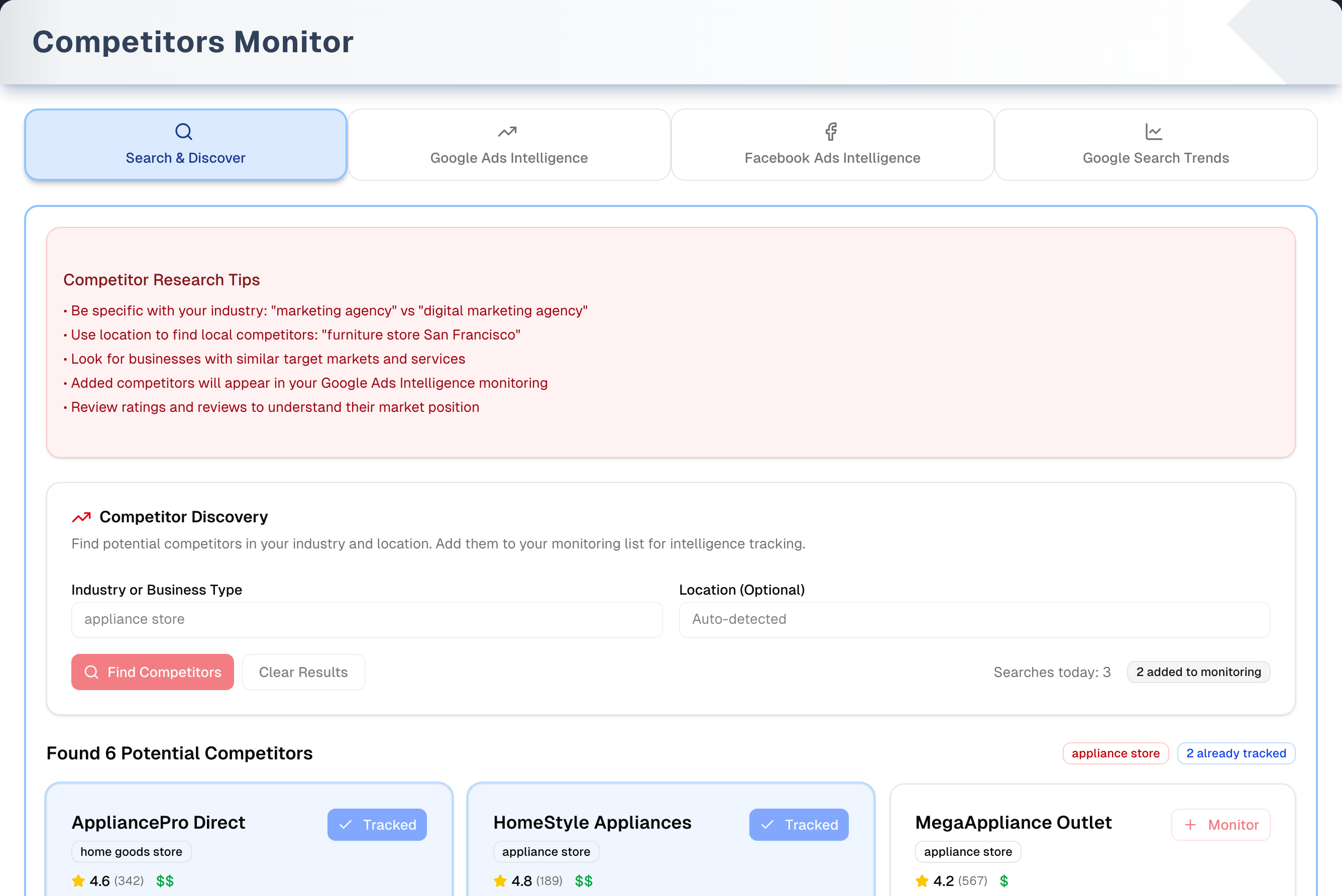
Competitors Monitor (sidebar Growth → Competitors Monitor) finds local rivals and gives you one-click research links for each of them. It has four tabs: Search & Discover, Google Ads Intelligence, Facebook Ads Intelligence and Google Search Trends. The page itself shows no ad spend, market share or trend numbers. Every research button opens a free public Google or Meta tool in a new browser tab.
Overview
- Find: on Search & Discover, search Google Maps for businesses like yours, then click Monitor on a result to add it to your competitor list.
- One shared list: the three intelligence tabs all show the same list. Adding, editing or removing a competitor on any of them changes it everywhere, and everyone in your store sees the same list.
- Research: each competitor card has Website and Edit, plus one tab-specific button: Google Ads (Google's Ads Transparency Center), FB Ads (Meta Ad Library) or Local / US (Google Trends).
- Everyone in your store can change the list. Monitor, Add Competitor, Edit and the trash icon are saved for whoever can open the page, whatever their role. When a change can't be saved it is never reported as done: the tab shows a red message saying why.
- Removing asks first. The trash icon asks "Remove …?" before anything happens, and once it is gone a message offers Undo. A removed competitor is kept out of sight for 90 days, then deleted for good the next time anyone changes the list.
- Plan: available on every plan. The Demo button in the header opens a sample version with a guided tour.
Tabs in detail
Search & Discover
- Type an Industry or Business Type (required) and, if you like, a Location (Optional), then click Find Competitors or press Enter. You get up to 12 businesses from Google Maps.
- There is no auto-detect button. When the tab opens, your browser may ask to share your location. If you allow it, your city shows in grey in the Location box and is used whenever you leave the box empty. With no city at all the search is not centred anywhere, and a line above the results says so — type your city to find rivals near you.
- Result cards show the name, Google category, star rating and review count, price level ($ to $$$), address, phone (with a copy icon), website, business status and Open now / Closed. The website is a link: it opens the business's own site in a new tab.
- Monitor adds the business to your list and turns into a green Added. A blue Tracked button means that business is already on your list — matched on its website, or, for one Google has no website for, on the Google listing it was added from. If Google has no website for it the button reads Monitor…, and clicking it asks you for the web address instead of guessing one.
- "Searches this visit" and "added to monitoring" only count since you opened the tab. They reset when you reload or switch tabs, and there is no daily search limit. Clear Results empties the results and both boxes.
Google Ads Intelligence
- Each card shows the competitor's name, website domain and the first two lines of your notes.
- Website opens their site. Edit opens Edit Competitor. Google Ads opens Google's Ads Transparency Center for their domain in the United States. The trash icon (tooltip "Remove competitor") asks before it removes them.
- Add Competitor opens Add New Competitor with Competitor Name, Website Domain and Notes & Insights (Optional). The same dialog is on all three intelligence tabs.
Facebook Ads Intelligence
- Same list and card layout. FB Ads opens the Meta Ad Library, searching for the competitor's domain among active ads in the US. Meta's keyword search can also show other advertisers that mention the same text.
Google Search Trends
- Local and US open Google Trends for the competitor's name (not their domain) over the past month.
- Local uses your area: one of 43 large US metro areas if your city and state are both one of them, otherwise your state, otherwise the whole US. It needs your browser location. The list heading names the area it settled on — "Local: Houston, Texas", "Local: Maine", or "Local and US both cover the United States".
Step by step: add and track a competitor
- On Search & Discover, type a business type (and a city if you like) and click Find Competitors.
- Click Monitor on each rival. The button turns green Added.
- Open Google Ads Intelligence. Check each new card's domain, and use Edit to fix it or add notes.
- Click Google Ads on the card, or switch tabs and click FB Ads, Local or US.
To add a business that Google Maps doesn't find, click Add Competitor on any intelligence tab.
Tips & best practices
- Be specific with industry keywords for better discovery, for example "appliance repair" rather than "repair".
- Type the domain however you like —
https://www.example.com/storeandexample.comare saved and compared as the same thing, so the same business can't be listed twice. - Use Notes & Insights to store pricing, keywords and observations. The card shows the first two lines.
- Check the Google Ads and FB Ads buttons weekly to catch new campaigns and messaging.
Troubleshooting
| Issue | Fix |
|---|---|
| "No businesses found. Try adjusting your search terms or location." | Use a broader term, check the location spelling, or type a city |
| "Searched without a location — type a city to find competitors near you." | Your browser didn't share its location and the box was empty, so nothing narrowed the search. Type your city in Location (Optional) |
| "We could not place “…” on the map, so these results are matched by name only." | The typed city couldn't be found. Check the spelling, or use a bigger nearby city |
| A research button or Website does nothing | Allow pop-ups for UpChannels in your browser. Every one of these buttons opens a new tab |
| "Competitor with this domain already exists" | The domain is already on your list — that is the real answer, shown as it is, inside the dialog. Look on any intelligence tab. www.example.com, example.com and example.com/store all count as the same site |
| "The competitor list was changed by someone else at the same time. Reload the page and try again." | Two people changed the list in the same moment. Reload the page and make your change again |
| The same business is on your list twice | The two entries hold the same site written two ways, such as www.example.com and example.com. Both cards still open, edit and save normally — remove whichever one you don't want with the trash icon, and click Undo if you pick the wrong one |
| Website or Google Ads opens the wrong site | The stored domain is wrong — perhaps mistyped when it was added. Click Edit and type the real domain |
| A business you already track still shows Monitor… | Your list holds it without the Google listing it came from (one typed in with Add Competitor, for example), and Google has no website for it to match on instead. Remove that entry with the trash icon on any intelligence tab, then click Monitor… on the result and type its web address |
| "Your competitor list could not be read" | The list couldn't be read, and the line under it says why — your sign-in has no store attached, the connection dropped, or whatever the store answered. Your competitors are still there: fix what it names and click Try again |
| Add Competitor or Update Competitor was refused | The dialog stays open with everything you typed still in it, and the reason is shown inside it, just above the buttons. Fix what it names and save again |
| Removed a competitor by mistake | Click Undo on the "… removed" message. If it has gone, add the competitor again with Add Competitor and retype your notes |
| Local shows the whole US | Allow location for UpChannels in your browser, then open the Google Search Trends tab again |
What's next
- Benchmark your own ads: Ads & Sales (sidebar Growth → Ads Insights)
- Sense your market: Local Vibes (sidebar Growth → Local Vibes)
- Win the review race: Reviews (sidebar Growth → Reviews Booster)
Detailed reference
Every button, icon, field and message on this page, for when you need the exact detail. Each panel starts closed — open the one you need.
Page header and toolbar
| Control | Where | What it does | Notes |
|---|---|---|---|
| Growth → Competitors Monitor (eye icon) | Sidebar, Growth group | Opens this page on Search & Discover | Hover text "Monitor and analyze your competitors." |
| Competitor Search, Competitor Google Ads, Competitor Facebook Ads, Competitor Search Trends | Shortcuts page, Growth group | Each opens this page straight on the matching tab | — |
| Title Competitors Monitor, "Discover competitors, track their advertising strategies, search trends, and market positioning in real-time." | Header | — | The page shows no live ad or trend data. The research buttons open Google and Meta sites |
| Demo (Play icon, amber) | Header, right | Opens the demo copy of this page with sample competitors. The guided tour starts by itself the first time | Everyone. Opens in the same browser tab. See the Demo mode panel below and Demo mode |
| Search & Discover (magnifier, blue) | Tab bar, 1st | Shows the Google Maps search | Default tab |
| Google Ads Intelligence (upward trend arrow, green) | Tab bar, 2nd | Shows your competitor list with Google Ads buttons | — |
| Facebook Ads Intelligence (Facebook icon, purple) | Tab bar, 3rd | Shows your competitor list with FB Ads buttons | — |
| Google Search Trends (line chart, orange) | Tab bar, 4th | Shows your competitor list with Local and US buttons | — |
| Tab link | Address bar | Each tab has its own address, ending in ?tab=search, ?tab=google-ads, ?tab=facebook or ?tab=search-trends. Opening such a link opens that tab | Any other value opens Search & Discover. Switching tabs updates the address without adding Back-button steps |
| Left and right arrow keys | Tab bar | Move between tabs when a tab has keyboard focus | — |
| Switching tabs | — | A tab reloads each time you come back to it. Search & Discover loses its results, typed text and both counters. The intelligence tabs re-read the list, so a competitor added on one tab shows on the others | — |
Tab: Search & Discover
Search card:
| Control | Where | What it does | Notes |
|---|---|---|---|
| Competitor Research Tips (red card) | Top of tab | Five read-only tips: "Be specific with your industry: "marketing agency" vs "digital marketing agency"", "Use location to find local competitors: "furniture store San Francisco"", "Look for businesses with similar target markets and services", "Added competitors will appear in your Google Ads Intelligence monitoring", "Review ratings and reviews to understand their market position" | Added competitors actually appear on all three intelligence tabs |
| Competitor Discovery, "Find potential competitors in your industry and location. Add them to your monitoring list for intelligence tracking." | Search card heading | — | — |
| Industry or Business Type (text box) | Search card, left | What to search for. Placeholder "e.g., furniture store, real estate agency, marketing agency" | Required. Press Enter to search |
| Location (Optional) (text box) | Search card, right | A city or area to search near. With a location the search becomes "… in …" and results are centred on that place | Placeholder shows the city your browser reported, or "Enter city or location" if none. An empty box uses the detected city. With no city at all the search is not centred anywhere and a line above the results says so. A city that can't be found on the map is also said out loud, and the results are matched by name only. Press Enter to search |
| Browser location prompt | When the tab opens | Your browser may ask to share your location. If you allow it, your city becomes the default location | Optional. Blocking it only means you type a city. The page waits up to 10 seconds for it |
| Find Competitors (magnifier; spinner while searching) | Search card, bottom left | Searches Google Maps and shows up to 12 businesses | Greyed while a search runs or while Industry or Business Type is empty. Repeating the exact same search before you reload the browser page shows the earlier results again (kept up to 24 hours) |
| Clear Results | Next to Find Competitors | Clears the results, both boxes and any error, and resets "added to monitoring" to 0 | Only shown when there are results. Doesn't reset "Searches this visit" |
| "Searches this visit: …" | Search card, bottom right | Number of searches since you opened this tab | Not a daily count, and no search limit. Failed searches aren't counted; searches with no results are. Resets on reload or when you switch tabs and come back |
| "… added to monitoring" (grey badge) | Next to "Searches this visit" | How many results you clicked Monitor on during this visit | Resets with Clear Results, reload or tab switch |
Results and result cards:
| Control | Where | What it does | Notes |
|---|---|---|---|
| "Found … Potential Competitor(s)" | Above the results | Number of results | Only when there are results and no search is running |
| Search badge (red outline), for example "appliance store in Houston" | Right of the heading | Shows the words in the two search boxes | "in …" only when a location was typed or detected. It follows the boxes, so if you edit them after searching, the badge changes while the results stay the same |
| "… already tracked" (blue outline) | Right of the heading | How many results are already on your list | Only when there is at least one. Ignores https://, "www.", any page path and capital letters. A business with no website counts when it was added from this same Google listing |
| Business name | Card, top | — | Long names are cut off. Hover to see the full name. "Unknown Business" when Google has no name |
| Category badge | Under the name | Google's main category, for example "home goods store" | "Business" when Google has no specific category |
| Yellow star, rating and "(…)" | Under the badge | Google star rating and number of reviews | Only when Google has a rating |
| "$", "$$" or "$$$" (green) | Next to the rating | Google's price level: inexpensive, moderate or expensive | Only when Google has one |
| Monitor (plus icon, red outline) | Card, top right | Adds the business to your competitor list, shared by all three intelligence tabs. Saves its name, website domain and the note "Added from Google search. Address: …, Phone: …, Rating: …" (phone and rating only if known). Turns into Added | No confirmation. While it saves it reads Adding… and is greyed, so a second click can't add the same business twice. The domain is the website Google holds, without https://, "www." or any page path. On failure the Search Error card shows the reason, for example "Competitor with this domain already exists" |
| Monitor… (plus icon, red outline) | Card, top right | Same as Monitor, but for a business Google has no website for: it opens the Website domain question on the card instead of saving at once | The three dots are the only difference in the button |
| Website domain (text box, on the card) | Card body, after Monitor… | Where you type the business's web address. "Google has no website for this business. Type its web address to track it." | https://, "www." and anything after the slash are dropped. Save (or Enter) adds the competitor with that domain; Cancel closes the question and saves nothing |
| Added (check, green, greyed) | Card, top right | You added this business during this visit | The card gets a green outline |
| Tracked (check, blue, greyed) | Card, top right | This business is already on your list | The card turns blue. Matched on the website domain, or — for a business with no website — on the Google listing it was added from. An entry your list holds without that listing — one typed in with Add Competitor, for example — is not recognised, so the result still shows Monitor…. Remove that entry with the trash icon on any intelligence tab before adding the business again |
| Adding… (spinner, greyed) | Card, top right | This card's save is on its way | Lasts only as long as the save. A click on it does nothing |
| Address (map pin) | Card body | Full address, as text | "Address not available" when Google has none |
| Phone (phone icon) | Card body | Phone number. 10-digit US numbers show as (xxx) xxx-xxxx | Only when Google has one |
| Copy icon (no tooltip) | End of the phone line | Copies the phone number. The icon turns into a green check for 2 seconds | Nothing happens if the browser blocks clipboard access |
| Website (globe icon) | Card body | Web address without https:// or "www." | A link: it opens the address Google holds for the business, in a new tab. Only when Google has one |
| Status dot and text | Card body | Green dot for "Operational". Red dot for anything else: "Closed temporarily" or "Closed permanently" | Only when Google has a status |
| "Open now" / "Closed" dot | Card body | Whether the business was open at the time of the search, by Google's hours | Only when Google has opening hours |
| Click "Monitor" to track this competitor's ads and trends | Card bottom (red strip) | Hint | Only on cards not yet added or tracked. A business with no website shows "Google has no website for this business. "Monitor…" asks you for one." instead |
| "Already being tracked in your competitor intelligence" | Card bottom (blue strip) | Hint | Only on Tracked cards |
Tab states:
| Control | Where | What it does | Notes |
|---|---|---|---|
| "Discover Your Competition", "Enter your industry or business type to find potential competitors in your market." (dashed card) | Below the search card | Shown before your first search in this visit | Doesn't come back after Clear Results. The area below the search card is then empty until you search again |
| "Searching for competitors..." (spinner card) | Below the search card | Shown while a search runs | — |
| Search Error (red card) with the message below it | Below the search card | Shown for a failed search and for a failed Monitor click | Stays until your next search or Clear Results. See Messages you may see |
| "Searched without a location — type a city to find competitors near you." / "We could not place “…” on the map, so these results are matched by name only." | Under the search card, above the results — below the red Search Error card when there is one | Says that nothing narrowed this search | After any search, including one that found nothing. Nothing is shown when the location was found, before your first search, while a search is running, or after Clear Results — the results it was about have gone with them |
Tab: Google Ads Intelligence
| Control | Where | What it does | Notes |
|---|---|---|---|
| Red error bar (alert icon) | Top of tab | Shows why a removal, or an undo, did not go through — and why a reload failed while your cards are still on screen | Only after a failure. A refused Add Competitor or Update Competitor is shown inside its own dialog instead, and a list that could not be read at all replaces the list with "Your competitor list could not be read" |
| How to Use Google Ads Intelligence (blue card) | Top of tab | Read-only tips: "Website: Visit competitor's website to analyze their products and services", "Edit: Add your insights and notes about each competitor's strategy", "Google Ads: Opens this competitor in Google's Ads Transparency Center, where their recent ads are published", "Notes: Use the edit feature to save competitive intelligence, pricing insights, and observations", "Regular Review: Open Google Ads weekly to see new campaigns and messaging" | Every tip names a button that is on the card |
| Competitors you follow, "The competitors you follow, with a way straight into the ads each of them is running" | List heading | — | The page shows your list and the research links; no market share or performance figures, because it has none |
| Add Competitor (plus icon) | List heading, right | Opens Add New Competitor | Greyed while the list loads |
| "Loading competitors..." (spinner) | List area | Shown while the list loads | — |
| Competitor card | List (one to three columns, by screen width) | Name, website domain, and notes in italics (first two lines only) | Most recently added or edited first. A new competitor goes to the top, and so does one you have just edited |
| Website (globe icon) | Card, first button row | Opens the competitor's website in a new tab | Pop-up blockers can stop it |
| Edit (pencil-and-square icon) | Card, first button row | Opens Edit Competitor with this competitor's details | — |
| Google Ads (target icon) | Card, second button row | Opens Google's Ads Transparency Center in a new tab, showing ads for this competitor's domain in the United States | A Google site. It shows whatever Google has on record for that domain. Nothing is saved in UpChannels |
| Trash icon (tooltip Remove competitor) | Card, second button row, right | Asks "Remove …?" and, once you answer Remove, takes the competitor off the list on all three tabs | Nothing is sent until you answer. Afterwards a message says "… removed" with Undo, which puts the competitor back with its notes |
| "No competitors added yet.", "Click "Add Competitor" to start tracking." | List area | Shown when the list really is empty | A list that could not be read shows "Your competitor list could not be read" with the reason and a Try again button instead, so an empty screen never stands in for an unread one |
Tab: Facebook Ads Intelligence
| Control | Where | What it does | Notes |
|---|---|---|---|
| Red error bar | Top of tab | Same as on Google Ads Intelligence | — |
| How to Use Facebook Ads Intelligence (blue card) | Top of tab | Read-only tips: "Website: Visit competitor's website to analyze their products and services", "Edit: Add your insights and notes about each competitor's Facebook strategy", "FB Ads: Opens this competitor in Meta's Ad Library, where their active Facebook and Instagram ads are published", "Notes: Use the edit feature to save observations about their social media campaigns and messaging", "Regular Review: Open FB Ads weekly to see new campaigns and creative" | Every tip names a button that is on the card |
| Facebook Ads Competitor Intelligence (Facebook icon), "Track and analyze competitor Facebook and Instagram advertising campaigns" | List heading | — | — |
| Add Competitor (plus icon) | List heading, right | Opens Add New Competitor with the subtitle "Add a competitor to track their Facebook and Instagram advertising campaigns." | Greyed while the list loads |
| "Loading competitors..." | List area | Shown while the list loads | — |
| Competitor card | List | Same as on Google Ads Intelligence: name, domain, notes, same order | — |
| Website (globe icon) | Card, first button row | Opens the competitor's website in a new tab | — |
| Edit (pencil-and-square icon) | Card, first button row | Opens Edit Competitor | — |
| FB Ads (Facebook icon) | Card, second button row | Opens the Meta Ad Library in a new tab, searching for the competitor's domain as a keyword. Shows active ads only, all ad types and media, in the United States | Meta's keyword search can also return other advertisers that mention that text |
| Trash icon (tooltip Remove competitor) | Card, second button row, right | Asks first, then removes the competitor from all tabs | The "… removed" message offers Undo |
| "No competitors added yet.", "Click "Add Competitor" to start tracking Facebook ads." | List area | Shown when the list really is empty | A list that could not be read shows "Your competitor list could not be read" and Try again instead |
Tab: Google Search Trends
| Control | Where | What it does | Notes |
|---|---|---|---|
| Browser location prompt | When the tab opens | Uses your browser location to choose the Local area: one of 43 large US metro areas (for example New York, Los Angeles, Chicago, Dallas, Houston, San Francisco, Seattle, Denver, Sacramento, Salt Lake City) if you are in one, otherwise your US state. Outside the US, or when location is blocked, Local uses the whole US | Your browser may ask for permission. The metro match needs the city AND the state to match, so Portland, Maine gets Maine and only Portland, Oregon gets that metro. Kansas City is matched on either side of the state line |
| Red error bar | Top of tab | Same as on Google Ads Intelligence | — |
| How to Use Google Search Trends Intelligence (blue card) | Top of tab | Read-only tips: "Website: Visit competitor's website to analyze their products and services", "Edit: Add your insights and notes about each competitor's search performance", "Local: Opens this competitor's Google Trends, filtered to your own area", "US: Opens the same trends across the whole United States", "Location-Based: Local is filtered to your area automatically, from your store's address", "Notes: Use the edit feature to save observations about their search visibility and trending patterns", "Regular Review: Open both weekly - Local for your own area, US for the national picture" | Every tip names a button that is on the card |
| Google Search Trends Intelligence (upward trend arrow), "Monitor competitor search interest and trending patterns on Google Search" | List heading | — | Once your location has been looked at, it adds in blue the area Local really uses: " • Local: Houston, Texas" for a metro, " • Local: Maine" for a state, or " • Local and US both cover the United States" when nothing narrower was found. It never shows a city that Local does not use |
| Add Competitor (plus icon) | List heading, right | Opens Add New Competitor with the subtitle "Add a competitor to track their Google Search trends and popularity patterns." | Greyed while the list loads |
| "Loading competitors..." | List area | Shown while the list loads | — |
| Competitor card | List | Same as on Google Ads Intelligence | — |
| Website (globe icon) | Card, first button row | Opens the competitor's website in a new tab | — |
| Edit (pencil-and-square icon) | Card, first button row | Opens Edit Competitor | — |
| Local (upward trend arrow; tooltip Search Trends in my Region) | Card, second button row | Opens Google Trends in a new tab for the competitor's name (not their domain), over the past month, limited to the area named in the heading | Uses the whole US until your location has been found, or if it can't be |
| US (magnifier; tooltip Track in the US) | Card, second button row | Opens the same Google Trends search for the whole United States | — |
| Trash icon (tooltip Remove competitor) | Card, second button row, right | Asks first, then removes the competitor from all tabs | The "… removed" message offers Undo |
| "No competitors added yet.", "Click "Add Competitor" to start tracking search trends." | List area | Shown when the list really is empty | A list that could not be read shows "Your competitor list could not be read" and Try again instead |
Dialog: Add New Competitor
Opened by Add Competitor on any of the three intelligence tabs. The form is the same on all three; only the subtitle differs. On Google Ads Intelligence it reads "Add a competitor's website to track their Google Ads performance and market intelligence." The other two are listed on their tab panels.
Fields:
| Field | Required | Default | Rules and error text |
|---|---|---|---|
| Competitor Name | Yes | Empty. Placeholder "e.g., TechStore Pro" | Help: "Enter the real, public name of the competitor as they're known in the market". Add Competitor stays greyed while it is empty or holds only spaces; there is no error text. Spaces at the start and end are removed on save. Up to 200 characters; a longer name is refused with "That competitor name is too long. Use 200 characters or fewer." Local and US search this name |
| Website Domain | Yes | Empty. Placeholder "e.g., techstorepro.com" | Help: "Domain only — we drop http://, https://, "www." and anything after the slash. For example example.com". That is exactly what happens on save, so https://WWW.Example.com/store?x=1 is stored as example.com and the research buttons all point at the right place. Up to 253 characters; a longer domain is refused with "That website domain is too long. Use 253 characters or fewer." If a competitor on your list already has this site, however it was written, saving fails with "Competitor with this domain already exists" |
| Notes & Insights (Optional) | No | Empty. Placeholder "e.g., Main competitor in electronics retail. Strong presence in social media ads. Target similar keywords like 'affordable electronics' and 'tech gadgets'..." | Help: "Add your competitive insights, strategies, target audience observations, or any other relevant information". Four lines tall (it scrolls, so you can write more than four lines). Shown in italics on the card, first two lines only. Up to 5,000 characters — about 800 words. A count under the box reads "… of 5,000 characters". Past 5,000 it turns red — "… of 5,000 characters — … too many. Shorten the notes to save." — and Add Competitor stays greyed until the note fits |
Buttons:
| Control | Where | What it does | Notes |
|---|---|---|---|
| Cancel | Footer | Closes without saving | Greyed while saving. What you typed stays, and comes back the next time you open Add Competitor on that tab, until you switch tabs or reload |
| Add Competitor (spinner while saving) | Footer | Saves the competitor. It appears at the top of the list, the dialog closes and the form clears | Greyed while saving, while Competitor Name or Website Domain is empty or holds only spaces, and while the notes are over 5,000 characters. All fields are locked while saving. On failure the dialog stays open with everything you typed still in it, and the reason appears in red inside the dialog, just above these buttons. It clears when you save again or reopen the dialog |
| X (close), Esc key, or a click outside | Dialog | Same as Cancel | — |
Dialog: Edit Competitor
Opened by Edit on any competitor card. It is the same on all three tabs. Subtitle: "Update competitor information, notes, and strategic insights."
Fields:
| Field | Required | Default | Rules and error text |
|---|---|---|---|
| Competitor Name | Yes | The current name | Help: "The real, public name of the competitor as they're known in the market". Update Competitor is greyed while it is empty or holds only spaces. Up to 200 characters, the same as in Add New Competitor |
| Website Domain | Yes | The current domain | Help: "Domain only — we drop http://, https://, "www." and anything after the slash. For example example.com". Cleaned on save the same way as in Add New Competitor. Changing it to a site another competitor on your list already uses fails with "Competitor with this domain already exists"; leaving the address as it is never fails, even where the same site is on your list twice because it was written two different ways. Up to 253 characters. The card shows the cleaned domain as soon as it is saved |
| Notes & Insights (Optional) | No | The current notes. Placeholder when empty: "Add your competitive insights, strategies, target audience observations, or any other relevant information..." | Help: "Update your competitive insights, strategies, or observations about this competitor". Up to 5,000 characters, with the same count under the box as in Add New Competitor. Past 5,000 Update Competitor stays greyed, and the old notes stay until the note fits |
Buttons:
| Control | Where | What it does | Notes |
|---|---|---|---|
| Cancel | Footer | Closes without saving | Greyed while saving |
| Update Competitor (spinner while saving) | Footer | Saves the changes. The card shows them at once, as saved, and moves to the top of the list; the dialog closes | Greyed while saving, while name or domain is empty or holds only spaces, and while the notes are over 5,000 characters. On failure the dialog stays open with your changes still in it and the reason appears in red inside the dialog, above these buttons |
| X (close), Esc key, or a click outside | Dialog | Closes without saving | — |
Messages you may see
No pop-up notifications are used on this page. A successful Monitor, add, edit or removal shows only as the card or list changing.
| Message | When it appears | What to do |
|---|---|---|
| Search Error (red card heading) with a message below | Any failure on Search & Discover, including a failed Monitor click | Read the message underneath |
| "Please enter a search query" | You pressed Enter in either search box while Industry or Business Type was empty | Type a business type |
| "No businesses found. Try adjusting your search terms or location." | Google found nothing for the search | Use a broader term, check the location spelling, or type a city |
| "Unauthorized" | The search ran after your sign-in expired | Sign out and back in |
| "Service temporarily unavailable" | The search service isn't set up on UpChannels' side | Contact UpChannels support |
| "Failed to search places. Please try again." | Google rejected or failed the lookup | Try again later. If it keeps happening, contact UpChannels support |
| "Internal server error" | Unexpected failure during a search | Try again. Contact support if it repeats |
| "HTTP …" (for example "HTTP 502") | The search failed without a message | Try again. Contact support if it repeats |
| "Search failed. Please try again." | Rare fallback for an unknown search failure | Try again |
| "Competitor with this domain already exists" | Monitor, Add Competitor or Update Competitor used a site a competitor on your list already has. Shown inside the dialog you were saving from | Check the list on any intelligence tab. www.example.com, example.com and example.com/store all count as the same site. Update Competitor only says this when you actually change the address |
| "Competitor not found" | Update Competitor or the trash icon acted on a competitor that is no longer on the list, usually because someone else removed it first | Nothing was changed. The list re-reads itself, so it already matches what the store holds |
| "… removed" with Undo | A competitor was removed with the trash icon | Undo puts it straight back, with its notes. It comes back as a new entry, so it moves to the top of the list |
| "Remove …?", "It comes off all three tabs. Your notes on it go too. You can undo this straight afterwards." | The trash icon on a competitor card | Keep it changes nothing. Remove takes it off |
| "Your competitor list could not be read" with the reason underneath and Try again | An intelligence tab could not read the list | Do what the reason says, then click Try again. Your competitors are still there |
| "Google has no website for this business. Type its web address to track it." | Monitor… on a Search & Discover result Google has no website for | Type the business's domain and click Save, or Cancel to leave it untracked |
| "Searched without a location — type a city to find competitors near you." | A search ran with no city typed and none detected | Type a city in Location (Optional) for results near you |
| "We could not place “…” on the map, so these results are matched by name only." | The city that was typed could not be found | Check the spelling, or use a bigger nearby city |
| "Enter a competitor name and website domain, then try again." | Add Competitor or Update Competitor was sent with an empty name or domain (a name of only spaces counts as empty) | Fill both boxes |
| "That competitor name is too long. Use 200 characters or fewer." | Competitor Name is over 200 characters | Shorten the name and save again. Nothing was saved |
| "That website domain is too long. Use 253 characters or fewer." | Website Domain is over 253 characters | Check for a pasted address with a long path. Nothing was saved |
| "Those notes are too long. Use 5,000 characters or fewer." | Notes & Insights is over 5,000 characters, about 800 words. The count under the box turns red first and the save button waits, so this is rare | Shorten the note, or keep the long version in a document and put a summary here. Nothing was saved, so copy your text before you close the dialog |
| "That is too many keywords for one competitor. Use 100 or fewer.", "One of those keywords is too long. Use 200 characters or fewer." | A Monitor click brought over more than 100 keywords from Google, or one unusually long one | Add the competitor with Add Competitor instead |
| "The competitor list was changed by someone else at the same time. Reload the page and try again." | Several people changed the list in the same moment and the change could not be re-applied | Reload the page and make your change again |
| "Only members of this store can change its competitor list. Sign out and back in, then try again." | Your login no longer belongs to this store, or it was switched off in Settings → Team while you had the page open | Sign out and back in. If it repeats, ask an owner to check your team record |
| "Competitors Monitor is hidden from your menu, so you can’t change the competitor list. Ask the store owner." | A change was sent from a page left open after Competitors Monitor was hidden for you | An owner can show it again for you in Settings → Team |
| "Your session has ended. Sign in again." | A change was sent after your sign-in expired | Sign in again. Nothing was saved |
| "The competitor list could not be saved. Try again.", "The competitor list could not be read. Try again." | Unexpected failure while saving or reading the list | Try again. Contact support if it repeats |
| "The competitor list could not be reached. Check your connection and try again." | The change never left the browser, usually a dropped connection | Check your connection and try again |
| The reason the list could not be read — for example "Your sign-in is not attached to a store, so the competitor list cannot be read. Sign out and back in, or ask the owner to check your account.", "Your store could not be read, so the competitor list is not available just now.", or whatever the store itself answered | Under "Your competitor list could not be read", when an intelligence tab could not read the list | Do what it says, then click Try again. "Failed to load competitors" appears only when the failure carried no reason at all. The tab never says the list is empty when it could not be read |
| "Searching for competitors..." | While a search runs | Wait |
| "Loading competitors..." | While an intelligence tab loads the list | Wait |
| "Discover Your Competition", "Enter your industry or business type to find potential competitors in your market." | Search & Discover before any search in this visit | Run a search |
| "Found … Potential Competitor(s)" | After a successful search | — |
| "… in …" (search badge) | After a search | — |
| "… already tracked" | Some results' websites are already on your list | — |
| "Searches this visit: …" and "… added to monitoring" | Always on Search & Discover | Counters for this visit only |
| Click "Monitor" to track this competitor's ads and trends | Result card not yet added or tracked | — |
| "Already being tracked in your competitor intelligence" | Result card whose website is already on your list | — |
| "Open now" / "Closed" | Result card with Google opening hours | Status at the time of the search |
| "Operational" or another business status | Result card with a Google status. The dot is green only for Operational | — |
| "No competitors added yet." with "Click "Add Competitor" to start tracking." (or "…to start tracking Facebook ads." / "…to start tracking search trends.") | An intelligence tab whose list really is empty | Add one with Add Competitor or Monitor |
| " • Local: …" or " • Local and US both cover the United States" | Google Search Trends heading, once your location has been looked at | Names the area Local uses |
| "403 - Forbidden", "You do not have permission to view this page. Contact your organization owner." | Opening this page after Competitors Monitor was hidden from your menu, in a store with more than one active person — however you reach it: a link in the app, a bookmark or a typed address. The sidebar row goes, and so do all four Shortcuts cards — Competitor Search, Competitor Google Ads, Competitor Facebook Ads and Competitor Search Trends | An owner can show it again for you in Settings → Team |
| "Loading..." | Briefly, while the page checks your access | Wait |
| "Demo mode — competitors are populated with sample data. All actions are disabled." | Banner on the demo page | — |
Who can use what
- Opening the page: anyone signed in to your store whose menu shows Competitors Monitor. If an owner hides it for someone in Settings → Team, that person gets "403 - Forbidden" here however they reach it — a link in the app, a bookmark or a typed address — and the sidebar row goes for them, together with all four Shortcuts cards: Competitor Search, Competitor Google Ads, Competitor Facebook Ads and Competitor Search Trends. The demo page is exempt and still opens. The one active person left in a store is always allowed in; someone switched off or removed in Team is not that person.
- Plan and add-ons: none. Every plan gets the whole page. The usual block when a free trial has ended still applies.
- The competitor list: one list per store, and everyone in the store sees it.
- Changing the list (Monitor, Add Competitor, Edit, trash icon): anyone who can open the page — the owner, managers and staff alike. The list is shared research, not a store setting, so no role is held back. A change is only ever reported as done once it is stored; if it can't be saved, the reason is shown where the change was made — inside the dialog for Add Competitor and Update Competitor, on the Search Error card for Monitor, and in the bar above the list for the trash icon. Someone switched off in Settings → Team is refused with "Only members of this store can change its competitor list…", even if they still have the page open.
- Searching: anyone signed in. There is no per-user or daily limit on the page.
- Research buttons (Website, Google Ads, FB Ads, Local, US): anyone. They open public Google, Meta or competitor sites in a new tab, and the browser may block them as pop-ups.
- Browser location: optional. It only sets the default search location and the Local Trends area.
Demo mode (/competitors/demo)
- Open it: the amber Demo button (Play icon) at the top right of Competitors Monitor. Works on every plan.
- Header: Competitors Monitor — Demo, "Sample competitors populated with demo data. All actions are disabled."
- Banner: "Demo mode — competitors are populated with sample data. All actions are disabled." with Take a Tour (question-mark icon) at its right end, which restarts the tour from step 1.
- Tour: starts by itself the first time the demo opens. Each step switches to its tab and darkens the page around the highlighted area. The tooltip shows progress dots, "… of 11", Back (from step 2), Skip (closes the tour), and Next, which reads Got it! on step 11 and closes the tour. Clicking the dark backdrop closes it. Keys: Esc closes, right arrow or Enter goes on (and closes on the last step), left arrow goes back. If a step's target can't be found within about 3 seconds, the tour moves on to the next step.
- Still works: the four tabs, Take a Tour, the tour buttons and Exit Demo Mode. The address doesn't change when you switch tabs.
- Disabled: everything inside the tabs. The search boxes are read-only (the industry box shows the sample search words and the location box shows "Auto-detected"), Find Competitors and Clear Results are greyed, and so are Monitor, Tracked, the copy icon, Add Competitor, Website, Edit, Google Ads, FB Ads, Local, US and the trash icon. Greyed buttons don't react to the mouse, so their tooltips don't show either. No dialog opens and nothing is saved.
- Leave: Exit Demo Mode (left arrow) at the top right goes back to Competitors Monitor, always on Search & Discover.
| # | Tab | Tour step | What it points at |
|---|---|---|---|
| 1 | Search & Discover | Tab Navigation — "Switch between four intelligence tabs: Search & Discover finds new competitors, Google Ads opens their ads in Google's Ads Transparency Center, Facebook opens them in Meta's Ad Library, and Search Trends opens Google Trends. This tour walks through each one." | The four-tab bar |
| 2 | Search & Discover | Research Tips — "Each tab includes a guide card with tips and best practices for that intelligence channel. Review these before starting your research." | The Competitor Research Tips card |
| 3 | Search & Discover | Search & Discover — "Enter your industry or business type and an optional location to find potential competitors using Google Places. Results show ratings, addresses, and websites." | The Competitor Discovery card: both boxes, the buttons and the counters |
| 4 | Search & Discover | Competitor Results — "Browse discovered competitors. Click "Monitor" to add them to your tracking list. Cards show ratings, contact info, business status, and competitive insights." | The results heading, badges and result cards |
| 5 | Search & Discover | Search Statistics — "Track how many searches you've run and how many competitors you've added to monitoring. Use this to measure your research progress." | The "Searches this visit" and "added to monitoring" counters |
| 6 | Google Ads Intelligence | Google Ads Intelligence — "This guide explains how to analyze each competitor: visit their website, add notes, view their latest Google Ads, and review weekly to catch new campaigns." | The How to Use Google Ads Intelligence card |
| 7 | Google Ads Intelligence | Ads Performance & Actions — "Every monitored competitor appears as a card showing their domain and your notes, with quick actions to open their site, edit insights, or pull up their Google Ads transparency data." | The Competitors you follow list |
| 8 | Facebook Ads Intelligence | Facebook Ads Intelligence — "Learn how to track competitors' active Facebook and Instagram ads through the Ads Library and record observations about their social campaigns and creative strategy." | The How to Use Facebook Ads Intelligence card |
| 9 | Facebook Ads Intelligence | Facebook Competitor Cards — "Each competitor card links straight to their FB Ads Library entry, alongside Website and Edit actions so you can monitor and annotate their social advertising in one place." | The Facebook Ads Competitor Intelligence list |
| 10 | Google Search Trends | Search Trends Intelligence — "This guide covers how to read competitors' Google Search interest, tracked both for your local region and across the entire US for regional and national insight." | The How to Use Google Search Trends Intelligence card |
| 11 | Google Search Trends | Local & US Trend Tracking — "Each card offers Local and US buttons to compare regional versus nationwide search interest for a competitor, plus Website and Edit actions to capture your findings." | The Google Search Trends Intelligence list |
Sample data: chosen by your store's industry. Appliance stores and appliance repair get an appliance set (search "appliance store" or "appliance repair"): AppliancePro Direct, HomeStyle Appliances, MegaAppliance Outlet and CookMaster Kitchen Co. Furniture stores get Modern Living Furnishings, Budget Furniture Warehouse, Heritage Home Furnishers and Urban Loft Interiors ("furniture store"). HVAC and plumbing businesses get CoolBreeze HVAC Solutions, Premier Air Comfort, EcoTemp Heating & Cooling and QuickFix Air Systems ("HVAC contractor" or "plumber"). Electronics, liquidation and apparel stores, and every other industry, get TechStore Pro, GadgetHub, ElectroMart and Digital World Electronics ("electronics store", "liquidation store" or "clothing store"; "electronics store" for any other industry). All are fictional. The same four appear on all three intelligence tabs in a fixed order. Search & Discover shows six results: those four plus two more (for example SmartHome Appliance Center and Value Appliance Depot in the appliance set).
Differences from the live page: the first two result cards always show blue Tracked, the rest show Monitor, and Added never appears. A result card's website is plain text, not a link. The counters are fixed at "Searches this visit: 3", "2 added to monitoring" and "2 already tracked", and the search badge shows the search words without "in …". The Trends heading always says "Location: San Francisco, CA" — the live page names the area Local really uses instead, for example "Local: Houston, Texas" — and the demo never asks for your location. Clear Results is shown (greyed) even though the live page shows it only after a search. There are no loading, empty, error or "Discover Your Competition" states, no "Remove …?" question and no Undo. The demo also formats 11-digit phone numbers starting with 1, which the live page leaves as they are.
Common questions
Where can I see a competitor's ad spend or performance numbers? Nowhere in UpChannels. Competitors Monitor stores your list and notes. Google Ads opens Google's Ads Transparency Center, FB Ads opens the Meta Ad Library and Local / US open Google Trends, all in a new tab. Those sites show the ads a business is running and how much people search for it, not what it spends.
Why do I get "Competitor with this domain already exists"?
Because a competitor on your list already has that site. Open any intelligence tab and look for it. https://www.example.com/store and example.com are the same site to us, so writing it differently won't get past it. The message appears inside the dialog you were saving from, with everything you typed still there.
Can managers and staff change the competitor list? Yes. Anyone who can open Competitors Monitor can use Monitor, Add Competitor, Edit and the trash icon, and the change is saved for the whole store. A change that can't go through is not reported as saved: a red message on the tab gives the reason.
Two of us edited the list at the same time. Does one change overwrite the other? No. Each change is re-applied on top of whatever is stored when it arrives, so two people adding different competitors both end up on the list. Only if the list keeps changing underneath you does the tab show "The competitor list was changed by someone else at the same time. Reload the page and try again."
Why does Website or Google Ads open the wrong site? The domain on the card is wrong, usually because it was mistyped when it was added. When Google has no website for a business, Monitor… asks you for the address rather than guessing one. Click Edit on the card and type the real one.
Is there a limit on searches? What does "Searches this visit" mean? There is no search limit on the page. "Searches this visit" only counts searches since you opened the tab, and it resets when you reload or switch tabs.
Why do my search results look scattered? Because nothing narrowed the search: your browser didn't share its location and the Location box was empty, or the city you typed couldn't be found on the map. The line above the results says which of the two it was. Type your city in Location (Optional), or allow location for UpChannels in your browser.
Can I undo removing a competitor? Yes, twice over. The trash icon asks "Remove …?" first, so nothing happens until you answer, and the "… removed" message that follows has an Undo button that puts the competitor back with its notes. Once that message has gone, add it again with Add Competitor or Monitor.
If I add a competitor on the Facebook tab, do I need to add it on the other tabs too? No. All three intelligence tabs share one list, so a competitor added, edited or removed on any tab changes on all of them.