Partners
Partner Network Development (sidebar: Growth → Partners Network) takes you from "who should we partner with?" to "when do we call them back?" across four tabs: Plan, Search, Reach Out and Follow Up. The Demo button in the header opens a sample version with a guided tour.
Overview
Your business type suggests partner types. Google Places finds matching local businesses. You save the ones you like, email or call them from Reach Out, and track them on Follow Up.
- Partners are kept apart from customers. They never appear on the Customers page, so you manage them only here.
- Every team member can use every part of the page, unless the owner hides Partners Network from their menu.
- New partners start as Prospect with Medium priority.
- You can't delete a partner. Set its status to Inactive to retire it.
Tabs in detail
Plan
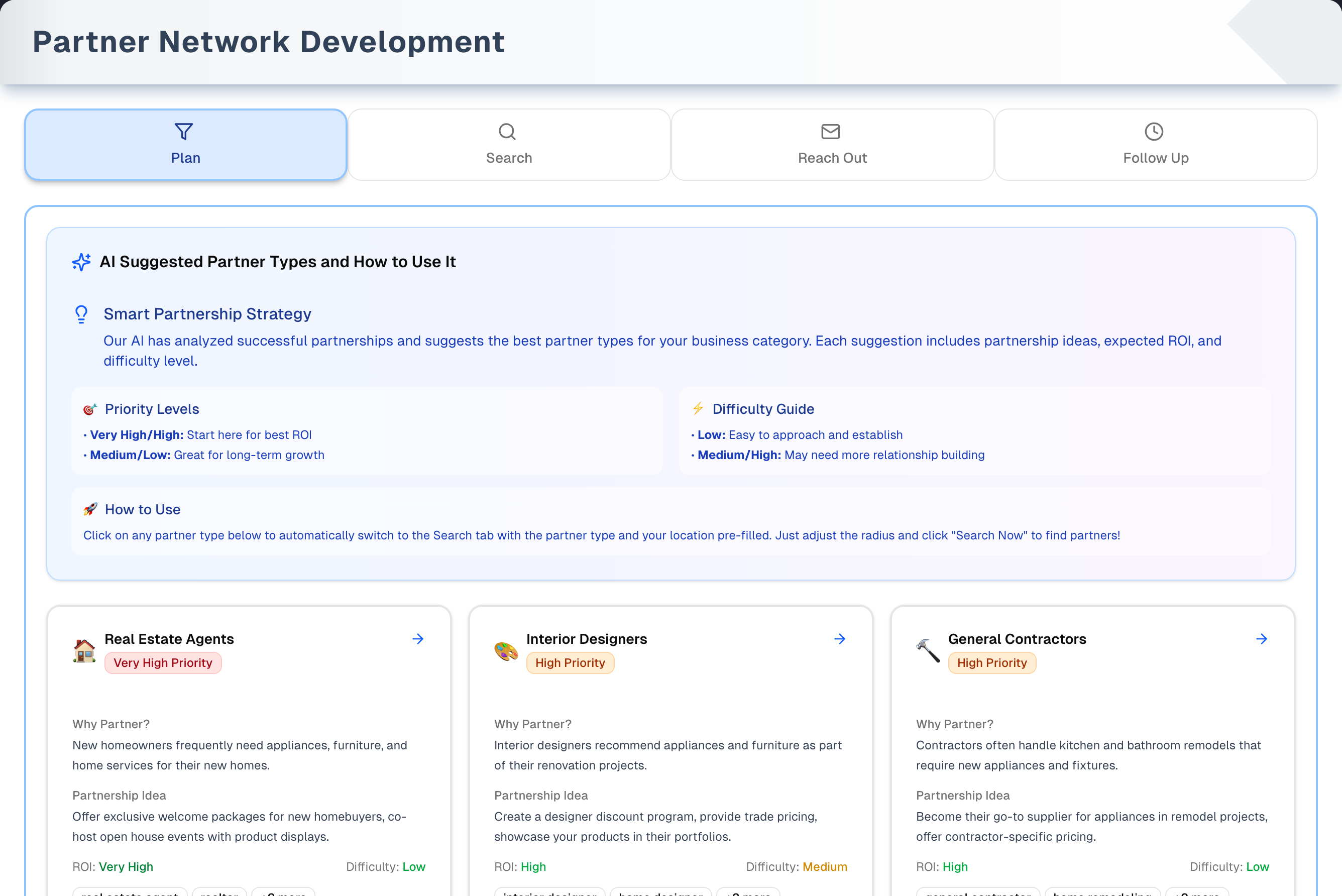
- Each card is a suggested partner type. It shows an icon and name, a Priority badge (Very High to Low), "Why Partner?", "Partnership Idea", ROI, Difficulty, and the first two search keywords.
- Click anywhere on a card to jump to Search with that type filled in. If City Name is empty, the app also tries to detect your location. The search uses the type's first keyword.
- If your business type has no partner types, four general types show instead.
Search
- Fill in City Name (or click My Location inside the field) and Partner Type (pick a preset or type your own keywords). Choose a Search Radius (1–30 miles, default 5), then click Search Now. Pressing Enter does not start a search.
- Each search shows up to 20 businesses. Load More Results fetches more, up to 60 in total. The radius is a preference, so a few results may sit just outside it.
- Each result shows the name, rating, address, phone (with a copy button), website and Google categories. Add to Reach-Out saves the business and the button changes to Added to Reach-Out. A business you already saved (same name or same Google listing) shows as added.
- Moving to another tab clears the search form and results. A Plan card fills the search in once, when it sends you to Search; after that the form is yours, and coming back to the tab gives you an empty one.
Reach Out
- Only partners with status Prospect or Contacted are listed here. Once a partner moves on to Responded, Active Partner or Inactive, find it on Follow Up.
- Each card has a Status dropdown that saves as soon as you change it. Choosing Contacted also records today as the last contact. The card also has an Email button and a phone button that dials the number.
- Email opens a pre-filled Subject and Message written for that partner type by your business type, when it has one. Recipient email starts with the address on file, and whatever you leave in that box is where the mail goes — change it and the new address is saved to the partner when you send. Edit the subject and the text, then click Send Email. Your mail app is asked to open, and the dialog then asks you whether it did: only Yes, mark as contacted records the contact. If it didn't open, No — copy the message instead gives you Copy address and Copy message and leaves the partner where it is.
- Templates expands four reference scripts (two emails, two call scripts) that you can read and copy by hand.
Follow Up
- A table of every saved partner with the columns Partner, Status, Priority, Contact (phone), Next Follow-up and Saved On. You can search by name, type, address or notes, and filter by Status and Priority.
- A row turns red once its Next Follow-up day is over in your store's time zone. A follow-up due today is not overdue.
- Click a row to edit Business Name, Partner Type, Phone, Email, Website, Address, Status, Priority, Next Follow-up and Progress & Note. This is the only place to change priority. Clearing Next Follow-up and saving removes the date.
Step by step: find and save partners
- Open Growth → Partners Network. On Plan, click a High (or Very High) priority card.
- On Search, check City Name and Partner Type, pick a Search Radius, then click Search Now.
- Click Add to Reach-Out on the businesses you like.
- On Reach Out, click Email (add the address from their website if needed) or the phone button, and update the status.
- On Follow Up, click the partner's row, set Next Follow-up and a note, then click Save Changes.
Tips & best practices
- Start with the highest-priority types on Plan.
- Save 3–5 candidates per type before reaching out.
- Before sending, replace every placeholder in square brackets, such as [Your Name]. The Subject box is separate from the message, so there's no "Subject:" line left in the text to tidy up.
- Set a Next Follow-up date after every contact. The Dashboard's Follow-ups due card counts the overdue ones.
Troubleshooting
| Issue | Fix |
|---|---|
| Plan shows four general types and the Partner Type list on Search is empty | Your business type has no partner types. Type your own keywords in Partner Type, or ask the owner to choose a business type in Settings → Business Type |
| Search Now is greyed out | Fill in both City Name and Partner Type |
| No search results | Check the city spelling, try other keywords, or widen the radius |
| Location detection fails | Allow location for the site (click the lock icon in the browser's address bar), or type your city |
| A partner disappeared from Reach Out | Its status moved past Contacted. It is still on Follow Up |
| A partner's email address is wrong | Correct it in the Email box of the Edit Partner dialog on Follow Up, or type the right address in Recipient email on Reach Out — it is saved when you send |
| I can't delete a partner | There is no delete. Set its status to Inactive |
| I can't remove a Next Follow-up date | Open the row, clear the Next Follow-up box and click Save Changes. The column goes back to "Not set" |
What's next
- Find local events to co-host: Growth → Local Vibes
- Reward partners' referrals: Growth → Loyalty Program
- See partner counts and overdue follow-ups: Dashboard
- Change the business type that drives partner suggestions: Settings
Detailed reference
Every button, icon, field and message on this page, for when you need the exact detail. Each panel starts closed. Open the one you need.
Page header and toolbar
| Control | Where | What it does | Notes |
|---|---|---|---|
| Title Partner Network Development and "Find and connect with local businesses to build strategic partnerships using Google Search intelligence." | Header | Page name and description | Sidebar: Growth → Partners Network. The Dashboard cards Partners, Active partnerships and Follow-ups due also open this page, and so does the Partner Network Development tile in Shortcuts |
| Demo (Play icon, amber) | Header, right | Opens the demo page with sample data. The guided tour starts on its own the first time | Everyone. See the Demo mode panel below and Demo mode |
| Plan tab (filter icon, blue) | Tab bar | Shows the suggested partner types | The page opens on this tab |
| Search tab (magnifier icon, green) | Tab bar | Shows the Google business search | Also opens when you click a Plan card |
| Reach Out tab (envelope icon, purple) | Tab bar | Shows Prospect and Contacted partners with Email and phone buttons | Reloads each time you open it |
| Follow Up tab (clock icon, orange) | Tab bar | Shows every saved partner in a table you can filter | Reloads each time you open it |
| Switching tabs | Tab bar | The tab you leave is reset. On Search, the form and results are cleared | A Plan card fills Search in only the first time it sends you there, so coming back later gives you an empty form rather than that card's partner type again. If you rerun an identical search without reloading the app, the earlier results come back from memory (kept up to 24 hours) |
Tab: Plan
| Control | Where | What it does | Notes |
|---|---|---|---|
| Card Suggested Partner Types and How to Use Them (sparkles icon) | Top of tab | Explains the cards. "Smart Partnership Strategy": "These partner types come from your business type's settings: the kinds of local business that tend to work well with yours. Each suggestion includes partnership ideas, expected ROI, and difficulty level." "🎯 Priority Levels": Very High/High: Start here for best ROI; Medium/Low: Great for long-term growth. "⚡ Difficulty Guide": Low: Easy to approach and establish; Medium/High: May need more relationship building. "🚀 How to Use": click any partner type to switch to Search with the partner type and your location pre-filled, then adjust the radius and click "Search Now" | Display only. The suggestions come from your business type's settings |
| Partner-type card (arrow icon top-right; footer "Click to auto-fill search form & find partners") | Card grid | Click anywhere on the card: opens Search with this partner type filled in. If City Name is empty, the app also tries to detect your location, and the browser may ask for permission | The search uses the card's first keyword (for example "real estate agent"), not the card's title |
| Icon and name | Card, top | The partner type | — |
| Priority badge "… Priority" | Card, under the name | How strongly this type is recommended | Very High red, High orange, Medium yellow, Low green |
| "Why Partner?" | Card body | Why this type is worth partnering with | — |
| "Partnership Idea" | Card body | A suggested way to work together | — |
| "ROI: …" | Card body | Expected return: Very High, High, Medium or Low | Green for Very High and High, yellow for Medium, grey for Low |
| "Difficulty: …" | Card body | How hard the partnership is to set up: Low, Medium or High | Green, yellow, red |
| Keyword chips (first two) and "+… more" | Card body | The keywords this type searches for | Not clickable. "+… more" appears when the type has more than two keywords |
| Four general types: "Complementary Local Businesses" (High), "Real Estate Agents & Property Managers" (High), "Chambers of Commerce & Community Organizations" (Medium), "Event Planners & Local Venues" (Medium) | Card grid | Shown when your business type has no partner types, and briefly while the page loads | With these cards, the Partner Type list on Search is empty. Clicking a card enters its first keyword as your own keywords, and partners you save get the type "Partner" |
Tab: Search
| Control | Where | What it does | Notes |
|---|---|---|---|
| Banner "✨ Form Auto-filled from Plan Tab!": "Partner type has been set to … and location detected as …. Just adjust the search radius and click "Search Now" to find partners!" | Top of tab | Confirms what a Plan card filled in | Only after you click a Plan card. The "location detected as" part shows only when City Name has a value. Stays until you change or clear Partner Type, or leave the tab. Nothing on the form is changed again after that first fill: typing a city, or picking a different partner type, is yours to keep |
| Card Partner Search Tips (lightbulb icon) | Top of tab, under the banner when it shows | Tips: "Start Local: Use 1-5 miles radius", "Be Specific: Exact addresses work better", "Result Limits: Up to 20 businesses per search, 60 with Load More" | Display only |
| City Name (placeholder "San Francisco, CA") | Search form, 1st | Where to search around. Accepts a city, an address, or map coordinates | Required. Search Now stays greyed out while it is empty. Typing clears any location error. If Google can't find the place on a map, the search is not centred anywhere — your typed place is still part of the search, so the results are matched by name rather than by distance |
| My Location (navigation arrow; tooltip Use current location) | Inside City Name, right | Reads your browser location and fills City Name with "City, Region". Shows "Loading..." while working, then a "Location detected" message | Disabled while detecting. Needs browser permission and a secure connection. Fills in map coordinates if the city lookup fails. Gives up after 10 seconds |
| Location error line (amber, alert icon) | Under City Name | Says why location detection failed. See Messages you may see | Clears when you type in City Name or try again |
| Partner Type (placeholder "Select or type custom keywords...") | Search form, 2nd | Click to open the list of preset types. Typing enters your own keywords and filters the list | Required: a preset or your own keywords. Search Now stays greyed out while it is empty |
| X icon (no tooltip) | Inside Partner Type, right | Clears the partner type or keywords | Only shows when something is filled in |
| Down-arrow icon (no tooltip) | Inside Partner Type, far right | Opens or closes the preset list | The list only appears if your business type has partner types. Clicking elsewhere closes it |
| Preset in the list | Partner Type list | Selects that partner type. The search uses its first keyword | The selected preset is highlighted blue. Partners you save get this type's name |
| "Search for: "…"" | Bottom of the Partner Type list | Keeps your typed keywords and closes the list | Only when you have typed keywords. Partners saved from a keyword search get the type "Partner" |
| Search Radius | Search form, 3rd | Options: 1 mile, 2 miles, 5 miles (default), 10 miles, 15 miles, 25 miles, 30 miles (max) | A preference, not a hard limit. Some results can lie outside it |
| Search Now (magnifier icon; spinner while searching) | Search form, right | Searches Google Places for "(keyword) in (city)" and shows up to 20 businesses | Greyed out while searching or when City Name or Partner Type is empty. Pressing Enter does not search |
| "Searching for businesses..." | Below the form | Spinner while a search runs | — |
| Search Error card (red) | Below the form | Shows why a search failed or found nothing. See Messages you may see | If Load More Results fails, the results already shown stay |
| "We could not place “…” on the map, so these results are matched by name only." | Between the form and the results | Says your typed place could not be found on a map, so the results are matched by name rather than by distance | After any search, including one that found nothing. Nothing is shown when the place was found |
| Heading "Found … Business(es) Near You" | Above results | How many businesses are loaded so far | Only when there are results |
| Badge "Within … miles of …" | Above results, right | Repeats the radius and city | Follows the current form values, even if you changed them after searching |
| Badge "More available" | Above results, right | More results can be loaded | Only when Google has another page |
| Load More Results (down arrow; "Loading more..." with spinner) | Below results | Adds the next 20 results. Duplicates are skipped | Only when more results exist, up to 60 in total. Disabled while loading |
| Tip "💡 Tip: Google Places returns up to 60 of the most relevant businesses. Try different search terms or a smaller radius for more targeted results." | Below results | Guidance | Only when no more pages remain and at least 15 results are loaded |
| Empty state "Find Partners Near You": "Enter your business location and select a partner type to discover local businesses." | Search tab | Shown before any search | Hidden while a Search Error card shows |
| Get My Location (navigation arrow) | Empty-state card | Same as My Location | Disabled while detecting |
Search results: business card
| Control | Where | What it does | Notes |
|---|---|---|---|
| Business name | Card, top | The business's Google name | Long names are cut short. Hover to see the full name |
| Star rating "… rating" | Under the name | The business's Google rating | Only if Google has a rating |
| Bookmark icon (no tooltip) | Card, top-right | Same as Add to Reach-Out | Filled blue once saved. Does nothing if the business is already saved |
| Address (pin icon) | Card body | Google address | "Address not available" when Google has none |
| Phone (phone icon), shown as (xxx) xxx-xxxx | Card body | The business's phone number | Only if Google has one |
| Copy icon (no tooltip) | Right of the phone | Copies the phone number. The icon turns into a green check for 2 seconds | No message. Does nothing if the browser blocks clipboard access |
| Website link (external-link icon) | Card body | Opens the website in a new tab | Only if Google has one |
| Category chips (up to 3, for example "real estate agency") | Card body | Google's categories for the business | Not clickable |
| Add to Reach-Out (bookmark, green outline) / Added to Reach-Out (check, solid green) | Card footer | Saves the business as a partner with status Prospect and priority Medium, plus the note "Discovered via Partner Discovery on …". Shows "… saved as a partner prospect!" The partner then appears on Reach Out and Follow Up | Shows Added to Reach-Out, which can't be clicked, when a partner with the same name or the same Google listing already exists. Saved type: the preset's name, or "Partner" for a keyword search. Email is left blank |
| Badge "Partnership Potential" | Card bottom | Label only | Shows on every card. It is not a score |
Tab: Reach Out
Only partners with status Prospect or Contacted are listed. If you change a card to Responded, Active Partner or Inactive, it stays on screen until you reopen the tab, then shows only on Follow Up.
| Control | Where | What it does | Notes |
|---|---|---|---|
| "Loading saved partners..." | Reach Out tab | Spinner while partners load | — |
| "Error Loading Partners" card and Try Again (refresh icon) | Reach Out tab | Loads the list again | Appears when loading fails. See Messages you may see |
| Empty state "No Saved Partners Yet": "Use the Search tab to find and save potential partners first." "Once you save partners from your search results, they'll appear here ready for outreach." | Reach Out tab | Shown when no Prospect or Contacted partners exist | Also shows when every partner has moved past Contacted. There's no button here. Open the Search tab yourself |
| Card Partner Reach Out Guide (book icon): "Learn how to effectively reach out to potential partners using our templates and tools" | Top of tab | "Best Practices": Research the business before reaching out; Personalize templates with specific details; Follow up within 3-5 business days; Keep initial contact brief and value-focused; Always update partner status after contact. "How to Use This Page": Templates: Click to expand and copy full templates; Email: Use templates to generate personalized emails; Phone: Call directly from partner cards; Status: Update status after each interaction; Follow-up: Use Follow-up tab to track progress. "💡 Pro Tip": "Replace placeholder text in templates (like [Your Name], [Partner Name], [their service]) with actual information before sending. This personalization significantly increases response rates!" | Display only. Shown when at least one partner is listed |
| Templates header (document icon, down arrow): "Pre-built email and call scripts for partner outreach" | Below the guide | Click to expand or collapse the four scripts | Starts collapsed. There's no copy button. Select the text to copy it |
| "Initial Partnership Inquiry": "Use for first contact with potential partners" | Templates → Email Templates | Click the text box to show all of it ("Click to expand" / "Click to collapse"). Subject "Partnership Opportunity - [Your Business Name]". It proposes referring customers to each other and meeting for coffee or a short call | Reference text only. It is not used by the Email button |
| "Follow-up Email": "Use for following up after initial contact" | Templates → Email Templates | Click to expand or collapse. Subject "Following up on Partnership Discussion". It proposes two-way referrals and joint marketing, and asks for 15 minutes this week | Reference text only |
| "Initial Cold Call": "Opening script for first phone contact" | Templates → Cold Call Scripts | Click to expand or collapse. Opens "Hi, this is [Your Name] from [Your Business Name]…", with lines for when they say yes and when they're busy | Reference text only |
| "Referral Discussion": "Script for discussing referral partnerships" | Templates → Cold Call Scripts | Click to expand or collapse. It explains a mutual referral program, offers a referral fee or no-fee option, and suggests a trial period | Reference text only |
| Partner card | Partner grid | Shows the partner's details and outreach buttons | Clicking the card itself does nothing |
| Name and "Saved: …" | Card, top-left | Partner name and the date it was saved | — |
| Partner-type badge | Card, top-right | The saved partner type | — |
| Status dropdown: Prospect, Contacted, Responded, Active Partner, Inactive | Card, top-right under the type | Saves the new status right away and shows "Partner status updated to …". Choosing Contacted also records today as the last contact | Shows "Updating..." and is disabled while it saves |
| Address (pin icon) | Card body | Saved address | — |
| Rating "… stars (… reviews)" | Card body | Google rating and review count saved with the partner | Only if a rating was saved. A partner saved without a review count shows the stars alone, for example "4.5 stars" |
| Website link (external-link icon) | Card body | Opens the website in a new tab | Only if a website is saved |
| "Last Contact: …" (envelope icon) | Card body | Date of the last recorded contact | Set when the status changes to Contacted here, or after Send Email once you confirm your mail app opened |
| Email (envelope icon, blue) | Card footer, left | Opens Email Template - … for this partner | Always available |
| Phone button: shows the phone number (phone icon, green), or No Phone | Card footer, right | Dials the number using your device's phone app | Greyed out as No Phone when no number is saved. Does not change the status |
Dialog: Email Template - (business name)
Opened by Email on a Reach Out card. Esc or a click outside also closes it.
Fields:
| Field | Required | Default | Rules and error text |
|---|---|---|---|
| Recipient email (placeholder "name@business.com") | Yes. Send Email stays greyed out while it is blank | The partner's saved email, if any | This box decides where the mail goes. Change it and the new address is saved to the partner before your mail app opens, so the correction sticks. Hint when an address is on file: "This is the address on file. Change it here and the new address is saved when you send." When none is: "This partner has no email on file. Find it on their website and enter it here — it will be saved when you send." Something that isn't an address is refused with "Enter a valid email address before sending." and nothing is sent or saved |
| Subject (placeholder "Partnership Opportunity") | No | Your business type's subject for this partner type, for example "Referral Partnership: Appliance Sales + Repair". Otherwise "Partnership Opportunity - (business name)" | Fully editable, and it is the subject your mail app receives. Left empty, "Partnership Opportunity - (business name)" is used |
| Message (large text box) | No | Your business type's outreach email for this partner type, matched on the partner's own type. Otherwise its default, otherwise a general partnership email | Fully editable. The subject is never repeated in the message. The general email has [Your Name], [Your Business Name], [Your Location] and [Your Contact Information] to replace; the industry ones have their own brackets, such as [Store Name] and [City]. The partner's name, type and rating are filled in for you where a template asks for them. Replace any remaining [bracketed] text yourself |
Buttons:
| Control | Where | What it does | Notes |
|---|---|---|---|
| Send Email (send icon; spinner while saving) | Dialog, bottom | Saves the address in Recipient email to the partner whenever it differs from the one on file, then asks your mail app to open with your Subject and Message | Greyed out while Recipient email is blank or while saving. If the address can't be saved, nothing is sent. Nothing is recorded yet: the dialog cannot see whether a mail app opened, so it asks |
| "We opened your email app with this message. Did it open?" with Yes, mark as contacted and No — copy the message instead | Dialog, in place of Send Email and Cancel | Yes sets the status to Contacted with today as the last contact and closes the dialog. No changes nothing and offers the copy buttons | The only way the partner is marked Contacted from this dialog |
| Copy address / Copy message | Dialog, after No — copy the message instead | Copy the recipient address, or the subject and message together, to your clipboard | For a browser with no mail app set up. The line above reads "Copy the address and the message, then send them from wherever you read your email. This partner stays in the outreach list until you mark them contacted." If your browser refuses clipboard access: "Couldn't copy. Select the text and copy it by hand." |
| Cancel | Dialog, bottom | Closes without sending or saving | — |
| X (close) | Dialog, top-right | Closes without sending or saving | — |
Tab: Follow Up
| Control | Where | What it does | Notes |
|---|---|---|---|
| "Loading Partner Follow-Ups": "Please wait while we fetch your data." | Follow Up tab | Spinner while partners load | — |
| "Error Loading Partners" card and Try Again (refresh icon, red) | Follow Up tab | Loads the list again | Appears when loading fails |
| Card Partner Follow-Up Guide (book icon): "Master the art of partner follow-up and relationship management" | Top of tab | "Follow-Up Best Practices": Set follow-up dates immediately after contact; Keep detailed notes of each conversation; Prioritize high-value partnerships; Don't let prospects go cold - stay consistent; Track response patterns and adjust timing. "How to Use This Page": Filter: Use status/priority filters to focus; Search: Find partners by name or notes; Edit: Click a partner's row to update their details; Overdue: Red highlights show overdue follow-ups; Notes: Add detailed interaction logs. "Good Notes Include": Date and method of contact; Key discussion points; Their specific needs/interests; Next steps agreed upon; Personal details to remember. "🚨 Priority System": High: Hot prospects, immediate potential; Medium: Interested but needs nurturing; Low: Long-term prospects, periodic check-ins | Display only |
| Partner Follow-Ups (filter icon): "Manage and track your partner prospects. Overdue follow-ups are highlighted." | Table card, top | Title of the table | — |
| Refresh Data (refresh icon) | Table card, top-right | Reloads all partners | — |
| Search box (placeholder "Search by name, type, address...") | Filter row | Filters as you type on business name, partner type, address and notes | Not case-sensitive |
| Status filter: All Statuses, Prospect, Contacted, Responded, Active Partner, Inactive | Filter row | Shows only that status | Default All Statuses |
| Priority filter: All Priorities, High Priority, Medium Priority, Low Priority | Filter row | Shows only that priority | Default All Priorities |
| Column Partner | Table | Business name, with the partner type underneath | Every saved partner shows, whatever its status. No sorting or pages |
| Column Status | Table | Badge in capitals: PROSPECT (grey), CONTACTED (purple), RESPONDED (cyan), ACTIVE PARTNER (green), INACTIVE (rose) | — |
| Column Priority | Table | Badge "HIGH Priority" (red), "MEDIUM Priority" (yellow) or "LOW Priority" (green) | New partners start at MEDIUM |
| Column Contact | Table | Phone number | Phone only. Blank when none is saved |
| Column Next Follow-up | Table | Date of the next planned contact (calendar icon), or "Not set" | The day you picked, shown in your store's time zone (Settings → Business Profile; a store with none set falls back to your browser's). Once that day is over the date turns red and bold and the whole row is tinted red, for any status including Active Partner and Inactive. A follow-up due today is not red |
| Column Saved On | Table | Date the partner was saved | — |
| Table row (click anywhere) | Table | Opens Edit Partner: … | Every row |
| "No partners found." "Try adjusting your filters or adding a new partner." | Table | No rows match | There's no add button on this tab. Partners are added from Search |
Dialog: Edit Partner: (business name)
Opened by clicking a Follow Up row. Only Business Name is required, and nothing else is checked. Esc or a click outside closes it without saving. There's no delete button: a partner can't be deleted, so set its status to Inactive instead.
Fields:
| Field | Required | Default | Rules and error text |
|---|---|---|---|
| Business Name | Yes | Current name | Renames the partner. Spaces at the start and end are dropped. While it is blank, "Enter the partner’s business name." shows under it and Save Changes is greyed out |
| Partner Type | No | Current type | Free text. Also decides which outreach email the Email dialog pre-fills: it is matched against your business type's partner types, so keep the wording the Search tab saved. Anything else falls back to the general email |
| Phone | No | Current phone | No format check. Clear it to remove the number |
| Email (placeholder "name@business.com") | No | Current email | The address Send Email on Reach Out uses. No format check here. Clear it to remove the address |
| Website | No | Current website | Clear it to remove the website |
| Address | No | Current address | Clear it to remove the address |
| Status: Prospect, Contacted, Responded, Active Partner, Inactive | No | Current status | Choosing Contacted here does not update the last-contact date (the Reach Out dropdown does) |
| Priority: High, Medium, Low | No | Current priority | The only place to change priority |
| Next Follow-up (date picker) | No | Current date, if set | Drives the red overdue highlight. The day you pick is saved as that day in your store's time zone. Clearing the box and saving removes the date, and the column goes back to "Not set" |
| Progress & Note (placeholder "Track progress, updates, and notes about this partnership...") | No | Current notes, starting with "Discovered via Partner Discovery on …" | Free text. The Follow Up search box looks in it |
Buttons:
| Control | Where | What it does | Notes |
|---|---|---|---|
| Save Changes (spinner while saving) | Dialog, bottom-right | Saves every field, shows "Partner updated successfully!" and closes | Greyed out while saving and while Business Name is blank. If saving fails, shows "Failed to update partner." and the dialog stays open |
| Cancel | Dialog, bottom | Closes without saving | — |
| X (close) | Dialog, top-right | Closes without saving | — |
Messages you may see
| Message | When it appears | What to do |
|---|---|---|
| "Location detected" | My Location, Get My Location or a Plan card found your location | Nothing |
| "Geolocation is not supported by this browser. Please type your city manually." | The browser has no location support | Type the city |
| "Location requires a secure (HTTPS) connection. Please type your city manually." | The page was opened over an insecure connection | Type the city |
| "Location is blocked for this site. Click the lock (or location) icon in your browser's address bar, allow location, then try again." | You blocked location for this site earlier | Allow location in the browser's site settings and try again, or type the city |
| "Location permission denied. Click the lock (or location) icon in your browser's address bar to allow location, then try again." | You declined the browser's location prompt | Same as above |
| "Your location is currently unavailable. Please type your city manually." | The device couldn't work out where it is | Type the city |
| "Getting your location timed out. Please try again or type your city manually." | No location within 10 seconds | Try again or type the city |
| "Could not get your location. Please type your city manually." | Any other location failure | Type the city |
| Search Error: "Please enter a location and select a business type or enter custom keywords" | A search started with a field missing (normally the button is greyed out) | Fill in City Name and Partner Type |
| Search Error: "No "…" businesses found within … miles of …. Try expanding your search radius or different keywords." | Google found nothing | Widen the radius, try other keywords, or check the city spelling |
| "We could not place “…” on the map, so these results are matched by name only." | The place in City Name could not be found on a map, so nothing centred the search | Check the spelling, or use a bigger nearby city |
| Search Error: "Unauthorized" | Your session has ended | Sign in again |
| Search Error: "Service temporarily unavailable" | The search service isn't set up on the server | Contact support |
| Search Error: "Failed to search places. Please try again." | Google rejected or failed the request | Try again later |
| Search Error: "Internal server error" | An unexpected server error | Try again. Contact support if it keeps happening |
| Search Error: "Search failed. Please try again." | Any other search failure | Try again |
| Search Error: "Failed to load more results. Please try again." | Load More Results failed. The results already shown stay | Click Load More Results again |
| "… saved as a partner prospect!" | Add to Reach-Out worked | Find it on Reach Out |
| "This partner is already saved!" | The business is already saved (same name or same Google listing) | Find it on Reach Out or Follow Up |
| "Failed to save partner. Please try again." | Saving failed | Try again |
| "Loading saved partners..." | Reach Out is loading | Wait |
| "Error Loading Partners": "Failed to load saved partners. Please try again." | The Reach Out list couldn't load | Click Try Again |
| "Error Loading Partners": "Failed to load partner data or user profile. …" and "Failed to load required data." | Your profile couldn't load when Reach Out opened | Reload the page |
| "No Saved Partners Yet" | No Prospect or Contacted partners | Save partners from Search, or look on Follow Up |
| "Partner status updated to …" | A status change on Reach Out saved (also after you confirm your mail app opened). The status reads as in the dropdown, for example "Active Partner" | Nothing |
| "We opened your email app with this message. Did it open?" | Send Email, after your mail app has been asked to open | Answer Yes, mark as contacted or No — copy the message instead. Nothing is recorded until you do |
| "Copy the address and the message, then send them from wherever you read your email. This partner stays in the outreach list until you mark them contacted." | You answered No — copy the message instead | Use Copy address and Copy message, then mark the partner Contacted yourself once you have sent it |
| "Email address copied." / "Message copied." | Copy address / Copy message worked | Paste it into your email |
| "Couldn't copy. Select the text and copy it by hand." | Your browser refused clipboard access | Select the text in the dialog and copy it the usual way |
| "Failed to update partner status" | A status change didn't save | Try again |
| "Updating..." | A status change is saving on a card | Wait |
| "This partner has no email on file. Find it on their website and enter it here — it will be saved when you send." | Email dialog for a partner with no email | Enter the address |
| "This is the address on file. Change it here and the new address is saved when you send." | Email dialog for a partner that already has an email | Information only. Edit the box if the address is wrong |
| "Enter a valid email address before sending." | Send Email with something that isn't an email address in the box | Correct the address. Nothing was sent or saved |
| "Failed to save the email address. Please try again." | The address in the box differed from the one on file and couldn't be saved. Nothing was sent | Try again |
| "Add a recipient email before sending." | Send with no email (normally the button is greyed out) | Enter an email |
| "Loading Partner Follow-Ups": "Please wait while we fetch your data." | Follow Up is loading | Wait |
| "Error Loading Partners": "Failed to load partners. Please try again." and "Failed to load partners." | The Follow Up list couldn't load | Click Try Again |
| "No partners found." "Try adjusting your filters or adding a new partner." | No partner matches the search or filters | Clear the search box and set both filters back to All |
| "Not set" | The partner has no Next Follow-up date, or the date was cleared and saved | Set one in the edit dialog |
| "Partner updated successfully!" | The edit dialog saved | Nothing |
| "Failed to update partner." | The edit dialog couldn't save | Try again |
Who can use what
| Topic | What happens |
|---|---|
| Roles | No owner or manager checks. Every signed-in team member sees all four tabs and can save partners, send emails, change statuses and edit partners |
| Menu visibility | The owner can hide Partners Network from one person's menu in Settings → Team. The sidebar row goes with it, and so does the one Shortcuts card, Partner Network Development. In a store with more than one active person, opening this page shows them "403 - Forbidden" however they reach it — a link in the app, a bookmark or a typed address. The demo page is exempt and still opens. Someone switched off or removed in Team doesn't count towards that head count, and is not treated as the one person left. See Team & menu visibility |
| Plan and add-ons | Available on every plan. No add-on or switch |
| Business type | Decides the Plan cards, the Partner Type list on Search, and the subject and message in the Email dialog — including a different one per partner type where the business type has them. It is changed in Settings → Business Type, and getting in and saving are two different rules. Settings opens for the owner and for the store's only active member (people switched off or removed in Team don't count). Saving the Business Type is narrower: it needs the owner, so the store's only active member who is not the owner can open the section and click Save Business Type, and is refused in the section's red box with "Nothing was changed: only the store owner can change the business type. If you are the owner, reload the page and try again." Your store can't edit the partner types or email templates themselves |
| Location | Sharing your location is optional. Typing a city always works |
| Dashboard counts | The Dashboard's Follow-ups due counts overdue follow-ups only for Prospect, Contacted and Responded partners. The Follow Up table turns rows red for every status, so the two numbers can differ. Both use the same rule for "overdue": the follow-up's day is over in your store's time zone |
| Demo | Everyone, on every plan. The demo page is exempt from menu visibility, so hiding Partners Network closes this page but not its demo |
Demo mode (/partners-network/demo)
- Open it: click Demo (Play icon, amber) at the top-right of Partner Network Development.
- Header: "Partner Network Development — Demo", "Sample page populated with demo data. All actions are disabled."
- Banner: "Demo mode — page is populated with sample data. All actions are disabled." with a Take a Tour button (question-mark icon) that restarts the tour.
- Tour: starts by itself the first time you open the demo. Each step switches to its tab first. The tooltip shows progress dots, "… of 11", Back (from step 2), Skip, and Next (Got it! on the last step). Keys: Right arrow or Enter for next, Left arrow for back, Esc to close. Clicking the dark background also closes the tour.
- Still works: the four tabs, Take a Tour, Exit Demo Mode, the tour controls, the Reach Out Templates header (expand and collapse), and clicking a Follow Up row to open the Edit Partner: … preview, which Cancel and X close.
- Disabled: Plan cards (clicking doesn't switch to Search), the whole Search form (City Name fixed at "San Francisco, CA", Partner Type fixed at "Real Estate Agents", radius fixed at "5 miles", My Location, Search Now), bookmark and Add to Reach-Out buttons, Reach Out status dropdowns, Email and phone buttons (the Email dialog can't open), Follow Up Refresh Data, search box and filters, and every field and Save Changes in the edit preview.
- Leave: Exit Demo Mode (left arrow, top-right) returns to the live page.
| # | Tab | Tour step | What it points at |
|---|---|---|---|
| 1 | Plan | Workflow Tabs: "Partner Network follows a 4-step workflow: Plan your strategy with suggested partner types, Search for businesses near you, Reach Out with templates, and Follow Up to track progress. This tour walks through each one." | The tab bar |
| 2 | Plan | Suggested Partner Types: "Your business type comes with a list of partner types that tend to work well with it. Each suggestion includes ROI estimates and difficulty levels." | The Suggested Partner Types card |
| 3 | Plan | Partner Type Cards: "Each card shows a recommended partner type with priority level, partnership ideas, expected ROI, and search terms. Click any card to auto-fill the Search tab." | The partner-type cards |
| 4 | Search | Search Tips: "Quick guidance for better results: start with a 1-5 mile radius, use specific addresses, and remember each search returns up to 20 nearby businesses, and Load More brings the total to 60." | The Partner Search Tips card |
| 5 | Search | Location-Based Search: "Enter your city, select a partner type (or type custom keywords), and set a search radius. Click "Search Now" to find businesses using Google Places." | The search form |
| 6 | Search | Search Results: "Results show business details including ratings, phone, website, and address. Click "Add to Reach-Out" to save a partner for outreach." | The results grid |
| 7 | Reach Out | Reach Out Guide: "Best-practice tips and a quick how-to for contacting partners: research first, personalize templates, follow up within 3-5 days, and update status after each touch." | The Partner Reach Out Guide card |
| 8 | Reach Out | Email & Call Templates: "Pre-built email templates and cold call scripts for partner outreach. Expand to copy a full template, then swap in the partner details before sending." | The Templates card |
| 9 | Reach Out | Saved Partner Cards: "Each saved partner card shows their details, status, and contact options. Use the Email and Phone buttons to reach out, and update their status after contact." | The partner cards |
| 10 | Follow Up | Follow-Up Guide: "Tips for staying on top of relationships: set follow-up dates right after contact, keep detailed notes, and prioritize high-value partnerships so prospects never go cold." | The Partner Follow-Up Guide card |
| 11 | Follow Up | Follow-Up Tracking: "Track all your partner prospects in a filterable table. Overdue follow-ups are highlighted in red. Click any row to edit partner details, add notes, and set next follow-up dates." | The follow-ups table |
Sample data: Plan shows six appliance-store types (Real Estate Agents – Very High, Interior Designers – High, General Contractors – High, Property Managers – Medium, Moving Companies – Medium, Insurance Agents – Low). Search shows six San Francisco real-estate businesses, and the first two already read Added to Reach-Out. Reach Out and Follow Up show six partners: Bay Area Premier Realty (Contacted, High), Elite Interior Design Studio (Active Partner, High), BuildRight General Contractors (Responded, Medium), Pacific Heights Home Group (Prospect, Medium), HomeComfort Property Managers (Contacted, High) and Sunset Movers & Relocation (Prospect, Low).
Differences from the live page:
- Live Plan cards come from your business type (or the four general types). The demo always shows its six appliance-store types.
- The demo Search tab always shows the "Form Auto-filled from Plan Tab!" banner and results. It has no empty state, no Search Error, no Load More Results or "More available", and no phone copy button. Websites are plain text, not links.
- The demo Reach Out tab lists Responded and Active Partner partners too. The live tab lists only Prospect and Contacted.
- Demo template previews are cut to three lines and can't be expanded. Some demo texts mention an appliance store, while the live scripts are general.
- On the demo Follow Up tab, the four sample follow-up dates are counted from today: one is two days ago, so that row shows red, and the others are due within the week. Rows without a date show "Not set".
- The demo edit preview has nearly the same layout as the live dialog — it has no Email field — and nothing can be changed.
Common questions
Why don't my partners show up on the Customers page? Partners are kept apart from customers on purpose. The Customers page leaves them out, so you view and manage partners only on the Reach Out and Follow Up tabs of this page.
How do I delete a partner? You can't delete a partner in the app. Open it on Follow Up and set Status to Inactive. It then drops off Reach Out, and you can hide it on Follow Up by filtering on the other statuses.
A partner I saved has disappeared from Reach Out. Where did it go? Reach Out lists only Prospect and Contacted partners. When a partner becomes Responded, Active Partner or Inactive, it leaves Reach Out the next time the tab opens. It is still on Follow Up.
Why is Search Now greyed out? Both City Name and Partner Type need a value. Pick a preset from the Partner Type list or type your own keywords. Pressing Enter doesn't start a search, so click Search Now.
I clicked Send Email and nothing opened. What now? Answer No — copy the message instead when the dialog asks whether your mail app opened. Nothing is recorded, the partner stays in the outreach list, and you get Copy address and Copy message so you can send it from wherever you read your email. Mark the partner Contacted with the Status dropdown once you have. Setting up a default mail app makes the button work properly next time.
How do I change a partner's email address? Two places. On Reach Out, open Email and type the right address in Recipient email — it is saved to the partner when you send. Or on Follow Up, click the row and edit the Email field, then Save Changes.
Why does the Dashboard's Follow-ups due number differ from the red rows on Follow Up? The Dashboard counts overdue follow-ups only for Prospect, Contacted and Responded partners. The Follow Up table turns a row red for any status once its day is over. Both measure the day in your store's time zone, so a follow-up due today counts in neither.
Why do I only get 20 results, and why are some outside my radius? Google returns 20 at a time. Click Load More Results for more, up to 60 in total. The radius steers the search toward your area but isn't a hard boundary, so a few results can be farther away.