Dashboard
The Business Dashboard grades how well your store is run across seven levels, from the daily counter to growing past your local market. Each key figure links to the page it comes from. Open it from Get Started → Dashboard in the sidebar.
Overview
The page has no tabs. It is one long scroll, in this order:
| Section | What you see |
|---|---|
| Quick Actions | Five shortcuts: Create a Sale, Schedule Service, Daily Journal, Communication Hub, Inventory List |
| Walk-in reminder | An amber banner when a location has logged no walk-in visitors since opening. It only appears from 1 PM, and only for stores that use the walk-in log |
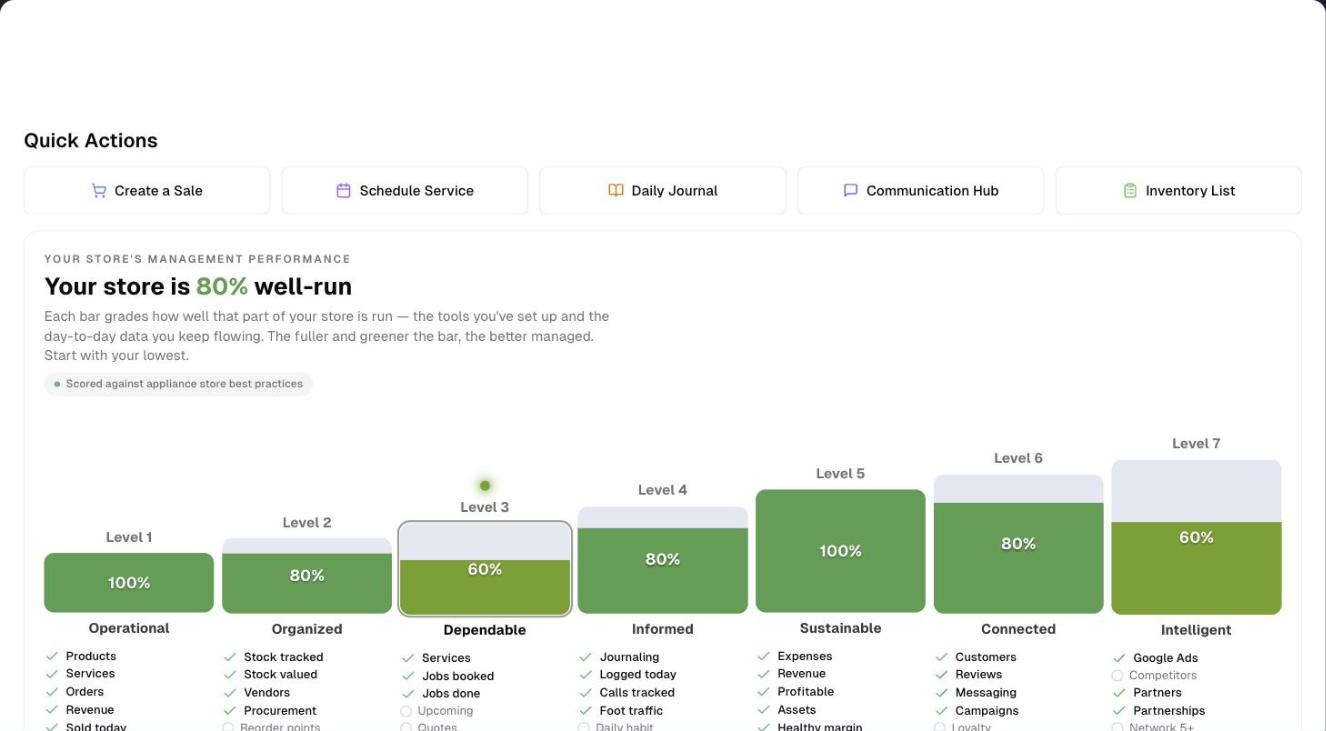
| The climb | "Your store is …% well-run" and seven rungs, one per level. Click a rung to jump to that level. A bouncing dot marks the level to work on next |
| Level 01–07 | Operational, Organized, Dependable, Informed, Sustainable, Connected, Intelligent. Each level has a score, figure cards, a chart, a Next step box (or a green "Mastered" line) and quick links |
| Profitability KPIs | Six cards measured against appliance best practice (appliance stores only) |
| Key Performance Indicators | Six figures for the last 30 days compared with the prior 30 |
| Recent activity | Sales, quotes, returns, scrapped stock, purchase orders, stock movements and service jobs, newest first |
The header has two controls:
- English / Español / 中文 pills. They change the language of this page only, and your browser remembers the choice.
- Demo. It opens a sample dashboard with a guided tour.
How the score works
- Each level checks five best practices, such as "Products", "Vendors" or "Logged today". Each practice in place is worth 20%.
- A level at 80% or more (4 of 5 practices) is Mastered and shows a green "Mastered" line.
- A level below 80% shows a Next step box with a suggestion and a button:
- Set it up when the feature isn't set up yet.
- Take a look otherwise.
- The headline "Your store is …% well-run" counts the practices in place across all seven levels (35 in total). When every level reaches 80%, the headline changes to "Your store is running like clockwork".
- The bouncing dot sits over your lowest level that is below 80%.
- Hover a practice under a rung to see what it checks and whether it's in place.
| Grade | Score |
|---|---|
| Just starting | 0–19% |
| Getting going | 20–39% |
| Building | 40–59% |
| Strong | 60–79% |
| Mastered | 80–100% |
The seven levels
| Level | Covers | Cards |
|---|---|---|
| 01 Operational | The daily counter | Revenue today, Pending orders, Revenue (30d), Avg sale, Lost sales this week, Active products, Services. Also a daily revenue chart and the top products and services sold |
| 02 Organized | Stock and supply | Inventory value, On-hand qty, Low stock, Out of stock, Open POs, Vendors. Also a Stock health chart |
| 03 Dependable | Scheduling and service | Active jobs, Jobs today, Upcoming (7d), Completed (7d), No-shows (7d), Open quotes. Also a Job activity chart |
| 04 Informed | Your Daily Journal habit | Inbound calls, Outbound calls and Door traffic, each with a 7-day mini chart |
| 05 Sustainable | The money you keep | Net profit (MTD), Gross margin, Expenses (MTD), Pending approvals, Total assets, Net worth. Also a revenue, costs and profit chart |
| 06 Connected | Bringing customers back | Customers, Avg rating, Reviews to reply, Open complaints, Conversations, Campaigns, Loyalty members. Also a Review responses chart |
| 07 Intelligent | Growing past your local market | Google Ads, Competitors tracked, Partners, Active partnerships, Follow-ups due, Local Vibes. Also a Growth pipeline chart |
Click a level card to open the page behind it. An amber card needs attention. Examples:
- Low-stock or out-of-stock products
- No-shows
- A loss this month
- Expenses waiting for approval
- Reviews waiting for a reply
- Overdue complaints or partner follow-ups
- For appliance stores, a figure outside its target
These can't be clicked:
- The Key Performance Indicators
- The Profitability KPIs, except Conversion rate
- The three Informed cards
- The charts, and the Top products sold and Top services sold lists
Appliance stores get benchmarks
Some dashboard extras depend on your business type. If it is Appliance Store or Appliance Repair (Settings → Business Type), the dashboard scores you against appliance best practice and adds:
- The chip "Scored against appliance store best practices"
- Target hints and review-frequency badges (DAILY, WEEKLY, MONTHLY, QUARTERLY) on cards
- Three extra cards (Inventory turnover, Service/warranty attach, Repeat rate) and a Margin by category chart
- Four climb practices checked against appliance targets instead, and named that way on the rung: AOV ≥ $1.4k, Turnover 4–6×, GM ≥ 30% and Repeat ≥ 50%
- A Profitability KPIs row above the KPIs
Every other business type gets the standard dashboard. No plan or add-on changes what the dashboard shows.
Step by step: read your dashboard
- Read the headline score and find the bouncing dot on the climb.
- Click that rung. The page scrolls to its level. Read the Next step, then click Set it up or Take a look.
- Scan the level bands for amber cards. Click one to open the page where you can fix the cause.
- Check Key Performance Indicators for 30-day trends.
- Browse Recent activity. Switch to Last 7 days for a longer window, and click a row to open that order, product or job.
Tips & best practices
- Revenue is the money received on sales, less refunds, on the day it came in, whatever the order's status. Revenue today counts a deposit taken today on an order not yet delivered, and counts nothing for a sale completed today that nobody has paid yet. The Sales Report, Profit & Loss, Weekly Reports, Lost Sales and Labour % read the same figure.
- The sales counts are dated by the day each order became a sale: a quote accepted today counts today — in the 30-day counts (Orders with Service and Customer Repeat Rate included), the top lists, the attach rate and the repeat rates — even though the Orders list keeps it under the day the quote was written.
- A KPI trend reads "No prior data" when the prior 30 days had nothing to compare with, so "+0% vs prior 30d" means the figure didn't move.
- Avg sale is the average counted sale: what the Completed, Delivered and Shipped sales came to, less anything returned on them, divided by how many there are. It is an order figure, not revenue, and Level 01, the KPI grid and the appliance Profitability KPIs all read it the same way.
- Your store switched to counting revenue as the money received on one day. For 30 days after it, Level 01 says so in one line: sales booked before the switch stay on the day each became a sale.
- The repeat figures differ too:
- Repeat rate and Repeat customers look at customers over the last 24 months.
- Customer Repeat Rate looks at sales in the last 30 days.
- All three count purchases: sales that aren't a quote and aren't cancelled or refunded. Quotes and returns never make a customer a repeat customer. Every sale counts, however many the store has.
- The language pills change this page only. The sidebar and other pages stay the same.
- Hover a card for a one-line explanation of the figure, in whichever of the three languages the page is set to.
- Click Demo to see a sample appliance store with an 11-step tour.
Troubleshooting
| Issue | Fix |
|---|---|
| Revenue today shows $0 despite recent orders | Revenue is the money received. Record the payment on the order (and mark it Completed), then refresh. A completed sale nobody has paid yet brings in nothing |
| Active jobs shows 0 | It only counts jobs scheduled within 30 days either side of today that aren't Completed, Cancelled or No-show. Check the Schedule |
| A card shows 0 or "—" unexpectedly | Each card loads on its own and shows 0 or "—" when its data can't be read. Refresh the page. If it stays wrong, open the page behind the card |
| Profitability KPIs row is missing | It only appears for the Appliance Store and Appliance Repair business types (Settings → Business Type) |
| Avg rating shows "—" and "Connect Google" | Connect Google Business on the Reviews page |
| A card has no hover explanation | Not every card has one — the three Daily Journal cards, for instance, have none. The rest explain themselves in English, Español and 中文 alike |
| Walk-in reminder keeps showing | Click Log now to log a visitor, or click X to hide the reminder for today in this browser |
| No SMS or messaging usage card | The dashboard doesn't have one. Open Settings → SMS and click Detailed usage |
| Recent activity is empty | Nothing happened in that window. Switch to Last 7 days |
| "403 - Forbidden" instead of the dashboard | The Dashboard item is hidden in your menu. Ask your store owner |
What's next
- Ring up a sale: Sales → New
- Log your day: Reports → Daily Journal
- See the sales that walked out: Lost Sales Report
- Dig into revenue: Reports → Sales Report
- Explore any page with sample data: Demo mode
- Read yesterday at a glance each morning, at the bottom of Quick Facts: Daily brief
Detailed reference
Every button, icon, field and message on this page, for when you need the exact detail. Each panel starts closed — open the one you need.
Page header and toolbar
| Control | Where | What it does | Notes |
|---|---|---|---|
| Dashboard | Sidebar, Get Started group | Opens the Business Dashboard | Standard menu item. If it is hidden in your menu, you see "403 - Forbidden" |
| Title Business Dashboard and the line "Climb the seven levels of a well-managed store — every key figure, in one place." | Header, left | Static heading | Español shows "Panel del negocio" and 中文 shows "经营仪表盘" |
| Globe icon with pills English, Español, 中文 | Header, right | Switches this page's headings, card titles, hints, chart labels, activity rows and card hover explanations to that language, and with them the Next step messages, the Profitability KPI cards (titles, targets and review-frequency badges), the pack's name in the benchmark chip and the walk-in reminder with its messages. The selected pill turns solid blue | Your browser remembers the choice for the next visit. It changes this page only, not the sidebar or other pages. A reason the server gives back (after "Could not log the visit:", say) stays as the server wrote it. Not shown on the demo page |
| Demo (Play icon, amber outline) | Header, far right | Opens the demo dashboard with sample data and a guided tour | Every user. Reads "演示" in 中文. Nothing in your store changes. See the Demo mode panel |
| (whole page) | — | One long scroll with no tabs or dialogs | Every figure loads on its own. A section whose data can't be read shows 0, "—" or an empty message, never an error |
Section: Quick Actions
Heading "Quick Actions". Five equal-width buttons in one row. On a narrow screen the row scrolls sideways.
| Control | Where | What it does | Notes |
|---|---|---|---|
| Create a Sale (cart icon, blue) | Quick Actions, 1st | Opens a new sale (Sales → New) | Always shown |
| Schedule Service (calendar icon, purple) | Quick Actions, 2nd | Opens the Schedule | Always shown |
| Daily Journal (book icon, orange) | Quick Actions, 3rd | Opens the Daily Journal | Always shown |
| Communication Hub (speech-bubble icon, indigo) | Quick Actions, 4th | Opens Messages | Always shown. The Messages page may show its own plan explainer |
| Inventory List (clipboard icon, green) | Quick Actions, 5th | Opens the Inventory Snapshot | Always shown |
Section: Walk-in reminder
An amber dashed banner under Quick Actions. There is one banner per location that needs it. It uses the same reminder as the Walk-ins page.
A banner appears only when all of these are true:
- Your store has logged at least one walk-in visit itself before, live or at end of day. Lost-sale records created automatically don't count.
- The location is active and has opening hours on file for today, and it isn't marked closed today.
- It is 1:00 PM or later in your store's time zone, the location's opening time has passed, and it hasn't closed yet.
- Nobody has logged a visitor at that location today.
- It hasn't been hidden for today in this browser.
It never appears on the demo page.
| Control | Where | What it does | Notes |
|---|---|---|---|
| Banner (alert icon): "No visits logged at … since opening (…). Someone near a screen?" | Under Quick Actions | Reminds you that nobody has logged a walk-in visitor at that location today. The brackets show the opening time | The banner clears on its own once a visit is logged |
| Log now (plus icon) | Banner, right | Logs one walk-in visitor at that location straight away, with the outcome still open. Shows the toast "Visitor logged" with the location name | On failure: "Could not log the visit: …" |
| Open walk-ins | "Visitor logged" toast | Opens the Walk-ins page | — |
| Undo | "Visitor logged" toast | Removes the visit you just logged. Shows the toast "Visit removed" | On failure: "Could not remove the visit: …" |
| X (tooltip Hide for today) | Banner, far right | Hides that location's reminder for the rest of today | Works in this browser only. The reminder comes back tomorrow, or on another device. If your browser blocks site storage, the hide lasts until you reload |
| Automatic refresh | (no control) | Re-reads today's visitor counts every minute and whenever you return to the browser tab. A visit logged on another device clears the banner within about a minute | The clock is also re-checked every minute, so the banner appears at 1 PM on a page left open |
Section: The climb
The large card headed "Your store's management performance".
| Control | Where | What it does | Notes |
|---|---|---|---|
| "Your store's management performance" | Card, top left | Static label | — |
| "Your store is …% well-run" | Card headline | The number is the best practices in place across all levels, out of 35, as a percentage. It is coloured by grade | While levels are still loading, it only counts the levels already loaded |
| "Your store is running like clockwork" with a green trend-up icon, and "Every part of your business is well-managed — time to scale up." | Card headline (replaces the % headline) | Shown when every level scores 80% or more | The bouncing dot disappears |
| "Each bar grades how well that part of your store is run — the tools you've set up and the day-to-day data you keep flowing. The fuller and greener the bar, the better managed. Start with your lowest." | Under the headline | Static explanation | Shown until every level reaches 80% |
| Chip "Scored against appliance store best practices" (green dot) | Under the explanation | Tells you the scores use appliance targets | Only for the Appliance Store and Appliance Repair business types, and on the demo |
| Rungs Level 1 … Level 7 | Staircase row | Click anywhere on a rung (label, bar, name or practices) to scroll smoothly to that level's band | Each rung shows "Level N", a bar filled to the score with the % in the middle, the level name, then five practices. The bar colour is the grade colour, grey while loading. On a narrow screen the row scrolls sideways |
| "…" on a rung | Middle of the bar | That level is still loading | — |
| Bouncing dot above a rung, and a ring around its bar | Over one rung | Marks the level to work on next | While levels are loading, it marks the first level not yet loaded. After that, it marks the lowest level below 80%. On a tie, the lower level number wins. No dot when every level is at 80% or more |
| Practice list: green tick = in place, empty circle = not yet | Under each rung | Hover a practice for its name, a one-line explanation, and "✓ In place" or "Not in place yet" | Every practice and its rule is in the next panel. Where your business type is scored on a different benchmark, the rung names that benchmark |
Section: The climb — the 35 best practices
Each level checks five practices. Appliance stores (Appliance Store or Appliance Repair business type) have one benchmark practice per level in Levels 01, 02, 05 and 06, in place of a standard one.
| Level | Practice | Hover text | Counts as in place when |
|---|---|---|---|
| 01 Operational | Products | "You've added products to your catalog — the items you sell are set up and ready to ring up." | You have at least 1 active product |
| 01 Operational | Services | "You offer services — installs, repairs, delivery — that customers can buy alongside products." | You have at least 1 active service |
| 01 Operational | Orders | "You've recorded sales orders in the last 30 days — the register is in active use." | Any order in the last 30 days |
| 01 Operational | Revenue (standard) | "You've received money on sales in the last 30 days." | Money received on sales in the last 30 days, less refunds, is more than $0 |
| 01 Operational | AOV ≥ $1.4k (appliance) | "Your average sale meets the appliance benchmark of $1,400 — a sign you're bundling and upselling higher-ticket items." | The 30-day average order value is $1,400 or more |
| 01 Operational | Sold today | "You've rung up at least one sale today." | Revenue today is more than $0 |
| 02 Organized | Stock tracked | "You're tracking on-hand inventory levels for your products." | Any product has a stock record |
| 02 Organized | Stock valued | "Your on-hand inventory has a calculated value because unit costs are recorded." | Inventory value is more than $0 |
| 02 Organized | Vendors | "You've added the suppliers/vendors you buy stock from." | At least 1 active vendor |
| 02 Organized | Procurement (standard) | "You've created purchase orders to restock from your vendors." | Any purchase order has ever been created |
| 02 Organized | Turnover 4–6× (appliance) | "Inventory turns over within the healthy 4–6× per year band, so capital isn't tied up in slow-moving stock." | Inventory turnover is between 4× and 6× |
| 02 Organized | Reorder points | "You've set minimum/reorder thresholds, so low stock gets flagged automatically." | Any product has a minimum level or reorder point above 0 |
| 03 Dependable | Services | "You've defined service offerings: the jobs your team performs." | At least 1 active service |
| 03 Dependable | Jobs booked | "You have service jobs scheduled on the calendar." | Any job scheduled between 30 days ago and 30 days ahead |
| 03 Dependable | Jobs done | "You've completed service jobs in the last 7 days." | At least 1 job marked Completed that was scheduled in the last 7 days: today and the 6 days before it (the same jobs as Completed (7d)) |
| 03 Dependable | Upcoming | "You have jobs scheduled over the next 7 days." | At least 1 Scheduled or Rescheduled job in the next 7 days, after today |
| 03 Dependable | Quotes | "You're using quotes to win larger or custom jobs." | Any quote exists |
| 04 Informed | Journaling | "You keep a daily journal of what happens in the store." | Any Daily Journal entry in the last 7 days |
| 04 Informed | Logged today | "Today's journal entry is filled in." | There is a journal entry for today |
| 04 Informed | Calls tracked | "You're logging inbound and outbound phone calls." | Calls logged in the journal in the last 7 days |
| 04 Informed | Foot traffic | "You're recording daily door/foot traffic — the basis for your visitor-to-buyer conversion." | Door traffic logged in the journal in the last 7 days |
| 04 Informed | Daily habit | "You've journaled on at least 3 of the last 7 days — a consistent reporting habit." | 3 or more journal entries in the last 7 days |
| 05 Sustainable | Expenses | "You're recording your business expenses." | Expenses recorded this month |
| 05 Sustainable | Revenue | "Your profit & loss shows money received on sales this month." | Profit & Loss revenue this month is more than $0 |
| 05 Sustainable | Profitable | "You're operating at a profit this month (net income above zero)." | Net profit this month is above $0 |
| 05 Sustainable | Assets | "You've recorded assets on your balance sheet." | Total assets are more than $0 |
| 05 Sustainable | Healthy margin (standard) | "Your gross margin is above zero." | Gross margin is above 0% |
| 05 Sustainable | GM ≥ 30% (appliance) | "Your gross margin meets the appliance benchmark of 30% — healthy pricing power after cost of goods." | Gross margin is 30% or more |
| 06 Connected | Customers | "You've built a customer list in your CRM." | At least 1 customer |
| 06 Connected | Reviews | "Your Google Business reviews are connected." | Google Business is connected |
| 06 Connected | Messaging (standard) | "You're having two-way conversations with customers." | At least 1 conversation the store has texted through the app (the Conversations card above 0) |
| 06 Connected | Repeat ≥ 50% (appliance) | "At least half of your buying customers have ordered more than once — meeting the appliance repeat-rate benchmark." | 24-month repeat rate is 50% or more |
| 06 Connected | Campaigns | "You've created SMS marketing campaigns to bring customers back." | At least 1 SMS campaign |
| 06 Connected | Loyalty | "You've set up a loyalty program." | At least 1 loyalty program, active or not |
| 07 Intelligent | Google Ads | "Your Google Ads account is connected." | Google Ads is connected |
| 07 Intelligent | Competitors | "You're tracking competitors." | At least 1 active competitor |
| 07 Intelligent | Partners | "You've added referral / business partners." | At least 1 partner |
| 07 Intelligent | Partnerships | "You have active partnerships." | At least 1 active partner |
| 07 Intelligent | Network 5+ | "Your partner network has grown to five or more partners." | 5 or more partners |
For appliance stores the rung shows the benchmark it is scored on, not the standard practice name. So Level 01's 4th practice reads "AOV ≥ $1.4k", Level 02's 4th reads "Turnover 4–6×", Level 05's 5th reads "GM ≥ 30%" and Level 06's 3rd reads "Repeat ≥ 50%". The hover text explains the same benchmark. The demo shows it the same way. Every other store keeps the standard names in the table above.
Section: Level bands (parts every level shares)
Each level is a card with a coloured left edge (the grade colour).
| Control | Where | What it does | Notes |
|---|---|---|---|
| Black badge "LEVEL 01" … "LEVEL 07", level icon, name and tagline | Band header, left | Static | Names and taglines are in the table below |
| Score "…%", grade word and progress bar | Band header, right | The level's score (practices in place out of 5) and grade | Shows "—" and a grey bar while loading. Grades: Just starting, Getting going, Building, Strong, Mastered |
| "… of 5 best practices in place" | Under the score | How many of the five practices are in place | Hidden while loading |
| Helper sentence | Band, top | Static encouragement (see the table below) | — |
| Figure cards | Band, middle | Click a card (the whole card is the link) to open the page behind it. Hover for a one-line explanation | While loading, a card shows a grey bar and can't be clicked. Amber background = needs attention. A small grey line under the value gives context. Appliance benchmark cards also show a target and a DAILY, WEEKLY, MONTHLY or QUARTERLY badge (how often to review it) |
| "Mastered — your … foundation is firing on all cylinders." (green tick) | Band, bottom | Confirms the level is at 80% or more | Replaces the Next step box |
| Next step: box (sparkle icon) with a message | Band, bottom | Suggests what to do next. The message is the level's status (see Messages you may see), or "Unlock more of your … tools" when there is none | Shown when the level is below 80% and finished loading. A healthy level can show a plain fact here, such as "Next step: $4.3k today" |
| Set it up / Take a look (arrow) | Right end of the Next step box | Opens the level's main page (see the table below) | Set it up when the level's feature isn't set up yet, otherwise Take a look |
| Quick links (arrow) | Band, bottom row | Open the level's related pages (see the table below) | Always shown, even while loading |
| Level | Tagline | Helper sentence | Set it up / Take a look opens | Quick links |
|---|---|---|---|---|
| 01 Operational | Run the daily counter | "Run your storefront like clockwork — every sale captured with ease." | New sale | New sale (new sale), Orders (Order Management), Products (products catalogue), Services (Services) |
| 02 Organized | Master your stock & supply | "Stay effortlessly in sync, so stock and suppliers never slow you down." | Inventory Snapshot | Snapshot, Procurement, Vendors |
| 03 Dependable | Schedule and serve reliably | "Show up for every customer with service they can always count on." | Schedule | Schedule, Services, Quotes (opens Order Management, not a quotes-only view) |
| 04 Informed | See the business clearly | "See your whole business clearly and make every call with confidence." | Daily Journal | Daily Journal, Reports. Reports opens Reports → Guide & Tips, which lists every report |
| 05 Sustainable | Know what you actually keep | "Turn hard-won revenue into real profit you actually keep." | Expenses | Expenses, Profit & Loss, Assets & Liabilities |
| 06 Connected | Bring customers back | "Build lasting bonds that keep customers coming back for more." | Customers | Customers, Reviews, Messages, SMS Campaigns, Loyalty |
| 07 Intelligent | Outgrow the local market | "Outgrow your local market and reach further than you imagined." | Ads & Sales | Ads & Sales, Competitors, Local Vibes, Partners |
Section: Level 01 Operational
| Control | Where | What it does | Notes |
|---|---|---|---|
| Revenue today (dollar icon) | Cards, 1st | The money received on sales so far today, less refunds, whatever the order's status. Click to open Order Management. Hover: "Money received on sales so far today, less refunds, whatever the order status." | Today is your store's day, whatever your computer's clock says. Shows "—" when your books could not be read, never a $0 that isn't true |
| Pending orders (cart icon) | Cards, 2nd | Orders entered today (sales, quotes, returns, scrap), or quotes converted to a sale today, that are Draft, Pending or Processing. Click to open Order Management. Hover: "Orders placed today that are not yet completed or fulfilled." | Today only |
| Revenue (30d) (trend icon), hint "last 30 days" | Cards, 3rd | The money received on sales over the last 30 store days, today included, less refunds. Click to open the Sales Report. Hover: "Money received on sales over the last 30 days, less refunds — the same figure as the Sales Report." | The same figure as the Sales Report, Weekly Reports, Labour % and Lost Sales for the same days. Shows "—" when your books could not be read. Can go below $0 when more was refunded than received |
| Avg sale (receipt icon) | Cards, 4th | The average counted sale over the last 30 days: what the Completed, Delivered and Shipped sales came to, less anything returned on them (tax included, on the sale's own date), ÷ how many there are. Click to open the Sales Report. Hover: "The average total of a counted sale (Completed, Delivered or Shipped) over the last 30 days; not revenue. Higher means more bundling and upselling of high-ticket items." | Standard stores show the hint "… orders". Appliance stores show "target ≥ $1,400" and a DAILY badge, and the card turns amber below $1,400 |
| Lost sales this week (trend-down icon), hint "… lost · … buyable" | Cards, 5th | The big number is walk-in visits this week (Sunday to today) that ended without a sale for a buyable reason, such as out of stock or wrong size. The hint counts every lost visit and the buyable ones. Click to open the Lost Sales Report on exactly these dates. Hover: "Visits this week (Sunday to today) that ended without a sale for a buyable reason, such as out of stock or wrong size: the part a purchase order can fix. The line below the number counts every lost visit. Counted from your walk-in log." | Every store. Shows 0 if you don't use the walk-in log. If the walk-in log can't be read, it also shows 0 and opens the report on its default range instead. Same numbers as the Lost Sales Report for the same days |
| Active products (box icon), with a dollar figure under the number | Cards, 6th | Number of active products, with the selling value of the stock you are holding underneath. Click to open the products catalogue. Hover: "Number of active products in your catalog." | The dollar figure is on-hand units × the product's price, for the products in your catalogue. Units set aside for orders still count, because you still own them. It is a retail figure, so it reads higher than Inventory value on Level 02, which prices the same stock at what you paid for it. Stock held by an archived product isn't counted. It reads $0 until you have stock on hand |
| Services (wrench icon) | Cards, 7th | Number of active services. Click to open Services. Hover: "Number of active service offerings customers can buy." | — |
| Chart "Daily revenue · 30 days" | Below the cards, left | One bar per store day for the last 30 days: the money received on sales that day, less refunds. A day with more refunded than received goes below zero. Hover a bar to see "Revenue" and the amount | Not clickable. Read from your books, so it covers every day whatever the size of the store. Shows "Loading…" while loading. With nothing received the bars are simply empty. When your books could not be read it shows "Couldn't load the money received. Refresh to try again" instead of bars |
| List "Top products sold" | Below the cards, middle | Top 5 products by the value of the Completed, Delivered and Shipped sales in the 30 days, before tax. Each row shows rank, name, "… units" and total. Hover the title: "Value of counted sales (Completed, Delivered or Shipped), before tax; not revenue" | Not clickable. Covers every order in the 30 days, however many; a very large store stops at the most recent 6,000 and an amber line above the lists then reads "Showing the most recent 6,000 orders of the last 30 days. The two lists below cover those orders only, so the earliest days of the month are not all counted. The revenue chart covers every day." Shows "Loading…" while loading and "No data yet" when empty |
| List "Top services sold" | Below the cards, right | Top 5 services by the value of the Completed, Delivered and Shipped sales in the 30 days, before tax. Each row shows rank, name, "… sold" and total. Same hover | Not clickable. The same orders as the products list. Shows "Loading…" while loading and "No data yet" when empty |
| Amber line "Before …, a sale's revenue was counted on the day it became a sale, less what came back, and these months are now read from the books. From … it is the money received." | Above the lists | Shown while the 30 days reach back before your store switched to counting revenue as the money received | Gone 30 days after the switch |
| Chart "Margin by category" ("target ≥ 30%") | Full width, under the lists | One bar per product category, for the 6 categories with the highest total list price. The margin comes from each active product's price and cost, not from actual sales, over every active product in the catalog, however many. Green at 30% or more, amber below, with a dashed line at 30%. Hover shows "Margin" and the % | Appliance stores only, and only when at least one category has priced products. Products without a price are left out. Products without a category are grouped as "Uncategorized" |
Section: Level 02 Organized
Inventory value, On-hand qty, Low stock, Out of stock and the Stock health chart are worked out on the server, over every switched-on stock record at your active locations, however many there are. So are the inventory value and average unit cost that Inventory turnover uses, and the units it counts as shipped out: every outbound stock movement of the last 30 days, however many. A switched-off record, or one at a switched-off or deleted location, is not counted, as on Inventory → Snapshot.
| Control | Where | What it does | Notes |
|---|---|---|---|
| Inventory value (boxes icon) | Cards, 1st | Value of on-hand stock at weighted-average cost, for example "$358.4k". Click to open the Inventory Snapshot. Hover: "Value of on-hand stock at weighted-average cost." | Never turns amber |
| On-hand qty (box icon) | Cards, 2nd | Total on-hand units across all locations. Click to open the Inventory Snapshot. Hover: "Total units physically in stock across your locations." | — |
| Low stock (warning icon) | Cards, 3rd | Products whose available quantity is at or below their minimum level. Only products with a minimum set count. Click to open the Inventory Snapshot. Hover: "Products at or below their minimum stock level — time to reorder." | Amber when above 0. Counts products, not branches: available quantity and minimum level are added up across every location, so a product low at three branches counts once. A product with nothing left to sell is counted under Out of stock instead |
| Out of stock (crossed box icon) | Cards, 4th | Products with nothing available anywhere. Click to open the Inventory Snapshot. Hover: "Products with nothing available to sell." | Amber when above 0. A product counts once when its available quantity added up across every location is 0 or below, so oversold products count and one that is out at a single branch while stocked at another does not. Counted the same way as Out of Stock on the Inventory Report, and normally the same number. The two differ only when a location has been deactivated: it is left out here and counted there |
| Open POs (truck icon), hint "… pending" | Cards, 5th | Purchase orders that are Pending or Processing. The hint shows their total value. Click to open Procurement. Hover: "Purchase orders still pending or in progress, with the value awaiting delivery." | — |
| Vendors (building icon) | Cards, 6th | Active vendors. Click to open Vendors. Hover: "Active suppliers you buy stock from." | — |
| Inventory turnover (repeat icon), "….×", hint "target 4–6×", badge MONTHLY | Cards, 7th | Units shipped out in the last 30 days × average unit cost × 12, divided by inventory value. Click to open the Inventory Report. Hover: "How many times a year you sell through your average inventory (annualized 30-day COGS ÷ inventory value). Appliances run healthy at 4–6×." | Appliance stores only. Amber outside 4–6× |
| Chart "Stock health" with "… products by availability" | Full width | Three bars. Well-stocked (green) "Above the minimum level". Low stock (amber) "At or below the minimum level — time to reorder". Out of stock (red) "Nothing available to sell". Hover a bar to see the count and description. A legend repeats the bands | Not clickable. All three bars count products, each product in one bar only, and together they add up to the product count shown beside the chart title. A product with nothing left to sell is always red, even when no minimum level is set for it; a product with no minimum level and something left to sell is green. The two amber figures match: the Low stock bar and the Low stock card are the same count |
Section: Level 03 Dependable
| Control | Where | What it does | Notes |
|---|---|---|---|
| Active jobs (wrench icon) | Cards, 1st | Service jobs dated between 30 days ago and 30 days ahead that aren't Completed, Cancelled or No-show. Click to open the Schedule. Hover: "Service jobs in progress or scheduled (not completed/cancelled)." | Jobs outside that window aren't counted. Every job in the window is counted, however many; the days are your store's |
| Jobs today (calendar-check icon) | Cards, 2nd | Jobs scheduled today that aren't cancelled. Click to open the Schedule. Hover: "Service jobs scheduled for today." | "Today" is the day at your store, not on your own device, so it is the same day for everyone |
| Upcoming (7d) (calendar-clock icon) | Cards, 3rd | Scheduled or Rescheduled jobs in the next 7 days, after today. Click to open the Schedule. Hover: "Service jobs scheduled over the next 7 days." | — |
| Completed (7d) (circle-check icon) | Cards, 4th | Jobs marked Completed that were scheduled in the last 7 days: today and the 6 days before it. A job marked Completed but dated later is not counted. Click to open the Schedule. Hover: "Service jobs completed in the last 7 days." | — |
| No-shows (7d) (person-x icon) | Cards, 5th | Jobs marked No-show that were scheduled in the last 7 days: today and the 6 days before it. Click to open the Schedule. Hover: "Jobs marked no-show in the last 7 days — a reliability red flag." | Amber when above 0 |
| Open quotes (document icon), hint = total value | Cards, 6th | Every quote still open, however many, with their total: Quote Pending, Quote Sent, and Quote Accepted until it is turned into a sale. A quote marked Quote Converted, Quote Rejected, Quote Expired, Completed or Cancelled is not counted, and neither is one turned into a sale, which is an order from then on. Click to open Order Management. Hover: "Quotes not yet turned into a sale, rejected or expired, with their total value." | — |
| Service/warranty attach (shield icon), hint "target ≥ 30%", badge MONTHLY | Cards, 7th | Share of sales in the last 90 days that included a service line or a warranty, counted over every sale in those 90 days, in any status. Shows "—" when there were no sales in 90 days. Click to open Services. Hover: "Share of recent sales that included a service or warranty. Appliance stores turn these into profit centers (target ≥ 30%)." | Appliance stores only. Amber below 30%. Not one of the five scored practices |
| Chart "Job activity (7-day window)" | Full width | Four bars: Today (blue), Upcoming (purple), Completed (green), No-shows (red). Hover a bar for its name and number, for example "Completed : 11" | Not clickable |
Section: Level 04 Informed
These three cards come from your Daily Journal. They can't be clicked and have no hover explanation.
| Control | Where | What it does | Notes |
|---|---|---|---|
| Inbound calls (phone icon, blue) with a 7-day chart | Cards, 1st | The big number is inbound calls on today's journal entry (0 if there's none). The chart shows inbound calls per day for the last 7 days | Hovering the chart shows the day and "Inbound calls" with the number. Shows "Loading…" while loading and "No journal data" if the journal can't be read |
| Outbound calls (phone icon, orange) with a 7-day chart | Cards, 2nd | Same, for outbound calls | Hovering the chart shows the day and "Outbound calls" with the number |
| Door traffic (door icon, purple) with a 7-day chart | Cards, 3rd | Same, for door traffic | Hovering the chart shows the day and "Door traffic" with the number |
Section: Level 05 Sustainable
| Control | Where | What it does | Notes |
|---|---|---|---|
| Net profit (MTD) (trend icon) | Cards, 1st | Net profit so far this month, from Profit & Loss (sales, with returns subtracted). Click to open Profit & Loss. Hover: "Operating profit so far this month — revenue minus cost of goods and operating expenses." | Amber when negative |
| Gross margin (percent icon) | Cards, 2nd | Gross margin so far this month, from Profit & Loss, for example "33.0%". Click to open Profit & Loss. Hover: "Gross profit as a share of revenue — your pricing power after cost of goods. Appliances target above 30%." | Appliance stores also see "target ≥ 30%" and a WEEKLY badge, and the card turns amber below 30% |
| Expenses (MTD) (wallet icon) | Cards, 3rd | Expenses recorded this month, rejected ones left out. Click to open Expenses. Hover: "Business expenses recorded so far this month." | — |
| Pending approvals (receipt icon) | Cards, 4th | This month's expenses in Submitted status, waiting for review. Click to open Expenses. Hover: "Submitted expenses awaiting review or approval." | Amber when above 0 |
| Total assets (bank icon) | Cards, 5th | Total of your asset accounts. Click to open Assets & Liabilities. Hover: "Total assets on your balance sheet." | — |
| Net worth (scale icon), hint "… liabilities" | Cards, 6th | Assets minus liabilities. Click to open Assets & Liabilities. Hover: "Total assets minus total liabilities." | — |
| Chart "Revenue, costs & profit (this month)" | Full width | Three bars: Revenue (green), Costs (amber; revenue minus net profit), Net profit (green, or red when negative). Hover shows "Amount" | Not clickable |
Section: Level 06 Connected
| Control | Where | What it does | Notes |
|---|---|---|---|
| Customers (people icon) | Cards, 1st | Number of customers: every one the Customers page lists (partners and deleted customers are not counted), however many. Click to open Customers. Hover: "People in your customer list / CRM." | — |
| Repeat rate (repeat icon), hint "target ≥ 50%", badge QUARTERLY | Cards, 2nd | Of customers who bought in the last 24 months, the share who bought more than once. A purchase is a sale that isn't a quote, cancelled or refunded, dated by the day it became a sale, and every one counts. Click to open Customers. Hover: "Share of customers in the last 24 months who bought more than once — a direct read on loyalty and lifetime value. Target ≥ 50%." | Appliance stores only. Amber below 50%. Shows 0% (amber) when no customer has ordered in 24 months |
| Avg rating (star icon), hint "… reviews" | Cards, 3rd | Google's own all-time star average for your connected locations, to one decimal, and in the hint Google's own review count: the same figures the top of Reviews shows. When Google does not send them, the average of your most recent reviews and the count of reviews read. Click to open Reviews. Hover: "Average star rating across your connected Google reviews." | Without Google Business connected, it shows "—" with the hint "Connect Google" |
| Reviews to reply (envelope icon) | Cards, 4th | Recent Google reviews with no reply yet. Click to open Reviews. Hover: "Reviews still awaiting a reply from you." | "—" when Google isn't connected. Amber when above 0 |
| Open complaints (warning-bubble icon), hint "… overdue" | Cards, 5th | Complaints not Resolved or Closed. The hint counts those past their due date. Click to open Complaints. Hover: "Complaints not yet resolved or closed. Overdue ones are past the due date their severity sets." | Amber when any are overdue |
| Conversations (speech-bubble icon) | Cards, 6th | The customers your store texts through the app: one for each customer on each of your store's numbers, counted in full. Click to open Messages. Hover: "Customers you text through the app, one per customer and store number." | An earlier conversation replaced by Start a new conversation is not counted separately, and a conversation made entirely outside the app is not counted |
| Campaigns (send icon), hint "… sent (mo)" | Cards, 7th | Number of SMS campaigns. The hint counts messages sent by this month's sent campaigns. Click to open SMS Campaigns. Hover: "SMS marketing campaigns you have created, with how many were sent this month." | — |
| Loyalty members (award icon), hint "… programs" | Cards, 8th | Members across all your loyalty programs. The hint counts the programs. Click to open Loyalty. Hover: "Customers enrolled across your loyalty programs." | Inactive programs and their members are counted too |
| Chart "Review responses" | Full width | Two bars: Replied (green) and To reply (amber). Hover a bar for its name and number | Only when Google Business is connected and has at least one review. Otherwise it shows "Connect Google Business to see how many reviews you've replied to." Not clickable |
Section: Level 07 Intelligent
| Control | Where | What it does | Notes |
|---|---|---|---|
| Google Ads (megaphone icon), value "Connected" or "Set up" | Cards, 1st | Shows whether Google Ads is connected. Click to open Ads & Sales. Hover: "Whether your Google Ads account is connected for paid-search insights." | Never amber |
| Competitors tracked (eye icon) | Cards, 2nd | Active competitors. Click to open Competitors. Hover: "Competitors you are monitoring." | — |
| Partners (handshake icon) | Cards, 3rd | All partners. Click to open Partners. Hover: "Referral and business partners you have added." | — |
| Active partnerships (people icon) | Cards, 4th | Partners in an active relationship. Click to open Partners. Hover: "Partners currently in an active relationship." | — |
| Follow-ups due (bell icon) | Cards, 5th | Partners in Prospect, Contacted or Responded status whose next follow-up date has passed. Click to open Partners. Hover: "Partners with an overdue follow-up." | Amber when above 0. Active partners are never counted here |
| Local Vibes (map-pin icon), value "Explore" | Cards, 6th | Shortcut card. Click to open Local Vibes. Hover: "Local news and events relevant to your market." | No figure |
| Chart "Growth pipeline" | Full width | Four bars: Competitors, Partners, Active, Follow-ups. Hover a bar for its name and number | Not clickable |
Section: Profitability KPIs (appliance stores)
Heading "Profitability KPIs" with "vs appliance best practice". It shows six cards above the Key Performance Indicators. It only appears for the Appliance Store and Appliance Repair business types, and on the demo. Card titles, targets and badges follow the language pills.
| Control | Where | What it does | Notes |
|---|---|---|---|
| Conversion rate (target icon), badge DAILY | Row, 1st | Visitors who bought, divided by visitors, over the last 30 days. The first caption line names the source. "from walk-in log" means walk-in visitors were logged in the window. "from door traffic" means none were, so it uses sales divided by Daily Journal door traffic. "no visitors logged yet" means neither exists, and the value shows "—". The second line always reads "Estimated from what your team logged". Click to open the Lost Sales Report. Hover: "Visitors who bought ÷ visitors, from your walk-in log (or Daily Journal door traffic when no visits are logged). Estimated from what your team logged. Track against your own baseline; published specialty-retail ranges are directional only." | The only clickable card in this row. It has no target and never turns amber. Matches the Lost Sales Report's "Last 30 days" |
| Avg sale (dollar icon), hint "target ≥ $1,400", badge DAILY | Row, 2nd | The average counted sale over the last 30 days: what those sales came to, less anything returned on them, ÷ how many there are. Hover shows the same explanation as the Level 01 card | Amber below $1,400. The same figure as the Level 01 card. Not clickable |
| Gross margin (percent icon), hint "target ≥ 30%", badge WEEKLY | Row, 3rd | Gross margin so far this month, from Profit & Loss. Hover shows the same explanation as the Level 05 card | Amber below 30%. "—" if Profit & Loss can't be read. Not clickable |
| Variable cost (trend-down icon), hint "target ≤ 90%", badge MONTHLY | Row, 4th | Cost of goods plus variable expenses so far this month, as a share of revenue (the money received, from Profit & Loss; the two can fall in different months, see Profit & Loss). Variable expense categories are commissions, sales commissions, marketing, advertising, ads, promotions, meals, shipping, delivery, freight, haul-away and parts, counted over every expense this month, however many. Rent, utilities, salaries and other categories are fixed and left out. Hover: "COGS plus variable expenses (commissions, marketing, shipping, parts) as a share of revenue — fixed overhead excluded. Lower is better." | Amber above 90%. "—" when there's no revenue this month. Not clickable |
| Inventory turnover (repeat icon), "….×", hint "target 4–6×", badge MONTHLY | Row, 5th | Yearly rate of 30-day cost of goods divided by inventory value (same method as the Level 02 card). Hover shows the same explanation as the Level 02 card | Amber outside 4–6×. "—" when inventory value is 0. Not clickable |
| Repeat customers (people icon), hint "target ≥ 50%", badge QUARTERLY | Row, 6th | Share of customers in the last 24 months with more than one purchase — a sale that isn't a quote, cancelled or refunded; every one counts. Hover: "Share of customers in the last 24 months who ordered more than once (target ≥ 50%)." | Amber below 50%. "—" when no customer has ordered in 24 months. Not clickable |
Section: Key Performance Indicators
Heading "Key Performance Indicators" with "last 30 days vs prior 30 days". Six cards, three per row on a wide screen. None are clickable. Each card shows an icon, name, value, trend and category (Sales, Customers or Operations). Hover a card for its explanation.
The current window is the last 30 days in your store's time zone, today included — the same days as Level 01's Revenue (30d), so the two revenue figures match. The prior window is the 30 days before that, with no day in both. The trend reads "+…% vs prior 30d" in green for a rise, "-…% vs prior 30d" in red for a drop, and "+0% vs prior 30d" in grey when the figure didn't move. When the prior window was 0 there is no comparison to make, so the trend reads "No prior data" in grey. It shows "—" (with $0 or 0 values) before the figures load or if loading fails. A prior window below zero is compared on size, so a smaller loss counts as a rise.
| Control | Where | What it does | Notes |
|---|---|---|---|
| Revenue (30 days) (dollar icon), Sales | Grid, 1st | The money received on sales in the window, less refunds. Hover: "Money received on sales over the last 30 days, less refunds, compared with the prior 30." | The same figure as Level 01's Revenue (30d) and the Sales Report for the same days |
| Avg sale (trend icon), Sales | Grid, 2nd | The average counted sale in the window: what the Completed, Delivered and Shipped sales came to, less anything returned on them, ÷ how many there are | Hover as the Level 01 Avg sale card |
| Orders with Service (bar-chart icon), Sales | Grid, 3rd | Completed, delivered and shipped sales in the window with at least one service line, dated by the day each became a sale, so a quote accepted today counts today. Quotes and returns don't count. The same figure as Orders with Service in the Services report. Hover: "Orders in the last 30 days that included at least one service line." | — |
| New Customers (30 days) (people icon), Customers | Grid, 4th | Customers added in the window. Hover: "Customers added in the last 30 days." | — |
| Customer Repeat Rate (trend icon), Customers | Grid, 5th | Share of the window's purchases — sales that aren't a quote, cancelled or refunded — made by customers who bought more than once in that same window. Every sale counts, dated by the day it became a sale. Hover: "Share of recent orders that came from repeat customers." | Different from the 24-month Repeat rate and Repeat customers cards |
| Total Orders (30 days) (activity icon), Operations | Grid, 6th | Every order in the window: sales, quotes, returns and scrap, any status. Hover: "All orders placed in the last 30 days." | — |
Section: Recent activity
The feed mixes sales, quotes, returns, scrapped stock, purchase orders, stock movements and service jobs, newest first. It reads up to 200 sales-side orders, the 100 most recent purchase orders and the 100 most recent stock movements in the window, then shows only what falls inside the button you picked.
If any of those three comes back full, the store was busier in that window than the feed reads, and the oldest events inside it are not listed. A line at the top of the card says so: "Busy period — showing the most recent 400 events in this window. Older ones from the same window are not listed." Switch to Last 24h for a narrower window, or open the list the events came from — Orders, Procurement or Inventory Report → Movements — which page through everything.
| Control | Where | What it does | Notes |
|---|---|---|---|
| Title "Recent activity" | Card header, left | Static | — |
| Last 24h | Card header | Shows the last 24 hours, counted back from right now, and goes back to page 1 | The default, shown solid when selected |
| Last 7 days | Card header | Shows the last 7 days, counted back from right now, and goes back to page 1 | Shown solid when selected |
| Items per page: 10 per page / 20 per page / 50 per page | Card header | Changes how many rows each page shows, and goes back to page 1 | Default 10 |
| Sale row (cart icon, blue): "New sale - Order …" and "Total $…" | List | Click to open that order on Order Management | The reference is the order number, or the last 4 characters of the order's ID if it has none. Only sales show a money total |
| Quote row (bar-chart icon, cyan): "Quote created - …" | List | Click to open that quote on Order Management | — |
| Return row (dollar icon, red): "Return initiated - …" | List | Click to open that return on Order Management | — |
| Scrap row (bin icon, orange): "Stock scrapped - …" | List | Click to open that scrap order on Order Management | No money total: writing stock off is not a sale |
| Purchase order row (clipboard icon, amber): "Procurement order - …" | List | Click to open that purchase order on Procurement Orders | The reference is the vendor's order number, then your own order number, then the last 4 characters of the ID. Up to the 100 most recent in the window |
| Inventory row (clipboard icon, green): "Inventory … - … (…)" and "SKU: …" | List | Shows the movement type in lower case (for example inbound, outbound), the product and the quantity. Click to open that product, or the Inventory Snapshot when no product is linked | The quantity shows as recorded, so outbound can be negative. Up to the 100 most recent movements in the window |
| Service row (calendar icon, purple): "Job … - …" and the service address | List | Shows the job status in lower case and the service name. Click to open that job on the Schedule | Placed by the job's scheduled date, not the date it was created. Every job in the window is listed, however many |
| Time, right of every row (for example "18 minutes ago") | List | How long ago the sale, quote, return or movement was created, or the job's scheduled date | Shown in the selected language |
| "Showing …-… of …" | Footer, left | Which rows you're viewing | The footer only appears when there is more than one page |
| Previous | Footer | Goes to the previous page | Disabled on page 1 |
| "… / …" | Footer | Current page and total pages | — |
| Next | Footer | Goes to the next page | Disabled on the last page |
| "Loading activity…" / "No recent activity" | List | Loading, or nothing in the window | Try Last 7 days |
Sub-page: SMS/MMS Usage Statistics
This page opens for exactly the people Settings opens for: the store's owner, anyone with the owner role, or the store's only active member. Anyone else is sent to Shortcuts, and typing the address changes nothing. It also has its own address under the dashboard but no sidebar item, so for menu visibility it belongs to Dashboard: hide Dashboard for someone and this page closes for them too, with "403 - Forbidden". Open it from Settings → SMS: on the SMS Status card, click Detailed usage. Set up SMS first with SMS Campaigns Setup.
| Control | Where | What it does | Notes |
|---|---|---|---|
| Title "SMS/MMS Usage Statistics" with "Detailed messaging usage for …" (month) | Header | Static | While loading, or on an error, the line reads "Detailed messaging usage and analytics" |
| SMS settings (back-arrow icon) | Header, right | Returns to Settings, SMS tab | Shown in every state |
| Month picker (calendar icon, placeholder "Select month") | Controls, left | Pick one of the last 12 months. The current one reads "… (Current)". The page reloads for that month | — |
| Refresh (circular arrows, spin while working) | Controls | Reloads the selected month | Disabled while refreshing |
| Messages (speech-bubble icon) | Controls, right | Opens Messages | — |
| SMS Campaigns (send icon) | Controls, right | Opens SMS Campaigns | — |
| Quota card "Monthly Quota - … Plan": "Outbound SMS + MMS (inbound messages are free)", "… / …", "… remaining", a bar and "…% used" | Under the controls | Outbound use against your plan's monthly quota. The bar is teal below 75%, orange from 75% and red from 90%. Over quota, the card gets a red border and a warning icon | Only when your plan has a quota. For a past month, that month's outbound total is compared with your current plan's limit |
| "SMS Breakdown": total, "… out", "… in" | Breakdown row | Display only | — |
| "MMS Breakdown": total, "… out", "… in" | Breakdown row | Display only | — |
| "Conversations": count and "Does not count against quota" | Breakdown row | Display only | — |
| "Phone Numbers" table ("Texting numbers set up for this store"): Phone Number, Friendly Name, Capabilities, Status, Created | Card | Your numbers, partly masked. The default sending number has a Default badge. Capability badges are SMS, MMS and Voice. Status is the number's real state: green Active for a number in use, otherwise the word the phone provider gave, and Unknown when it reported none | Empty: "No phone numbers found" |
| "Daily Usage Trend" chart ("Message volume breakdown by day for …") | Card | Stacked areas for SMS Out, SMS In, MMS Out and MMS In, with a legend and hover values | Empty: "No usage data available for this period" |
| "All Usage Categories" table: Category, Description, Count ("Every texting usage record for …") | Card | Usage categories with a count above zero. Media categories have a Media badge | Empty: "No usage records for this period" |
| "Show … categories with zero usage" / "Hide … categories with zero usage" | Under the categories table | Shows or hides the greyed rows with zero use | Only when such categories exist |
| "Account Information" ("Texting account details and setup"): Account SID (masked), Account Name, Status (or "Unknown"), Default From Number (or "Not set"), and a "Messaging Services" list with "Created …" | Bottom card | Display only | The Messaging Services list only appears when there are any |
| "Texting isn't set up for this store yet": "Once texting is connected, this page shows every message this store has sent and received." and Ask UpChannels to set up texting | Replaces the page body | The button opens the SMS Campaigns setup page, where you get the Getting your texting number connected card with a form to UpChannels | Shown when your store's texting connection isn't set up |
| Error: the error as the title, "Unable to load usage data. Please try again." and Retry (circular arrows) | Replaces the page body | Retry reloads | Titles you may see: "Unable to determine organization", "Failed to fetch usage data", "Failed to fetch detailed SMS usage", "Failed to load SMS usage data", and "Only the store owner can see the texting usage details. Ask your owner to open this page." |
Messages you may see
| Message | When it appears | What to do |
|---|---|---|
| "403 - Forbidden" / "You do not have permission to view this page. Contact your organization owner." | The Dashboard item is hidden in your menu | Ask the store owner to show the Dashboard item for you |
| "Loading..." (whole page) | Your access is still being checked | Wait a moment |
| "…" on a rung, "—" as a level score | That level is still loading | Wait |
| "Just starting", "Getting going", "Building", "Strong", "Mastered" | The grade next to each level score. With five practices a level scores 0, 20, 40, 60, 80 or 100%, so 4 of 5 is Mastered | — |
| "… of 5 best practices in place" | Under each level score once loaded | — |
| "Mastered — your … foundation is firing on all cylinders." | The level is at 80% or more | — |
| "Next step: Unlock more of your … tools" | The level is below 80% and has no specific message | Click Take a look or Set it up |
| "Next step: Add your first product" (button Set it up) | Level 01: no active products and no active services | Add products or services |
| "Next step: No sales in 30 days" | Level 01: you have a catalogue, no money was received on sales in 30 days, and there was no Completed, Delivered or Shipped sale in them | Ring up and complete sales |
| "Next step: No money received on sales in 30 days" | Level 01: there were Completed, Delivered or Shipped sales in the 30 days, but no money was received on sales in them (for example financing still to fund, or invoices not paid yet) | Take the payments that are due on the Payment tab of each order, or record the ones already taken |
| "Next step: Refunds took back all the money received in 30 days" | Level 01: money was received on sales in the 30 days, but refunds in them came to as much or more, so Revenue (30d) is $0 or below | Check the refunds on the Payment tab of those orders. Nothing to do if they were right |
| "Next step: Couldn't load the money received. Refresh to try again" | Level 01: the money received could not be read from your books, so Revenue today and Revenue (30d) show "—" instead of a figure, the daily revenue chart says the same, and the level's score shows "—": whether the store sold today is not known, so the level is not scored down for it. In the climb at the top the level shows "…" and is left out of the overall figure | Refresh the page. If it keeps happening, contact support |
| "Next step: $… today" (for example "$4.3k today") | Level 01 is healthy and you sold today | Nothing, this is a status fact |
| "Next step: Add inventory" (button Set it up) | Level 02: no stock records yet | Set up inventory |
| "Next step: … low" or "… low, … out" (for example "2 low" or "0 low, 3 out") | Level 02: products are low or out of stock | Reorder |
| "Next step: Finish setup" (button Set it up) | Level 03 or 04: your store couldn't be identified | Sign out and back in. If it continues, contact support |
| "Next step: Add a service" (button Set it up) | Level 03: no active services | Create a service |
| "Next step: … no-show this week" / "… no-shows this week" | Level 03: jobs marked No-show in the last 7 days | Review the Schedule |
| "Next step: … upcoming" or "… today" | Level 03 is healthy | Nothing, this is a status fact |
| "Next step: Journal logged today" | Level 04: today's journal entry exists (only visible when the level is below 80%) | — |
| "Next step: Log today's journal" | Level 04: no journal entry for today | Open the Daily Journal |
| "Next step: Track sales & expenses" (button Set it up) | Level 05: no revenue, expenses or assets this month | Record sales, expenses or assets |
| "Next step: Operating at a loss" | Level 05: net profit is negative this month | Review Profit & Loss |
| "Next step: Add customers" (button Set it up) | Level 06: no customers | Add customers |
| "Next step: 1 review needs a reply" / "… reviews need a reply" | Level 06: Google is connected and reviews are waiting | Reply on Reviews |
| "Next step: … customers" ("1 customer" for one) | Level 06 is healthy | Nothing, this is a status fact |
| "Next step: … partner follow-up due" / "… partner follow-ups due" | Level 07: partner follow-ups are overdue | Open Partners |
| "Next step: Set up growth tools" (button Set it up) | Level 07: no Google Ads, competitors or partners | Set up any of them |
| A level at 0%, "0 of 5 best practices in place", Take a look | That level's data couldn't be loaded (Level 07 shows Set it up) | Refresh the page |
| "Loading…" | Daily revenue chart, top lists or journal cards while loading | Wait |
| "No sales data yet" | Level 01 daily sales chart couldn't be built. A month with no sales shows empty bars instead | Refresh the page |
| "No data yet" | Top products or Top services is empty | — |
| "No journal data" | Level 04 cards when the journal can't be read | Refresh |
| "Connect Google Business to see how many reviews you've replied to." | Level 06 chart when Google isn't connected or has no reviews | Connect Google Business on Reviews |
| "—" with the hint "Connect Google" | Avg rating when Google Business isn't connected (Reviews to reply shows "—" too) | Connect Google Business on Reviews |
| "Set up" (value) | Google Ads card when Google Ads isn't connected | Connect it on Ads & Sales |
| "from walk-in log", "from door traffic", "no visitors logged yet", "Estimated from what your team logged" | Conversion rate captions | Log walk-ins or door traffic |
| "—" on a Profitability KPI | No data for that KPI (for example, no revenue this month for Variable cost) | — |
| "—" as a KPI trend | Key Performance Indicators haven't loaded, or failed to load | Refresh |
| "+0% vs prior 30d" (grey) | That KPI is level with the prior 30 days | — |
| "No prior data" (grey) | The prior 30 days were 0 for that KPI, so there's nothing to compare | — |
| "Loading activity…" / "No recent activity" | Recent activity is loading, or nothing happened in the window | Switch to Last 7 days |
| "No visits logged at … since opening (…). Someone near a screen?" | Walk-in reminder conditions are met | Click Log now, or hide it for today |
| Toast "Visitor logged" with Open walk-ins and Undo | After Log now | — |
| Toast "Visit removed" | After Undo | — |
| Toast "Could not log the visit: …" / "Could not remove the visit: …" (fallback "Something went wrong.") | Log now or Undo failed | Try again. Check you're allowed to log walk-ins |
| Amber card background | The card needs attention: Low stock, Out of stock, No-shows, Pending approvals, Reviews to reply or Follow-ups due above 0; a negative net profit; overdue complaints; or, for appliance stores, a figure outside its target | Click the card |
| DAILY, WEEKLY, MONTHLY, QUARTERLY badges | Appliance benchmark cards: how often to review that figure | — |
Who can use what
-
Every role (owner, manager and staff) can open the dashboard. It has no role, plan or add-on check of its own. A user whose menu hides the Dashboard item sees "403 - Forbidden".
-
Figures are read with your own access. A card whose data you can't read shows 0 or "—".
-
The pages behind the cards keep their own rules. For example, Messages or SMS Campaigns may show an upgrade explainer on that page.
-
Business type (Settings → Business Type) decides the appliance extras:
- The Profitability KPIs row and the "Scored against appliance store best practices" chip
- The benchmark practices: AOV ≥ $1.4k, Turnover 4–6×, GM ≥ 30%, Repeat ≥ 50%
- The Inventory turnover, Service/warranty attach and Repeat rate cards, and the Margin by category chart
Only the Appliance Store and Appliance Repair types get them.
-
Walk-in reminder: only for stores that have logged walk-ins before.
-
The only thing on the dashboard that changes data is Log now (and its Undo).
Demo mode (/dashboard/demo)
- Open it: click Demo (Play icon, amber outline) at the far right of the dashboard header.
- Header: "Business Dashboard — Demo", with "A guided sample of the seven-level dashboard, populated with demo data."
- Banner: "Demo mode — the dashboard is populated with sample data for a thriving appliance store. Every link is live, but nothing here is your real data."
- Take a Tour (question-mark icon, right of the banner): reopens the guided tour from step 1. The tour also opens on its own the first time you arrive; after you close it, this browser remembers and only Take a Tour brings it back.
- Tour controls: progress dots and "… of 11". Back (from step 2), Skip (closes the tour), Next, and Got it! on the last step (closes the tour). Keyboard: Esc closes from anywhere, Right arrow or Enter goes forward (closing on the last step), Left arrow goes back. Keys typed in a field, or pressed on a button that has the focus, are left to that field or button. Clicking the dark backdrop closes the tour. If a step's target can't be found within about 3 seconds, the tour moves on by itself. Once you have closed the tour your browser remembers, so it doesn't open by itself next time — Take a Tour replays it.
- Disabled or missing: the language pills (the demo is English only) and the walk-in reminder.
- Still works: every Quick Action, card link, quick link, Next step button and rung scroll. These open your real pages with your real data. The Lost sales this week card opens the real report for this week. The Last 24h and Last 7 days buttons and the per-page picker can be clicked, but the list stays the same 7 sample rows. Hover explanations work.
- Leave: click Exit Demo Mode (back-arrow icon) at the right of the header to return to your dashboard.
| # | Tab | Tour step | What it points at |
|---|---|---|---|
| 1 | — | Quick Actions | The shortcut row at the top. "The shortcuts you reach for most — start a sale, add a customer, add a product, book a job. Every dashboard page opens on this row." |
| 2 | — | The Climb | The climb card (tip shown below it). "Your store's management maturity at a glance. Each rung grades one of the seven levels of a well-managed store — the fuller and greener the bar, the better managed that part of your business. The bouncing marker points to the best place to focus next." |
| 3 | — | Level 1 · Operational | Level 01 band. "The daily counter — revenue today, pending orders, 30-day revenue, the average sale, lost sales this week, and the products and services you sold. Revenue is the money received on sales, less refunds. This is the heartbeat of the store." |
| 4 | — | Level 2 · Organized | Level 02 band. "Stock and supply — inventory value, on-hand units, low stock and out of stock, vendors, open purchase orders, a stock-health chart, and inventory turnover against the 4–6× best-practice band." |
| 5 | — | Level 3 · Dependable | Level 03 band. "Scheduling and service — active jobs, what's on today, completed work, no-shows, open quotes, and your service/warranty attach rate." |
| 6 | — | Level 4 · Informed | Level 04 band. "Daily visibility from the journal — inbound/outbound calls and door traffic over the last seven days, so you always know what's really happening on the floor." |
| 7 | — | Level 5 · Sustainable | Level 05 band. "The money you actually keep — net profit for the month, gross margin vs the 30% target, month-to-date expenses, pending expense approvals, and your assets and net worth." |
| 8 | — | Level 6 · Connected | Level 06 band. "Customer relationships — total customers, repeat rate, reviews and ratings, open complaints, conversations, SMS campaigns, and loyalty membership." |
| 9 | — | Level 7 · Intelligent | Level 07 band. "Growth beyond the storefront — Google Ads, competitor tracking, and your partner network. The final rung is about outgrowing the local market." |
| 10 | — | Performance KPIs | The Profitability KPIs and Key Performance Indicators block. "Profitability KPIs measured against appliance best practice, plus your headline sales, customer, and operations metrics — last 30 days versus the prior 30." |
| 11 | — | Recent Activity | The Recent activity card. "A live feed of everything happening across the store — sales, quotes, returns, scrapped stock, procurement orders and inventory movements — newest first." |
The page has no tabs, so no step switches tabs. Steps 3–11 show the tip above the section.
What the demo shows:
- The climb: "Your store is 80% well-run", with the appliance chip. Level 1 is at 100%, Level 2 at 80%, Level 3 at 60%, Level 4 at 80%, Level 5 at 100%, Level 6 at 80% and Level 7 at 60%. The bouncing dot is on Level 3 Dependable.
- Next step boxes:
- Level 3: "3 jobs scheduled today", with Take a look to the Schedule.
- Level 7: "Unlock more of your Intelligent tools", with Take a look to Ads & Sales.
- The other levels show the Mastered line.
- Level 01: Revenue today $4,250, Pending orders 6, Revenue (30d) $132,800, Avg sale $1,450, Lost sales this week 9 ("18 lost · 9 buyable"), Active products 214 ($358,400), Services 12. Margin by category shows Refrigeration at 28% in amber.
- Level 02: Inventory value $358.4k, On-hand qty 642, Low stock 0, Out of stock 0, Open POs 4 ("$28.6k pending"), Vendors 9, Inventory turnover 4.8×.
- Level 03: Active jobs 8, Jobs today 3, Upcoming 0, Completed 11, No-shows 0, Open quotes 0, attach rate 32%.
- Level 04: today's journal shows 24 inbound calls, 15 outbound calls and 38 door traffic.
- Level 05: Net profit $21.4k, Gross margin 33.0%, Expenses $18.7k, Pending approvals 2 (amber), Total assets $486.0k, Net worth $343.5k.
- Level 06: Customers 1,284, Repeat rate 54%, Avg rating 4.7 ("312 reviews"), Reviews to reply 0, Open complaints 3 ("1 overdue", amber), Conversations 18, Campaigns 6, Loyalty members 386.
- Level 07: Google Ads Connected, Competitors 0, Partners 3, Active 2, Follow-ups 0.
- Profitability KPIs: Conversion 40% (from walk-in log, the same as the Lost sales demo), Avg sale $1,450, Gross margin 33%, Variable cost 84%, Inventory turnover 4.8×, Repeat customers 54%.
- Key Performance Indicators: $132,800 (+12%), $1,450 (+4%), 61 (+9%), 47 (+6%), 54% (+3%), 94 (+8%).
Differences from the live page:
- Exit Demo Mode replaces Demo, and there are no language pills.
- The appliance extras always show, even if your business type is not an appliance type.
- Recent activity rows open general pages (Order Management, Schedule, Inventory Snapshot, Procurement), not a specific record.
- The Quick Actions tour step speaks of adding a customer, adding a product and booking a job. The row's five buttons are Create a Sale, Schedule Service, Daily Journal, Communication Hub and Inventory List.
See Demo mode for how demos work across the app.
Common questions
Why does Revenue today show $0 when I just made a sale? Revenue is the money received. A sale nobody has paid yet brings in nothing until the payment is recorded on it (and marked Completed). A deposit taken today counts today, even on an order that is still Pending.
Why is revenue higher or lower than the sales I completed? Revenue follows the money, not the order: a deposit taken today on a delivery next week is today's revenue, and the balance paid on delivery is that day's. A sale booked before your store switched to this way of counting is not counted again when its last payment comes in.
What does "Your store is 80% well-run" mean? Each of the seven levels checks five best practices, 35 in all. The headline is the share that are in place. Hover a practice under a rung to see what it checks.
Why is the bouncing dot on a level that looks fine? The dot marks your lowest-scoring level that is below 80%, not the level with the most amber cards. The score only counts the five best practices, so a level can have amber cards and still score well. A level at 80% or more counts as Mastered even with one practice missing, and never gets the dot.
Why don't I see the Profitability KPIs row or the "target" hints? They only appear for the Appliance Store and Appliance Repair business types. Your business type is set under Settings → Business Type.
How do I get rid of the amber walk-in reminder? Click Log now to log a visitor, or click X to hide it for today in this browser. It only appears from 1 PM, for locations with opening hours, when nobody has logged a visitor there today.
Where do I see SMS usage? Not on the dashboard. Open Settings → SMS and click Detailed usage to see the SMS/MMS Usage Statistics page.