Sales Report
Reports → Sales Report shows what came in on your sales in a date range, and what you sold. Total Revenue is the money received on sales, less refunds, whatever the order's status: a deposit on an order not yet delivered counts on the day it was paid, and a completed sale nobody has paid yet brings in nothing until they do. The other cards count what you sold: sales orders that are Completed, Delivered or Shipped. What sold is net of returns: what the customers kept. The report is read-only and always covers your whole store, all locations combined.
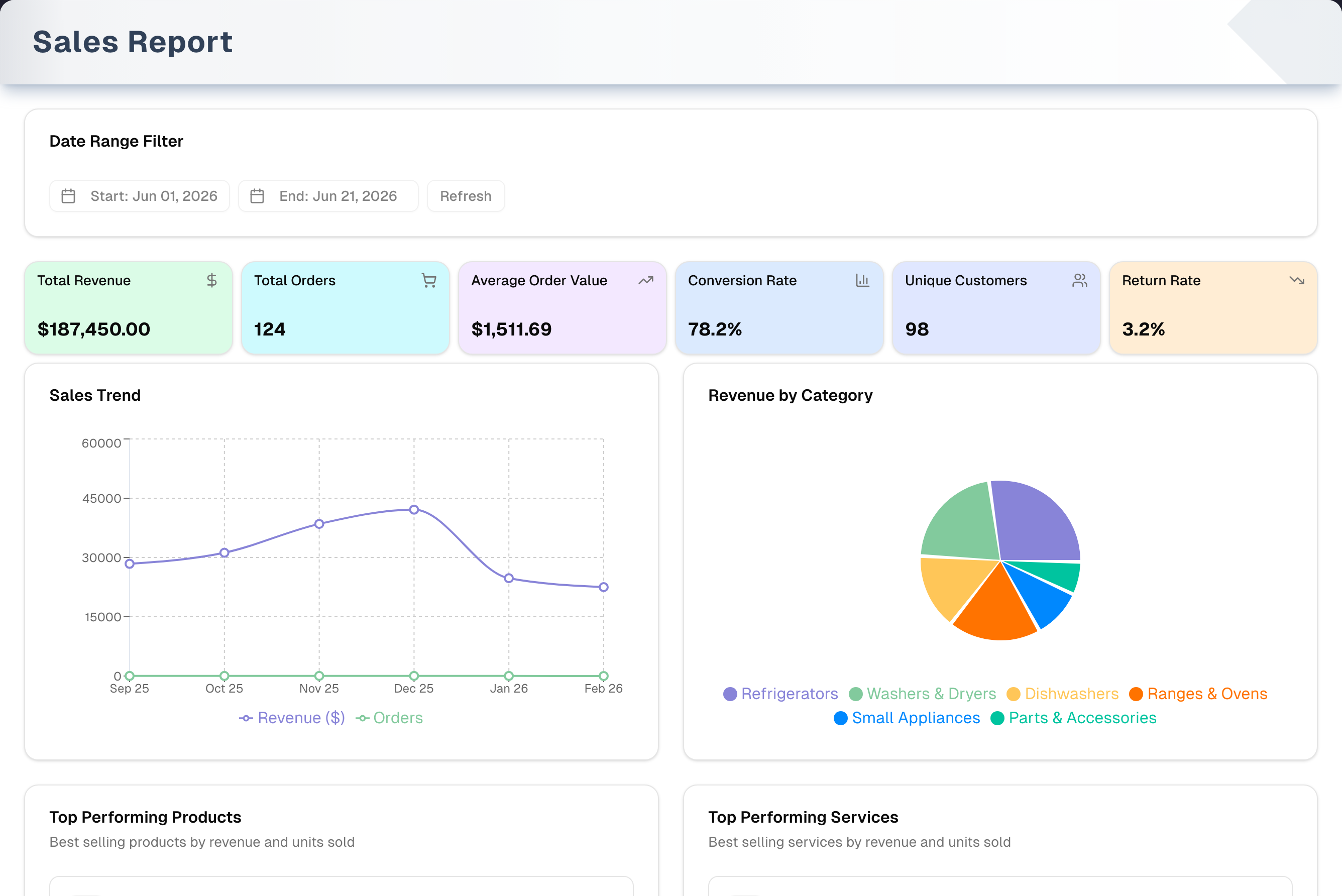
Overview
From top to bottom, the page shows:
- Date Range Filter: Start and End dates. The report opens on the 1st of the current month through today.
- Six KPI cards (below).
- Walk-ins in this range: the visitors your team logged on Walk-ins for the same days, with a Lost sales report link.
- Sales Trend: revenue received and the number of sales, one point per month inside the range.
- Sales by category: a pie of your top 6 product categories, by the value of the counted sales (those Completed, Delivered or Shipped), less what came back.
- Top products sold and Top services sold: the top 5 of each by the value of the counted sales, with units sold, both less what came back.
| Card | What it counts |
|---|---|
| Total Revenue | The money received on sales in the range, less the money handed back, sales tax included. Under the figure the card says what came in, what was refunded and the sales tax inside it, and on a second line the sales tax on the sales made in the range |
| Total Orders | The number of completed, delivered and shipped sales made in the range, not every order you created |
| Average sale | What those sales came to, less anything returned on them, ÷ how many there are, tax included. It is an order figure, not revenue |
| Conversion Rate | Those sales ÷ the chances to sell in the range: sales and quotes dated in it, leaving out drafts, cancelled orders and quotes that became a sale (that sale is already counted). Returns, scrap and purchase orders are not chances to sell, so they don't count |
| Unique Customers | Different customers on those sales. Sales with no customer aren't counted |
| Return Rate | Returns made in the range ÷ the counted sales. A return counts once per sale, by the day it came back: the sales something was returned on, plus any older stand-alone return orders (those Completed, Delivered or Shipped). It counts orders, not dollars |
Revenue is counted on the day the money moved: each payment on the day it was received, each refund on the day it was handed back. A $500 deposit taken in October on an order delivered in November is October's revenue. The count of sales, the average sale and what sold are counted on the day each order became a sale: the day a quote was accepted, and for any other sale the day it was entered. A return comes off what sold on the sale's own date, even when it is made later; its refund comes off Total Revenue on the day the money went back. Total Revenue keeps its sales tax in, and says how much — Profit & Loss reports the same money without the tax. The category pie and the top lists are the value of the counted sales made in the range, before tax, so they don't add up to Total Revenue either, and they say so under their titles.
Sales tax shows two ways. The tax inside Total Revenue is the tax on the money received. The second line, Sales tax on sales made in the range, is the tax on the sales made in those days, which is the figure to use if you file sales tax on sales made rather than on money collected.
Your store switched to counting revenue this way on one day. Sales booked before then stay where they were booked, on the day each became a sale, less what came back; payments that finish off those older sales afterwards are not counted again. When a range starts before that day, the page says so in one line above the cards.
The report has no export, print, location filter or salesperson filter. It's on every plan.
Step by step: analyze sales
- Open Reports → Sales Report in the sidebar. You can also click the Revenue (30d) or Avg sale card on the Dashboard.
- Click Start and pick a day, then click End and pick a day. The report reloads as soon as you pick each date. Refresh reloads the same range again.
- Read the KPI cards for revenue received, sales count, average sale, conversion and return rate.
- To see a trend, pick a range that covers several months. The default range (this month so far) gives the Sales Trend chart a single point.
- Scan Top products sold and Top services sold for your best sellers. To see who came in and left without buying, click Lost sales report on the walk-ins strip.
Key features
| Feature | What it does |
|---|---|
| KPI cards | Total Revenue, Total Orders, Average sale, Conversion Rate, Unique Customers, Return Rate |
| Walk-ins in this range | Visitors logged on Walk-ins for the same days, and the share who bought. Links to the Lost Sales Report for those days |
| Sales trend | Revenue received and number of sales per month, for the months inside the range |
| Sales by category | The value of the counted sales for your top 6 product categories, before tax, less what came back. Services, custom lines and products without a category show as "Uncategorized" |
| Top products sold | Top 5 catalog products by the value sold, with units sold, both net of returns |
| Top services sold | Top 5 services by the value sold, with units sold, both net of returns |
| Date range filter | Scopes the whole report. Picking a date reloads it |
| Demo | Opens the report with sample data and a guided tour |
Tabs, views & filters
The report is a single page with no tabs.
| Control | Options |
|---|---|
| Start / End | Any day, past or future. Defaults to the 1st of the current month through today. If you pick a Start after the End, End moves to that same day (and the other way round). Days run from midnight to midnight in your store's time zone, so everyone sees the same figures for the same dates. With no time zone set in Settings, your computer's is used |
| Refresh | Reloads all data for the range. You don't need it after picking a date |
Tips & best practices
- Compare ranges of the same length, such as this month against last month, to judge momentum.
- Treat Conversion Rate as a rough signal. It counts the sales and quotes in the range, so a month of quotes that haven't closed yet shows a lower rate. Recording purchase orders doesn't change it.
- For the share of walk-in visitors who bought, read the walk-ins strip or the Lost Sales Report. That's a different number from Conversion Rate.
- Use the top products and services to guide stock and promotions.
Troubleshooting
| Issue | Fix |
|---|---|
| Total Revenue is $0 but sales were completed | Nothing was paid on them in the range. Revenue is the money received: a completed sale nobody has paid brings in nothing until the payment is recorded |
| Total Revenue shows money but the other cards are $0 and the charts say "No … data available" | Money came in (deposits, balances paid on older sales) but no sale was completed, delivered or shipped in the range. Widen the range to see the sales |
| A sale is missing from Total Orders or the lists | Those count a sale on the day it became a sale — the day a quote was accepted, else the day it was entered — and only once it is Completed, Delivered or Shipped. A converted quote shows on the Orders list under the day the quote was written, but here under the day it was accepted. Days follow your store's time zone, so a late-evening sale stays on the store's day for everyone reading the report |
| A payment is missing from Total Revenue | Revenue is counted on the day the payment was recorded as received. A payment left Pending counts only once it is marked Completed, and then on that day |
| Total Revenue doesn't match Profit & Loss | This report includes sales tax; the line under the card says how much. Profit & Loss reports the same money net of tax, and adds income that is not from a sale, such as bank-line Other Income |
| The tax inside Total Revenue differs from "Sales tax on sales made in the range" | The first is the tax on the money received in the range, the second the tax on the sales made in it. A deposit taken this month on a sale made next month moves them apart |
| Sales Trend shows a single dot | The chart shows one point per month. Pick a range that spans several months |
| Conversion Rate looks low | It divides your counted sales by the sales and quotes in the range. Open quotes that haven't closed yet lower it |
| A product is missing from Top products sold | Only lines linked to a catalog product count, and only the top 5 show. Custom lines typed on an order aren't counted |
| Services show as "Uncategorized" in the pie | Categories come from products. Services and custom lines have no product category |
| "This report could not be loaded" | Click Try Again. The date filter stays on screen, so you can also narrow the range and read a smaller period. If it keeps happening, send support the exact text under the heading |
| "403 - Forbidden" | The owner has hidden Sales Report from your menu. Ask them to show it again (see Team) |
| The Dashboard's Revenue (30d) doesn't match | The Dashboard covers the last 30 days; the report opens on the current month. Set the same days and the two read the same money received |
| A line above the cards says revenue was counted differently before a date | Your range starts before your store switched to counting revenue as the money received. Sales booked before that day stay where they were booked; the months since read the money received |
What's next
- Create more sales: Sales → New
- See the visitors who left without buying: Reports → Lost Sales Report
- Check profitability: Reports → Profit & Loss
- Reward top customers: Growth → Loyalty Program
Detailed reference
Every button, icon, field and message on this page, for when you need the exact detail. Each panel starts closed — open the one you need.
Page header and toolbar
| Control | Where | What it does | Notes |
|---|---|---|---|
| Sales Report (bar-chart icon) | Sidebar, Reports group | Opens the report | Hover text: "View detailed sales reports and analytics." In stores with more than one active person, the owner can hide it per team member |
| Reports group header | Sidebar | Expands or collapses the Reports group | Hover text: "View and analyze various reports." |
| Question-mark icon (tooltip Open Guide & Tips, green) | Sidebar, right end of the Reports header row | Opens the Reports Guide & Tips page | The guide appears as this icon, not as a list item. See the Sub-page panel below |
| Revenue (30d) card | Dashboard | Opens this report | The card covers the last 30 days. The report opens on the current month, so the numbers differ until you set the same days |
| Avg sale card | Dashboard | Opens this report | The average counted sale over the Dashboard's 30 days, the same figure this report's Average sale gives for the same days |
| Page title Sales Report, subtitle "Money received on sales in the range, less refunds, sales tax included." | Header, left | Static text | Shown while loading and on the error screen too |
| Amber line "Before …, a sale's revenue was counted on the day it became a sale, less what came back, and these months are now read from the books. From … it is the money received." | Above the KPI cards | Shown only when the range starts before your store switched to counting revenue as the money received | The date is your store's switch day. Sales booked before it stay on the day each became a sale |
| Demo (Play icon, amber) | Header, right | Opens the report with sample data and a guided tour | Always shown, also while loading and on the error screen. Everyone. See the Demo mode panel below |
The header has no export, print, location or salesperson controls. Every figure covers the whole store, all locations combined.
Section: Date Range Filter
Card title Date Range Filter. The whole section is hidden while the report loads and on the error screen.
| Control | Where | What it does | Notes |
|---|---|---|---|
| Start: … (calendar icon), for example "Start: Sep 01, 2026" | 1st button | Opens the Start calendar | Default: the 1st of the store's current month, from the start of that day in your store's time zone. The date on the button is the store's date too, and so is the day ringed in the calendar and the month it opens on — they agree wherever you are reading from |
| End: … (calendar icon), for example "End: Sep 18, 2026" | 2nd button | Opens the End calendar | Default: the store's today — the date it is where the shop is, not where you are — to the end of that day in your store's time zone. Reading the report from another time zone near midnight does not add or drop a day, in the figures or in the calendar |
| Refresh | 3rd button | Reloads every section for the current range. The page shows "Loading sales data..." meanwhile | Optional: picking a date already reloads the report. It's never greyed out and shows no confirmation |
Section: KPI cards
Total Revenue is read from your books: the money received on sales between Start and End, less the money handed back, each on the day it moved. Every other card counts a sale when it is a sales order with status Completed, Delivered or Shipped that became a sale between Start and End (a converted quote on the day it was accepted, any other sale on the day it was entered). Draft, Saved, Pending, Processing, Cancelled, Refunded and quote statuses don't count as sales. A sale with part of it returned still counts, for what the customer kept: its value and units are net of returns, on the sale's own date. One whose every line came back turns Refunded and leaves the count. The cards are display only and don't open anything.
| Control | Where | What it does | Notes |
|---|---|---|---|
| Total Revenue (dollar-sign icon, green card) | Card 1 | The money received on sales in the range less the money handed back, in dollars and cents, tax included | Every kind of tender counts when it is recorded as received: cash, card, check, store credit, a loyalty credit, gift card, trade-in and the rest. A refund comes off on the day it is handed back. Money paid above an order's total counts too, until it is refunded. Under the figure, in small grey text: "$4,200.00 received − $310.00 refunded · includes $300.00 sales tax". When the range holds sales booked before your store's switch, the line goes on: "· $1,070.00 sales booked before Oct 2, 2026 − $107.00 returned". A second line: "Sales tax on sales made in the range: $280.00", the tax on the counted sales made in those days, for a store that files sales tax on sales made. Every figure shows as $0.00 when there is nothing to report. Profit & Loss reports the same money net of tax |
| Total Orders (cart icon, cyan card) | Card 2 | Number of counted sales | Under the figure: "Counted sales: Completed, Delivered or Shipped" — the one name the page gives the sales its order figures count. Not every order entered in the range |
| Average sale (trending-up icon, purple card) | Card 3 | What the counted sales came to, less anything returned on them (tax included), ÷ how many there are | Under the figure: "Counted sales’ totals ÷ their count, tax included". Hover text: "The average total of a counted sale; not revenue". $0.00 when there are no counted sales |
| Conversion Rate (bar-chart icon, blue card) | Card 4 | Counted sales ÷ the sales and quotes in the range × 100, with one decimal, for example "62.5%". Under the figure, in small grey text: "Counted sales ÷ sales and quotes in the range (drafts and cancelled excluded)" | Drafts, cancelled orders and quotes that became a sale are left out of the base; returns, scrap orders and purchase orders from Procurement were never chances to sell, so they are too. Both sides go by the same date — a sale by the day it became one, a quote by the day it was written — so a quote accepted in a later month can't push a month above 100%. 0.0% when there was nothing in the range. It isn't the walk-in conversion shown under the cards |
| Unique Customers (people icon, indigo card) | Card 5 | Number of different customers on the counted sales | Sales with no customer attached aren't counted |
| Return Rate (trending-down icon, orange card) | Card 6 | Returns made in the range ÷ the counted sales × 100, one decimal. A return is recorded on the sale it comes back on, so the count is the sales whose latest return falls in the range (by the day it came back, as the orders list's Return tab dates them), plus older stand-alone return orders created in the range that are Completed, Delivered or Shipped. Under the figure, in small grey text: "Counted returns ÷ counted sales" | Counts orders, not dollars: a sale with two returns in the range counts once. Draft, pending and cancelled stand-alone returns are left out. What was handed back in money is in the "refunded" figure under Total Revenue. 0.0% when no sale was counted. Can go above 100% when things bought earlier come back in a quiet range. There is no warning colour or threshold |
Section: Walk-ins in this range
A one-line strip between the KPI cards and the charts. It reads the same numbers as the Lost Sales Report and the Dashboard for the same days. It reloads whenever you change a date.
| Control | Where | What it does | Notes |
|---|---|---|---|
| Door icon | Left | Decoration | — |
| Grey placeholder bar | Middle | Shown while the walk-in numbers load | — |
| "Walk-ins in this range: … visitors · …% conversion (estimated from what your team logged)" | Middle | Every visit logged on Walk-ins for the days you picked (walk-in, phone and online), all locations. Conversion = visits marked Sold ÷ all visits, as a whole percent | "visitor" when there is exactly one. Not the same number as the Conversion Rate card |
| "Walk-ins in this range: none logged. Log visitors on Walk-ins — nothing to install." | Middle | Shown when no visits were logged for those days | "Walk-ins" in this text isn't a link. Use Sales → Walk-ins in the sidebar |
| "Walk-in numbers could not be loaded." | Middle | Shown when the walk-in numbers fail to load | The rest of the report still works |
| Hover text "Walk-in days … – … (store time)", for example "Walk-in days Sep 1 – Sep 18 (store time)" | Anywhere on the strip | Shows which days are counted | Only after the numbers have loaded. Walk-in days use the calendar days you picked, in your business time zone |
| Lost sales report (arrow icon) | Right | Opens the Lost Sales Report on the same days | Before the numbers load, or after they fail, it opens the Lost Sales Report on its default range |
Section: Sales Trend
| Control | Where | What it does | Notes |
|---|---|---|---|
| Sales Trend chart | Charts row, left | One point per month inside the range that had money received or a counted sale. The labels read like "Sep 26". Caption under the title: "Revenue received each month, and the counted sales made in it" | The default range gives one point. Months follow your store's time zone |
| Revenue received ($) line (purple) | Chart | The money received on sales that month, less refunds, rounded to whole dollars — each payment in the month it came in | Shares one scale with Orders, so the Orders line looks flat next to revenue. The scale on the left reads in dollars, for example "$30K" |
| Orders line (green) | Chart | Number of counted sales per month, by the day each became a sale | — |
| Hover over the chart | Chart | Shows the nearest month plus "Revenue received ($) : $28,400.00" and "Orders : 18" | Revenue with its dollar sign, orders as a plain count. Clicking does nothing |
| Legend | Under the chart | Colour key for the two lines | Display only |
| "No trend data available" | In place of the chart | No money received and no counted sales in the range | — |
Section: Sales by category
| Control | Where | What it does | Notes |
|---|---|---|---|
| Sales by category pie | Charts row, right | The value of the counted sales per product category for your top 6 categories, less what came back, rounded to whole dollars | Caption under the title: "Value of counted sales, before tax; not revenue. Line amounts before tax, so the slices don't add up to Total Revenue". Categories past the top 6 are left out, not grouped |
| "Uncategorized" slice | Pie | Collects services, custom lines and products that have no category | Services always land here, because categories come from products |
| Hover a slice | Pie | Shows the category name and value in dollars, for example "Refrigerators : $5,200.00" | Clicking does nothing |
| Legend | Under the pie | Category names with their colours | Display only |
| "No category data available" | In place of the pie | No counted sales in the range | — |
Section: Top products sold and Top services sold
Both lists come from the counted sales in the range. Rows are ranked by the value sold (line amounts before tax, less what came back) and aren't clickable. They say what sold, not what came in: revenue is the money received, on the Total Revenue card.
| Control | Where | What it does | Notes |
|---|---|---|---|
| Top products sold, "Value of counted sales, before tax; not revenue. Line amounts before tax" | Bottom row, left | Up to 5 products | Only lines linked to a catalog product count. Custom lines and services don't |
| Top services sold, "Value of counted sales, before tax; not revenue. Line amounts before tax" | Bottom row, right | Up to 5 services | Only service lines linked to a service in your catalog count. The value is the price charged on the order line |
| Rank badge #1 to #5 | Each row, left | Position by the value sold | — |
| Name | Each row | Product or service name | — |
| "… units sold" | Under the name | Total quantity across the counted sales, less the units brought back | Units brought back come off on the sale's own date, as in Quick Facts' and Weekly Reports' Items sold |
| Dollar amount | Each row, right | The value sold, in dollars and cents | No growth percentage is shown |
| "No product data available" / "No service data available" | In place of the list | No counted sale in the range has a matching line | — |
Dialog: Start and End calendars
Small month calendars that open under the Start and End buttons.
| Control | Where | What it does | Notes |
|---|---|---|---|
| A day (Start calendar) | Start calendar | Sets Start to the beginning of that day and reloads the report straight away. The calendar closes as the page reloads | If the new Start is after End, End moves to the end of the same day |
| A day (End calendar) | End calendar | Sets End to the end of that day and reloads the report | If the new End is before Start, Start moves to the beginning of the same day |
| The day that is already picked | Either calendar | Nothing happens | — |
| Left and right arrows | Top of the calendar | Show the previous or next month | — |
| Days from the next or previous month (greyed) | Edges of the grid | Can be picked like any other day | Future dates can be picked too |
| Click outside, or press Esc | — | Closes the calendar without a change | — |
Sub-page: Reports Guide & Tips
Opened from the question-mark icon on the Reports header in the sidebar. The page only explains the reports; nothing on it changes data.
| Control | Where | What it does | Notes |
|---|---|---|---|
| Sidebar toggle (panel icon) | Top bar, left | Collapses or expands the sidebar | — |
| Breadcrumb Reports › Guide & Tips | Top bar | Shows where you are | Reports is plain text, not a link. It's hidden on narrow screens |
| Title Reports Guide & Tips, subtitle "Read the numbers across the business — journal, inventory, services, expenses, P&L, balance sheet, and sales. Expand any report for its workflow, key features, and tips." | Page top | Static text | Badges Updated and Reports below it |
| Report cards | Page body | Click a card to open or close it and see its workflow, key features and tips | Eight cards, all closed at first: Daily Journal, Inventory Report, Services Report, Expenses Report, Profit & Loss, Assets & Liabilities, Sales Report and Lost sales |
The Sales Report card:
| Part | Text |
|---|---|
| Summary line | "Revenue received, conversion, what sold, and returns." Chips: KPIs, Charts |
| Workflow | Set date range (start • end) → Refresh (reload metrics) → Read KPIs (revenue • avg sale • returns) → Analyze (trend • category • top sellers) |
| Key features | "6 KPIs incl. conversion & return rate", "Revenue received by month", "Sales by category", "Top products sold", "Top services sold" |
| Tips | Revenue is the money received, tax included: "Total Revenue is the money received on sales in the range, less refunds, sales tax included. The card says what came in, what went back and the tax inside it, and the tax on the sales made beside it. Profit & Loss reports the same money net of tax." Compare periods: "Adjust the range to validate lifts against prior months." Cross-check returns: "Watch return-rate trends alongside top products to catch quality issues." |
The Refresh step is optional on the real page, because picking a date already reloads the report.
Messages you may see
| Message | When it appears | What to do |
|---|---|---|
| "Loading sales data..." | Each time the report loads: on opening, after picking a date and after Refresh. Everything below the header is hidden meanwhile | Wait |
| "Loading..." | While the app checks your menu access, before the page shows | Wait |
| "This report could not be loaded", in red, with the reason under it and a Try Again button | A data request failed | Click Try Again. The date filter and Refresh stay where they are, so you can change the range and try a smaller one. If it repeats, send support the reason it printed. Demo still works |
| "Failed to load sales data", as the reason under that heading | An unknown error while loading | Click Try Again. If it repeats, contact support |
| "403 - Forbidden" / "You do not have permission to view this page. Contact your organization owner." | The owner has hidden Sales Report from your menu and you opened it another way, for example from a Dashboard card or a saved link | Ask the owner to show it again (see Team) |
| "No trend data available" | No money received and no counted sales in the range | Widen the range |
| "No category data available" | No counted sales in the range | Widen the range |
| "No product data available" | No counted sale in the range has a catalog product line | Widen the range |
| "No service data available" | No counted sale in the range has a service line | Widen the range, or add services on your sales |
| "Walk-ins in this range: … visitors · …% conversion (estimated from what your team logged)" | Visits were logged on Walk-ins for those days | Information only |
| "Walk-ins in this range: none logged. Log visitors on Walk-ins — nothing to install." | No visits were logged for those days | Log visits on Walk-ins if you want walk-in numbers |
| "Walk-in numbers could not be loaded." | The walk-in numbers failed to load | Reload the page. The rest of the report still works |
| "Walk-in days … – … (store time)" | Hovering the walk-ins strip | Information only |
| "Before …, a sale's revenue was counted on the day it became a sale, less what came back, and these months are now read from the books. From … it is the money received." | The range starts before your store switched to counting revenue as the money received | Information only. Pick a range that starts on or after the date to read only the money received |
| "Uncategorized" | Pie slice for lines with no product category | Give your products a category in the catalog |
| "View detailed sales reports and analytics." / "View and analyze various reports." / "Open Guide & Tips" | Hovering the sidebar item, the Reports header or the guide icon | Information only |
The report shows no pop-up notifications and never changes any data.
Who can use what
- Plans: every plan, including the free trial. No add-on, feature switch or plan badge.
- Roles: owners, managers and staff see the same report with the same numbers for the whole store. There is no location filter. Nothing on the page changes data.
- Menu visibility: in stores with more than one active person, the owner can hide Sales Report for a team member in Settings → Team. That person gets "403 - Forbidden" if they open the page directly. Nothing is blocked while the store has only one active person: people switched off or removed in Team don't count.
- Demo: everyone who can open the report can open the demo from the Demo button.
- Data limits: every counted sale in the date range is included, however many there are. A long range on a busy store loads in batches, so it can take a few seconds longer.
Demo mode (/reports/sales/demo)
- Open it: click Demo (Play icon, amber) in the page header, right.
- Header: "Sales Report — Demo", subtitle "Sample sales data populated with demo data. All actions are disabled."
- Banner: "Demo mode — sales report is populated with sample data. All actions are disabled." (eye icon), with Take a Tour (question-mark icon) at its right end.
- Disabled: Start, End and Refresh are greyed out, and the calendars don't open. The date buttons show the current month so far.
- Still works: hovering the charts, Take a Tour and Exit Demo Mode.
- Tour: starts automatically the first time the demo opens. Take a Tour restarts it from step 1. Each step shows progress dots and an "N of 6" counter, Back (from step 2 on), Skip (closes), Next, and Got it! on the last step (closes). Keyboard: Esc closes, Right arrow or Enter goes to the next step (closes on the last), Left arrow goes back. Clicking the dark background closes the tour. Steps 1–4 place the card below the highlighted area and steps 5–6 above it, moving it to the other side when it doesn't fit; the card always stays inside the window and narrows to fit a phone. If a step's area doesn't appear within about 3 seconds, the tour moves on to the next step.
- Leave: Exit Demo Mode (left-arrow icon, header right) returns to the live report.
The page has no tabs, so every step is on the same view.
| # | Section | Tour step | What it points at |
|---|---|---|---|
| 1 | Date Range Filter | Date Range Filter | The date filter card. "On the live report, pick a start and an end date and the figures reload on their own — Refresh is there for reading the same range again after somebody else has rung a sale up. Here in the demo the pickers and Refresh are switched off." |
| 2 | KPI cards | Key Performance Metrics | The six KPI cards. "Six at-a-glance KPIs. Total Revenue is the money received on sales in the range, less refunds, with the sales tax inside it and the tax on the sales made beside it. Total Orders, Average sale, Conversion Rate, Unique Customers and Return Rate are worked out from the counted sales made in the range: those Completed, Delivered or Shipped." |
| 3 | Sales Trend | Sales Trend Chart | The trend chart. "Track the revenue received each month beside the counted sales made in it. Hover over data points to see exact figures for each month." |
| 4 | Sales by category | Sales by category | The pie chart. "See how the value of your counted sales is spread across your product categories, before tax. It is what sold, not revenue. Categories come from the products themselves, so a service line or a line typed straight onto an order has none and lands under 'Uncategorized'." |
| 5 | Top products sold | Top products sold | The products list. "Your best-selling products ranked by the value of counted sales for the selected period, before tax, with the units that went with it. No growth figure: the report does not compare one period with another, so there is none to show." |
| 6 | Top services sold | Top services sold | The services list. "Your best-selling services by the value of counted sales, before tax. Great for identifying which services are driving the most value for your business." |
Differences from the live page:
- The sample figures, categories, products and services match your store's industry: appliance, furniture, electronics, liquidation and apparel retail, and HVAC, plumbing and appliance services. Other stores see the electronics samples. None of your real sales are shown.
- Sales Trend shows six sample months: the current month and the five before it, whatever dates the filter shows. The figures are the same sample every month; only the month names move on.
- The sample top lists are ranked by value sold, highest first, as on the live page.
- There is no walk-ins strip, and no loading or error screens.
- The date pickers and Refresh are switched off here, which step 1 says.
- The sample money received, refunds and sales tax under Total Revenue are part of the industry sample, like every other figure here, and there is no before-the-switch line.
See Demo mode for how demos work across the app.
Common questions
What counts as revenue on this report? The money received on sales, whatever the order's status: a deposit on a pending or special order, the balance paid on delivery, money kept on a cancelled order, a payment on a quote. Each payment counts on the day it was received and each refund comes off on the day it was handed back. A completed sale nobody has paid yet counts for nothing until they pay. Purchase orders are not sales, so money on them never counts.
Which orders count as sales on this report? For Total Orders, Average sale, the rates and the lists: sales orders with status Completed, Delivered or Shipped that became a sale between Start and End. Drafts, saved and pending orders, processing, cancelled and refunded orders, quotes, returns, scrap orders and purchase orders don't count as sales. A sale is counted on the day it became a sale — the day a quote was accepted, and for any other sale the day it was entered.
How does a return change this report? Two ways, on two dates. The average sale, the category pie, the top lists and units sold take what came back off the sale, on the sale's own date. Total Revenue takes the refund off on the day the money went back. So a return made this month on last month's sale changes last month's figures for what sold, and lowers this month's Total Revenue. A sale whose every line came back turns Refunded and drops out of the counted sales.
Why doesn't Total Revenue match Profit & Loss? Total Revenue keeps the sales tax in; the line under the card says how much. Profit & Loss reports the same money net of tax, and adds income that is not from a sale, such as bank-line Other Income. The category pie and the top lists here are the value of the completed sales, before tax and less what came back, so they don't add up to Total Revenue either.
What happened to sales made before my store switched? They stay where they were booked, on the day each became a sale, less what came back. The report reads those months from your books: what came back is taken off each month's total, and a completed sale your books hold no entry for is counted on the switch day. A payment that finishes off one of those sales after the switch is not counted again. When your range starts before the switch, a line above the cards says so.
How is Conversion Rate worked out? It's the number of counted sales ÷ the chances to sell in the range × 100. A chance to sell is a sale or a quote in the range — a sale by the day it became one, a quote by the day it was written; drafts, cancelled orders and quotes that became a sale are left out, and so are returns, scrap orders and purchase orders. Each card says this under its own figure. Return Rate is measured against what you sold instead: counted returns ÷ counted sales.
Why is the walk-in conversion different from the Conversion Rate card? They measure different things. The walk-ins strip divides visits marked Sold by all visits your team logged on Walk-ins (walk-in, phone and online). Conversion Rate divides counted sales by the sales and quotes in the range. See the Lost Sales Report for walk-in detail.
Why does Sales Trend show only one point? The chart shows one point per month, and the report opens on the current month. Pick a Start date a few months back to see a trend. Months with no money received and no counted sales are skipped.
Why don't the Dashboard's Revenue (30d) and Avg sale match this report? The Dashboard cards cover the last 30 days, while this report opens on the current month. Set the same days and the two read the same money received and the same average sale.
Do I have to click Refresh after changing the dates? No. Picking a Start or End date reloads the report by itself. Refresh just reloads the same range, for example to pick up a sale completed a moment ago.
Can I export the report, or filter by location or salesperson? No. The report has no export, print, location filter or salesperson filter. It always covers the whole store.