Profit & Loss
The Profit & Loss statement (Reports → Profit & Loss) shows whether you made money in a calendar month: revenue, cost of goods sold (COGS), operating expenses and net income before tax. Each figure sits next to the previous month, the year to date and the same month last year. The page is read-only, so nothing you do on it changes your data.
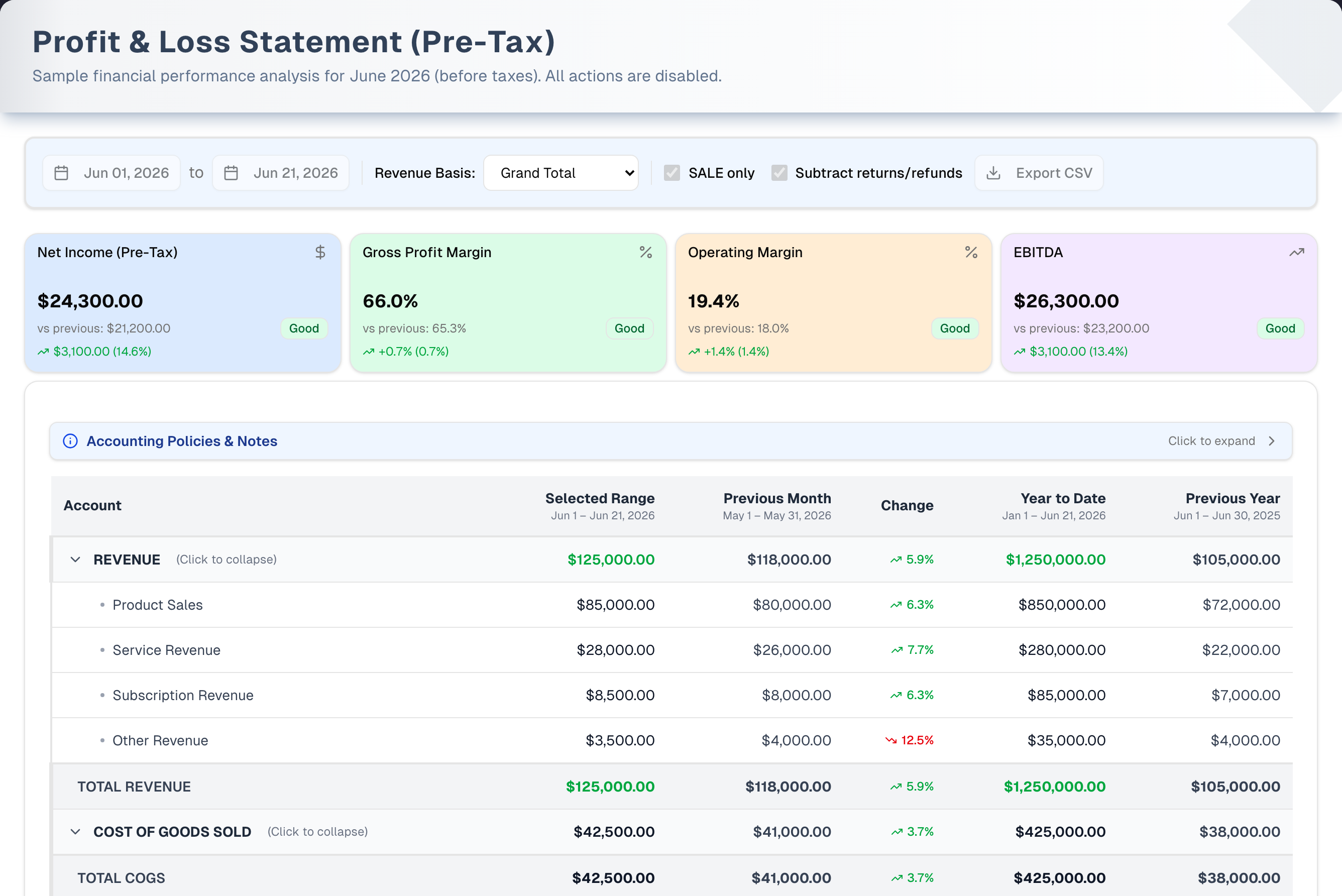
The screenshot shows sample data. Its figures and some of its controls differ from the demo you open with Demo.
Overview
- Plan: the page needs Pro or a free trial. On Basic it shows sample figures behind an Unlock Pro & Premium Features card, and only the Demo button still works. The page waits until your plan has been checked before reading anything, so a Basic store never sees its own figures here, even for a moment; if the check cannot be completed the page carries on after a few seconds rather than leaving you on the spinner. Export CSV and Download PDF need Premium or a trial. On Pro they open an Unlock Premium Features pop-up.
- KPI cards: Net Income (Pre-Tax), Gross Profit Margin, Operating Margin and EBITDA. Each card compares with the previous month and shows a Good or Warning badge. EBITDA is operating income plus depreciation; when your books hold no depreciation the card says so, and the figure equals Net Income.
- Statement: Revenue → Total Revenue → COGS → Gross Profit → Operating Expenses → Operating Income → Net Income. Net Income is Operating Income: the page applies no income tax or interest. Every line is read from your books.
- Columns: Selected Range (the month you picked; while that month is still running it is labelled "month to date" and ends on today's date), Previous Month, Change (against the previous month), Year to Date (January 1 to the same cutoff as Selected Range) and Previous Year. Previous Year is the same month one year earlier, not the whole year. While the month is still running, Compare like-for-like cuts Previous Month and Previous Year to the same days.
- What counts:
- Revenue is the money received on sales, less sales tax, in the month each payment came in — whatever the order's status. A deposit on an order not yet delivered counts in the month it was paid; a completed sale nobody has paid yet counts for nothing until they pay. A refund comes off in the month it is handed back.
- Cost of goods is booked when the goods leave: when the order is completed, delivered or shipped, or when a line is delivered while the order is still open. Goods that come back are taken off in the month they come back. So revenue and cost of goods can land in different months: a deposit taken in October on goods delivered in November is October's revenue and November's cost. Over any stretch longer than your delivery lead time the two add up, and a counter sale paid and taken the same day lands both in one month.
- Your store switched to this way of counting on one day. Sales booked before then stay where they were booked, in the month each became a sale; payments that finish off those older sales afterwards are not counted again. Those months are read from your books as well. When a column reaches back before the switch, a line above the table says so.
- An expense lands in the month of its transaction date — the date typed on the expense, whatever the clock. Rejected expenses don't count.
- Month edges follow your store's time zone, so everyone sees the same month whatever clock they are on. If no time zone is set in Settings, your computer's is used.
- Where the expense lines come from: eight of the ten expense categories feed the first five lines and Payroll & Wages — Meals → Sales & Marketing; Fuel, Travel and Vehicle Maintenance → Travel/Vehicle; Office Supplies → Office Supplies; Tools → Tools & Equipment; Training & Education → Training & Education; Payroll & Wages → Payroll & Wages. The other two, Parts and Other, go to Other Operating Expenses. A delivered purchase order's Other Expenses & Fees, Shipping and Tax, less its Discount, land on Freight & Fees on Purchases: your stock is valued at what the goods cost, so the rest of what you owe the vendor is an expense, not stock. Everything else your books record as an expense — stock written off (scrapped, or found missing by a count), merchant processing fees, reconciliation differences — lands in Other Operating Expenses, so it is inside the total rather than left out. Professional Services, Rent & Utilities, Insurance, Research & Development and Depreciation have no source in UpChannels today: there is no screen that opens an account of one of those kinds, so in practice all five read Not tracked. Subscription Revenue is Not tracked for the same reason: nothing here records a recurring charge to a customer. Not tracked is not a "-" — a dash means a real $0, so neither can be read as the other.
Payroll & Wages sits in Operating Expenses and adds up two things: what your finalized pay runs posted to the books, and any expense you recorded in the Payroll & Wages category. A pay run only posts when the owner has switched Post finalized pay runs to Finance (Payroll & Wages) on in Settings → Workforce (see Workforce). With it off, pay runs add nothing here and the line shows your Payroll & Wages expenses alone. A run posts gross pay less deductions, before any advance repayment comes back. Marking the run paid moves the cash without touching this line again. The figure is wages only: UpChannels does not file payroll taxes, so no tax is added to it.
Step by step: run a P&L
- Open Reports → Profit & Loss in the sidebar.
- Pick the month in Month:. It lists the last 24 months, newest first. The report always covers the whole calendar month; there are no custom start and end dates.
- Click the REVENUE or OPERATING EXPENSES row to hide or show its detail lines. COST OF GOODS SOLD has no detail lines.
- Read the KPI cards and the Change column against the previous month.
- To keep a copy, click Export CSV or Download PDF (Premium or a trial). Both hold the whole statement, whatever you have collapsed on screen.
Key features
| Feature | What it does |
|---|---|
| KPI cards | Net Income (Pre-Tax), Gross Profit Margin, Operating Margin and EBITDA, each against the previous month with a Good or Warning badge |
| Statement | Revenue, COGS, operating expenses and the calculated totals, with colour-coded left borders. Click REVENUE or OPERATING EXPENSES to collapse it |
| Period columns | Selected Range (the month you picked, labelled "month to date" while it is still running), Previous Month, Change, Year to Date (labelled "to date" alongside it), Previous Year (the same month a year earlier) |
| Accounting Policies & Notes | A panel above the table, closed by default. Click it to read how revenue, COGS and expenses are counted, and the sales tax on the sales made in the month |
| Export CSV | Downloads the whole statement as raw numbers, collapsed sections included (Premium or a trial) |
| Download PDF | Opens a print-ready copy on your store's letterhead; choose Save as PDF in the print dialog (Premium or a trial) |
| Demo | Sample data and a 6-step guided tour, on any plan |
Tabs, views & filters
There are no tabs. The light-blue bar under the header holds all the choices.
| Control | Options |
|---|---|
| Month: | One calendar month from the last 24 (default: this month). No custom range and no quarter |
There are no revenue options: revenue is the money received on sales, read from your books.
Tips & best practices
- Compare Gross Profit Margin month over month to catch COGS creep.
- Expand Operating Expenses to find your largest cost relative to revenue.
- The current month only holds the days so far, while Previous Month is a full month, and the page says so: a line above the table reads "September is still running (day 21 of 30). The Change column and the KPI arrows compare a part month with a whole one. Turn on Compare like-for-like to compare the same days." Early in the month those arrows will usually point down. To ask "am I ahead of last month?", turn on Compare like-for-like beside Month:: Previous Month and Previous Year are then cut to the same days (September 1–21 against August 1–21 and September 1–21 last year), and the Change column and the KPI arrows follow. It is off each time you open the page.
- For planning, read the Year to Date column. The page has no quarterly or custom range, so for a quarter add up three months.
- Record expenses in the right category. Each category feeds one line (see How the numbers are calculated below), and Other and Parts land in Other Operating Expenses.
- Net income builds up as Retained Earnings on Reports → Assets & Liabilities, so the two statements tie out exactly. Refunds come off revenue on their own Returns & Allowances line, in the month the money went back — so a quiet month with refunds against earlier sales can show revenue below $0.
- A month with many deposits and few deliveries shows high revenue and low cost of goods, and the month the goods go out shows the reverse. Judge margins over several months, or over the Year to Date column.
- New to the P&L? Click the amber Demo button in the page header for a guided tour with sample data.
Troubleshooting
| Issue | Fix |
|---|---|
| Unlock Pro & Premium Features covers the page and the figures never change | The store is on Basic, so you are seeing sample figures. Click Check Details to upgrade in Settings → Billing, or use Demo |
| Revenue or Net Income is $0 | Revenue is the money received in the month. Check that the payments on your sales were recorded, and marked Completed: a Pending payment counts only once it is completed, in the month it is |
| COGS is $0 | COGS is the cost the books recorded when goods left stock: the average cost of the stock you received. It is $0 when stock was received at no cost or no goods left in the month — a month of deposits with the deliveries still to come |
| Revenue is high but COGS is low, or the other way round | Revenue follows the money and cost of goods follows the goods. Deposits taken this month on goods delivered next month put the revenue here and the cost there. Look at several months together |
| Unlock Premium Features pops up on export | Export CSV and Download PDF need Premium or a free trial. Pro sees this pop-up |
| The export is missing lines | It shouldn't be: Export CSV and Download PDF both hold the whole statement, whatever you have collapsed on screen. Check you are looking at the right month, then try the other one and compare |
| "Please allow pop-ups for this site to download the PDF report." | The window is opened by your click, so this happens only when pop-ups are blocked outright for the site. Allow them, then click Download PDF again |
| Payroll & Wages is $0 | The pay run isn't finalized, or Post finalized pay runs to Finance (Payroll & Wages) was off when it was finalized. Wages paid outside a pay run need an expense in the Payroll & Wages category |
| Margin looks wrong | Revenue and cost of goods can fall in different months (see above). Over a single month a margin can swing; over the Year to Date it evens out |
| A line above the table says revenue was counted differently before a date | One of the columns reaches back before your store switched to counting revenue as the money received. Sales booked before that day stay in the month each became a sale |
| Other Operating Expenses is more than your Other and Parts expenses, or negative | It also holds stock written off (scrapped, missing in a count, zeroed by Reset Inventory, or lowered by an Audit fix), merchant processing fees from bank reconciliation, and reconciliation over/short adjustments. A cash-over adjustment reduces it, and so does stock a count or an Audit fix finds |
| No KPI cards, and the table shows only its headings | That month has nothing to report: no money received, no goods out and no expenses in it. While figures are still loading you see "Loading Profit & Loss…" instead, and a load that fails says so |
| This statement could not be loaded | The figures couldn't be read. The reason from your store is on the card, and no figures are left on screen. Click Try Again. If it keeps happening, contact support |
What's next
- Drill into revenue: Reports → Sales Report
- Review spending: Reports → Expenses Report
- Check financial position: Reports → Assets & Liabilities
- Estimate business income for tax: Income Tax Prep
Detailed reference
Every button, icon, field and message on this page, for when you need the exact detail. Each panel starts closed. Open the one you need.
Page header and toolbar
Ways in
| Control | Where | What it does | Notes |
|---|---|---|---|
| Profit & Loss (trending-up icon) | Sidebar, Reports group, between Expenses Report and Assets & Liabilities | Opens this page | A small Pro tag shows beside it on Basic. No tag during a trial or while the plan is still loading. In a store with more than one active person, the owner can hide it for a member in Settings → Team |
| Net profit (MTD) card | Dashboard, Level 05 Sustainable | Opens this page | Shows this month's net income so far, from the same calculation. Shown in a warning tone when it is negative |
| Gross margin card | Dashboard, Level 05 Sustainable | Opens this page | Shown in a warning tone when the margin is below its benchmark target |
| Profit & Loss link | Dashboard, Sustainable level's link list | Opens this page | — |
| Open Profit & Loss | Income Tax Prep, Pre-tax income card | Opens this page | — |
Header
| Control | Where | What it does | Notes |
|---|---|---|---|
| Title Profit & Loss Statement (Pre-Tax) | Header, left | — | Static |
| Subtitle "Comprehensive financial performance analysis for … (before taxes)." | Under the title | Names the month you picked, for example "September 2026" | Changes with Month: |
| Demo (Play icon, amber) | Header, right | Opens the demo with sample data and a guided tour | Always shown, and still clickable under the Basic plan overlay. See the Demo mode panel below and Demo mode |
Filter and options bar (light-blue bar under the header)
| Control | Where | What it does | Notes |
|---|---|---|---|
| Month: dropdown | Bar, 1st | Picks the calendar month. The report covers the whole month, from its first instant to its last in your store's time zone, and all columns and KPI cards reload | Last 24 months, newest first, labelled like "September 2026". Default: the month it is now where your store is. No future months, no custom dates. Picking another month clears the figures and shows "Loading Profit & Loss…" until the new month's figures land, so a month's figures are never shown under another month's heading |
| Compare like-for-like (switch) | Bar, after Month: | Off: Previous Month and Previous Year are whole months. On: both are cut to the same days as the month so far — the 1st through today's date in your store — and reload, and so do the Change column and the KPI cards' "vs previous" and arrows. Selected Range and Year to Date don't change | Shown only while the selected month is still running; a closed month always compares whole months. Off by default and each time you open the page. A day the shorter month doesn't have (the 31st against September, the 29th against a February) takes that month whole. The column headers then add "(same days)", and both downloads say which comparison they carry |
| Export CSV (download icon) | Bar, right | Premium or a trial: downloads a CSV straight away, with no confirmation or message. Other plans: opens Unlock Premium Features | File name profit-loss-YYYY-MM-DD-to-YYYY-MM-DD.csv (first and last day of the month). Columns: Account, Current Month, Previous Month, Change %, Year to Date, Previous Year. Every line of the statement, collapsed sections included, so the file always adds up to its own totals. Raw numbers: no $ sign, no rounding, negatives with a minus sign. Change % has one decimal and is 0.0 when the previous month is 0. Above the header, the same notes the PDF carries: what revenue is, your store's switch day, that revenue and cost of goods are read from the books, the sales tax on the sales made in the month, and — while the selected month is still running — a line naming the day it has reached and what the Change column is comparing: a full month, or the same days of the previous month with Compare like-for-like on. Greyed out while the statement is loading and after a failed load, so you can't download an empty file |
| Download PDF (document icon) | Bar, right, after Export CSV | Premium or a trial: opens a print-ready copy in a new window and opens the browser's print dialog; choose Save as PDF. Other plans: opens Unlock Premium Features | Pop-ups must be allowed. Every line of the statement is included, collapsed sections too. Greyed out while the statement is loading and after a failed load. See Dialog: PDF print window |
| Your choices | — | — | The month, Compare like-for-like and collapsed sections are not saved. The page opens on this month, with whole-month comparisons, every time |
Section: KPI cards
Four cards under the filter bar. Each shows its label and an icon, a large value, "vs previous: …" (the previous calendar month's value), a Good or Warning badge, and a trend line "… (…%)" with a green up arrow or red down arrow. The cards are not clickable.
| Control | Where | What it does | Notes |
|---|---|---|---|
| Net Income (Pre-Tax) (dollar icon, blue card) | Card 1 | Net income for the month | Good at $0 or more, otherwise Warning. Trend: the dollar change from the previous month, and that change as a percent of the previous month (0 when the previous month is $0) |
| Gross Profit Margin (percent icon, green card) | Card 2 | Gross profit ÷ total revenue | Good at 30.0% or more, otherwise Warning. 0.0% when revenue is $0. Both trend numbers are the change in percentage points, for example "+0.7% (0.7%)" |
| Operating Margin (percent icon, orange card) | Card 3 | Operating income ÷ total revenue | Good at 10.0% or more, otherwise Warning. 0.0% when revenue is $0. Trend in percentage points, as above |
| EBITDA (trending-up icon, purple card) | Card 4 | Operating income plus depreciation | The caption under the figure says "Operating income + depreciation". With no depreciation booked it adds "No depreciation is booked, so this equals operating income", and the card then shows the same figure as Net Income (Pre-Tax). Good at $0 or more, otherwise Warning |
| Badge Good (green) / Warning (yellow) | Each card, right of "vs previous" | Quick health flag using the thresholds above | Warning means below the threshold, not an error |
| Trend arrow and colour | Each card, bottom | Green up arrow when this month is equal to or above the previous month; red down arrow when below | An unchanged value shows a green up arrow |
Section: Accounting Policies & Notes
| Control | Where | What it does | Notes |
|---|---|---|---|
| Accounting Policies & Notes bar (info icon), "Click to expand" / "Click to collapse" with a chevron | Top of the statement card | Opens or closes the notes | Closed by default and not remembered. The whole panel is the click target, so clicking the open text also closes it |
| Accounting Note | Inside the panel | ""Parts & Materials" recorded via regular Expenses are treated as Operating Expenses. When parts are procured through purchase orders, their costs flow into COGS. Revenue and COGS are read from the books; expenses do not affect COGS." | — |
| Revenue Policy | Inside the panel | "Revenue is the money received on sales, less sales tax, on the day it was received; refunds come off on the day they are handed back. Sales booked before … stay where they were booked, on the day each became a sale, and those months are read from the books too. Cost of goods is booked when the goods leave, so in a month with many deposits or many deliveries the two can land in different months. Shipping and other income that reach the books count as revenue. Rejected expense claims are excluded from operating expenses." | The "Sales booked before …" sentence names your store's switch day, and is left out for a store that has always counted revenue this way |
| Sales tax on sales made (by sale date): | Inside the panel, under the policy | "$… . The books' Sales Tax Payable is the tax inside the money received." | The tax on the completed, delivered and shipped sales made in the selected month, for a store that files sales tax on sales made rather than on money collected |
Section: Statement table
Columns
| Column | Sub-label | What it shows | Notes |
|---|---|---|---|
| Account | — | The line name | — |
| Selected Range | Dates, e.g. "Sep 1 – Sep 30, 2026", or "Sep 1 – Sep 21, 2026 (month to date)" while that month is still running | The month you picked | The month in progress is decided on your store's clock, not your computer's, so it is right on the 1st and the last day of a month wherever you are reading from. The figures are unchanged either way: the month is always read to its last day, so future-dated expenses still count |
| Previous Month | e.g. "Aug 1 – Aug 31, 2026", or "Aug 1 – Aug 21, 2026 (same days)" with Compare like-for-like on | The calendar month before, or its same days | — |
| Change | Sublabel "part month vs a full month" while the selected month is still running, or "same days of both months" with Compare like-for-like on | Selected Range against Previous Month, as a percent with an up or down arrow | Not adjusted for the days elapsed unless Compare like-for-like is on: early in a month it compares a few days with a whole month, which the line above the table also says. Blank when either month is $0. Equal amounts show a grey "0.0%" with no arrow. The arrow shows which way the figure moved; the colour shows whether that helped. On revenue lines, the totals and Gross Profit, Operating Income and Net Income, up is green. On cost lines — Cost of Goods Sold, every operating expense, Total COGS and Total Operating Expenses — up is red and down is green, because a month of rising costs is not an improvement. Returns & Allowances is held as a negative, so a smaller month of returns reads as an increase, in green. A decrease shows its size without a minus sign |
| Year to Date | Dates, e.g. "Jan 1 – Aug 31, 2026", or "Jan 1 – Sep 21, 2026 (to date)" while the selected month is still running | January 1 to the same cutoff as Selected Range | For a past month it stops at the end of that month, not today. While the selected month is still running it is labelled by today's date, the same day Selected Range names, so the two headers never give one cutoff two different end dates |
| Previous Year | e.g. "Sep 1 – Sep 30, 2025", or "Sep 1 – Sep 21, 2025 (same days)" with Compare like-for-like on | The same month one year earlier, or its same days | Not the whole previous year |
Amounts show as $1,234.56, negatives in brackets as ($1,234.56), and exactly $0 as "-". Colour applies to the Selected Range and Year to Date columns only; the other two columns stay grey. On GROSS PROFIT, OPERATING INCOME and NET INCOME those amounts are green at $0 or more and red below. The REVENUE and TOTAL REVENUE amounts are green when positive (the five revenue detail lines are not coloured). In Selected Range, a negative TOTAL COGS, OPERATING EXPENSES or TOTAL OPERATING EXPENSES shows in red.
Rows, in order
| Control | Where | What it does | Notes |
|---|---|---|---|
| REVENUE (chevron, "(Click to collapse)" / "(Click to expand)") | Row 1, green left border | Click hides or shows the six revenue lines | Expanded by default and not remembered. Collapsing tidies the screen only: Export CSV and Download PDF still hold those lines |
| Product Sales | Revenue line | Money received for product lines, net of sales tax. Each payment is split across its order's lines by their value | — |
| Service Revenue | Revenue line | Money received for service lines, the same way. The same figure as the Services report's Service Revenue | — |
| Other Sales | Revenue line | Money received on sales with neither product nor service lines, net of sales tax | — |
| Subscription Revenue | Revenue line | Always Not tracked | Nothing in UpChannels records a recurring charge to a customer, so this line has no source. It is not a zero |
| Other Revenue | Revenue line | Revenue your books hold that did not come from a sale: bank-line Other Income from reconciliation, and entries written by hand | TOTAL REVENUE less the four sale lines and Returns & Allowances |
| Returns & Allowances | Revenue line | Refunds handed back on sales in the month, net of tax, and the returns and allowances of sales booked before your store's switch. Shown as a negative and already inside TOTAL REVENUE | Counted in the month the money went back, not the month of the sale. "-" when nothing went back |
| TOTAL REVENUE | Total row (grey) | Everything your Revenue accounts moved in the month: the sum of the revenue lines, including the negative Returns & Allowances line | Same value as the REVENUE row |
| COST OF GOODS SOLD (chevron and click hint) | Section row, orange left border | Clickable like the other sections | It has no detail lines, so clicking only flips the chevron |
| TOTAL COGS | Total row | Cost of the goods that left in the month, less the cost of goods that came back | See How the numbers are calculated |
| GROSS PROFIT "= Total Revenue - Total COGS" | Calculated row, blue band | Total revenue minus total COGS | Formula in italics under the name |
| OPERATING EXPENSES (chevron and click hint) | Section row, red left border | Click hides or shows the 13 expense lines | Collapsing tidies the screen only: the CSV and the PDF still hold them |
| Sales & Marketing | Expense line | Expenses in the Meals category | Only Submitted, Approved or Reimbursed expenses count; Rejected ones don't |
| Travel/Vehicle | Expense line | Fuel, Travel and Vehicle Maintenance expenses | Same status rule |
| Office Supplies | Expense line | Office Supplies expenses | — |
| Tools & Equipment | Expense line | Tools expenses | — |
| Training & Education | Expense line | Training & Education expenses | — |
| Professional Services | Expense line | Reserved for professional, legal and accounting accounts | Not tracked in practice: UpChannels has no screen that opens an account of that kind. Fees recorded as an expense claim land in Other Operating Expenses |
| Rent & Utilities | Expense line | Reserved for rent and utilities accounts | Not tracked in practice, for the same reason. Rent recorded as an Other expense claim lands in Other Operating Expenses |
| Insurance | Expense line | Reserved for an insurance account | Not tracked in practice, for the same reason |
| Research & Development | Expense line | Reserved for a research and development account | Not tracked in practice, for the same reason |
| Depreciation | Expense line | Reserved for a depreciation or amortization account | Not tracked in practice, for the same reason, so the amount EBITDA adds back is $0 and EBITDA equals Net Income |
| Payroll & Wages | Expense line | Finalized pay runs posted to the books, plus Payroll & Wages expenses | Pay runs post only when Post finalized pay runs to Finance (Payroll & Wages) is on in Settings → Workforce. Marking a run paid doesn't change this line again |
| Freight & Fees on Purchases | Expense line | For each purchase order delivered, its Other Expenses & Fees (freight, handling), Shipping and Tax, less its Discount: the part of the order total the stock's cost doesn't carry | Booked on the day the order is marked Delivered (for a whole import, the day the load arrived), so it lands in that month, and a later save or receipt does not move it. Nothing while an order is still being received. Negative when an order's discount is larger than its charges. Some older orders keep one entry on their order date instead, and charges that older orders left in Inventory are moved here by a one-time catch-up, dated the day it is run |
| Other Operating Expenses | Expense line | Parts, Other and any unrecognised expense category. Also stock written off — scrapped, found missing when a count is posted (a serial-numbered unit marked Not Available during the count included), zeroed by Reset Inventory, or written off by an Inventory Audit fix — merchant processing fees posted from bank reconciliation, reconciliation over/short or close-with-difference write-offs, and every other expense account in your chart of accounts that none of the named lines above claims | Can be lower than your Other and Parts expenses, or negative, because a cash-over adjustment reduces it, and so does stock a count or an Audit fix finds beyond what was on file, or a unit a count wrote off being found again |
| TOTAL OPERATING EXPENSES | Total row | Sum of the 13 expense lines | Same value as the OPERATING EXPENSES row |
| OPERATING INCOME "= Gross Profit - Total Operating Expenses" | Calculated row | Gross profit minus total operating expenses | — |
| NET INCOME "= Operating Income (Pre-Tax)" | Calculated row | Equals operating income | No income tax, interest or other income or expense is applied |
| Row hover | Any row | Light grey highlight; section rows show a pointer | Only the three section rows respond to clicks. Rows don't open orders or expenses |
How the numbers are calculated
| Topic | Behaviour |
|---|---|
| What counts as revenue | The money received on sales and quotes, whatever the order's status, net of sales tax: every kind of tender (cash, card, check, store credit, a loyalty credit, gift card, trade-in and the rest) once it is recorded as received. A refund comes off. Money paid above an order's total counts, with no tax in it, until it is refunded. Money on purchase orders is never revenue |
| Which month a payment lands in | The month it was received. A payment recorded as Pending and marked Completed later lands in the month it was marked Completed; a card refund that settles days after it was asked for lands in the month it settled. Voiding a payment, deleting an order or correcting a payment's amount changes the month the payment was in: they say it never happened, or happened differently |
| Sales tax | Taken off revenue: it is owed to the tax authority. Each payment carries its share of the order's tax, so part payments add up to the order's tax to the cent. When an order's total or tax changes after money was taken, the difference is booked in the month of the change |
| Sales booked before the switch | Your store switched to this way of counting on one day. Sales booked before it stay in the month each became a sale, at their whole total less what came back; payments that finish them off afterwards are not revenue again. Deposits your store was holding on sales not yet booked became revenue on the switch day |
| Which month an expense lands in | The month of the expense's transaction date: the calendar date typed on the expense, taken as written. An expense dated the 1st counts in that month for every store, whatever time zone it is in |
| Month edges | Your store's time zone (Settings → Organization), so the month starts and ends at the same instant for everyone. That applies to sales, pay runs and accounting entries, which happen at a moment in time; an expense is counted on the date typed on it instead, so the first and last days of a month are never lost. The balance sheet on Assets & Liabilities closes its months the same way, which is what keeps the two statements tied together. With no time zone set, your computer's is used |
| Product / Service / Other split | Each payment is split across its order's product and service lines by their value. A delivery or freight charge on the order is inside that money, so it counts as revenue too |
| COGS | Your books' cost of goods account, and nothing else: the stock's average cost for the goods that left, booked the day they left — when the order is completed, delivered or shipped, or a line is delivered while the order is open — less the cost of goods that came back, booked the day they came back. A line whose goods did not go through a stock record is costed once, at the stock level's or the product's cost, and keeps that cost. Revenue and COGS can therefore land in different months |
| Expenses counted | Submitted, Approved or Reimbursed. Rejected expenses, and any with an unknown status, are left out |
| Freight & Fees on Purchases | From your books: each delivered purchase order's total less the cost of its goods — its Other Expenses & Fees, Shipping and Tax, less its Discount. Your stock, and so each sale's cost of goods, is valued at the goods' cost alone, which is why these are an expense and not part of COGS or Inventory. Other Expenses & Fees that are not inside an order's total are not in what you owe, so they are not counted |
| Expense category → line | Meals → Sales & Marketing. Fuel, Travel, Vehicle Maintenance → Travel/Vehicle. Office Supplies → Office Supplies. Tools → Tools & Equipment. Training & Education → Training & Education. Payroll & Wages → Payroll & Wages. Parts, Other → Other Operating Expenses |
| Very busy stores | Every payment, expense and book entry in the period is counted, however many there are. A long range on a busy store loads in batches, so it can take a few seconds longer |
| Tie-out with Assets & Liabilities | Every line is read from the same book entries the balance sheet adds up, so cumulative net income equals Retained Earnings exactly |
Dialog: Unlock Premium Features
Opens when someone below Premium, outside a trial (for example on Pro), clicks Export CSV or Download PDF.
| Control | Where | What it does | Notes |
|---|---|---|---|
| Lock icon, Unlock Premium Features, "Advanced reporting & data export" | Pop-up header (violet) | — | Static |
| Check Details (green) | Header, right | Closes the pop-up and goes to Settings → Billing | — |
| Premium pill with "Everything in Pro", "2,000 SMS/month", "Advanced reporting (grouped/pivot)", "CSV / PDF data export" | Body | Static list | Names both formats, whichever button opened it |
| X (header, right of Check Details), the Esc key, or a click outside the card | Header or dimmed backdrop | Closes the pop-up. Nothing downloads | — |
Dialog: Unlock Pro & Premium Features (plan overlay)
Covers the whole page when the store is on Basic and not in a trial.
| Control | Where | What it does | Notes |
|---|---|---|---|
| Page behind the card | Whole page, dimmed | Shows sample figures (the demo's numbers, for example $125,000.00 revenue), not your store's | Nothing behind it can be clicked except Demo in the header |
| Lock icon, Unlock Pro & Premium Features, "SMS, insights, finance tools & more" | Centred card, header | — | Static |
| Check Details | Card header | Goes to Settings → Billing | The card header's only button |
| Pro column: "500 SMS/month + a dedicated phone #", "SMS campaigns & review invites", "Ads-vs-store insights", "Finance: expenses, assets, reports", "Customer Portal: tracking, payments, scheduling" | Card body, left | Static | — |
| Premium column: "Everything in Pro", "2,000 SMS/month", "Advanced reporting (grouped/pivot)", "CSV / PDF data export", "Workforce: time clock, timesheets, pay runs" | Card body, right | Static | — |
Dialog: PDF print window
| Element | Where | What it contains | Notes |
|---|---|---|---|
| New browser window | Opens over the app the moment you click | "Preparing your report…" while your store details load, then the print-ready statement. The print dialog opens by itself; choose Save as PDF | The print dialog opens once, when the window loads or after about 0.7 seconds. Closing the window while it still reads "Preparing your report…" cancels the download |
| Letterhead | Top left | Store name in capitals, then address, and phone • email, from the store profile or its first location | Shows Your Business if the store details can't be loaded |
| Title block | Top right | Profit & Loss Statement (Pre-Tax), "Selected range: …", "Generated …" (date and time) | While the month is still running, "Selected range" carries the same "(month to date)" the column header shows |
| Table | Body | Account, Selected Range, Previous Month, Year to Date, Previous Year, each with its dates. Zeros print as "-", negatives in red brackets | No Change column. Every line of the statement, collapsed sections included |
| Notes | Under the table | "Pre-tax statement. Revenue is the money received on sales, less sales tax, on the day it was received; refunds come off on the day they are handed back. …" (the Revenue Policy text, with your store's switch day) / "Revenue and cost of goods are read from the books; expenses by their transaction date." / "Sales tax on sales made (by sale date): $… . The books' Sales Tax Payable is the tax inside the money received." | A month still running adds a line naming the day it has reached, and whether Previous Month and Previous Year were compared whole or like-for-like ("Compared like-for-like: Previous Month and Previous Year are cut to the same days (1–21) …"). The column dates show "(same days)" too. The CSV carries the same lines above its header |
| Footer | Bottom | "Profit & Loss Statement (Pre-Tax)" and "Generated by UpChannels" | Letter-size page, 0.5 inch margins |
| Browser alert "Please allow pop-ups for this site to download the PDF report." | Browser alert | Shown when the browser blocks pop-ups for the site outright | Allow pop-ups for the app, then click Download PDF again |
Messages you may see
| Message | When it appears | What to do |
|---|---|---|
| "Loading..." | While the app checks whether you may open the page | Wait |
| "403 - Forbidden" / "You do not have permission to view this page. Contact your organization owner." | The owner hid Profit & Loss from your menu, in a store with more than one active person | Ask the owner to turn it back on in Settings → Team |
| Unlock Pro & Premium Features card over the page | The store is on Basic and not in a trial | Upgrade to Pro or higher with Check Details. Demo still works |
| Unlock Premium Features pop-up | Export CSV or Download PDF clicked below Premium, outside a trial | Upgrade to Premium to export |
| "Please allow pop-ups for this site to download the PDF report." | The browser blocked the PDF window | Allow pop-ups and try again |
| Amber line "Before …, a sale's revenue was counted on the day it became a sale, less what came back, and these months are now read from the books. From … it is the money received." | Above the table, when one of the columns reaches back before your store switched to counting revenue as the money received | Information only |
| "Click to expand" / "Click to collapse" | On the Accounting Policies & Notes bar and the three section rows | Click to toggle |
| Badges Good / Warning | KPI cards. Good at: Net Income $0 or more, Gross margin 30% or more, Operating margin 10% or more, EBITDA $0 or more | Warning means below the threshold, not an error |
| "vs previous: …" | Each KPI card | The previous calendar month's value |
| "= Total Revenue - Total COGS", "= Gross Profit - Total Operating Expenses", "= Operating Income (Pre-Tax)" | Under the three calculated rows | — |
| "-" in a cell | The amount is exactly $0 | A line nothing is recorded under reads Not tracked instead, so a dash always means a real zero |
| Not tracked in a cell | That line has no source, so there is no figure to show in any of the four columns | Subscription Revenue, Professional Services, Rent & Utilities, Insurance, Research & Development and Depreciation — nothing in UpChannels records to any of them today. It is not a zero: the figure is unknown, so it is written into the CSV and the PDF as words rather than as a number |
| An amount in brackets, e.g. "($1,234.56)" | A negative amount: a loss, or a negative line such as Other Operating Expenses after a cash-over adjustment | — |
| "Loading Profit & Loss…" with a spinner | The figures are being read: the first load, a month you just picked, or a Try Again | Wait |
| "Updating…" with a small spinner above the figures | The figures on screen are being re-read for the same month. They stay readable until the new ones land | Wait |
| This statement could not be loaded, with the reason underneath and a Try Again button | The figures couldn't be read. "Nothing is shown below rather than figures from another month" — the KPI cards and the table are cleared, so an earlier month can never be read as this one | Click Try Again. If it keeps happening, contact support |
| No KPI cards and a table with only headings | The month loaded and has nothing in it: no money received, no goods out, no expenses | Check the month, and that the payments on your sales were recorded |
The page shows no pop-up notifications (toasts).
Who can use what
| Capability | Who / when |
|---|---|
| Open the page | Anyone signed in to the store, unless the owner has hidden Profit & Loss for them in Settings → Team; they then get "403 - Forbidden". Nothing is blocked while the store has only one active person: people switched off or removed in Team don't count |
| See your store's real figures | Pro, Premium or an active free trial (a trial counts as Premium). Basic sees sample figures behind the plan overlay. If a trial store already chose a plan at checkout, that plan decides at once. If the plan can't be worked out, the page opens |
| Export CSV / Download PDF | Premium or an active trial. Pro gets the Unlock Premium Features pop-up |
| Change the month or filters, collapse sections | Anyone who can see the real figures. Nothing is saved |
| Owner, manager, staff | No difference on this page: it has no role checks and nothing to edit |
| Demo | Anyone signed in, on any plan. No overlay and no export pop-up |
Demo mode (/finance/profit-loss/demo)
- Open it: the amber Demo button (Play icon) at the right of the page header. It works even under the Basic plan overlay.
- Header: Profit & Loss Statement (Pre-Tax) — Demo, subtitle "Sample financial performance analysis for … (before taxes). All actions are disabled." (always the current month).
- Banner: "Demo mode — financial data is populated with sample data. All actions are disabled." Take a Tour (question-mark icon) at its right restarts the tour from step 1.
- Tour: starts by itself the first time the demo opens. Once you have closed it your browser remembers, so it doesn't open by itself the next time — Take a Tour replays it from step 1. Keys: Esc closes it from anywhere, the right arrow or Enter moves forward (Enter on the last step closes it), and the left arrow goes back. Enter is left to whatever you have focused — a field, or a button such as Next › — so it doesn't also move the tour; the arrows keep working after you click Next › with the mouse.
- Disabled: Month: (it holds one month) and both downloads. Like the live page, there are no revenue options.
- Still works: the Accounting Policies & Notes bar, and the REVENUE, COST OF GOODS SOLD and OPERATING EXPENSES rows collapse and expand. KPI cards and cells are display-only, as on the live page.
- Leave: Exit Demo Mode (left-arrow icon) at the right of the header returns to the live page.
| # | Tab | Tour step | What it points at |
|---|---|---|---|
| 1 | — (no tabs) | Filter & Options Bar | The whole filter bar. "Pick the month your P&L covers. There are no revenue options: revenue is the money received on sales, less sales tax, read from your books." |
| 2 | — | Key Financial Metrics | The row of four KPI cards. "Four KPI cards showing Net Income (Pre-Tax), Gross Profit Margin, Operating Margin, and EBITDA. Each shows the current value, comparison with previous month, and trend direction." |
| 3 | — | Accounting Policies & Notes | The Accounting Policies & Notes bar. "Click to expand how revenue, cost of goods and expenses are counted: revenue on the day the money came in, cost of goods on the day the goods left." |
| 4 | — | P&L Statement Table | The whole statement table (the tour card sits above it). "The full Profit & Loss statement with Revenue, COGS, Gross Profit, Operating Expenses, Operating Income, and Net Income. Each section is color-coded with left borders." |
| 5 | — | Collapsible Sections | The REVENUE row. "Click on section headers (Revenue, COGS, Operating Expenses) to collapse or expand their detail rows. The chevron icon indicates the current state." |
| 6 | — | Export CSV and Download PDF | The two disabled download buttons. "Download the whole P&L statement as a CSV file for Excel or Google Sheets, or as a PDF to print or send on. Both cover every row — current month, previous month, change %, YTD and previous year — whatever is folded on screen, and both carry the notes that say how the figures were counted." |
Tour controls
| Control | Where | What it does | Notes |
|---|---|---|---|
| Progress dots | Top of the tour card | The current step is a wide blue dot | — |
| "… of 6" | Tour card, bottom left | Step counter | — |
| Back | Tour card | Previous step | Hidden on step 1 |
| Skip | Tour card | Closes the tour | — |
| Next / Got it! | Tour card | Next step. On step 6 it reads Got it! and closes the tour | — |
| Click the dimmed backdrop | Outside the card | Closes the tour | — |
| Esc | Keyboard | Closes the tour | — |
| → or Enter | Keyboard | Next step; closes the tour on the last step | — |
| ← | Keyboard | Previous step | Does nothing on step 1 |
Differences from the live page:
- The Month: dropdown holds one month and cannot be changed, and Selected Range is month-to-date rather than the whole month.
- Both downloads are shown but disabled, and nothing is ever written.
- There is no Compare like-for-like switch: the sample's comparisons are fixed figures.
- The sample has no refunds, so Returns & Allowances reads "-", and Other Sales reads "-" too.
- Sample EBITDA ($11,300.00) differs from Net Income ($9,300.00) because the sample adds back $2,000.00 of depreciation. The EBITDA card carries the same caption as the live page, "Operating income + depreciation". The sample fills every line, so nothing reads Not tracked — on a real store those five lines do.
- Revenue Policy note is the live page's own, without a switch day, and there is no sales-tax-on-sales-made line.
- No plan overlay and no export pop-up.
- Sample KPI cards: Net Income (Pre-Tax) $9,300.00 vs $7,000.00 (Good, trend "$2,300.00 (32.9%)"); Gross Profit Margin 66.0% vs 65.3% (Good); Operating Margin 7.4% vs 5.9% (Warning, below 10%); EBITDA $11,300.00 vs $9,000.00 (Good).
The Month: label, the revenue policy, the four KPI card labels, the EBITDA caption and both download buttons are the live page's own words: the two pages read them from one place, so the demo cannot drift away from what the app does.
Common questions
Why does EBITDA match Net Income? EBITDA is operating income plus depreciation, and Net Income is operating income too, because no tax or interest is applied. UpChannels records no depreciation, so the add-back is $0 and the two cards hold the same figure. The caption under the card says so rather than leaving you to work it out.
Why do Rent & Utilities, Insurance and Professional Services say "Not tracked"? Those lines don't come from expense categories, and UpChannels has no screen that opens an account of one of those kinds, so nothing can be recorded against them — they read Not tracked on every store. Rent or insurance recorded as an Other expense claim shows up in Other Operating Expenses instead, and is inside the total there. Not tracked is deliberately not a "-": a dash on this page means a real $0.
Can I add my own expense line? No. The Add Assets, Liabilities & Equity tab in Finance → Assets & Liabilities opens those three kinds of account and no others, so the five reserved lines above stay Not tracked. The depreciation that page estimates for an asset is an estimate on the balance sheet, not an amount posted to your books, so it doesn't reach this statement either. Every expense your books do record is counted, though: whatever none of the named lines claims lands in Other Operating Expenses, which is what keeps this statement tied to the Assets & Liabilities report.
An order was completed this month but its revenue shows up in last month. Why? Revenue is the money received, in the month each payment came in. If the customer paid a deposit last month, that deposit is last month's revenue, and only the balance paid this month is this month's. The goods' cost lands in the month they left. Month edges follow your store's time zone, so a payment taken just before midnight on the last day of the month stays in that month for everyone, wherever they are reading from.
Why are revenue and cost of goods in different months? Revenue follows the money and cost of goods follows the goods. A deposit in October on an appliance delivered in November puts that revenue in October and its cost in November. This is the usual way to count revenue as money received while keeping stock in your books. Over any stretch longer than your delivery lead time the two add up.
What happened to sales made before my store switched? They stay in the month each became a sale, at their whole total less what came back, so months already reported keep their revenue. A payment that finishes off one of those sales afterwards is not counted again. Deposits your store was holding on sales not yet booked became revenue on the switch day. Those months are read from your books too, shipping and bank-line Other Income included.
Where is the sales tax I owe? Revenue here is net of sales tax. The notes give the sales tax on the sales made in the month, for a store that files on sales made; the Sales Tax Payable line on Assets & Liabilities is the tax inside the money received.
Can I run the P&L for a quarter or custom dates? No. Month: picks one whole calendar month from the last 24. The Year to Date column covers January 1 to the end of that month. For a quarter, add three months together.
I'm on Pro. Why can't I export? Export CSV and Download PDF need Premium or a free trial. On Pro they open Unlock Premium Features; Check Details goes to Settings → Billing.
Does collapsing a section change what I download? No. Collapsing REVENUE, COST OF GOODS SOLD or OPERATING EXPENSES tidies the page only — Export CSV and Download PDF both hold every line of the statement, so each total has its detail behind it. The PDF has no Change column, and that is the only thing either file leaves out.
Why doesn't net income match Retained Earnings on Assets & Liabilities? They do: every line here is read from the same book entries the balance sheet adds up. Retained Earnings is cumulative, so compare it with the total of every month, not a single month.
Where are the freight and fees I paid on my purchase orders? On Freight & Fees on Purchases, in the month the order was marked Delivered: its Other Expenses & Fees, Shipping and Tax, less its Discount. An order placed in September and delivered in October puts them in October, and a later save does not move them back. They are not in COGS, because each sale's cost of goods is the goods' own cost, so Gross Profit stays on the goods, as the product and sales screens count it. Charges that older orders left in Inventory are moved here by a one-time catch-up, dated the day it is run, so the months already reported stay as they were. If you also enter an order's freight in Expenses, it is counted twice, here and on that expense's line. Keep it in one place: on the order when the vendor bills it, or as the expense, and off the order, when you pay someone else for it.
Why is Other Operating Expenses more than my Other and Parts expenses, or negative? It also holds stock you scrapped, merchant processing fees posted from bank reconciliation, and reconciliation cash over/short or close-with-difference write-offs. A cash-over adjustment reduces it and can take it below zero.