Plan & Billing
Settings → Plan & Billing is what your store pays UpChannels. (What your customers pay you is Accept Payments.) The pane's heading reads Billing & Subscription. The same page also opens on its own, without the Settings menu, from the Trial ends … row in the sidebar, the Billing Management shortcut and the Check Details button on any upgrade prompt.
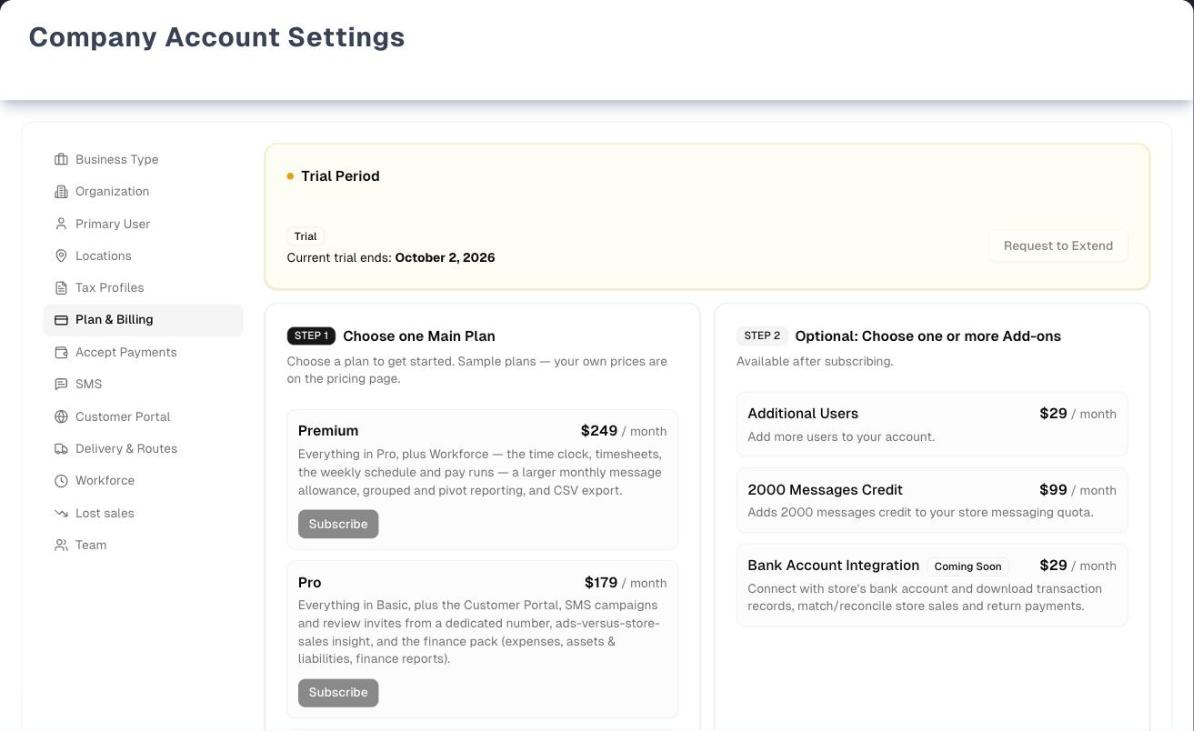
The page looks different before and after you subscribe. Before, it shows the plans to choose from. After, it shows your subscription on the left and what you can add on the right.
Only the store's owner can change billing: subscribe, change the plan, add or remove anything, update the card or cancel. The owner is the person marked as the store's owner in Team, or anyone with the owner role. Everyone else on the team can open the page but only read it. It shows the plan, the lines, the trial date and any payment problem, with a note at the top: "Only the store owner can change billing. Ask your owner to subscribe or make changes here. If this store has no owner to ask, contact UpChannels support."
That holds even for a one-person store: subscribing, paying an invoice and updating the card are owner actions like any other. If nobody in your store has the Owner switch or the owner role — for example a store whose only owner was switched off in Team — nobody there can change billing: contact UpChannels support. Being the only active person in the store changes nothing the page says: it shows that same one note, word for word, and the note already names support for a store with no owner to ask.
The trial
A new store starts on a 14-day free trial. The Trial Period card shows Current trial ends: with the date, and the sidebar shows Trial ends … until then.
During the trial every plan-gated page opens as though you were on Premium, with three limits:
- Users: 2 per location, the same allowance a paid plan gives.
- Locations: one, the same as a paid plan gives. You can create your first location during the trial; a second one shows Subscribe to add more locations.
- Text messages: capped at Pro's 500 a month, not Premium's 2,000.
Need longer? The owner can click Request to Extend on the Trial Period card, which opens a short Request Trial Extension form. All seven fields are required, and Request Extension sends it to the sales team, who get back to you.
When the trial ends without a plan, every page in the app sends you to this page until you subscribe. Only the owner can subscribe. Anyone else who is sent here sees the plans read-only and needs to ask the owner — or, if the store has no owner, UpChannels support.
Choosing a plan
Before you subscribe, the page shows two cards side by side:
- Choose one Main Plan lists each plan with its monthly price and a green Subscribe button.
- Optional: Choose one or more Add-ons lists the add-ons for information only. They are available after subscribing. Items marked Coming Soon are not for sale yet.
Subscribe takes you to Stripe's secure checkout page to enter your card. When the payment goes through you come back to this page, which now shows your subscription. If you back out on Stripe's page, you come back with nothing changed. Each checkout buys one plan for one location. You add more locations and any add-ons afterwards.
If at least 48 hours of your free trial are left, and your store has never had a paid subscription before, your card is saved now and first charged when the trial would have ended. With less time left, the plan starts and is billed straight away. Either way, the plan you chose decides what you can use from that moment. Pick Basic on day 5 of the trial and Premium-only features close then, not later. Until the first charge, the page says "Your … plan starts on …" and the sidebar row says "… plan starts …".
After you subscribe
The page splits into Active Subscription on the left and Available Products & Add-ons on the right.
- Monthly Total adds up every line. Your main plan shows its quantity as Qty: 1 Location, Qty: 2 Locations and so on. Each unit is one location licence. An older product billed under Main Plan that isn't the plan we sell you shows a plain Qty: 2 instead: Add Location and a plan change only act on your plan, and its units give no locations or users. The number of locations shown on your plan line is the number Settings → Locations lets you have.
- Add Location adds one location licence, and shows only on a line whose units really are licences. Add on any other line adds one more of it, for example one more pack of 5 users. Remove takes the whole line off, whatever its quantity, and asks you to confirm first. It is not offered on your main plan: to change the plan use Switch, and to end it use Cancel subscription.
- On the right, Upgrade (to a higher plan) or Switch (to any other plan, including a smaller one) changes your main plan, and Add puts a new add-on on your subscription.
Add Location and Add take effect as soon as you click, with no confirmation step. Remove, Upgrade and Switch ask first. The removal confirmation names the line, says how many of it come off and what you stop paying, and that the unused part is credited pro rata. Upgrade and Switch ask first too: the confirmation shows the new plan, how many locations it covers and the new monthly amount. A plan change keeps your locations. A store paying for 3 locations on Pro that upgrades to Premium pays for 3 locations on Premium, and add-ons such as user packs stay as they are. Either way the difference is worked out pro rata and shows on your next invoice (the page says so under Available Products & Add-ons).
What each plan includes
| Feature | Basic | Pro | Premium |
|---|---|---|---|
| Sales, catalog, inventory, procurement, scheduling and the core reports | ✅ | ✅ | ✅ |
| Delivery Routing & Dispatch | ✅ | ✅ | ✅ |
| Finance: Expenses, Assets & Liabilities, Transactions, Profit & Loss, the Expenses Report and the Assets & Liabilities report | — | ✅ | ✅ |
| Messages and SMS Campaigns | — | ✅ 500 texts a month | ✅ 2,000 texts a month |
| Ads & Sales insights | — | ✅ | ✅ |
| Customer Portal | — | ✅ | ✅ |
| Workforce (time clock, timesheets, pay runs) | — | — | ✅ |
| Grouped and pivot views, CSV and PDF export | — | — | ✅ |
A free trial opens everything Premium does, with the limits above. A page outside your plan still opens, but greyed out behind an Unlock Pro & Premium Features (or Unlock Premium Features) panel. Its Check Details button brings you here. The sidebar also tags those pages Pro or Premium.
Users and locations
Each unit of your main plan covers one location with 2 users. Each Additional Users pack adds 5 users. Total users = locations × 2 + packs × 5.
When you try to add a location or a user beyond that, UpChannels stops you with License Limit Reached instead of charging you. It shows either Locations Used or Users Used. Go to Billing brings you here. Use Add Location for another location, or Add next to Additional Users for more people (Add Location also brings 2 users). These buttons appear only once you have a paid subscription, and only for the owner.
When a payment goes wrong
A red or orange box appears at the top of the page, and the card's title changes to Subscription (Payment Issue).
| Box heading | What it means | What to do |
|---|---|---|
| Payment Authentication Required | Your bank wants you to confirm the payment | Complete Payment opens Stripe's invoice page in a new tab, where you confirm it |
| Payment Method Update Required | The card on file could not be charged | Update Payment Method, then Pay Now |
| Payment Failed | A renewal charge failed ("attempt 1", "attempt 2" and so on) | Update Payment Method, then Pay Now |
Update Payment Method opens Stripe's billing page in a new tab. The box clears after the next successful payment.
You don't have to wait for a failed payment: Manage payment method & invoices, at the bottom of the Active Subscription card, opens the same Stripe page whenever you need it — to change a card before it expires, or to download an invoice for your accountant. A store whose subscription has ended keeps the link below the plans, so old invoices stay reachable. If UpChannels can't confirm that Stripe's page is set up the way it needs, the link on the Active Subscription card is replaced by "Card changes and invoices are handled by UpChannels support right now." rather than disappearing, and the same line appears in the payment problem box in place of Update Payment Method. Below the plans there is no such line: a store with no subscription and no card on file has nothing to manage there.
While the subscription is past due or unpaid, UpChannels sends everyone on your team to this page whatever page they open, until the payment goes through. The billing page itself always stays open so the owner can fix it. For everyone else it is read-only, so ask the owner to pay.
Cancelling
- Cancel subscription (a small link at the bottom of the Active Subscription card) opens Cancel your subscription. It tells you the date you keep access until: "You'll keep full access until …"
- UpChannels asks What's driving this? Answering is optional. Pick one of nine reasons: too expensive for what we use, not using it enough, missing a feature we need, too hard to set up or use, switching to another system, it didn't work reliably, support wasn't there when we needed it, closing or selling the business, or something else. Once you pick one, a box appears for details, with It's OK to contact me about this. ticked.
- Some reasons show one offer beneath your answer. Too expensive for what we use offers Remove add-ons and stay when you have add-ons: every add-on is removed and your plan keeps running. Not using it enough, too hard to set up or use, didn't work reliably and the support reason offer Book a free session, and the team contacts you. Nothing is cancelled if you take an offer. Closing or selling the business gets no offer. The Cancel subscription button stays available the whole time.
- Click Cancel subscription in the dialog. A message says "Your subscription is scheduled to end." and the card shows Cancellation Scheduled: "You can continue using all features until then." You keep the days you paid for and are not charged again. Keep my subscription closes the dialog without changes.
Changed your mind? Resume subscription, inside the Cancellation Scheduled box, calls it off. Nothing is charged, nothing about your plan or add-ons changes, and your normal billing simply carries on at the end of the period.
If you are on a trial, or your trial has ended, and you are not planning to continue, Not planning to continue? Tell us why below the plans asks the same question. It cancels nothing.
Tips
- Add-ons can't be bought during the trial. Subscribe first, then add them from the right-hand column.
- Remove takes a whole line off. There is no "minus one", so to go from three locations to two, contact support. Remove is never offered on your main plan.
Troubleshooting
| Problem | What to do |
|---|---|
| Every page sends me to Billing & Subscription | Your trial has ended, or the subscription is past due, unpaid or cancelled. An amber notice at the top of the page says which of the two it was. Subscribe, or fix the payment from the box at the top. If the page has no buttons, you're not the owner: the notice tells you to ask the owner |
| The page has no buttons and says "Only the store owner can change billing. Ask your owner to subscribe or make changes here. If this store has no owner to ask, contact UpChannels support." | Only the store's owner can change billing. Ask the owner, or someone with the owner role, to make the change. If nobody in the store has the Owner switch or the owner role, contact UpChannels support |
| I'm the only person here and the page has no buttons at all | Being the only active person in a store does not make you its owner. Contact UpChannels support |
| "Failed to load subscription" | Reload the page. If it keeps happening, contact support |
| Subscribe to add more locations when adding a second location during the trial | The trial covers one location, like any single plan (a store that moved across with several keeps a licence for each). Subscribe, then use Add Location for each extra one |
| License Limit Reached when adding a user | Add a user pack (Add next to Additional Users) or a location |
| I can't find my invoices or a way to change my card | Use Manage payment method & invoices at the bottom of the Active Subscription card: invoices live on Stripe's billing page, not in UpChannels. If that link is replaced by "Card changes and invoices are handled by UpChannels support right now.", contact support |
What's next
- Everything else in Settings: Settings Overview
- Add team members once you have the seats: Team & Menu Visibility
- Take card payments from customers: Accept Payments
- SMS quota and usage: SMS Campaigns setup
Detailed reference
Every button, icon, field and message on this page, for when you need the exact detail. Each panel starts closed — open the one you need.
Page header and toolbar
| Control | Where | What it does | Notes |
|---|---|---|---|
| Plan & Billing (credit-card icon) | Settings left menu, sixth entry, after Tax Profiles and before Accept Payments | Opens the billing pane inside Settings | Settings opens for the store's owner, anyone with the owner role and the store's only active person; everyone else is sent to Shortcuts. The stand-alone billing page below still opens for them |
| Page title "Company Account Settings" and "Manage your personal information and organization settings" | Top of Settings | Heading only | — |
| Pane heading Billing & Subscription (credit-card icon) and "Manage your subscription plan and billing information" | Top of the Plan & Billing pane (amber border) | Heading only | Inside Settings only |
| Page heading Billing & Subscription | Top of the stand-alone billing page (address ends in /settings/billing) | Heading only | No subtitle and no Settings menu on this page |
| Sidebar row "Trial ends …" (red) with a right arrow | Left sidebar, under the store-name box | Opens the stand-alone billing page | Shown to everyone on the team while a trial is running |
| Sidebar row "… plan starts …" (amber), e.g. "Pro plan starts Sep 30, 2026" | Same place | Opens the stand-alone billing page | Replaces "Trial ends …" once a plan was bought during the trial |
| Billing Management tile | Shortcuts, Get Started group | Opens the stand-alone billing page | Shown to everyone Settings opens for: the Owner switch in Team, the owner role, or the store's only active person. Everyone else reaches the page by the sidebar trial row (only while a trial is running) or its own address — and it opens for them, read-only |
| "Loading subscription…" / spinner with "Loading subscription..." | Page body | Shown while your subscription loads | — |
| "No organization found in session." | Stand-alone page | Shown instead of the billing page when your sign-in has no store attached | Sign out and back in, or finish onboarding |
| Red text "Failed to load subscription" | Page body | Shown when the subscription could not be loaded | No retry button. Reload the page |
| Coming back from Stripe checkout | Page load | Your new subscription is saved and the page opens on the subscribed view; the sidebar row updates | No success message is shown |
| "Refreshing..." with spinner | Covers both columns | Shown while a change is being applied or the page reloads your subscription | Blocks clicks until it finishes |
| Owner-only note (lock icon) "Only the store owner can change billing. Ask your owner to subscribe or make changes here. If this store has no owner to ask, contact UpChannels support." | Top of the page | Tells a team member who isn't the owner that the page is read-only for them. UpChannels support is a link: it opens a new mail to team@upchannels.com, already titled "Billing: this store has no owner to ask" | Shown to everyone except the owner, and it is one fixed sentence: it reads the same for the store's only active person as for anybody else. Every button that would change billing is hidden, on both the plans view and the subscribed view. The trial date, the plan, the lines and any payment problem still show |
Section: Trial Period card
This card shows only while a trial is still running. Before you subscribe it sits above the plans; after you subscribe the same section appears at the bottom of the Active Subscription card, for as long as free days are left.
| Control | Where | What it does | Notes |
|---|---|---|---|
| Amber dot and heading Trial Period | Card header | Marks the card as trial information | The card is only ever shown while the trial is running, so the dot is always amber |
| Chip Trial, label "Trial Period" (clock icon) | Amber strip | Status label | — |
| "Current trial ends: …" (e.g. "Current trial ends: October 2, 2026") | Amber strip | The trial end date | Always a real date in the future: with no trial date there is no card |
| Request to Extend | Amber strip, right | Opens the Request Trial Extension form below the card. The button then reads Close, which folds the form away again | Owner only |
| Trial Period on the subscribed view | Bottom of Active Subscription | Same card and button | Shown only while free days are left — which is the case for a plan bought during the trial, because buying keeps the days you had. A store whose trial has ended, or that never had one, sees no Trial Period card here |
Section: Before you subscribe (choosing a plan)
Shown when your store has no live subscription: during the trial, after the trial has ended, or after a cancelled subscription has fully ended.
| Control | Where | What it does | Notes |
|---|---|---|---|
| Arrow "STEP 1", Choose one Main Plan, "Choose a plan to get started", black Main Plan badge (crown icon) | Left card header | Heading only | — |
| Plan card: name, description, "… / month" | Left card, one per plan | Shows each main plan and its monthly price | Highest price first. Names, descriptions and prices come from UpChannels' Stripe catalogue |
| Subscribe (green) | Each plan card, right | Takes you to Stripe's checkout page in the same tab. After a successful payment you return to the billing page on the subscribed view. If you cancel on Stripe's page you return with nothing changed | While it starts, the clicked button shows a spinner and "Starting checkout..." and every Subscribe button is greyed out. Owner only. Buys one plan for one location |
| Arrow "STEP 2", Optional: Choose one or more Add-ons, "Available after subscribing", black Add-on badge (puzzle icon) | Right card header | Heading only | — |
| Group headings Features and Professional Services | Right card | Self-serve add-ons and hands-on services, listed separately | A group with nothing in it is hidden. Within a group, add-ons for sale come first, cheapest first, then Coming Soon items |
| Add-on card: name, Coming Soon chip (when not released), description, "… / month" | Right card | Information only. There are no buttons here | Add-ons are added after subscribing, from Available Products & Add-ons |
| "No add-ons available at this time." | Right card | Empty state | — |
| Spinner "Loading available plans..." | Whole section | Shown while plans load | — |
| Manage payment method & invoices (grey underlined link) | Centred below both cards | Opens Stripe's billing page in a new tab: your card, your billing details and every past invoice | Owner only, and only for a store that has paid before — a store that has never subscribed has nothing to show |
| Not planning to continue? Tell us why (grey underlined link) | Centred below both cards | Opens Not planning to continue? | Shown to the owner whenever your store has a trial date, running or ended |
Section: Payment problem box
Appears above both columns on the subscribed view when Stripe reports a payment problem. At the same time the Active Subscription heading becomes Subscription (Payment Issue) with a red dot.
| Control | Where | What it does | Notes |
|---|---|---|---|
| Heading Payment Authentication Required (orange, warning triangle) with "Your payment requires authentication. Please complete the verification to continue your subscription." | Top of the page | Your bank needs you to confirm the payment (a security step such as 3-D Secure) | — |
| Heading Payment Method Update Required (red) with "Your payment method could not be processed. Please update your card information." | Top of the page | The card on file could not be charged | — |
| Heading Payment Failed (red) with "Payment failed (attempt …). Please check your card details and try again." | Top of the page | A charge failed; the attempt number counts Stripe's retries | — |
| Complete Payment (orange) | Box, action row | Opens Stripe's invoice page in a new tab to confirm the payment | Authentication box only, and only when Stripe supplied an invoice link. Owner only |
| Pay Now (red) | Box, action row | Opens Stripe's invoice page in a new tab to pay the invoice | The other two boxes, when Stripe supplied an invoice link. Owner only |
| Update Payment Method (grey) | Box, action row | Opens Stripe's billing page in a new tab to change your payment method. Its return link brings you back to the billing page | The same page as Manage payment method & invoices on the card footer, which is available whether or not a payment has failed. Shown only when UpChannels can open that page at all; when it can't, the box says "Card changes and invoices are handled by UpChannels support right now." in its place, and Pay Now (when the invoice offers one) lets you pay and change the card on Stripe's own invoice page. The version UpChannels opens is set up for your card and your invoices, and to keep switching and cancelling in the app, where your locations carry over and a cancellation is recorded. Owner only. Errors: "The payment portal isn't available right now. Contact UpChannels support to update your card or get an invoice.", "Failed to open billing portal", "No Stripe customer for organization", "No organization associated with this account" |
| Box clears | — | The box disappears after the next successful payment | — |
Section: Active Subscription (left column)
| Control | Where | What it does | Notes |
|---|---|---|---|
| Dot and heading Active Subscription (green) or Subscription (Payment Issue) (red) | Card header | Red while a payment problem is open | — |
| "ID: sub_… — Status: …" | Under the heading | Your Stripe subscription number and its status as Stripe reports it, e.g. Active, Trialing, Past_due | Quote the ID when you contact support |
| Amber note "Your … plan starts on …, when your free trial ends. Your card is not charged before then, and the app already shows you the … plan." | Under the ID line | Explains a plan bought during the trial | Only while the status is Trialing, until the first charge |
| Cancellation Scheduled box: "Your current billing cycle ends on …", "You will not be charged after this date", "You can continue using all features until then" | Under the ID line | Confirms a scheduled cancellation | Only after you cancel |
| Resume subscription | Inside the Cancellation Scheduled box | Calls the cancellation off at once. Nothing is charged, and no line, quantity or price changes. Your normal billing carries on at the end of the current period. Success: "Your subscription will continue." with "Nothing is charged now. Your normal billing carries on at the end of this period." | Owner only. Clicking it twice is harmless — the second click changes nothing. If the subscription has already ended there is nothing to resume: "No subscription found for your organization", and the plans view is the way back |
| Monthly Total "… / month" | Top of the subscription box | The sum of every line (price × quantity) | Hidden if the subscription has no lines |
| Main Plan badge (crown) and plan line: name, "… each", chip "Qty: 1 Location" or "Qty: … Locations", line total "… / month" | Subscription box | Your main plan | Each unit of quantity is one location licence with 2 users. A line listed here that is not the plan we sell you (an older or retired product) shows a plain "Qty: …" and offers Add, not Add Location. Its quantity gives no locations or users, even when its name reads like a plan tier (for example "Protection Plan"): only the plan we sell you counts, so the chip, Add Location and the allowance Settings → Locations enforces always agree. On an older subscription that has no line from the current catalogue at all, the line named after a plan tier (Basic, Pro or Premium) is the plan |
| Add-on badge (puzzle) and add-on lines: name, "… each", chip "Qty: …", line total | Subscription box | Your add-ons | For Additional Users, each unit is a pack of 5 users |
| Add Location (blue) | Main plan line, right | Adds one location licence at once, with no confirmation. The prorated amount shows on your next invoice | Owner only. Shown only on a line whose units are location licences. Hidden while a cancellation is scheduled. Success: "Quantity updated successfully!". Otherwise the message says why, for example "Payment is required to apply this change. Please update your payment method." or "Payment is required before this change can be applied. Update your payment method and try again." |
| Add (purple on an add-on line, blue on any other non-licence line) | Each add-on line, right | Adds one more of that line (e.g. one more user pack) at once, with no confirmation. The prorated amount shows on your next invoice | Same conditions and messages as Add Location |
| Remove (red) | Each line except your main plan, right | Opens Remove …? Confirming takes the whole line off, whatever its quantity. The unused part is credited pro rata | Owner only. Not offered on the line whose units are your location licences (Switch changes the plan, Cancel subscription ends it), nor when only one line is left, nor while a cancellation is scheduled. A line listed under Main Plan that isn't the plan we sell you (an older or retired product) does keep its Remove. Success: "Item removed successfully!". If Stripe or UpChannels refuses the removal the line stays and the message says why, for example "Payment is required before this change can be applied. Update your payment method and try again." |
| "Active until …" (yellow) | Each line, right | Replaces Add, Add Location and Remove | Only while a cancellation is scheduled |
| Trial Period section | Near the bottom | See the Trial Period panel | Only while free days are left |
| Manage payment method & invoices (grey underlined link) | Card footer, left | Opens Stripe's billing page in a new tab: your card, your billing details and every past invoice. Its return link brings you back here | Owner only. Always available — not just while a payment has failed. Shown only when UpChannels can confirm Stripe's page is set up for card and invoices and cannot end a subscription; otherwise the line "Card changes and invoices are handled by UpChannels support right now." takes its place |
| Cancel subscription (grey underlined link, red on hover) | Card footer, right | Opens Cancel your subscription | Owner only. Shown whenever the subscription is live, whatever the number of lines. Hidden once a cancellation is scheduled |
Section: Available Products & Add-ons (right column)
| Control | Where | What it does | Notes |
|---|---|---|---|
| Blue dot and Available Products & Add-ons | Card header | Heading | — |
| "Add-ons you enable today start immediately and will appear on your next invoice (prorated when applicable)." | Under the heading | Explains how add-ons are billed | — |
| Arrow "STEP 1", Choose one Main Plan, Main Plan badge | Plans box | Lists the main plans you are not on | While a cancellation is scheduled, your current plan is listed too |
| Upgrade (green) | Each plan card | Opens Upgrade to …? (see the confirmation panel). Confirming changes your main plan to this one and keeps its quantity, so every location licence carries over. Add-ons stay as they are. The difference is prorated onto your next invoice. Success: "Successfully upgraded to …!" / "Your new plan is now active for … locations." | Shown when the plan ranks higher than yours (Basic, then Pro, then Premium). Your rank comes from your plan line alone, so another line under Main Plan that isn't the plan we sell you never sets it; and if your plan isn't one of those three names, nothing is treated as ranking above it and every card shows Switch. Also clears a scheduled cancellation. Owner only. If your store is already on that plan — say the page was open in another tab while it changed — nothing is charged again and the message is "You're staying on …." instead |
| Switch (green) | Each plan card | Same as Upgrade, with Switch to …?. Success: "Successfully switched to …!" / "Your plan has been updated for … locations." | Shown for a plan of the same or a lower rank, so a downgrade is also Switch, and for any plan whose rank can't be compared with yours. While a cancellation is scheduled your current plan is listed too, and Switch on it opens Stay on …?, which only calls off the cancellation |
| Arrow "STEP 2", Optional: Choose one or more Add-ons, Add-on badge, groups Features and Professional Services | Add-ons box | Lists the add-ons not yet on your subscription | Coming Soon items sort last in each group |
| Add (green) | Each add-on card | Adds the add-on (quantity 1) at once, with no confirmation. The prorated amount shows on your next invoice. Success: "Item added successfully!" | Adding a new add-on also clears a scheduled cancellation. While a cancellation is scheduled, add-ons you already have are listed too, and Add then adds one more of them ("Quantity updated successfully!") without clearing the cancellation. Owner only |
| Coming Soon (greyed-out button) and Coming Soon chip | Add-on card | Cannot be bought yet | — |
| "All available products are already in your subscription." | Right column | Nothing left to add | Replaces the whole column, including its heading |
| "Loading available products..." | Right column | Loading state | — |
Dialog: Upgrade or Switch confirmation
Opened by Upgrade or Switch in Available Products & Add-ons. Nothing changes until you confirm.
| Control | Where | What it does | Notes |
|---|---|---|---|
| Title Upgrade to …?, Switch to …? or Stay on …? | Header | Names the plan you picked | Stay on …? when you picked the plan you are already on (possible only while a cancellation is scheduled) |
| "Your main plan changes from … to …. Your … locations carry over." | Under the title | Says the new plan keeps every location licence you pay for now | With one location it reads "Your 1 location carries over." With no main plan on the subscription: "… becomes your main plan, for 1 location." For your current plan: "You keep … for your … locations. Nothing else changes." |
| "Now: …" with "… / month" | Grey box | What your main plan costs now (price × locations) | Not shown for Stay on …?, or when the current price isn't known |
| "New: …" with "… locations × … = … / month" | Grey box, bold | What the new plan will cost for the same locations | Just the number of locations when the new price isn't known. For Stay on …? the line starts with the plan name alone |
| "Your add-ons stay as they are." | List | Add-ons, user packs and message credits are not touched | Neither is any other line under Main Plan that is not your plan (an older product, for example): it keeps its own price and quantity. What counts as your plan is what the UpChannels catalogue sells as one, not what its name sounds like, so a line called "Protection Plan" is left alone. Not shown for Stay on …? |
| "The difference for the rest of this billing period is worked out pro rata and shows on your next invoice." | List | How the change is billed | Not shown for Stay on …? |
| "This also calls off your scheduled cancellation." | List | Choosing a plan cancels a scheduled cancellation | Only while a cancellation is scheduled |
| Keep current plan (Go back for Stay on …?) | Footer | Closes the dialog. Nothing changes | Esc does the same |
| Upgrade to …, Switch to … or Stay on … | Footer | Applies the change. The columns show "Refreshing..." until it is done | Messages: see Messages you may see |
Dialog: Remove a line
Opened by Remove on a subscription line. Nothing changes until you confirm. Remove is not offered on your main plan.
| Control | Where | What it does | Notes |
|---|---|---|---|
| Title Remove …? | Header | Names the line, as the card shows it | For example Remove Additional Users? |
| "It comes off your subscription." / "All … of them come off your subscription, not just one." | Under the title | Says that the whole line goes, not one unit of it | The second wording when the line's quantity is more than one |
| "You stop paying … / month for it." | List | The line's monthly total (price × quantity) | Left out when the price is not known |
| "The unused part of this billing period is credited pro rata and shows on your next invoice." | List | How the removal is billed | — |
| "You can add it back at any time from the right-hand column." | List | — | — |
| Keep it | Footer | Closes the dialog. Nothing changes | Esc and clicking outside do the same |
| Remove … | Footer | Takes the line off. The columns show "Refreshing..." until it is done | Messages: see Messages you may see |
Dialog: Cancel your subscription
Opened by Cancel subscription at the bottom of the Active Subscription card. Opening the dialog changes nothing in Stripe.
Header: title Cancel your subscription, then "You'll keep full access until …, and you won't be charged again. Your data stays put." Without a period end date it reads "You'll keep full access until the end of your current billing period, and you won't be charged again. Your data stays put."
Fields:
| Field | Required | Default | Rules and error text |
|---|---|---|---|
| What's driving this? (optional), nine reasons, pick one | No | None picked | Never needed to cancel |
| Details box, labelled with the reason's question | No | Empty | Appears only after you pick a reason. Up to 500 characters. Changing the reason clears it |
| It's OK to contact me about this. | No | Ticked | Appears with the details box. Unticked, nobody follows up later |
The reasons:
| Reason | Details question | Box placeholder | Offer shown |
|---|---|---|---|
| Too expensive for what we use | "What would have made it worth it?" | "Optional" | Keep the core plan, drop the extras, only if you have add-ons |
| We're not using it enough | "What got in the way of using it?" | "Optional" | Let us fix this first — on us |
| Missing a feature we need | "Which feature? This one goes straight to the roadmap." | "This is the part that actually helps us." | None |
| Too hard to set up or use | "Where did it get hard?" | "Optional" | Let us fix this first — on us |
| Switching to another system | "Which one did you move to?" | "This is the part that actually helps us." | None |
| It didn't work reliably | "What broke?" | "This is the part that actually helps us." | Let us fix this first — on us |
| Support wasn't there when we needed it | "What happened?" | "This is the part that actually helps us." | Let us fix this first — on us |
| Closing or selling the business | "Anything we can help you wrap up?" | "Optional" | None, ever |
| Something else | "Tell us what we're missing." | "This is the part that actually helps us." | None |
Offers (at most one, in a blue box below the question):
| Control | Where | What it does | Notes |
|---|---|---|---|
| Keep the core plan, drop the extras: "You can remove your add-on and keep everything else running. Your data and settings stay exactly as they are." (or "You can remove your … add-ons…") with Remove add-ons and stay | Blue box | Removes every add-on line (features, services, user packs, message credits), pro rata, and keeps your main plan. Nothing is cancelled. The dialog closes with "Done — your subscription is still active. We'll be in touch." | Errors: "There's nothing that can be removed on its own. You can still cancel below.", "We couldn't apply that just now. Nothing has changed — please try again.", "We couldn't reach the billing service. Nothing has changed." |
| Let us fix this first — on us with Book a free session | Blue box | Tells the UpChannels team, who contact you. Nothing changes in your subscription and nothing is cancelled. The dialog closes with "Done — your subscription is still active. We'll be in touch." | Taking it counts as permission to contact you. The text depends on the reason: not using it enough "Most of the time this is a setup that never quite got finished. Someone from our team will sit down with you for an hour and get it working around how your shop actually runs — no charge, no pitch."; too hard "An hour with someone who knows the system usually settles it. We'll set it up around how your shop actually works — no charge, no pitch."; didn't work reliably "That shouldn't be happening, and we'd like to see it. Someone will go through it with you and either fix it or tell you straight that we can't."; support "That's on us. Someone will call you directly — not a ticket queue — and go through whatever is outstanding." |
Buttons:
| Control | Where | What it does | Notes |
|---|---|---|---|
| Cancel subscription (red outline) | Footer, left | Schedules the cancellation for the end of the current billing period and saves your answer. The dialog closes, "Your subscription is scheduled to end." appears, and the card shows Cancellation Scheduled | Always available, whether you answered or not, even while an offer is showing. Shows a spinner while working. Errors in a red box: "We couldn't cancel your subscription just now. Nothing has changed — please try again, or email support and we'll take care of it." or "We couldn't reach the billing service. Nothing has changed — please try again." |
| Keep my subscription (dark) | Footer, right | Closes the dialog without changes | — |
| X (close), Esc, or clicking outside | Top right / anywhere outside | Closes without changes | Not while a request is running |
Dialog: Not planning to continue?
Opened by Not planning to continue? Tell us why below the plans, before you subscribe. Nothing is cancelled.
| Control | Where | What it does | Notes |
|---|---|---|---|
| Title Not planning to continue? with "Nothing here cancels anything — your trial runs its course either way. We'd just like to know what didn't work, so the next dealer's experience is better." | Header | — | — |
| What stopped you? and the same nine reasons as the cancel dialog | Body | Pick one | Not marked optional: you need a reason to send |
| Details box (the reason's question, up to 500 characters) and It's OK to contact me about this. (ticked) | After you pick a reason | Same as the cancel dialog | No offers here |
| Never mind | Footer | Closes. Nothing is saved | — |
| Send feedback (dark) | Footer | Saves your answer | Greyed out until a reason is picked. Spinner while sending. Sending again within 24 hours updates your earlier answer |
| Thank you — that helps with "We read every one of these. If you left your permission, someone may reach out — otherwise, your trial just runs its course and nothing else happens." and Close | Replaces the form | Confirms it was sent | — |
| Red box errors | Above the footer | "It looks like this account has an active subscription. Refresh the page and use the cancel option on your subscription instead." / "We couldn't save that just now. Please try again." / "We couldn't reach the server. Please try again." | — |
| X (close), Esc, or clicking outside | — | Closes | Not while sending |
Form: Request Trial Extension
Opens inside the Trial Period card when you click Request to Extend. The card is there while free trial days are left — including after you have chosen a plan part-way through the trial — and gone once they run out, so a store that has been paying for a while has neither the card nor the button. Title Request Trial Extension, with "Need more time to evaluate our platform? Fill out the form and our sales team will get back to you."
Fields:
| Field | Required | Default | Rules and error text |
|---|---|---|---|
| Company Name | Yes | Your store's name | Placeholder "Your company name" |
| Business Location (hint "City, State or full address") | Yes | Empty | Placeholder "e.g., San Francisco, CA" |
| Your Name | Yes | Your name | Placeholder "Your full name" |
| Phone Number | Yes | Your mobile or business phone, when it is one this form can send; a stored number with an extension in it is left out and the box starts empty | Placeholder "+1 (555) 123-4567". "Please provide a valid phone number. Digits and + ( ) - . only, and no extension." is shown under the box before anything is sent |
| Yes | Your email | Placeholder "you@company.com". "Please provide a valid email address." | |
| Business Challenges & Goals | Yes | Empty | Placeholder "Tell us about your business challenges and what you're hoping to achieve...". Your username is added to it automatically |
| Previous Vendor | Yes | Empty | Placeholder "What software/vendor are you currently using?" |
Buttons:
| Control | Where | What it does | Notes |
|---|---|---|---|
| Request Extension (full width) | Form footer | Sends the request to the sales team | Your browser points at any empty field first. While sending it reads "Submitting..." and every field is greyed out |
| Success: check mark, Thank you!, "We've received your message and will get back to you shortly.", then "A copy has been sent to …" or "No confirmation email was sent — our team will get in touch at …. A copy goes only to the email you sign in with, once a day." | Replaces the form | Confirms it was sent, and says whether a copy of the request was emailed to you | A copy is emailed only when the Email box holds the address you sign in with, at most once a day. Send another request brings the form back; use Close on the Trial Period card to hide it |
| Red error box | Above the button | Shows why it was not sent: "Please fill in …" (a field held only spaces), "Please provide a valid email address.", "Please provide a valid phone number.", "Failed to submit form. Please try again later.", or "Something went wrong" | Fix the field and send again |
| Close | Trial Period card, where Request to Extend was | Folds the form away | — |
Dialog: License Limit Reached
Not on the billing page itself. It opens when you try to add more than your licences allow, and leads here.
| Control | Where | What it does | Notes |
|---|---|---|---|
| Trigger: Create New Location | Settings → Locations | Opens the dialog (locations version) instead of the new-location form | When no location licence is free. A trial carries one licence, so a trial store creates its first location normally and meets this on the second |
| Trigger: Create User | Settings → Team | Opens the dialog (users version) | When no user seat is free. If the server refuses a new user over the limit, the same dialog shows its numbers |
| Title License Limit Reached (amber warning triangle) | Header | — | On a store with no subscription (a trial) it reads Subscribe to add more locations, or Subscribe to add more people in the users version |
| "You've reached your location license limit." / "You've reached your user license limit." | Under the title | Which limit you hit | Without a subscription it reads "Your free trial covers 1 location. Choose a plan to add more." or "Your free trial covers 2 users. Choose a plan to add more." — the numbers are the ones your store really has. If your plan could not be read at all, the dialog says so instead: We couldn't check your plan |
| Locations Used (pin icon) or Users Used (people icon) "… / …" with an amber bar | Usage box | How many you use out of how many you have | Only the one you were adding |
| How licenses work: "Main Plan: Each plan covers 1 location with 2 users included", "User Packs: Each add-on pack adds 5 users", "Total Users: (Locations × 2) + (User packs × 5)", and "Your Plan: … locations × 2 = … base users" (e.g. "Your Plan: 1 location × 2 = 2 base users") | Blue box | Explains the arithmetic | "Your Plan" appears only in the users version, when you have location licences |
| "To add more locations, please upgrade your subscription by purchasing additional location licenses." / "To add more team members, you can either add more locations (each includes 2 users) or add a user pack (5 users per pack)." | Body | What to buy | Without a subscription both are replaced by "Every plan covers 1 location with 2 users. Subscribe first, then add locations and user packs from the billing page." — there is nothing to add a licence to yet |
| Cancel | Footer | Closes | — |
| Go to Billing (credit-card icon) | Footer | Closes and opens the Billing & Subscription page | Reads See plans without a subscription. Either way it lands on the billing page itself. During a trial that page offers Subscribe only; Add Location and user packs appear after subscribing |
Sub-page: Stripe pages
| Control | Where | What it does | Notes |
|---|---|---|---|
| Stripe checkout | Opened by Subscribe, same tab | You enter your card on Stripe's own page. After payment you return to the billing page; if you back out you return with nothing changed | One main plan, one location per checkout. During a trial with 48 hours or more left (and no earlier subscription) the card is saved and first charged when the trial ends |
| Stripe billing page | Opened by Update Payment Method, or by Manage payment method & invoices, new tab | Stripe's page for your payment details and past invoices. Its return link brings you back to the billing page | Owner only. Reachable whenever you need it from the card footer, not just while the payment problem box shows. UpChannels opens one only when it can confirm the page is set up for the card and invoices and cannot end a subscription; otherwise it opens nothing and says so. Switch or cancel from the billing page rather than there, so your locations carry over and a cancellation is recorded — and tell UpChannels support if Stripe's page offers you a plan change, because it should not |
| Stripe invoice page | Opened by Pay Now or Complete Payment, new tab | Pay or confirm the unpaid invoice | — |
| Invoices and receipts | Opened by Manage payment method & invoices, new tab | Past invoices live on Stripe's billing page, not in UpChannels | The billing page itself lists no invoices. The link is owner-only, and absent when UpChannels cannot open Stripe's page |
Upgrade prompts that lead here
| Control | Where | What it does | Notes |
|---|---|---|---|
| Panel Unlock Pro & Premium Features / "SMS, insights, finance tools & more" (lock icon). Pro list: "500 SMS/month + a dedicated phone #", "SMS campaigns & review invites", "Ads-vs-store insights", "Finance: expenses, assets, reports", "Customer Portal: tracking, payments, scheduling". Premium list: "Everything in Pro", "2,000 SMS/month", "Advanced reporting (grouped/pivot)", "CSV / PDF data export", "Workforce: time clock, timesheets, pay runs" | Over Pro pages: Messages, SMS Campaigns, Expenses, Assets & Liabilities, Transactions, Profit & Loss, Expenses Report and the Assets & Liabilities report | The page shows greyed out behind the panel and can't be clicked. On Assets & Liabilities the lock also holds behind the screen: correcting a balance, Record Owner's Equity and adding an account with an opening balance are refused with "Posting to your books is a Pro feature. Open Plan & Billing to upgrade." | Basic plan only. Never during a trial, and not while your plan can't be worked out |
| Check Details (green) | Header of every upgrade panel | Opens the billing page | Shown to everyone |
| Panel Unlock Premium Features / "Advanced reporting & data export" (Premium list: "Everything in Pro", "2,000 SMS/month", "Advanced reporting (grouped/pivot)", "CSV / PDF data export"), with a Demo Data chip on the grouped and pivot views | Order Management Groupable View, Pivot View and Export CSV; Products Groupable and Export (…); Expenses Groupable View, Pivot View and Export CSV; Export CSV and Download PDF on Profit & Loss and the Assets & Liabilities report | Grouped and pivot views show sample data; export and PDF download are blocked | Any plan below Premium, outside a trial. Escape, the ✕ and clicking outside the panel all close it, everywhere it appears |
| Upgrade panel in the Send message dialogs | Customers page and Order Management | The message box is greyed out with sample text | Basic plan, outside a trial |
| Upgrade panel with Demo Data | Ads & Sales | Sample data behind the panel | Basic plan, outside a trial |
| Message Upgrade required "Your plan does not include SMS. Upgrade to Pro or Premium to send messages." with Upgrade | Any text-message send | Upgrade opens the billing page | When a send is refused (Basic plan, ended trial, inactive subscription, or this month's allowance used up). A more specific reason can replace the default text |
| "Your plan doesn’t include SMS. Upgrade to Pro or Premium to send messages." with Upgrade plan, or Manage plan | Settings → SMS | Opens the billing page | Manage plan (with your usage meter instead of the sentence) when your plan includes texts. Opening Settings is not enough to use either button: the store’s only active person can open this pane and gets the refusal sentence where the buttons would be |
| Upgrade plan (beside Buy … credits when that is offered) | SMS campaign send confirmation | Opens the billing page | When the send is refused, because of your plan or because this month's allowance is used up. Buy … credits asks Add SMS credits? before anything is charged, and never restarts a plan that is set to end. Owner only: everyone else gets a sentence in place of the buttons — "Only the store owner can change billing. Ask your owner to make this change.", or, for the store's only active person, "Only the store owner can make this change. Contact UpChannels support if this store has no owner." |
| Workforce is included with Premium / "Your current plan does not include Workforce." with Upgrade plan | Team → Workforce and Settings → Workforce | Opens the billing page | Upgrade plan is shown to owners only; others see the card without it. The Workforce page adds "It adds a PIN time clock for your store tablet, timesheets you approve, and a pay run with the arithmetic showing." Settings adds "Upgrade to Premium to turn Workforce on and set it up here." and, if Workforce is switched on, "It is switched on for your store, so the time clock tablets stop working until you upgrade." with Turn off Workforce |
| The customer portal is included in Pro and Premium / "Your current plan does not include the Customer Portal." with Upgrade plan | Settings → Customer Portal | Opens the billing page | Upgrade plan is shown only to the person with the Owner switch on — unlike the Workforce card, the owner role without the switch does not get it. Adds "Upgrade to Pro or Premium to turn the portal on here." and, if the portal is switched on, "It is switched on for your store, so links your staff already sent show an unavailable page until you upgrade." with Turn off the portal |
| Upgrade to Pro | Order → customer portal link dialog | Opens the billing page | When the link can't be made because of your plan |
| Sidebar tags Pro / Premium beside menu items | Left sidebar | Marks pages your plan doesn't include | Not during a trial or while your plan is unknown. Pro: Expenses, Assets & Liabilities and Transactions (Finance), Expenses Report, Profit & Loss and Assets & Liabilities (Reports), SMS Campaigns, Messages, Ads & Sales, Customer Portal. Premium: Workforce, My Hours |
| Full-page "Redirecting..." to the billing page | Any page | Sends you to the billing page | When the trial has ended, or the subscription is past due, unpaid, incomplete, cancelled or inactive. Checked again every 5 minutes and when you come back to the browser tab. The billing page then shows an amber notice saying which of the two it was — once the page has loaded; if it cannot load, reloading still shows the notice |
Messages you may see
| Message | When it appears | What to do |
|---|---|---|
| "Loading subscription..." / "Loading available plans..." / "Loading available products..." | While the page loads | Wait |
| "Failed to load subscription" | The subscription could not be loaded | Reload. If it persists, contact support |
| "No organization found in session." | Stand-alone billing page, no store on your sign-in | Sign out and in again, or finish onboarding |
| "Current trial ends: …" | Trial Period card | Always a date still to come. A store with no trial left gets no Trial Period card at all |
| "No add-ons available at this time." | Before subscribing, no add-ons in the catalogue | — |
| "All available products are already in your subscription." | After subscribing | Nothing left to add |
| Coming Soon | Add-on not released yet | Can't be bought yet |
| "Starting checkout..." | After Subscribe | Wait for Stripe's page to open |
| "Failed to start checkout" / "No organization associated with this account" / "That price is not part of this catalog" / "Failed to create checkout session" | Subscribe did not reach Stripe | Reload and try again. If it persists, contact support |
| "Your … plan starts on …, when your free trial ends. Your card is not charged before then, and the app already shows you the … plan." | Plan bought during the trial | Nothing to do; the chosen plan's features apply now |
| Sidebar "Trial ends …" (red) / "… plan starts …" (amber) | Trial running / plan bought during the trial | Click to open the billing page |
| Payment Authentication Required: "Your payment requires authentication. Please complete the verification to continue your subscription." | Your bank wants a confirmation step | Complete Payment |
| Payment Method Update Required: "Your payment method could not be processed. Please update your card information." | The card could not be charged | Update Payment Method, then Pay Now |
| Payment Failed: "Payment failed (attempt …). Please check your card details and try again." | A renewal charge failed | Update Payment Method, then Pay Now |
| Subscription (Payment Issue) | Card title while any of the three boxes shows | Fix the payment |
| "The payment portal isn't available right now. Contact UpChannels support to update your card or get an invoice." | UpChannels could not confirm that Stripe's billing page is set up the way this app needs — so it does not open one at all, rather than send you to a page that could end your subscription outside the recorded flow | Contact UpChannels support. They can update your card and send you an invoice |
| "Failed to open billing portal" / "No Stripe customer for organization" | Update Payment Method failed | Contact support |
| "Refreshing..." | A change is being applied | Wait |
| "Successfully upgraded to …!" / "Your new plan is now active for … locations." | Upgrade worked | — |
| "Successfully switched to …!" / "Your plan has been updated for … locations." | Switch worked | — |
| "You're staying on …." / "Your scheduled cancellation is called off." | Stay on … worked. Also shown after Upgrade or Switch when your store turns out to be on that plan already, so nothing was charged | — |
| "Payment is required to complete this plan change. Please update your payment method." | After Upgrade or Switch, when Stripe reports the subscription as past due, unpaid or waiting for its first payment | Use Update Payment Method or Pay Now in the payment problem box |
| "Failed to change plan. Please try again." | Upgrade or Switch did not reach UpChannels at all (no network). Nothing was changed | Check your connection and try again |
| "Your previous subscription was canceled. Start a new subscription to make this change." (after Upgrade or Switch) | The subscription has already ended, so there is no plan to move | Subscribe again from the plans view |
| "Unable to change your subscription just now. Please try again." (after Upgrade or Switch) | The plan change did not go through for a reason we could not name. Nothing was changed | Try again. If it keeps failing, contact support |
| "Item added successfully!" / "Quantity updated successfully!" | Add or Add Location worked | — |
| "Payment is required to apply this change. Please update your payment method." | After Add or Add Location, when Stripe reports the subscription as past due, unpaid or waiting for its first payment | Use Update Payment Method or Pay Now in the payment problem box |
| "Payment is required before this change can be applied. Update your payment method and try again." | Add, Add Location or Remove was refused because the amount for the rest of this period could not be charged. Nothing changed | Fix the card first: Update Payment Method or Pay Now in the payment problem box, then try again |
| "Your previous subscription was canceled. Start a new subscription to make this change." | Add, Add Location or Remove on a subscription that has already ended | Subscribe again from the plans view |
| "Unable to change your subscription just now. Please try again." | Add, Add Location or Remove did not go through for a reason we could not name. Nothing changed | Try again. If it keeps failing, contact support |
| "Failed to add item" | Add or Add Location did not reach UpChannels at all (no network) | Check your connection and try again |
| "That is a main plan. Use Switch to change plans." | A request to add a main plan as an extra line (not something the page sends: plans go through Upgrade or Switch). Nothing changed | Use Upgrade or Switch in the right-hand column |
| "Item removed successfully!" | Remove worked | — |
| "That line is your main plan. Use Switch to change plans, or Cancel subscription to end it." | A removal aimed at your main plan (not something the page offers: your main plan has no Remove). Nothing changed | Use Switch to move to another plan, or Cancel subscription to end it |
| "Use Cancel subscription to end your subscription." | A removal aimed at the only line left. Nothing changed | Use Cancel subscription |
| "Failed to remove item" | Remove did not reach UpChannels at all (no network). The line stays | Check your connection and try again |
| Cancellation Scheduled: "Your current billing cycle ends on …" / "You will not be charged after this date" / "You can continue using all features until then" | After cancelling | — |
| "Active until …" | Each line while a cancellation is scheduled | — |
| "Your subscription is scheduled to end." | Cancellation confirmed | — |
| "Your subscription will continue." / "Nothing is charged now. Your normal billing carries on at the end of this period." | Resume subscription worked | — |
| "Unable to resume your subscription just now. Please try again." | Resume subscription did not go through. Nothing changed, and the cancellation is still scheduled | Try again. If it keeps failing, contact support |
| "No subscription found for your organization" | Resume subscription on a subscription that has already ended | Subscribe again from the plans view |
| "Failed to resume subscription" | Resume subscription did not reach UpChannels at all (no network). The cancellation is still scheduled | Check your connection and try again |
| "Done — your subscription is still active. We'll be in touch." | An offer in the cancel dialog was taken | — |
| "We couldn't cancel your subscription just now. Nothing has changed — please try again, or email support and we'll take care of it." | Cancel refused | Try again or email support |
| "We couldn't reach the billing service. Nothing has changed — please try again." | Cancel could not reach the server | Try again |
| "There's nothing that can be removed on its own. You can still cancel below." | Remove add-ons and stay with nothing removable | Cancel or keep |
| "We couldn't apply that just now. Nothing has changed — please try again." / "We couldn't reach the billing service. Nothing has changed." | Offer could not be applied | Try again |
| Thank you — that helps / "We read every one of these…" | Trial feedback sent | — |
| "It looks like this account has an active subscription. Refresh the page and use the cancel option on your subscription instead." | Trial feedback while a subscription exists | Refresh and use Cancel subscription |
| "We couldn't save that just now. Please try again." / "We couldn't reach the server. Please try again." | Trial feedback failed | Try again |
| Thank you! / "We've received your message and will get back to you shortly." / "A copy has been sent to …" or "No confirmation email was sent …" | Trial extension request sent. The last line says whether a copy was emailed to the address you sign in with | Wait for the sales team |
| "Please fill in …" / "Please provide a valid email address." / "Please provide a valid phone number." / "Failed to submit form. Please try again later." / "Something went wrong" | Trial extension request not sent | Fix the field and send again |
| License Limit Reached: "You've reached your location license limit." / "You've reached your user license limit." | Adding a location or user beyond your licences, with a subscription | Go to Billing, then Add Location or a user pack |
| Subscribe to add more locations / Subscribe to add more people: "Your free trial covers 1 location. Choose a plan to add more." | Adding a location or user beyond your trial's allowance | See plans, then subscribe |
| We couldn't check your plan: "Your plan couldn't be read just now, so we can't tell whether you can add more locations." / "… more people." | Adding a location or user while your plan could not be read | Reload the page and try again. No usage figures are shown, because none were read |
| Upgrade required: "Your plan does not include SMS. Upgrade to Pro or Premium to send messages." | A text-message send was refused | Upgrade, or buy credits if the monthly allowance is used up |
| Unlock Pro & Premium Features / Unlock Premium Features | A page or view outside your plan | Check Details opens the billing page |
| Demo Data | A Premium view showing sample data | Upgrade to Premium to see your own data |
| "Only the store owner can change billing. Ask your owner to subscribe or make changes here. If this store has no owner to ask, contact UpChannels support." | Top of the page, for anyone who isn't the owner | Ask the owner. If the store has none, click UpChannels support in the note — it opens a mail to team@upchannels.com with the subject already filled in |
| "Only the store owner can change billing. Ask your owner to make this change." | A change was refused because you're not the owner (for example your owner role was removed while the page was open). The page then reloads read-only. Also shown on the SMS pages in place of Buy … credits and Upgrade plan for anyone but the owner | Ask the owner |
| "Only the store owner can make this change. Contact UpChannels support if this store has no owner." | The store's only active person is refused a billing change, so there is no owner in the store to ask. It stands in for Buy … credits and Upgrade plan on the SMS pages, and it is what a refused change says — for instance one sent from a page that was still open when the Owner switch was turned off. It is never the note on the billing page, which is the same for everyone | Contact UpChannels support |
| "Redirecting..." (full screen) | Trial ended or subscription unpaid or cancelled | Subscribe or fix the payment |
Who can use what
| Who | What they can do |
|---|---|
| Owner (the store's owner, or anyone with the owner role) | Settings → Plan & Billing and every button on it, plus the Buy … credits and Upgrade plan buttons on the SMS pages and Upgrade plan on the Workforce explainer. One place goes by the Owner switch alone, so the owner role without it doesn't get it: Upgrade plan on the Customer Portal explainer |
| The store's only active person, without the Owner switch or the owner role (people switched off or removed in Team don't count) | Can open Settings, but on the billing page can change nothing: Subscribe, Pay Now, Complete Payment, Update Payment Method, Upgrade, Switch, Add Location, Add, Remove, Cancel subscription, Resume subscription, Manage payment method & invoices, Request to Extend and Not planning to continue? are all hidden, and UpChannels refuses them even if they try another way. The billing page reads exactly as it does for any other team member, note included — nothing on it mentions that you are the only one here. The wording differs only where a sentence is printed in place of a button, or where a change is refused after the fact: because there is no owner in the store to ask, those name UpChannels support. Buy … credits and Upgrade plan on the SMS pages are hidden too, with "Only the store owner can make this change. Contact UpChannels support if this store has no owner." in their place |
| A store with no owner at all (nobody has the Owner switch or the owner role, whether one person or ten) | Nobody can subscribe, pay an overdue invoice or change the card. The page still opens and still shows the plan, the lines and any payment problem. Contact UpChannels support |
| Other team members | Settings is closed to them (they are sent to Shortcuts). The stand-alone Billing & Subscription page still opens for them, from the sidebar trial row (shown to everyone), Check Details on an upgrade panel, or the automatic redirect, but read-only. They see the plan, the lines, the trial date and any payment problem, with the note "Only the store owner can change billing. Ask your owner to subscribe or make changes here. If this store has no owner to ask, contact UpChannels support." Every button that would change billing is hidden: Subscribe, Request to Extend, Not planning to continue?, Pay Now, Complete Payment, Update Payment Method, Add Location, Add, Remove, Upgrade, Switch, Cancel subscription, Resume subscription and Manage payment method & invoices. Buy … credits and Upgrade plan on the SMS pages are hidden for them too, with "Only the store owner can change billing. Ask your owner to make this change." in their place. UpChannels refuses billing changes from them even if they try another way |
| Someone who isn't signed in | Nothing. UpChannels shows a store's plan, lines, trial date and payment problems only to people signed in to that store |
| A store on a running trial | Every plan-gated page opens as on Premium, except: 2 users per location, one location (a second needs a plan), and Pro's 500 texts a month |
| A store that bought a plan during the trial | The chosen plan's features apply at once; billing starts when the trial ends |
| A store whose payment is past due | Keeps its plan's features, but every page sends everyone to the billing page until the payment goes through |
| A store whose subscription is unpaid (Stripe has stopped retrying) | Drops to Basic features, and every page sends everyone to the billing page until the payment goes through |
| A store whose trial ended, or whose subscription is cancelled | Every page sends everyone to the billing page, which shows the plans to subscribe to |
Demo mode (/settings/demo)
- Open it: Demo (Play icon, amber) at the top right of Settings, or the address
/settings/demo. It opens for the same people as the rest of Settings, and the screenshot at the top of this page comes from it. - Header: "Company Account Settings — Demo" with "A sample store's settings, populated with demo data. All actions are disabled." and Exit Demo Mode (back arrow, blue), which opens Settings.
- Banner: "Demo settings. A sample store — the numbers, the plans and the Stripe account are invented, and every control is disabled.", with Take a Tour.
- Disabled: Request to Extend and every Subscribe. Still works: the settings menu on the left switches panes, and every entry has its own sample pane.
- Leave: Exit Demo Mode.
- Guided tour: five steps across Business Type, Organization, Locations, Tax Profiles and Team. It does not visit Plan & Billing. See Settings Overview.
Differences from the live page:
| Demo | Live page |
|---|---|
| Always the before-you-subscribe view. No subscribed view, payment problem box, cancel dialog or Not planning to continue? link | Both views and all of those |
| Trial card with an amber dot, a "Trial" badge, "Current trial ends: October 2, 2026" and a greyed-out Request to Extend | Your real date and a working button, and only while your trial is still running |
| Plain "STEP 1" / "STEP 2" badges | Arrow-shaped steps with black Main Plan and Add-on badges |
| Step 1 text "Choose a plan to get started. Sample plans — your own prices are on the pricing page." | "Choose a plan to get started" |
| Sample Premium, Pro and Basic plans with invented prices, each with a greyed-out Subscribe under its description | Your catalogue's plans and prices, with Subscribe beside the price |
| Sample add-ons Additional Users, 2000 Messages Credit and Bank Reconciliation, with no group headings and no Coming Soon chips | Add-ons grouped under Features and Professional Services |
Common questions
How do I add another location or more users? Once you have a paid subscription: Add Location on your main plan line adds one location licence (with 2 users), and Add next to Additional Users adds a pack of 5 users. If Additional Users isn't on your subscription yet, click Add on it in the right-hand column. Both apply at once, and the prorated amount shows on your next invoice. During a trial you can't buy either; your trial covers one location and 2 users — or, if you moved across with several locations, one licence and 2 users for each of them — and See plans takes you here to subscribe.
Can I buy add-ons during my trial? No. Before you subscribe the add-ons are listed for information only ("Available after subscribing"). Subscribe to a main plan, then use Add in Available Products & Add-ons.
If I subscribe during my trial, am I charged straight away? Not if at least 48 hours of the trial are left and your store has never had a paid subscription: your card is saved and first charged when the trial ends. Otherwise the plan is billed straight away. Either way the plan you chose governs what you can use from that moment.
How do I update my card or see my invoices? Click Manage payment method & invoices at the bottom of the Active Subscription card — or, if your subscription has ended, below the plans. It opens Stripe's billing page in a new tab, where your card, your billing details and every past invoice live; UpChannels itself lists no invoices. Only the store's owner sees the link. If it is replaced by "Card changes and invoices are handled by UpChannels support right now.", UpChannels could not confirm that Stripe's page is set up the way it needs, and support will change the card or send the invoice for you.
I cancelled by mistake. How do I undo it? Click Resume subscription in the Cancellation Scheduled box. It calls the cancellation off straight away: nothing is charged, nothing about your plan or add-ons changes, and your normal billing carries on at the end of the current period. (Choosing a plan with Upgrade or Switch, or adding an add-on you don't already have, also clears a scheduled cancellation, but those change what you pay. Adding one more of something you already have does not clear it.) Once the period has ended there is nothing left to resume — subscribe again from the plans view.
Why does every page send me to Billing & Subscription? Your trial has ended, or your subscription is past due, unpaid, incomplete or cancelled. An amber notice at the top of the page says which of the two it was. Subscribe to a plan, or use the payment problem box to pay. Once the payment goes through the redirect stops. If you're not the owner, the page is read-only: ask the owner to subscribe or pay. If the store has no owner at all, contact UpChannels support.
Why can't I change anything on the billing page? Only the store's owner can change billing: the person marked as the owner, or anyone with the owner role. Everyone else sees the page read-only, with "Only the store owner can change billing. Ask your owner to subscribe or make changes here. If this store has no owner to ask, contact UpChannels support." at the top. Ask the owner to make the change. Being the only active person in the store does not change that — subscribing and paying are owner actions too — and it does not change the page either: the note is one sentence shown to everyone who isn't the owner, and it already points at UpChannels support when there is no owner to ask. Click UpChannels support in the note: it opens a mail to team@upchannels.com titled "Billing: this store has no owner to ask". Only the sentences printed in place of a button elsewhere, such as on the SMS pages, are worded for you: they name support rather than an owner.
What happens to my extra locations if I switch plans? They carry over. Upgrade and Switch change the plan on your main-plan line and keep its quantity, so a store paying for 3 locations on Pro pays for 3 locations on Premium. The confirmation shows the number of locations and the new monthly amount before anything changes. Add-ons, including user packs, stay as they are, and so does any other line under Main Plan that isn't the plan we sell you — what counts as your plan is the UpChannels catalogue's own tag, not what the line is called, so a line named "Protection Plan" keeps its own price and quantity. That line gives no locations or users, before or after the change.
Do you ever run a discount or take a promotion code? No. The prices on this page are the prices, there is no box for a promotion code, and no discount is offered for staying when you cancel. Check Details on the upgrade panels opens this page.