Bank Reconciliation
Reconciliation answers one question: does what the bank says match what we wrote down? UpChannels pulls the bank feed in, confirms the matches it is sure about, proposes the ones it is fairly sure about, and makes you decide the rest. Then it lets you close the period so the answer stops moving.
Open Finance → Bank Reconciliation. The page header always has a Demo button that walks the whole flow on sample data — including before you have the add-on or a connected bank, so you can see what it does first.
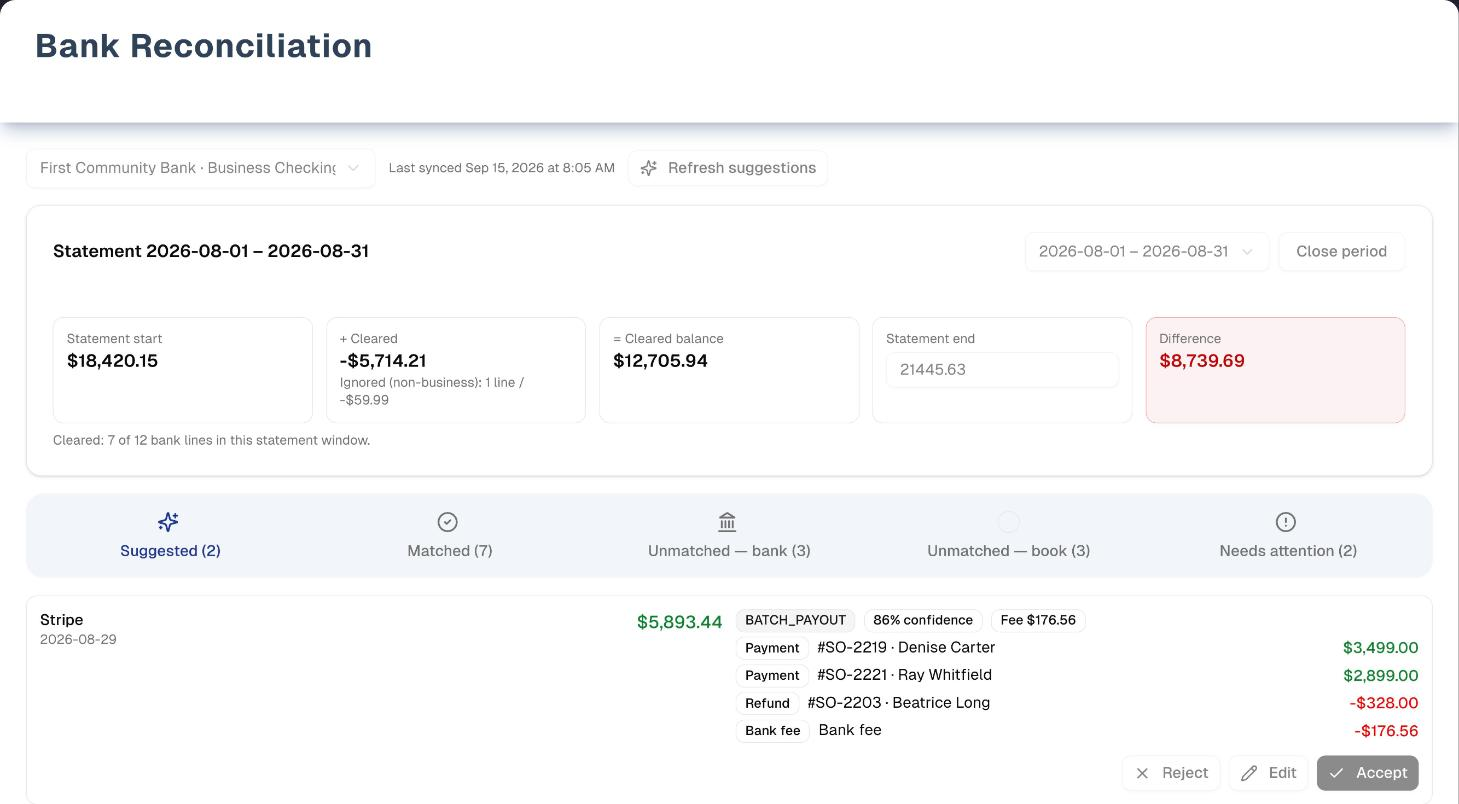
The screenshot is the demo: a sample August statement on a sample bank feed.
Before you start: connect a bank
- Bank feeds are an add-on. UpChannels switches it on for your store, on any plan. With it off, this page shows a Bank feeds add-on card in place of the workspace. If your store still has a bank connected, the card adds that Plaid charges for it even though nothing is being imported, and gives the owner Disconnect a bank in Settings — the one way to reach the Bank Connections (Plaid) page while the add-on is off. There the connected banks are listed with a Disconnect button and nothing else.
- The owner connects the bank. With the add-on on and no bank yet, the owner sees Connect a bank in Settings, which opens Settings on Bank Connections. Everyone else sees "Ask your owner to connect a bank under Settings → Bank Connections."
- Mark the business account Primary. On Bank Connections, set your business account to Primary (reconciled) and personal or out-of-books accounts to Excluded. If you connect just one checking or savings account, it becomes Primary by itself — unless you had marked that account Excluded before, in which case your choice stands and nothing is promoted. Only one account per store can be Primary.
- The feed updates on its own. New bank activity arrives automatically, and the matcher runs after every sync. There is no "sync now" button.
Two banners are worth knowing:
- "Importing up to 24 months of history — matching improves as it completes." A newly connected account backfills, so early matching is thinner than it will be later.
- "Bank connection needs attention — reconnect it under Settings → Bank Connections. Syncing is paused; existing data stays usable." The bank wants a fresh login. The owner clicks the link and uses Reconnect on Bank Connections.
Step by step: reconcile a month
- Pick the account from the selector at the top. Each entry shows the bank, the account and its last four digits, with (Primary) after the Primary one. The page opens on the Primary account, and the last sync time sits next to the selector.
- In the Start reconciliation card, enter the Statement start date, Statement end date, Statement opening balance ($) and Statement closing balance ($) from your paper or PDF statement, then click Start reconciliation. After your first closed period, the start date is filled in as the day after the last one, and the opening balance is locked to the last closing balance.
- Work the tabs. They appear in this order, each with a count:
| Tab | What is in it | What you do |
|---|---|---|
| Suggested | Matches the matcher proposes but did not confirm on its own | Accept, Edit or Reject each one |
| Matched | Everything cleared in the window: confirmed and auto-matched lines, transfers, and lines you ignored | Unmatch or Restore if you got one wrong |
| Unmatched — bank | Bank lines with nothing matched to them | Build deposit (money in) or Match (money out), Record to books (the owner and managers), or Ignore |
| Unmatched — book | Payments and expenses you recorded that no bank line has cleared yet | Nothing to click: they clear when a bank line is matched to them |
| Needs attention | Lines the bank pulled back after they were matched, possible duplicates, payments with no usable payment method, and bank connection or account-setup warnings | Read only: handle duplicates from Unmatched — bank, re-match the freed payments from Unmatched — book, and connection warnings on Bank Connections |
- Watch the Difference tile: the statement closing balance minus the cleared balance. $0.00 (green) means the period ties out. You can correct the closing balance in the Statement end tile at any time while the period is open. The dates are fixed once the period is started — they decide which bank lines belong to it, so only the owner can change them, and the screen has no control for it.
- The owner clicks Close period. At $0.00 it simply closes. If a difference of up to $10.00 remains, the button reads Close with difference. It needs a Reason and posts the difference for you, Dr Cash / Cr Operating Expenses or Dr Operating Expenses / Cr Cash depending on the direction, so a closed period never silently swallows money. Over $10.00, the period cannot be closed until you find the rest.
- To start the next statement, click Start next statement on the closed period, or just carry on — closing already hands you the Start reconciliation card. The closed period's closing balance becomes the next opening balance.
Automatic matches. After every bank sync, the matcher confirms a match on its own only when it is very sure (90% or higher and clearly ahead of the next candidate), the amount agrees to the cent, and there is no processor fee. Those land straight in Matched as Auto-matched. Everything else waits in Suggested. Refresh suggestions re-runs the matcher over the open statement window. It is hidden when you view a closed period.
Matching a deposit that covers several sales
A card processor pays out one lump for many sales, minus its fee. Build deposit (on a money-in line) and Match (on a money-out line) open the same Match bank line dialog:
- Add the book entries the line settles. Build deposit starts the list filtered to CASH entries, so for a card payout switch the filter to All methods (or CARD / PROCESSOR). Search by order number, customer or amount, typing the amount as it is shown (for example "1,250.00").
- The dialog keeps a running Residual vs bank amount: whatever is still unexplained.
- Pick the Processor fee option that is true for your books, and enter the Fee amount ($):
- No fee: the amounts already agree.
- Post fee journal (Dr Fees / Cr Cash): the fee has not been recorded anywhere yet.
- Link an existing expense: you already recorded the fee as an expense, so point at it instead of counting it twice.
- If a leftover of $10.00 or less remains, you can tick Write off … as a cash over/short adjustment.
- Click Confirm match once the residual is $0.00 or written off.
When you Accept a suggestion that carries a fee, a Processor fee dialog asks the same question: post a fee journal (Dr Merchant Processing Fees / Cr Cash), or link an expense you already recorded.
Recording a bank line you never wrote down
Record to books turns a bank line into a real entry and clears it in one step. The amount and date always come from the bank line. It writes into your books, so it is for the owner and managers; everyone else can still match a line to something already recorded, or ignore it.
| Type | When | What it asks for |
|---|---|---|
| Expense | Money-out lines only | Category (required), Vendor, Description (filled in from the bank line) and Payment method (Bank Transfer by default). Creates an expense in Expenses, already Approved in the name of whoever recorded it and not reimbursable. It is the one expense that skips review, which is why only an owner or manager can record one: the money has already left the bank, so there is nothing to approve. Because it lands Approved, changing its amount, date, category or payment method afterwards takes an owner or manager other than the person who recorded it |
| Income | Money-in lines only | An Income account (Other Income by default) and a Memo |
| Transfer | Any line | Either pair it with the equal and opposite line in another connected account (within 2 days), or book it one-sided against a Counterpart account: Owner Draw by default for money out, Owner Contribution for money in |
What a match holds on to. While a match is confirmed or automatic, the thing at the other end of it — a payment, the order behind a refund, an expense, or the journal entry a recorded income or transfer wrote — cannot be deleted anywhere in UpChannels. The attempt is refused with "This … has been matched to a bank line (…). Unmatch it under Bank Reconciliation first." A match the matcher only suggested holds nothing: reject it or ignore it and the row deletes as usual.
Ignore is for lines that are not business at all ("e.g. Personal purchase on the business card"). The reason is optional. It shows on the ignored line and in the close summary. An ignored line still counts toward the cleared balance, and you can Restore it from the Matched tab while the period is open — or, in a closed period, on a line marked Correction, where the owner can still restore it.
Closed periods stay closed
Once a period is closed, its bank-line buttons are greyed out. Only the owner can still reverse a match inside it. Unmatch opens Unmatch in a closed period, which needs a reason. Reverse & reopen posts a dated reversing journal entry instead of editing history and sends the line back to Unmatched — bank. What happens to the period depends on whether the next one has been started:
- No later period yet. This one reopens (marked Reopened), so you can fix it and close it again.
- A later period is already open. An account can only have one period open at a time, so this one stays Closed and the reversal is recorded as a correction. That one bank line is marked Correction: the owner can match it or ignore it again right here, so the closed period can be made to tie out. Any fee or difference the new match carries is dated today, not back inside the closed month, and the moment the line is matched it is locked again with the rest of the period. Ignoring it instead keeps the Correction mark, so the owner can still press Restore on it under Matched & ignored and match it after all. If the reversed match was a transfer, both sides of it are marked, and only the owner can work on either side — for everyone else the marked line stays greyed out. If the period itself is later reopened (reversing another match in it when nothing after it is open), the mark goes and the line is treated like any other line in an open period. Record to books stays greyed out — a correction puts a match right, it does not add a new expense or income to a closed month.
Tips
- Reconcile the Primary account. Mark personal cards and accounts Excluded. Their lines are only paired as transfers, never matched to sales or expenses.
- Work Suggested first. It is the quickest way to clear most of the month.
- When the difference will not close, look at Unmatched — book first: deposits in transit, uncashed checks, or a payment recorded with the wrong amount.
- Pending lines have not posted at the bank yet and can still change.
- The note "Bank reports … as of last sync" under the statement title is a sanity check on the closing balance you typed. The statement, not the bank's live balance, is what counts.
Troubleshooting
- I closed the period — what now? The page moves straight to the Start reconciliation card for the next statement. If you have gone back to look at a closed period, Start next statement in its header brings the card back. When a colleague has already started the next period, that button reads Go to the open period instead, because an account can only have one period open at a time.
- There is no Close period button. Only the owner sees it, and only on the account's open (or reopened) period.
- Close with difference is greyed out. Type a Reason, or, if the difference is over $10.00, keep matching, record the missing lines, or correct the statement balance.
- Confirm match is greyed out. Add at least one entry and get the residual to $0.00 (or tick the write-off). Enter a fee above $0.00 when a fee option is chosen, and pick the expense when linking one.
- A payment is not in the Build deposit list. Change the filter from CASH to All methods. The list shows at most 50 entries and only reaches back 14 days before the statement start. Payments by store credit, gift card, financing, loyalty points or "Other", cash-paid expenses, and payments still pending never appear.
- The buttons on Unmatched — bank are greyed out. You are viewing a closed period. The one exception is a line marked Correction, which the owner can match or ignore to put a reversed match right; for everyone else that line is greyed out too.
- Accept and Edit are greyed out on Suggested. Same reason: the suggestion is on a bank line inside a closed period. Reject still works, because clearing a proposal changes no total.
- "Only one account can be Primary…" Set the current Primary account to Unassigned or Excluded first. Disconnecting a bank releases the Primary place its account held, so a bank you have disconnected never keeps it. An Excluded account stays excluded after a disconnect, and stays excluded if you reconnect that bank: its imported lines are kept, and Excluded is what keeps them out of matching against sales and expenses. Nothing promotes an Excluded account on its own.
What's next
- Where the takings come from: Accept Payments
- Every payment and refund, day by day: Transactions
- Expenses you recorded (and ones you record from the bank feed): Expenses
- The statements this feeds: Reports → Assets & Liabilities
Detailed reference
Every button, icon, field and message on this page, for when you need the exact detail. Each panel starts closed — open the one you need.
Page header and toolbar
Before the workspace appears. These screens keep the page title and the Demo button; only the workspace underneath changes.
| Control | Where | What it does | Notes |
|---|---|---|---|
| Spinner | Centre of the page | Shown while your bank connections load | — |
| Red box with the error (e.g. "Failed to load bank connections" or "No organization context") and Retry (circular-arrows icon) | Top of the page | Retry loads the bank connections again | Only when the first load failed |
| Card Bank feeds add-on (bank-building icon): "Import bank and card transactions automatically and reconcile them against your books, tied to your orders and expenses." / "Bank reconciliation is an optional add-on that isn't enabled for this organization yet. Contact UpChannels to enable bank feeds and reconciliation for your store." | Centre | Information, plus See a demo | Add-on is off. Only UpChannels can switch it on. Any plan can have it |
| See a demo (Play icon) | Inside the add-on card and inside the connect-your-bank card | Opens the demo with sample data and a guided tour | Everyone, with or without the add-on |
| "Plaid charges for each bank still connected to your store, even though nothing is being imported." | Inside that card | — | Only while your store still has a bank connected |
| Disconnect a bank in Settings | Inside that card | Opens the Bank Connections (Plaid) settings page, where each connected bank has a Disconnect button | Owner only, and only while a bank is still connected. It is the only link that reaches that page while the add-on is off |
| "Ask your owner to disconnect any bank you no longer use under Settings → Bank Connections." | Inside that card | — | Shown instead to everyone who is not the owner, while a bank is still connected |
| Card Connect your bank to start reconciling: "Reconciliation compares your bank's transaction feed against the sales, refunds, and expenses recorded here." | Centre | — | Add-on on, but no bank connected (or every bank was disconnected) |
| Connect a bank in Settings | Inside that card | Opens the Bank Connections (Plaid) settings page | Owner only |
| "Ask your owner to connect a bank under Settings → Bank Connections." | Inside that card | — | Shown to everyone who is not the owner |
| "403 - Forbidden" / "You do not have permission to view this page. Contact your organization owner." | Whole page | Blocks the page | The owner has hidden Bank Reconciliation from your menu. See Team & Menu Visibility |
Header and account bar (once a bank is connected):
| Control | Where | What it does | Notes |
|---|---|---|---|
| Title Bank Reconciliation and "Match your bank feed against recorded sales, refunds, and expenses — then close the statement period." | Page header | Heading only | — |
| Demo (Play icon, amber) | Header, right | Opens the demo with sample data and a guided tour | Everyone. See Demo mode |
| Account selector (placeholder "Choose a bank account") | Toolbar, left | Switches the page to that account: loads its statement periods and opens its open period, or shows the Start reconciliation card | Each option reads bank · account ••last four digits, plus " (Primary)" for the Primary account. Lists every account on every connected bank, including Excluded and Unassigned ones. Opens on the Primary account, else the first one. Accounts on a disconnected bank are not listed |
| "Last synced …" or "Not synced yet" | Toolbar, next to the selector | When the bank last synced successfully | Date and time in your browser's format |
| Refresh suggestions (sparkle icon; spinner while it runs) | Toolbar, right | Re-runs the matcher over the statement window: clears the current unconfirmed suggestions there and proposes new ones, and may auto-match lines it is sure about. Never touches confirmed or auto-matched lines or closed periods. Handles up to 200 bank lines per run | Only on the account's open (or reopened) period, hidden on closed ones. Greyed out while running. Anyone who can open the page. A failure shows in a red banner |
| Red banner "Bank connection needs attention — reconnect it under Settings → Bank Connections. Syncing is paused; existing data stays usable." | Under the toolbar | The underlined words open Settings on Bank Connections, where the owner uses Reconnect | The bank wants a fresh sign-in |
| Blue banner "Importing up to 24 months of history — matching improves as it completes." | Under the toolbar | Information only | The first import of history is still running |
| Red banner with an error (e.g. "Failed to load sessions", "Failed to load reconciliation data", "Failed to generate suggestions") | Under the toolbar | Shows a later load or refresh error | Reload the page |
| Spinner under the tab bar | Below the tabs | The tab contents are reloading | — |
| Amounts | Everywhere on the page | Money into the bank is positive and green; money out is negative and red | — |
Tab bar (appears once a statement period is selected):
| Control | Where | What it does | Notes |
|---|---|---|---|
| Suggested (…) (sparkle icon, blue) | 1st tab, opens by default | Matcher proposals waiting for a decision | The page always opens on this tab |
| Matched (…) (tick-in-circle icon, green) | 2nd tab | Everything cleared | Count = match cards + ignored lines |
| Unmatched — bank (…) (bank icon, orange) | 3rd tab | Bank lines with no match | — |
| Unmatched — book (…) (empty circle, purple) | 4th tab | Book entries in the window no bank line has cleared | — |
| Needs attention (…) (alert icon, rose) | 5th tab | Warnings | Count = lines the bank pulled back (Stale) + possible duplicates + entries that need classification, plus 1 if the account has no book scope, plus 1 if the bank needs a fresh sign-in |
Section: Start reconciliation card
Shown when no statement period is selected: the account has never been reconciled, every period is closed (including right after you close one), or you clicked Start next statement on a closed period.
Fields:
| Field | Required | Default | Rules and error text |
|---|---|---|---|
| Statement start date (date) | Yes | The day after the last closed statement ended, if there is one | Amber hint when the date does not carry straight on from the last closed statement. Later: "Leaves a gap: … would not be reconciled.", naming the day or the span left out. Earlier, or the closing day itself: "Overlaps the prior statement, which ended … and is closed. Bank lines inside that closed period can't be matched in this session." Both are warnings only — the date is still yours to set |
| Statement end date (date) | Yes | Empty | Must be on or after the start date |
| Statement opening balance ($) | Yes | Empty for the first statement; after that the last closing balance | Locked after the first closed statement, with "Carried forward from the prior closed statement." |
| Statement closing balance ($) | Yes | Empty | Accepts $, commas and negative amounts |
Buttons:
| Control | Where | What it does | Notes |
|---|---|---|---|
| Card title Start reconciliation and "Enter the statement period and the opening/closing balances from your paper or PDF bank statement — the statement, not the app, is the anchor." | Session panel | Heading only | — |
| Start reconciliation (play icon; spinner while saving) | Card, bottom | Opens the statement period. Message "Reconciliation session started", then the balance strip and tabs appear | Greyed out until both dates are set, the end is not before the start, and both balances are numbers. Anyone who can open the page. The dates and opening balance cannot be changed afterwards |
Section: Statement card and balance strip
| Control | Where | What it does | Notes |
|---|---|---|---|
| "Statement … – …" | Card title | The period's dates, as year-month-day | — |
| Closed (padlock icon) | After the title | The period is closed | — |
| Reopened (amber) | After the title | An owner reversed a match in this closed period, so it is open again | Behaves like the open period: Close period and Refresh suggestions are back. Closing it again replaces any earlier write-off |
| "Bank reports … as of last sync" | Under the title | Sanity check only. The statement closing balance you typed is what counts | Shown when the bank's live balance differs from your statement closing balance |
| Statement-period picker (placeholder "Statement period"); options "… – …", with " (closed)" on closed ones | Card header, right | Switches the page to another period of this account, e.g. to look back at a closed month | Shown when the account has two or more periods, and on a closed period even if it is the only one. A period you pick here stays picked while you work; it has no "new period" option — Start next statement is that button |
| Start next statement (Play icon) / Go to the open period | Card header, right, on a closed period | Start next statement brings up the Start reconciliation card for the next statement, with the dates and opening balance already filled in from this one. It reads Go to the open period and switches to it when someone has already started the next period | Anyone who can open the page, not just the owner. Hidden in the demo |
| Close period | Card header, right | Opens Close statement period | Owner only, and only on the account's open or reopened period. Solid when the Difference is $0.00, outlined otherwise. Never greyed out |
| Statement start | Strip, 1st tile | The period's opening balance | Read only |
| + Cleared | Strip, 2nd tile | Total of every bank line in the window that is matched, a transfer, or ignored | Extra line "Ignored (non-business): … line(s) / …" when you have ignored lines |
| = Cleared balance | Strip, 3rd tile | Statement start + Cleared | Read only |
| Statement end (text box) | Strip, 4th tile | The statement closing balance. Change it and click or tab away to save | Editable on the open or reopened period by anyone who can open the page, plain text on closed ones. No message on success; "Failed to update the balance" (or the server's reason) on failure. Text that is not a number is ignored |
| Difference | Strip, 5th tile | Statement end − Cleared balance | Green at $0.00, red otherwise |
| "Cleared: … of … bank lines in this statement window." | Under the strip | Progress count | — |
Tab: Suggested
One card per proposed match: the bank line on the left, the book entries it would clear on the right.
| Control | Where | What it does | Notes |
|---|---|---|---|
| "No suggestions right now — use Refresh suggestions after new bank activity syncs." | Tab body | Empty state | — |
| Bank line: name (merchant, else the bank's description, else "Bank transaction"), date, "· Check #…" for checks, Pending (grey) and Possible duplicate (red) badges, amount | Card, left | — | — |
| Match-type badge: One to one, Batch payout, Split, Refund, Transfer or Manual | Card, right | One payment to one line; a processor payout of many sales; a split; a refund; a transfer between your own accounts; built by hand | — |
| …% confidence | Card, right | How sure the matcher is | Solid badge at 90% or more, outlined below |
| Fee … | Card, right | A processor fee netted out of this payout | Accept will ask how to book the fee |
| Write-off … | Card, right | A small leftover the matcher proposes to write off | Accepting the suggestion accepts the write-off |
| Entry list: type badge (Payment, Refund, Order refund, Expense, Bank fee, Adjustment or Booked line), label ("#order · customer", else a description or reference), amount | Card, right | What the line would clear | — |
| Reject (X icon) | Card, bottom, 1st | Rejects the suggestion. The line moves to Unmatched — bank. Message "Suggestion rejected" | No confirmation. The matcher will not propose that same set of entries for the line again |
| Edit (pencil icon) | Card, bottom, 2nd | Opens Edit match, pre-filled with this suggestion | Greyed out on a closed period, like Accept |
| Accept (tick icon; spinner while saving) | Card, bottom, 3rd | Without a fee: confirms straight away ("Match confirmed") and the line moves to Matched. With a fee: opens Processor fee first | The three buttons are greyed out while that card is saving. On a closed period Accept and Edit are greyed out, with "This bank line is in a closed statement period, so the suggestion can't be accepted or edited. Reject still works. Reverse the period's match from the Matched tab first if the books need correcting." under the card. Reject stays available — it only clears the proposal. On a line marked Correction both are offered to the store owner; everyone else sees "Released for correction: the statement period stays closed, so only the store owner can accept or edit this suggestion." |
Tab: Matched
| Control | Where | What it does | Notes |
|---|---|---|---|
| "Nothing has been matched in this statement window yet." | Tab body | Empty state | — |
| Match card: bank line (left), badges and cleared entries (right) | Tab body | One card per confirmed or auto match | — |
| Auto-matched / Matched | Card, right | Auto-matched: UpChannels confirmed it on its own (exact amount, high confidence, no fee). Matched: a person confirmed it | — |
| Match-type badge (One to one, Batch payout, Split, Refund, Transfer, Manual) | Card, right | See Suggested | — |
| Fee … / Write-off … | Card, right | The fee or write-off booked with the match | When not zero |
| "Transfer pair: … · … · …" | Card, right, in place of the cleared entries | On a transfer between two of your own accounts: the other leg's date, description and amount, and the account it is in when that account is connected too | The card always shows this account's line on the left, whichever leg the match was built from. If the other leg can't be read the card falls back to the cleared-entry list |
| Cleared entries: type badge, label, amount | Card, right | What the line cleared | A line recorded with Record to books as Income or a one-sided Transfer shows one Booked line entry |
| Unmatch (undo-arrow icon; spinner while working) | Card, bottom right | Open period: removes the match at once, with no confirmation. The line returns to Unmatched — bank (for a transfer, both lines do). Any fee journal, write-off, or income or one-sided transfer entry the match posted is removed. The payments and expenses themselves stay (including an expense created with Record to books). Message "Match removed". Closed period: opens Unmatch in a closed period | Open period: anyone who can open the page. Closed period: owner only; others see no Unmatch button. An unmatched line can be proposed or auto-matched again after the next sync or Refresh suggestions |
| Ignored row (dashed border): Ignored badge, bank line, "Reason: …" | Tab body | A non-business line you ignored. It still counts toward Cleared | Reason line only when one was entered |
| Restore | Ignored row, right | Un-ignores the line: it goes back to Unmatched — bank. Message "Line restored to Unmatched" | No confirmation. Hidden on closed periods — except on a line marked Correction, where it is offered to the store owner, with "Released for correction — the store owner can still restore this line and match it." under the row. Otherwise anyone who can open the page |
Tab: Unmatched — bank
| Control | Where | What it does | Notes |
|---|---|---|---|
| "Every bank line in this window is accounted for." | Tab body | Empty state | — |
| Row: bank line (name, date, Check #, Pending / Possible duplicate badges) and amount | Tab body | — | Possible duplicates show here and in Needs attention |
| Correction badge (amber outline) and "Released for correction: the statement period stays closed, only the store owner can match or ignore this line, and any fee or difference the new match carries is dated today rather than back inside the closed month." | Row | Marks a line whose match the owner reversed in a closed period that could not reopen. Both sides of a reversed transfer are marked | Only on those lines, and only while the period is still closed. It goes away as soon as the line is matched again, and also if the period is reopened later — then the line is an ordinary open-period line and its fees are dated on the line again. Ignoring the line keeps it, so Restore still works — see Matched & ignored |
| Build deposit (link icon) | Row, 1st button, money-in lines | Opens Match bank line with the entry list filtered to CASH | Greyed out on closed periods, except on a line marked Correction, and then only for the store owner |
| Match (link icon) | Row, 1st button, money-out lines | Opens Match bank line with the list on All methods | Greyed out on closed periods, except on a line marked Correction, and then only for the store owner |
| Record to books (notebook icon) | Row, 2nd button | Opens Record to books | The owner and managers only — for everyone else it is greyed out and a line under the list says so. Also greyed out on closed periods, including on a line marked Correction: new expenses and income are never added to a closed month |
| Ignore (crossed-out eye icon) | Row, 3rd button | Opens Ignore bank line | Greyed out on closed periods, except on a line marked Correction, and then only for the store owner |
Tab: Unmatched — book
Read only: this tab has no buttons.
| Control | Where | What it does | Notes |
|---|---|---|---|
| "Recorded in your books but not yet cleared against a bank line — deposits in transit, uncashed checks, or entries the bank never received." | Top of the tab | Explains the list | — |
| "Every in-window book entry has been cleared against the bank." | Tab body | Empty state | — |
| Row: label ("#order · customer", else description or reference), type badge (Payment, Refund, Order refund, Expense), date, payment-method badge (Cash, Card, Processor, Check, ACH, Zelle / Cash App, or red Needs classification), amount | Tab body | An entry leaves this list when a bank line is matched to it (from Suggested, Build deposit or Match, or an auto-match) | Only entries dated inside the statement window, by your store's time zone |
What counts as a book entry: completed payments, refunds and order refunds, and expenses that are not rejected, but only when the payment method can touch a bank. Card brands, debit, Apple Pay, Google Pay and Samsung Pay show as Card; payment gateways, PayPal and Venmo as Processor; Zelle and Cash App as Zelle / Cash App; ACH, bank transfer and wire as ACH. Never included: store credit, gift cards, loyalty points, trade-in credit, warranty claims, insurance payouts, barter, consignment, refund offsets, internal adjustments, the "Other" method, financing providers, and generic digital wallets. Expenses paid by cash, digital wallet or "Other" are left out; check, bank transfer, debit card and credit card expenses are included. Pending or processing payments appear once completed.
Tab: Needs attention
Read only: this tab has no buttons. Handle duplicates from Unmatched — bank, re-match a freed payment from Unmatched — book, and the connection and book-scope warnings on the Bank Connections page.
| Control | Where | What it does | Notes |
|---|---|---|---|
| "Nothing needs attention." | Tab body | Empty state | — |
| Red box "The bank connection needs attention — reconnect it under Settings → Bank Connections. Syncing is paused until then." | Top | Information (plain text, not a link) | The bank needs a fresh sign-in |
| Amber box "This account has no book scope yet — mark it Primary or Excluded under Settings → Bank Connections so matching knows what to reconcile." | Top | Information (plain text) | The account is Unassigned |
| Stale (red) row: the bank line, the amount, and "The bank removed this line on … after it was matched — its match was voided, and the payments or expenses it had cleared are back under Unmatched — book. Match them again, or leave them if the bank line is not coming back." | List | Tells you the bank took a line back out of its feed after you had matched it | Read only. The date is the day the line was withdrawn, in your store's time zone. The line no longer counts toward Cleared or "… of … bank lines", so a period that ties out still ties out |
| Possible duplicate (red) row | List | A posted bank line that looks like a twin of another | The same line has Match, Record to books and Ignore in Unmatched — bank |
| Book entry with a red Needs classification badge | List | A payment or expense whose payment method UpChannels cannot place on a bank rail (for example no method recorded). It is never proposed for matching | Also listed in Unmatched — book. Nothing on this page changes it |
Lines the bank withdraws (for example a pending charge that never posts): if the line was matched and the bank posted a replacement, the match quietly moves to the replacement and nothing is listed. If there is no replacement, the match is undone, its payments and expenses go back to Unmatched — book, and the withdrawn line is listed here as Stale so you know why. A withdrawn line is not counted in Cleared, in the bank-line count or in any other tab — it is history, not work.
Dialog: Processor fee
Opened by Accept on a suggestion that carries a fee.
| Control | Where | What it does | Notes |
|---|---|---|---|
| Title Processor fee and "This payout nets a … fee. Choose how to book it so it is not double-counted." | Header | — | — |
| "Confirming also accepts a … write-off for the remaining difference." | Under the header | — | Only when the suggestion carries a write-off |
| Post a fee journal (Dr Merchant Processing Fees / Cr Cash) (radio) | Body | Books the fee as a new journal entry | Chosen by default |
| Link an expense you already recorded for this fee (radio) | Body | Uses an existing expense as the fee instead of posting a new one | — |
| Expense picker (placeholder "Choose the recorded fee expense"); options "… · …" (label and amount) | Body | Picks that expense | Only with the Link option. Lists expenses from the window (and 14 days before it) not already cleared. If it is empty, the Link option cannot be confirmed |
| Cancel | Footer | Closes; nothing saved | — |
| Confirm match (spinner while saving) | Footer | Confirms the match with your fee choice. Message "Match confirmed" | Greyed out while saving, or when Link is chosen and no expense picked |
Dialog: Match bank line / Edit match
Opened by Build deposit or Match (title Match bank line) or by Edit on a suggestion (title Edit match). Description: "Select the book entries this bank line settles. The members must net to the bank amount within the fee and any accepted write-off."
Fields:
| Field | Required | Default | Rules and error text |
|---|---|---|---|
| Add book entry filter: All methods, Cash, Card, Processor, Check, ACH, Zelle / Cash App | — | Cash from Build deposit, All methods otherwise | Filters the entry list by payment method |
| Search (placeholder "Search order #, customer, amount…") | — | Empty | Matches the label, order number, reference and the amount as displayed: "1,250.00" finds $1,250.00, "1250" does not |
| Processor fee: No fee, Post fee journal (Dr Fees / Cr Cash), Link an existing expense | — | No fee (Edit of a suggestion with a fee: Post fee journal, with the fee filled in) | — |
| Fee amount ($) (placeholder "0.00") | With a fee option | Empty | Must be above $0.00. Once the selection includes money-in entries, a hint shows "Typical fee band: … – …" (0.5% to 4.5% of those entries), with " (outside the usual range)" in amber when the fee falls outside it. The hint never blocks |
| Fee expense to link (placeholder "Choose the already-recorded fee expense") | With Link an existing expense | Empty | Required to confirm |
| Write off … as a cash over/short adjustment (checkbox) | — | Off | Only when the residual is not zero and is $10.00 or less |
Buttons and display:
| Control | Where | What it does | Notes |
|---|---|---|---|
| Bank line: name, date, amount | Top box | The line you are matching | — |
| Selected book entries: type, label, amount; "No entries selected yet." when empty | Section 1 | The entries this line will clear | The type reads Payment, Refund, Order refund or Expense. Edit pre-fills the suggestion's entries (its fee goes into the fee fields instead) |
| X (aria-label Remove entry) | Each selected entry, right | Takes that entry out of the match and back into the list | — |
| Entry list rows (plus icon): label, type badge, date, method badge, amount | Section 2 | Click a row to add it to Selected | At most 50 shown, so narrow with the filter or search. Leaves out entries already selected or cleared by another match. Covers the statement window plus 14 days before the start. Empty: "No unmatched book entries found for this filter." |
| "Σ members", "− Fee", Residual vs bank amount | Summary box | Live tie-out: entries − fee − bank amount | Residual green at $0.00, red otherwise |
| "The residual exceeds the $10.00 write-off cap — adjust the member set or the fee." (red) | Summary box | — | Residual over $10.00: cannot be saved until fixed |
| Cancel | Footer | Closes; nothing saved | — |
| Confirm match (spinner while saving) | Footer | Saves the match. Message "Match confirmed" and the line moves to Matched | Greyed out until at least one entry is selected, the residual is $0.00 (or written off), the fee is above $0.00 when a fee option is chosen, and an expense is picked for Link. Editing a suggestion without changing its entries keeps its match type; otherwise it is saved as MANUAL |
Dialog: Record to books
Opened by Record to books on an Unmatched — bank line. Description: "Books this bank line and clears it in one step. The amount (…) and date (…) come from the bank line itself." The bank line (name, date, amount) is pinned at the top.
Fields:
| Field | Required | Default | Rules and error text |
|---|---|---|---|
| Type tabs Expense / Income / Transfer | Yes | Expense for money out, Income for money in | Expense is greyed out on money-in lines, Income on money-out lines. Transfer is always available |
| Category (required) (Expense; placeholder "Choose an expense category") | Yes | Empty | Options "name — description": Fuel, Parts, Meals, Tools, Travel, Office Supplies, Vehicle Maintenance, Training & Education, Payroll & Wages, Other |
| Vendor (Expense) | No | Empty; placeholder shows the bank's merchant name, or "Vendor name" | — |
| Description (Expense) | No | The bank line's merchant or name | — |
| Payment method (Expense) | — | Bank Transfer | Bank Transfer, Check, Debit Card, Credit Card, Cash, Digital Wallet, Other — the names Expenses shows for the same methods |
| Income account (Income) | — | Other Income (default) | Plus your store's active revenue accounts |
| Memo (Income; placeholder "e.g. Interest income, vendor rebate") | No | Empty | — |
| Transfer type (Transfer) | — | "One-sided (owner draw / contribution or another balance account)" | Or "Pair with: … · … · …": an equal, opposite line in another connected account dated within 2 days. When there is none: "No opposite-sign line of the same amount was found in your other connected accounts." |
| Counterpart account (Transfer, one-sided only) | — | "Owner Draw (default)" for money out, "Owner Contribution (default)" for money in | Plus your store's active asset and equity accounts |
| Memo (Transfer) | No | Empty | — |
Buttons:
| Control | Where | What it does | Notes |
|---|---|---|---|
| Cancel | Footer | Closes; nothing saved | — |
| Record (spinner while saving) | Footer | Expense: creates an approved expense and clears the line. Income: posts Dr Cash / Cr the income account. One-sided transfer: posts a journal between Cash and the counterpart account. Paired transfer: clears both lines. Message "Recorded to the books"; the line moves to Matched | Greyed out while saving, or on Expense until a Category is chosen |
Dialog: Ignore bank line
| Control | Where | What it does | Notes |
|---|---|---|---|
| Title Ignore bank line and "Marks “…” as non-business. It still counts toward the cleared balance and is listed in the close summary; you can restore it any time while the period is open — and on a line marked Correction, the store owner can restore it even though the period is closed." | Header | — | — |
| Reason (placeholder "e.g. Personal purchase on the business card") | Body | Shown on the ignored row and in the close summary | Optional |
| Cancel | Footer | Closes | — |
| Ignore line (spinner while saving) | Footer | Marks the line ignored. It moves to Matched as an ignored row, and any suggestion on it is dropped. Message "Line marked as non-business" | Greyed out only while saving |
Dialog: Unmatch in a closed period
Opened by Unmatch on the Matched tab while viewing a closed period. Owner only: others do not see the button there.
| Control | Where | What it does | Notes |
|---|---|---|---|
| Title Unmatch in a closed period and "This statement period is closed. Unmatching posts a dated reversing journal entry — history is never silently edited — and records an audit event. A reason is required. If no later period has been started, this one reopens. If one has, it stays closed and the bank line is marked Correction: you can match it again here, and any fee or difference that comes with the new match is dated today rather than back inside the closed month." | Header | — | — |
| Reason (required) (placeholder "Why is this closed-period match being reversed?") | Body | Recorded with the reversal | Required |
| Cancel | Footer | Closes | — |
| Reverse & reopen (red; spinner while working) | Footer | Posts reversing journal entries for anything the match booked, removes the match and returns the line to Unmatched — bank. With no later period open it also reopens this one (Reopened): "Match reversed — this statement period is open again" | Greyed out until a reason is typed. If a later period for this account is already open, this one stays Closed and the message says so: "Match reversed. A later period is already open, so this one stays closed: the reversal was recorded as a correction, and the bank line is marked Correction so you can match it again here." |
Dialog: Close statement period
Opened by Close period (owner only).
| Control | Where | What it does | Notes |
|---|---|---|---|
| Title Close statement period and "… – …. Closing locks the period; the closing balance carries into the next statement." | Header | — | — |
| Cleared balance, Statement end, Difference | Summary box | The numbers you are closing on | Difference green at $0.00, red otherwise |
| "Ignored (non-business): … line(s) / …" and a list "date · name — reason amount" | Body | Every ignored line, for a last review | Only when lines are ignored |
| "The difference is zero — this period is fully reconciled." (green) | Body | — | Difference $0.00 |
| "The difference is not zero. Closing now posts an audited … write-off of … (cap $10.00)." (amber) | Body | Explains the write-off | Difference not zero and $10.00 or less. The first gap names the entry that applies: "Dr Operating Expenses / Cr Cash" when the difference is negative, "Dr Cash / Cr Operating Expenses" when it is positive. The amount is shown without a minus sign |
| Reason (required) (placeholder "Why is this period being closed with a difference?") | Body | Recorded on the write-off entry | Only when there is a difference within the cap |
| "The difference exceeds the $10.00 write-off cap. Keep matching, record missing entries, or fix the statement balances before closing." (red) | Body | — | Difference over $10.00: the period cannot be closed |
| Cancel | Footer | Closes | — |
| Close period / Close with difference (spinner while saving) | Footer | Locks the period. Message "Statement period closed — start the next one when your next statement arrives". The panel then moves off the locked period and shows the Start reconciliation card for the next statement, with the dates and opening balance filled in | Greyed out over the cap, or when a reason is needed and empty. The label is Close period at $0.00, Close with difference otherwise |
Sub-page: Bank Connections (Plaid)
Open it from the Bank Connections entry in the Settings menu, or from this page: Connect a bank in Settings when the add-on is on and no bank is connected, the underlined "Settings → Bank Connections" in the reconnect banner, and Disconnect a bank in Settings on the add-on card when the add-on is off and a bank is still connected. Like the rest of Settings it opens for the store's owner and the store’s only active person; everyone else sees "Redirecting..." and lands on Shortcuts. Opening it is not the same as using it: the store’s only active person, when not the marked owner, sees the controls greyed out and no Disconnect button. The line that says why, "Only the organization owner can manage bank connections.", belongs to the Connect a bank card, so while the add-on is off — where there is no such card — the controls are simply missing, with nothing on screen to explain it.
| Control | Where | What it does | Notes |
|---|---|---|---|
| "Loading bank connections…" (spinner) | Page | Loading | — |
| Heading Bank Connections (Plaid) (bank icon) and "Securely link your business bank accounts to import transactions and reconcile them against your sales, purchases, and expenses." | Top | Heading only | — |
| Red box with the error and Retry | Under the heading | Retry reloads the list | "Failed to load bank connections." or the server's reason |
| Card Bank feeds add-on: "Import bank and card transactions automatically and reconcile them against your books, tied to your orders and expenses." / "Bank connections are an optional add-on that isn't enabled for this organization yet. Contact UpChannels to enable bank feeds and reconciliation for your store." | Body | Information only | Add-on off. With banks still connected it adds "Nothing is being imported from the banks below, but Plaid charges for each one until it is disconnected.", and a Connected banks list follows |
| Amber "Bank feeds are enabled for your organization, but Plaid isn't configured on this server yet. Connecting a bank is unavailable until setup is complete." | Body | — | Connect a bank is greyed out |
| Card No banks connected: "Connect your first bank account to start importing transactions for reconciliation." | Body | — | No banks connected |
| Bank card: bank name and status badge Connected, Reconnect required, Access revoked or Connection error | One card per bank | — | Disconnected banks drop off the page |
| "Last synced …" / "No successful sync yet" | Bank card | — | — |
| Amber box "The bank needs you to sign in again before syncing can continue." with Reconnect (spinner while working) | Bank card | Opens Plaid's own sign-in window to refresh the bank login. Success: "Bank sign-in refreshed. The connection status will update shortly." | Reconnect required only. Owner only (greyed out for others) |
| Account row: "name •••• last four" and the account type (e.g. depository, credit); "No accounts were returned for this connection." when none | Bank card | — | — |
| Book scope picker: Primary (reconciled), Excluded, Unassigned | Each account row, right | Primary: the account you reconcile. Excluded: personal or out-of-books; its lines are only paired as transfers, never matched to sales or expenses. Unassigned: flagged in Needs attention | Owner only. Only one Primary per store: "Only one account can be Primary. Set the current Primary account to Unassigned or Excluded first." Other failures: "Could not update the account scope." Disconnecting a bank releases the Primary place its account held, so a bank you disconnected never blocks a new Primary. Shown as a plain label, with no picker, while the add-on is off |
| "Reconciliation runs against the Primary account. Mark personal or out-of-books accounts as Excluded." | Bank card, bottom | — | With the add-on off it reads "Bank feeds are off for your store, so nothing is imported from this bank. Plaid still charges for it until you disconnect it." |
| Disconnect (spinner while working) | Bank card, bottom right | Opens Disconnect …?: "This stops importing new transactions from this bank. Transactions already imported are retained, along with your reconciliation history. You can reconnect the bank at any time." with Cancel and Disconnect (red) | Owner only (hidden for others). Still offered once the add-on is switched off, so Plaid's charges can always be stopped — and there the last sentence reads "Plaid stops charging for it. To connect a bank again, ask UpChannels to turn bank feeds back on.", because that page offers no Connect a bank and no Reconnect. Success: "… disconnected. Imported transactions were kept, and its account no longer holds the Primary place, so a new bank can take it." Failure: "Could not disconnect the bank." Afterwards the bank's accounts no longer appear on the Reconciliation page |
| Card Connect a bank: "Link a business checking, savings, or credit card account through Plaid. Your credentials stay with Plaid and your bank — UpChannels only receives transaction data." | Bottom | — | Hidden while the add-on is off |
| Connect a bank (spinner while working) | Connect card | Opens Plaid's own window to pick a bank and sign in. Success: "Bank connected. Transactions will start importing shortly." If the store then has no Primary and exactly one checking or savings account, that account becomes Primary — unless that account is one you had marked Excluded, which is left as it is. Reconnecting a bank you had before keeps an Excluded account excluded. It does not bring back Primary: disconnecting released that place so another bank could take it, so set it again unless the rule above has already done it for you | Greyed out for non-owners, when Plaid isn't configured, or while a connection is in progress. Messages: "This bank is already connected.", "Plaid Link closed with an error. Please try again.", "Could not start Plaid Link.", "Could not finish connecting the bank." |
| "Only the organization owner can manage bank connections." | Connect card | — | Non-owners. Part of the Connect card, so it is not shown while the add-on is off |
Messages you may see
On the page:
| Message | When it appears | What to do |
|---|---|---|
| "Reconciliation session started" | Start reconciliation worked | — |
| "Failed to start the session" | Starting failed with no reason given | Check the dates and balances and try again |
| "Failed to update the balance" | Saving the Statement end tile failed | Try again |
| "Match confirmed" | Accept, or Confirm match in Processor fee or Match bank line, worked | — |
| "Failed to confirm the match" | Accept failed with no reason given | Reload the page |
| "Suggestion rejected" | Reject worked | The line is now in Unmatched — bank |
| "Failed to reject the suggestion" | Reject failed | Try again |
| "Failed to apply the match" | Match bank line / Edit match could not save | Check the residual and fee |
| "Recorded to the books" | Record worked | — |
| "Failed to record the bank line" | Record failed | Try again |
| "Line marked as non-business" | Ignore line worked | — |
| "Failed to ignore the line" | Ignore failed | Try again |
| "Match removed" | Unmatch in an open period worked | — |
| "Failed to unmatch" | Unmatch failed | Reload and try again |
| "Line restored to Unmatched" | Restore worked | — |
| "Failed to restore the line" | Restore failed | Try again |
| "Match reversed — this statement period is open again" | Reverse & reopen worked and the period reopened | — |
| "Match reversed. A later period is already open, so this one stays closed: the reversal was recorded as a correction, and the bank line is marked Correction so you can match it again here." | Reverse & reopen worked, but a later period is open | Match the line on Unmatched — bank; it is locked again afterwards. Ignoring it instead is not final — the mark stays and Restore brings it back |
| "Only the store owner can match a line marked Correction, including as the other half of a transfer." / "Only the store owner can ignore or restore a line marked Correction." | Someone other than the owner tried to match, ignore or restore a line marked Correction — including pairing an open-period line with a marked line as the other half of a transfer | Ask the owner. Reversing the match was owner-only, so putting it right is too |
| "Statement period closed — start the next one when your next statement arrives" | Closing worked | Nothing: the Start reconciliation card for the next statement is already on screen |
| "Failed to close the session" | Closing failed with no reason given | Try again |
| "Leaves a gap: … would not be reconciled." | Statement start date is later than the day after the last closed statement. One day names that day; a longer gap names the first and last day left out | A warning only. Move the start date back to cover the gap, or carry on if you meant to skip it |
| "Overlaps the prior statement, which ended … and is closed. Bank lines inside that closed period can't be matched in this session." | Statement start date is on or before the day the last closed statement ended | A warning only. Lines inside the overlap stay locked to the closed statement, so nothing in that stretch can be matched here. Start the day after the last close, or reopen the earlier period first |
| "Carried forward from the prior closed statement." | The opening balance is locked | — |
| "Bank reports … as of last sync" | The bank's live balance differs from your statement closing balance | A sanity check only |
| "Typical fee band: … – … (outside the usual range)" | The fee in Match bank line is unusual for the payout size | A warning only |
| "The residual exceeds the $10.00 write-off cap — adjust the member set or the fee." | Match bank line leftover is over $10.00 | Add or remove entries or change the fee |
| "The difference exceeds the $10.00 write-off cap. Keep matching, record missing entries, or fix the statement balances before closing." | Closing with more than $10.00 unexplained | Keep working the tabs |
| "No unmatched book entries found for this filter." | The Match bank line list is empty | Switch to All methods or change the search |
| "No opposite-sign line of the same amount was found in your other connected accounts." | No transfer pair available | Use One-sided |
From the server:
| Message | When it appears | What to do |
|---|---|---|
| "A statement period is already open for this account. Pick it from the statement-period picker and finish it first." | Starting a period while another one is open or reopened (for example, a colleague just started one) | Pick that period from the statement-period picker and finish it. From a closed period, Go to the open period takes you straight there |
| "A statement period with this start date already exists for this account. Pick other dates." | A period with the same start date already exists | Pick other dates |
| "This statement period has just been closed. Reload the page and try again." | Editing Statement end on a period someone else just closed | Reload |
| "Only the store owner can change a started period's statement dates." | Something asked the server to move a started period's statement dates, and you are not the marked owner | The dates cannot be changed from the screen. Ask the owner |
| "This payment / order / expense / journal entry has been matched to a bank line (…). Unmatch it under Bank Reconciliation first." | Seen elsewhere in the app — on a payment, an order, an expense or a recorded income that a confirmed or automatic match is still clearing | Come back here, Unmatch the line, then delete it. Deleting it while the match is live would leave the match pointing at nothing and a closed period no longer tying out |
| "Only the store owner can close a statement period." | A non-owner tried to close | Ask the owner |
| "This statement period is already closed. Reload the page." | The period was closed twice (e.g. from two tabs) | Reload |
| "The difference is no longer $0.00 — it is now $…, because the bank data changed. Reload and close again; you will be asked for a reason." | Bank data changed after the dialog opened, so the difference is no longer zero | Reload and close again; a reason will be asked for |
| "$… is still unexplained, more than the $10.00 a period can close with. Keep matching." | The server found more than $10.00 unexplained | Keep matching |
| "Only the store owner can undo a match in a closed period." | A non-owner tried to reverse a closed-period match | Ask the owner |
| "That match was already removed or changed. Reload the page and try again." | The match was already removed or changed elsewhere | Reload |
| "That suggestion has been replaced, for example by a new sync. Reload the page and try again." | The suggestion was replaced, e.g. by a sync or Refresh suggestions | Reload |
| "This bank line was matched somewhere else in the meantime. Reload the page and try again." | The line (or the transfer's other line) was cleared elsewhere in the meantime | Reload |
| "This bank line is in a closed statement period, so it can't be changed." | Acting on a line dated inside a closed period | Nothing to do unless the owner reverses a match |
| "This bank line is ignored. Restore it first." | Matching or recording an ignored line | Restore it first |
| "The bank took this line back out of its feed. Reload the page and try again." | The bank withdrew the line | Reload |
| "This bank line is $0.00, so there is nothing to record. Use Ignore instead." | Record on a $0.00 bank line | Use Ignore instead |
| "The entries, fee and write-off don't add up to the bank amount. Adjust them and try again." | The entries, fee and write-off do not add up to the bank amount | Adjust the entries, fee or write-off |
| "One of these entries is already cleared by another match. Pick another entry, or undo the other match first." | An entry is already used by another match | Pick another entry, or unmatch the other match |
| "The fee expense you chose no longer exists. Pick another one." | The chosen fee expense no longer exists | Pick another expense |
| "The account you chose no longer exists. Pick another one." | The chosen income or counterpart account no longer exists | Pick another account |
| "The other line of this transfer no longer exists." / "A transfer's two lines must be in different accounts." / "A transfer's two lines must be the same amount, one in and one out." (each ending "Reload, or record it One-sided.") | The transfer pair is no longer valid | Reload, or use One-sided |
| "This bank line is matched. Undo the match first." | Ignoring a line that is already matched | Unmatch it first |
| "This bank line is no longer ignored. Reload the page and try again." | Restoring a line that is no longer ignored | Reload |
| "That bank account is no longer connected. Reload the page and try again." | Refresh suggestions on an account that was removed | Reload |
| "Your sign-in has no store attached. Sign out and back in." | Your sign-in has no store attached | Sign out and back in |
On Bank Connections: "Plaid, the bank connection service, could not complete that just now. Try again in a minute." and "UpChannels could not complete that just now. Try again in a minute." are temporary; try again. "That bank connection no longer exists. Reload the page." means someone else removed it. "Bank feeds are not turned on for your store." and "Bank connections are not set up on UpChannels yet." mean UpChannels has to switch something on, and "Your sign-in has expired. Sign in again." means just that. "Only the organization owner can manage bank connections" is shown to anyone else. Contact UpChannels support if a message keeps coming back.
Badges and labels:
| Badge | Meaning |
|---|---|
| Pending (grey) | The bank has not posted the line yet |
| Possible duplicate (red) | A posted line that looks like a twin of another |
| Needs classification (red) | The payment method cannot be placed on a bank rail |
| Cash, Card, Processor, Check, ACH, Zelle / Cash App (outlined) | How a book entry reaches the bank |
| Payment, Refund, Order refund, Expense, Bank fee, Adjustment, Booked line | Type of book entry. Booked line = an entry made with Record to books (Income or Transfer), or the other account's line in a transfer |
| One to one, Batch payout, Split, Refund, Transfer, Manual | Type of match |
| …% confidence | The matcher's confidence (solid at 90% or more) |
| Fee … / Write-off … | Fee or write-off carried by the match |
| Auto-matched / Matched | Confirmed by UpChannels / by a person |
| Ignored | Cleared as non-business |
| Closed (padlock) / Reopened (amber) | Statement period status |
| Connected, Reconnect required, Access revoked, Connection error | Bank connection status on Bank Connections |
| Bank-verified (bank icon, green) | Elsewhere in the app: on an order's Payment tab and in the Expenses list (icon only). Tooltip "Bank-verified — matched to a bank transaction during reconciliation". The payment or expense is part of a confirmed or auto match. Only with the add-on on |
Who can use what
| Who | Can |
|---|---|
| Anyone with Bank Reconciliation in their menu | Open the page (when the add-on is on); start a statement period; edit Statement end; Refresh suggestions; Accept, Edit, Reject; Build deposit or Match; Ignore; Restore; Unmatch in an open period. None of that reaches a line marked Correction, on either side of a transfer. They cannot change a started period's dates — the screen offers no way to, and the server refuses it |
| The owner and managers | Record to books — writing a new expense, income or transfer into your books from a bank line. Everyone else sees the button greyed out with "Recording a bank line into your books needs the owner or a manager." |
| The owner (the account marked as the store's owner) | All of the above, plus Close period, re-dating a period that is already started, Unmatch in a closed period (Reverse & reopen), the Connect a bank in Settings button, the Disconnect a bank in Settings link while the add-on is off, and everything on Bank Connections: connect, reconnect, disconnect and book scope |
| The store’s only active person, when not the marked owner (Settings opens for them) | Can open Bank Connections, but Connect a bank, Reconnect and the scope picker are greyed out, with "Only the organization owner can manage bank connections.", and Disconnect is hidden. On the reconciliation page they have the same rights as everyone else: no Close period, no Unmatch in a closed period, and no matching, ignoring or restoring a line marked Correction |
| Someone whose menu hides Bank Reconciliation | Loses the sidebar row (there is no Shortcuts card for this page to lose) and sees "403 - Forbidden" and "You do not have permission to view this page. Contact your organization owner." on the page, whether they click through or type the address. The demo address still opens for them — a hidden menu item never closes a demo. See Team & Menu Visibility |
| Plans and add-ons | Needs the Bank feeds add-on, which UpChannels switches on. No plan gate: Basic, Pro and Premium can all have it. With the add-on off, the owner can still see and disconnect banks that are already connected, and the add-on card links them there. The demo needs no add-on |
Demo mode (/finance/reconciliation/demo)
- Open it: Demo (Play icon, amber) in the page header, on every state of the page — while it loads, after a failed load, on the Bank feeds add-on card, on the Connect your bank to start reconciling card and on the working board. Those last two cards also carry a See a demo button. The address ending
/finance/reconciliation/demostill works if you prefer to type it. - Header: "Bank Reconciliation — Demo" — "A sample August statement matched line by line against the bank feed. Sample data; all actions are disabled." Exit Demo Mode (left arrow) goes back to Bank Reconciliation.
- Banner: "Demo mode — a sample August statement on a sample bank feed. All actions are disabled." with Take the tour, which restarts the tour at step 1.
- Tour: starts by itself the first time you open the demo. Progress dots and "… of 8", Back (from step 2), Skip (closes), Next, and Got it! on the last step. Clicking the dark backdrop closes it. Keys: Esc closes, right arrow or Enter goes on (and closes on the last step), left arrow goes back. When a step belongs to another tab, the page switches tab first.
- Still works: the five tabs, Take the tour, Exit Demo Mode and the tour buttons.
- Disabled: the account selector, Refresh suggestions, the statement-period picker, Close period, the Statement end box, and every button on the tabs (Reject, Edit, Accept, Unmatch, Restore, Build deposit, Match, Record to books, Ignore).
| # | Tab | Tour step | What it points at |
|---|---|---|---|
| 1 | Suggested | Your bank feed, not a CSV — "Pick the connected account. Transactions arrive from the bank on their own — up to 24 months of history on the first connect — so there is nothing to download and import each month. Refresh suggestions re-runs the matcher after new activity lands." | The account bar |
| 2 | Suggested | The statement is the anchor — "You type the opening and closing balances off your paper or PDF statement, and the strip does the rest: start, plus everything cleared, equals the cleared balance. Difference is what the statement says minus what you have cleared. Here it is $8,739.69 — exactly the five lines still sitting in Suggested and Unmatched." | The statement card and balance strip |
| 3 | Suggested | Five buckets, one queue — "Suggested is the matcher’s proposals. Matched is everything cleared, including transfers and lines you ignored. The two Unmatched tabs are the bank side and the book side of the same gap. Needs attention holds duplicates, lines the bank pulled back, and payments with no method recorded." | The tab bar |
| 4 | Suggested | Accept, edit or reject — "The bank line is on the left, the book entries it would clear on the right, with a confidence score. This Stripe payout bundles two sales and a refund and nets a $176.56 fee — accepting it asks whether to post the fee as a journal or link an expense you already recorded, so it is never counted twice." | The Suggested list |
| 5 | Matched | Everything already cleared — "Confirmed and auto-matched lines, each showing what it cleared: the supplier ACH against its purchase order, the card refund against order SO-2189, the monthly service charge against its expense. Transfers between your own accounts and non-business lines you ignored sit here too — cleared for the balance, kept out of the books." | The Matched list |
| 6 | Unmatched — bank | Bank lines with nothing behind them — "Money that moved but was never recorded. Match links it to an existing entry, Record to books writes the expense or income for you straight from the line, and Ignore parks a personal charge with a reason. The utility debit here has no expense yet — one click records it." | The Unmatched — bank list |
| 7 | Unmatched — book | The other side of the gap — "Entries in your books the bank has not seen: a check deposit still in transit, an uncashed check to a contractor, and a payment with no method recorded. These are normal mid-month — they are also the first place to look when the difference will not close." | The Unmatched — book list |
| 8 | Needs attention | Close at zero — "Duplicates and unclassified entries get flagged before they cost you a night of hunting. Once the difference reads $0.00, Close period locks the statement and carries the closing balance into the next one — July closed clean, and its ending balance is August’s opener." | The Needs attention list |
Sample data: First Community Bank · Business Checking ••4321 (Primary) and Business Savings ••9987, "Last synced Sep 15, 2026 at 8:05 AM". Periods "2026-08-01 – 2026-08-31" (open) and "2026-07-01 – 2026-07-31 (closed)". Strip: Statement start $18,420.15; + Cleared -$5,714.21 with "Ignored (non-business): 1 line / -$59.99"; = Cleared balance $12,705.94; Statement end 21445.63; Difference $8,739.69 (red); "Cleared: 7 of 12 bank lines in this statement window." Tabs: Suggested (2), Matched (7), Unmatched — bank (3), Unmatched — book (3), Needs attention (3).
Differences from the live page: none of the dialogs open. There are no banners, empty states, Start reconciliation card or loading spinners. Needs attention holds one line the bank pulled back (a $1,250.00 MOBILE CHECK DEPOSIT, Stale, removed Sep 2, 2026 — the deposit for SO-2225, which is why that payment is under Unmatched — book), a possible duplicate and a needs-classification entry, and never the connection or book-scope warnings. Cards never show the Write-off badge. The Matched tab shows the transfer to savings as a separate row with a Transfer badge; on the live page a confirmed transfer appears as a match card with the Transfer match-type badge and a "Transfer pair" line naming the other leg. Close period and Refresh suggestions always show (the live page shows Close period to the owner only, and Refresh suggestions on the open period only). The sync time is fixed.
Common questions
Why can't I find a payment in Build deposit, or in Unmatched — book? Build deposit starts filtered to Cash, so switch the filter to All methods. The list shows at most 50 entries and reaches back only 14 days before the statement start, and it leaves out entries already cleared by another match. Some payments never appear: store credit, gift cards, loyalty points, financing providers, generic digital wallets and the "Other" method never reach the bank. Expenses paid by cash, digital wallet or "Other" are left out too, and a payment still pending appears only once it completes.
I closed my statement. How do I start the next one? Nothing to do: closing moves the page to the Start reconciliation card, with the start date set to the day after the last statement and the opening balance locked to its closing balance. If you have since gone back to look at a closed period, click Start next statement in its header. When someone else has already started the next period, that button reads Go to the open period, because an account can only have one open period at a time.
Why can't I close the period? Only the owner sees Close period, and only on the open (or reopened) period. At $0.00 it closes straight away. With a difference of $10.00 or less, type a Reason and click Close with difference. UpChannels then posts the difference to Operating Expenses against Cash: Dr Cash / Cr Operating Expenses when the statement is higher than what you cleared, Dr Operating Expenses / Cr Cash when it is lower. Over $10.00, it cannot be closed until you match, record or correct more.
What is the difference between Reject and Unmatch? Reject turns down a suggestion, and the matcher will not propose that same set of entries for the line again. Unmatch undoes a confirmed or auto-matched line in an open period, with no confirmation. Any fee journal, write-off, or income or transfer entry the match posted is removed, but the payments and expenses stay. The matcher can propose, or auto-match, the same line again after the next sync or Refresh suggestions.
I recorded a bank line to the books by mistake. How do I undo it? Unmatch it on the Matched tab. For Income and one-sided Transfer, that removes the entry it posted. For Expense, the expense it created stays in Expenses, and it was created already Approved. That means the person who recorded it can no longer change its money details there: opening the expense and clicking Edit leaves Amount, Category, Transaction Date, Payment Method and Is Reimbursable greyed out, under the note "This expense is approved, so its amount, date, category, payment method and Reimbursable setting can only be changed by the owner or a manager other than the employee. The employee can still untick Reimbursable until it is marked Reimbursed." An owner or manager who isn't them has to make the change. Its description, vendor, notes and receipt stay editable. To remove it altogether, use Delete on the expense — that is open to the store owner and Managers, including the person who recorded it; anyone else has to ask one of them.
Which account gets reconciled, and why is an account listed with no suggestions? The selector lists every account on your connected banks and opens on the one marked Primary (reconciled) on Bank Connections. Excluded accounts are only paired as transfers, never matched to sales or expenses. An Unassigned account is flagged in Needs attention until the owner marks it Primary or Excluded. Only one account per store can be Primary.
How often does the bank feed update? On its own: the bank notifies UpChannels of new activity, and UpChannels also checks on a schedule. The matcher runs after every sync. There is no manual sync button. A new connection imports up to 24 months of history, and the blue banner shows until that finishes. If the red "Bank connection needs attention" banner shows, syncing is paused until the owner uses Reconnect on Bank Connections.
What does the Bank-verified badge on an order or expense mean? That payment or expense is part of a confirmed or auto-matched line in Bank Reconciliation. It shows on the order's Payment tab and, as an icon, in the Expenses list, only while the Bank feeds add-on is on. Suggested matches do not count.