Assets & Liabilities
Assets & Liabilities is your live balance sheet, on two tabs — Live Accounts and Add Assets, Liabilities & Equity. Balances come from your books (journal entries), and a banner tells you whether assets equal liabilities plus equity.
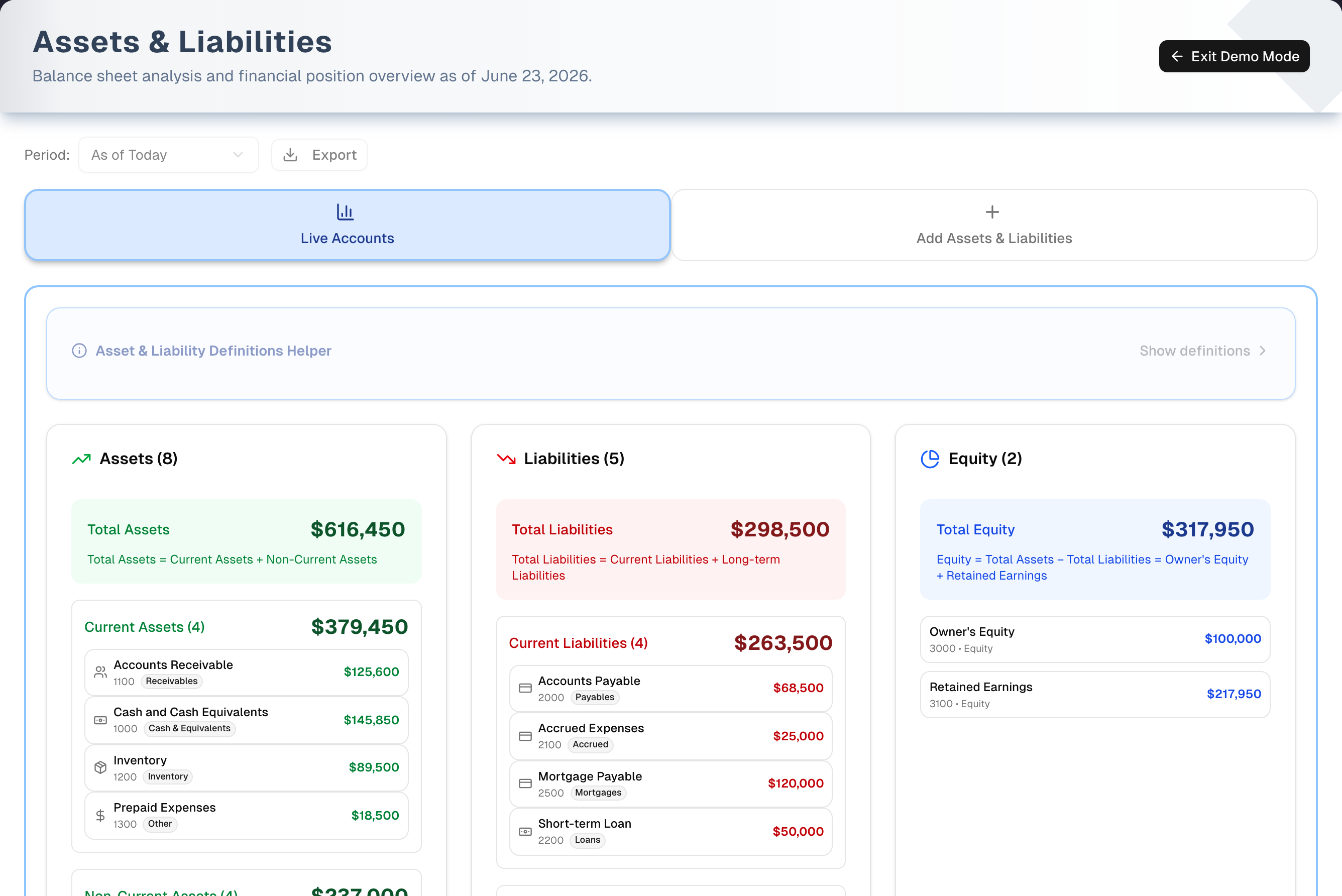
Overview
Open it from Finance → Assets & Liabilities in the sidebar. Record what the business owns (assets), what it owes (liabilities) and the money you put in or took out (owner's equity), then check the totals as of today or the end of last month, quarter or year. Profit you've earned shows up by itself as Retained Earnings, so the sheet ties to your Profit & Loss.
- Plan: Pro or Premium, or any free trial. On Basic the page shows sample figures behind an Unlock Pro & Premium Features card — see Plan & Billing — and nothing on it can post to your books. Export needs Premium or a free trial; on Pro it opens an Unlock Premium Features card instead of downloading.
- Try it first: the amber Demo button opens a read-only copy with sample accounts and a 10-step guided tour (Demo mode).
Tabs in detail
Live Accounts
- Period selector (header): As of Today, End of Last Month, End of Last Quarter or End of Last Year. It changes the date the balances are worked out for — it doesn't compare periods side by side — and goes back to As of Today each time you open the page.
- Balance banner: green Balanced. when assets equal liabilities plus equity (within $1), amber Out of balance. when they don't.
- Asset & Liability Definitions Helper: click Show definitions for a short guide to current vs non-current items.
- Assets (Current / Non-Current), Liabilities (Current / Long-term) and Equity cards, each with a total and its accounts A→Z. The Non-Current and Long-term groups are hidden when empty.
- A deactivated account carries a grey Inactive tag and a faded row. Its balance stays in the totals, because its entries are still in your books. Switching an account off keeps it out of the pickers on this page. The accounts UpChannels posts to by itself — Cash and Cash Equivalents, Accounts Receivable, Accounts Payable, Inventory, Customer Deposits, Cost of Goods Sold, Operating Expenses, Sales Revenue, Sales Returns and Allowances, Sales Tax Payable, Other Income, Merchant Processing Fees, Inventory Write-Offs, Opening Balance Equity, Owner Contribution, Owner Draw, Payroll & Wages, Accrued Wages, Staff Advances, Store Credit and Freight & Fees on Purchases — can't be switched off at all: Active Account is greyed out on them and says why, and their Account Code is fixed for the same reason (the name is still yours to change). Nor can another account be given one of their codes: your books would post into it from then on, for good. To have sales land under your bank's name, rename Cash and Cash Equivalents instead. Deactivated accounts with nothing left in them are tucked behind Show N inactive accounts at the foot of the card, and the card title counts them separately — "Assets (12 · 2 inactive)".
- The Asset Type or Liability Type you chose decides the group: Current goes in the Current group, Fixed, Intangible, Investment and Long-term in the other one. The account name is only read when no type is saved — an untyped asset whose name contains "cash", "receivable", "inventory" or "prepaid" counts as Current, and an untyped liability whose name contains "payable", "short", "accrued", "credit card", "deposit", "unearned", "tax" or "store credit" does too. That is what puts the accounts your sales create — Cash and Cash Equivalents, Accounts Payable, Sales Tax Payable, Customer Deposits, Store Credit — in the right place. Anything else untyped counts as non-current or long-term.
- Equity lists your equity accounts plus a read-only Retained Earnings line (cumulative net income from your books). An account named "Opening Balance Equity" is shown as Owner's Equity, unless you already have an account of that name — then it reads Owner's Equity (opening balance). An account of your own named "Retained Earnings" is shown as Retained Earnings (posted). No two lines say the same thing.
- Click any account to edit it: name, code (fixed on the accounts UpChannels posts to by itself), description and Active Account, plus type, category, details and Current Balance for assets and liabilities. Typing a new balance (with As of Today selected) posts a journal entry against Owner's Equity for the difference between what you typed and the balance in your books. Delete Account deactivates an account that has history instead of deleting it.
- Adding, editing, retiring and deleting accounts — and correcting a balance — is for the owner and managers. Everyone else can open the page and read it, and can download it on Premium. They can still open an account and type in it, but Save Changes and Active Account are greyed out with the reason beside them, and Delete Account isn't shown.
- Auto-calc (in the edit dialog, for assets and loans) shows an estimated value from depreciation or loan payments, worked out as of the Period on screen. Estimates are not posted to your books.
- Export downloads the balance sheet for the selected period as a CSV, with an Estimated column that says
eston auto-calculated balances and a Status column of Active or Inactive. Downloading data is a Premium feature: on Basic or Pro the button opens an Unlock Premium Features card instead of a file. On screen those same balances carry an amber est. tag beside the account name, next to the Inactive tag.
Add Assets, Liabilities & Equity
- Add New Asset: name, Asset Type (Current / Fixed / Intangible / Investment) and Category, Purchase Price, Current Value, Purchase Date, plus Depreciation Method and Useful Life for Fixed Assets; serial number, vendor, location and description → Add Asset.
- Add New Liability: name, Liability Type (Current / Long-term) and Category, Original Amount, Current Balance, Interest Rate, Start Date, plus Maturity Date and Payment Frequency for Long-term; creditor, account number, minimum payment and description → Add Liability.
- Record Owner's Equity: money you put into the business (Contribution) or took out (Draw). Choose the equity account (default "Owner's Capital"), the amount and the cash or bank account the money moved through → Record Equity. It posts one balanced entry, so the sheet stays tied out.
Where an opening balance comes from: only Current Value (asset) or Current Balance (liability). The full amount is posted against Owner's Equity, dated the day you add the account — so adding a loan lowers Owner's Equity by the same amount. Purchase Price and Original Amount on their own leave the balance at $0.
Step by step: add an account
- Open the Add Assets, Liabilities & Equity tab (or Shortcuts → New Asset/Liability).
- Fill Add New Asset or Add New Liability — name, type, category and the financial details.
- Enter today's value in Current Value (asset) or the amount owed in Current Balance (liability). This is the balance the account starts with.
- Click Add Asset or Add Liability. The form stays where it is, clears itself and shows a green message; "Updating figures…" appears above the tabs while the balances are re-read. The new account is listed on Live Accounts.
- Optional, for equipment and loans: click the account on Live Accounts, tick Auto-calc from depreciation or Auto-calc from amortization, and click Save Changes. The box starts unticked until you save it ticked, so the list shows the balance from your books until then.
Step by step: record an owner contribution or draw
- On Add Assets, Liabilities & Equity, scroll to Record Owner's Equity.
- Keep Owner's Capital (or type another equity account name) and choose Contribution (money in) or Draw (money out).
- Enter the Amount. Cash / Bank account already shows the cash account your sales and expenses use — change it only if the money moved through a different one.
- Optionally set the Date and Description, then click Record Equity.
Tips & best practices
- Always fill Current Value or Current Balance when adding an account — without it the account shows $0.
- Auto-calc values are estimates that aren't posted to your books, so they usually make the banner say Out of balance. For a sheet that ties out, untick Auto-calc, type the real balance, and save.
- Correct balances with As of Today selected. Under a past Period, Current Balance can't be changed: a correction is always measured from today's books and dated today.
- Record Owner's Equity puts the money in your usual cash account by itself. It only offers to create one — "Cash and Cash Equivalents", the same account your sales use — when your store has none, and once it has made it the picker names it instead. If that account has been switched off, the form says so and asks you to switch it back on rather than making a second one; the same goes for a switched-off equity account. When either side is refused, nothing is created at all.
- The Add forms insist on Liability Type (or Asset Type) and Category: they, not the name, decide which group an account is listed and subtotalled under. Accounts UpChannels opens for you — Cash and Cash Equivalents, Accounts Payable, Sales Tax Payable, Customer Deposits, Store Credit — have no type, so the edit dialog still lets you save without one.
- Profit belongs in Retained Earnings (automatic). Use Record Owner's Equity only for money you put in or took out.
- A payment counts on the day the money moved, not the day it was entered, so a back-dated payment lands in the period it belongs to on this sheet and in Profit & Loss. If an older back-dated payment still sits in the period it was keyed in, ask support.
- Store credit is money you owe, not money you hold. Every store-credit payment — loyalty credit spent at the till, the credit's share of a return or a cancel, and store credit keyed on an order's Payment tab — is posted to Store Credit, a current liability, instead of to Cash and Cash Equivalents. Credit a customer spends lowers it; credit you give back raises it. Loyalty points aren't posted when they are earned, so spending them can take Store Credit below zero: that amount is the loyalty credit your customers have used. Some older store-credit payments were posted to Cash and Cash Equivalents; a one-time catch-up, dated the day it is run, moves each of them to Store Credit, so today's balances are right and months already reported stay as they were. If one of those payments is later voided or edited, its catch-up comes off at the same moment. Gift cards and trade-in credit still post to Cash and Cash Equivalents.
- Sales in the books. Revenue is the money received on sales, so a sale your store books now is posted when it is paid — Cash (or Store Credit), Revenue and Sales Tax Payable — and never passes through Accounts Receivable or Customer Deposits. Accounts Receivable holds only what customers still owe on sales booked before your store switched to counting revenue this way; what customers owe on newer sales is on the orders list, in the Balance column and under the Unpaid and Partly paid payment filters. Customer Deposits holds money on orders that aren't sales, such as purchase orders. Sales Tax Payable is the tax inside the money received, not the tax on the sales made — for that, read Sales tax on sales made in the range on the Sales Report. Opening one of these three accounts says so under its code.
- Keep account codes consistent with your chart of accounts for clean exports. Codes must be unique in your store.
Troubleshooting
| Issue | Fix |
|---|---|
| Banner says Out of balance (A ≠ L + E) | First look for accounts with Auto-calc on — the banner then adds "Some balances are auto-calculated estimates…". Their estimates aren't in your books: untick Auto-calc and enter the real balance. Otherwise look for a sale or expense missing its journal entry |
| A new asset or liability shows $0 | No Current Value was entered for the asset, or 0 was entered as the liability's Current Balance. Click it on Live Accounts, untick Auto-calc if it's ticked (Current Balance is greyed out while it is), type the real balance in Current Balance and click Save Changes |
| A new account shows $0 for End of Last Month / Quarter / Year | Opening balances and balance corrections are dated the day you make them, so earlier period ends don't include them |
| Can't delete an account | It has journal history, so it's deactivated instead — it keeps its balance in the totals and is listed with an Inactive tag (or behind Show N inactive accounts when it holds nothing). Re-enable it with Active Account. Whether an account counts as having history doesn't depend on the Period you are looking at: entries dated after the period end count too. Delete Account is shown only to the owner and managers, on every account — with history or without — because retiring an account and deleting one are both changes to the chart of accounts |
| Can't switch off Cash and Cash Equivalents (or another account UpChannels opened) | Your sales, expenses, pay runs and bank reconciliation post to it by its code, so switching it off would only hide a label while the balance kept growing. You can rename it — the name is yours — but its Account Code is greyed out too, because moving the code would strand the balance the same way and start a second, empty account under the old code. Use a different account for the money you wanted to move instead. One that is already switched off is not stuck: tick Active Account back on |
| "Your books post to the code … by themselves … so another account can't take it" | You typed one of the codes your books post to (CASH, AP, PAYROLL and the rest) into another account's Account Code. Your books would post into that account from then on, and it could never be switched off or re-coded again, so it is refused. To see the books' figures under a name of yours — your bank's, say — rename the account they post to. A balance already in a separate account has to be moved across by hand |
| Auto-calc balance looks off | Untick Auto-calc (Current Balance goes back to the balance in your books), type the real balance and save. The correction is measured from your books, never from the estimate. Unticking and saving without typing only turns Auto-calc off; nothing is posted |
| A long-term loan shows under Current Liabilities | It has no Liability Type saved and its name contains "payable", "short", "accrued", "credit card", "deposit", "unearned" or "tax". Click it, set Liability Type to Long-term Liabilities and click Save Changes — the type always wins over the name |
| Several accounts named "Cash" | Extra cash accounts can be left over from older equity entries. Record Owner's Equity uses your existing cash account, so it doesn't add more. Move the balances onto the one you want to keep (click each, type the real balance under Current Balance, save), then deactivate the spares with Active Account. The one UpChannels posts to — "Cash and Cash Equivalents" — can't be switched off, so make that one the keeper |
| The page is greyed out under Unlock Pro & Premium Features | Your store is on Basic. Upgrade in Plan & Billing — only the store's owner can change the plan, and everyone else sees that page read-only — or use Demo to look around |
What's next
- See the formal report: Reports → Assets & Liabilities
- Tie spending to the books: Finance → Expenses
- Review profitability: Reports → Profit & Loss
Detailed reference
Every button, icon, field and message on this page, for when you need the exact detail. Each panel starts closed — open the one you need.
Page header and toolbar
| Control | Where | What it does | Notes |
|---|---|---|---|
| Sidebar Finance → Assets & Liabilities | Sidebar | Opens this page on Live Accounts | On Basic, a small Pro tag shows beside it. No tag during a trial or while the plan can't be determined |
| Shortcuts cards Assets & Liabilities Management and New Asset/Liability | Shortcuts page, Finance group | Open this page on Live Accounts, or on the Add tab | Both are gone from Shortcuts for anyone an owner has hidden Assets & Liabilities from, along with the sidebar item |
| Figure cards Total assets and Net worth, and the Assets & Liabilities quick link | Dashboard, Sustainable level | Open this page | — |
| Title Assets & Liabilities and "Balance sheet analysis and financial position overview as of …." | Header | The date is the selected period's date, for example "September 18, 2026": today, or the last day of last month, last quarter or last year | Follows the Period selector. For As of Today it is today in the time zone that period ends in (see Period), so with no store time zone set it is the date in UTC |
| Period: dropdown (placeholder "Select period") | Header, right | As of Today (default), End of Last Month, End of Last Quarter, End of Last Year. Reloads every balance as of that date — only entries dated on or before it count — and works out Auto-calc estimates for that date too | Each period ends at 11:59:59 pm on its last day in your store's time zone (your computer's, if the store has none set), so the same figures come out wherever the page is opened from. As of Today ends at 11:59:59 pm today in your store's time zone, or in UTC if the store has none set, the day a balance correction (Save Changes, below) is measured by, so the two always count the same entries: an entry dated after today — a post-dated expense, a journal entry keyed for next week — counts from its own date, not before. The page shows "Loading financial data..." while it reloads. No side-by-side comparison. Back to As of Today on every visit |
| Export (Download icon) | Header, right of Period | Downloads assets-liabilities-YYYY-MM-DD.csv: one row per asset, liability and equity account with its balance for the selected period, a Retained Earnings row (when not zero), and TOTAL rows for Total Assets, Total Liabilities and Total Equity. Columns: Section, Code, Account, Balance, Estimated, Status | Premium only, like every other download in Finance: on Basic or Pro it opens the Unlock Premium Features card (Check Details goes to Plan & Billing) and no file is written. A free trial counts as Premium, and if the plan can't be determined the download goes ahead. The file name carries the date the balances are as of — today for As of Today, otherwise the last day of that month, quarter or year, in the same time zone as the header's date. Estimated says est on auto-calculated balances. Status says Active or Inactive. Deactivated accounts are included, so the file always adds up to the totals. "Opening Balance Equity" and a posted "Retained Earnings" account are exported under the same names the page shows them under. Not clickable while the page is locked |
| Demo (Play icon, amber) | Header, far right | Opens the read-only sample copy with a guided tour | Works on every plan, even while the page is locked. See the Demo mode panel and Demo mode |
| Green banner "Balanced. Assets = Liabilities + Equity. Equity includes a Retained Earnings line (cumulative net income from the ledger), so it ties to your Profit & Loss." | Above the tabs | Confirms the sheet ties out | Difference under $1. Hidden while the page is locked |
| Amber banner "Out of balance. Assets ≠ Liabilities + Equity. …" | Above the tabs | Warns that the sheet doesn't tie out | Difference of $1 or more. The same Retained Earnings sentence follows |
| Extra sentence "Some balances are auto-calculated estimates (marked "est.") and are not backed by journal entries." | End of either banner | At least one listed balance is an Auto-calc estimate (Auto-calc saved on, with the details it needs) | Each of those rows carries an amber est. tag beside its name, and the CSV's Estimated column says est on the same rows |
| Tab Live Accounts (blue, bar-chart icon) | Tab bar, first | The balance sheet cards | Opens by default |
| Tab Add Assets, Liabilities & Equity (orange, plus icon) | Tab bar, second | The three add forms | /finance/assets-liabilities?tab=add-asset opens this tab. Switching tabs doesn't change the address |
| "Loading financial data..." (spinner) | Whole page | Shows while the balances load for the first time and after changing Period | The header and tabs are hidden while it shows. Adding, saving, recording or deleting does not bring it back — those re-read the figures in the background so the form or dialog you used stays on screen |
| "Error loading financial data", the reason, and Try Again | Whole page | The balances couldn't be read at all. Try Again reloads them | Only for the first load and a Period change. A failed add, save or delete never shows it: that reason appears in the red box on the form or dialog you used |
| "Updating figures…" (spinner) | Above the tabs | The balances are being re-read after something you added, saved, recorded or deleted | Everything on screen stays usable while it runs |
| Amber strip "Your change was saved, but the figures below may be out of date: …" with Try Again and Dismiss | Above the tabs | Your change went through, but the re-read that follows it failed, so the totals on screen are from before it | Try Again re-reads them; Dismiss hides the strip |
| Upgrade card Unlock Pro & Premium Features | Over the page | Locks the page and shows sample figures | Basic with no trial. See Who can use what |
Tab: Live Accounts
| Control | Where | What it does | Notes |
|---|---|---|---|
| Card Asset & Liability Definitions Helper (Info icon) with Show definitions / Hide definitions | Top of the tab | Click the card header to open or close it | Closed on every visit. Reference only — no equity definitions |
| Helper, left column "🔹 Assets" | Inside the helper | "✅ Current Assets — Convertible to cash within 1 year": cash and cash equivalents, accounts receivable, inventory, short-term investments, prepaid expenses, notes receivable. "✅ Non-Current Assets — Held longer than 1 year": property, plant and equipment (PPE), long-term investments, intangible assets, deferred tax assets, right-of-use assets | Most items carry a short example, such as "(money owed by customers)" |
| Helper, right column "🔸 Liabilities" | Inside the helper | "✅ Current Liabilities — Due within 1 year": accounts payable, short-term loans or debt, accrued expenses, unearned revenue, current portion of long-term debt. "✅ Non-Current Liabilities — Due after 1 year": long-term loans or bonds payable, lease liabilities, deferred tax liabilities, pension obligations, warranty liabilities | The Liabilities card calls this group Long-term Liabilities |
| Card title Assets (…) (green, trending-up icon) | Left card | The number of active asset accounts, and the deactivated ones beside them — "12 · 2 inactive" | Just the number when nothing is deactivated |
| Total Assets and "Total Assets = Current Assets + Non-Current Assets" | Assets card, green box | Sum of every asset balance for the period | Includes Auto-calc estimates, and deactivated accounts — their entries are still in your books, so leaving them out would stop the sheet balancing |
| Current Assets (…) and its subtotal | Assets card | Current assets, A→Z | An asset lands here when its Asset Type is Current. With no type saved, a name containing "cash", "receivable", "inventory" or "prepaid" counts as Current — so an untyped "Cash and Cash Equivalents" shows here, while equipment saved as Fixed and called "Cash Register" does not. Shown whenever the card has any assets, even with 0 inside |
| Non-Current Assets (…) and its subtotal | Assets card | Every other asset: Fixed, Intangible and Investment, and untyped assets whose name has none of those words | Hidden when empty |
| Show N inactive accounts / Hide inactive accounts | Foot of each card | Reveals the deactivated accounts with nothing left in them, which are hidden by default | Only shown when the card has any. A deactivated account that still holds a balance is always listed, tagged Inactive — its money is in the total above it. The group counts and subtotals include every account either way |
| Asset row: icon, name, code, category tag, balance | Assets card | Click to open Edit Asset Account | Icon follows the name: banknote (cash), people (receivable), package (inventory), building (property), truck (equipment), otherwise a dollar sign. Tags: Cash & Equivalents, Receivables, Inventory, Equipment, Property, Vehicles, Software, Other (no tag when no category), plus a grey Inactive tag on a deactivated account, whose row is faded, and an amber est. tag when the balance is an Auto-calc estimate (hover it for "Auto-calculated estimate — not backed by journal entries") |
| Empty state "No asset accounts found" | Assets card | No asset accounts | Balances that can't be read show "Error loading financial data" and Try Again over the whole page instead of empty cards |
| Card title Liabilities (…) (red, trending-down icon) | Middle card | The number of active liability accounts, and the deactivated ones beside them | Same "… · N inactive" form as the Assets card |
| Total Liabilities and "Total Liabilities = Current Liabilities + Long-term Liabilities" | Liabilities card, red box | Sum of every liability balance | Includes Auto-calc estimates and deactivated accounts |
| Current Liabilities (…) and its subtotal | Liabilities card | Current liabilities, A→Z | A liability lands here when its Liability Type is Current. With no type saved, a name containing "payable", "short", "accrued", "credit card", "deposit", "unearned", "tax" or "store credit" counts as Current — so untyped Sales Tax Payable, Customer Deposits and Store Credit show here, while a "Mortgage Payable" saved as Long-term does not. Shown whenever the card has any liabilities, even with 0 inside |
| Long-term Liabilities (…) and its subtotal | Liabilities card | Everything saved as Long-term, plus untyped liabilities whose name has none of those words, A→Z | Hidden when empty |
| Liability row: icon, name, code, category tag, balance | Liabilities card | Click to open Edit Liability Account | Icon follows the name: card (payable/account), banknote (loan/debt), dollar sign (tax/payroll), building (mortgage/note), trending-down (interest), otherwise a card. Tags: Payables, Loans, Credit Cards, Mortgages, Bonds, Accrued, Deferred, Other, plus a grey Inactive tag on a deactivated account, whose row is faded. Accounts added here get a code of LIA- and a long number |
| Empty state "No liability accounts found" | Liabilities card | No liability accounts | — |
| Card title Equity (…) (blue, pie-chart icon) | Right card | The number of active equity accounts, and the deactivated ones beside them | The Retained Earnings line isn't counted |
| Total Equity and "Equity = Total Assets − Total Liabilities = Owner's Equity + Retained Earnings" | Equity card, blue box | Sum of the equity accounts plus Retained Earnings | — |
| Equity row: name, "… • Equity" (code), an Inactive tag when deactivated, balance | Equity card | Click to open Edit Equity Account | Equity accounts the page creates get a code of EQ- and a long number. An account named "Opening Balance Equity" is shown as Owner's Equity (the dialog shows its real name). If your store also has an account actually named Owner's Equity — some older stores do — the opening-balance line reads Owner's Equity (opening balance) instead, so the two are never confused. New corrections and opening balances all post to the one account |
| Retained Earnings — "Cumulative net income (from operations)" and amount | Equity card, after the accounts | Your income minus expenses from your books, up to the period date. Makes the sheet tie to Profit & Loss | Read-only — it doesn't open. Hidden when $0. An equity account of your own named "Retained Earnings" is listed above it as Retained Earnings (posted), the same name Reports → Assets & Liabilities gives it, so the two lines are never both called Retained Earnings |
| Empty state "No equity accounts found" | Equity card | No equity accounts and Retained Earnings is $0 | — |
Tab: Add Assets, Liabilities & Equity — Add New Asset
Left card on the tab. Card header: Add New Asset (plus icon) — "Register a new asset to track its value, depreciation, and other details". Fields are grouped under Basic Information, Financial Information and Additional Information.
Fields:
| Field | Required | Default | Rules and error text |
|---|---|---|---|
| Asset Name (placeholder "e.g., Office Computer, Company Vehicle") | Yes | Empty | The browser asks you to fill it. The name only affects grouping when no Asset Type is chosen (see Live Accounts) |
| Asset Type (placeholder "Select asset type") | Yes | None | Current Assets, Fixed Assets, Intangible Assets, Investment Assets. Changing it clears Category. Fixed Assets shows Depreciation Method and Useful Life. Leaving it empty stops the save with "Choose the Asset Type." under the box and in the red banner at the top of the card |
| Category (placeholder "Select category") | Yes | None | Greyed out until a type is picked. Current: Cash & Cash Equivalents, Accounts Receivable, Inventory, Other Current Assets. Fixed: Property & Buildings, Equipment & Machinery, Vehicles, Other Fixed Assets. Intangible: Software & Licenses, Other Intangible Assets. Investment: Investment Assets (shown later with the "Other" tag). Leaving it empty stops the save with "Choose the Category." |
| Description (placeholder "Brief description of the asset") | No | Empty | — |
| Purchase Price (placeholder "0.00") | Yes | Empty | Saved for Auto-calc. Does not set a balance on its own |
| Current Value (placeholder "0.00") | No | Empty | Sets the opening balance: the full amount is posted to the asset against Owner's Equity (created if missing), dated today, as "Initial balance for …". Blank or 0 posts nothing and the asset shows $0. Red note under it: "⚠️ Important: type what this asset is worth today. The whole amount is posted to your books against Owner's Equity, dated today — not the purchase date. Leave it blank or 0 and the asset starts at $0. Purchase Price is only used for depreciation estimates." |
| Purchase Date | Yes | Empty | Saved for Auto-calc. Doesn't change the opening entry's date |
| Depreciation Method (placeholder "Select method") | No | Straight Line | Fixed Assets only. Straight Line, Declining Balance, Sum of Years Digits |
| Useful Life (Years) (placeholder "e.g., 5") | No | Empty | Fixed Assets only. Whole years — decimals are dropped when saved |
| Serial Number (placeholder "Asset serial number") | No | Empty | Under Additional Information |
| Vendor/Supplier (placeholder "Company or person") | No | Empty | — |
| Location (placeholder "Where asset is located") | No | Empty | — |
Buttons and extras:
| Control | Where | What it does | Notes |
|---|---|---|---|
| Result box (green with a save icon, or red with an alert icon) | Top of the card | Shows the outcome of Add Asset | See Messages. It stays on screen, and a failure shows the store's own reason |
| Badges Asset Registration and "… Asset" (for example "Fixed Asset") | Card footer, left | Show the chosen type | The type badge appears once a type is picked |
| Reset (circular arrows) | Card footer | Clears every field | No confirmation. Doesn't clear a message already showing |
| Add Asset (Save icon) → "Adding Asset..." | Card footer | Creates the asset (code AST- plus a number, active), posts the opening entry if Current Value was given, then re-reads the balances in the background so it appears on Live Accounts | Greyed out while saving. The form stays on screen, empties itself and shows the green message; "Updating figures…" appears above the tabs while the balances catch up. Auto-calc can't be switched on here, only in the account's edit dialog afterwards |
| Card Asset Preview (Name, Type, Category, Purchase Price, Current Value) | Below the form | A live summary of what you typed | Appears once Asset Name has text; each line appears once that field is filled. Not clickable |
Tab: Add Assets, Liabilities & Equity — Add New Liability
Right card on the tab (below Add New Asset on a narrow screen). Card header: Add New Liability (plus icon) — "Register a new liability to track debts, loans, and other financial obligations". Same three field groups as the asset card.
Fields:
| Field | Required | Default | Rules and error text |
|---|---|---|---|
| Liability Name (placeholder "e.g., Business Loan, Credit Card, Mortgage") | Yes | Empty | The name only affects grouping when no Liability Type is chosen (see Live Accounts) |
| Liability Type (placeholder "Select liability type") | Yes | None | Current Liabilities, Long-term Liabilities. Changing it clears Category. Long-term shows Maturity Date and Payment Frequency. Leaving it empty stops the save with "Choose the Liability Type." under the box and in the red banner at the top of the card |
| Category (placeholder "Select category") | Yes | None | Greyed out until a type is picked. Current: Accounts Payable, Credit Cards, Accrued Expenses, Other Current Liabilities. Long-term: Long-term Loans, Mortgages, Bonds Payable, Deferred Revenue, Other Long-term Liabilities. Leaving it empty stops the save with "Choose the Category." |
| Description (placeholder "Brief description of the liability") | No | Empty | — |
| Original Amount (placeholder "0.00") | Yes | Empty | Saved for Auto-calc. Does not set the balance on its own |
| Current Balance (placeholder "0.00") | Yes | Empty | Sets the opening balance: the full amount is posted to the liability against Owner's Equity, dated today, as "Initial balance for …" — so Owner's Equity drops by the same amount. 0 posts nothing. Red note: "⚠️ Important: type the amount you owe today. The whole amount is posted to your books against Owner's Equity, dated today — so Owner's Equity drops by that much. Original Amount is only used for the payoff estimate." |
| Interest Rate (%) (placeholder "0.00") | No | Empty | Saved for Auto-calc |
| Start Date | Yes | Empty | Saved for Auto-calc |
| Maturity Date | No | Empty | Long-term only. Needed for Auto-calc |
| Payment Frequency (placeholder "Select frequency") | No | Monthly | Long-term only. Weekly, Bi-weekly, Monthly, Quarterly, Annually. Monthly is saved for current liabilities too |
| Creditor/Lender (placeholder "Bank or company name") | No | Empty | Under Additional Information |
| Account Number (placeholder "Account or loan number") | No | Empty | — |
| Minimum Payment (placeholder "0.00") | No | Empty | For your reference; not used in any calculation |
Buttons and extras:
| Control | Where | What it does | Notes |
|---|---|---|---|
| Result box (green or red) | Top of the card | Shows the outcome of Add Liability | See Messages. It stays on screen, and a failure shows the store's own reason |
| Badges Liability Registration and "… Liability" ("Current Liability" or "Long-term Liability") | Card footer, left | Show the chosen type | The type badge appears once a type is picked |
| Reset (circular arrows) | Card footer | Clears every field | No confirmation. Doesn't clear a message already showing |
| Add Liability (Save icon) → "Adding Liability..." | Card footer | Creates the liability (code LIA- plus a number, active), posts the opening entry (none when Current Balance is 0), then re-reads the balances in the background | Greyed out while saving. As with Add Asset, you stay on this tab and the green message stays on the card |
| Card Liability Preview (Name, Type, Category, Original Amount, Current Balance, Interest Rate) | Below the form | A live summary of what you typed | Appears once Liability Name has text |
Tab: Add Assets, Liabilities & Equity — Record Owner's Equity
Card below the asset and liability cards. Card header: Record Owner's Equity (piggy-bank icon) — "Record capital you contributed (or drew) so the balance sheet reflects your real equity. Posts a balanced entry between an equity account and a cash account, so it ties out."
Fields:
| Field | Required | Default | Rules and error text |
|---|---|---|---|
| Equity Account (placeholder "e.g., Owner's Capital") | Yes | Owner's Capital | Type a name or pick a suggestion: Owner's Capital, Opening Balance Equity, Additional Paid-in Capital. Helper: "Existing accounts with this name are reused; otherwise a new equity account is created." Matching ignores capitals but needs the exact name, and only live accounts are reused — if the only account with that name has been switched off, the entry is refused and says so instead of quietly putting money back into a retired account. Only spaces: "Enter an equity account name." "Retained Earnings" isn't among the suggestions: accumulated profit already appears by itself, as the amber note on this card says |
| Type | Yes | Contribution (money in) | Contribution (money in): cash up, equity up. Draw (money out): both go down |
| Amount (placeholder "0.00") | Yes | Empty | Must be more than zero. The browser blocks a blank or negative amount; 0 shows "Enter an amount greater than zero." |
| Cash / Bank account (placeholder "Select account") | Yes | Your store's cash account | The account your sales and expenses already post through ("Cash and Cash Equivalents"), or failing that one filed as cash, or one whose name contains cash, bank or checking. Every active asset account is listed, not only cash and bank ones; deactivated accounts are left out. Helper: "The asset side of the entry — the account the money moved in to / out of. It starts on the cash account your sales and expenses already use." Create the "Cash and Cash Equivalents" account is offered only when the store has no cash account at all, and creates it once; the picker is read back as soon as the entry is recorded, so it then names that account instead of going on offering to create one. If Cash and Cash Equivalents itself has been switched off, an amber line under the picker names it and says to switch it back on under Live Accounts: a replacement can't be created while the switched-off one is still in the books. Any other switched-off account — a retired Business Checking, say — doesn't stop the entry; Cash and Cash Equivalents is created beside it. There is no check that a draw leaves enough cash |
| Date | No | Empty (now) | The entry's date — decides which period views include it |
| Description (placeholder "e.g., Initial owner investment") | No | Empty | Blank uses "Owner capital contribution" or "Owner draw" |
Buttons and extras:
| Control | Where | What it does | Notes |
|---|---|---|---|
| Amber note "Use this for opening capital and owner contributions/draws — not for current operating profit. Accumulated profit already appears automatically as "Retained Earnings" (derived from the ledger) on the Assets & Liabilities report." | Above the footer | Guidance | — |
| Result box (green or red) | Top of the card | Shows the outcome of Record Equity, including the checks on Amount and Equity Account | See Messages. It stays on screen, and a failure shows the store's own reason |
| Badge Equity Entry | Card footer, left | Label only | — |
| Reset (circular arrows) | Card footer | Back to Owner's Capital, Contribution, empty amount, your store's cash account, empty date and description | No confirmation |
| Record Equity (Save icon) → "Recording…" | Card footer | Checks both sides of the entry before anything is written: the equity account with that name (live ones only) and the account chosen under Cash / Bank account. Then it creates whichever is missing — "Cash and Cash Equivalents" only when the store has none — posts one balanced entry (Contribution: debit cash, credit equity; Draw: debit equity, credit cash), re-reads the picker, and re-reads the balances in the background | Greyed out while saving. If either side is refused, nothing at all is created — not even the equity account. The green message stays on the card, and the Equity card catches up behind it |
Dialog: Edit Asset / Liability / Equity Account
Opens when you click an account row on Live Accounts (not the Retained Earnings line). Title "Edit Asset Account", "Edit Liability Account" or "Edit Equity Account" with a green, red or blue badge.
Fields for every account
| Field | Required | Default | Rules and error text |
|---|---|---|---|
| Account Name | Yes | The account's name | The browser asks you to fill it. Shows "Opening Balance Equity" by its real name |
| Account Code | Yes | The current code | Must be unique in your store — a duplicate fails with "Failed to update account. Please try again." Greyed out on an account UpChannels posts to by itself, where the line under it reads "Your books post to … by its code CASH, so the code can't be changed. The name is yours to change." Your books find those accounts by their code, so moving the code would strand the balance exactly as retiring the account would. Typing one of those codes into another account shows "Your books post to the code … by themselves … so another account can't take it", and Save Changes refuses it. On Accounts Receivable, Customer Deposits and Sales Tax Payable a second line says what the account holds (see Sales in the books under Tips) |
| Description | No | Current description | — |
| Active Account (checkbox) | — | Ticked for active accounts | Unticked accounts stay in the totals, and are listed with an Inactive tag (or behind Show N inactive accounts when they hold nothing). The dialog header shows the same tag. Tick it to bring back an account that Delete deactivated. Greyed out for anyone below manager, and on an account UpChannels posts to by itself while it is still on, where the line under it reads "Your books post to … by themselves — sales, expenses, pay runs — so this account can't be switched off." One of those accounts that is already off has had nothing posted to it yet, so the box is not greyed out there and you can tick it back on |
Asset accounts
| Field | Required | Default | Rules and error text |
|---|---|---|---|
| Asset Type (placeholder "Select asset type") | No (the accounts UpChannels opens for you have no type, and insisting on one would stop them being saved) | Saved type; if none, the group the account is already listed under | Current Assets, Fixed Assets, Intangible Assets, Investment Assets. Changing it clears Category. With no type saved the dialog opens on the same answer the card gave: Current Assets for a name containing cash, receivable, inventory or prepaid, Fixed Assets for anything else — so opening an account and clicking Save Changes can never move it to the other group behind your back. It's saved when you click Save Changes, and from then on the type decides the group, not the name |
| Category (placeholder "Select category") | No, for the same reason | Saved category | Greyed out until a type is set. Same options as the Add form |
| Purchase Price | No | Saved value | Used by Auto-calc |
| Current Balance | No | The account's balance in your books for the selected Period; while Auto-calc is ticked, the dialog's own estimate | With Auto-calc off, a value you type posts a correction on Save (see Save Changes). Greyed out while Auto-calc from depreciation is ticked, and under any Period other than As of Today, with "Switch Period to As of Today to correct the balance." underneath. Red note, always shown: "⚠️ Important: Type the value this asset has today. Saving posts the difference from the books as a balance adjustment against Owner's Equity." |
| Auto-calc from depreciation (checkbox) | — | Your saved choice (unticked until you save it ticked) | Replaces the balance with an estimate from Purchase Price, Purchase Date, Useful Life and Depreciation Method: here at once, and in the list once you save. Nothing is posted. Unticking it puts the balance from your books back in Current Balance; saving without typing a new value only turns Auto-calc off and posts nothing. Line underneath: "Computed from straight-line over 5 years since 2024-06-15 → $…" (method shown as straight-line, declining-balance or sum-of-years), or "→ insufficient data" when price, useful life or purchase date is missing. Save Changes keeps your choice. The dialog, the Live Accounts list and the Assets & Liabilities report all work the estimate out the same way, as of the selected Period, so the figure here is the figure you see on the list |
| Purchase Date | No | Saved value | Used by Auto-calc |
| Depreciation Method | No | Saved, or Straight Line | Fixed Assets only. Straight Line, Declining Balance, Sum of Years Digits |
| Useful Life (Years) | No | Saved value | Fixed Assets only. Whole years |
| Serial Number, Vendor/Supplier, Location | No | Saved values | Under Additional Information |
Liability accounts
| Field | Required | Default | Rules and error text |
|---|---|---|---|
| Liability Type (placeholder "Select liability type") | No (the accounts UpChannels opens for you have no type) | Saved type; if none, the group the account is already listed under | Current Liabilities, Long-term Liabilities. Changing it clears Category. With no type saved the dialog opens on the same answer the card gave: Current Liabilities for a name containing payable, short, accrued, credit card, deposit, unearned or tax, Long-term Liabilities for anything else — so opening an account and clicking Save Changes can never move it to the other group behind your back. Clicking Save Changes stores it, and from then on the type decides the group |
| Category (placeholder "Select category") | No, for the same reason | Saved category | Greyed out until a type is set. Current: Accounts Payable, Short-term Loans, Credit Cards, Accrued Expenses, Other Current Liabilities. Long-term: Long-term Loans, Mortgages, Bonds Payable, Deferred Revenue, Other Long-term Liabilities. Short-term Loans exists only here and shows with the "Loans" tag |
| Original Amount | No | Saved value | Used by Auto-calc |
| Current Balance | No | The account's balance in your books for the selected Period; while Auto-calc is ticked, the dialog's own estimate | Same correction rule as assets. Greyed out while Auto-calc from amortization is ticked, and under any Period other than As of Today. Red note: "⚠️ Important: Type the amount owed today. Saving posts the difference from the books as a balance adjustment against Owner's Equity." |
| Auto-calc from amortization (checkbox) | — | Your saved choice (unticked until you save it ticked) | Replaces the balance with the remaining balance of a fixed-payment loan, from Original Amount, Interest Rate, Start Date, Maturity Date and Payment Frequency: here at once, and in the list once you save. Nothing is posted. As with assets, unticking it puts the balance from your books back in Current Balance, and saving without typing posts nothing. Line: "Computed from …% APR, monthly payments $…" or "insufficient data". Worked out as of the selected Period, the same way the Live Accounts list and the Assets & Liabilities report do it. Before the first payment it equals the original amount; after the maturity date it is $0. A maturity date on or before the start date is treated as no term at all, and the whole original amount is shown |
| Interest Rate (%) | No | Saved value | Used by Auto-calc |
| Start Date, Maturity Date | No | Saved values | Shown for every liability here, unlike the Add form |
| Payment Frequency | No | Saved, or Monthly | Weekly, Bi-weekly, Monthly, Quarterly, Annually |
| Creditor/Lender, Account Number, Minimum Payment | No | Saved values | Under Additional Information |
Equity accounts: only Account Name, Account Code, Description and Active Account. The Financial Information and Additional Information headings show with nothing under them. An equity balance can't be typed here — use Record Owner's Equity.
Buttons
| Control | Where | What it does | Notes |
|---|---|---|---|
| X (close, screen-reader label "Close") | Top right | Closes without saving | Esc or clicking outside also closes |
| Result box (green with a save icon, or red with an alert icon) | Top of the dialog | Shows the outcome of Save Changes or Delete | About the account in front of you only. Closing the dialog, or opening another account, clears it — except while a save is still running, when the message waits for its own result |
| Delete Account (Trash icon, red) | Footer, left | Turns into "Delete this account?" with Yes, delete and Keep | Greyed out while saving. Shown only to the owner and managers, on every account — whether it has entries or not. On an account with entries it deactivates rather than deletes, including entries dated after the period you are looking at. On an account UpChannels posts to by itself it does neither: the red box explains that your books post there, and nothing changes |
| Yes, delete (Trash icon) → "Working..." | Footer, left, after Delete Account | With any entry behind it — at any date, whatever Period is selected — deactivates the account instead, shows the message, and closes after about 2 seconds. With none: deletes it for good and closes at once, with no message | A delete that doesn't go through leaves the dialog open with the reason in the red result box, so it never closes as if the account were gone. "This account was not deleted…" means your access changed while the page was open or someone else deleted it first. If an entry lands between the check and the delete, the delete is not left refused: the account is deactivated instead and says so |
| Keep | Footer, left, after Delete Account | Cancels the delete | Greyed out while working |
| Cancel | Footer, right | Closes without saving, and clears the last result message | — |
| Save Changes → "Saving..." | Footer, right | Saves every field and the Auto-calc choice. If Auto-calc is off, As of Today is selected and you typed a new Current Balance, also posts "Balance adjustment for …" dated today, against Owner's Equity (created if missing), for the difference between what you typed and the account's balance in your books at that moment — from the entries dated up to the end of today in your store's time zone (UTC, if it has none set), the same ones As of Today shows, so an entry dated after today is never cancelled in advance. Shows the result, reloads the balances, and closes about 2 seconds later | Greyed out while saving, and while a delete is working (it keeps its label then — only Yes, delete says "Working..."). Nothing is posted when you didn't type in Current Balance (opening and saving, or only switching Auto-calc), or when your books already show the typed amount. The difference is never measured from an Auto-calc estimate or a past Period's balance. Asset up: debit the asset, credit Owner's Equity. Liability up: debit Owner's Equity, credit the liability. Going down does the reverse. Owner's Equity here means the oldest equity account whose name contains both "owner" and "equity", so an "Owner's Capital" account isn't used |
Dialog: Unlock Premium Features
Opens when a store below Premium, and outside a free trial, clicks Export. Nothing is downloaded. It is a small card in the middle of a dimmed page.
| Control | Where | What it does | Notes |
|---|---|---|---|
| Lock icon, Unlock Premium Features, "Advanced reporting & data export" | Card header | — | — |
| Check Details (green) | Card header, right | Closes the card and opens Settings → Billing | — |
| Premium chip and list: "Everything in Pro", "2,000 SMS/month", "Advanced reporting (grouped/pivot)", "CSV / PDF data export" | Card body | What the plan adds | Read-only |
| X (header, right of Check Details), the Esc key, or a click on the dimmed area outside the card | Header or anywhere outside | Closes the card. Nothing is downloaded | — |
Messages you may see
| Message | When it appears | What to do |
|---|---|---|
| "Loading financial data..." | Opening the page and changing Period | Wait |
| "Updating figures…" | After any add, save, record or delete, while the balances are re-read | Nothing — the page stays usable |
| "Your change was saved, but the figures below may be out of date: …" | The re-read after a change failed | Try Again in the amber strip, or reload the page |
| "Error loading financial data" + reason + Try Again | The balances couldn't be read on opening the page or after changing Period | Click Try Again. If it keeps happening, sign out and back in |
| "No organization ID found for current user" | The reason under the error when your sign-in has no store | Sign out and back in; contact support if it stays |
| "Balanced. Assets = Liabilities + Equity. Equity includes a Retained Earnings line (cumulative net income from the ledger), so it ties to your Profit & Loss." | Totals tie within $1 | Nothing |
| "Out of balance. Assets ≠ Liabilities + Equity. …" | Totals differ by $1 or more | Turn off Auto-calc on estimated accounts and enter real balances; otherwise look for a sale or expense missing its journal entry |
| "Some balances are auto-calculated estimates (marked "est.") and are not backed by journal entries." | At least one listed balance is an Auto-calc estimate | The rows it means carry an amber est. tag; the CSV's Estimated column shows est on the same rows |
| "No asset accounts found" / "No liability accounts found" / "No equity accounts found" | You have no accounts of that kind yet. When balances can't be read the whole page shows "Error loading financial data" and Try Again instead, so an empty card means there is nothing of that kind to show | Add accounts on the Add tab |
| "Asset "…" has been added successfully!" | Add Asset worked | Stays on the card until you add another or press Reset |
| "That account code is already used in your store." | Add Asset or Add Liability, with an opening Current Value or Current Balance typed, and an Account Code another account already has | Give it a different code and add it again; everything you typed is still in the form. Nothing was created and no opening entry was posted |
| "That parent account is not one of this store's accounts." / "That is not an account category UpChannels uses." / "The account could not be created" | The add was refused while the opening entry was being posted | Nothing was created. Fix what the message names, or try again |
| "This account is already being saved. Reload the page." | Add Asset or Add Liability pressed twice on the same form | Reload — the account was made once, not twice |
| The store's own reason for a refused add, in the red box — for example "duplicate key value violates unique constraint" for a code already in use | Add Asset or Add Liability failed with no opening balance typed (that add goes straight to your store) | Fix what the message names and add it again; everything you typed is still in the form |
| "The asset was not created and the store gave no reason. Please try again." / "The liability was not created and the store gave no reason. Please try again." | The add came back empty with no error at all | Try again |
| "Liability "…" has been added successfully!" | Add Liability worked | Stays on the card |
| "An unexpected error occurred" | An add or record form, or Save Changes, hit an unknown error | Try again |
| "Contribution of $… recorded against "…"." / "Draw of $… recorded against "…"." | Record Equity worked | Stays on the card; the Equity card catches up behind it |
| "Enter an amount greater than zero." | Record Equity with an amount of 0 | Enter a positive amount |
| "Enter an equity account name." | Record Equity with a name of only spaces | Type a name |
| "The equity account was not created and the store gave no reason." | The new equity account came back empty with no error | Try again |
| "The cash account was not created and the store gave no reason." | Your store had no cash account and creating one came back empty | Pick an existing account under Cash / Bank account |
| The account's name, then "is switched off. This form will not record money against a retired account: switch it back on under Live Accounts, or pick another account." | Amber, under Cash / Bank account, and again in the red box if you press Record Equity: Cash and Cash Equivalents is deactivated, so this form has nothing to record against and can't create a replacement while the switched-off one is in the books | Open the account under Live Accounts, tick Active Account and save, then record the entry. Or pick a different account. Nothing is posted meanwhile |
| The equity account's name, then "is switched off. This form will not record money against a retired account: switch it back on under Live Accounts, or use a different equity account name." | The name typed under Equity Account matches only an account that has been switched off | Switch it back on under Live Accounts, or type a different name. Nothing is posted and no second account with that name is made |
| "The cash account you picked is no longer there. Pick another." | The account chosen under Cash / Bank account was deleted or switched off while the form was open | Choose another account. Nothing is created in its place |
| "Your accounts could not be read, so there is nothing to choose from: … Reload the page and try again." | Under Cash / Bank account, when your accounts couldn't be loaded | Reload. Record Equity stays greyed out until they load, so nothing is posted to a made-up account |
| "Refusing to post an unbalanced journal entry (debits … != credits …)." | A safety check on every entry — shouldn't happen from this page | Contact support |
| "Successfully updated …." | Save Changes worked, no balance correction | Nothing |
| "Successfully updated … and adjusted its balance in the books from $… to $…." | Save Changes worked and a balance correction was posted. The first amount is what your books showed, the second what you typed | Nothing |
| "Successfully updated …. The books already show $…, so no adjustment was posted." | You typed the balance your books already had | Nothing |
| "Updated …, but the balance adjustment failed and was NOT posted: …" | The details saved but the correction entry failed; nothing was posted. The reason follows, for example "This change is already being saved. Reload the page to see the balance." after a double click | Reload, then type the balance again and save |
| The store's own reason for a refused save, in the red box — for example "duplicate key value violates unique constraint" for an Account Code already in use | Save Changes failed | Fix what the message names and save again. The dialog stays open with your changes |
| ""…" has journal entries, so it was deactivated instead of deleted (to keep the ledger balanced)." | Yes, delete on an account with activity | Expected. Tick Active Account to undo |
| The store's own reason for a refused deactivation, in the red box | Yes, delete fell back to deactivating and that was refused too | Reload the page and try again |
| "Failed to deactivate account. Please try again." | Deactivating came back empty with no reason at all | Try again |
| "This account was not deleted. Deleting is limited to managers and the store owner, and it may also have been removed by someone else already. Reload the page to see what is there now." | Yes, delete on an unused account removed nothing — your access changed while the dialog was open, or someone else deleted it first | Reload the page. If the account is still listed, ask the owner or a manager |
| "This account was not saved. Changing the chart of accounts needs the owner or a manager. The account may also have been removed, or your access changed while the page was open. Reload the page to see what is there now." | Save Changes came back with nothing changed. Usually the person is below manager; it also reads this way when someone else deleted the account, or when your access changed while the dialog was open | Ask the owner or a manager. Reload the page to see what is there now. Nothing was saved |
| "This account was not saved. Changing the chart of accounts needs the owner or a manager." | The store refused the new account outright — Add Asset, Add Liability or Add Equity Account with Current Value / Current Balance left at 0, pressed by someone below manager | Ask the owner or a manager. Nothing was created |
| "Changing the chart of accounts needs the owner or a manager." | Above the add forms, and beside a greyed-out Save Changes | Ask the owner or a manager to make the change |
| "Updated …, but the balance adjustment failed and was NOT posted: Changing the chart of accounts needs the owner or a manager." | A Current Balance correction reached the store from someone below manager — normally only when their access changed while the dialog was open | Ask the owner or a manager to type the balance. The account's other details did save; nothing was posted to your books |
| "Adding an account needs the owner or a manager." | Add Asset, Add Liability or Add Equity Account pressed by someone below manager, with an opening Current Value or Current Balance typed | Ask the owner or a manager. Nothing was created and no opening entry was posted |
| "Posting a journal entry needs the owner or a manager." | Record Equity pressed by someone below manager | Ask the owner or a manager. Nothing was posted |
| ""…" could not be deleted because entries still point at it, so it was deactivated instead (to keep the ledger balanced)." | Yes, delete on an account an entry was added to between the check and the delete | Expected. Tick Active Account to undo |
| "Failed to delete account." | Deleting for good failed for a reason with no message of its own | Untick Active Account instead |
| "Failed to deactivate account. Please try again." (after a refused delete) | The delete was blocked by entries pointing at the account and switching it off failed too | Reload the page and untick Active Account yourself |
| "Delete this account?" | After clicking Delete Account | Yes, delete or Keep |
| "⚠️ Important: type what this asset is worth today. …" | Always, under Add Asset → Current Value | The opening entry is the full Current Value against Owner's Equity |
| "⚠️ Important: type the amount you owe today. …" | Always, under Add Liability → Current Balance | The opening entry is the full balance and lowers Owner's Equity |
| "⚠️ Important: Type the value this asset has today. …" / "⚠️ Important: Type the amount owed today. …" | Edit dialog, under Current Balance | Shown even while Auto-calc is on (when nothing is posted) |
| "Switch Period to As of Today to correct the balance." | Edit dialog, under Current Balance, with a past Period selected | Set Period to As of Today, then open the account again |
| "Computed from … → $…" / "insufficient data" | Edit dialog, Auto-calc ticked | "insufficient data" means a missing price, useful life or purchase date (assets), or amount, start or maturity date (liabilities) |
| Unlock Pro & Premium Features — "SMS, insights, finance tools & more" | Store on Basic, no trial | Check Details to see plans |
Who can use what
| Who / what | Can do | Notes |
|---|---|---|
| Premium, or any free trial | Everything on the page, Export included | If the plan can't be determined, the page opens and Export works |
| Pro | Everything except Export, which opens the Unlock Premium Features card | Same as the other Finance pages: downloading data is Premium |
| Basic (no trial) | Sees sample figures behind the Unlock Pro & Premium Features card ("SMS, insights, finance tools & more"; the Pro list includes "Finance: expenses, assets, reports"). Only Demo and the card's own button can be clicked | The balance banner is hidden. Check Details, the card's only button, opens Plan & Billing. The sidebar item shows a Pro tag. The lock is not only drawn on screen: correcting a balance, Record Owner's Equity, and adding an asset or liability with an opening Current Value or Current Balance are all refused with "Posting to your books is a Pro feature. Open Plan & Billing to upgrade." even if the request reaches the store another way. A free trial counts as Premium, and if the plan can't be read the write goes ahead |
| Any store member who can open the page | View, and download on Premium. The Add Assets, Liabilities & Equity tab opens with "Changing the chart of accounts needs the owner or a manager." above the forms, the account dialog's Save Changes and Active Account are greyed out with the same line, and Delete Account is not shown. Correcting a Current Balance is refused with the same line even if the request reaches the store another way | An owner can hide Assets & Liabilities from one person's menu, and that person then gets "403 - Forbidden" here — though the demo address still opens, because a hidden menu item never closes a demo. See Settings → Team |
| The owner and managers | Add accounts, edit them, retire them (Active Account) and permanently delete an unused one, and post a manual journal entry | Delete Account is hidden from everyone else on every account, whatever Period is selected. If a delete is refused anyway, the red result box says "This account was not deleted…" and the dialog stays open |
Demo mode (/finance/assets-liabilities/demo)
- Open it: Demo (Play icon, amber) at the right of the Assets & Liabilities header. Works on every plan, even while the page is locked.
- Header: "Assets & Liabilities — Demo" with the usual "Balance sheet analysis…" line and today's date. Exit Demo Mode (left arrow) goes back to the live page.
- Banner: "Demo mode — accounts are populated with sample data. All actions are disabled." with Take a Tour (question-mark icon), which restarts the tour at step 1.
- Tour: starts by itself the first time you open the demo. Progress dots and "… of 10", Back (from step 2), Skip (closes), Next, and Got it! on the last step. Clicking the dark backdrop closes it. Keys: Esc closes, right arrow or Enter goes on (and closes on the last step), left arrow goes back. When a step belongs to the other tab, the page switches tab first; a step whose target can't be found within about 3 seconds is skipped.
- Still works: switching between the two tabs, Take a Tour, Exit Demo Mode, Show definitions, and clicking any account row to open its window. That window is for reading only: every box is fixed, and Save Changes and Delete Account are greyed out. Cancel closes it.
- Disabled: the Period dropdown and Export (moved above the tabs), every form field on the Add tab, and Reset, Add Asset and Add Liability.
| # | Tab | Tour step | What it points at |
|---|---|---|---|
| 1 | Live Accounts | Period Selector — "Choose a reporting period — view your financial position as of today, end of last month, last quarter, or last year. Export the balance sheet anytime." | The Period dropdown and Export (both disabled in the demo) |
| 2 | Live Accounts | Tab Navigation — "Switch between Live Accounts (view your current assets, liabilities & equity) and Add Assets & Liabilities (create new accounts). This tour walks through both." | The tab bar |
| 3 | Live Accounts | Definitions Helper — "Expand this card to see detailed definitions of current vs non-current assets and liabilities — helpful when categorizing your accounts." | The Definitions Helper card. Show definitions opens it, here as on the live page |
| 4 | Live Accounts | Assets Panel — "View all your asset accounts grouped into Current Assets (cash, receivables, inventory) and Non-Current Assets (equipment, vehicles, buildings). Click any row to view details." | The Assets card. A row opens the read-only account window |
| 5 | Live Accounts | Liabilities Panel — "View all liability accounts grouped into Current Liabilities (payables, short-term loans) and Long-term Liabilities (mortgages, equipment loans). Click any row to see details." | The Liabilities card. A row opens the read-only account window. The sample Mortgage Payable is saved as Long-term, so it sits under Long-term Liabilities, exactly as the step says |
| 6 | Live Accounts | Equity Panel — "View your equity accounts including Owner's Equity and Retained Earnings. Equity = Total Assets − Total Liabilities." | The Equity card |
| 7 | Add Assets & Liabilities | Add a New Asset — "Register an asset by capturing its name, type, and category, then financial details like purchase price, current value, purchase date, depreciation method, and useful life." | The Add New Asset card |
| 8 | Add Assets & Liabilities | Asset Preview — "A live summary of the asset you are entering — name, type, category, purchase price, and current value — so you can confirm the details before saving." | The Asset Preview card |
| 9 | Add Assets & Liabilities | Add a New Liability — "Record debts, loans, and obligations with their type and category, plus financial terms like original amount, current balance, interest rate, and start date." | The Add New Liability card |
| 10 | Add Assets & Liabilities | Liability Preview — "A live summary of the liability you are entering — name, type, category, original amount, balance, and interest rate — to verify before you save." | The Liability Preview card |
Sample data (also what a locked Basic page shows): Assets $616,450 — Current: Cash and Cash Equivalents $145,850, Accounts Receivable $125,600, Inventory $89,500, Prepaid Expenses $18,500; Non-Current: Building $95,000, Equipment $85,000, Software Licenses $12,000, Vehicles $45,000. Liabilities $298,500 — Current: Accounts Payable $68,500, Accrued Expenses $25,000, Short-term Loan $50,000; Long-term: Mortgage Payable $120,000, Equipment Loan $35,000. Equity $317,950 — Owner's Equity $100,000 and Retained Earnings (posted) $217,950 (an ordinary sample account, named the way the live page names one). The Add tab is pre-filled with the asset "Samsung Commercial Refrigerator" (Fixed Assets, Equipment & Machinery, $4,500 price, $3,800 value, 2024-06-15, Straight Line, 7 years, serial RF-2024-SM-4500, Samsung Electronics, Main Showroom) and the liability "Business Credit Line - Chase" (Current Liabilities, Credit Cards, $15,000 original, $12,350 balance, 19.99%, 2024-01-15, Chase Bank, ****-4821, $350 minimum).
Differences from the live page: the second tab is called Add Assets & Liabilities and has no Record Owner's Equity card. There is no Balanced / Out of balance banner and no automatic Retained Earnings line. Period and Export sit above the tabs instead of in the header, and there's no Demo button. The warnings under Current Value and Current Balance are shorter (no "⚠️ Important:" and no sentence about Purchase Price or Original Amount). The sample liability is Current, so Maturity Date and Payment Frequency don't appear.
Common questions
Why does the banner say Out of balance? Usually because an account has Auto-calc on: its depreciation or loan estimate is shown in the totals but never posted to your books. The banner then adds "Some balances are auto-calculated estimates…". Untick Auto-calc on those accounts and type the real balance. If no account uses Auto-calc, look for a sale or expense that is missing its journal entry. The check allows a difference under $1.
I added an asset with a purchase price, so why does it show $0? Only Current Value (or Current Balance for a liability) gives an account its opening balance. Purchase Price and Original Amount are stored for Auto-calc only. With As of Today selected, click the account, untick Auto-calc if it's ticked, type the real balance in Current Balance and click Save Changes. That posts the difference between what you typed and your books against Owner's Equity.
Why did adding a loan lower my Owner's Equity? A liability's opening balance is posted against Owner's Equity, so the sheet still balances: the amount owed goes up and Owner's Equity goes down by the same amount. Correcting a balance later works the same way: raising what you owe lowers Owner's Equity, and lowering it raises Owner's Equity.
I clicked Yes, delete but the account is still there. Why? An account with any entry behind it is deactivated instead of deleted, to keep your books balanced — the message says it "has journal entries, so it was deactivated instead of deleted". That is decided from every entry the account has ever had, so it doesn't change with the Period you are looking at. A deactivated account keeps its balance in the totals — its entries are still in your books — and is listed with an Inactive tag, or behind Show N inactive accounts at the foot of the card when nothing is left in it. Delete Account is shown only to the owner and managers, on every account — with history or without — because retiring an account and deleting one are both changes to the chart of accounts. A delete that is refused for any other reason says so in the red result box instead of closing the dialog.
Why is my mortgage listed under Current Liabilities? Only if it has no Liability Type saved: for an untyped account the name is all there is to go on, and "payable" reads as current. Click the account, set Liability Type to Long-term Liabilities and click Save Changes. A saved type always beats the name, so it moves to Long-term Liabilities and stays there.
Why is Current Balance greyed out in the edit dialog? Auto-calc from depreciation (assets) or Auto-calc from amortization (liabilities) is ticked, so the value is calculated for you — untick it to type a balance yourself. It is also greyed out when Period is set to anything other than As of Today, because a correction is always measured from today's books and dated today.
I unticked Auto-calc and saved. Did that change my books? No. Unticking puts your books' balance back in Current Balance, and Save posts a correction only for a value you type. The list then shows the balance from your books instead of the estimate.
Can I compare periods or see financial ratios here? No. The Period dropdown only changes the date the balance sheet is worked out for, and this page shows no ratio cards. For the formal balance-sheet report, see Reports → Assets & Liabilities.
Should I record profit with Record Owner's Equity? No. Profit appears by itself as the Retained Earnings line. Use Record Owner's Equity only for money you put into the business (Contribution) or took out (Draw).