Management
Inventory → Management opens Inventory Management, where you find, move and verify stock across three tabs: Search, Transfer and Count.
Overview
- Search looks up products, bulk stock per location and individual serialized units. From a result you can edit a product or a unit, or write off an Available unit.
- Transfer moves quantities from one active location to another. Submit shows what will move and where, and the stock moves only when you confirm with Post transfer. A history is kept under Recent Transfers.
- Count runs a count session for one location: a scan count with a barcode scanner (Start scan count, see Scan Counting), or a typed count (Start Count Now). Saving a bulk count only records it. End Session shows what will change and updates stock only after you confirm. Marking a serialized unit Not Available changes stock at once.
- Each tab has its own address (
#search,#transfer,#count), so you can bookmark a tab. Switching tabs clears unsaved on-screen work, such as a transfer you have not submitted. - Demo (header, right) opens the page with sample data and a guided tour.
- On the Shortcuts page, Transfer Inventory and Count Inventory open the Transfer and Count tabs as pages of their own. They work the same way.
Nothing on this page depends on your plan or your role: every team member who can open it can use every control.
Tabs in detail
Search
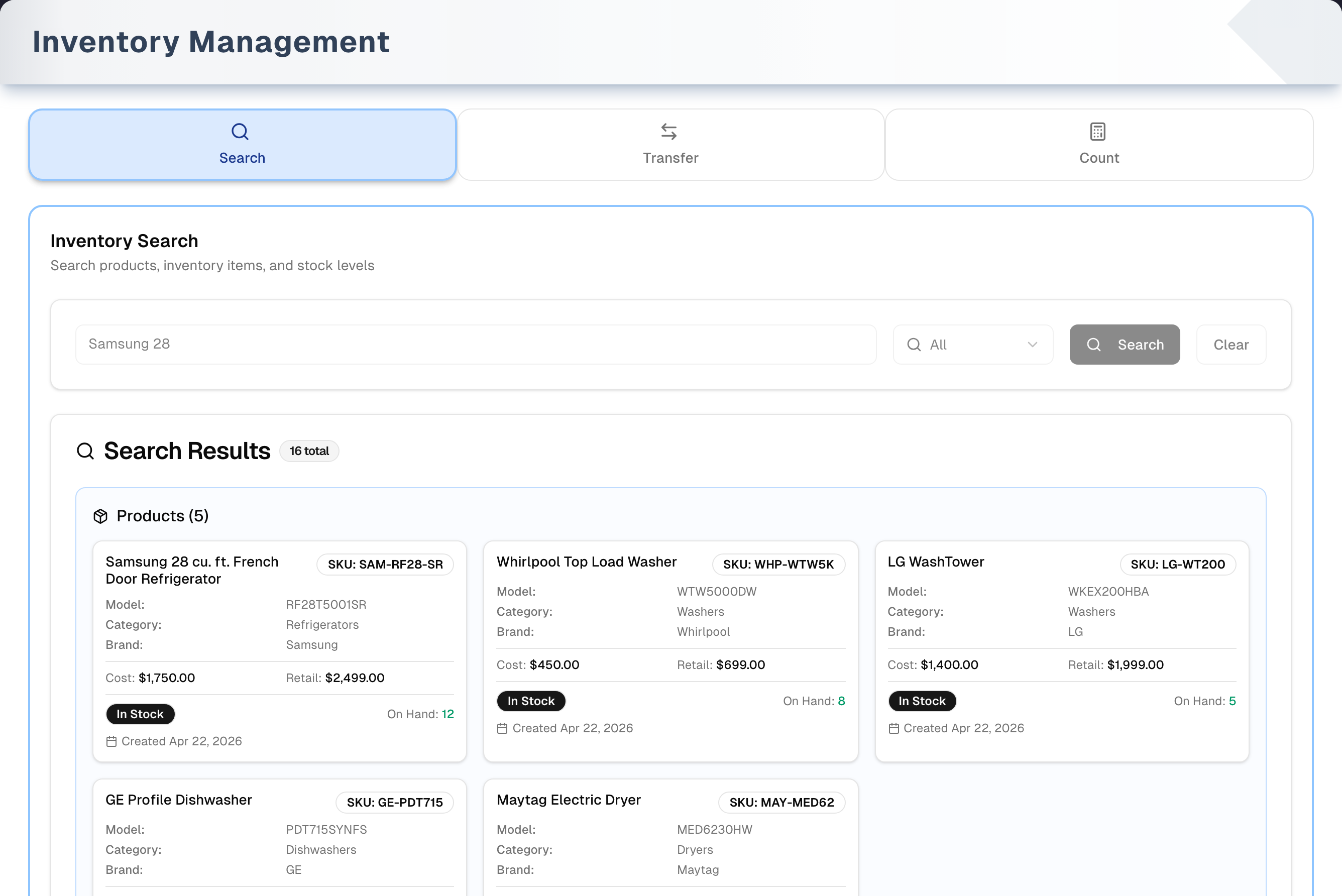
- One search box plus a type selector: All, Products, Inventory, Barcode, SKU and Serial. Type at least 3 characters, then click Search or press Enter. There are no location, category, status or quantity filters, and no export.
- All matches product names and SKUs, serialized units by SKU and by serial number, and barcodes on both products and units. Part of any of them is enough and letter case does not matter. Barcode searches barcodes only. Only active products are found.
- Results appear as cards in three panels:
- Products: matching products with cost, retail and a stock badge (In Stock, Low Stock or Out of Stock). Click a card to open the product's details, the same window as Catalog → Products, where you can edit or delete it.
- Bulk Items: for each product found, one card per location showing the stock that is not a serialized unit, as On-Hand = Available + Reserved. These cards are read-only. To correct a bulk quantity, run a count.
- Trackable Items: serialized units in any status, including Sold and Scrapped. Click a card to edit the unit's serial number, batch, barcode, status, condition, grade and unit prices. Status can only be switched between Available and Not Available, and that moves stock: Not Available lowers On Hand at the unit's location by 1, and switching the unit back to Available returns that 1. Outside a count this books nothing: a unit set aside (on display, away for repair) is still yours, so the books keep it while the Inventory page leaves it out. To write one off for good, switch it back to Available and Write off it. Write off scraps the unit: only Available units can be written off, and the unit becomes Scrapped with stock 1 lower. It stays on file.
- You can't change a unit's location here. Use Transfer.
Transfer
- Step 1: pick From Location and To Location (active locations only) and add optional Transfer Notes. There is no reason list: the notes are saved as the transfer's reason and its internal notes. Changing From Location empties the transfer list without asking.
- Step 2 appears once From Location is set. Type at least 2 characters of a product name or SKU. A product is listed only if it has Available stock at the From location, and a serialized product also needs at least one Available unit there. A product stocked there as more than one variant is listed once per variant with stock, for example "Variant: Black", and each is its own line, so you move exactly the variant you pick. Tick products and click Add Selected, or click Add on one row.
- Transfer Items: change a quantity with − and + or type it (1 up to the Available quantity). Remove a row with ×. Total is quantity × the product's cost price.
- Submit opens a review of the transfer. Its title asks "Move N units (M products) from … to …?", it lists each line with its quantity, and it says "Stock moves at once — to undo it, transfer it back." Nothing has moved yet. Cancel takes you back to the form; Post transfer moves the stock.
- Post transfer moves the stock at once. The From location goes down, the To location goes up, and up to that many Available serialized units move with it, the oldest first (the app picks which units). A variant moves from its own stock record, into the To location's record for the same variant, with that variant's own units. The stock keeps its value: it moves at the From location's average cost. If the product has no stock record at the To location, the transfer makes one there; a receipt, a delivery or another transfer making the same record at the same moment waits for it, so the same record is never made twice. The transfer is numbered TRF-YYYYMMDD-NNNN and saved with status DELIVERED.
- If the connection drops while posting, press Post transfer again. A transfer that already went through is not posted twice: the second press brings back the first one.
- Once a transfer is posted, only its reason and notes can be edited. A transfer can't be changed, cancelled or reversed. To move stock back, make a transfer in the other direction.
- Recent Transfers (left column) lists the 50 latest transfers, 5 per page, with a product-name filter. Click a row for Transfer Details.
- Location Management (top right) opens Settings → Locations.
Count
- Start scan count is the quickest way to count: walk the floor with a barcode scanner, then review and post. It has its own page: Scan Counting. The rest of this section is the typed count.
- A session belongs to one location, and only one session runs at a location at a time, scanned or typed. Pick the location in the dropdown (the first active location is selected for you), click Start Count Now, name the session and click Start. If somebody has already started the count here, the store refuses the second one and opens the one already running instead.
- Bulk Items lists every stock record at the location. A product stocked there as more than one variant has a row for each, with "Variant: …" under the name ("No variant" for stock kept without one, and "record 1 of 2" where two records share one), so you count each variant on its own row. Click Count, enter the physical On Hand (the only number you count), add notes if you like and click Save Count. Any count can be saved, including one equal to the system number. Counting a row again replaces its earlier count, so the latest count is the one that is used.
- Trackable Items lists the Available and Not Available serialized units at the location. Click Count, switch a missing unit to Not Available and click Save Status. The unit's status and On Hand change as soon as you save: each unit marked Not Available lowers On Hand by 1, and switching it back to Available returns that 1. Marked in a count, the missing unit is also written off in your books, the way the count books any other missing stock ("Inventory count - unit not found, written off"), and switching it back to Available later, in a count or not, takes that loss back.
- End Session first shows what will change and asks you to confirm with Post counts. For each counted row, the difference between your count and On Hand when you counted it is applied to On Hand now. Sales, receipts, transfers and unit changes made since the count are kept, and a shortfall stops at 0. Available is recalculated as On Hand less the stock held for orders, so it goes below 0 when you count fewer than are promised, and an adjustment is recorded. The change reaches your books too: stock the count found missing is written off to Inventory Write-Offs, and stock it found beyond what was on file goes back into Inventory, at the product's average cost (else its last cost), so the balance sheet moves with the shelf. There is no pause, discard or export.
- If a count leaves a location with fewer Available than it has Available serialized units, the extra units are marked Scrapped, oldest first. It never scraps more units than the count removed, and a higher count never brings units back.
- Recent Count Sessions shows the 3 latest sessions across all locations. Click a completed one to see each record's before → after values.
Step by step: transfer stock
- Open Transfer and choose From Location and To Location.
- In Step 2, type at least 2 characters of a product name or SKU. Tick products and click Add Selected, or click Add on a row.
- Set each quantity, add Transfer Notes if you want a record of why, and click Submit.
- Check the From and To locations and the quantities in the review, then click Post transfer. To change something, click Cancel instead.
- Note the Order Number in Transfer Created Successfully and click Continue. The transfer appears at the top of Recent Transfers.
Step by step: run a count
With a barcode scanner, click Start scan count instead and follow Scan Counting. To type the counts:
- Open Count and pick the location in the dropdown.
- Click Start Count Now, give the session a name and click Start.
- For a serialized unit you can't find, click Count on its Trackable Items row, switch it to Not Available and click Save Status. Do this before you count that product's bulk row.
- For each bulk row whose shelf quantity differs, click Count, enter the On Hand you counted and click Save Count. If you mistype, count the row again: the new number replaces the old one.
- Check the Variance lines, then click End Session. Review the list of changes and click Post counts.
Tips & best practices
- The product card's On Hand is the total across every location that holds the product, with the number of locations underneath. To see where that stock is, read the Bulk Items and Trackable Items cards below it.
- For barcodes, scan or type the code with either All or Barcode. Part of a code is enough, letter case does not matter, and a space before or after it is ignored.
- Add Transfer Notes. They become the transfer's reason and internal notes, which is your audit trail.
- Count in a quiet period if you can. Sales, receipts and transfers made after you count a row are kept when you end the session, but a sale made while you are counting that shelf can still throw the number off.
- Mark missing serialized units Not Available before you count that product's bulk row. Marking a unit already changes On Hand, so if you mark one after the row was counted, End Session treats the row's count as out of date, leaves its On Hand as it is and lists the product under "Not applied". Count the row again in a new session if the number still looks wrong.
- One count session runs at a location at a time. Starting a second one is refused with "A count session is already running at this location.", and the count already running opens for you, so two people never walk the same shelf apart. If a product is counted again before a session ends — by a stock reset, or by marking a trackable unit Available or Not Available — End Session leaves that product's On Hand as it is and lists it under "Not applied".
- On the Transfer tab, Enter never submits a transfer. In the product search box it adds the ticked products (or the only matching one), and in a quantity box it just confirms the number. Only Post transfer, in the review that Submit opens, moves stock.
- Count high-value or fast-moving categories regularly. The Variance lines flag what to investigate.
Troubleshooting
| Issue | Fix |
|---|---|
| Location missing from Transfer or Count | Only active locations are listed. Activate it under Settings → Locations. The Location Management button on the Transfer tab goes there |
| Product doesn't appear in Transfer Step 2 | It needs Available stock at the From location, and a serialized product needs at least one Available unit there. Check it on the Search tab |
| "Insufficient stock for product …" in the transfer review | Stock at the From location dropped after you added the product, for example because of a sale. Click Cancel, lower the quantity or remove the product and add it again, then Submit again |
| Search finds nothing for a barcode | Check the code is on the product or the unit — Search looks at both. Only active products are found, so an inactive product with that barcode won't show |
| I saved the wrong count | Click Count on the row again and save the right number. It replaces the earlier count |
| A count dialog doesn't seem to respond | Look for the red message inside the dialog, just above its buttons: Start, Save Count and Save Status each say there why they were refused |
| Start says "A count session is already running at this location." | Somebody else started the count, or this tab has been open since before it started. Select Cancel: the count already running is opened for you, and the Session Active badge names it |
| "This unit is reserved, sold or already written off…" | Only Available units can be written off. The message says why the unit was refused; handle reserved or sold units through their order |
| A count session shows "0 items counted" and "0 variances" | The figures are filled in when the session ends, so they read 0 while it is active. Some older completed sessions always show 0. Click View Details on the completed session to see the records |
| A session I just started isn't under Recent Count Sessions | The list doesn't reload when you start a session. Click Refresh. The Session Active badge confirms the session is running |
| High count variances | Check for unrecorded damage, theft, or transfers and sales made during the count |
| "403 - Forbidden" | The owner has hidden Management from your menu. That also blocks the separate Transfer Inventory, Count Inventory and search pages. Ask them to show it again (see Team) |
What's next
- Verify the result: Inventory → Snapshot
- Investigate movements: Reports → Inventory Report
- Restock shortfalls: Inventory → Procurement
Detailed reference
Every button, icon, field and message on this page, for when you need the exact detail. Each panel starts closed — open the one you need.
Page header and toolbar
| Control | Where | What it does | Notes |
|---|---|---|---|
| Management (sliders icon) | Sidebar, Inventory group | Opens this page on the Search tab | If the owner hides it from a team member, that person sees "403 - Forbidden" here and on the separate Transfer Inventory, Count Inventory and search pages |
| Title Inventory Management, subtitle "Search your stock, count it, move it between locations and reset a location's figures." | Header | Page heading | Static text, naming the four tools below it |
| Demo (Play icon, amber) | Header, right | Opens /inventory/management/demo, a read-only copy with sample data. The guided tour starts on its own the first time | Everyone. Opens in the same browser tab. See the Demo mode panel and Demo mode |
| Search tab (magnifier icon, blue) | Tab bar | Shows the Search tab. The address ends in #search | Default tab |
| Transfer tab (two-arrows icon, orange) | Tab bar | Shows the Transfer tab. The address ends in #transfer | — |
| Count tab (calculator icon, purple) | Tab bar | Shows the Count tab. The address ends in #count | — |
Tab in the address: #search, #transfer, #count, or ?tab=search, ?tab=transfer, ?tab=count | Page address | Opens the page on that tab | Any other value opens Search. ?tab= wins over # |
| Switching tabs | Tab bar | Loads only the tab you open | Unsaved on-screen work on the tab you leave is cleared: the transfer's locations, notes and items, typed search text and search results. Saved data is kept, including an active count session and its saved counts |
| Coloured frame around the tab (blue, orange, purple) | Tab body | Decoration | — |
Tab: Search
| Control | Where | What it does | Notes |
|---|---|---|---|
| Heading "Inventory Search", "Search products, inventory items, and stock levels" | Top of tab | Static text | — |
| Search box "Enter at least 3 characters (name, SKU, barcode, serial...)" | Search card | Holds the search term | Greyed out while a search runs. Typing doesn't search by itself: click Search or press Enter |
| Enter key | Search box | Runs the search | Only with 3 or more characters (not counting spaces at the start or end) and when no search is running |
| Type selector (default All) | Right of the search box | Chooses what is searched | Changing it doesn't re-run the search. Click Search again |
| All (magnifier icon) | Type selector | Product name or SKU contains the text (active products, up to 25 by name and 25 by SKU), plus serialized units whose SKU contains it and units whose serial number contains it — both, always, up to 25 each. Then barcodes, on active products and on units (up to 25 each) | Everything the box's hint mentions. A product or unit already found is not listed twice |
| Products (box icon) | Type selector | Product name or SKU contains the text. Active products only, up to 25 each | No unit results |
| Inventory (cart icon) | Type selector | Serialized units by SKU, falling back to serial number. Up to 25 | No product results, so Bulk Items stays empty |
| Barcode (barcode icon) | Type selector | Barcode contains the text, on active products and on units. Up to 25 each | Part of a code is enough, letter case does not matter, and spaces before or after the code are ignored. Use it to search barcodes only; All covers them too |
| SKU (# icon) | Type selector | SKU contains the text, on active products and on units | No 25-result limit |
| Serial (# icon) | Type selector | Serial number contains the text, on units only | No 25-result limit. No product results, so Bulk Items stays empty |
| Search (magnifier icon; spinning arrows while running) | Search card | Runs the search. When products are found it also loads every location's stock for each of them, which fills Bulk Items | Greyed out with fewer than 3 characters or while a search runs |
| Clear | Search card | Empties the box, the results and any error. The panels go back to their "will appear here" hints | Always available |
| "Search Error" card (warning icon) | Below the search card | Shows why the search failed | Only after an error. See Messages |
| Search Results header with "N total" badge | Results card | The badge adds up the products, units and bulk stock records the page draws | The badge shows only after a search that found something. A stock record whose whole quantity is serialized units is not counted — those units have a card each under Trackable Items — so the badge always matches the number of cards |
| "No results found" / "Try adjusting your search terms or search type" | Results card | Empty state | After a search where nothing at all was found |
| Products (N) panel (blue) | Results card | One card per matching active product | Before a search: "Product results will appear here" / "Search by product name, SKU, or other identifiers". No match: "No products found matching your search criteria" |
| Product card | Products panel | Click anywhere to open the product's details window (see Dialog: Product details) | — |
| Product card contents | Product card | Name, "SKU: …" badge, Model, Category and Brand (when set), Cost and Retail ("N/A" if blank), a stock badge with "On Hand: N", the line "across N locations" (or "at 1 location"), and a "Created …" date | On Hand is the total across every active location that holds the product. Out of Stock when that total is 0 or less, Low Stock when it is at or below those locations' minimum levels added up, otherwise In Stock. A product with no minimum level anywhere is never Low Stock. The whole stock block is hidden when the product has no stock record |
| Bulk Items (N) panel (purple) | Results card | One card per product per location that holds stock that isn't a serialized unit | Only for products found in the Products panel. Cards whose bulk On-Hand, Available and Reserved are all 0 are hidden. Before a search: "Bulk item results will appear here" / "Bulk items show aggregate inventory quantities by location.". None found: "No bulk items found for the searched products" / "Bulk items show aggregate inventory quantities by location. Search for products to view their stock levels." |
| Bulk item card | Bulk Items panel | Click to open Bulk Item Quantity Adjustment, an explanation with no inputs | — |
| Bulk card contents | Bulk card | Name, "SKU:" badge, location, stock badge, the line On-Hand = Available + Reserved, Min, Max and Reorder (when set), and the last movement date | Bulk figures leave out serialized units. On-Hand = On Hand minus the units at that location that are Available, Reserved, Damaged or Returned. Available = Available minus Available units. Reserved = stock held for orders plus damaged-return holds, minus Reserved units. None go below 0. Min, Max and Reorder are display-only here: set them with Edit levels in the product window on Inventory → Snapshot |
| Trackable Items (N) panel (green) | Results card | One card per matching serialized unit, in any status, including Sold and Scrapped | Before a search: "Trackable item results will appear here" / "Search for items tracked by serial number, batch number, or barcode". None found: "No trackable items found matching your search criteria" / "Try searching by SKU, serial number, or barcode" |
| Trackable item card | Trackable Items panel | Click to open Trackable Item | — |
| Trackable card contents | Trackable card | Product name, "SKU:" badge (the product's SKU), S/N, Barcode, Batch, Location, Status badge, Condition, Cost, Retail and the date it was created | S/N, Barcode, Batch, Location and Condition show only when set. Status badge: AVAILABLE green, SCRAPPED and DAMAGED red, RETURNED outlined, HELD OFF SALE amber for a unit a Damaged or Defective return holds off sale, others grey. Hover over RESERVED to see what holds it: "Order #… holds this unit." when a Pending or Processing order names it on a line (a Draft or Saved order holds nothing, so it is never named), "An order holds this unit." when an order's reservation holds it, or "Held for an order, or off sale after a Damaged or Defective return." when the unit's record doesn't say which. The Trackable Item window says the same. A deleted location shows as a code instead of a name |
Dialog: Product details
Opened from a card in the Products panel. It is the same window as Catalog → Products, which covers every field. The controls that matter from this page:
| Control | Where | What it does | Notes |
|---|---|---|---|
| Title (product name), subtitle "code • SKU • brand" | Header | Identifies the product | Opened from Search, the brand reads "No Brand" when unset and the code shows the SKU |
| Link / Refresh from catalog (circular-arrows icon) | Header | Opens the catalog link and refresh window | Appliance stores only (business type Appliance Retail or Appliance Services) |
| Edit (pencil icon) | Header | Switches to edit mode with the tabs Basic Info, Pricing, Physical, Variants, Vendors and Media | See Catalog → Products |
| Delete (trash icon, red) | Header | Browser prompt "Are you sure you want to delete this product?". OK checks for linked records and refuses if any exist. Otherwise it removes the product's variants and archives the product (hidden, not erased), and the card leaves the results | Refused when the product has serialized units (in any status, ever), stock on hand or held stock at any location, or any procurement or sales order line. Transfers alone don't block it. See Messages |
| Cancel / Save (disk icon; "Saving...") | Header, edit mode | Cancel discards the edits. Save writes the product and updates its card in the results | Both greyed out while saving. If saving fails, a browser alert says "Failed to update product. Please try again." |
| View tabs Product Details, Procurement (N), Inventory | Body | Read-only product information, purchase history and stock | Product Details can also show a walk-in requests card |
| X (close) / Esc / click outside | Dialog | Closes | — |
Dialog: Bulk Item Quantity Adjustment
| Control | Where | What it does | Notes |
|---|---|---|---|
| Title "Bulk Item Quantity Adjustment" (box icon) | Header | Explanation only, no inputs | Opens from any Bulk Items card |
| "Bulk items represent aggregate inventory quantities tracked at the location level." and "To adjust the quantity of bulk items, please use the Count Session function to perform an inventory count and make adjustments." | Body | Explains that bulk quantities are corrected with a count | — |
| Count Session link | Body text | Opens this page's Count tab in a new browser tab | — |
| Got it | Footer | Closes | — |
| X (close) / Esc / click outside | Dialog | Closes | — |
Dialog: Trackable Item
Opened from a card in the Trackable Items panel. Fields (after Edit):
| Field | Required | Default | Rules and error text |
|---|---|---|---|
| Serial Number ("Enter serial number") | No | Current value. View mode shows "N/A" when blank | Free text |
| SKU | — | — | Read-only. Shows "N/A" when blank |
| Batch Number ("Enter batch number") | No | Current value. View mode shows "N/A" when blank | Free text |
| Barcode ("Enter barcode") | No | Current value. View mode shows "N/A" when blank | Free text. This is the unit's own barcode, which the Barcode search type matches exactly |
| Current Status | — | Current status | For an Available or Not Available unit, the options are Available and Not Available, with the hint "Changing this moves stock: Not Available lowers On Hand at this location by 1, and switching the unit back to Available returns that 1." On Save, Not Available lowers On Hand (and Available) at the unit's location by 1. On Hand never goes below 0: at 0 or below nothing moves. Available can go below 0, when what is left is promised to orders: that is a shortfall, shown rather than hidden. Switching the unit back to Available raises them by 1 only when marking that unit Not Available lowered them. A unit set Not Available while On Hand was 0, a unit at a location whose stock has been reset since, and some older Not Available units switch back with no stock change. Each change is its own movement ("Unit marked not available" / "Unit marked available"). A unit in any other status (Reserved, Sold, Damaged, Scrapped…) shows its badge instead, with "Only Available and Not Available units can be switched here. Reserved and sold units follow their order." A unit held off sale after a Damaged or Defective return is Reserved too, and reads HELD OFF SALE here, as on its Search card, with "A Damaged or Defective return holds this unit off sale. Put it back on sale from Inventory → Snapshot once it is repaired, or write it off here with Write off." instead: once it is repaired, a manager puts it back on sale from Inventory → Snapshot, the product's row, Put back on sale; if it can't be repaired, Write off writes it off by its serial. The unit's live status is checked again when you save, so a unit an order took in the meantime is refused with "Cannot change availability of a … item…". View mode shows a badge: Available green, Reserved yellow (amber HELD OFF SALE for a unit a return holds off sale), Sold blue, Damaged and Scrapped red, Returned orange, others grey. Orders move units for you: reserving stock on an order makes a unit Reserved, fulfilling makes it Sold, cancelling or deleting the order makes it Available again, and a customer return makes it Available with condition Used |
| Location (pin icon) | — | — | Read-only, with the hint "To move this item to a different location, use the Transfer function". The store refuses a move here too: "Use Inventory → Transfer to move a unit to another location. Changing it here would move the unit without its stock." |
| Condition ("Select condition") | No | Current value. View mode shows "Not specified" when blank | Options New, Like New, Refurbished, Good, Used, Fair, Poor, Damaged, Defective — including the three the app sets by itself: Used on a unit a customer returned, Defective on a return recorded as one, and Refurbished from the procurement importer. A condition from anywhere else is offered back as itself rather than dropped |
| Grade ("Enter grade (e.g., A, B, C)") | No | Current value. View mode shows "Not specified" when blank | Free text |
| Item Cost Price ("0.00") | No | Current value | Number (the arrows step by 0.01). A cost of 0 shows as an empty box. Clearing the box and saving removes the price, which then shows "N/A". This unit's own cost |
| Item Retail Price ("0.00") | No | Current value | Same rules as Item Cost Price |
Buttons and read-only parts:
| Control | Where | What it does | Notes |
|---|---|---|---|
| Title "Trackable Item: …" (archive icon) | Header | Shows the serial number, or an internal ID when the unit has none | — |
| Edit (pencil icon) | Header | Turns on editing for the fields above | — |
| Write off (X icon, red) | Header | Browser prompt "Write off this unit (…)? Its status becomes Scrapped and On Hand at this location drops by 1. The unit stays on file and is not erased." OK does exactly that: the status becomes SCRAPPED, the location's On Hand and Available each drop by 1, and a scrap movement is recorded. Either can go below 0: Available when the rest of the stock is promised to orders, On Hand when the unit was still on file after its stock had gone. The loss is recorded as it happened, and Inventory → Snapshot → Audit lists what it leaves short for review. When a product has more than one stock record at the location (one per option), the 1 comes off the record for the unit's own option — the same record Available / Not Available moves — and otherwise off the oldest. A sale or a reservation of the same product saved at the same moment waits for the write-off and then applies on top of it, so neither is lost. The card leaves the results and the dialog closes | Available units, and units a Damaged or Defective return holds off sale (HELD OFF SALE): the prompt then adds "It comes out of the stock held off sale, so Available does not change.", and On Hand and the held stock of the record the return brought it back onto each drop by 1 while Available stays as it is. Any other unit is refused, and the message says why: "This unit is reserved, sold or already written off, so it is managed through its order — it can't be written off here." A unit somebody else already wrote off while this window was open says "This unit was already gone" instead — nothing was written and On Hand did not move. The unit isn't erased: search again and it shows as SCRAPPED. Greyed out while it saves |
| Cancel | Header, edit mode | Discards the edits | Greyed out while saving |
| Save (disk icon; "Saving...") | Header, edit mode | Saves the fields to this unit. Stock doesn't change, except that switching Current Status moves On Hand by 1 (see above) | "Inventory item updated successfully", or "Error" with the reason. The store saves the fields, not the browser, so a unit's status can only ever change through the Available / Not Available switch or through the order, transfer, count or scrap that moves it. The other fields are saved first and a status change last. If the other fields can't be saved, nothing is saved and stock doesn't change. If they are saved but the status change is refused, the message reads "Your other changes were saved, but the status was not changed: …" with the reason, for example "Cannot change availability of a reserved item…" |
| Transfer link | Under Location | Opens this page's Transfer tab in a new browser tab | — |
| Product Information card: Product Name, Product SKU, Category, Product Barcode | Body | Read-only | Product Barcode is the product's own barcode, or "N/A" when it has none. Category shows only when set. The card is hidden if the unit has no product |
| Product Cost Price, Product Retail Price | Financial Information card | Read-only | The product's catalogue prices, beside the unit's own. They differ when a unit was bought or is being sold at something other than the catalogue price |
| Created At, Last Updated | Activity Timeline card | Date and time in your store's time zone | — |
| X (close) / Esc / click outside | Dialog | Closes without saving | — |
Tab: Transfer
The right column holds the error banner and the Create New Transfer form. The left column is Recent Transfers (second table below).
| Control | Where | What it does | Notes |
|---|---|---|---|
| Heading "Inventory Transfer", "Transfer inventory between locations" | Top of tab | Static text | — |
| Location Management (gear icon) | Top right | Opens Settings → Locations | Same browser tab. An unsubmitted transfer is lost |
| Red error banner (warning icon) | Top of right column | Shows the tab's errors and notices | Stays until the next successful action. Some notices clear themselves (see Messages). A transfer that could not be posted says why inside the transfer review instead, where you can see it |
| Create New Transfer card, "Step 1: Set Transfer Locations" | Right column | Groups the locations and notes | — |
| From Location ("Select source location"; "Loading..." while loading) | Step 1 | Source location. Options show "Name (CODE)" | Required (marked with an asterisk). Active locations only. Changing it empties Transfer Items without asking. "No locations available" when there are none |
| To Location ("Select destination location") | Step 1 | Destination location | Required. The From location is left out of the list |
| Transfer Notes ("Optional notes about this transfer...") | Step 1 | Saved as both the Transfer Reason and the Internal Notes of the transfer | Optional. Both can be edited later in Transfer Details. There is no reason list |
| "Step 2: Choose Inventories to Transfer" card | Right column | Product picker | Appears only after From Location is chosen |
| Product search ("Search products by name or SKU..."; spinner while searching) | Step 2 | Searches as you type from 2 characters, by name or SKU, up to 50 products | Lists a product only when it has Available stock at From. A serialized product also needs an Available unit there. Inactive products with stock are listed too. Emptying the box clears the list and the ticks |
| Select All (N selected) | Step 2 list header | Ticks every listed product that has stock and isn't already added. Click again to untick | Shown once there are results |
| Add Selected (N) (+ icon) | Step 2 list header | Adds the ticked products at quantity 1 each and clears the search | Greyed out with nothing ticked. If some are skipped: "N products added. M skipped (already in transfer or no stock)", which clears after 5 seconds |
| Row tick box | Step 2 row | Ticks the product (the variant, on a variant's row) | Greyed out when Available is 0 or the row is already added |
| Row text "SKU: … • Available: N" (and "• Already added") | Step 2 row | Available is the sellable quantity at From, bulk and serialized together. A product with more than one stock record at From has a row for each one with stock, starting "Variant: …" ("No variant" for stock kept without one, and "record 1 of 2" where two records share a variant), oldest first | Rows already added are dimmed |
| Add (+ icon) | Step 2 row | Adds that product at quantity 1 and clears the search | Greyed out when there is no stock or it is already added |
| Transfer Items (N) card | Right column | The list to transfer, with columns Product (name, "Variant: …" when the product has more than one record at From, and SKU), Available, Quantity and Total | Appears after the first product is added. Two variants of one product are two lines, and the review counts them as one product |
| − (minus icon) | Quantity cell | Quantity −1 | Greyed out at 1 |
| Quantity box | Quantity cell | Type a quantity. It is kept between 1 and Available, and decimals are dropped | You can't enter more than is available |
| + (plus icon) | Quantity cell | Quantity +1 | Greyed out at the Available quantity |
| × (X icon, no label) | Last column | Removes the row | No confirmation |
| Total column | Each row | Quantity × the product's cost price | $0.00 when the product has no cost price |
| "N items, Q total quantity" and "Total: $X" | Under the list | Number of products, total units and value at cost | — |
| Submit (two-arrows icon; "Submitting..." with a spinner) | Bottom of the form | Opens the transfer review (see its panel, "Move N units (M products) from … to …?"). Nothing moves until Post transfer is clicked there | Greyed out until From and To are both set and different and at least one item is listed. Also greyed out, reading "Submitting...", while a transfer is posting |
| What Post transfer records | — | A transfer numbered TRF-YYYYMMDD-NNNN with status DELIVERED. For each product, the From location's On Hand and Available go down by the quantity and the To location's go up (a stock record is created there if needed). Two movements are recorded, "Transfer Outbound" and "Transfer Inbound". Up to that many Available serialized units at From move to To, oldest first. The app picks which units, and you can't choose serial numbers. Each line moves the stock record it was picked from: for a variant, that variant's record at From, into the To location's record for the same variant (made for that variant if there is none), with the units that belong to that record (a unit belongs to the record of its own variant, else to the product's oldest record there). A sale at To draws on every one of the product's records there, so the variant moved in can be sold at once, even when another variant's record there is empty. | The server checks stock again: "Insufficient stock for product …" if it dropped meanwhile. A line that names no variant, for a product with stock free at From as more than one variant, is refused: "… is stocked at … as more than one variant (…), so which one to transfer is not clear. Pick the variant on the transfer line." Stock held for orders stays at From. The date in the number is the store's own date, in the store's time zone (UTC when none is set), the same as order numbers. The stock moves at the From location's average cost (its last purchase cost if it has no average). A To location with no stock record for the product starts at that cost. An existing record's average cost is recalculated by quantity, counting only stock actually on hand there, so a To location whose On Hand is below zero takes the incoming cost. The From location's average cost doesn't change |
| Enter key | Product search box | Adds the ticked products, the same as Add Selected. With nothing ticked, it adds the single listed product that can still be added. It never submits the transfer | Does nothing when several products are listed and none is ticked |
| Enter key | Quantity box | Confirms the number and leaves the box. It never submits the transfer | |
| Enter key | Transfer Notes, or the focused Submit button | Notes: adds a new line. Submit: opens the transfer review, the same as clicking it | Submitting from the keyboard still needs Submit to be focused. The review opens with Cancel focused, so a second Enter cancels rather than posts |
Recent Transfers (left column):
| Control | Where | What it does | Notes |
|---|---|---|---|
| Title Recent Transfers (clock icon) | Panel header | The 50 latest transfers, newest first, 5 per page | Refreshes after a transfer posts or you save its notes |
| Refresh (circular-arrows icon, no label) | Panel header, right | Reloads the list and returns to page 1 | — |
| Filter box ("Filter by product name...") | Panel header | Keeps transfers that include a product whose tag contains the text: its name, its variant ("White"), or both as the tag writes them ("Washer · White") | SKU and transfer number don't match. Searches only the 50 loaded. Returns to page 1 |
| X (clear filter) | Inside the filter box | Clears the filter | Only when the box has text |
| Clear filter (link) | Empty result | Clears the filter | Shown with "No transfers match "…"" |
| Transfer row | List | Click anywhere to open Transfer Details | — |
| Row contents | Each row | From → To location chips, date and time, "N products, M items", up to 3 product tags and "+N more", the reason in italics (first 60 characters), and bottom right the transfer's TRF number and a status badge | A product moved as a variant has its variant in its tag, for example "Washer · White", so two variants of one product are two tags. A transfer with no TRF number shows the last 6 characters of its internal ID instead. The reason line is hidden when blank or exactly "Inventory Transfer". The badge normally reads DELIVERED. Locations that were later deleted still show their names |
| Previous (left-arrow icon) / Next (right-arrow icon), "Page X of Y" | Panel footer | Moves between pages of 5 | Only with more than one page. Greyed out at the ends |
| Retry (circular-arrows icon) | Error state | Reloads the list | After "Failed to load recent transfers. Please try again." |
| "Loading recent transfers..." / "No recent transfers found" with "Transfer orders will appear here once created" | Panel body | Loading and empty states | — |
Dialog: Move N units (M products) from … to …?
Opened by Submit. Nothing has moved while it is open.
| Control | Where | What it does | Notes |
|---|---|---|---|
| Title "Move N units (M products) from … to …?" (two-arrows icon) | Header | Names the total units, the number of products, and the From and To locations | "1 unit (1 product)" for a single unit. Locations show by name |
| "Stock moves at once — to undo it, transfer it back." | Under the title | Says what Post transfer does | A transfer can't be cancelled or reversed. A transfer back may return different serialized units, and both locations keep their blended average cost |
| Line list | Body | Each product's name, SKU and "× quantity", in the order of Transfer Items | Exactly what Post transfer sends |
| Red message box | Above the buttons | Why the transfer could not be posted, for example "Insufficient stock for product …" | The review stays open. The message clears when you post again or close the review |
| Cancel | Footer, left | Closes the review and goes back to the form, with everything still filled in | Has the focus when the review opens. Greyed out while posting |
| Post transfer (two-arrows icon; "Posting..." with a spinner) | Footer, right | Moves the stock (see "What Post transfer records" in Tab: Transfer) and opens Transfer Created Successfully | Greyed out while posting. Pressed again after a lost connection, the same transfer is not posted twice: the store returns the one already recorded. Change anything on the form and it is a new transfer |
| X (close) / Esc / click outside | Dialog | Same as Cancel | Does nothing while posting |
Dialog: Transfer Created Successfully
| Control | Where | What it does | Notes |
|---|---|---|---|
| Title "Transfer Created Successfully" (green check), "Your inventory transfer has been processed." | Header | Confirms the stock has moved | Opens right after Post transfer succeeds, in place of the review. The form is already cleared |
| Order Number, Transfer ID, From, To, Items, Status | Body | Order Number is the TRF number. Items is the number of products | Status is the status the transfer was saved with, DELIVERED, the same as Recent Transfers and Transfer Details show |
| Continue | Footer | Closes | — |
| X (close) / Esc / click outside | Dialog | Closes | — |
Dialog: Transfer Details
| Control | Where | What it does | Notes |
|---|---|---|---|
| Title "Transfer Details", "View and edit transfer order information" | Header | Opened from a Recent Transfers row | "Loading transfer details..." while loading |
| Summary card: TRF number, status badge, From:, To:, Created:, Total Items:, Total Value:, Movements: | Body | Total Items is the total quantity moved, not the number of products. Total Value = quantity × the product's cost price as it was on the transfer form. The stock itself moves at the From location's average cost (see Stock Movements). Movements is normally 2 per line | DELIVERED shows a tick |
| Transfer Notes card, Edit (pencil icon) | Card header | Turns on editing for the two fields below | — |
| Transfer Reason ("Why was this transfer made?") | Notes card | Edits the reason | Optional. View mode shows "No reason specified" when blank |
| Internal Notes ("Internal notes for this transfer...") | Notes card | Edits the internal notes | Optional. View mode shows "No notes" when blank |
| Cancel (X icon) | Card header, edit mode | Restores the saved values | Greyed out while saving |
| Save (disk icon; spinner) | Card header, edit mode | Saves the reason and notes, reloads the dialog and refreshes Recent Transfers | Only the notes can be edited. Items, quantities and locations can't, and a transfer can't be cancelled or reversed. On failure: "Failed to update transfer notes. Please try again." |
| Items (N) tab | Tabs | Table: Product (name, with the variant for a line moved as one, for example "Washer · White", and SKU), Quantity, Unit Price, Total | The variant is read from the stock record the line moved, so two variants of one product are two named lines ("No variant" for stock kept without one beside a variant). Unit Price is the product's cost price as it was on the transfer form, not a selling price. Empty: "No items found" |
| Stock Movements (N) tab | Tabs | Table: Type ("Transfer Outbound" with a red down arrow, "Transfer Inbound" with a green up arrow), Product (with the variant of the record it moved, as on the Items tab), From → To, Quantity, Previous, New, Unit Cost, Total, Date | Previous and New are On Hand before and after. Unit Cost is the From location's average cost the stock moved at (the product's cost price only when the From location had no cost), and Total is Unit Cost × quantity. Some older transfers show Available quantities and the product's cost price here instead. Empty: "No stock movements found" |
| X (close) / Esc / click outside | Dialog | Closes | Unsaved note edits are lost. The next Transfer Details you open starts in view mode, showing that transfer only: edit mode, a half-typed note and any error message are all cleared when the window closes |
Tab: Count
From top to bottom: the blue guide box, Scan counts, Recent Count Sessions, the red error banner (when there is an error), then the New Count Session card with the location, search, session buttons and the Bulk Items and Trackable Items tables. Saving a bulk count does not change stock: End Session does, after you confirm. Save Status on a serialized unit changes stock at once.
| Control | Where | What it does | Notes |
|---|---|---|---|
| Guide box "How to Perform Inventory Counting:" | Top of tab | Seven tips: scan with a barcode scanner through Start scan count, start a session with Start Count Now, find an item with the "Search items to count..." box, Count a row to record what you counted, review the highlighted variances, then "End Session: Review what will change and confirm. Each product's latest count is applied to its On Hand at that moment", and add notes as you go | Every tip names a control that is on this tab |
| "Loading organization context..." | Whole tab | Shown until the app identifies your store | If it doesn't go away, sign out and back in |
| Recent Count Sessions card (calendar icon), "Page N" | Below Scan counts (or the guide) | The 3 latest sessions across all locations, newest first | Hidden until the store has started a session. The location isn't shown. A session you just started doesn't appear here until you click Refresh, end it, or come back to the tab |
| Session row | Recent sessions | Status badge (ACTIVE green, others grey), session name, "Started: …" and "• Ended: …", "N items counted", "N variances" | A typed count's CANCELLED row is a count that was merged into another count running at the same location: everything counted in it was moved onto that count, so nothing was lost. A scan count's CANCELLED row is a scan count someone ended with Cancel count. A typed count opens only once COMPLETED: it shows View Details (eye icon) and opens the session details, and its ACTIVE row does nothing. A scan count's row opens at any status (see Scan badge). A row that opens can also be reached with Tab and opened with Enter. The two counts are filled in when the session ends: they read 0 while it is active, and on some older sessions. View Details shows the records |
| Scan badge | Session row | Marks a scan count | A scan count's row opens its scan screen while it runs, and its report once it ended |
| Previous / Next | Recent sessions header | Pages of 3 | Only with more than one page |
| Scan counts card (scan icon) | Below the guide, above the Recent Count Sessions | The 10 latest scan counts: Running, Posted or Cancelled, the name, location, start time and who posted, with the accuracy and shrinkage of a posted one | Hidden once it has loaded and the store has no scan count. While loading it shows grey bars; if the list can't load it says "Scan counts could not be loaded." with Try again. A row opens the count: Resume while it runs, the report once it ended |
| Red error banner (warning icon) with Dismiss | Above New Count Session | Shows tab-level problems: your store couldn't be identified, or the Bulk Items and Trackable Items lists couldn't load. Dismiss hides it | Those two are all it shows. Refusals from Start, Save Count, Save Status and View Details are shown inside their own dialog instead |
| "Please select a location to begin counting inventory." | Above New Count Session | Reminder | Only when no location is selected. Rare, because the first active location is preselected |
| New Count Session card (calculator icon) | Main card | Holds the count controls and both tables | The title stays the same while a session is active |
| Location dropdown ("Select location") | Card toolbar, left | Chooses the location to count. Reloads both tables and looks up that location's active session | Active locations only. Sessions belong to one location, so switching can show a different session or none |
| Search box ("Search items to count...") | Card toolbar | Filters both tables as you type. Bulk Items: product name or SKU. Trackable Items: product name or SKU, serial number or unit barcode | Returns both tables to page 1 |
| Start scan count (scan icon) | Card toolbar, right | Opens Start scan count. See Scan Counting | Only when the location has no active session. Greyed out with no location or while loading |
| Start Count Now (calculator icon, outlined) | Card toolbar, right | Opens Start New Count Session | Only when the location has no active session, as this tab last read it. Greyed out with no location or while loading. If somebody started the count after this tab loaded, the button is still here and Start refuses it |
| Session Active (…) badge (clock icon) | Card toolbar | Names the active session at this location | Only while a typed session is active here |
| Scan count running (…) badge and Resume scan count | Card toolbar | A scan count is running at this location; Resume scan count opens its scan screen | Shown instead of End Session. The Count buttons stay greyed out: a scan count is counted by scanning |
| End Session (red) | Card toolbar | Opens End count session and update stock?, which lists what will change. Nothing changes until you click Post counts there | Only while a session is active. Greyed out while loading or posting. Anyone in the store can end any session. See Dialog: End count session and update stock? |
| Refresh (circular-arrows icon; spins while loading) | Card toolbar | Reloads locations, the active session, recent sessions and both tables | Greyed out while loading |
| Bulk Items sub-card (box icon), "Page N" | Inside the card | One row per stock record at the location, including those with 0 On Hand. Columns Product (with "Variant: …" under the name for a record of a variant, "No variant" for a record without one beside another record of the product, and "record 1 of 2" where two records share one), Actions, SKU, On Hand Qty, Available Qty, Reserved Qty, Status. 20 per page | Each page is in alphabetical order by product name, but the alphabet restarts on every page, so use the search box to find one product. On Hand is the full quantity, including serialized units (unlike Search's Bulk Items). Reserved is stock held for open orders plus damaged-return holds, the same figure every other inventory screen shows |
| Count (calculator icon) | Bulk Items, Actions column | Opens Count Item - Adjust Stock Levels for that row | Greyed out until a session is active at this location, and while loading |
| "Variance: ±N" under the product, "→ N" under On Hand, Available and Reserved | Bulk Items row | The count saved in this session (the latest one, if the row was counted again). Green means more than the On Hand when counted, red means less | Right after saving, all three "→" values show (Available and Reserved repeat the system value). After a refresh the Variance line, "→ N" under On Hand and the status remain |
| Status badge pending, counted, variance, adjusted | Bulk Items, Status column | pending = not counted in this session. variance = counted with a difference (yellow). counted = no difference (green). adjusted = applied at End Session (blue) | Counting the row again replaces the count and updates the badge |
| Previous / Next, "Page N" | Under the Bulk Items table | Pages of 20 | Only with more than one page |
| "Loading bulk items..." / "No bulk items found" / "No items match your search" | Bulk Items sub-card | Loading and empty states | — |
| Trackable Items sub-card (scan icon), "Page N" | Inside the card | Serialized units at the location with status Available or Not Available. Columns Product, Actions, SKU, Serial Number, Condition, Status. 20 per page | Each page is in alphabetical order by product name, restarting on every page. Reserved, sold and scrapped units are never listed. A unit marked Not Available stays listed, so you can switch it back. Condition badge NEW green, USED blue, others grey |
| Count (calculator icon) | Trackable Items, Actions column | Opens Confirm Item Availability for that unit | Greyed out until a session is active, and while loading |
| Previous / Next | Under the Trackable Items table | Pages of 20 | Only with more than one page |
| "Loading trackable items..." / "No trackable items found in inventory." with "Individual items with serial numbers, batch numbers, or specific tracking requirements will appear here." / "No trackable items match your search." | Trackable Items sub-card | Loading and empty states | — |
Dialog: Start New Count Session
Fields:
| Field | Required | Default | Rules and error text |
|---|---|---|---|
| Session Name | No | "Count Session" followed by your computer's current date and time, filled in as the dialog opens | Clear it to type your own name. Left empty, the session is still named "Count Session" and the date and time |
| Description (optional) ("Describe this count session...") | No | Empty | Blank saves "Physical inventory count session". It isn't shown anywhere on this page afterwards |
Buttons:
| Control | Where | What it does | Notes |
|---|---|---|---|
| Title "Start New Count Session" (calculator icon) | Header | Opened by Start Count Now | — |
| "Location: …" (blue info box) | Body, top | The location chosen on the tab | Can't be changed here. Close the dialog and change the tab's location dropdown |
| Cancel | Footer | Closes | Typed text is kept for the next time the dialog opens |
| Start | Footer | Creates an ACTIVE session for the location and closes the dialog. No stock changes | On a refusal the dialog stays open and shows the reason in a red box above its buttons, for example "Please select a location before starting a count session". It stays while the dialog is open, and the next time you open the dialog it is gone, so you are never shown a problem you have already dealt with. If a count is already running here, the reason reads "A count session is already running at this location. Select Cancel to carry on with it." — closing the dialog puts you in that session, with its name in the Session Active badge |
| X (close) / Esc / click outside | Dialog | Closes | — |
Dialog: Count Item - Adjust Stock Levels
Opened by Count on a Bulk Items row. Fields:
| Field | Required | Default | Rules and error text |
|---|---|---|---|
| On Hand Quantity | Yes | This session's saved count for the row, otherwise the system On Hand | Whole numbers 0 or more. Decimals are dropped, and anything that isn't a number becomes 0. Any number can be saved, including the system On Hand |
| Notes (Optional) ("Add any notes about this count (damages, discrepancies, etc.)") | No | Empty | Shown later in the session details, Notes column |
Buttons and read-only parts:
| Control | Where | What it does | Notes |
|---|---|---|---|
| Title "Count Item - Adjust Stock Levels" (calculator icon) | Header | — | — |
| Product name, "SKU: …" | Body, top | Identifies the stock record | — |
| "Stock Level Fields:" box | Body | "On Hand: Total physical inventory — the only value you count here"; "Available: Sellable quantity, derived by the system from On Hand minus Reserved when the count is posted"; "Reserved: Stock held for open orders, plus any damaged-return holds (managed by orders and returns, not by counts)" | The Reserved number matches the Reserved column on the tab behind the dialog |
| − (minus icon) | Next to On Hand | Counted −1, not below 0 | — |
| + (plus icon) | Next to On Hand | Counted +1 | — |
| "System: N" | Beside the box | The current On Hand | — |
| "Variance: ±N" (yellow warning) | Under the box | The live difference | Only when the counted number differs |
| Available (system) "Derived on post — not counted" and Reserved (system) "Held for open orders and returns — not counted" | Body | Read-only context | Reserved is stock held for open orders plus damaged-return holds |
| "Variance Detected" box: "On Hand: A → B (±N)" | Body | Summary of the difference | Only when there is a difference |
| Cancel | Footer | Closes without saving | Greyed out while saving |
| Save Count (disk icon; "Saving...") | Footer | Saves the count for this row in the session, replacing any earlier count of the row. The system number it is compared with is the row's On Hand at the moment you save. Stock doesn't change until End Session | On a refusal the dialog stays open and shows the reason in a red box above its buttons. It stays while the dialog is open, and the next row you open starts clean |
| X (close) / Esc / click outside | Dialog | Closes without saving | — |
Dialog: Confirm Item Availability
Opened by Count on a Trackable Items row.
| Control | Where | What it does | Notes |
|---|---|---|---|
| Title "Confirm Item Availability" (scan icon) | Header | — | — |
| Product name, "SKU: …", "Serial #: …", "Current Status:" badge | Body, top | Identifies the unit | — |
| Amber note "This item is …. Reserved, sold, used, or scrapped units are managed through their order and stock movements and can't be toggled here." | Body | Explains why Save Status is greyed out | Only when the status shown in the table is something other than Available or Not Available. The table lists only those two, so you normally won't see it. If the unit changed after the table loaded, the dialog still shows the old status and Save Status is refused instead (see Messages) |
| Item Availability Status switch | Body | On = Available (green check). Off = Not Available (red X). Hint: "Toggle to confirm whether this item is available in inventory" | Starts On for an Available unit |
| "Status will be updated to: Available. If marking it Not Available lowered On Hand, On Hand at this location goes back up by 1 as soon as you save." or "Status will be updated to: Unavailable. On Hand at this location goes down by 1 as soon as you save." (blue) | Body | Preview of the change | Only when the switch differs from the current status |
| Cancel | Footer | Closes without saving | Greyed out while saving |
| Save Status (disk icon; "Saving...") | Footer | Changes the unit's status and the stock at once. Not Available lowers On Hand and Available for the product at this location by 1. On Hand never goes below 0; Available goes below 0 when the units left are promised to orders, which is the shortfall the Audit lists for review. Switching the unit back to Available raises them by 1 again only when marking the unit Not Available lowered them. A unit set Not Available while On Hand was 0, a unit at a location whose stock has been reset since, and some older Not Available units switch back with no stock change. Each change is recorded as its own movement, tied to the session. Nothing waits for End Session, and saving with the switch unchanged changes nothing | Greyed out while loading, and when the amber note shows. The unit's current status is checked again when you save, and a refusal such as "Cannot change availability of a reserved item…" is shown in a red box inside the dialog, above its buttons. Marking three units of one product Not Available lowers On Hand by 3. The Bulk Items numbers reload after each save |
| X (close) / Esc / click outside | Dialog | Closes | — |
Dialog: End count session and update stock?
Opened by End Session. It checks what posting would do right now and lists it before anything changes.
| Control | Where | What it does | Notes |
|---|---|---|---|
| Title "End count session and update stock?" (warning icon) | Header | — | — |
| "Each product's latest saved count is applied to its On Hand now. Sales, receipts, transfers and unit changes made since a count was saved are kept. This can't be undone." | Body, top | Explains what posting does | — |
| "Checking what will change..." | Body | Shown while the list loads | Post counts is greyed out until it has loaded |
| Amber note "Stock moved since you counted one product" (or "… N products"). "The difference you counted is applied to On Hand now, so those changes are kept." | Body | Warns that stock changed after some rows were counted | Only when a row that will change was counted before its On Hand moved |
| Amber note "Not applied: … This product was counted again after you counted it — in another count session, by a stock reset, or by marking a trackable unit Available or Not Available — so its On Hand stays as it is. Count it again in a new session if needed." (plural wording for several products) | Body, above the table | Names the products End Session will skip | Only when the product was counted again after this session counted it: another session posted a count for it, stock was reset, or one of its trackable units was switched between Available and Not Available. Each of those already changed On Hand from a fresh look at the shelf, so applying this count on top would repeat it. The skipped count is kept and marked superseded |
| Table: Product, Counted, On Hand when counted, On Hand now, On Hand after with the change in brackets | Body | One row per product whose On Hand will change | On Hand after = On Hand now + (Counted − On Hand when counted). A shortfall stops at 0 and never raises a product that is already below 0. A row marked "Stock moved since you counted" (amber) had a sale, receipt or transfer after it was counted. A product that was counted again after you counted it — in another session, by a stock reset, or by marking one of its trackable units Available or Not Available — isn't in the table at all (see "Not applied") |
| "N products will change. M counted products already match stock." | Under the table | Summary | Products whose count matches stock are left as they are |
| "No On Hand will change: every saved count matches stock, or nothing was counted. Ending the session only closes it." | Body | Instead of the table | Post counts still ends the session. Reads "Nothing else changes: the other saved counts match stock. Ending the session only closes it." when the "Not applied" note shows |
| Red box with a message | Body | Loading or posting failed | See Messages |
| Cancel | Footer | Closes. Nothing changes and the session stays active | Greyed out while posting. X, Esc and clicking outside also close it, except while posting |
| Post counts (red; "Posting...") | Footer | For each counted row, applies the change shown, records an "Inventory count adjustment" movement with the before and after On Hand, books the change in your journal — a shortfall as "Inventory count - shortfall written off" (Dr Inventory Write-Offs, Cr Inventory), extra stock as "Inventory count - stock found" (Dr Inventory, Cr Inventory Write-Offs), valued at the stock record's average cost, else its last cost, and nothing for goods with no cost — marks each changed row's count adjusted, and marks the session COMPLETED with its items-counted and variances figures. Available becomes On Hand minus stock held for orders and reserved stock, below 0 when you counted fewer than are promised: that shortfall stays in view, and Inventory → Snapshot → Audit lists it for review under Over-reservation rather than as a mismatch to fix. The page then reloads its stock and clears the search box | Only the latest count of each row is used; an older count of the same row is kept and marked superseded. A row counted in another session or reset after this count is skipped (also marked superseded), checked again as it posts, so two sessions posting at the same moment don't both apply. If a lower count leaves fewer Available than there are Available serialized units at the location, the extra units are marked Scrapped, oldest first, never more than the count removed. A higher count never brings units back. If someone else ends the session first, posting is refused and nothing is applied twice. Clicking again after a dropped connection doesn't post twice |
Dialog: Session details
Opened by View Details on a completed session. The title is the session name followed by " - Details".
| Control | Where | What it does | Notes |
|---|---|---|---|
| Title "… - Details" (calendar icon) | Header | Names the session | — |
| Summary: name, "Completed session", "Started: … • Ended: …", "N items counted", "N variances", "Value: $X" | Body, top | Session facts | "Items counted" is the number of rows counted and "variances" the number whose count differed. Both read 0 on some older sessions. The Value chip is hidden |
| Red box with Retry | Body, in place of the Count Records table | Shown when the records couldn't be loaded, with the reason. Retry reads them again | The dialog opens before the records load, so a failure shows here rather than on the tab behind |
| Count Records table: Product, SKU, On Hand, Available, Reserved (each "before → after" with the difference), Status, Notes | Body | One row per counted product, latest count first, with the values captured when the count was saved. Some older sessions show several rows for one product: the one used is adjusted, the older ones superseded. A count that End Session skipped because the product was counted in another session, or reset, afterwards is also superseded | Available and Reserved always show no change, "(0)", because only On Hand is counted. Reserved is the figure the Count tab showed when the count was saved. Save Status adds no rows here, because it changes stock straight away. Some older sessions show rows from it, with today's stock numbers and Notes "Trackable item status changed: AVAILABLE → UNAVAILABLE (Serial: …)", where the "Serial" is an internal ID, not the serial number. A spinner shows while loading. Empty: "No count records found for this session" |
| Close | Footer | Closes | — |
| X (close) / Esc / click outside | Dialog | Closes | — |
Sub-pages
| Page | What it is | How you get there | Notes |
|---|---|---|---|
/inventory/management/demo | Read-only demo with a guided tour | Demo in the header | See the Demo mode panel |
/inventory/transfer | The Transfer tab as its own page (header "Transfer", tag "Live System") | Shortcuts → Transfer Inventory | Works like the tab |
/inventory/count | The Count tab as its own page (header "Inventory Count", tag "Count System") | Shortcuts → Count Inventory | Works like the tab |
/inventory/search | The Search tab as its own page (header "Inventory Search", tag "Search System") | Address only. Shortcuts → Search Inventory opens this Management page instead | Works like the tab |
| Settings → Locations | Where you add, edit and activate locations | Location Management on the Transfer tab | Same browser tab. See Settings |
| Count or Transfer tab in a new browser tab | This page opened on that tab | Count Session link in the Bulk Item dialog, Transfer link in the Trackable Item dialog | — |
On the three stand-alone pages, the breadcrumb at the top is plain text, not links. Use the sidebar to move on.
Messages you may see
| Message | When it appears | What to do |
|---|---|---|
| "Please enter a search term" / "Please enter at least 3 characters to search" | Search tab. Normally not seen, because Search and Enter need 3 characters | Type at least 3 characters |
| "Organization is not resolved. Please sign in again." | Search tab, when the app can't identify your store | Sign out and back in |
| "Search Error" card with other text | A search failed | Try again and check your connection |
| "No results found" / "Try adjusting your search terms or search type" | Nothing matched | Try fewer characters, or another type. Only active products are found |
| "Success" / "Inventory item updated successfully" | Trackable Item saved | — |
| "Error" / "Failed to update inventory item" | Trackable Item save failed without a reason | Try again |
| "Error" / "Only Available and Not Available can be set here. Reserved and sold units follow their order." | Trackable Item save with a status other than Available or Not Available | Leave the status as it is and handle the unit through its order |
| "Error" / "Your other changes were saved, but the status was not changed: …" | Trackable Item Save with other edits and a status change: the edits were saved, then the status change was refused (the reason follows) | Check the reason. For a unit an order holds, handle it through its order; otherwise click Edit and change the status again |
| "Write off this unit (…)? Its status becomes Scrapped and On Hand at this location drops by 1. The unit stays on file and is not erased." (browser prompt; for a unit shown HELD OFF SALE it adds "It comes out of the stock held off sale, so Available does not change.") | Trackable Item → Write off | OK writes the unit off. Cancel stops |
| "Unit written off" / "… is now Scrapped. On Hand dropped by 1." | The unit was written off | — |
| "This unit was already gone" / "… is no longer on file at this store, so nothing changed. The list has been refreshed." | Somebody else wrote the unit off, or moved it, while this window was open | Nothing was written and On Hand did not move. The card leaves the results; search again to see the unit as Scrapped |
| "Error" / "This unit is reserved, sold or already written off, so it is managed through its order — it can't be written off here." | The unit isn't Available (reserved, sold, damaged, not available…) | Handle reserved or sold units through their order. For damaged or missing units, correct stock with a count |
| "Error" / "This unit is no longer held off sale: it was put back on sale, sold or written off since you searched, so nothing was written off. Search again to see where it stands." | Write off on a unit the search showed HELD OFF SALE, which changed since | Search again: a unit put back on sale is written off as an Available one; a sold one is handled through its order |
| "Error" / "Could not write this unit off. Please try again." | A connection error, or a refusal that carried no reason | Try again |
| "Are you sure you want to delete this product?" (browser prompt) | Product details → Delete | OK continues to the checks |
| "Cannot delete product" / "This product is linked to existing … Please resolve or archive the product instead." (lists inventory, stock on hand, procurement orders, sales orders) | Product delete blocked | Products that ever had stock or orders can't be deleted. Switch Active off in Edit instead (see Catalog → Products) |
| "Product deleted" / "… has been deleted." | Product archived | — |
| "Failed to update product. Please try again." (browser alert) | Product details → Save failed | Try again. The edit-mode checks are covered in Catalog → Products |
| "Delete failed" / "Could not remove product variants." or "Failed to delete product. Please try again." | Product delete error | Try again |
| "Failed to load locations. Please try again." | Transfer tab couldn't load locations | Reload the page |
| "No locations available" | The From or To list has no active locations | Add or activate a location in Settings → Locations |
| "Failed to search products. Please try again." | Transfer product search failed | Try again |
| "N products added. M skipped (already in transfer or no stock)" | Add Selected skipped some products. Clears after 5 seconds | — |
| "Product is already added to the transfer" / "No available stock for this product at the selected location" / "Please select at least one product to add" | Transfer safeguards. Normally not seen, because those buttons are greyed out | — |
| "Organization ID not found. Please ensure you are logged in with proper organization access." | Post transfer couldn't identify your store. Shown in the transfer review | Sign out and back in |
| "Insufficient stock for product …: available=N, requested=M" | Post transfer, shown in the transfer review: stock at the From location is now lower than the quantity | Lower the quantity, or remove the product and add it again. The product appears as an internal ID, not its name |
| "No stock level found for product … at source location …" | Post transfer, shown in the transfer review: the product has no stock record at the From location (for a named variant, none for that variant) | Pick another From location |
| "… is stocked at … as more than one variant (…), so which one to transfer is not clear. Pick the variant on the transfer line." | Post transfer for a line that names no variant, while the product has stock free at From as two or more variants. The Transfer tab names the variant on every line, so this comes from a line built elsewhere | Search for the product again and add the variant's row |
| "The stock picked for product … is not at the source location …. Search for the product again." / "The variant named for product … is not the variant of the stock picked for it. Search for the product again." | Post transfer: the stock record a line was picked from is not at the From location any more, or the line names another variant | Remove the line, search for the product again and add it |
| "variant … is not a variant of product …" | Post transfer for a line naming another product's variant | Search for the product again and add the variant's row |
| "Source and destination locations must be different" | Server check. The screen normally prevents it | Pick different locations |
| "source location … not found in organization" / "destination location … not found in organization" / "product … not found in organization" | A location or product was deleted meanwhile | Reload the page and pick again |
| "Transfer Created Successfully" / "Your inventory transfer has been processed." | Transfer posted | Note the Order Number (TRF-…) |
| "Failed to load recent transfers. Please try again." | Recent Transfers couldn't load | Click Retry |
| "No recent transfers found" / "Transfer orders will appear here once created" | No transfers yet | — |
| "No transfers match "…"" | The Recent Transfers filter found nothing | The filter matches product names and variants only, not SKUs or transfer numbers. Click Clear filter |
| "Loading transfer details..." | Transfer Details is loading | Wait |
| "Failed to load transfer details. Please try again." | Transfer Details couldn't load | Close and reopen it |
| "Failed to update transfer notes. Please try again." | Saving notes failed | Try again |
| "No reason specified" / "No notes" | Transfer Details, empty fields | Click Edit to add them |
| "Loading organization context..." | Count tab, before it identifies your store | If it stays, sign out and back in |
| "Failed to load inventory data" (or a database message) | Count tab couldn't load | Click Refresh |
| "Please select a location before starting a count session" | Starting a session with no location | Pick a location |
| "A count session is already running at this location." | Start, when somebody has already started the count here (or this tab has been open a while) | Select Cancel. The count already running is opened for you; the Session Active badge names it |
| "The location this count is at is not one of your store's. Pick one of your own locations and start the count again." | Start, when the count names a location that belongs to another store — normally only a program starting the count, since the picker lists your own locations. No session is started | Pick one of your own locations |
| "Failed to start count session" / "Failed to create count session" (or a database message) | Start failed | Try again |
| "Failed to post count session" / "This count session has already been ended." | In the End Session dialog: posting failed, or the session was already ended in another browser tab or by someone else (nothing is applied twice) | Close the dialog and click Refresh |
| "Could not check what End Session will change." / "Count session not found" | In the End Session dialog, when the list can't load | Close the dialog and try again. Post counts stays greyed out until the list loads |
| "No active count session or selected item" | Save Count or Save Status without an active session, for example after someone else ended it | Click Refresh and start a session |
| "Failed to save count. Please try again." | Save Count failed | Try again |
| "This count session has ended. Start a new session to count again." | Save Count or Save Status after the session was ended, for example in another browser tab | Click Refresh and start a session |
| "Enter a count of 0 or more." / "This product has no stock record at the location being counted." | Save Count refused | Enter a whole number. For the second, click Refresh |
| "Cannot change availability of a … item. Reserved, sold, used, or scrapped units are managed through their order and stock movements." | Save Status, or Save in the Trackable Item dialog, on a unit an order holds (its status changed after the screen loaded) | Handle the unit through its order |
| "Inventory item not found" / "This unit is not at the location being counted." | Save Status or Trackable Item Save errors | Click Refresh. The unit may have moved or been deleted |
| "There is no stock record for this product at the unit's location." | Save Status or Trackable Item Save on a unit whose product has no stock record at the location the unit sits at, so there is nothing for the switch to add to or take from | Receive or transfer some of that product into the unit's location, or move the unit to a location that already stocks it, then switch it |
| "Failed to update the unit. Please try again." / "You are not an active member of this store." | Save Status or Trackable Item Save failed | Try again. The second means your login has been switched off |
| "Failed to load session details" | View Details couldn't load. It shows inside the Session details dialog, in place of the records | Click Retry in the dialog |
| "403 - Forbidden" / "You do not have permission to view this page. Contact your organization owner." | The owner hid Management from this user's menu. It shows on this page and on the separate Transfer Inventory, Count Inventory and search pages. The demo still opens | Ask the owner to show it again |
| "Loading..." | Page access check in progress | Wait |
Who can use what
| Capability | Who | Notes |
|---|---|---|
| Open the page and use every tab, dialog and button | Every team member who can open the page | No role checks. Anyone can search, edit or write off units, edit or delete products (subject to the stock check), post transfers, edit transfer notes, and start and end count sessions, including one someone else started |
| Plans, add-ons and feature switches | Not applicable | Nothing on this page depends on your plan, an add-on or a switch |
| Menu access | Owner decides | In stores with more than one active member, the owner can hide Management per team member, who then sees "403 - Forbidden" here and on the separate pages opened from Shortcuts → Transfer Inventory and Count Inventory (those cards disappear too). Owners and a store's only active member are never blocked. See Team |
| Link / Refresh from catalog | Appliance stores (business type Appliance Retail or Appliance Services) | In the product details window. Hidden for other business types |
| Demo | Everyone | — |
Demo mode (/inventory/management/demo)
- Open it: click Demo (Play icon, amber) in the page header, right.
- Header: "Inventory Management — Demo", subtitle "Sample inventory management populated with demo data. All actions are disabled."
- Banner: "Demo mode — inventory management is populated with sample data. All actions are disabled." (eye icon), with Take a Tour (question-mark icon) at its right end, which restarts the tour from step 1.
- Sample data: chosen to match your business type (Appliance, Furniture, Electronics, Liquidation, Apparel, HVAC, Plumbing or Appliance Services, with Electronics as the fallback), each with two locations and five products. None of your real stock is shown.
- Still works: the three tabs, Exit Demo Mode, Take a Tour and the tour controls.
- Disabled: everything inside the tabs. Buttons, dropdowns, tick boxes and text boxes are greyed out or read-only, and cards and rows open nothing.
- Tour: starts on its own the first time the demo opens. Each step switches to its tab and highlights one area. The card shows dots, "N of 10", Back (from step 2 on), Skip and Next (Got it! on the last step). Keyboard: Esc closes, Right arrow or Enter goes to the next step (Enter on the last step closes), Left arrow goes back. Clicking the dark background closes the tour. Closing resets it to step 1. If a step's target doesn't appear, the tour moves on after a few seconds.
- Leave: Exit Demo Mode (left-arrow icon, header right) returns to the live page.
| # | Tab | Tour step | What it points at |
|---|---|---|---|
| 1 | Search | Tab Navigation | The Search / Transfer / Count tab bar. "Switch between three inventory management views: Search for finding products and stock levels, Transfer for moving inventory between locations, and Count for physical inventory counting." |
| 2 | Search | Search Controls | The search box, type selector, Search and Clear. "Search your inventory by name, SKU, barcode, or serial number. Use the type selector to narrow results to specific categories like Products, Inventory, Barcode, SKU, or Serial." |
| 3 | Search | Search Results | The Search Results card. "Results are organized into three sections: Products (catalog entries with pricing), Bulk Items (aggregate stock levels by location), and Trackable Items (serialized inventory with condition tracking)." |
| 4 | Transfer | Transfer Locations | The Create New Transfer card. "Select source and destination locations for your inventory transfer. Set "From" and "To" locations, then add optional transfer notes." |
| 5 | Transfer | Product Search | The Step 2 card. "Search for products available at the source location. Use checkboxes to select multiple products, then click "Add Selected" to add them to the transfer in bulk." |
| 6 | Transfer | Transfer Items & Submit | The Transfer Items card. "Review selected items and adjust quantities with the +/- controls. Each line shows its own total; the summary underneath shows total items, quantity and cost. Submit opens a review of the move, and Post transfer in it moves the stock." |
| 7 | Count | Count Sessions | The Recent Count Sessions card. "View recent count sessions with their status, items counted, and variances found. Click completed sessions to see detailed count records with before/after values." |
| 8 | Count | Count Controls | The location, search, Start Count Now and Refresh. "Select a location, search for specific items, then click "Start Count Now" to begin a count session. Refresh reloads data from the server." |
| 9 | Count | Bulk Items Table | The Bulk Items table. "Count bulk inventory by recording physical On Hand, Available, and Reserved quantities. Click the "Count" button on any row to open the adjustment modal. Variances are highlighted automatically." |
| 10 | Count | Trackable Items Table | The Trackable Items table. "Verify individual serialized items during counting. Click "Count" to confirm availability status. Items are tracked by serial number, condition, and status." |
Differences from the live page:
- The search box is pre-filled with the first words of a sample product and the type is fixed to All (the other types are greyed out). Results are always shown: 5 products, 5 bulk cards and 6 units ("16 total").
- Location Management is a plain greyed-out button.
- Recent Transfers shows 3 fixed rows numbered like "TXF-2024-0042", with status COMPLETED and "N items", and no refresh, filter or pages. The live list shows DELIVERED, has a filter, refresh and 5 per page, and TRF numbers appear in Transfer Details.
- The transfer form is pre-filled (From, To and the notes "Monthly inventory rebalancing between locations"), and the product list shows all 5 products with 3 marked "Already added". There is no × remove column, and Submit is greyed out.
- The Count guide is one line: "Start a Count Session, then use Quick Scan or Count buttons to record physical quantities." There is no Quick Scan on the demo or the live page.
- Recent Count Sessions includes a CANCELLED session and non-zero counts, with no pages.
- There is no Session Active badge or End Session. Start Count Now and Refresh are greyed out.
- The table headers read "Page 1 of 1 (Total: N)". The live page shows "Page N".
- The Trackable Items table includes a RESERVED unit and a USED unit. The live table lists Available and Not Available units only.
- Step 6 mentions "the cost per item": the list shows each line's Total only. Step 9 mentions recording Available and Reserved: only On Hand is counted.
Common questions
I saved counts but stock didn't change. Why? Saving a bulk count only records it in the session. Stock changes when someone clicks End Session on the Count tab for that location and then Post counts. (Marking a serialized unit Not Available is different: it changes stock straight away.)
I clicked End Session by mistake. Can I undo it? End Session only opens the list of changes. Click Cancel and nothing happens. Once you click Post counts there is no undo: the corrections are posted as adjustments. To fix a number after that, start a new session at the same location, count the affected rows again and end that session.
We kept selling while we counted. Will End Session bring sold items back? No. End Session applies the difference you counted to On Hand as it is when you post, so sales, receipts, transfers and unit changes made after a row was counted are kept. Rows whose stock moved since you counted them are marked "Stock moved since you counted" in the End Session list.
After End Session, a product shows Available below 0. Is that a mistake? No. It means you counted fewer than are promised to open orders: for example 3 on the shelf with 5 held for an order leaves Available at −2. Open Audit on Inventory → Snapshot: it lists the product under Over-reservation and names the orders holding it. Receive more stock, free units on one of those orders, or, if the shelf really holds more, count it again. Until then, new sales of it at that location are refused unless you sell it on backorder with Allow Oversell.
I typed the wrong number in a count. How do I fix it? Click Count on the row again and save the right number, even if it equals the system On Hand. It replaces the earlier count, and only the latest count is used at End Session.
Can I cancel or reverse a transfer? No. In Transfer Details you can edit only the reason and the internal notes. To move stock back, post a new transfer in the opposite direction. The transfer review says so before anything moves. A transfer back may return different serialized units, and it leaves both locations' average costs blended.
Where do I find the transfer number? Each row in Recent Transfers shows it, bottom right: TRF-YYYYMMDD-NNNN, dated by your store's own day. It is also in Transfer Details (click the row) and in the Order Number line of the confirmation, whose status reads DELIVERED like everywhere else. Only a transfer with no number shows a 6-character code, the end of its internal ID.
Why doesn't a barcode search find anything? Both All and Barcode search barcodes, and part of a code is enough, so check the code is really on the product or the unit. Only active products are found, so an inactive product carrying that barcode won't show.
What happens when I click Write off on a serialized unit in Search? The unit is written off, not erased. Its status becomes Scrapped, and On Hand and Available at its location drop by 1, below 0 if that is what is left. The 1 comes off the stock record for the unit's own option, the one switching it Available or Not Available would move. A unit a Damaged or Defective return holds off sale (HELD OFF SALE) is written off the same way, except that it comes out of the stock held off sale, so Available does not change. Only those and Available units can be written off. Units an order reserved, and sold units, are refused with "This unit is reserved, sold or already written off, so it is managed through its order — it can't be written off here." and are handled through their order.
I marked the wrong unit Not Available. How do I undo it? The unit stays in the Count tab's Trackable Items list. Click Count, switch it back to Available and click Save Status, or use Search (Trackable Item → Edit → Current Status → Available). Either way, On Hand goes back up by 1 straight away if marking it Not Available lowered it. A unit set Not Available while On Hand was 0, a unit at a location whose stock has been reset since, and some older Not Available units switch back without changing On Hand.
Can two of us count the same location at once? You can both work on the same session, but the location only ever has one. Whoever presses Start Count Now second is told "A count session is already running at this location." and, on Cancel, lands in the session already running. Different locations can be counted at the same time.
Why does On Hand on the Count tab differ from Search's Bulk Items? The Count tab shows the full On Hand, including serialized units. Search's Bulk Items leaves serialized units out.