Snapshot
Inventory → Snapshot opens the Inventory Status Overview, your live stock dashboard for every active location. It has three tabs, Inventory Combined, Bulk Items and Trackable Items, each with its own metric cards. The toolbar also holds Audit, History and Reset Inventory.
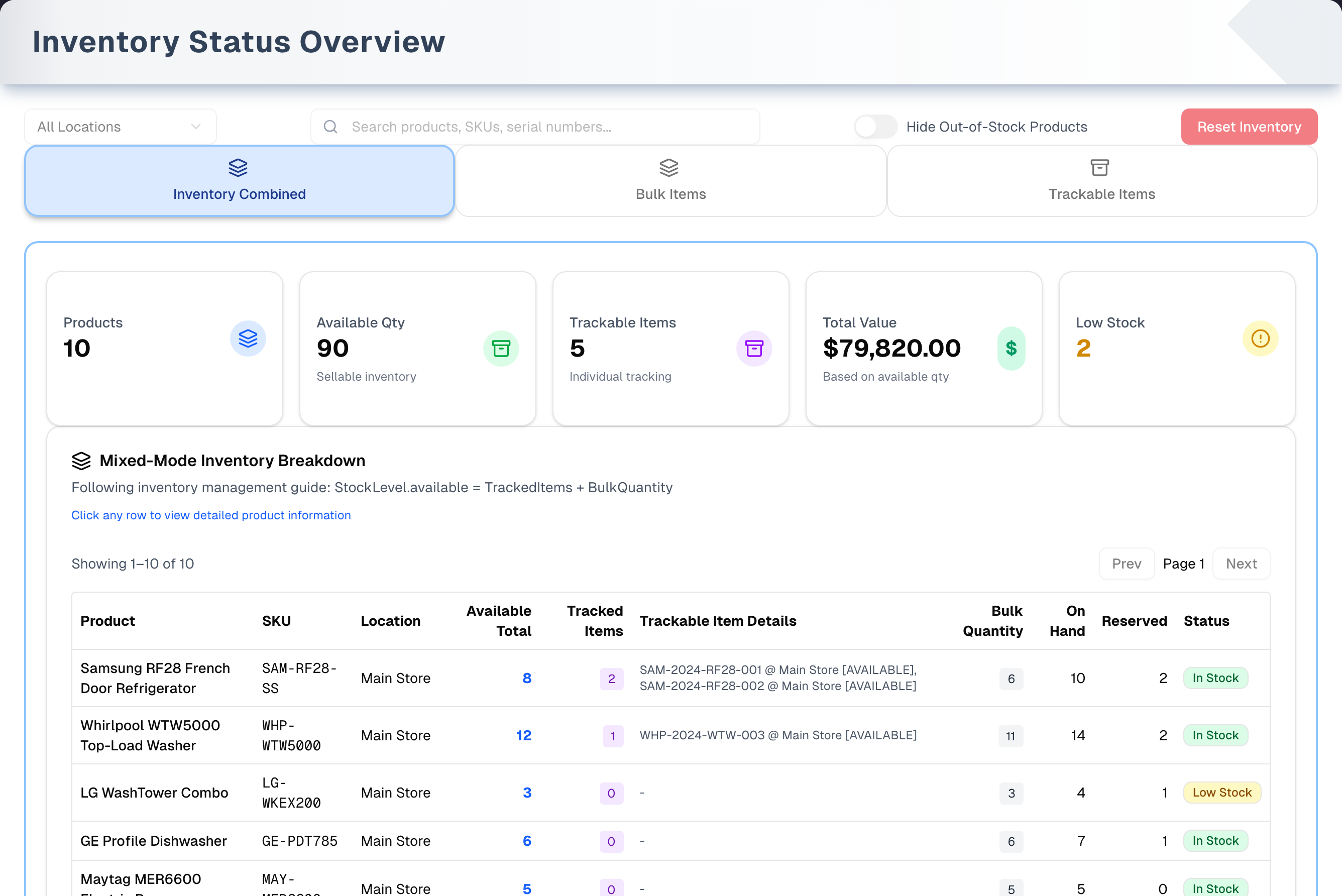
Overview
Filter by location, search by product name, SKU or serial number, and hide out-of-stock products. Each tab shows the same stock with metrics suited to it. Click a row for full details. The detail windows change no stock but one thing: a manager can put stock held off sale after a damaged or defective return back on sale from Product Details. Otherwise this page changes stock only through Audit and Reset Inventory.
- Item lifecycle. A strip under the header lists the statuses a serialized unit moves through: Available (in stock) → Reserved (held for an order, or off sale after a damaged return) → Sold (fulfilled) · Scrapped (written off, final). A unit a customer returned Damaged or Defective is Reserved too: held off sale, not for an order, until a manager puts it back on sale (see Product Details below). This page lists Available units only. Reserved, sold and scrapped units do not appear here.
- Value. Stock is valued at on-hand × average cost from receiving, or the last purchase cost when there is no average. The product's Cost Price is not used. This is the same basis as Reports → Inventory Report.
- Demo. The Demo button (header, right) opens the page with sample data and a guided tour.
Tabs in detail
Inventory Combined
- Metrics: Products (one per table row: a stock record, or a product's serialized units with no stock record at that location), Available Qty, Trackable Items, Total Value (at cost, with the retail value shown underneath) and Low Stock.
- These five cards count every stock record and Available unit at the location you picked, however large your store is. While you search or hide out-of-stock products, they count only the rows listed. The same goes for the cards on the Bulk Items and Trackable Items tabs and for the two check cards below.
- The Mixed-Mode Inventory Breakdown table has one row per stock record. A product stocked as two variants at one location, or with a duplicate record there, has a row for each, labelled under the product name with the variant ("No variant" for a record with none, and "record 1 of 2" when two share one). Each serialized unit is counted on the row of its variant's record (a unit with no variant, on the record with no variant); a unit whose variant has no record there, on the product's oldest record there. Serialized units with no stock record at a location are a row of their own. It shows Available Total = Tracked Items + Bulk Quantity, then On Hand, Reserved (stock held for orders) and Status. The table shows 50 rows per page ("Showing X–Y of Z", with Prev and Next).
- Formula validation card. It turns green, "Formula Validates Correctly", when Available = Tracked + Bulk across the table's rows: one per stock record, with the serialized units that row counts, so both of a product's two records at one location are in it. It turns yellow, "Formula Validation Alert", and shows the discrepancy when a product has more Available serialized units than Available stock, or when a product's Available is below 0. Audit fixes the first under Negative bulk quantity. A negative Available whose numbers add up is a real shortfall, which Audit lists for review under Negative on-hand or Over-reservation; only one whose numbers disagree is fixed, under Available mismatch.
- Physical stock balances card. It checks that on-hand = available + held stock on every stock record's row. When it holds you see "Physical Stock Balances". When it doesn't, it turns red as "Stock Imbalance — N stock records", where N counts rows (one per stock record), lists up to 8 SKUs with the difference (and how many more there are), and offers an Audit & fix button that opens the Audit. Both cards check every row at the location you picked, not just the ones on screen.
Bulk Items
- Metrics: Bulk Products, Bulk Quantity, Tracked Items, Bulk Value and Mixed Products.
- Lists products that have bulk (non-serialized) quantity at a location, with the bulk quantity shown separately. Like the Combined table, it has a row per stock record, labelled with its variant when a product has more than one record there, and each record's bulk quantity is its Available less its own serialized units (those of its variant, a record with no variant taking the units with none, and the product's oldest record there also taking those of a variant with no record there), so its Bulk Quantity card matches the Formula validation card's Bulk figure. Each row has two money columns, and they measure different things: Bulk Value is the Bulk Qty beside it at cost, and Stock Value is the whole record — bulk and serialized together. The Bulk Value card adds up the first.
Trackable Items
- Metrics: Trackable Items, Avg Item Value, Total Items Value, NEW Condition and Other Conditions. Values use each unit's own cost.
- Lists individual Available serialized units (card title "Available Trackable Items (N)"): product, SKU, serial number, batch, location, condition, grade, status, cost, retail and date added. The barcode is shown in Item Details.
Detail windows
- Product Details: basic information and the stock levels (Available, On Hand and Reserved, where Reserved includes stock held for orders). When the record holds stock off sale after a Damaged or Defective return, an orange strip says how much, and the owner or a manager can Put back on sale once it is repaired or found sound: how many, which of the held serials (tick them), whether it sells as Used or New, and why. It moves from held to Available (On hand does not change), the serials go back to Available, and the reason is recorded on the stock movement, which appears under History. Stock that cannot be sold is written off with Scrap (Sales → New → Others) instead. It also shows the minimum level, maximum level and reorder point — which the owner or a manager can change with Edit levels — the Available = Tracked + Bulk breakdown, and financials (total value, average cost, last cost, retail price, cost price). Below that come this product's Available units at that location, the last movement date and the active status.
- Item Details: serial number, SKU, batch, barcode, status and location. It also shows product information, condition and grade, item vs. product cost and retail, and when the unit was created and last updated.
Controls
| Control | Options |
|---|---|
| Tabs | Inventory Combined · Bulk Items · Trackable Items |
| Filters | Location · Search (product name, SKU or serial number) · Hide Out-of-Stock Products (applies to Inventory Combined and Bulk Items only) |
| Status badges | In Stock · Low Stock · Out of Stock |
| Audit | Opens Inventory Audit & Correction (see below). A red number on the button shows how many issues the last stock check found |
| History | Opens Reports → Inventory Report on the Movements tab, where Audit and Reset adjustments appear |
| Reset Inventory | Destructive page action (see below) |
| Demo | Sample-data copy of this page with a guided tour |
Audit & correction
Audit checks your stock for the inconsistencies that quietly break reports, shows what it found, and offers a fix for each one it can repair. The scan starts as soon as the dialog opens. It checks every stock record at the location picked in the filter, or at all locations, not only the batch this page loaded. That includes records this page does not list: a stock record that is switched off, or one at a location that is switched off or deleted. A sale can still read those, so a problem on one can still refuse a sale, and its finding ends by saying which it is, for example "Stock record switched off: the Snapshot does not list it, but a sale at this location can still read it." A product with more than one stock record at a location, one per variant for example, is checked as one wherever its stock is set against its serialized units or its open orders. Such a finding is listed once, on the record sales use, and says "across its 2 stock records at this location". Only Stock held by no order can appear on more than one of them, on each record holding part of the stock no order needs. Every available fix starts ticked. Untick any you don't want, click Review & Apply (N), check the summary and click Apply Corrections. Nothing changes before that last click. The page then reloads its stock and the Audit opens again on a fresh scan, so you see straight away what is left. Re-scan checks again at any time. A clean store gets "No inconsistencies found".
| What it looks for | The fix it offers |
|---|---|
| Ledger drift (the movement history doesn't add up to on-hand) | Pick one: Keep on-hand (write one reconciling adjustment so the history matches) or Trust ledger (set on-hand to the history's total) |
| Available mismatch (Available doesn't equal on-hand minus held stock) | Recompute available, to the true figure: below 0 if more is promised or sold than is on hand. An Available below 0 that does add up is not a mismatch; it is one of the next two |
| Negative on-hand (more has been sold here than was ever received) | None: listed under Needs manual review. Receive the missing stock (it came in and was never booked, or it is an Allow Oversell backorder still owed to a customer), or count the shelf in Inventory → Management → Count |
| Over-reservation (more is promised than is on hand) | None: listed under Needs manual review, naming the open orders holding the stock. Receive the stock, correct the count, or free units on one of those orders. If some of the stock is held by no order, release that under Stock held by no order first: when that is the whole gap, nothing is short |
| Negative bulk quantity (more units marked Available than sellable stock) | Pick one: Trust stock (default: update the stale unit records, stock unchanged; the serial an open order was promised is the one it keeps for that order) or Trust units (raise stock to match the units). Where that stock is short of what it has promised, only Trust stock is offered: raising stock to the units there would book stock nobody has over units a customer is owed |
| Stock held by no order | Release the stock back to sellable |
| Unrecorded reservation (open orders hold more than stock records) | None: listed under Needs manual review. Open the named orders and remove the line and add it again, or cancel the order and re-create it. Saving the line again as it is writes nothing |
| Missing unit records (only for products that require a serial number on every unit) | None: listed under Needs manual review. Receive the missing units with serial numbers, or run an inventory count |
The Audit never resets, clamps or recomputes a real shortfall away. Doing that would leave the sale refused anyway, erase the backorder, and hand the next delivery of that product to whoever bought first instead of the customer waiting for it. While a product's Available is below 0 at a store, new sales of it there are refused with "… Available is below zero at this location: more is promised or sold than is on hand. Receive the stock, correct the count, or free units on an order holding them; Inventory → Snapshot → Audit names those orders." Once the stock is received, the count corrected or the units freed, it sells normally again. Where the counts themselves don't add up (Available is not on hand less what is held and promised), the refusal says so instead, with the four counts, and points at the Available mismatch finding: apply Recompute available first.
Counting a shelf, switching a serialized unit Available or Not Available, writing a unit off from Inventory → Management → Search, and a Scrap from Sales → New → Others that you confirmed in its Record the loss? window follow the same rule: when more is promised than is left, they leave Available below 0, and the Audit lists the product under Over-reservation or Negative on-hand instead of calling it a mismatch. So do receiving and deleting a purchase order on Procurement: a receipt adds what arrived to whatever the record holds, below 0 included, and lowering a receipt or deleting a received order takes all of it back out, even where some of it has already been sold. A product whose Available reads 0 over a real shortfall shows as Available mismatch, and Recompute available sets it to the true figure. A delivery, a counter sale, or setting an order to Completed, of a product that tracks inventory but has no stock record at the order's location makes the record there at 0 (at the line's cost price) and takes it below zero, so it is listed under Negative on-hand for review: receive the stock there, transfer it in, or count the shelf. A Pending Delivery or Processing sale of such a product, or adding one to an order, with Allow Oversell makes the record the same way and reserves on it below zero, so it is listed under Over-reservation until the stock arrives; without Allow Oversell it is refused. A return of one makes the record and puts the goods back in it. A product with Track inventory off gets no record and never shows here.
Keep on-hand and Trust units each write an adjustment movement named "Audit correction — …", which you can see under History. Keep on-hand leaves on-hand as it is and only adds the missing history. Releasing held stock also leaves a note there.
The fixes that change stock are booked the way a count is, to Inventory and Inventory Write-Offs at the record's average cost, else its last cost. Trust units books the stock it adds as found. Keep on-hand and Trust ledger fix a record whose on-hand changed with no movement, which your books never saw: Keep on-hand books that difference (found, or written off), and Trust ledger, which sets on-hand back to the history your books already follow, books nothing. The one exception is stock a record already held when UpChannels first opened your books (June 2026 for stores already using it then, the import day for a store moved from MyStore), which valued every record's stock once to start them: a difference that was already there then, and that nothing has since added to the history, is in the books, so Keep on-hand books nothing for it and Trust ledger takes it out. Recompute available, the release and Trust stock change no on-hand and book nothing. Recompute available, Trust ledger and Trust stock correct the numbers directly, without a new movement. Any fix that sets Available sets it to on-hand less held stock, below 0 if that is the truth. When a product has several stock records at a location, Trust stock, Trust units and the release weigh them together. Trust stock only re-labels units beyond all the records' sellable stock. It marks as held first the serials that open orders holding stock (Pending or Processing) have promised, and it never marks as sold a serial an open order names while another unit will do, so the serial a customer was promised stays theirs; with no order naming a unit it takes the oldest first. Trust units raises the record sales use by what the others don't already hold. It is never applied while any of the product's records at that location is short of what it holds (Available below 0, or more held than is on hand), even from an older scan: the finding offers only Trust stock there, which marks the units as held for the orders waiting. The release gives back only stock no open order holds, taking it from the records sales never use first. If stock changes between the scan and Apply Corrections (or another fix you ticked for the same product and location changes it first), that fix is skipped and the finding shows up again in the fresh scan. Apply it again. Once Apply Corrections starts, the product's stock records at that location are held until the fixes are done, so a sale saved at that moment waits and then applies on top rather than being overwritten.
The red number on the Audit button comes from an automatic check that runs every night at 03:20 UTC across all your locations. It counts the same stock records the dialog checks, switched-off ones included. It is not a to-do you created. It ignores the location filter and does not count Missing unit records, so it can differ from what the dialog finds. Applying corrections, or resetting inventory, checks your stock again straight away and the number changes to match, and a reload shows that figure. The nightly check still runs; if the fresh check can't be recorded, the number stays as it was until then.
Reset Inventory (destructive)
Try Audit first. It fixes the specific thing that is wrong. Reset is the blunt instrument.
A red Reset Inventory button sits in the toolbar. Only the owner or a manager can use it. For everyone else it is greyed out, and its hover text says so. After the confirmation dialog "Reset all inventory levels to zero?" and Confirm Reset, it does the following at all your active locations, all at once or not at all:
- It sets On Hand, Available and held stock to 0 for every product, so stock held for open orders is cleared too (the orders themselves stay open). An adjustment "Inventory reset to zero" is recorded for each product that had stock.
- It writes the stock it zeroes off in your books, the way a count writes off a shortfall: "Inventory reset - stock written off" (Dr Inventory Write-Offs, Cr Inventory) at each record's average cost, else its last cost, so the Inventory figure on Assets & Liabilities follows the shelf to 0 and stock you receive afterwards is not counted on top of stock that has gone. A record held below 0 is put back to 0 the other way. The loss shows on Profit & Loss under Other Operating Expenses.
- It deletes serialized units that were Available. Reserved, sold, scrapped and Not Available units are kept. Switching one of the kept Not Available units back to Available afterwards leaves stock at 0: the reset already zeroed the 1 that marking it Not Available took out.
- Products stay on this page at 0, shown as Out of Stock. Switch on Hide Out-of-Stock Products to hide them.
A sale, receipt or delivery at the same moment waits for the reset, or the reset for it, so each "Inventory reset to zero" adjustment is written from the figure the record really held. It affects reports and any workflow that relies on current stock, so use it only to start over. The dialog links to Inventory Receiving (Procurement → Receive). Stock you receive afterwards shows up on this page and in Audit straight away. If the reset can't finish, nothing is changed and a red "Reset failed" message says why.
Step by step: inspect stock
- Pick a location (or All Locations) and search for a product, SKU or serial number.
- Switch tabs (Combined / Bulk / Trackable) for the right view.
- Click a row to open its details. On Inventory Combined, a row made only from serialized units (no stock record in the view) does not open anything. Searching by serial number produces such rows, so use Trackable Items to open a unit found that way.
Step by step: fix a stock problem
- Click Audit, or Audit & fix on a red Stock Imbalance card. The scan starts on its own.
- Read each finding. For Ledger drift and Negative bulk quantity, click the chip for the number you trust.
- Untick any fix you don't want, then click Review & Apply (N).
- Check the summary and click Apply Corrections (or Back to change your picks).
- The page reloads its stock and the Audit reopens on a fresh scan. Anything still listed was skipped or is still wrong. Fix it again, or close the dialog with X.
Tips & best practices
- Trust Available: it equals tracked items plus bulk quantity.
- Use the location filter to isolate a warehouse before counting.
- A $0 value with stock usually means no purchase cost has been recorded. Value uses the average cost from receiving, or the last purchase cost. Setting a Cost Price on the product does not change it, but receiving stock with a unit cost does.
- When the Audit button shows a red number, open it: last night's check found something.
Troubleshooting
| Issue | Fix |
|---|---|
| "Error Loading Inventory" | Click Retry. If the message mentions an authentication token, click Refresh Page or sign out and back in |
| Low Stock is always 0 | Nothing has a minimum level yet. The card says "No minimum levels set yet" until one is set. Click a product row, then Edit levels, and set a Minimum Level above 0. The owner or a manager can do this |
| Value looks low or $0 | Value comes from the average or last purchase cost recorded when stock is received. Receive stock with a unit cost; the product's Cost Price is not used |
| Amber banner "Showing the first batch of records…" | The page lists every stock record and every Available serialized unit, a page at a time, so this banner is reserved for a store far larger than any it has been seen on (tens of thousands of either). If it does appear, the lists are short by whatever was left unread. The cards on every tab and the check cards still count every record, unless you are searching or hiding out-of-stock products. A search only narrows what was already loaded. Audit always checks every current stock record |
| Yellow "Formula Validation Alert" | Open Audit and fix Negative bulk quantity. If a product's Available is below 0, apply Available mismatch when the Audit offers it, and otherwise follow the guidance under Needs manual review |
| A product can't be sold: "Available is below zero at this location: more is promised or sold than is on hand" (or "… because its stock counts disagree with each other …") | More of it is promised or sold at that store than is on hand, for example an Allow Oversell backorder. Open Audit: the finding under Needs manual review names any open orders holding it (none when more was simply sold than ever arrived). It is listed even when the stock record or its location is switched off, and says so. Receive the stock, correct the count, or free units on one of those orders, and the product sells normally again. If the Audit shows Available mismatch for it, apply that first |
| A row on Inventory Combined won't open, or searching a serial number shows the product with On Hand 0 | The row is built only from serialized units, with no stock record behind it: either the units sit at a location with no stock record for that product, or a serial-number search matched the unit but not the product's stock row. Open the unit from Trackable Items, or search by product name or SKU to see the full stock row |
| A reserved or sold serial number isn't listed | This page lists Available units only. A serial that came back Damaged or Defective is Reserved (held off sale), so it isn't listed either |
| A repaired returned item still shows as held (Reserved), and its serial isn't listed | Stock a Damaged or Defective return holds off sale stays held until someone puts it back on sale. Click the product's row, then Put back on sale under Inventory Levels (the owner or a manager), tick the serial that was repaired and say why. If the refusal names serials to pick, tick the ones going back |
| A serial's status doesn't match the shelf: one a customer took is still listed as Available, or one that came back isn't listed while another serial of the same product is | The Available figures are right; only the unit records are off. Contact support to correct the serials |
| Every product shows 0 and Out of Stock after Reset Inventory | That is what the reset does: the stock records stay, at 0. Receive stock again through Inventory Receiving, or switch on Hide Out-of-Stock Products |
| A product you stock is missing from the page | Its stock record is switched off, so the page doesn't list it (Audit still checks it, marked "Stock record switched off"). Receiving stock into it lists it again. If you are not expecting a delivery of it, contact support |
| Reset Inventory is greyed out | Only the owner or a manager can reset inventory. Ask one of them |
What's next
- Replenish low items: Inventory → Procurement
- Move or count stock: Inventory → Management
- Analyze trends and movement history: Reports → Inventory Report
Detailed reference
Every button, icon, field and message on this page, for when you need the exact detail. Each panel starts closed — open the one you need.
Page header and toolbar
| Control | Where | What it does | Notes |
|---|---|---|---|
| Title Inventory Status Overview, subtitle "View real-time stock levels, alerts, and inventory health across all locations." | Header | Page heading | Reached from Inventory → Snapshot |
| Demo (Play icon, amber) | Header, right | Opens this page with sample data and a guided tour | Everyone. See the Demo mode panel and Demo mode |
| Item lifecycle strip (Info icon): Available "in stock" → Reserved "held for an order, or off sale after a damaged return" → Sold "fulfilled" · Scrapped "written off (final)" | Under the header | Explains the statuses a serialized unit moves through | Always shown. Can't be closed and isn't clickable |
| Amber banner "Showing the first batch of records in the lists. The cards on every tab and the check cards count every record; while you search or hide out-of-stock products they count only the rows listed." | Above the toolbar | Warns that the page stopped reading its lists before the end | The page reads every record a page at a time and only stops at a very high ceiling (tens of thousands of stock records or serialized units), so an ordinary store never sees this. If the card figures could not be loaded either, the banner reads "Showing the first batch of records — totals (Products, Available Qty, Total Value, Low Stock) may be incomplete for large catalogs." instead, because the cards are then added up from the same short lists |
| Location select (placeholder "Select location"; All Locations, then each location) | Toolbar, left | Filters every tab, the metric cards and the check cards. Also sets which location Audit scans | Lists active locations only. Default All Locations, with which Audit scans every location, switched-off and deleted ones included. Changing it returns the Combined table to page 1 |
| Search box "Search products, SKUs, serial numbers..." (magnifier icon) | Toolbar, centre | Filters as you type, no Enter needed. Stock rows match product name or SKU. Serialized units match product name, unit SKU or serial number | Not case-sensitive. A serial-number search matches the unit but not the product's stock row, so Inventory Combined shows a row built from the unit alone (On Hand 0, can't be opened). Changing the search returns the Combined table to page 1 |
| X (clear search) | Right end of the search box | Clears the search | Only while the box has text |
| "Search results for "…": N products, M items" + Clear | Blue bar under the toolbar | Shows how many stock rows and Available units match. Clear empties the search | Only while searching. "products" counts stock rows after the location and out-of-stock filters. This Clear leaves the Combined table on the page it was on; the X in the search box goes back to page 1 |
| Hide Out-of-Stock Products switch | Toolbar | Hides stock rows whose Available is 0 or less | Applies to Inventory Combined and Bulk Items and their cards. No effect on Trackable Items. On Inventory Combined, rows built only from serialized units (no stock record) stay visible. Returns the Combined table to page 1 |
| Audit (shield icon, blue outline) | Toolbar, right group | Opens Inventory Audit & Correction and starts a scan | Everyone. Always enabled |
| Red number on Audit | Top-right corner of the Audit button | How many issues the last stock check found for this store — the nightly one at 03:20 UTC, or the one taken when you last applied corrections or reset inventory | Shows "9+" above nine. Hidden when the last check found nothing, when no check has run yet, or if it can't be read. Counts all locations whatever the filter, switched-off and deleted ones and switched-off stock records included, and leaves out Missing unit records. Screen readers announce "… issues found in the last inventory check"; hovering over the Audit button shows "The last stock check found … issue(s). Open Audit to review them.". Applying corrections or resetting updates it, and a reload shows the same figure |
| History (clock icon) | Toolbar, right group | Opens Reports → Inventory Report on the Movements tab | Everyone. Audit and Reset adjustments appear there |
| Reset Inventory (red) | Toolbar, far right | Opens Reset all inventory levels to zero? | The owner and managers. For other team members it is greyed out, and hovering it says that only the owner or a manager can reset inventory. It is also greyed out for a moment while the page checks your role. See Dialog: Reset all inventory levels to zero? |
| Tab Inventory Combined (blue) | Tab bar | Merged view of bulk and serialized stock | Default tab. The tab isn't kept in the page address, so a reload returns here |
| Tab Bulk Items (green) | Tab bar | Products with bulk (non-serialized) quantity | — |
| Tab Trackable Items (purple) | Tab bar | Available serialized units, one per row | — |
| Spinner "Loading inventory data..." | Content area | Shown while stock loads | Also after Retry, a reset, or applying Audit corrections |
| Error card "Error Loading Inventory" with the error text | Replaces the page | A stock read failed | See Messages you may see |
| Retry (refresh icon) | Error card | Loads the page data again | Works as often as you press it |
| Refresh Page | Error card | Reloads the browser page | Only when the error mentions an authentication token |
| Show Debug Info / Hide Debug Info (bug icon, orange) | Error card | Turns a technical "Debug Information" card on or off, for support | Only after the page has loaded once: a first-load failure has no details to show, so the button isn't offered |
| "Debug Information" card with Hide Debug (chevron icon) | Top of the page | Technical details for support: Timestamp, Operations API, Core API, Token, and counts of Locations, Stock Levels and Inventory Items. Hide Debug removes the card | Appears only if debug was turned on during an error and a Retry then succeeded |
| "No inventory data available." | Content area | Nothing loaded and no error | Refresh the page |
Tab: Inventory Combined
Everything here follows the Location, Search and Hide Out-of-Stock filters. The five cards are worked out on the server for the location you picked, over every switched-on stock record and every Available unit there, so they are never short. While you search or hide out-of-stock products, the cards count the rows listed instead, by the same rules. So do the two check cards below the table. The table itself covers the records the page loaded (see the amber banner).
| Control | Where | What it does | Notes |
|---|---|---|---|
| Card Products | Metric row, 1st | Number of table rows: one per stock record, plus one per product per location for serialized units with no stock record there | A product stocked at two locations counts twice, and so does a product with two stock records at one location, such as two variants. Includes rows that exist only because of serialized units |
| Card Available Qty, "Sellable inventory" | Metric row, 2nd | Total of the Available Total column | Every stock record's Available is added up, both of a product's two variants included |
| Card Trackable Items, "Individual tracking" | Metric row, 3rd | Total Available serialized units | — |
| Card Total Value, "At cost · Retail …" | Metric row, 4th | On-hand × unit cost (average cost, else last purchase cost, else $0), added up over stock records. The retail figure is on-hand × the product's retail price | Product Cost Price is not used. Stock held for orders is still valued. Same basis as the Inventory Report's Inventory Value and the Dashboard cards — one valuation everywhere |
| Card Low Stock (yellow number), subtitle "At or below the minimum level" or "No minimum levels set yet — open a product to set one" | Metric row, 5th | Stock records with a minimum level above 0 whose Available is at or below it, sold-out stock included | A record that has run out is counted here, because it is the one that most needs reordering — its own row still reads Out of Stock, so the card can be higher than the number of yellow badges. The second subtitle shows while nothing on the page has a minimum level, so a 0 is never ambiguous. Set one with Edit levels in the product window |
| Hover on any card | Metric cards | Shows the card name, its subtitle and "Overall inventory metrics across all types" | Hover only. No click action |
| Card heading Mixed-Mode Inventory Breakdown, subtitle "Available = tracked units + bulk quantity", hint "Click any row to view detailed product information" | Above the table | Heading | — |
| "Showing …–… of …" | Above the table, left | Which rows you are looking at, 50 per page | Counts all rows after filters. Changing the location, the search box or Hide Out-of-Stock goes back to page 1, so a narrower list never leaves you on a page it no longer has |
| Prev | Above the table, right | Previous page | Disabled on page 1 |
| "Page N" | Between Prev and Next | Current page | — |
| Next | Above the table, right | Next page | Disabled on the last page |
| Column Product | Table | Product name ("Product …" if the name is missing). Under it, the variant, when the product has more than one stock record at that location | The table scrolls inside its box |
| Column SKU | Table | Product SKU, "N/A" if none | — |
| Column Location | Table | Location name, "Unknown Location" if not found | — |
| Column Available Total (bold blue) | Table | Sellable quantity on the stock record. For a row with no stock record, the number of Available units | — |
| Column Tracked Items (purple chip) | Table | Available serialized units of this product at this location. Where the product has more than one stock record there, the units of this row's variant (a unit with no variant counts on the record with no variant; a unit of a variant with no record there, on the oldest record) | — |
| Column Trackable Item Details | Table | Up to 3 units as "serial @ location [status]", then ", +N more". If there are none here but some at other locations: "Other locations: …". "-" when none | "Other locations" appears only with All Locations selected. Hovering shows a technical list of the units |
| Column Bulk Quantity (grey chip) | Table | Available Total minus Tracked Items, never below 0 | — |
| Column On Hand | Table | Physical quantity on the stock record | 0 for rows with no stock record |
| Column Reserved | Table | Stock held: reserved for orders plus stock held back from damaged returns | — |
| Column Status: In Stock (green) / Low Stock (yellow) / Out of Stock (red) | Table | Out of Stock when Available Total is 0 or less. Low Stock when a minimum level above 0 is set and Available is at or below it. Otherwise In Stock | — |
| Row click | Any row with a stock record behind it | Opens Product Details for that product and location | A row built only from serialized units has no stock record to open, so it shows no pointer and no hover — it is a line to read, not a link. That happens when there is no stock record in view: none at that location, or the stock row was filtered out by a serial-number search or by Hide Out-of-Stock |
| "No stock levels found matching your criteria" | Under the table | No stock rows and no Available units match the filters | Clear the search, pick All Locations, or turn off Hide Out-of-Stock |
| Box "Inventory Management Guide Formula:" "Available Total = Tracked Items + Bulk Quantity" "Available is the single number this page trusts. Tracked units are the part of it you can identify one by one." | Below the table | Explains the formula | Static |
| Green card "Formula Validates Correctly" "… = … + … = … ✓" "All inventory quantities align perfectly with the mixed-mode formula." | Below the formula box | Confirms Available Total = Bulk + Tracked across the rows | When the totals agree. Adds up every row at the location picked, not just the page on screen; while you search or hide out-of-stock products, only the rows listed |
| Yellow card "Formula Validation Alert" "… = … + … = … (… discrepancy)" + "Possible causes: Data sync issues, product/item associations, or tracked items linked to different product variants. Review individual product breakdowns for mismatched associations." | Same place | Flags a mismatch | Appears when a product has more Available serialized units than Available stock, or its Available is below 0. Audit fixes the first under Negative bulk quantity. The second it lists for review under Negative on-hand or Over-reservation, and fixes under Available mismatch only when the numbers disagree |
| Green card "Physical Stock Balances" "On Hand (…) = Available + Committed (…) ✓" "Every location balances: nothing is unaccounted for between physical stock and reservations." | Below the formula card | Confirms on-hand = available + held stock on every row | Checks every row with a stock record: one per record, so both of a product's two records at one location |
| Red card "Stock Imbalance — N stock record(s)" "On Hand (…) = Available + Committed (…) — off by …" + "These stock records don't add up: On Hand should equal Available plus held stock (what is on the shelf no longer matches what is sellable plus what is promised):" and up to 8 lines "SKU: On Hand … vs Available … + held … (±…)", then "+N more…" | Same place | Lists rows where physical stock and sellable plus held stock disagree | Held stock is everything promised to an order plus any damaged-return holds. Covers every record at the location picked, however many; while you search or hide out-of-stock products, only the rows listed. Each record that is off is a line of its own, in the table's order, so a product with two records at one location can be listed twice under one SKU, its oldest record first |
| Audit & fix (shield icon, red outline) | Inside the red Stock Imbalance card | Opens Inventory Audit & Correction, same as the toolbar Audit button | Only when the card is red |
Tab: Bulk Items
These cards count every stock record and Available unit at the location you picked, however large your store is. While you search or hide out-of-stock products, they count only the rows listed.
| Control | Where | What it does | Notes |
|---|---|---|---|
| Card Bulk Products | Metric row, 1st | Stock records whose Available is higher than their own Available units, so they have bulk quantity | A record's own units are the ones on its Inventory Combined row: those of its variant (for a record with no variant, the units with none), and, on the product's oldest record at the location, those of a variant that has no record there (and those with no variant when no record there has none) |
| Card Bulk Quantity, "Non-tracked inventory" | Metric row, 2nd | Total of Available minus each record's own Available units, each record floored at 0 | The same figure as the Bulk part of the Formula validation card on Inventory Combined |
| Card Tracked Items, "Individual tracking" | Metric row, 3rd | Available serialized units after the Location and Search filters | Hide Out-of-Stock does not change it |
| Card Bulk Value, "Bulk quantity only — Stock Value includes tracked units" | Metric row, 4th | Bulk quantity × unit cost (average cost, else last purchase cost, else $0) | The same figure as the table's Bulk Value column, added up. The Stock Value column prices the whole record instead |
| Card Mixed Products, "Both bulk & tracked" | Metric row, 5th | Records that have both serialized units and extra bulk quantity | — |
| Hover on any card | Metric cards | Shows the card name, its subtitle and "Bulk inventory specific metrics" | Hover only |
| Card heading Bulk Items, subtitle "Bulk items are non-tracked inventory managed in bulk quantities", hint "Click any row to view detailed product information" | Above the table | Heading | — |
| Column Product | Table | Product name, the variant underneath when the product has more than one stock record at the location (as on Inventory Combined), then its category | — |
| Column SKU | Table | Product SKU, "N/A" if none | — |
| Column Location | Table | Location name | — |
| Column Bulk Qty (bold blue) | Table | Available minus this record's own Available units | Only rows with bulk quantity above 0 are listed |
| Column Total Available | Table | Available on the stock record | — |
| Column Tracked Items (purple) | Table | This record's own Available units: those counted on its Inventory Combined row | — |
| Column Min Level | Table | Minimum stock level, "-" if not set | — |
| Column Status | Table | In Stock / Low Stock / Out of Stock, same rules as Inventory Combined | — |
| Column Bulk Value | Table | Bulk Qty × unit cost (average cost, else last purchase cost, else $0) | The Bulk Qty beside it, priced. Hover the heading: "Bulk Qty at cost. This is what the Bulk Value card adds up." |
| Column Stock Value | Table | On-hand × the same unit cost, for the whole record | Includes serialized units, not only the bulk part. Hover the heading: "Every unit in this stock record — bulk and tracked together — at cost. This is what the Total Value card and the Inventory Report add up." Both columns use the same unit cost, so the only difference between them is the quantity |
| Row click | Any row | Opens Product Details | — |
| "No stock levels found matching your criteria" | Under the table | No rows with bulk quantity match the filters | All rows show on one page (no paging) |
Tab: Trackable Items
These cards count every Available unit at the location you picked, however large your store is. While you search or hide out-of-stock products, they count only the units listed.
| Control | Where | What it does | Notes |
|---|---|---|---|
| Card Trackable Items, "Individual items" | Metric row, 1st | Available serialized units after Location and Search | Hide Out-of-Stock does not apply |
| Card Avg Item Value, "Per trackable item" | Metric row, 2nd | Total Items Value ÷ number of units | Units with no cost count as $0 |
| Card Total Items Value, "All trackable items" | Metric row, 3rd | Each unit's own cost price, added up | Not the same basis as the Combined Total Value |
| Card NEW Condition, "New condition items" | Metric row, 4th | Units whose condition is NEW, or blank | — |
| Card Other Conditions, "Used, damaged, etc." | Metric row, 5th | All other units | — |
| Hover on any card | Metric cards | Shows the card name, its subtitle and "Individual trackable items metrics" | Hover only |
| Card heading Available Trackable Items (N), subtitle "Units currently Available — the part of the Available total you can identify one by one", hint "Click any row to view detailed item information" | Above the table | Heading | Reserved, sold and scrapped units never appear on this page |
| Column Product | Table | Product name with the product SKU underneath | "Unknown Product" if not linked |
| Column Inventory SKU | Table | The unit's own SKU, "-" if it has none | The product's SKU is the one under the product name |
| Column Serial Number | Table | Unit serial number, "-" if none | — |
| Column Batch | Table | Batch number, "-" if none | — |
| Column Location | Table | Location name | — |
| Column Condition | Table | Outline badge. Shows NEW when blank | — |
| Column Grade | Table | Badge, "-" if none | — |
| Column Status | Table | Blue badge with the unit's status | Always Available on this page, shown in capitals |
| Column Cost | Table | Unit cost price, "-" if none | — |
| Column Retail | Table | Unit retail price, "-" if none | — |
| Column Added | Table | Date the unit was created, in your store's date format | — |
| Row click | Any row | Opens Item Details | — |
| "No trackable items found matching your criteria" | Under the table | No Available units match | All rows show on one page (no paging) |
Dialog: Product Details
Opens when you click a row on Inventory Combined (rows with a stock record) or Bulk Items. Only the stock levels, and stock held off sale after a damaged or defective return, can be changed here, by the owner or a manager.
| Control | Where | What it does | Notes |
|---|---|---|---|
| Title "Product Details: …" | Header | Product name ("Stock Level …" if the name is missing), then the variant in brackets when the record has one | — |
| X (close), Esc, or click outside | Dialog | Closes | — |
| Card Basic Information: Product Name, SKU, Location, Category, Barcode, Status badge | 1st card | Shows the product at this location | "N/A" or "Unknown Location" when missing |
| Card Inventory Levels: tiles Available, On Hand, Reserved | 2nd card | Current quantities | Reserved = stock held for orders plus stock held back from damaged returns. There is no separate Committed tile on the live page |
| Orange strip "N held off sale after a damaged or defective return: on hand, but not for sale." | 2nd card, under the tiles | Only when the record holds stock off sale | Everyone sees it |
| Put back on sale | 2nd card, in the orange strip | Opens the form below and reads which serials the record holds off sale | Only for the store owner and managers |
| How many (starts at everything held) · Goes on sale as (Used, New) · "Serials held here: tick the ones going back on sale" (each serial with "returned on …", the order it came back on) · Why it can go back on sale (placeholder "Repaired, or inspected: no fault found") | 2nd card, in the form | Bulk held stock goes back first. When the quantity needs every held serial they all go; otherwise tick the ones that were repaired | The reason is required, up to 500 characters. "It moves from held to Available; On hand does not change. The reason is recorded on the stock movement. Stock that cannot be sold is written off with Scrap (Sales → New → Others) instead." |
| Cancel / Put back on sale ("Saving...") | 2nd card, in the form | Put back on sale moves the quantity from held to Available, puts the ticked serials back Available in the condition picked, writes one stock movement "Held stock put back on sale" with the reason and who did it, and reloads the page's figures. A "Back on sale" message says how many, and which serials | Refusals show in a red box: "Only N held off sale on this stock record, so M cannot go back on sale. Nothing was changed.", "N of the stock held off sale here are serial-numbered (…): pick which of them go back on sale. Nothing was changed.", "Unit … is not held off sale on this stock record (a unit an order holds is freed on its order). Nothing was changed.", "Say why it can go back on sale, …", and, for anyone who is not the owner or a manager, a refusal saying so |
| Stock levels: Minimum Level, Maximum Level, Reorder Point | 2nd card, lower row | Shows each level, or "Not set" | Everyone sees them |
| Edit levels | 2nd card, beside "Stock levels" | Turns the three into boxes you can type in | Only for the store owner and managers. Staff see the numbers and no button |
| Minimum Level / Maximum Level / Reorder Point boxes (placeholder "Not set") | 2nd card, while editing | Whole or decimal numbers, 0 or more. Leave a box empty for "not set" | A minimum level above 0 is what makes this product count as Low Stock, here and on the Search tab, once Available reaches it. A product that has run out is still counted on the Low Stock card, though its own badge reads Out of Stock. The note under the boxes says so |
| Cancel / Save levels ("Saving...") | 2nd card, while editing | Cancel drops the edits. Save levels writes the three numbers and reloads the page's figures | Changing these never moves stock: no quantity changes and nothing is added to the stock history. A refusal shows in a red box above the buttons |
| Card Mixed-Mode Inventory Breakdown "Following inventory management guide: Available = Tracked Items + Bulk Quantity": tiles Total Available "(Single source of truth)", Tracked Items "(Individual records)", Bulk Quantity "(Calculated remainder)", and the line "Available (…) = Tracked Items (…) + Bulk Quantity (…)" | 3rd card | Breakdown for this product at this location | — |
| Card Financial Information: Total Value, Average Cost, Last Cost, Retail Price, Cost Price | 4th card | Total Value = on-hand × average cost (else last cost, else $0). The others are shown as recorded | "N/A" when empty. Cost Price is shown but not used for Total Value |
| Card Tracked Items (N) "Individual items with detailed tracking": Serial Number, Batch Number, Condition, Grade, Cost Price, Retail Price | 5th card | This product's Available units at this location; where it has more than one stock record there, the units of this record's variant, as on the table row | Only when there are some. Rows can't be clicked |
| Card Activity Information: Last Movement (date, or "No recent movement"), Active Status badge | 6th card | Last stock change and whether the record is active | Always Active on this page, which lists only active records |
Dialog: Item Details
Opens when you click a row on Trackable Items. Read-only.
| Control | Where | What it does | Notes |
|---|---|---|---|
| Title "Item Details: …" | Header | Serial number (or an internal id if there is none) | — |
| X (close), Esc, or click outside | Dialog | Closes | — |
| Card Item Information: Serial Number, SKU (the unit's own SKU), Batch Number, Barcode, Current Status (green badge), Location | 1st card | Unit details | "N/A" when empty |
| Card Product Information: Product Name, Product SKU, Category, Product Barcode | 2nd card | The product this unit belongs to | Only when the unit is linked to a product |
| Card Quality & Condition: Condition, Grade | 3rd card | Unit condition and grade | "Not specified" when empty |
| Card Financial Information: Item Cost Price, Item Retail Price, Product Cost Price, Product Retail Price | 4th card | Compares this unit's prices with the product's | "N/A" when empty |
| Card Activity Timeline: Created At, Last Updated | 5th card | Date and time, in your store's format | — |
Dialog: Inventory Audit & Correction
Opens from Audit (toolbar) or Audit & fix (red Stock Imbalance card). Each time it opens it runs a fresh scan of every stock record at the location chosen in the page filter (All Locations = every location of your store, switched-off and deleted ones included), including switched-off stock records, which this page does not list. Every record is checked on its own for its history, Available and shortfall. The unit records and the open orders belong to the product at a location, not to one record: a sale draws on every one of the product's stock records there, whatever its variant, taking what each has free oldest first (between two records made at the same moment, always the same one first), and what none has free, with Allow Oversell, below zero on the oldest. A unit the line is tied to comes off its own record (its variant's) first, and is delivered and released there first too, and returned there first (on an order with a second line of the same product too). The unit a line is tied to is held, sold, freed and returned with its line whatever bulk stock the product also has, so it leaves the Available list as soon as the sale is saved. A line tied to no unit takes the serial-numbered units of the record its stock comes off, so each record's serials match its figures, and a line lowered in part keeps its tied unit to the last. Each unit a sale holds is on record as held for that order's line, so an order that is cancelled or completed frees or sells its own units, and one that is lowered gives its own back first; none of them takes a unit another open order holds while any other unit will do. Goods coming back from an order — a return, a delete, a lowered line — bring back that order's own units, by each unit's sales history, never a unit another order, or another line of the same order, sold. A unit that comes back Damaged or Defective is held off sale: it is Reserved, counted in the product's Reserved with the other damaged-return holds, sold to no one, and written off when that held stock is written off. So one order line can hold part of its units on each of two records, and its cancel, delivery and return give each record back its own part. A line reserved before its order was moved to another location keeps using the record it reserved on. So where a product has more than one record at a location (one per variant, or a duplicate), Missing unit records, Negative bulk quantity, Stock held by no order and Unrecorded reservation weigh all of them together, switched-off ones and ones this page does not list included. The first two and the last are listed once, on that oldest record. An open line's demand counts on each record it holds units on (the record of a unit the line is tied to first, as a delivery takes it), so a line split over two records is not read as stock held by no order on one and a shortfall on the other. Stock held by no order is listed on each record holding more for orders than the open lines sitting on it, the product's other records there first and its oldest record last. The dialog moves through scanning, results, confirm and applying screens. After applying, the page reloads its stock and the dialog opens again on a new scan.
Screens and buttons
| Control | Where | What it does | Notes |
|---|---|---|---|
| Title Inventory Audit & Correction (shield icon) | Header | — | — |
| X (close), Esc, or click outside | Dialog | Closes | Ignored while scanning or applying |
| Spinner "Auditing inventory traces…" "Reconciling the movement ledger against on-hand across all records." | Scanning screen | Shown while the scan runs | No buttons |
| Red box with an error | Results screen | The scan failed | For example "no organization context" |
| Green tick "No inconsistencies found" "Every trace reconciles: the movement ledger matches on-hand and available balances correctly." | Results screen | Nothing is wrong | — |
| "N issue(s) found" + badges "… high" (red) and "… medium" (amber) + "X of Y fixes selected" | Results, top | Summary of the findings | A badge shows only for a severity that has findings. "Y" counts fixable findings only |
| Select all auto-fixes | Under the summary | Ticks every fix that can be applied | Shown when at least one finding can be fixed. After each scan all fixes are already ticked |
| Clear | Next to Select all auto-fixes | Unticks every fix | Same condition |
| Group heading "Check name (N)" | Results list | Groups fixable findings by check | Check names are in the table below |
| Checkbox | Left of each fixable finding | Includes or leaves out that fix | — |
| Finding card: product name, SKU, severity (high or medium), location, the finding message, and "Fix: …" | Results list | Describes the problem and the fix that will run | Messages are in the table below. On a record this page does not list, the message ends with "Stock record switched off: the Snapshot does not list it, but a sale at this location can still read it.", "Location switched off: the Snapshot does not list it, but an order at this location can still read its stock." or "Location deleted: …" in the same words. The same ending appears on review cards |
| Chips "Keep on-hand …" / "Trust ledger …" | Inside a Ledger drift finding | Picks which number is right. Keep on-hand (default) writes a reconciling adjustment. Trust ledger sets on-hand to the movement history's total | The chosen chip turns blue and the "Fix:" line updates |
| Chips "Trust stock …" / "Trust units …" | Inside a Negative bulk quantity finding | Trust stock (default) updates the stale unit records and leaves stock unchanged, keeping the serial an open order was promised for that order. Trust units raises stock to match the units | Same. When the product has more than one stock record at the location, the Trust stock figure is their total. On stock short of what it has promised there are no chips: the finding says "Trust units is not offered: this stock is short of what it has promised, so raising it to the units would book stock nobody has. Trust stock marks the units held; receive or count any stock that really arrived." and applies Trust stock |
| Section Needs manual review (N) (Info icon, amber cards): product, SKU, location, the check name, message and guidance | Results list, bottom | Problems the audit can't fix for you, or must not: a real shortfall (Negative on-hand, Over-reservation) is reviewed against what holds it. The amber guidance says what to do | No checkbox. Nothing is applied for these |
| Re-scan (refresh icon) | Results footer | Runs the scan again. All fixes are ticked again and chips go back to their defaults | — |
| Review & Apply (N) | Results footer | Goes to the confirm screen | Disabled when no fix is ticked |
| "Apply N correction(s)? Quantity changes are written as audit adjustment movements, so the ledger stays the source of truth and every change is traceable." + a list of each fix with its count | Confirm screen | Summary of what will run | — |
| Back (arrow icon) | Confirm footer | Returns to the results with your ticks kept | — |
| Apply Corrections | Confirm footer | Applies the ticked fixes together. Each fix first checks that the row hasn't changed since the scan — by somebody else; the run's own earlier fixes on the same row don't count — and is skipped if it has | If it fails, the error shows and you stay on this screen. Two fixes on one product and location, which is the usual pair, both apply in one press. While the fixes are being applied, a sale, reservation or delivery of the same product at the same location waits for them and then applies on top, so neither overwrites the other |
| Spinner "Applying corrections…" | Applying screen | Shown while fixes are saved | Can't be closed |
| After applying | Whole page | The dialog closes while the page shows "Loading inventory data...", then opens again by itself and runs a fresh scan. The red number on Audit disappears | A result summary ("N correction(s) applied, M skipped", a Skipped list, Re-scan and Close) exists but is replaced by the fresh scan straight away, so you normally won't see it. Anything skipped or still wrong is listed again in the new results |
Checks and fixes. "Open orders" means sales orders at the same location that are Draft, Saved, Pending or Processing, minus anything already settled at delivery. A line reserved before its order was moved to another location counts at the location it reserved at, where its stock is held and where delivery takes it from, and the guidance names its order there. So the Audit at the old location does not offer to release that order's stock, and the new location does not report it as an unrecorded reservation. Quotes and completed, cancelled or refunded orders hold nothing, and service lines are ignored.
| Check | Severity | Can the audit fix it? | Fix (as shown) | What the fix does | Message shown |
|---|---|---|---|---|---|
| Ledger drift | high | Yes, pick one | "Write reconciling ledger adjustment (keep on-hand)" (default) or "Set on-hand to ledger total" | Default: adds one adjustment "Audit correction — ledger reconciliation" so the history matches today's on-hand, and stock is unchanged. Alternative: sets on-hand (and available) to what the history adds up to, with no new movement | "Movement ledger sums to … but on-hand is … (off by …)." |
| Available mismatch | medium | Yes | "Recompute available" | Sets Available to on-hand minus held stock, below 0 when that is what it comes to, so a shortfall stays in view. Raised only when the numbers disagree; a row that already adds up is skipped as "already consistent". No movement | "Available is … but should be on-hand … - reserved … - committed … = …." When that is below 0 it adds " That is below zero: recomputing shows the shortfall, it does not clear it (see Needs manual review)." |
| Negative on-hand | high | No (Needs manual review) | — | Nothing. Guidance: "This is a real shortfall, so the Audit does not reset it to 0. If the stock arrived but was never booked in, or this is an Allow Oversell backorder still owed to a customer, receive it via Inventory → Receiving. Otherwise count the shelf in Inventory → Management → Count and post the count." When stock is also held here it adds " A further … unit(s) are held here by …: free any that will not be collected.", naming the open orders (only on a record holding some of their units), and then " Of those, … unit(s) are committed to no open order: release them under Stock held by no order." for any no order holds | "Sold past what was received: on-hand is …, so … more unit(s) left this location than ever arrived." |
| Over-reservation | medium | No (Needs manual review) | — | Nothing. Guidance: "This is a real shortfall, so the Audit does not clamp or recompute it: that would take the promise off an order that is still waiting. Receive the stock, correct the count in Inventory → Management → Count if the shelf holds more, or free units on an order holding them (…)." The brackets name the open orders, and are left out on a record that holds none of their units. When damaged-return holds are part of it, it adds " … of them are reserved off sale, such as a damaged or defective return." When some of the committed stock is held by no open order, it starts "Release the … unit(s) committed to no open order under Stock held by no order first. The rest is a real shortfall, …" instead, and when those units are the whole gap it reads only "Release the … unit(s) committed to no open order under Stock held by no order: that clears this, and no order is short. The Audit does not clamp or recompute it." | "More is promised than is on hand: … held (reserved … + committed …) against on-hand …, so … unit(s) are short." When some are held by no open order it adds " … of the committed unit(s) are held by no open order." |
| Missing unit records | medium | No (Needs manual review) | — | Nothing. Guidance: "This product is set to require a serial number on every unit, but stock shows … sellable units and only … have unit records. Receive the missing units with serial numbers via Inventory → Receiving, or run an Inventory Count to set the true quantity." With more than one stock record for the product here, the sellable figure is their total and both add " across its … stock records at this location" after it | "Serialized product: … unit records vs … sellable stock." |
| Negative bulk quantity | medium | Yes, pick one | "Update the stale unit records (stock unchanged)" (default) or "Raise stock to match the tracked units" | Default: re-labels the extra Available units, oldest first, as Reserved (up to the stock held for orders) and then as Sold. Stock and history are unchanged. Alternative: sets Available to the unit count and raises on-hand with adjustment "Audit correction — reconcile stock to tracked items". Skipped if it would lower stock, and never applied where the product's stock at that location is short of what it holds. With more than one stock record for the product here, the extra units are those beyond all the records' sellable stock (each counted from 0, never below), Reserved goes up to what they all hold, and the alternative raises only the oldest record, by what the others don't already hold | "… units are marked Available but sellable stock is … — bulk quantity would be …. … unit record(s) are stale (sold or held but never updated)." With several records it reads "sellable stock across its … stock records at this location is …" |
| Stock held by no order | high | Yes | "Release the stock back to sellable" | Re-checks open orders at that moment, lowers held stock to what they need and raises Available. Adds an information-only note "Audit correction — orphaned reservation released" that doesn't change on-hand. With more than one stock record for the product here, the surplus is what they all hold beyond the open orders, and each record gives back only its share, so the record holding the orders' units keeps them | "… unit(s) are committed but open orders only account for …. … unit(s) are held by nothing and cannot be sold." With several records: "… unit(s) are committed on this record and … across its … stock records at this location, but open orders only account for …. … unit(s) on this record are held by nothing and cannot be sold." |
| Unrecorded reservation | high | No (Needs manual review) | — | Nothing. Guidance: "Open orders are holding … unit(s) but stock only records … as committed, so … unit(s) are promised to a customer AND still counted as sellable. Open … and remove the line and add it again, or cancel the order and re-create it, so the order flow writes the reservation. Saving the line again as it is writes nothing." The "Open …" part names the order numbers, or says "the open orders for this product". With more than one stock record for the product here, it is set against what they all commit | "Open orders hold … unit(s) but only … are committed — … could be sold twice." With several records it adds " across its … stock records at this location" after "committed" |
"Inventory → Receiving" in the guidance is the Receive tab of Procurement. An inventory count is done in Inventory → Management.
Why a fix can be skipped
A skipped fix changes nothing, so if the problem is still there it appears again in the fresh scan that follows Apply Corrections.
| Reason (as worded in the app) | What it means | What to do |
|---|---|---|
| "stock level no longer exists" | The product's stock record at that location was removed, or it sits at a location that isn't one of your store's | Nothing to fix |
| "another correction already fixed this row" | More than one of Keep on-hand, Trust ledger and Trust units was ticked for the same product and location. Only the first runs | Check the fresh scan and apply again if anything is left |
| "stock changed since the scan" | A sale, receipt or other change happened between the scan and Apply | Apply the fix again from the fresh scan. Another fix you ticked for the same product and location doesn't cause this |
| "already consistent" | The problem was already gone | Nothing to do |
| "skipped — would reduce stock (needs manual review)" | Trust units would have lowered stock | Count the product, or pick Trust stock |
| "not raised to the units: this stock is short of what it has promised, a real shortfall. Use Trust stock, or receive or count any stock that really arrived" | Trust units was sent for stock that is short of what it has promised (Available below 0, or more held than is on hand), from an older scan or after another fix in the same press showed the shortfall. Raising it to the units would book stock nobody has over units a customer is owed | Re-scan and apply Trust stock. If units really arrived that were never booked in, receive them or count the shelf |
Dialog: Reset all inventory levels to zero?
| Control | Where | What it does | Notes |
|---|---|---|---|
| Text "This will set On Hand, Available and held stock to 0 for every product at your organization's active locations." with bullets "Serialized units that are Available are deleted. Reserved, sold and scrapped units are kept." / "Stock held for open orders is cleared to 0." / "The stock you zero is written off in your books (Inventory Write-Offs), so what you receive afterwards is not counted on top of it." / "Products stay listed at 0 (Out of Stock) and come back as soon as you receive stock again." / "This affects reports and any workflows relying on current stock, and it can't be undone." and "After completion, you can receive orders again here: Inventory Receiving." | Dialog body | Warning | — |
| Link Inventory Receiving | Dialog body | Opens Procurement on the Receive tab | In a store with no purchase orders yet, Receive is locked and the Import tab opens instead |
| X (close), Esc, or click outside | Dialog | Closes without changes | Still works while "Resetting…" shows, but closing then doesn't stop the reset |
| Cancel | Dialog footer | Closes without changes | Disabled while resetting |
| Confirm Reset (red), then "Resetting…" | Dialog footer | At every active location: records an adjustment "Inventory reset to zero" for each product with on-hand stock, sets on-hand, available, reserved and committed to 0, and deletes serialized units that were Available (reserved, sold and scrapped units are kept). The dialog closes, a toast confirms, and the page reloads its stock, with every product still listed at 0 | The owner and managers only. Your role is checked again when you confirm, and anyone else gets "Reset failed", saying that only the owner or a manager can reset inventory, with nothing changed. The reset is all or nothing: if any part can't be done, nothing is changed. Stock locations that are switched off are not touched. Clicking Confirm Reset again after a dropped connection doesn't reset twice |
| Toast "Inventory reset complete" "All stock levels have been set to 0 (… updated) and … trackable items deleted. If needed, redo Receiving here: Inventory Receiving." | Bottom of screen | Success. The link opens Procurement → Receive | "… updated" counts every stock record at your active locations, including ones that were already 0 |
| Red toast "Reset failed" with the error, or "Unable to reset inventory. Please try again." | Bottom of screen | Failure | — |
Messages you may see
| Message | When it appears | What to do |
|---|---|---|
| "Showing the first batch of records in the lists. The cards on every tab and the check cards count every record; …" | The store is large enough that the page stopped reading its lists before the end: tens of thousands of stock records or serialized units | The tables may be short. The cards on every tab and the check cards are not, unless you are searching or hiding out-of-stock products. Location and search only filter what was loaded. Audit checks every current stock record. An ordinary store never sees this |
| "Showing the first batch of records — totals (Products, Available Qty, Total Value, Low Stock) may be incomplete for large catalogs." | The same, when the card figures could not be loaded either, so the cards are added up from the same short lists | Totals may be low. Reload the page to load the card figures again. Audit checks every current stock record |
| "Loading inventory data..." | Page loading | Wait |
| "Error Loading Inventory" with "Locations query failed: …", "Stock levels query failed: …" or "Inventory items query failed: …" | A stock read failed | Click Retry. If it keeps failing, refresh or sign out and back in |
| "Authentication Issue: Your session may have expired. Try refreshing the page or logging out and back in." | The error mentions an authentication token | Click Refresh Page or sign in again |
| "No inventory data available." | Nothing loaded and no error | Refresh |
| "No stock levels found matching your criteria" | Combined or Bulk table is empty after filtering | Clear the search, pick All Locations, turn off Hide Out-of-Stock |
| "No trackable items found matching your criteria" | Trackable table is empty | Only Available units are listed. Clear the filters |
| "Search results for "…": N products, M items" | While a search is typed | Click Clear to reset |
| "Formula Validation Alert" "… (… discrepancy)" + "Possible causes: …" | A product has more Available serialized units than Available stock, or its Available is below 0 | Open Audit and fix Negative bulk quantity. For a negative Available, apply Available mismatch if it is offered, otherwise follow the guidance under Needs manual review |
| "Formula Validates Correctly" "All inventory quantities align perfectly with the mixed-mode formula." | Totals agree | Nothing |
| "Stock Imbalance — N stock record(s)" + "These stock records don't add up: On Hand should equal Available plus held stock …" | On-hand isn't equal to available plus held stock on some rows | Click Audit & fix |
| "Physical Stock Balances" "Every location balances: nothing is unaccounted for between physical stock and reservations." | Every row balances | Nothing |
| Red number on Audit | The last stock check found issues — the nightly one at 03:20 UTC, or the one taken when you last applied corrections or reset inventory | Click Audit to see and fix them |
| "Auditing inventory traces…" "Reconciling the movement ledger against on-hand across all records." | Audit scan running | Wait. The dialog can't be closed meanwhile |
| "No inconsistencies found" "Every trace reconciles: the movement ledger matches on-hand and available balances correctly." | Clean scan | Nothing |
| "N issue(s) found" / "X of Y fixes selected" | The scan found problems | Review, then Review & Apply |
| "no organization context" | Audit or a fix ran without a store selected | Sign in again |
| "Audit failed" / "Failed to apply corrections" | General scan or apply failure | Try again. Contact support if it repeats |
| "Apply N correction(s)? Quantity changes are written as audit adjustment movements, so the ledger stays the source of truth and every change is traceable." | Confirm screen | Apply Corrections or Back |
| "Applying corrections…" | Fixes being saved | Wait |
| "Loading inventory data...", then "Auditing inventory traces…" again | Right after Apply Corrections: the page reloads its stock and the Audit reopens on a fresh scan | Check what is left in the new results |
| "N correction(s) applied, M skipped" and skip reasons ("stock changed since the scan" and so on) | A result summary after applying. It is replaced by the fresh scan straight away, so you normally won't see it | See "Why a fix can be skipped" in the Audit panel |
| Finding messages and guidance ("Movement ledger sums to …", "Open orders hold …", and so on) | In the Audit results | See the checks table in the Audit panel |
| Toast "Inventory reset complete" "All stock levels have been set to 0 (… updated) and … trackable items deleted. If needed, redo Receiving here: Inventory Receiving." | Reset succeeded | Receive stock again via Procurement → Receive |
| Toast "Reset failed", saying that only the owner or a manager can reset inventory | Someone who isn't the owner or a manager confirmed a reset (for example, their role changed after the page loaded). Nothing was changed | Ask the owner or a manager |
| A refusal saying that setting minimum, maximum and reorder levels is limited to managers and the store owner | Save levels in Product Details, by someone who isn't one (for example, their role changed after the page loaded). Nothing was saved | Ask the owner or a manager |
| "This stock record is not in your store." / "This stock record is at a location that is no longer active." | Save levels for a record that has since moved out of reach | Close the window and click Refresh |
| "Minimum level cannot be negative." / "Maximum level cannot be negative." / "Reorder point cannot be negative." / "Minimum level cannot be above the maximum level." | Save levels with a number that doesn't make sense | Fix the box named in the message |
| "Unable to save these levels. Please try again." | Save levels failed for another reason | Try again. Contact support if it repeats |
| Toast "Reset failed" "Inventory reset stopped: … Nothing was changed." | Part of the reset couldn't be done, usually because stock changed at that moment, so all of it was undone | Try again |
| Toast "Reset failed" with another error, or "Unable to reset inventory. Please try again." | Reset failed. Nothing was changed | Try again |
| "403 - Forbidden" "You do not have permission to view this page. Contact your organization owner." | App-wide access block. Only in stores with more than one active team member, when the owner has hidden a page from your menu | Ask the owner to change your menu access |
| "Demo mode — inventory is populated with sample data. All actions are disabled." | On the demo page | Click Exit Demo Mode to return |
Who can use what
| Capability | Who | Notes |
|---|---|---|
| Open the page, switch tabs, filter, search, open Product and Item Details | Every signed-in team member of the store | Without a store the page shows Not Found |
| Demo | Everyone | — |
| History | Everyone | The Inventory Report has its own rules |
| Audit scan | Everyone | Read-only. Nothing changes until Apply Corrections |
| Apply Corrections | Everyone | The app has no role restriction on applying audit fixes |
| Reset Inventory | The owner and managers | Greyed out for other team members, with hover text saying so. The role is checked again when the reset runs, and a team member who has been switched off can't run it |
| Edit levels in Product Details (minimum, maximum, reorder point) | The owner and managers | The button is hidden from other team members, who still see the three numbers. The role is checked again when the levels are saved, so a saved change from a team member who has since been switched off is refused |
| Plans, add-ons and feature switches | Not applicable | Nothing on this page depends on your plan, an add-on or a switch |
| Menu access | Owner decides | In stores with more than one active member, the owner can hide menu items per team member. See Team |
Demo mode (/inventory/demo)
- Open it: click Demo (Play icon, amber) in the page header, right.
- Header: "Inventory Status Overview — Demo", subtitle "Sample inventory populated with demo data. All actions are disabled."
- Banner: "Demo mode — inventory is populated with sample data. All actions are disabled." (eye icon), with Take a Tour at its right end.
- Sample data: two locations, "Main Store" and "Warehouse", with sample products chosen to match your store's industry. None of your real stock is shown.
- Disabled: the location select, the search box, the Hide Out-of-Stock Products switch, and Reset Inventory (shown greyed out).
- Not shown: Audit and its red number, History, the Item lifecycle strip, the amber first-batch banner, the physical stock balance card with Audit & fix, and the metric-card hover text.
- Still works: the three tabs, Prev / Next on Inventory Combined, and row clicks, which open read-only Product Details and Item Details.
- Tour: starts automatically the first time the demo opens. Take a Tour restarts it from step 1. It shows dots and a "N of 9" counter, Back (from step 2 on), Skip (closes) and Next, and on the last step Got it! (closes). Keyboard: Esc closes, Right arrow or Enter goes to the next step, Left arrow goes back. Clicking the dark background closes the tour. If a step's target doesn't appear within a few seconds, the tour moves to the next step.
- Leave: Exit Demo Mode (arrow icon, header right) returns to the live Snapshot.
| # | Tab | Tour step | What it points at |
|---|---|---|---|
| 1 | Inventory Combined | Inventory Tabs | The tab bar. "Switch between three views: Inventory Combined shows the mixed-mode breakdown, Bulk Items shows non-tracked inventory, and Trackable Items shows individually serialised items. This tour walks through each one." |
| 2 | Inventory Combined | Filters & Controls | The toolbar. "Filter by store location, search by product name / SKU / serial number, toggle out-of-stock visibility, and manage inventory resets — these controls apply across every tab." |
| 3 | Inventory Combined | Performance Metrics | The metric cards. "At-a-glance metrics that update per-tab: product counts, available quantities, trackable items, total inventory value, and low-stock alerts." |
| 4 | Inventory Combined | Inventory Table | The Mixed-Mode Inventory Breakdown table. "Your full mixed-mode inventory breakdown. Click any row to view detailed product information including inventory levels, tracked items, and financial data." |
| 5 | Inventory Combined | Formula Validation | The formula boxes. "Real-time validation: Available Total = Tracked Items + Bulk Quantity. Green means everything adds up, yellow flags discrepancies to investigate." |
| 6 | Bulk Items | Bulk Items — Metrics | The Bulk metric cards. "These cards focus on non-tracked stock: how many products carry bulk quantity, the total bulk units and their value, and how many products mix bulk with individually tracked items." |
| 7 | Bulk Items | Bulk Items Table | The Bulk table. "Every product with a bulk quantity, showing bulk units alongside total available, tracked items, minimum level, stock status, and total value. Click a row for full product details." |
| 8 | Trackable Items | Trackable Items — Metrics | The Trackable metric cards. "Serialised-inventory metrics: total trackable items, average and total item value, and a condition breakdown separating NEW items from used, damaged, and other conditions." |
| 9 | Trackable Items | Trackable Items Table | The Trackable table. "Each individually tracked unit with its serial number, batch, location, condition, grade, status, and pricing. Click any row to open the full item detail view." |
Differences from the live page:
- The Total Value card says "Based on available qty" and values Available × a sample purchase cost. The live page uses on-hand × average or last cost, with "At cost · Retail …".
- The Bulk Bulk Value card and its value column, and the Trackable Avg Item Value and Total Items Value cards, also use the sample purchase cost (on Available quantity, or per unit) instead of the live page's rules. The demo has one value column called Total Value; the live page has Bulk Value and Stock Value.
- The Combined Reserved column shows reserved stock only. The live page adds stock held for orders.
- Product Details has four level tiles (Available, On Hand, Reserved, Committed) and values Available stock. The live page has three tiles and values on-hand stock.
- Combined rows that exist only because of serialized units open a Product Details window. On the live page they don't open anything.
- The Low Stock card counts the same records as the live page, but has no subtitle under the number, so a 0 there doesn't say whether any minimum level is set.
- Trackable Item Details never shows "Other locations: …" or hover details.
- The formula card has plain headings with no "Possible causes" text, and click hints have no light-bulb icon.
- Dates follow your browser's format instead of the store's date format.
See Demo mode for how demos work across the app.
Common questions
Why doesn't Total Value match quantity × the product's Cost Price? Snapshot values stock at on-hand × the average cost recorded when stock was received, or the last purchase cost if there is no average. The product's Cost Price is not used. Receiving stock with a unit cost updates the value. Stock held for orders is still counted because you still own it.
Why is Low Stock 0, and why do no rows show the Low Stock badge? Low Stock only counts stock records that have a minimum level above 0. While none is set the card says "No minimum levels set yet". Click a product row, then Edit levels, and set a Minimum Level: the product counts as Low Stock once its Available is at or below it. The store owner and managers can set it; staff can see it. The same minimum level gives the yellow Low Stock badge in the table and on the Search tab of Inventory → Management.
Why is the Low Stock card higher than the number of yellow badges? Because a product that has run out is counted on the card but reads Out of Stock on its row. The card answers "what should I reorder", so stock at 0 against a minimum of 5 belongs on it; the badge answers "what is this product's state right now", where "out" is the more urgent word. Products with no minimum level set are on neither.
A serial number I sold (or reserved) isn't on the Trackable Items tab. Is it lost? No. This page loads and lists only units whose status is Available. Reserved, sold and scrapped units don't appear anywhere on Snapshot.
What does the red number on the Audit button mean? It is how many issues the last stock check found across all your locations, switched-off stock records included — the automatic one at 03:20 UTC, or the one taken the moment you last applied corrections or reset inventory. Click Audit to run a live scan and fix them. The number can differ from the dialog: it ignores the location filter and doesn't count Missing unit records. Once you apply fixes it changes to match, and a reload shows the same figure.
The yellow "Formula Validation Alert" is showing. What do I do? Usually some product has more units marked Available than its Available stock. Open Audit, find Negative bulk quantity, and choose Trust stock (default: marks the extra unit records as Reserved or Sold, stock unchanged) or Trust units (raises stock to match the units; not offered where the stock is short of what it has promised). Then apply. The alert also shows when a product's Available has gone below 0. That is a real shortfall, and the Audit lists it under Needs manual review as Negative on-hand or Over-reservation, adding Available mismatch only when the numbers disagree.
Why are some findings under "Needs manual review" with no checkbox? Unrecorded reservation and Missing unit records can't be fixed safely by the audit, because the fix would take stock off the shelf or needs real serial numbers. Negative on-hand and Over-reservation are real shortfalls: more is sold or promised than is on hand, and resetting, clamping or recomputing them away would erase a backorder a customer is waiting for. Follow the amber guidance. For an unrecorded reservation, open the named orders and re-save or re-create the line. For missing unit records, receive the missing units with serial numbers or run an inventory count. For a shortfall, receive the stock, count and correct the shelf, or free units on the named orders.
I clicked Reset Inventory and now every product shows 0. How do I get stock back? That is what the reset does: every product at your active locations stays listed at 0 (Out of Stock) and its Available serialized units are deleted. Receive stock again through Inventory Receiving and the products show their new quantities here and in Audit straight away. There is no undo button on this page. A product that is missing altogether has a switched-off stock record: receiving stock into it lists it again, and Audit still checks it and lists any problem on it, marked "Stock record switched off". If a product you stock is missing and you are not expecting a delivery of it, contact support.
Why can't I click Reset Inventory? Only the owner or a manager can reset inventory, because it wipes the stock of the whole store. Ask one of them to run it.
I applied the Audit fixes but didn't see a result. Did it work? Yes, if the fresh scan no longer lists the problem. As soon as the fixes are saved the page reloads its stock and the Audit reopens on a new scan, so the "corrections applied" summary is replaced right away. Anything still listed was skipped (for example because a sale or a receipt changed the stock between the scan and Apply) or needs manual review. Adjustments the Audit wrote are under History.