Marketplace
Marketplace is UpChannels' planned B2B wholesale network, where businesses will buy and sell with each other. It isn't live yet. The page previews what's planned and lets you join the waitlist. Open it from Inventory → Marketplace in the sidebar, or from the Marketplace card on Shortcuts.
Overview
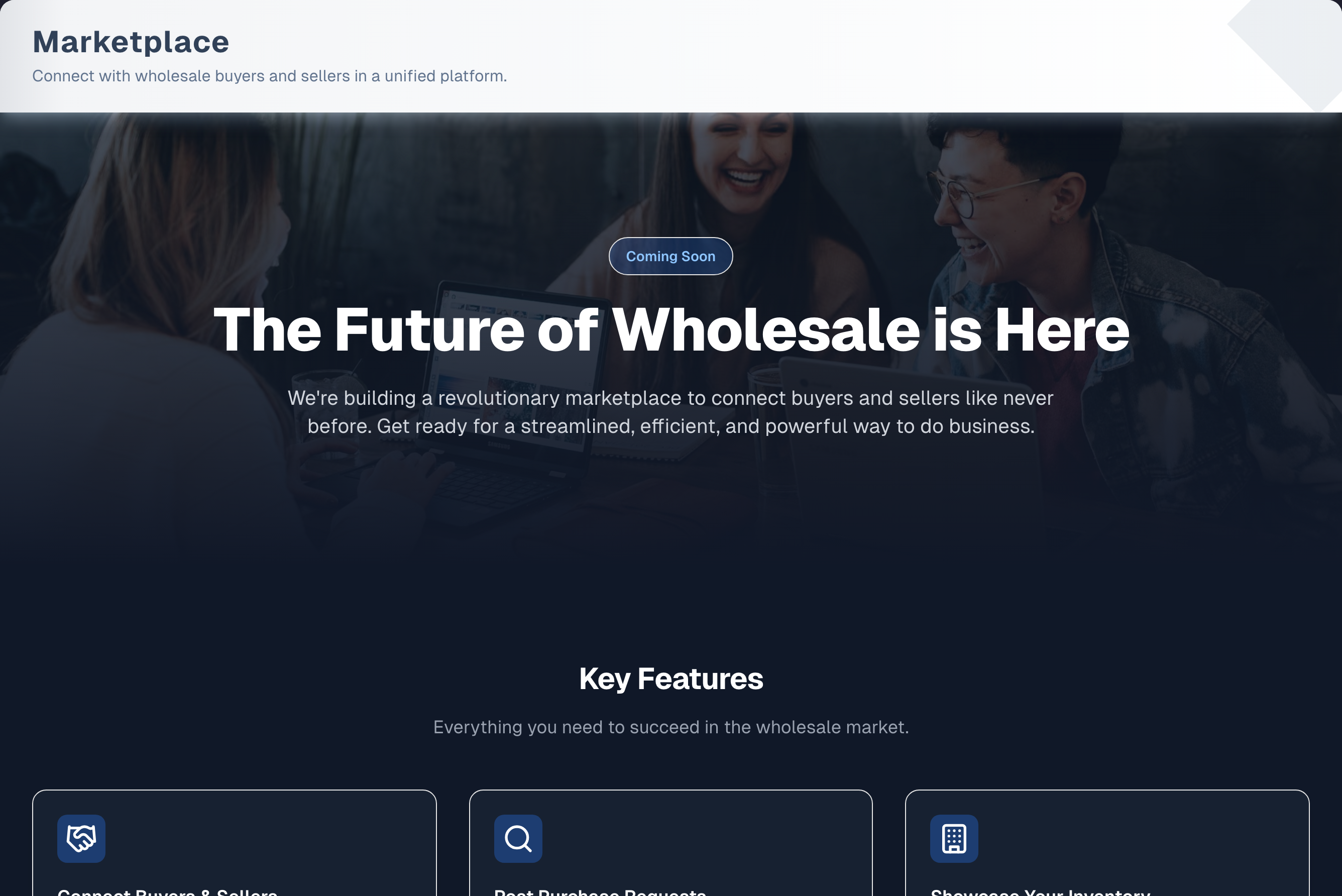
Marketplace is one scrolling page. It has no tabs, no header buttons and no demo. It has three parts:
- A banner with a Coming Soon label and the headline "The Future of Wholesale is Here".
- Key Features: nine cards that describe what's planned. The cards aren't clickable.
- Join the Waiting List: a form titled Join the Waitlist that sends your details to the UpChannels team.
Nothing on the page connects to your stock, catalog or orders. You can't list products on the marketplace yet.
Step by step: join the waitlist
- Scroll to Join the Waiting List at the bottom of the page.
- Check the fields filled in from your account: Company Name (your store's name), Your Name, Email and, if your profile has a phone number this form can send, Phone Number. A stored number with an extension in it, or one longer than the box allows, is left out rather than filled in, so type the number to use. Change any of them if you need to. These four are all that is required.
- Optionally say what you are hoping to buy or sell in Anything you're looking for?
- Click Join Waitlist.
- A Thank you! panel replaces the form. It says whether a copy of your request was emailed to you and names the address the team will reply to, and offers Send another request if you want to send a second one.
The waitlist uses the same form as the Contact Sales buttons and the trial-extension request on other pages, but it asks for less and your request is tagged as a marketplace waitlist signup, so the team can find every signup at launch. Nothing is sent to you automatically when the marketplace opens — the team gets in touch.
Key features (planned)
| Feature card | What it will do |
|---|---|
| Connect Buyers & Sellers | One platform where wholesale buyers and sellers connect and trade |
| Post Purchase Requests | Buyers post what they need and reach a network of suppliers |
| Showcase Your Inventory | Sellers list products so buyers can find them |
| Direct Communication | Built-in messaging between buyer and seller |
| Integrated Order Processing | Manage orders from creation to fulfillment in the system |
| Client & Order Management | Dashboards for buyers and sellers to manage connections, orders and history |
| Expand Your Network | Find new business opportunities and trusted partners |
| Rating System | Buyers and sellers are rated, and higher-rated partners get more opportunities |
| Catalog Sync | Buyers stay in sync with their suppliers' catalogs automatically |
None of these features work yet.
Older marketplace addresses
A few addresses from an earlier marketplace preview still open. Nothing in the menu links to them.
- Supply Pool, Procurement Requests and Marketplace Profile (addresses that start with
/procurement/) show a Coming soon notice. There is nothing to fill in or save. /procurement/ordersforwards to Inventory → Procurement./procurement/importopens the working procurement importer, the same one as the Import tab on Procurement. It isn't part of the marketplace.
For menu visibility these addresses belong to a menu item: the three Coming soon pages to Marketplace, and /procurement/orders and /procurement/import to Procurement. Hiding that item for a team member blocks them too ("403 - Forbidden").
Tips & best practices
- This is a preview. Nothing on the page is active, and it doesn't change your stock, catalog or orders.
- The request already says it came from the marketplace waitlist. Use Anything you're looking for? to say what you hope to buy or sell.
- Each click on Join Waitlist sends a new request. To correct a detail, click Send another request on the thank-you panel and say that it replaces your earlier one.
- Get ready now by keeping your catalog, stock and vendor list up to date (links below).
Troubleshooting
| Issue | Fix |
|---|---|
| Join Waitlist does nothing and the browser points at a field | That field is empty, or the browser doesn't accept the email address. Company Name, Your Name, Phone Number and Email are required |
| "Please provide a valid phone number. Digits and + ( ) - . only, and no extension." | Shown under Phone Number as soon as you press the button, before anything is sent. Use digits, with optional spaces, dashes, dots, brackets and a leading +. The number needs 7 to 20 digits. Remove words such as "ext". The message goes as soon as you change the box |
| "Your request didn't reach UpChannels. Check your connection and try again." in the red box | The connection dropped. Check your connection and click Join Waitlist again |
| "Please provide a valid email address." | Use a full address such as name@shop.com. An address with no dot after the @ is refused |
| "Please fill in Company Name." (or another box's name) | That field contains only spaces. Type real text in it |
| "Too many requests" | Wait about a minute and try again |
| "Failed to submit form. Please try again later." | The request didn't go through. Try again later and contact support if it keeps happening |
| No confirmation email arrived | Look at what the Thank you! panel said. A copy goes only to the email you sign in with, and once a day, so none is sent if you typed another address or already had one today; the panel then says "No confirmation email was sent". If it said "A copy has been sent to …", check spam. Either way the request went through |
| "… is too long. Please keep it to … characters — nothing has been sent." | An answer arrived longer than the form stores. The boxes stop at the limit as you type, so this normally only happens on a page left open from before an update — reload and send again |
| "403 - Forbidden" when opening Marketplace | The owner has hidden Marketplace for you. Ask them to show it again in Settings → Team |
What's next
- Prepare your catalog: Catalog → Products
- Keep stock accurate: Inventory → Snapshot
- Line up suppliers: Inventory → Vendors
Detailed reference
Every button, icon, field and message on this page, for when you need the exact detail. Each panel starts closed — open the one you need.
Page header and toolbar
The page has no tabs, no header buttons, no Demo button and no guided tour.
| Control | Where | What it does | Notes |
|---|---|---|---|
| Marketplace (shop-front icon) | Sidebar → Inventory, last item, after Snapshot, Management, Procurement, Vendors and Labels | Opens this page | Every plan. No Pro or Premium tag. Not shown to a team member the owner has hidden it from |
| Hover tooltip on Marketplace | To the right of the sidebar item | Shows "Access inventory marketplace and suppliers." | If your menu gives the item its own description, that description shows instead |
| Sidebar search | Top of the sidebar | Typing "market", or a word from the tooltip such as "suppliers", keeps Marketplace in the list | Matches the item's name or its tooltip text |
| Marketplace card (shop-front icon) | Shortcuts → Inventory group | Opens this page | Shown as "Mercado" in Spanish and "市场" in Chinese. Not shown to a team member the owner has hidden Marketplace from |
| Title Marketplace and "Connect with wholesale buyers and sellers in a unified platform." | Top banner | Text only | — |
| Marketplace card | Inventory Guide & Tips page (green ? icon, tooltip Open Guide & Tips, on the sidebar's Inventory header) | Click it to expand. Workflow: "Join waitlist" (get notified) → "Find partners" (buyers & sellers) → "Make deals" (buy & sell). Key features: Buy & sell inventory, Purchase requests, Integrated messaging, B2B ratings. Tip Sign up early: "Join the waitlist to be first in when the marketplace opens." | Status label Coming soon, chip "Waitlist" and the line "Buy and sell inventory with other businesses. Join the waitlist for early access." The card doesn't link to this page |
Section: Hero banner
| Control | Where | What it does | Notes |
|---|---|---|---|
| Pill Coming Soon | Centre of the dark banner | Label only, not clickable | Always shown |
| Headline "The Future of Wholesale is Here" | Banner | Text only | — |
| "We're building a revolutionary marketplace to connect buyers and sellers like never before. Get ready for a streamlined, efficient, and powerful way to do business." | Under the headline | Text only | — |
| Background photo | Behind the banner text | Decoration only | Alt text "Marketplace background" |
Section: Key Features
Heading Key Features, with the line "Everything you need to succeed in the wholesale market." The cards grow slightly and glow when you point at them, but none of them is clickable. Phones show one card per row, tablets two and wide screens three.
| Card | Icon | Text on the card | Notes |
|---|---|---|---|
| Connect Buyers & Sellers | Handshake | "A unified platform for wholesale buyers and sellers to connect and transact seamlessly." | Planned, not active |
| Post Purchase Requests | Magnifier | "Buyers can post requests for products they need, reaching a wide network of potential suppliers." | Planned, not active |
| Showcase Your Inventory | Office building | "Sellers can list their available products, making them discoverable to interested buyers." | Planned. There is no way to put a product on the marketplace yet, and no product screen has a marketplace option |
| Direct Communication | Speech bubble | "Built-in messaging allows for direct and efficient communication between parties." | Planned, not active |
| Integrated Order Processing | Shopping cart | "Manage orders from creation to fulfillment directly within the system, simplifying your workflow." | Planned, not active |
| Client & Order Management | People | "Powerful dashboards for both buyers and sellers to manage their connections, orders, and history." | Planned, not active |
| Expand Your Network | Lightning bolt | "Discover new business opportunities and grow your network of trusted partners." | Planned, not active |
| Rating System | Star | "For buyers and sellers; higher-rated partners gain more opportunities and resources." | Planned, not active |
| Catalog Sync | Circular arrows | "Enable buyers to automatically sync with suppliers’ catalogs for up-to-date products." | Planned, not active |
Section: Join the Waiting List form
The section is headed Join the Waiting List, with the line "Be the first to know when the marketplace launches." Below it is a white card titled Join the Waitlist, with the line "Be the first to know when our marketplace launches. Tell us who to contact." The form sits on the page. It isn't a pop-up, and it has no Close button.
It is the short version of the Contact Sales form: Business Location and Previous Vendor are not asked for here, and the message box is optional. On wide screens Company Name sits beside Your Name, Phone Number takes the next row on its own, and Email spans the full width below it. Every required label has a red asterisk.
Fields:
| Field | Required | Default | Rules and error text |
|---|---|---|---|
| Company Name | Yes | Your store's name | Placeholder "Your company name". Only spaces gives "Please fill in Company Name." The box stops at 200 characters; anything longer that still arrives is refused with "Company Name is too long. Please keep it to 200 characters — nothing has been sent." |
| Your Name | Yes | Your display name, otherwise your name, otherwise your first and last name from your profile | Placeholder "Your full name". Only spaces gives "Please fill in Your Name." The box stops at 200 characters |
| Phone Number | Yes | Your mobile phone, otherwise your business phone — but only a stored number this form can send. One with "ext" in it, or longer than 30 characters, is left out and the box starts empty with its placeholder showing | Placeholder "+1 (555) 123-4567". Allowed: digits, spaces, dashes, dots, brackets and a plus sign in front, with 7 to 20 digits (the plus sign doesn't count as one, and a plus anywhere else is refused). Otherwise "Please provide a valid phone number. Digits and + ( ) - . only, and no extension." appears under the box, the box is outlined, and nothing is sent; changing the box clears it. A box holding only spaces gets the same message, since a phone number of nothing but spaces is not one either. The box stops at 30 characters |
| Yes | Your sign-in email | Placeholder "you@company.com". The browser checks the shape first, with its own wording. The app then needs a dot after the @ and at most 254 characters, otherwise "Please provide a valid email address." So "me@shop" is refused. The box stops at 254 characters | |
| Anything you're looking for? | No | Empty | Three-line box with a "… / 2,000" count under it. Placeholder "Optional — what you hope to buy or sell here". The box stops at 2,000 characters, and your 2,000 are all yours: the blank line, "[Submitted by: …]" (your username or email) and "[From: Marketplace waitlist]" are added on top of them when the request is filed, so a long message never loses them |
The filled-in values appear once your profile loads, and only in fields that are still empty. They never overwrite what you typed.
Buttons and states:
| Control | Where | What it does | Notes |
|---|---|---|---|
| Join Waitlist | Full width, bottom of the form card | Sends your details to the UpChannels team, tagged Marketplace waitlist | The browser stops the send while a required field is empty and points at that field |
| Enter key | Any one-line field | Sends the form, like clicking Join Waitlist | In Anything you're looking for?, Enter starts a new line instead |
| "Submitting..." with a spinner | On Join Waitlist while sending | Shows the request is on its way | The button and every field are locked until it finishes |
| Thank you! panel (green check), "We've received your message and will get back to you shortly.", then either "A copy has been sent to …." or "No confirmation email was sent — our team will get in touch at …. A copy goes only to the email you sign in with, once a day." | Replaces the whole form card | Confirms the request was received, says whether a copy was emailed, and names the address the reply will go to. The fields are cleared | A copy is emailed when the Email box holds the address you sign in with (upper and lower case and spaces at the ends don't matter), and not more than once a day for this form. Otherwise the second wording shows. Send another request brings the empty form back without a reload, filled in again from your account. A Close button appears as well where the form is in a dialog |
| Red error box | Above Join Waitlist | Shows why the send failed (see Messages you may see) | One problem at a time: empty fields are checked first, then the email. A phone the form cannot send is caught before anything is sent and named under Phone Number instead, so this box never carries it. What you typed stays in place. Fix it and click Join Waitlist again |
What happens after you send:
- The UpChannels team receives your answers as a new request to follow up on.
- The request is tagged Marketplace waitlist, so it can be told apart from the Contact Sales requests on Messages, SMS Campaigns and Pro Marketing and from Request to Extend on the Billing page, which all use the same form. The tag is also written at the end of your message.
- If the Email box holds the address you sign in with, UpChannels emails you a copy: subject "We got your request: Marketplace waitlist", listing what you sent. Replying to it reaches team@upchannels.com. It goes once a day at most for this form, and never to an address that isn't your sign-in email, so a request with another address gets no email. The Thank you! panel says which happened. No other notification is sent.
- Each send creates a separate request. Sending twice creates two.
Sub-pages: header on the /procurement addresses
The older marketplace addresses below use a plain header, not the banner on the Marketplace page. None of them has a menu item, and the Marketplace page doesn't link to any of them.
| Control | Where | What it does | Notes |
|---|---|---|---|
| Sidebar toggle (panel icon, screen-reader label "Toggle Sidebar") | Header, far left | Hides or shows the sidebar | Keyboard: Ctrl+B (⌘+B on Mac) works anywhere in the app |
| Breadcrumb items such as Procurement, Supply Pool, Requests, My Profile, Details and Import | Header, after the toggle | Plain text, not links | Hidden on narrow screens, where only the last item shows |
| Last breadcrumb item | Header | Names the current page | Not clickable |
| Coloured chip | Header, right | Label only | Text differs per page (see each sub-page) |
Sub-page: Supply Pool (/procurement/supply-pool)
A "Coming soon" placeholder. There are no listings, filters, sorting or inquiry buttons, and nothing can be typed or saved.
| Control | Where | What it does | Notes |
|---|---|---|---|
| Breadcrumb Procurement › Supply Pool › Supply Pool | Header | Text only | See the header panel above |
| Chip Marketplace (green) | Header, right | Label only | Names the section, as on Procurement Requests. The page is a placeholder |
| Heading Supply Pool and "Browse available inventory and surplus loads from vendors in the network." | Top of the page | Text only | — |
| Badge Coming soon (clock icon, amber) | Right of the heading | Label only | — |
| Amber notice (info icon) | Below the heading | "The procurement marketplace isn’t available yet." and "We’re not showing listings, quotes or a profile here because none of it would be connected to a real marketplace — anything you entered would be lost. We’ll turn this on once the network is wired to the backend." | Planned items: "Browse supply and excess-inventory listings with manifests.", "Filter by category, condition and location." and "Send an inquiry to start a conversation with the seller." |
Sub-page: Supply Pool load (/procurement/supply-pool/…)
Any address that adds one more part after /procurement/supply-pool/, such as /procurement/supply-pool/123, opens this placeholder. Nothing is looked up, so every such address "works" and no real listing sits behind it.
| Control | Where | What it does | Notes |
|---|---|---|---|
| Breadcrumb Procurement › Supply Pool › Details › Supply pool load | Header | Text only | It doesn't repeat whatever follows the last slash: nothing behind the address is looked up, so naming a load there would read as if that load existed |
| Chip Load Details (blue) | Header, right | Label only | — |
| Back to Supply Pool (left arrow, outline button) | Top left of the page | Opens the Supply Pool placeholder | Always shown. The only link in the app to any of these addresses |
| Heading Supply pool load and "Reference asked for: …" | Next to Back to Supply Pool | Text only | The reference is shown in a monospaced font as what was typed, not as a load that was found |
| Badge Coming soon (clock icon, amber) | Top right | Label only | — |
| Amber notice (info icon) | Below the heading | "Supply pool listings aren’t available yet." and "Nothing on this address is looked up: any reference typed after /procurement/supply-pool/ opens this same page, so a reference appearing here is not evidence that such a load exists. We’re not showing a manifest, pricing or vendor contacts because there is no marketplace listing behind it. Listing details and inquiries will be available once the network is wired to the backend." | No list of planned items on this page |
Sub-page: Procurement Requests (/procurement/requests)
A "Coming soon" placeholder. There is no Post Request button and no form.
| Control | Where | What it does | Notes |
|---|---|---|---|
| Breadcrumb Procurement › Requests › Procurement Requests | Header | Text only | See the header panel above |
| Chip Marketplace (orange) | Header, right | Label only | — |
| Heading Procurement Requests and "Post your inventory needs and receive quotes from verified vendors." | Top of the page | Text only | — |
| Badge Coming soon (clock icon, amber) | Right of the heading | Label only | — |
| Amber notice (info icon) | Below the heading | The same "The procurement marketplace isn’t available yet." notice as Supply Pool | Planned items: "Post a request describing the product, quantity, budget and deadline.", "Receive and compare quotes from vendors in the network." and "Accept a quote to turn it into a tracked procurement order." |
Sub-page: Marketplace Profile (/procurement/myprofile)
A "Coming soon" placeholder. There is no profile form and no Save Profile button.
| Control | Where | What it does | Notes |
|---|---|---|---|
| Breadcrumb Procurement › My Profile › Marketplace Profile | Header | Text only | See the header panel above |
| Chip Vendor Visibility (purple) | Header, right | Label only | — |
| Heading Marketplace Profile and "Your public profile that vendors and buyers see in the network." | Top of the page | Text only | — |
| Badge Coming soon (clock icon, amber) | Right of the heading | Label only | — |
| Amber notice (info icon) | Below the heading | The same "The procurement marketplace isn’t available yet." notice as Supply Pool | Planned items: "Set the display name, logo and details counterparties will see.", "Build a rating from completed deals." and "Control your visibility in requests and the supply pool." |
Sub-page: /procurement/orders, /procurement/import and /procurement
| Address | What happens | Notes |
|---|---|---|
/procurement/orders | Forwards straight to Inventory → Procurement, which has the tabs Orders, New Order, Import and Receive | Old bookmarks still work. See Procurement |
/procurement/import | Opens a working importer for procurement orders, with the header Import Procurement Orders, breadcrumb Procurement › Import and chip Import System (blue) | The same importer as the Import tab on Procurement. Not part of the marketplace. Nothing in the app links to this address |
/procurement on its own | Shows "This page could not be found." | There is no page at this address |
Messages you may see
| Message | When it appears | What to do |
|---|---|---|
| Coming Soon (banner pill) or Coming soon (amber badge) | Always, on Marketplace and on every placeholder address | Nothing. The marketplace hasn't launched. Join the waitlist on the Marketplace page |
| "The procurement marketplace isn’t available yet." with "We’re not showing listings, quotes or a profile here because none of it would be connected to a real marketplace — anything you entered would be lost. We’ll turn this on once the network is wired to the backend." | Supply Pool, Procurement Requests and Marketplace Profile placeholders | Nothing to do. Nothing can be entered, so nothing is lost |
| "Supply pool listings aren’t available yet." with "Nothing on this address is looked up: any reference typed after /procurement/supply-pool/ opens this same page, so a reference appearing here is not evidence that such a load exists. We’re not showing a manifest, pricing or vendor contacts because there is no marketplace listing behind it. Listing details and inquiries will be available once the network is wired to the backend." | Any Supply Pool load address | A shared load link isn't a real listing |
| "Submitting..." (with a spinner) | While the waitlist request is being sent | Wait |
| Thank you! and "We've received your message and will get back to you shortly." | After a successful Join Waitlist | Done. The next line says whether a copy was emailed to you. Send another request brings the form back |
| The browser's own "fill out this field" or email-format tip | Clicking Join Waitlist with a required field empty, or an email the browser doesn't accept (for example, one without an @) | Fill in Company Name, Your Name, Phone Number and Email |
| "Please provide a valid email address." | The browser accepted the email, but it has no dot after the @ or is longer than 254 characters | Correct the email |
| "Please provide a valid phone number. Digits and + ( ) - . only, and no extension." | The phone contains letters or other symbols, a plus sign anywhere but in front, or fewer than 7 or more than 20 digits. Shown under the box, before anything is sent | Use digits with optional spaces, dashes, dots, brackets and a leading + |
| "Please fill in Company Name." or "Please fill in Your Name." | That field contains only spaces. The browser accepts spaces but the app doesn't. The message names the box by its label. (Phone Number is checked before anything is sent, so a phone of nothing but spaces gets the phone message under the box instead) | Type real text in that field |
| "Too many requests" | More than 20 sends in a minute from the same network | Wait about a minute and try again |
| "Failed to submit form. Please try again later." | The request couldn't be saved on UpChannels' side, or UpChannels' server isn't set up to receive these requests yet | Try again later. If it keeps happening, contact support. The request did not go through |
| "Something went wrong. Please try again." | The send failed without a specific reason | Try again. Contact support if it repeats |
| "Your request didn't reach UpChannels. Check your connection and try again." | The connection dropped while sending | Check your connection and try again. Contact support if it repeats |
| "Your request wasn't sent: UpChannels answered with an error (…). Please try again in a moment." | An error page came back instead of UpChannels' own answer, for example during an update (the number is the error code) | Try again in a moment. Contact support if it repeats |
| "403 - Forbidden" and "You do not have permission to view this page. Contact your organization owner." | Opening Marketplace after the owner hid it for you (stores with more than one active person) | Ask the owner to show Marketplace for you again in Settings → Team |
| "Loading..." | Briefly, while the app checks whether you may open the page | Wait |
| "This page could not be found." | /procurement on its own, a Supply Pool address with more than one part after /procurement/supply-pool/, or any Supply Pool, Supply Pool load, Requests, Profile or Import address when no store is attached to your sign-in | /procurement alone isn't a page. For the others, finish setting up or joining your store, then sign out and in again |
Who can use what
| Who or what | Marketplace page | Join Waitlist form | Placeholder addresses |
|---|---|---|---|
| Plan | Every plan, including trials. No plan tag and no upgrade prompt | Every plan | Every plan |
| Trial ended with no paid plan | Sends you to Billing, as every page does | Not reachable | Sends you to Billing |
| Add-ons and feature switches | None | None | None |
| Owner, manager, staff | The same for everyone. In a store with more than one active person, the owner can hide Marketplace for a team member in Settings → Team. That person no longer sees it in the sidebar or on Shortcuts, and opening it (or one of the older marketplace addresses) shows "403 - Forbidden", even from a bookmark. Owners and a store's only active member are never blocked | The same for everyone. The filled-in values are the signed-in person's own name, email and phone, plus the store's name | Not in the menu, but hiding Marketplace for someone blocks the Supply Pool, Procurement Requests and Marketplace Profile pages for them too, and hiding Procurement blocks /procurement/orders and /procurement/import |
| No store attached to your account yet | Sends you to Onboarding ("Redirecting to onboarding..."), as every page does | Not reachable | "This page could not be found." |
Common questions
Is the marketplace live? When does it launch? No, it isn't live. The page is a preview with a waitlist, and the app gives no launch date. Nothing on it works yet, and it doesn't touch your stock, catalog or orders.
I joined the waitlist but got no email. Did it work? If you saw the Thank you! panel, it worked. A copy is emailed only to the address you sign in with, and at most once a day, so if you typed a different email, or had already joined today, the panel said "No confirmation email was sent" and none came. If it said "A copy has been sent to …", check spam. Nothing is sent automatically at launch. Your details go to the UpChannels team, tagged as a marketplace waitlist signup, for them to follow up on.
Why does a waitlist ask for my company and phone number? So the team can reach you when the marketplace opens. The waitlist is the short version of the Contact Sales form used elsewhere in the app: it asks only who to contact, and the message box is optional. Your request is tagged as a marketplace waitlist signup, so it can be found among the other requests at launch.
Can I list my products on the marketplace? Not yet. No product screen has a marketplace option. Showcase Your Inventory is a planned feature.
Where are the Supply Pool, My Requests and My Profile tabs? The Marketplace page has no tabs. The older Supply Pool, Procurement Requests and Marketplace Profile addresses still open, but each shows only a Coming soon notice with nothing to fill in.
A team member can't see Marketplace, or gets "403 - Forbidden". The owner has hidden Marketplace for that person, which also blocks the older Supply Pool, Procurement Requests and Marketplace Profile addresses. The owner can show it again in Settings → Team. Owners and a store's only active member are never blocked.
How do I change the details I sent, or send them again? Reload the page. The form comes back filled in from your account. Each send creates a new request, so say in Anything you're looking for? that it replaces your earlier one.
Is there a demo or guided tour for Marketplace? No. The page has no Demo button and no tour.